Zero Trust for Microsoft 365 Data with Purview
Every other Zero Trust control — identity, device, network, application — ultimately exists to protect one thing: your data.
- Content owner
- Insyto Content Team
- Editorial reviewer
- Ritesh Mhatre
- Technical reviewer
- Navish Ansari
- Next review
- To be scheduled
- Last reviewed
- Review pending
- Technical level
- Intermediate · CIOs, data governance and Microsoft 365 teams
Every other Zero Trust control — identity, device, network, application — ultimately exists to protect one thing: your data. Yet data is the pillar organizations most often leave for last, because it is the hardest to see. Sensitive information sprawls across Exchange, SharePoint, OneDrive, and Teams, spills onto endpoints and into non-Microsoft clouds, and now flows through AI assistants that can surface it in seconds. Applying Zero Trust to data means knowing what you hold, classifying it by sensitivity, protecting it wherever it travels, controlling who can use it, and catching risky movement before it becomes a breach. Microsoft Purview is the platform that delivers those capabilities across Microsoft 365 and beyond.
This guide sets out how to apply Zero Trust to Microsoft 365 data with Purview: the five-element data defense-in-depth model Microsoft recommends, how sensitivity labels carry protection with the data, what each Purview capability contributes, how a document moves from creation to classification to enforced protection, and how to deploy it all in a logical progression. Because Microsoft updates these capabilities and their licensing regularly, verify current behavior against Microsoft documentation before you act.
Who should read this
- IT directors and Microsoft 365 owners responsible for data protection
- Security, compliance, and records management leaders
- Purview, SharePoint, and Microsoft 365 administrators
- Enterprise architects designing the data pillar of a Zero Trust program
Key points for executives
A defensible data-protection program under Zero Trust normally rests on four conditions:
- Sensitive data is discovered and classified wherever it lives, not assumed.
- Protection travels with the data through labels, encryption, and access control.
- Risky movement and use are checked and prevented, not just logged after the fact.
- Data that is no longer needed is governed and deleted to shrink exposure.
Data protection delivers the “verify explicitly,” “least privilege,” and “assume breach” principles at the information layer. For the surrounding tenant strategy, see Zero Trust for Microsoft 365.
Executive takeaways
- Purview unifies classification, labeling, DLP, insider risk, and governance under one data strategy.
- Sensitivity labels carry encryption and access control with the file, wherever it goes.
- DLP prevents oversharing across Microsoft 365, endpoints, and non-Microsoft clouds.
- Data Security Posture Management (DSPM) gives unified visibility and AI observability.
- Deploy in phases — frame, classify, protect, prevent, manage, and govern.
Why protect Microsoft 365 data for Zero Trust?
In a perimeter model, data was protected by keeping it inside the network. That assumption no longer holds: data lives in the cloud, moves to unmanaged devices, is shared with external partners, and is now read and generated by AI assistants such as Microsoft 365 Copilot. Identity and device controls decide who and what can reach a resource, but once a user opens a file, only data-centric controls decide what happens next. Zero Trust for data closes that gap. It refuses to trust a file’s location as a proxy for its safety and instead attaches protection to the data itself — so a document remains encrypted and access-controlled whether it sits in SharePoint, lands in a personal inbox, or is copied to a USB drive.
Microsoft frames a Zero Trust data strategy around five core elements of defense in depth: data classification and labeling, information protection, data loss prevention, insider risk management, and data governance. Each addresses a different failure mode — you cannot protect what you have not classified, access control alone does not stop risky movement, and even well-governed access does not account for a malicious or careless insider. Together they form a layered defense in which no single control is trusted to be sufficient.
How does Purview deliver Zero Trust for data?
Purview implements the five elements as a connected pipeline rather than isolated tools. Data is first discovered and classified; sensitivity labels then apply protection; DLP checks risky actions; insider risk management watches behavior; and data governance minimizes what is retained. Underneath, Data Security Posture Management provides a single view of where sensitive data lives, who can access it, how it is protected, and where the gaps are — increasingly extended to the AI apps and agents now touching that data.
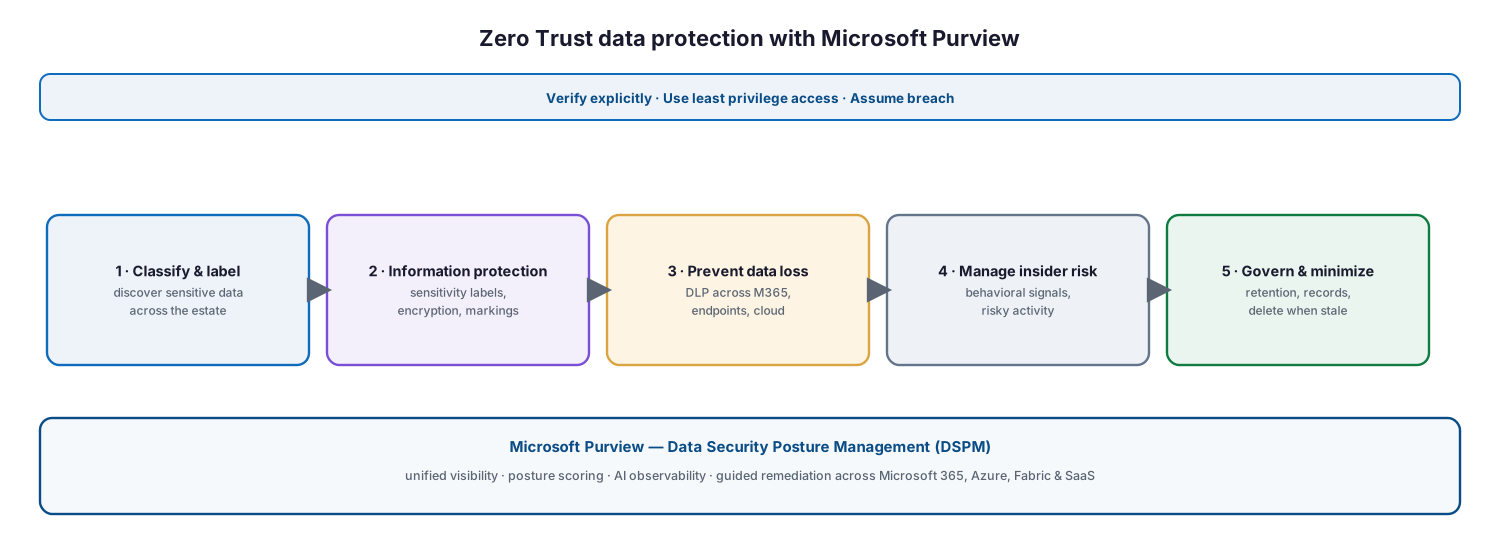
Figure 1. Zero Trust data protection with Microsoft Purview — five defense-in-depth stages resting on DSPM for unified visibility.
The principles map directly onto the pipeline. Classification and labeling deliver verify explicitly by making data sensitivity a signal in every access and usage decision. Encryption and access control deliver least privilege by ensuring only the right people can open the most sensitive content. DLP and insider risk management deliver assume breach by minimizing the blast radius of oversharing, exfiltration, and insider threats. Governance shrinks the target surface by removing data that no longer needs to exist.
Know your data: classification and labeling
Knowing where sensitive data resides is the biggest single challenge for most organizations, and it is the prerequisite for everything else. Purview data classification discovers and classifies content using sensitive information types (built-in and custom patterns such as credit-card or national-ID numbers), trainable classifiers (machine-learning models for categories like source code or contracts), and exact data match for precise records. Content explorer and activity explorer then show what was found and what users are doing with it.
Classification feeds sensitivity labels — the heart of the data pillar. A label records how sensitive an item is and, crucially, can carry protection with it: encryption, content markings such as headers, footers, and watermarks, and access control that persists wherever the file travels. A clear, small taxonomy is more effective than a sprawling one; Microsoft’s example set of Personal, Public, General, Confidential, and Highly Confidential is a proven starting point.
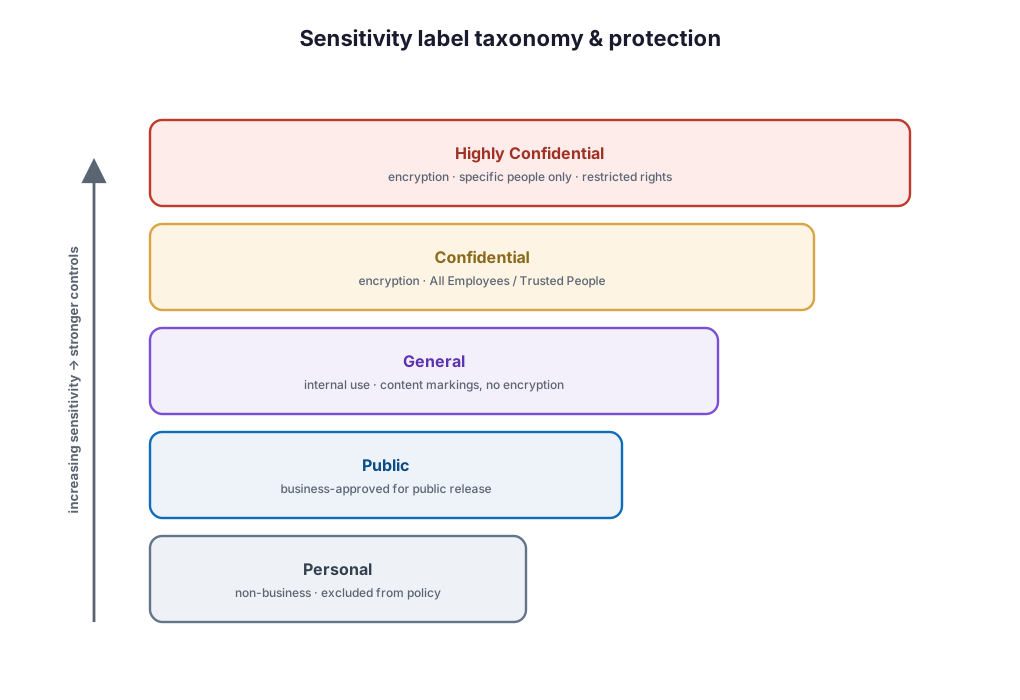
Figure 2. A sensitivity label taxonomy — protection strengthens as classification rises, from unrestricted Public through encrypted, restricted Highly Confidential.
Labels can be applied manually by users, recommended to them, applied automatically when sensitive content is detected, set as a default, or made mandatory. Auto-labeling runs client-side in Office apps and service-side across Exchange, SharePoint, and OneDrive, so protection scales without relying on every user to make the right call.
What are Purview’s data-security capabilities?
The data pillar is delivered by a family of Purview capabilities that share classification signals and reporting. Understanding what each contributes helps you sequence a deployment and avoid buying overlapping point tools.
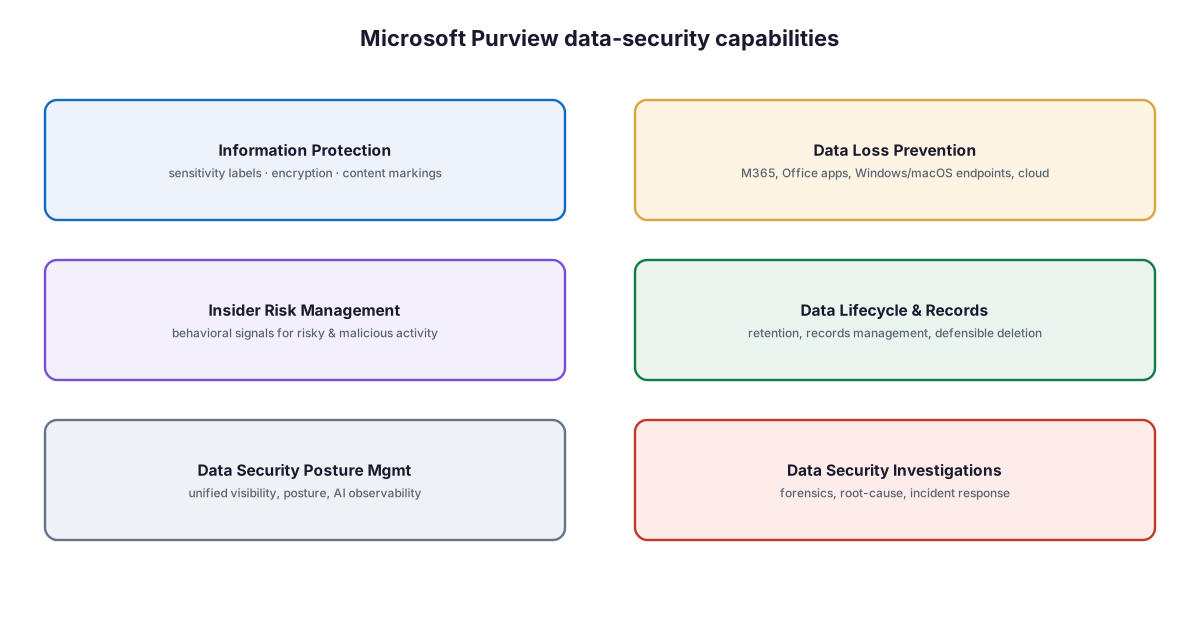
Figure 3. The Microsoft Purview data-security capabilities that implement the five Zero Trust data elements.
Information Protection applies sensitivity labels, encryption, and content markings to documents and emails. Data Loss Prevention identifies and controls sensitive data in motion across Microsoft 365 services, Office apps, Windows and macOS endpoints, on-premises shares, and non-Microsoft clouds. Insider Risk Management correlates behavioral signals to surface risky or malicious activity that access control alone would miss. Data Lifecycle and Records Management govern retention and defensible deletion. Data Security Posture Management unifies these signals into one posture view with AI observability, and Data Security Investigations provides forensics and root-cause analysis when an incident occurs.
How does a document get classified and protected?
The controls come together in the life of a single item. A file created anywhere in the estate is scanned and classified; a sensitivity label is applied by one of several methods; that label enforces encryption, markings, and access control; and when a user later tries to share, copy, or upload the item, DLP evaluates the action against policy.
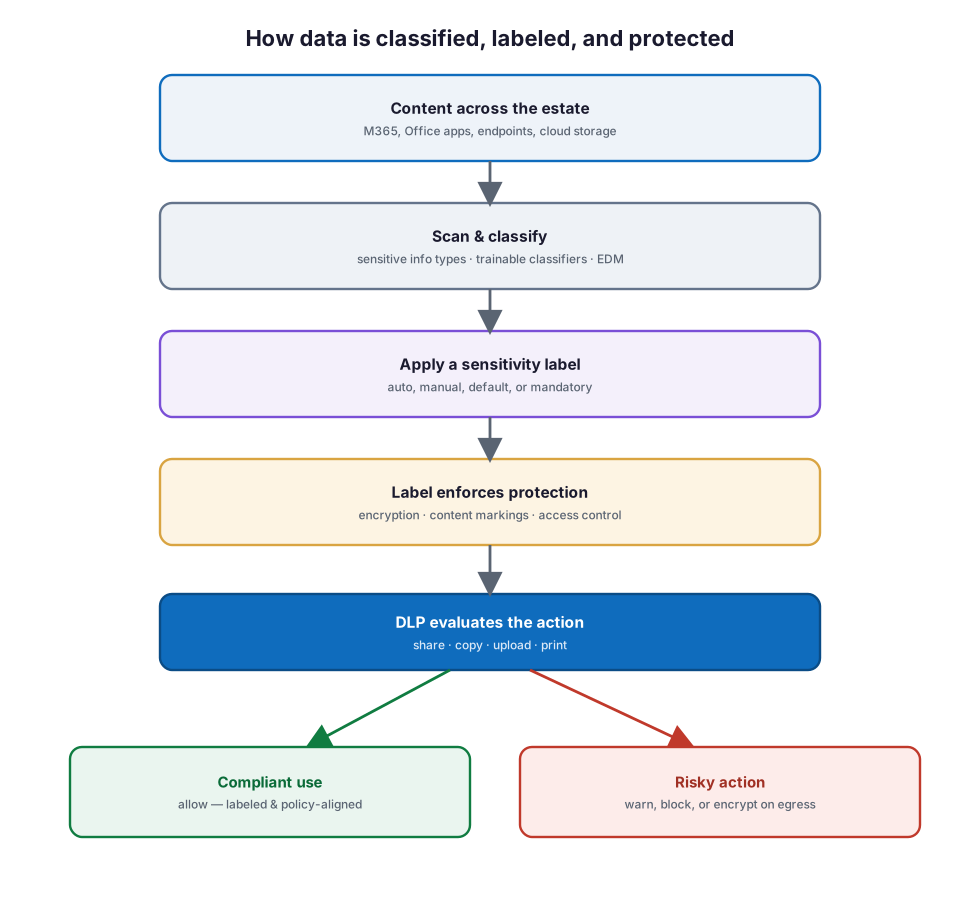
Figure 4. How data is classified, labeled, and protected — from content discovery through label enforcement to a DLP decision that allows or restricts the action.
Because the label travels with the file, protection is not lost when the document leaves its original location. A DLP policy can then use the label as a condition — for example, blocking external sharing of anything marked Highly Confidential, or warning and educating users before they overshare. This is why sensitivity labels and DLP are far stronger together than either is alone: labels establish what the data is, and DLP governs what may be done with it.
How do you deploy it?
Data protection is iterative rather than linear — the more you classify, the more accurately you can label and prevent leakage, and those results reveal more data to protect. Microsoft’s recommended sequence still gives a clear progression, and a phased rollout that tightens controls gradually earns user trust rather than triggering resistance.

Figure 5. A Zero Trust data-protection deployment roadmap — frame, classify, protect, prevent, manage, and govern.
Begin by framing a data classification and sensitivity-label taxonomy so every later decision has a shared vocabulary. Then classify and label — automatically where possible, manually where judgment is needed — and extend discovery across the estate. Next, apply encryption, content markings, and access control to the most sensitive labels, and control access to Teams, groups, and SharePoint sites with container labels. Add DLP to prevent leakage across Microsoft 365, endpoints, and clouds, starting in audit mode before you enforce blocking. Layer in insider risk management and monitor posture with DSPM. Finally, govern the lifecycle: retain what you must, and delete what you no longer need to minimize exposure.
Best practices
Start with a small, business-aligned label taxonomy and expand only when a real need emerges; a handful of well-understood labels beats a dozen that confuse users. Lead with automatic and default labeling so protection does not depend on user diligence, but keep manual labeling for content where only a knowledgeable user can judge sensitivity. Roll out DLP in audit mode first, learn from the alerts, then move to warn-and-educate before you block outright — this tunes policies against real behavior and avoids business disruption. Use sensitivity labels as conditions in DLP policies so the two reinforce each other. Extend protection to containers — Teams, Microsoft 365 Groups, and SharePoint sites — not just individual files, and to non-Microsoft clouds through Defender for Cloud Apps. Treat DSPM as your continuous control loop, reviewing posture and remediating the highest-risk gaps first. And plan for AI from the start: assistants like Microsoft 365 Copilot honor sensitivity labels and DLP, so good labeling is now a direct AI-safety control.
Common mistakes
The most common failure is deploying tools before framing a taxonomy, which produces inconsistent labels and unmanageable policies. A close second is over-engineering the label set so users cannot tell Confidential from Highly Confidential and default to the wrong choice. Many organizations enable DLP straight into blocking mode and generate so much friction that the policies are switched off. Others protect files but ignore containers and non-Microsoft clouds, leaving obvious gaps. Relying only on manual labeling leaves most content unclassified, while relying only on automation misses context that only users hold. Treating classification as a one-time project rather than a continuous loop lets coverage decay. Finally, deploying data protection without accounting for AI assistants risks exposing sensitive content through Copilot and third-party agents that inherit whatever oversharing already exists.
Implementation checklist
Frame and classify
- Define a data classification framework and a small sensitivity-label taxonomy.
- Configure sensitive information types, trainable classifiers, and exact data match as needed.
- Publish sensitivity labels with a sensible default and, where appropriate, mandatory labeling.
Protect and control
- Apply encryption, content markings, and access control to your most sensitive labels.
- Enable auto-labeling client-side in Office and service-side across Exchange, SharePoint, and OneDrive.
- Use container labels to control access and sharing for Teams, groups, and SharePoint sites.
Prevent, manage, and govern
- Deploy DLP across Microsoft 365, endpoints, and clouds, starting in audit mode.
- Use sensitivity labels as conditions in DLP policies.
- Enable Insider Risk Management and monitor posture with DSPM.
- Apply retention and records management, and delete data that is no longer needed.
Frequently asked questions
What is Zero Trust for data? It is the application of Zero Trust principles — verify explicitly, least privilege, and assume breach — to information rather than networks. Instead of trusting a file because of where it sits, protection is attached to the data itself so it is classified, labeled, encrypted where needed, access-controlled, and monitored wherever it travels.
What are the five elements of Microsoft’s data defense-in-depth model? Data classification and labeling, information protection, data loss prevention, insider risk management, and data governance. Each addresses a different failure mode, and together they form a layered defense in which no single control is trusted to be sufficient.
How do sensitivity labels differ from DLP? A sensitivity label describes what the data is and can carry protection — encryption, markings, and access control — with the file. DLP governs what may be done with data in motion, such as sharing, copying, or uploading. They are strongest together: labels can be used as conditions inside DLP policies.
Do I have to label everything manually? No. Labels can be applied automatically when sensitive content is detected, set as a default, recommended to users, or made mandatory. Most organizations combine automatic and default labeling for scale with manual labeling for content that requires human judgment.
What is Data Security Posture Management (DSPM)? DSPM is the Purview experience that unifies signals from information protection, DLP, insider risk, and investigations into a single view of where sensitive data resides, who can access it, and how it is protected. It adds guided remediation and AI observability to track sensitive data flowing through AI apps and agents.
How does this relate to protecting data for Copilot and AI? AI assistants surface data a user already has access to, so oversharing and weak labeling become AI-exposure risks. Purview’s classification, labeling, and DLP directly govern what AI can retrieve and generate, and DSPM monitors AI interactions with sensitive data. See the related Copilot data-security guidance below.
Summary
Zero Trust for Microsoft 365 data makes information the protected asset rather than an afterthought behind identity and device controls. Microsoft Purview delivers the five-element defense in depth — classify and label data, protect it with encryption and access control, prevent leakage with DLP, manage insider risk, and govern the lifecycle — with Data Security Posture Management providing unified visibility across Microsoft 365, the cloud, and the AI apps now touching sensitive content. Deploy it in phases — frame, classify, protect, prevent, manage, and govern — start DLP in audit mode, keep the label taxonomy small, and let sensitivity labels and DLP reinforce each other. The result is data that carries its own protection wherever it travels and a posture that is monitored and improved continuously.
Organizations can begin with the Data & AI Readiness Checklist, review the Microsoft 365 Governance Knowledge Center, or schedule a technology assessment.
Authoritative references
Verified against publicly available Microsoft Learn documentation. Source access date: 27 July 2026. Product capabilities and licensing change frequently — confirm current details before deployment.
- Microsoft Learn: Secure data with Zero Trust
- Microsoft Learn: Deploy an information protection solution with Microsoft Purview
- Microsoft Learn: Learn about sensitivity labels
- Microsoft Learn: Get started with sensitivity labels
- Microsoft Learn: Restrict access to content using sensitivity labels to apply encryption
- Microsoft Learn: Automatically apply a sensitivity label to content
- Microsoft Learn: Learn about sensitive information types
- Microsoft Learn: Learn about trainable classifiers
- Microsoft Learn: Learn about data loss prevention
- Microsoft Learn: Use sensitivity labels as conditions in DLP policies
- Microsoft Learn: Use sensitivity labels to protect Teams, groups, and sites
- Microsoft Learn: Insider Risk Management solution overview
- Microsoft Learn: Deploy a data governance solution with Microsoft Purview
- Microsoft Learn: Learn about Data Security Posture Management (DSPM)
- Microsoft Learn: Microsoft Purview data security and compliance protections for generative AI
Microsoft product capabilities, licensing, and feature availability may vary by subscription, tenant configuration, region, and Microsoft product updates. Verify current Microsoft documentation before making deployment decisions.
Related Knowledge Center resources
- Zero Trust for Microsoft 365 — The surrounding tenant strategy.
- Microsoft Purview Data Security for Copilot — Extend labeling and DLP to AI.
- SharePoint Permissions Cleanup Before AI Deployment — Fix oversharing before Copilot.
- Microsoft Defender XDR Deployment Guide — Correlate data and threat signals.
- The Zero Trust Roadmap — Where the data pillar fits the program.
On this page
- Key points for executives
- Executive takeaways
- Why protect Microsoft 365 data for Zero Trust?
- How does Purview deliver Zero Trust for data?
- Know your data: classification and labeling
- What are Purview’s data-security capabilities?
- How does a document get classified and protected?
- How do you deploy it?
- Best practices
- Common mistakes
- Implementation checklist
- Frequently asked questions
- Summary
- Authoritative references
- Related Knowledge Center resources