Zero Trust for Microsoft 365: A Deployment Blueprint Across Identity, Devices, Apps, and Data
Zero Trust is a security strategy, not a product — an approach that assumes breach and verifies every request as though it came from an uncontrolled network: never trust, always verify.
- Content owner
- Insyto Content Team
- Editorial reviewer
- Ritesh Mhatre
- Technical reviewer
- Navish Ansari
- Next review
- To be scheduled
- Last reviewed
- Review pending
- Technical level
- Intermediate · CISOs, IT directors, identity administrators
Zero Trust is a security strategy, not a product — an approach that assumes breach and verifies every request as though it came from an uncontrolled network: never trust, always verify. Microsoft 365 is built to implement that strategy, with security and information-protection capabilities spanning identity, devices, applications, and data, coordinated by a central policy-enforcement layer and watched by integrated threat protection. This guide is a practical blueprint for deploying Zero Trust with Microsoft 365, following Microsoft’s own principles, reference architecture, and phased deployment plan.
The goal is a Microsoft 365 estate where access is granted only after explicit verification of the user and device, privilege is minimized, sensitive data is protected wherever it travels, and threats are detected and remediated automatically. We map each principle to the specific Microsoft 365 capabilities that deliver it — Microsoft Entra Conditional Access, Microsoft Intune, Microsoft Defender XDR, and Microsoft Purview — and sequence the work so value arrives early and risk falls steadily. Because Microsoft updates these capabilities and their licensing regularly, verify current behavior against Microsoft documentation before you act.
Who should read this
- CISOs and IT directors setting a Microsoft 365 security strategy
- Microsoft 365 and security administrators deploying the controls
- Enterprise architects designing a Zero Trust rollout
- Compliance and risk leaders aligning to Zero Trust and regulation
Key points for executives
A defensible Zero Trust deployment on Microsoft 365 normally rests on four conditions:
- Every access request is verified explicitly, using identity and device signals through Conditional Access.
- Access is least-privilege and risk-adaptive, and sensitive data is protected in place.
- Breach is assumed — Microsoft Defender XDR monitors, detects, and automatically remediates across the estate.
- The rollout is phased across identity, devices, apps, data, AI, and compliance, so protection compounds.
Zero Trust for Microsoft 365 ties together the identity, device, data, and threat-protection controls into one coordinated strategy. For the tenant-hardening baseline it builds on, see the Microsoft 365 Tenant Security Assessment Checklist.
Executive takeaways
- Zero Trust is a strategy delivered with Microsoft 365, not a single feature.
- Conditional Access is the policy-enforcement engine at the center of the architecture.
- The three principles — verify explicitly, least privilege, assume breach — map to concrete controls.
- Microsoft frames deployment as five swim lanes, from securing hybrid work to compliance.
- Start with identity and device protection; layer data, AI, and threat protection over it.
What are the Zero Trust principles?
Microsoft frames Zero Trust around three principles that govern every access decision and control.
Table 1. The Zero Trust principles and how Microsoft 365 delivers them.
| Principle | What it means | Microsoft 365 capability |
|---|---|---|
| Verify explicitly | Authenticate and authorize on all available signals | Conditional Access, MFA, Intune device compliance |
| Use least privilege | Just-in-time / just-enough access, risk-based, data protection | PIM, risk-based Conditional Access, Purview |
| Assume breach | Minimize blast radius; segment; monitor and respond | Microsoft Defender XDR, segmentation, analytics |
What is the Zero Trust architecture for Microsoft 365?
In the reference architecture, security policy enforcement sits at the center — Conditional Access with MFA, factoring in user risk, device status, and the policies you set. Around it, each component of the estate — identities, devices, data, apps, network, and infrastructure — is configured with appropriate security, and those policies are coordinated (for example, device compliance policies define a healthy device, and Conditional Access requires a healthy device to reach specific apps and data). Threat protection and intelligence monitors the whole environment and takes automated action.
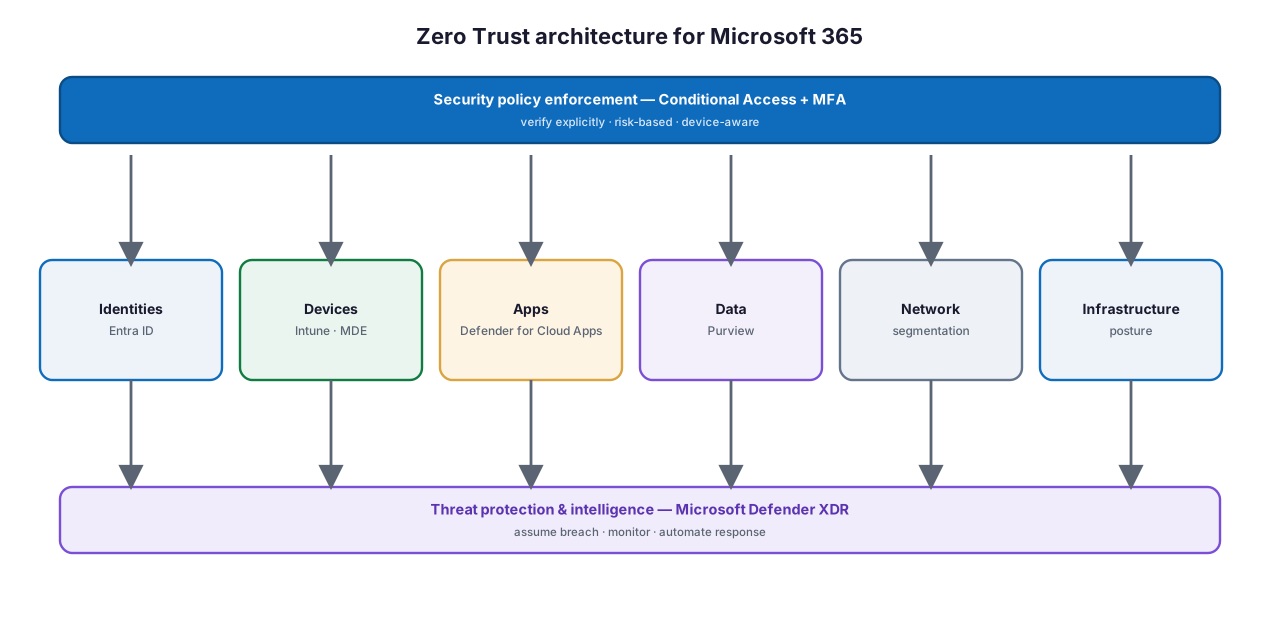
Figure 1. The Zero Trust architecture for Microsoft 365 — Conditional Access enforces policy across every pillar, and Microsoft Defender XDR provides threat protection.
Diagram description: At the top, security policy enforcement — Conditional Access plus MFA — verifies explicitly with risk-based, device-aware policy. It applies across the pillars: identities (Microsoft Entra ID), devices (Intune and Microsoft Defender for Endpoint), apps (Microsoft Defender for Cloud Apps), data (Microsoft Purview), network (segmentation), and infrastructure (posture). Underneath, threat protection and intelligence — Microsoft Defender XDR — assumes breach, monitors, and automates response.
What does the deployment plan look like?
Microsoft organizes the deployment into five swim lanes, aligned to Zero Trust business scenarios. They can be pursued in parallel, but most organizations lead with securing hybrid work, because identity and device protection is the foundation everything else relies on.

Figure 2. The Microsoft 365 Zero Trust deployment plan — five swim lanes from securing hybrid work to meeting compliance.
Diagram description: The Microsoft 365 Zero Trust deployment plan has five swim lanes: secure hybrid work (identity and device access with Conditional Access and Intune), reduce breach damage (Microsoft Defender XDR), protect data (Microsoft Purview labels and DLP), secure AI apps and data (DSPM for AI and Defender for Cloud Apps), and meet compliance (Compliance Manager and Priva).
Table 2. The five deployment swim lanes.
| Swim lane | Focus | Key capabilities |
|---|---|---|
| 1 · Secure remote & hybrid work | Identity and device access protection | Conditional Access, Intune, MFA |
| 2 · Reduce breach damage | Threat detection and response | Microsoft Defender XDR |
| 3 · Protect sensitive data | Classify and protect information | Microsoft Purview Information Protection, DLP |
| 4 · Secure AI apps & data | Govern AI usage and data | Purview DSPM for AI, Defender for Cloud Apps |
| 5 · Meet compliance | Regulatory alignment | Compliance Manager, Priva, retention |
How does policy enforcement work?
Conditional Access is the engine that makes “verify explicitly” real. It evaluates the signals around each sign-in — the user and role, device compliance, location and network, sign-in risk, and the application — and enforces the right control: allow, require MFA, require a compliant device, or block.
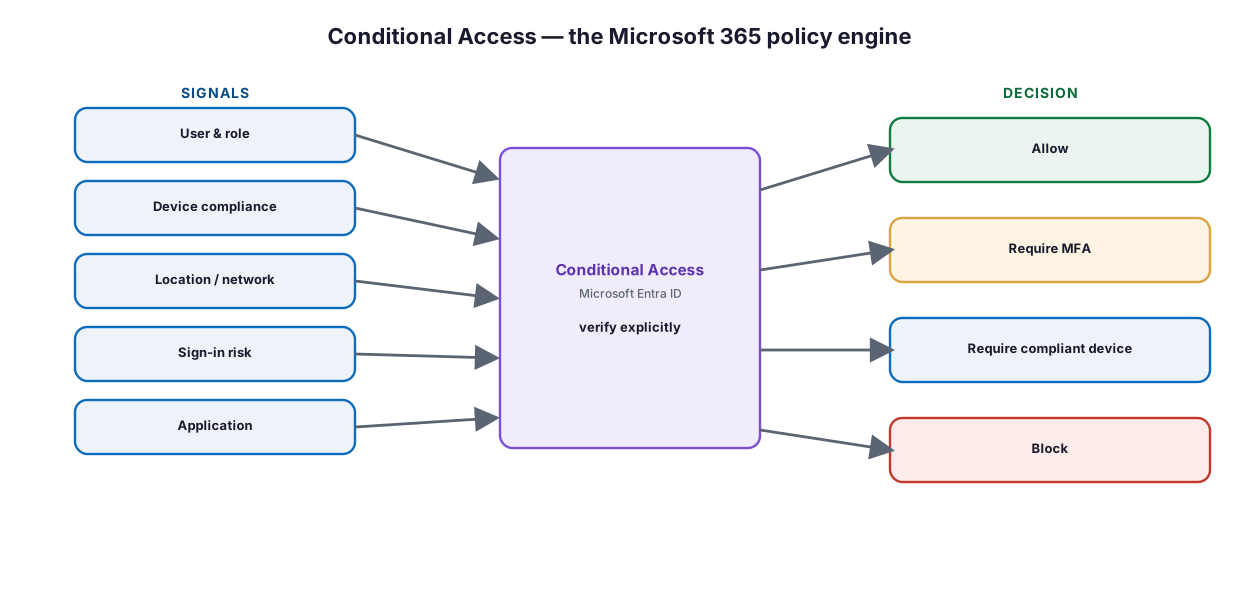
Figure 3. Conditional Access — the Microsoft 365 policy engine turning signals into access decisions.
Diagram description: Conditional Access in Microsoft Entra ID evaluates signals — user and role, device compliance, location and network, sign-in risk, and application — and verifies explicitly to produce an access decision: allow, require MFA, require a compliant device, or block.
Microsoft provides a prescriptive set of identity and device access policies in three tiers, so you can adopt protection at a level that fits your risk and readiness, and raise it over time.
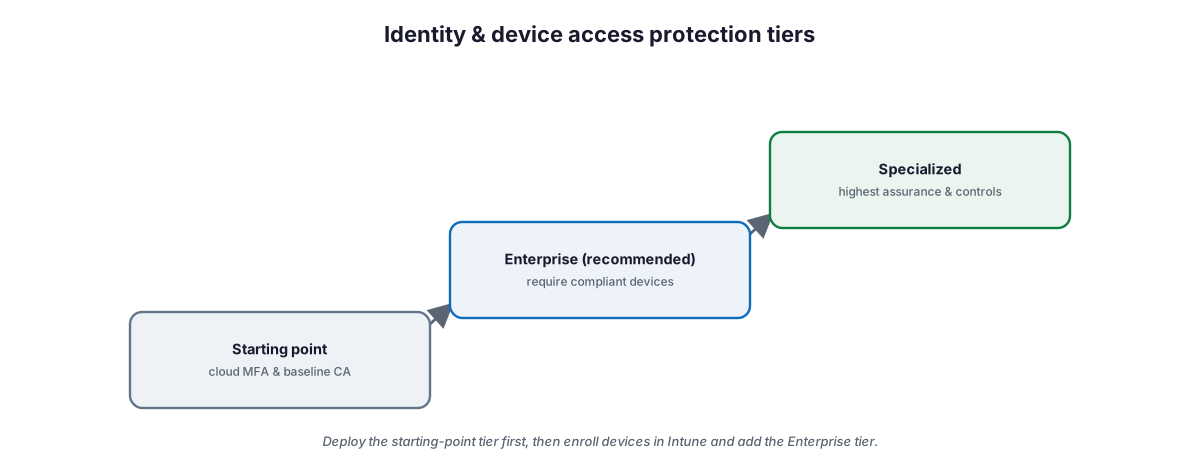
Figure 4. Identity and device access protection tiers — starting point, enterprise (recommended), and specialized.
Diagram description: Microsoft’s identity and device access protection comes in three tiers that rise in assurance: starting point (cloud MFA and baseline Conditional Access, no device enrollment required), enterprise (recommended, requiring compliant devices), and specialized (highest assurance and controls). Deploy the starting-point tier first, then enroll devices in Intune and add the enterprise tier.
Table 3. Securing hybrid work — three phases.
| Phase | Work |
|---|---|
| 1 · Starting-point policies | Baseline Conditional Access and MFA; no device enrollment needed |
| 2 · Enroll devices in Intune | App protection, compliance, and device-profile policies |
| 3 · Enterprise-tier policies | Require compliant devices for access to apps and data |
The recommended policies require Microsoft E3 or E5 and Microsoft Entra ID (cloud-only or hybrid). Device-based policies additionally require enrolling devices in Intune.
How is the rest of the estate protected?
With identity and devices secured, the remaining swim lanes add depth across the pillars, producing a defense-in-depth posture.
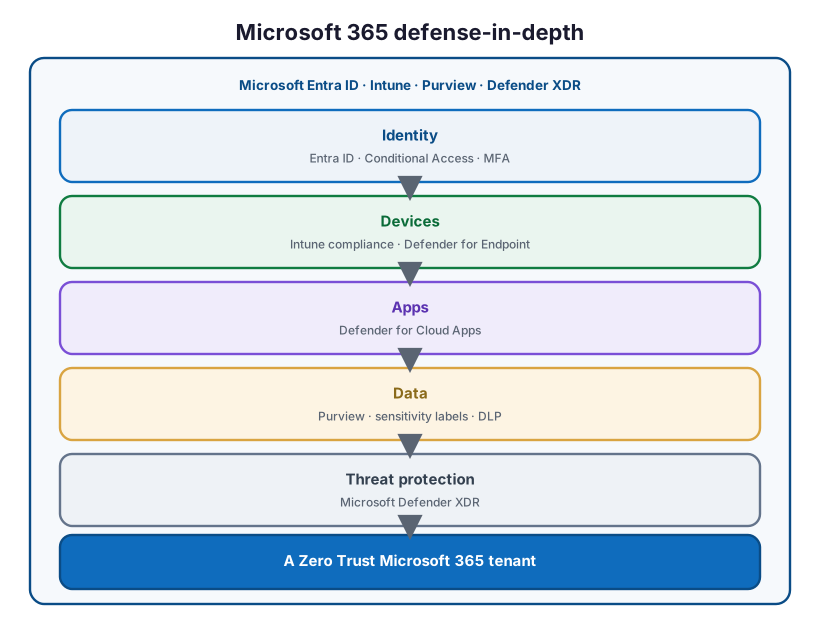
Figure 5. Microsoft 365 defense-in-depth — layered controls across identity, devices, apps, data, and threat protection.
Diagram description: A Microsoft 365 defense-in-depth stack built on Microsoft Entra ID, Intune, Purview, and Defender XDR: identity (Entra ID, Conditional Access, MFA), devices (Intune compliance, Defender for Endpoint), apps (Defender for Cloud Apps), data (Purview, sensitivity labels, DLP), and threat protection (Microsoft Defender XDR) — together delivering a Zero Trust Microsoft 365 tenant.
- Reduce breach damage (Defender XDR). Microsoft Defender XDR collects, correlates, and analyzes signals across endpoints, email, apps, and identities, providing unified incidents and automated response — the “assume breach” pillar. Defender for Cloud Apps also discovers and governs SaaS and GenAI apps.
- Protect sensitive data (Purview). Microsoft Purview Information Protection lets you know, protect, and prevent the loss of data through sensitivity labels and DLP, wherever it lives or travels.
- Secure AI apps and data. Purview Data Security Posture Management (DSPM) for AI gives visibility into how AI interacts with sensitive data — including Microsoft Copilot and third-party apps — and Defender for Cloud Apps discovers and governs GenAI usage.
- Meet compliance. Compliance Manager, retention and DLP policies, communication compliance, and Priva help align to regulation; a Zero Trust approach often already satisfies many requirements.
Best practice. Sequence the swim lanes but do not serialize them rigidly. Lead with identity and device protection (swim lane 1), stand up Defender XDR early for visibility (swim lane 2), and begin data protection (swim lane 3) in parallel — it can start at any time. This gets you both prevention and detection quickly, rather than waiting for a perfect end state.
What are the prerequisites?
Zero Trust for Microsoft 365 assumes cloud identity and appropriate licensing. The recommended identity and device access policies require Microsoft 365 E3 or E5 and Microsoft Entra ID, in cloud-only or a supported hybrid mode. Device-based controls require Intune; advanced threat protection and information protection scale with Defender and Purview licensing (E5 provides the fullest coverage). Confirm current requirements with Microsoft.
Best practices
- Make Conditional Access the single, consistent policy layer across Microsoft 365.
- Enforce MFA for all users and block legacy authentication first.
- Require compliant, Intune-managed devices for access to sensitive apps and data.
- Configure and safeguard break-glass accounts before enforcing policies.
- Deploy Microsoft Defender XDR early for cross-workload visibility and response.
- Classify and protect data with Purview sensitivity labels and DLP.
- Extend controls to SaaS and GenAI apps with Defender for Cloud Apps and DSPM for AI.
- Roll out identity and device policies in report-only mode, then enforce.
- Track posture with Microsoft Secure Score and iterate.
Common mistakes
- Treating Zero Trust as a product. It is a strategy delivered across many coordinated controls.
- Securing identity but not devices. Compliant-device requirements are core to verify-explicitly.
- No break-glass accounts. A Conditional Access misstep can lock out administrators.
- Skipping threat protection. Prevention without Defender XDR leaves breaches undetected.
- Ignoring data protection. Access control alone does not protect data that travels.
- Forgetting AI and SaaS. GenAI and shadow SaaS expand the attack surface if ungoverned.
- Big-bang rollout. Phase the swim lanes and validate before enforcing.
Implementation checklist
Before considering Zero Trust for Microsoft 365 in place, confirm that:
- Conditional Access enforces MFA for all users and blocks legacy authentication
- Break-glass accounts are configured, excluded, and monitored
- Devices are enrolled in Intune with compliance policies
- Enterprise-tier identity and device access policies require compliant devices
- Microsoft Defender XDR is deployed across endpoints, email, apps, and identities
- Purview sensitivity labels and DLP protect sensitive data
- Defender for Cloud Apps and DSPM for AI govern SaaS and GenAI usage
- Compliance Manager and Priva address regulatory requirements
- Policies were validated in report-only mode before enforcement
- Microsoft Secure Score is baselined with a review cadence
Frequently asked questions
Is Zero Trust a Microsoft 365 product?
No. Zero Trust is a security strategy — verify explicitly, use least privilege, assume breach. Microsoft 365 provides the capabilities (Conditional Access, Intune, Defender XDR, Purview) to implement it.
What sits at the center of the architecture?
Security policy enforcement — Conditional Access with MFA — which factors user risk and device status into every access decision across identities, devices, apps, and data.
What are the five deployment swim lanes?
Secure remote and hybrid work, reduce breach damage (Defender XDR), protect sensitive data (Purview), secure AI apps and data, and meet regulatory compliance.
Where should we start?
With securing hybrid work: implement starting-point Conditional Access and MFA, enroll devices in Intune, then add the enterprise-tier policies that require compliant devices.
What licensing is needed?
The recommended identity and device access policies require Microsoft 365 E3 or E5 and Microsoft Entra ID. Device controls require Intune; advanced threat and information protection scale with Defender and Purview (E5 is the fullest). Confirm with Microsoft.
How does this handle AI security?
Swim lane 4 uses Purview DSPM for AI to see how AI interacts with sensitive data and Defender for Cloud Apps to discover and govern GenAI apps, alongside labels, DLP, and insider-risk controls.
How does Zero Trust help with compliance?
A Zero Trust approach often meets or exceeds requirements around access to sensitive data; Compliance Manager, retention, DLP, and Priva help track and close remaining gaps.
Key takeaways
- Zero Trust for Microsoft 365 is a strategy delivered with Conditional Access, Intune, Defender XDR, and Purview.
- Policy enforcement (Conditional Access) is the center; every pillar is configured and coordinated.
- Deploy in five swim lanes, leading with identity and device protection.
- Add threat protection, data protection, AI security, and compliance in depth.
- Phase the rollout, validate in report-only mode, and track Secure Score.
Summary
Zero Trust for Microsoft 365 turns a set of powerful capabilities into one coordinated security strategy: verify every request explicitly with Conditional Access and compliant devices, grant least-privilege and risk-adaptive access, protect data in place with Purview, and assume breach with Microsoft Defender XDR watching the whole estate. Follow Microsoft’s five swim lanes — lead with securing hybrid work, stand up threat protection early, and layer data, AI, and compliance over the top — and phase the rollout so prevention and detection both arrive quickly. Done well, Microsoft 365 becomes a Zero Trust environment where trust is earned per request, not granted by default.
Organizations can begin with the Data & AI Readiness Checklist, review the Microsoft 365 Governance Knowledge Center, or schedule a technology assessment.
Authoritative references
Verified against publicly available Microsoft Learn documentation. Source access date: 23 July 2026. Product capabilities and licensing change frequently — confirm current details before deployment.
- Microsoft Learn: Zero Trust deployment plan with Microsoft 365
- Microsoft Learn: Zero Trust as a security foundation
- Microsoft Learn: Zero Trust identity and device access configurations
- Microsoft Learn: Common identity and device access policies
- Microsoft Learn: Manage devices with Intune
- Microsoft Learn: Zero Trust with Microsoft Intune
- Microsoft Learn: Pilot and deploy Microsoft Defender XDR
- Microsoft Learn: Deploy a Microsoft Purview Information Protection solution
- Microsoft Learn: Discover, protect, and govern AI apps and data
- Microsoft Learn: What is Conditional Access?
- Microsoft Learn: Manage data privacy with Microsoft Priva and Purview
- Microsoft Learn: Zero Trust adoption framework
- Microsoft Learn: Microsoft Secure Score
- Microsoft Learn: Zero Trust Guidance Center
Microsoft product capabilities, licensing, and feature availability may vary by subscription, tenant configuration, region, and Microsoft product updates. Verify current Microsoft documentation before making deployment decisions.
Related Knowledge Center resources
- Microsoft 365 Tenant Security Assessment Checklist — Baseline and harden the tenant.
- Conditional Access Best Practices for SMBs — The policy engine in depth.
- Microsoft Defender XDR Deployment Guide — The threat-protection pillar.
- Microsoft Purview Data Security for Microsoft 365 Copilot — Data protection.
- How to Implement Zero Trust Identity Using Microsoft Entra ID — The identity foundation.
On this page
- Key points for executives
- Executive takeaways
- What are the Zero Trust principles?
- What is the Zero Trust architecture for Microsoft 365?
- What does the deployment plan look like?
- How does policy enforcement work?
- How is the rest of the estate protected?
- What are the prerequisites?
- Best practices
- Common mistakes
- Implementation checklist
- Frequently asked questions
- Summary
- Authoritative references
- Related Knowledge Center resources