Remote Monitoring and Management (RMM): Proactive IT Support at Scale
There is a hard ceiling on how many devices a technician can support by hand.
- Content owner
- Insyto Content Team
- Editorial reviewer
- Ritesh Mhatre
- Technical reviewer
- Navish Ansari
- Next review
- To be scheduled
- Last reviewed
- Review pending
- Technical level
- Intermediate · IT operations leaders, platform engineers
Executive Summary
There is a hard ceiling on how many devices a technician can support by hand. Visiting desks, logging into machines one at a time, checking each server manually, and patching everything individually simply does not scale — and it keeps IT permanently reactive, learning about problems only when users complain. Remote monitoring and management (RMM) breaks that ceiling. By installing a lightweight agent on every device that reports to a central platform, RMM lets a single technician watch, manage, patch, and fix an entire fleet from one console. It is the technology that makes proactive, scalable IT support possible, and it is the backbone of how managed service providers and lean internal IT teams support far more devices than they ever could manually.
The shift RMM enables is fundamental. Instead of finding out about problems when users notice them, an RMM catches issues — a filling disk, a stopped service, a failing drive — and often fixes them automatically before anyone is affected. Instead of touching devices one at a time, it acts on the whole fleet through policies. Instead of patching manually and inconsistently, it automates updates across every machine. And instead of headcount scaling with device count, one technician supports many more devices. This is precisely why RMM sits at the center of the managed-services model: it converts per-device effort into fleet-wide, policy-driven, proactive management.
But that same power carries a serious responsibility. Because an RMM can run code on every device it manages, it is effectively a master key to the entire estate — and attackers know it. RMM platforms have been abused in real supply-chain and ransomware attacks, where a single compromise let adversaries push malware to every managed device at once. Securing the RMM is therefore not optional; it is the most important security decision in a managed environment. This vendor-neutral guide explains how RMM works, its core capabilities, the transformation it delivers, the essential steps to secure it, and the practices that turn an RMM from a noisy tool into genuinely proactive, low-friction management.
How RMM Works
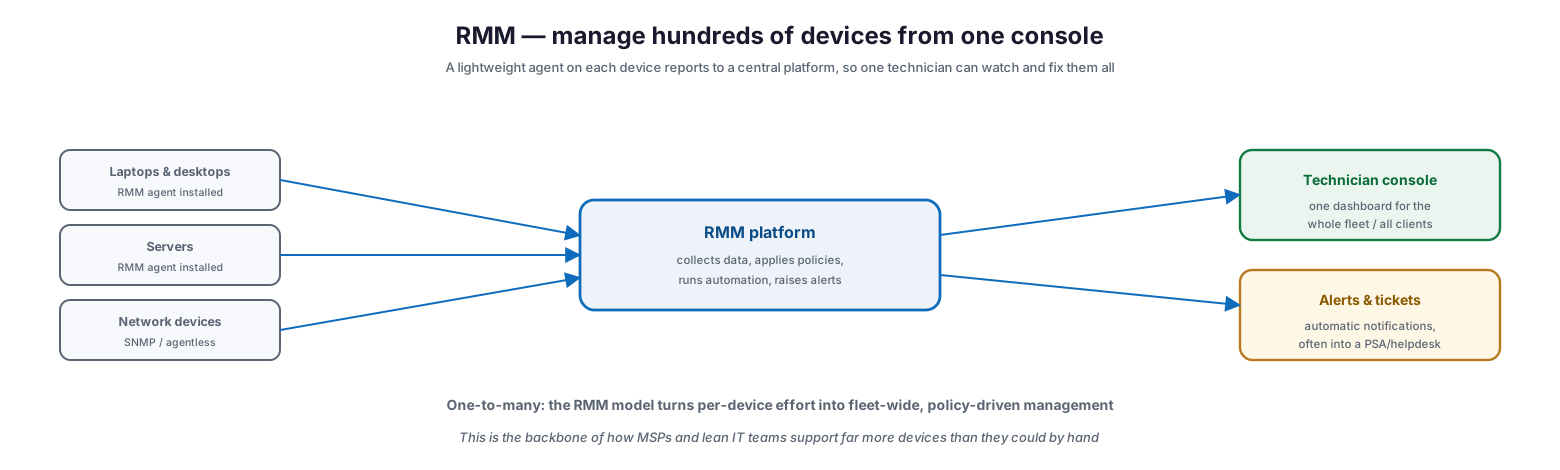
The RMM model is elegantly simple, and understanding it clarifies why it scales so well. It replaces per-device attention with a central platform fed by agents.
RMM — manage hundreds of devices from one console
A lightweight RMM agent is installed on each managed device — laptops, desktops, and servers — while network devices are often monitored via SNMP or agentless methods. Those agents report continuously to a central RMM platform, which collects the data, applies policies, runs automation, and raises alerts. The technician works from a single console that presents one dashboard for the whole fleet, or for every client an MSP supports, with alerts and tickets generated automatically and often fed into a helpdesk or professional services automation (PSA) system. This is the one-to-many model: rather than dividing a technician’s time across individual devices, the RMM lets policies and automation act across the entire estate at once. It is exactly this architecture that allows a small team to support hundreds or thousands of devices proactively — the effort no longer scales linearly with the number of machines.
What an RMM Platform Does
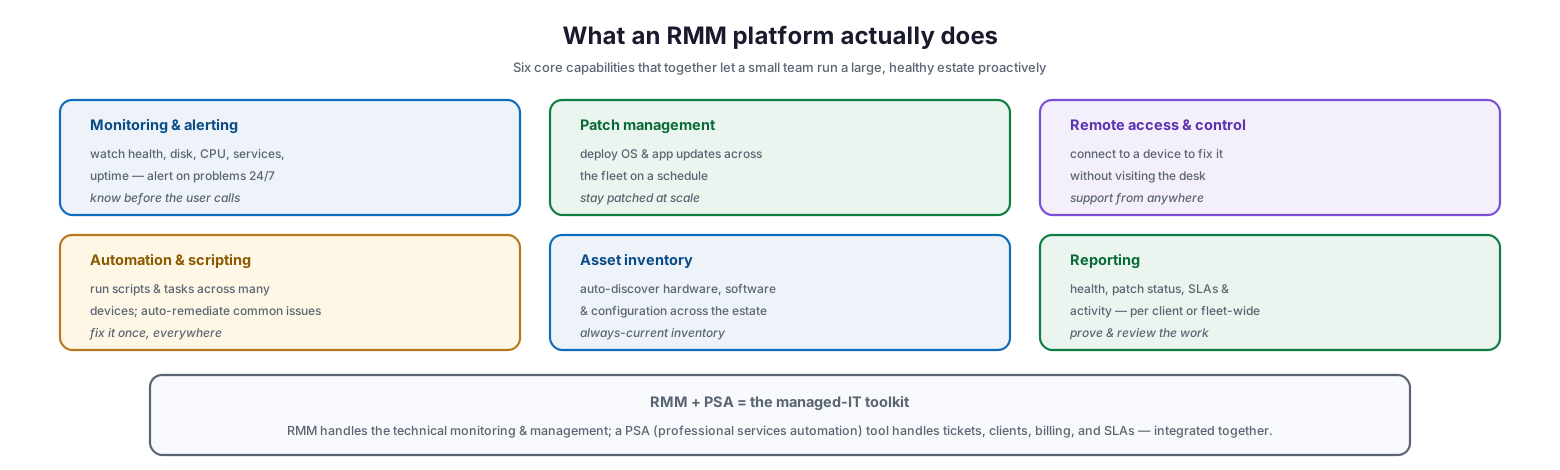
An RMM is not a single feature but a bundle of capabilities that together enable proactive, scalable management. Six core functions do most of the work.
What an RMM platform actually does
Monitoring and alerting watches health, disk, CPU, services, and uptime around the clock and raises alerts on problems, so IT knows before the user calls. Patch management deploys operating-system and application updates across the fleet on a schedule, keeping everything patched at scale. Remote access and control lets a technician connect to a device to fix it without visiting the desk, supporting users from anywhere. Automation and scripting runs scripts and tasks across many devices and auto-remediates common issues, so a fix written once applies everywhere. Asset inventory auto-discovers hardware, software, and configuration across the estate, providing an always-current inventory. And reporting produces health, patch-status, SLA, and activity reports per client or fleet-wide, to prove and review the work. In a managed-IT context, the RMM is typically paired with a PSA tool: the RMM handles the technical monitoring and management, while the PSA handles tickets, clients, billing, and SLAs, the two integrated together as the managed-IT toolkit.
| Capability | What it does |
|---|---|
| Monitoring & alerting | 24/7 health watch; alerts before users notice |
| Patch management | Fleet-wide OS and app updates on a schedule |
| Remote access & control | Fix devices remotely without a desk visit |
| Automation & scripting | Run tasks and auto-remediate across many devices |
| Asset inventory | Auto-discover hardware, software, configuration |
| Reporting | Health, patch, SLA, and activity reporting |
Why RMM Transforms IT Support
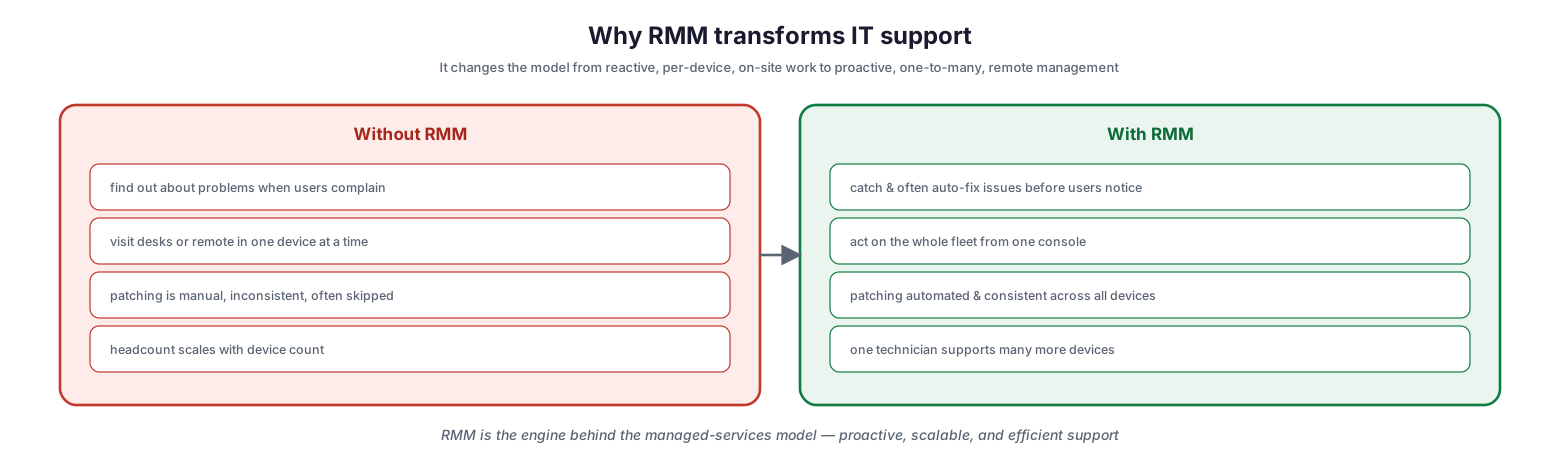
The value of RMM is best seen in the before-and-after. It does not merely make existing work faster; it changes the entire model of how support is delivered.
Why RMM transforms IT support
Without RMM, IT finds out about problems when users complain, visits desks or remotes into one device at a time, patches manually and inconsistently (often skipping machines), and needs headcount that scales with device count. With RMM, IT catches and often auto-fixes issues before users notice, acts on the whole fleet from one console, patches automatically and consistently across all devices, and lets one technician support many more devices. The transformation is from reactive to proactive, from per-device to one-to-many, and from on-site to remote. This is the engine behind the managed-services model, and it is why RMM adoption is the single biggest step most growing IT operations can take toward proactive, efficient support. The economics are compelling: the same team can cover a far larger estate, at higher quality, with fewer surprises.
| Dimension | Without RMM | With RMM |
|---|---|---|
| Awareness | Learn of issues when users complain | Catch (and often auto-fix) before users notice |
| Reach | One device at a time | Whole fleet from one console |
| Patching | Manual, inconsistent, skipped | Automated and consistent |
| Scaling | Headcount grows with devices | One technician supports many more |
Securing the RMM
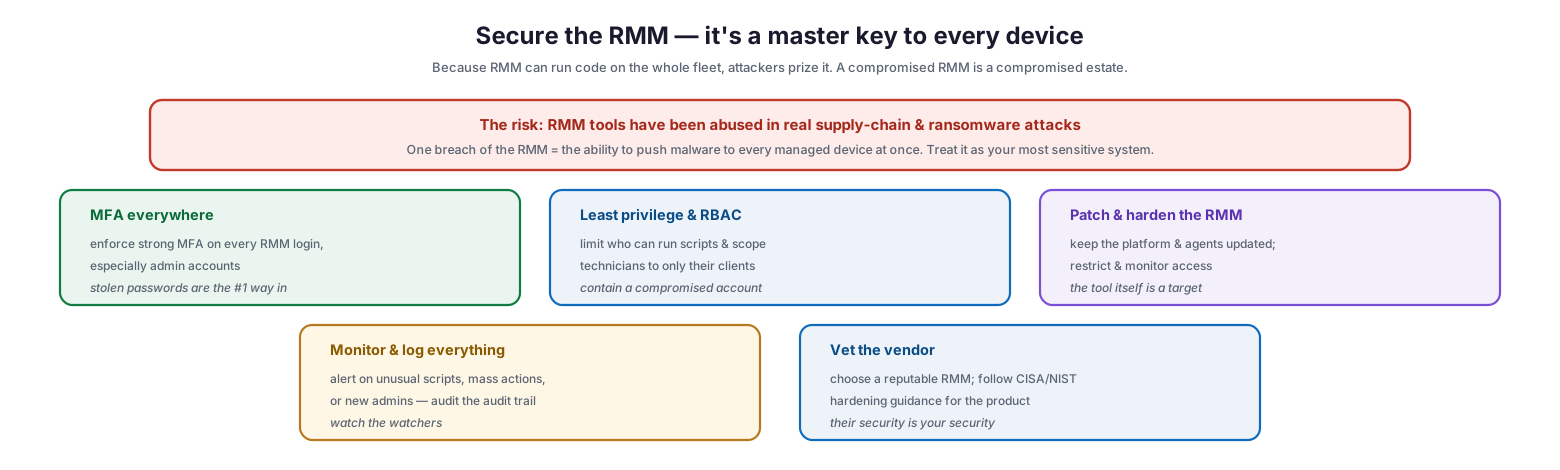
The power that makes RMM so valuable also makes it dangerous if compromised. Because the platform can execute code on every managed device, it is a high-value target, and its security must be treated with the utmost seriousness.
Secure the RMM — it’s a master key to every device
The risk is not theoretical: RMM tools have been abused in real supply-chain and ransomware attacks, because one breach of the RMM grants the ability to push malware to every managed device at once. The RMM must therefore be treated as the most sensitive system in the environment, protected by several controls. Enforce MFA everywhere — strong multi-factor authentication on every RMM login, especially admin accounts, since stolen passwords are the number-one way in. Apply least privilege and role-based access control — limit who can run scripts and scope technicians to only their clients, so a compromised account is contained. Patch and harden the RMM itself — keep the platform and agents updated and restrict and monitor access, because the tool is a target. Monitor and log everything — alert on unusual scripts, mass actions, or new admin accounts, auditing the audit trail. And vet the vendor — choose a reputable RMM and follow published hardening guidance (such as that from CISA and NIST) for the product, because the vendor’s security is your security. Skimping on any of these turns the organization’s most powerful management tool into its single greatest vulnerability.
| Control | Why it matters |
|---|---|
| MFA on all logins | Blocks stolen-credential access, the top entry point |
| Least privilege & RBAC | Contains a compromised technician account |
| Patch & harden the RMM | The platform and agents are themselves targets |
| Monitor & log actions | Detects abuse — unusual scripts, mass actions, new admins |
| Vet the vendor | The RMM provider’s security becomes your security |
Getting Real Value from RMM
An RMM delivers value only in proportion to how well it is configured. A poorly set up RMM is a firehose of noise; a well-configured one is a quiet, proactive management engine. A handful of practices make the difference.
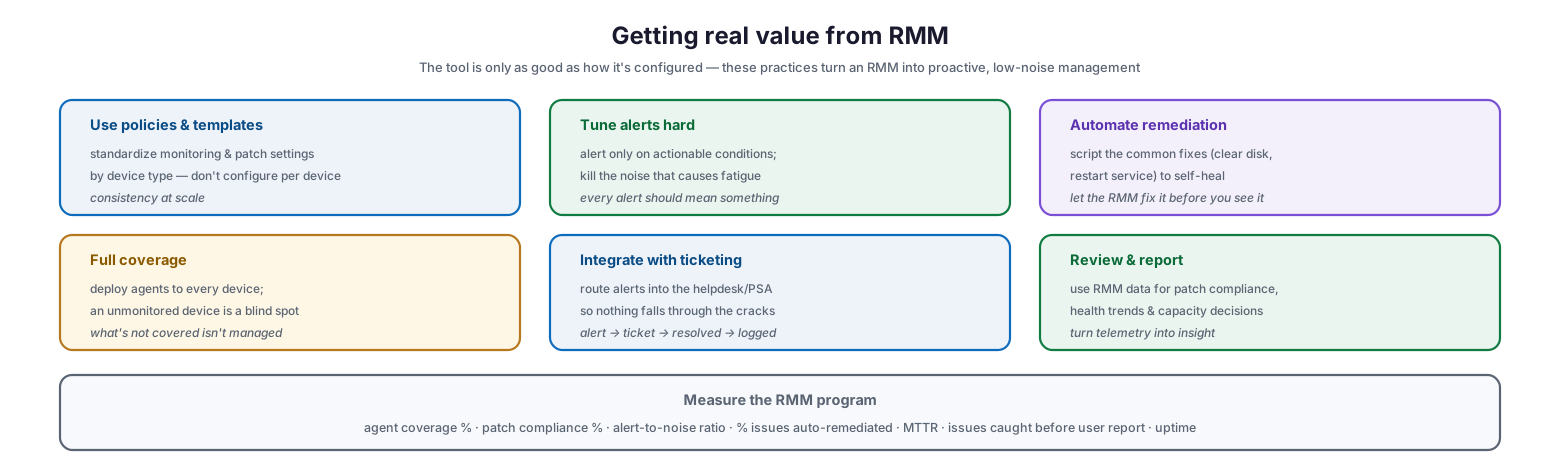
Getting real value from RMM
Use policies and templates to standardize monitoring and patch settings by device type rather than configuring each device individually — consistency at scale. Tune alerts hard so the platform alerts only on actionable conditions, killing the noise that causes alert fatigue; every alert should mean something. Automate remediation by scripting the common fixes — clearing a full disk, restarting a stopped service — so the system self-heals and the RMM fixes issues before a technician even sees them. Ensure full coverage by deploying agents to every device, because an unmonitored device is a blind spot and what is not covered is not managed. Integrate with ticketing so alerts route into the helpdesk or PSA and nothing falls through the cracks, following the alert-to-ticket-to-resolved-to-logged flow. And review and report, using RMM data for patch compliance, health trends, and capacity decisions to turn telemetry into insight. Measured by agent coverage, patch compliance, alert-to-noise ratio, the share of issues auto-remediated, mean time to resolve, issues caught before user reports, and uptime, an RMM program becomes a demonstrable driver of proactive, efficient IT.
RMM Checklist
- Deploy RMM agents to every managed device; leave no unmonitored blind spots.
- Configure monitoring, alerting, and patching through policies and templates by device type.
- Tune alerts so only actionable conditions notify; eliminate noise that causes fatigue.
- Automate remediation of common issues so the environment self-heals.
- Use RMM patch management to keep the whole fleet consistently up to date.
- Integrate RMM alerts with a helpdesk or PSA so every issue becomes a tracked ticket.
- Enforce MFA on all RMM logins, especially administrator accounts.
- Apply least privilege and role-based access; scope technicians to their clients.
- Keep the RMM platform and agents patched and hardened.
- Monitor and log RMM activity; alert on unusual scripts, mass actions, and new admins.
- Choose a reputable RMM vendor and follow published hardening guidance.
- Report on health, patch compliance, and SLAs; use the data to drive improvement.
Best Practices
Standardize with policies, not per-device settings. The whole point of RMM is one-to-many management. Configure monitoring and patching through templates by device type so the estate stays consistent and new devices inherit the right settings automatically.
Treat alert tuning as ongoing work. An untuned RMM buries real problems under noise. Continuously refine alerts so every notification is actionable, and the team learns to trust them rather than ignore them.
Automate the routine fixes. Identify the issues that recur and script their remediation so the RMM resolves them automatically. Self-healing is where RMM delivers its biggest efficiency and reliability gains.
Cover everything. An RMM only manages what it can see. Ensure every device has an agent, and audit for gaps, because unmonitored machines are exactly where problems and security risks hide.
Secure the RMM above all else. Because it can run code fleet-wide, the RMM is a master key. Enforce MFA, least privilege, patching, monitoring, and vendor diligence. A compromised RMM is a compromised estate.
Turn data into decisions. The RMM generates rich telemetry on health, patching, and capacity. Use it not just to react but to spot trends, plan capacity, and demonstrate the value and compliance of the service.
Common Mistakes
Leaving devices unmonitored. Any machine without an agent is invisible to the RMM and unmanaged. Partial coverage creates blind spots that undermine the whole proactive model.
Not tuning alerts. Accepting default, noisy alerting leads to fatigue, where technicians ignore notifications and miss the ones that matter. Alerts must be tuned to be actionable.
Ignoring automation. Using RMM only for monitoring and manual fixes leaves most of its value untapped. Automating remediation is what converts monitoring into self-healing.
Neglecting RMM security. Failing to lock down the RMM with MFA, least privilege, and monitoring exposes the organization to catastrophic, fleet-wide compromise. It is the single most important system to secure.
Configuring device by device. Setting up monitoring and patching individually does not scale and produces inconsistency. Use policies and templates so management is genuinely one-to-many.
Not integrating with ticketing. Alerts that do not become tracked tickets get lost. Integrate the RMM with a helpdesk or PSA so every issue is captured, actioned, and recorded.
Frequently Asked Questions
What is RMM? Remote monitoring and management is software that uses agents installed on devices to let IT teams monitor, manage, patch, and remotely support an entire fleet of endpoints, servers, and network devices from a central console. It is the backbone of proactive, scalable IT support.
How is RMM different from a monitoring tool? Monitoring tools watch and alert; RMM also manages — it patches, runs scripts, provides remote access, and automates remediation. RMM combines monitoring with the ability to act on devices at scale, not just observe them.
What is the difference between RMM and PSA? RMM handles the technical side — monitoring, patching, remote management. PSA (professional services automation) handles the business side — tickets, clients, billing, and SLAs. Managed IT providers typically use both, integrated together.
Why is RMM security so important? Because an RMM can execute code on every device it manages, a compromise gives an attacker control over the whole fleet. RMM tools have been abused in real supply-chain and ransomware attacks, so securing the RMM with MFA, least privilege, and monitoring is critical.
Does a small business need RMM? Any organization managing more than a handful of devices benefits from RMM, whether run internally or through a managed service provider. It enables proactive support, consistent patching, and efficient management that manual methods cannot match at scale.
How do we avoid alert fatigue with RMM? Tune alerts so they fire only on actionable conditions, use policies to standardize thresholds, automate the remediation of common issues so they never generate a human alert, and route the rest into a ticketing system. Every alert that reaches a person should require action.
Conclusion
Remote monitoring and management is the technology that lets IT escape the reactive, per-device trap and support a large estate proactively and efficiently. By placing an agent on every device and managing them all from a central console, RMM transforms IT from finding out about problems when users complain to catching and often auto-fixing them first, from touching machines one at a time to acting on the whole fleet, and from headcount that scales with devices to a small team covering many. It is the engine of the managed-services model and one of the highest-leverage investments a growing IT operation can make.
That power, though, comes with a non-negotiable responsibility: securing the RMM itself. Because it is a master key to every managed device, it must be the most carefully protected system in the environment — locked down with MFA, least privilege, diligent patching, and vigilant monitoring. Configure it well, with standardized policies, tuned alerts, and automated remediation, cover every device, integrate it with ticketing, and turn its data into decisions. Do that, and RMM delivers exactly what modern IT support demands: proactive, scalable, consistent management that keeps the estate healthy and the team ahead of the work — safely.
References
- CISA — Guidance for securing Remote Monitoring and Management (RMM) software
- CISA — Protecting Against the Threat of Remote Access Software
- NIST SP 800-46 Rev. 2 — Guide to Enterprise Telework and Remote Access
- NIST SP 800-53 — Access Control and System Monitoring controls
- CIS Controls — Continuous Vulnerability Management and asset monitoring
- ITIL 4 — Monitoring and Event Management practice
- CISA — #StopRansomware guidance (RMM abuse)