Automated Patch Management: Turning Patching Into a Reliable Pipeline
Patching is one of the most important things an IT team does and one of the most reliably neglected.
- Content owner
- Insyto Content Team
- Editorial reviewer
- Ritesh Mhatre
- Technical reviewer
- Navish Ansari
- Next review
- To be scheduled
- Last reviewed
- Review pending
- Technical level
- Intermediate · IT operations leaders, platform engineers
Executive Summary
Patching is one of the most important things an IT team does and one of the most reliably neglected. The reason is not that anyone doubts its value — everyone knows that unpatched systems are how most breaches begin — but that doing it by hand is slow, repetitive, and easy to defer when the week gets busy. Someone has to read the vendor bulletins, log in to each machine, install and reboot one system at a time, and track the whole thing in a spreadsheet that drifts out of date almost immediately. Under real-world pressure, that work slips, and the window between “a fix exists” and “the fix is installed” stretches from hours into weeks or months. Every day in that window is a day of avoidable exposure to a known, already-fixed vulnerability.
Automation closes that gap. An automated patch management pipeline discovers available updates across the whole estate, tests them on a small group first, rolls them out in controlled waves within maintenance windows, verifies that each one installed cleanly, and reports on coverage — all on a schedule, with little or no manual effort. The point is not merely to save time, though it does. The point is consistency: a machine does not get tired, skip a busy week, or forget a server. The result is a short, predictable time from release to installed, near-complete and measurable coverage, and a narrow exposure window instead of a wide one. This article is deliberately about the automation of patching — the pipeline, the rings, the gates, and the guardrails — rather than a general argument for why patching matters, which is assumed.
This vendor-neutral guide explains how to automate patch management well. It contrasts manual patching with an automated pipeline, walks through the automated patch lifecycle stage by stage, explains ring-based rollout as the mechanism that keeps automation safe, breaks down the building blocks an automated system needs, and sets out the guardrails — maintenance windows, rollback, and an emergency fast-track — that let a team move fast where it is safe and carefully where it counts. The governing principle throughout is that automation should make patching both faster and safer at once, never one at the expense of the other.
Manual Patching vs. an Automated Pipeline
The case for automation is clearest when the two approaches are placed side by side. Manual and automated patching do not differ only in effort; they produce fundamentally different outcomes in speed and coverage.
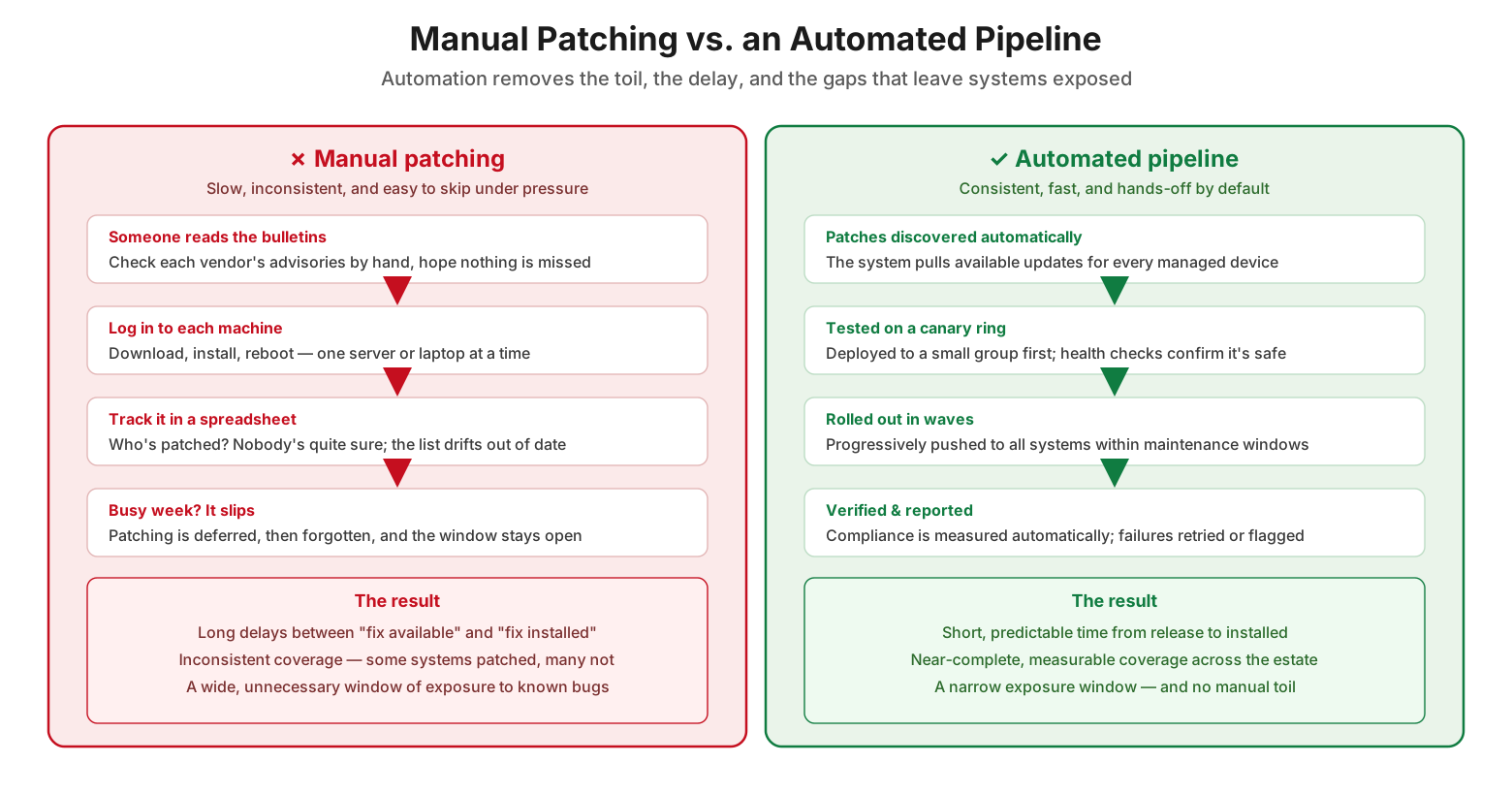
Manual patching vs. an automated pipeline
Manual patching is a chain of human steps, each a chance to slow down or drop the ball. Someone reads the bulletins by hand, hoping nothing is missed. They log in to each machine to download, install, and reboot, one at a time. They track who is patched in a spreadsheet that no one quite trusts. And when a busy week arrives, patching is the first thing to slip — deferred, then forgotten, while the window stays open. The result is long delays between fix-available and fix-installed, inconsistent coverage where some systems are patched and many are not, and a wide, unnecessary exposure to known bugs. An automated pipeline replaces that chain with a repeatable process: patches are discovered automatically for every managed device, tested on a canary ring with health checks confirming they are safe, rolled out in progressive waves inside maintenance windows, and verified and reported on automatically, with failures retried or flagged. The outcome is the mirror image of manual patching — short, predictable timelines, near-complete measurable coverage, a narrow exposure window, and no manual toil.
The Automated Patch Lifecycle
Automation works because it turns patching into a defined pipeline that runs the same way every time. Understanding the stages of that pipeline is the key to building or evaluating one.
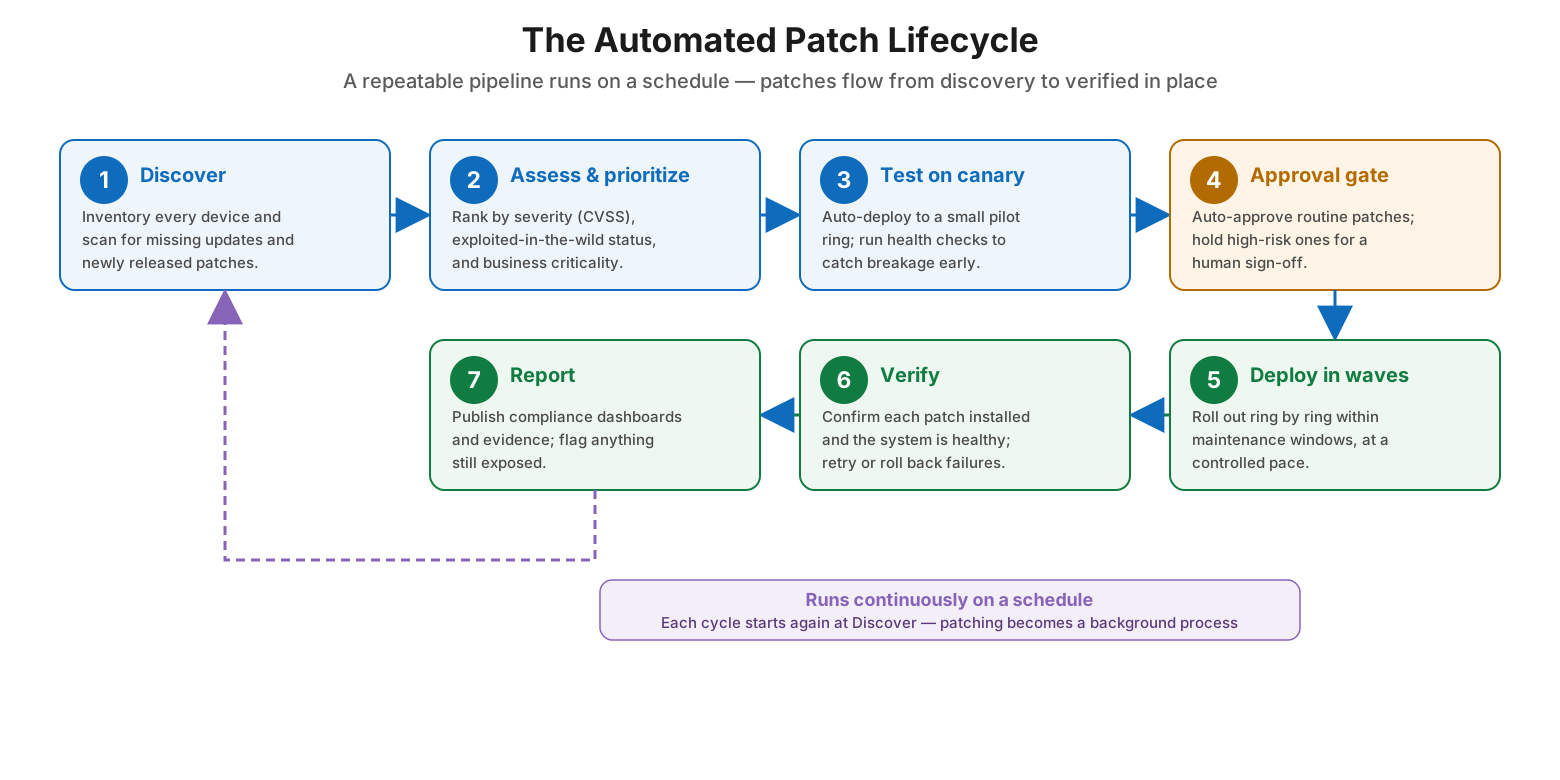
The automated patch lifecycle
The lifecycle runs in a loop. It begins with discover: inventory every device and scan for missing updates and newly released patches. Next is assess and prioritize, ranking patches by severity (using scores like CVSS), by whether the vulnerability is being exploited in the wild, and by the business criticality of the affected systems. Then comes test on canary, auto-deploying to a small pilot ring and running health checks to catch breakage early. An approval gate follows: routine, low-risk patches are auto-approved, while high-risk ones are held for a human sign-off. Approved patches move to deploy in waves, rolling out ring by ring within maintenance windows at a controlled pace. Each deployment is followed by verify, confirming the patch installed and the system is healthy, and retrying or rolling back failures. Finally, report publishes compliance dashboards and audit evidence and flags anything still exposed. Then the cycle starts again at discover. Because it runs continuously on a schedule, patching stops being a project someone has to remember and becomes a background process that simply happens.
| Stage | What automation does | Why it matters |
|---|---|---|
| 1. Discover | Inventory devices, scan for missing patches | Nothing is overlooked or forgotten |
| 2. Assess & prioritize | Rank by CVSS, exploitation, business criticality | The most dangerous gaps get fixed first |
| 3. Test on canary | Deploy to a pilot ring, run health checks | Breakage is caught before it spreads |
| 4. Approval gate | Auto-approve routine; hold high-risk for review | Speed for the safe, control for the risky |
| 5. Deploy in waves | Roll out ring by ring in maintenance windows | Controlled pace, contained blast radius |
| 6. Verify | Confirm install and health; retry or revert | Coverage is real, not assumed |
| 7. Report | Publish compliance and audit evidence | Provable, measurable patch posture |
Ring-Based Rollout: Contain the Blast Radius
The single most important safety mechanism in automated patching is the ring, also called phased or wave deployment. It is what lets a team push patches automatically without risking that a bad update takes down everything at once.
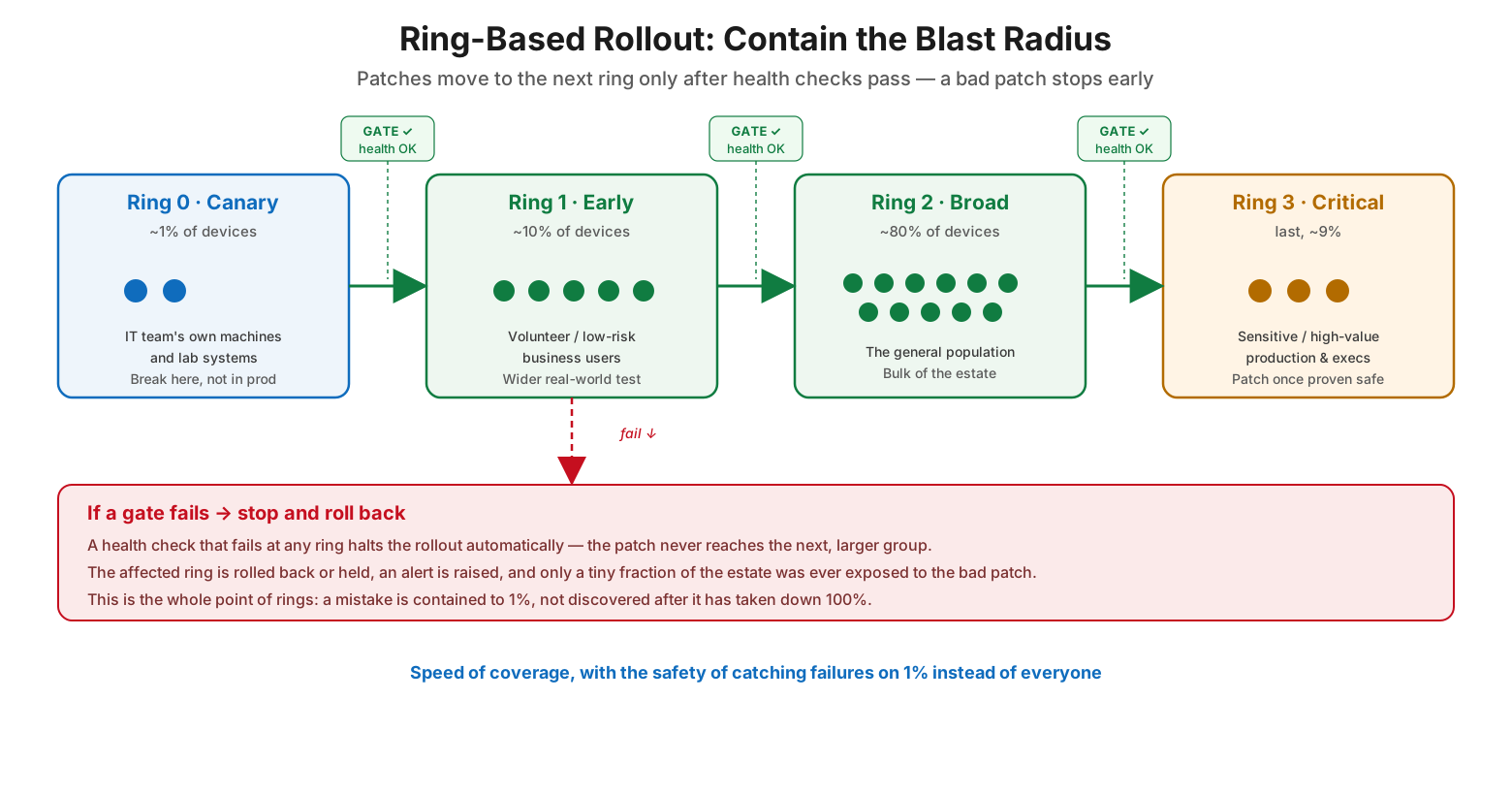
Ring-based rollout — contain the blast radius
In a ring model, patches move outward through progressively larger groups. Ring 0, the canary, is roughly one percent of devices — the IT team’s own machines and lab systems — where a bad patch breaks harmlessly instead of in production. Ring 1, the early ring, is around ten percent: volunteer or low-risk business users who provide a wider, real-world test. Ring 2, the broad ring, is the bulk of the estate, perhaps eighty percent — the general population. Ring 3, the critical ring, comes last: sensitive, high-value production systems and executives, patched only once the update has proven safe everywhere else. Between each ring sits an automated gate: the patch advances only if health checks pass. If a gate fails, the rollout halts automatically. The affected ring is rolled back or held, an alert is raised, and the patch never reaches the next, larger group. This is the entire purpose of rings — a mistake is contained to one percent of the estate, caught early, rather than discovered after it has taken down everyone. Rings give a team the speed of automated coverage with the safety of catching failures on a tiny fraction of systems.
| Ring | Share of estate | Who’s in it | Purpose |
|---|---|---|---|
| Ring 0 — Canary | ~1% | IT team machines, lab systems | Break here, not in production |
| Ring 1 — Early | ~10% | Volunteer / low-risk users | Wider real-world validation |
| Ring 2 — Broad | ~80% | The general population | Bulk coverage once proven |
| Ring 3 — Critical | ~9% (last) | Sensitive production, execs | Patch only after it’s proven safe |
What an Automated Patch System Is Made Of
Behind the pipeline and the rings sits a set of components that have to work together. Knowing them helps in choosing a tool or assembling a capability from what you already have.
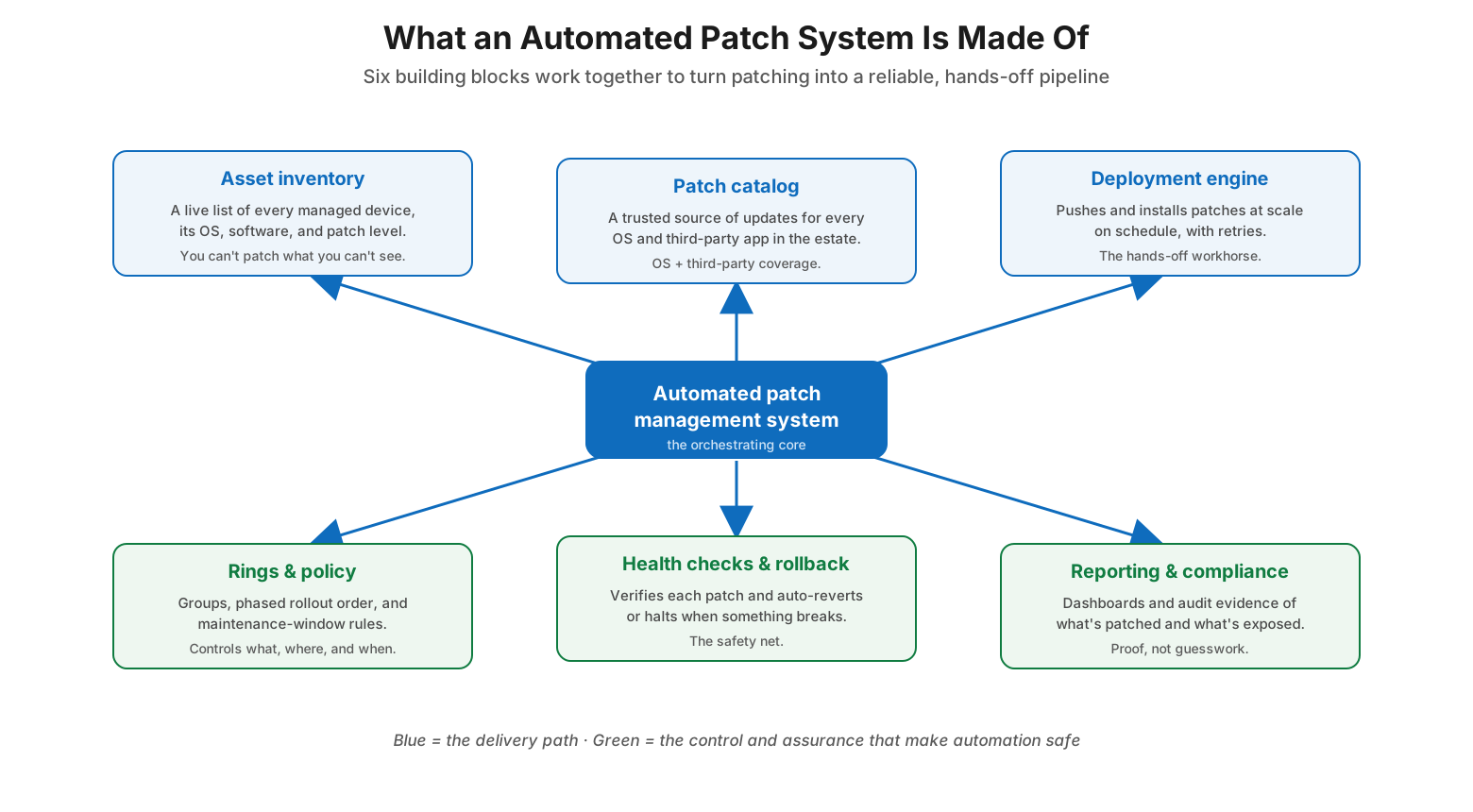
What an automated patch system is made of
An automated patch system rests on six building blocks. An asset inventory keeps a live list of every managed device, its operating system, installed software, and current patch level — because you cannot patch what you cannot see. A patch catalog provides a trusted source of updates covering every operating system and, importantly, the third-party applications that are so often the weak point. A deployment engine pushes and installs patches at scale, on schedule, with retries — the hands-off workhorse. A rings-and-policy layer defines the groups, the phased rollout order, and the maintenance-window rules, controlling what gets patched, where, and when. Health checks and rollback verify each patch and automatically revert or halt when something breaks — the safety net that makes unattended automation trustworthy. And reporting and compliance produce the dashboards and audit evidence showing what is patched and what remains exposed, turning patch posture into proof rather than guesswork. The first three form the delivery path; the last three form the control and assurance that make automating that path safe.
| Building block | Role | Key point |
|---|---|---|
| Asset inventory | Live list of devices and patch levels | Can’t patch what you can’t see |
| Patch catalog | Trusted source of OS + third-party updates | Third-party apps are the common gap |
| Deployment engine | Installs at scale on schedule, with retries | The hands-off workhorse |
| Rings & policy | Groups, rollout order, maintenance windows | Controls what, where, and when |
| Health checks & rollback | Verify and auto-revert on failure | The safety net for unattended runs |
| Reporting & compliance | Dashboards and audit evidence | Proof of posture, not guesswork |
Automated Patch Management Checklist
- Maintain a complete, live asset inventory; you cannot patch what you cannot see.
- Cover third-party applications, not just the operating system, in the patch catalog.
- Prioritize automatically by severity, active exploitation, and business criticality.
- Test every patch on a small canary ring with automated health checks before wider release.
- Roll out in rings, expanding only after each gate’s health checks pass.
- Deploy within defined maintenance windows, never in the middle of the workday.
- Auto-approve routine patches; require human sign-off only for high-risk ones.
- Take a snapshot or restore point before patching and enable automatic rollback on failure.
- Halt the rollout automatically when a gate fails so a bad patch cannot spread.
- Keep an emergency fast-track for actively-exploited, critical vulnerabilities.
- Verify installation and system health after every wave; retry or revert failures.
- Report compliance continuously and flag any system still exposed.
Best Practices
Automation only pays off when speed is paired with the guardrails that keep it safe — scheduling, testing, rollback, and an escape hatch for emergencies.
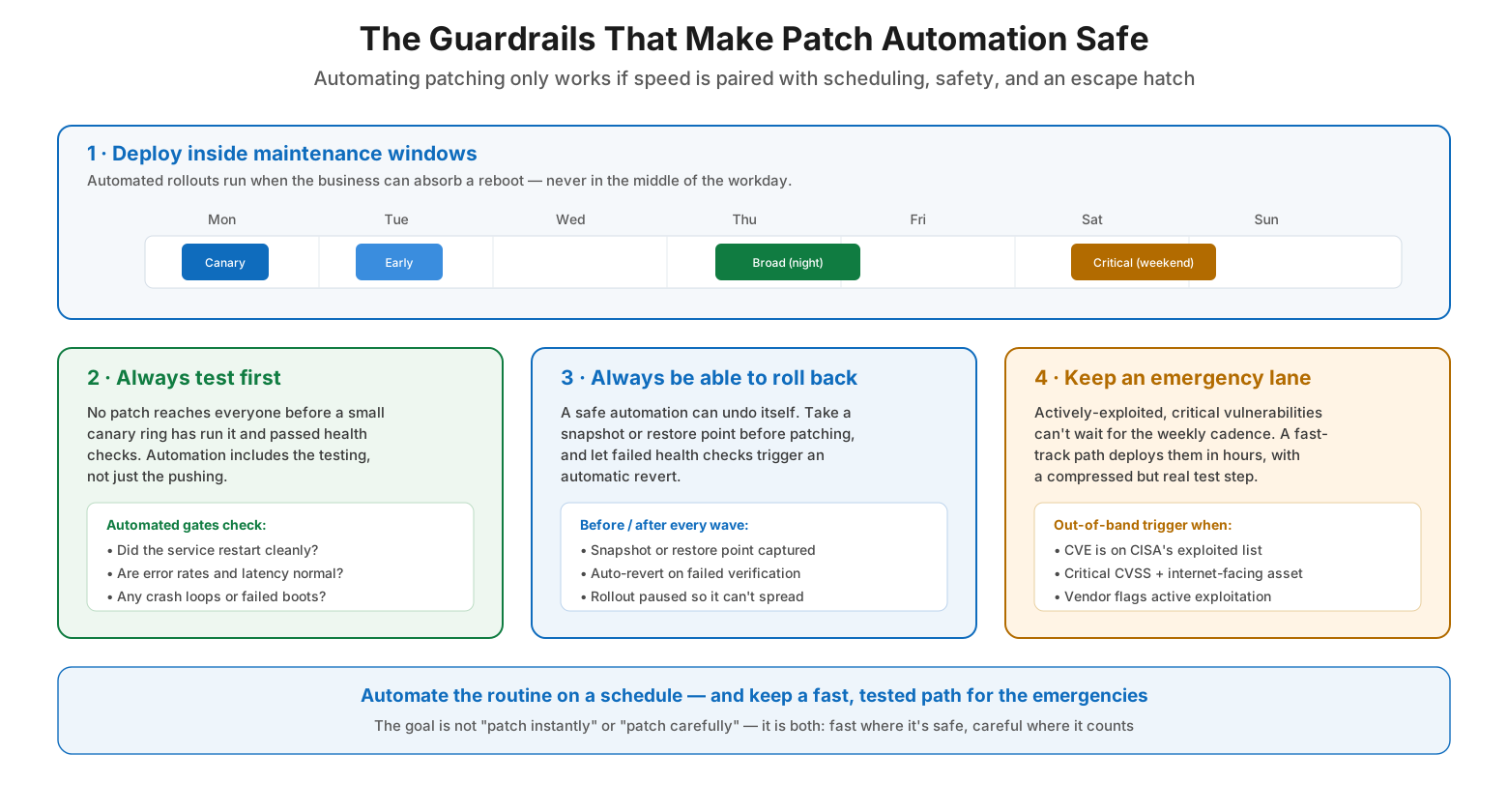
The guardrails that make patch automation safe
Automate the whole lifecycle, not just the install. The value is lost if a human still has to read bulletins, decide priorities, and check results. Automate discovery, prioritization, testing, deployment, verification, and reporting so the pipeline runs end to end.
Always test before you trust. No patch should reach the whole estate before a canary ring has run it and passed health checks. Automation must include the testing step, not just the pushing step — otherwise it simply distributes mistakes faster.
Make rollback a first-class feature. A safe automation can undo itself. Capture a snapshot or restore point before each wave, and let failed health checks trigger an automatic revert and pause the rollout so a bad patch cannot spread further.
Respect maintenance windows. Schedule automated rollouts for times the business can absorb a reboot. Patching that disrupts the workday erodes trust in automation and pushes teams back toward doing it manually and late.
Keep an emergency lane. Actively-exploited critical vulnerabilities cannot wait for the weekly cadence. Maintain an out-of-band fast-track that deploys them in hours, with a compressed but genuine test step, triggered by signals like a CVE appearing on CISA’s exploited-vulnerabilities list.
Measure and report coverage. Automation makes it possible to know your exact patch posture at any moment. Publish compliance dashboards, track the time from release to installed, and flag exposed systems so gaps are visible and closed.
Common Mistakes
Automating deployment without testing. Pushing patches automatically to everything with no canary ring means a bad update reaches the entire estate at once. Always gate wider rollout behind health checks on a small group.
Ignoring third-party applications. Focusing automation on the operating system alone leaves browsers, runtimes, and other widely-exploited third-party software unpatched. The patch catalog must cover them too.
No rollback plan. Trusting unattended automation without the ability to revert is a recipe for a bad night. Snapshots and automatic rollback are what make hands-off patching safe.
Patching during business hours. Rollouts that reboot machines mid-workday frustrate users and undermine confidence in the whole program. Confine automated deployment to maintenance windows.
Treating every patch the same. Auto-approving high-risk changes, or slow-walking an actively-exploited critical fix through the normal cadence, both cause harm. Route routine and emergency patches down different lanes.
Set-and-forget with no monitoring. Automation is not an excuse to stop looking. Without verification and reporting, silent failures accumulate and coverage quietly erodes. Watch the pipeline and act on what it flags.
Frequently Asked Questions
What is automated patch management? It is the use of a system to run the patching lifecycle — discovering, prioritizing, testing, deploying, verifying, and reporting on patches — automatically and on a schedule, rather than by manual effort on each machine. The goal is consistent, fast, measurable patching with minimal human toil.
How is this different from just patching regularly? Manual patching, even on a regular schedule, depends on people remembering and having time. Automation makes patching a background process that runs reliably every cycle, tests before deploying, rolls out in controlled waves, and proves its own coverage — none of which manual effort sustains consistently at scale.
Is it safe to patch automatically? What if a patch breaks something? It is safe when built with the right guardrails: canary testing, ring-based rollout with health-check gates, and automatic rollback. These ensure a bad patch is caught on a tiny fraction of systems and reverted, rather than distributed everywhere. Automation without these safeguards is risky; automation with them is safer than manual patching.
What are deployment rings? Rings are progressively larger groups of devices that a patch moves through in order — from a small canary, to early adopters, to the broad estate, to critical systems last. A patch advances to the next ring only after health checks pass in the current one, containing the impact of any bad update.
How do we handle urgent, actively-exploited vulnerabilities? Keep an emergency or out-of-band fast-track separate from the normal cadence. When a vulnerability is critical and being exploited — for example, listed on CISA’s Known Exploited Vulnerabilities catalog — the fast-track deploys the fix in hours with a compressed but real test step, rather than waiting for the next scheduled window.
Does automation eliminate the need for people? No. Automation handles the routine, repetitive work and frees people to focus on judgment: approving high-risk changes, investigating failures, tuning policies, and responding to emergencies. The pipeline runs the process; people govern it.
Conclusion
The problem with patching has never been knowing that it matters. It is that manual patching is slow, inconsistent, and the first casualty of a busy week — and every delay leaves a known vulnerability open longer than it needs to be. Automation solves this not by trying harder but by changing the nature of the work: a defined pipeline that discovers, tests, deploys, verifies, and reports on patches the same way every cycle, without depending on anyone to remember. That consistency is what shrinks the exposure window and turns patch coverage from a hopeful spreadsheet into a measured fact.
What makes automated patching trustworthy rather than reckless is the discipline built into it. Ring-based rollout contains the blast radius so a bad patch is caught on one percent of systems, not all of them. Health checks and automatic rollback give the automation the ability to undo its own mistakes. Maintenance windows keep it from disrupting the business, and an emergency fast-track ensures the truly urgent fixes are never stuck behind the routine ones. Assemble those building blocks and hold to the guiding principle — that automation should make patching both faster and safer at the same time — and patching finally becomes what it should be: a reliable background process the whole organization can depend on.
References
- NIST SP 800-40 Rev. 4 — Guide to Enterprise Patch Management Planning
- CISA — Known Exploited Vulnerabilities Catalog
- CISA — Binding Operational Directive 22-01 (remediating known exploited vulnerabilities)
- Google SRE Book — Release Engineering (progressive rollouts)
- Google SRE Workbook — Canarying Releases
- FIRST — Common Vulnerability Scoring System (CVSS)
- NIST National Vulnerability Database (NVD)