Patch Management Best Practices
Unpatched software is the most reliably exploited weakness in business IT.
- Content owner
- Insyto Content Team
- Editorial reviewer
- Ritesh Mhatre
- Technical reviewer
- Navish Ansari
- Next review
- To be scheduled
- Last reviewed
- Review pending
- Technical level
- Intermediate · IT operations leaders, platform engineers
Executive Summary
Unpatched software is the most reliably exploited weakness in business IT. The overwhelming majority of successful attacks use vulnerabilities for which a fix already existed — the patch simply had not been applied. Patch management is the discipline of closing that window: getting security and reliability updates onto every device and server, quickly, without breaking the business in the process. For a growing organization it is also one of the least glamorous and most frequently neglected parts of IT, because doing it manually is tedious, disruptive, and never finished.
The tension at the heart of patch management is speed versus stability. Patch too slowly and you leave known holes open for attackers; patch too aggressively and a bad update can take out the whole fleet at once. The resolution is not to choose one over the other but to industrialize the process: deploy updates in sequential rings so problems are caught on a few devices before they reach everyone, automate the routine so scarce IT time is not consumed by it, and measure the result so gaps are visible and closed. Microsoft’s cloud tooling — Windows Autopatch, update rings, and Intune reporting — makes this achievable for even a small IT team.
This guide sets out patch management best practices for a managed IT context. It covers what a complete patch program must include, how deployment rings balance speed and stability, how Windows Autopatch automates the work, how to patch servers and third-party applications, and how to measure and enforce patch compliance. It assumes devices are managed through Microsoft Intune — the broader setup and compliance disciplines are covered in the companion Intune deployment and device compliance guides — and focuses here on doing patching well. Because Microsoft’s update tooling evolves, verify specifics against the linked documentation.
Who should read this:
- CIOs, CTOs, and IT directors accountable for vulnerability and update posture
- IT managers and administrators who run the update process
- Security leaders measuring patch compliance and exposure
- SMB decision-makers evaluating managed patching
What must a patch program cover?
A patch program is more than monthly Windows updates. A complete program keeps the whole software stack current, and each update type carries different risk and cadence.
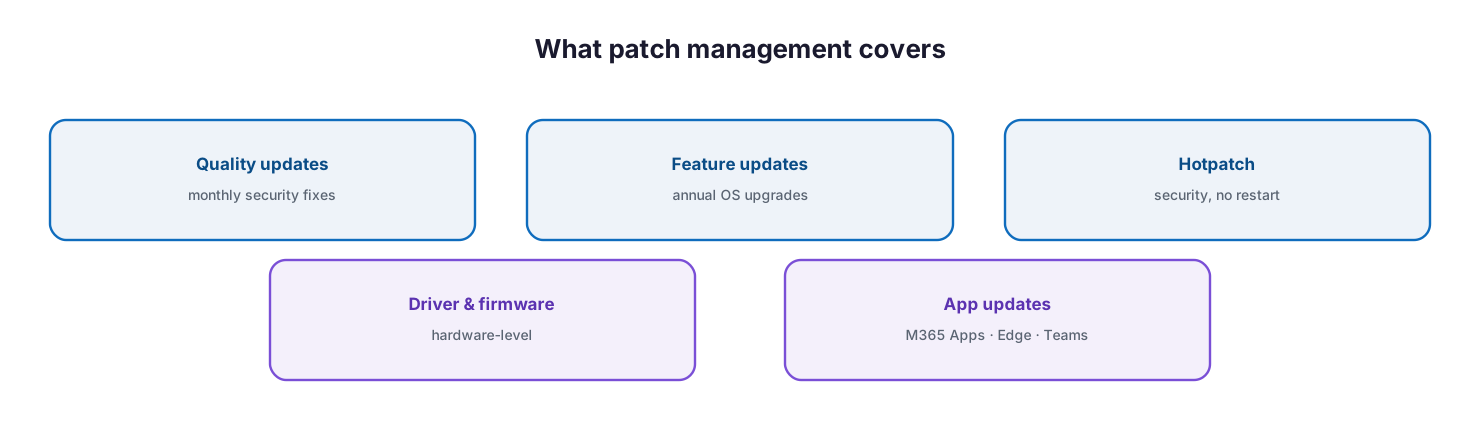
What patch management covers: quality updates (monthly security fixes), feature updates (annual OS upgrades), hotpatch (security with no restart), driver and firmware (hardware-level), and app updates for Microsoft 365 Apps, Edge, and Teams.
Quality updates are the monthly security and reliability fixes — the highest-priority, most time-sensitive patches. Feature updates are the annual operating-system upgrades that must be adopted before a version reaches end of service. Hotpatch updates apply monthly security fixes without requiring a restart, cutting disruption. Driver and firmware updates patch at the hardware level, where vulnerabilities and stability issues also live. And application updates keep Microsoft 365 Apps, Microsoft Edge, and Microsoft Teams — and, ideally, third-party applications — current. A program that patches Windows but ignores drivers, firmware, and applications leaves a large part of the attack surface open.
How do deployment rings balance speed and stability?
The single most important technique in patch management is the deployment ring. Rather than releasing an update to every device at once, you release it in sequence to progressively larger groups, watching for problems at each stage before promoting to the next.
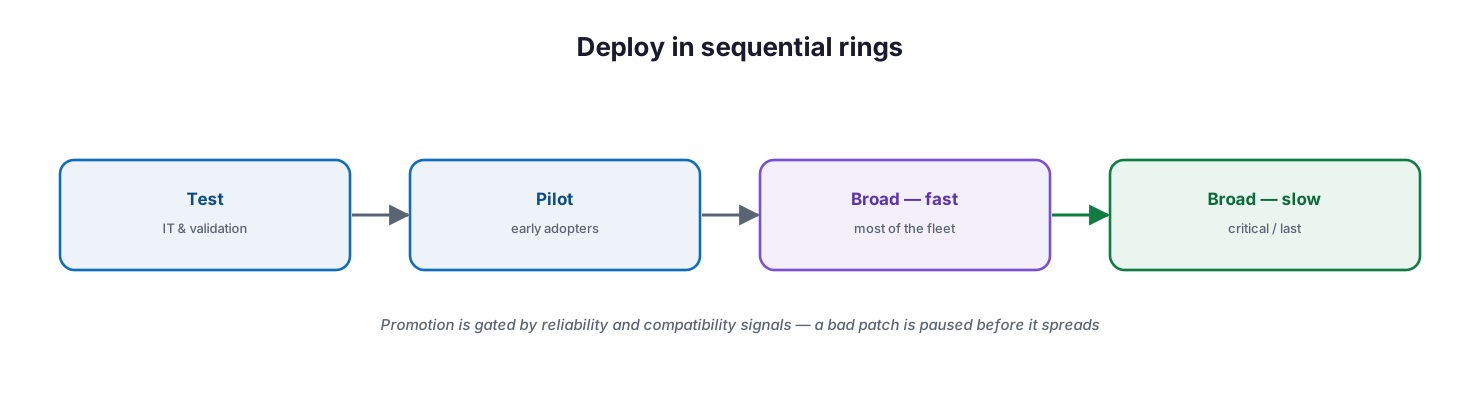
Deploy in sequential rings: test with IT and validation, pilot with early adopters, then broad-fast for most of the fleet, then broad-slow for critical or last devices — promotion gated by reliability and compatibility signals.
A typical structure runs a test ring (IT and validation devices), a pilot ring (a representative cross-section of early adopters), and one or more broad rings for the rest of the fleet, with the most critical devices deliberately last. The power of the model is that a defective update reveals itself on a handful of machines, not thousands, and can be paused before it spreads. Windows Autopatch releases updates this way automatically, responding to reliability and compatibility signals to slow or halt a rollout that is causing problems. Rings are how you get both speed (updates flow continuously) and stability (bad ones are contained).
How does Windows Autopatch automate patching?
For organizations on Microsoft 365 Business Premium or enterprise plans, Windows Autopatch is the modern way to run this process. It is a cloud service that automates updates for Windows, Microsoft 365 Apps for enterprise, Microsoft Edge, and Microsoft Teams — sequencing them through rings, monitoring signals, and freeing IT from the routine mechanics of patching. As of 2025, its capabilities are available with Business Premium and A3+ licenses, bringing enterprise-grade patch automation within reach of SMBs.
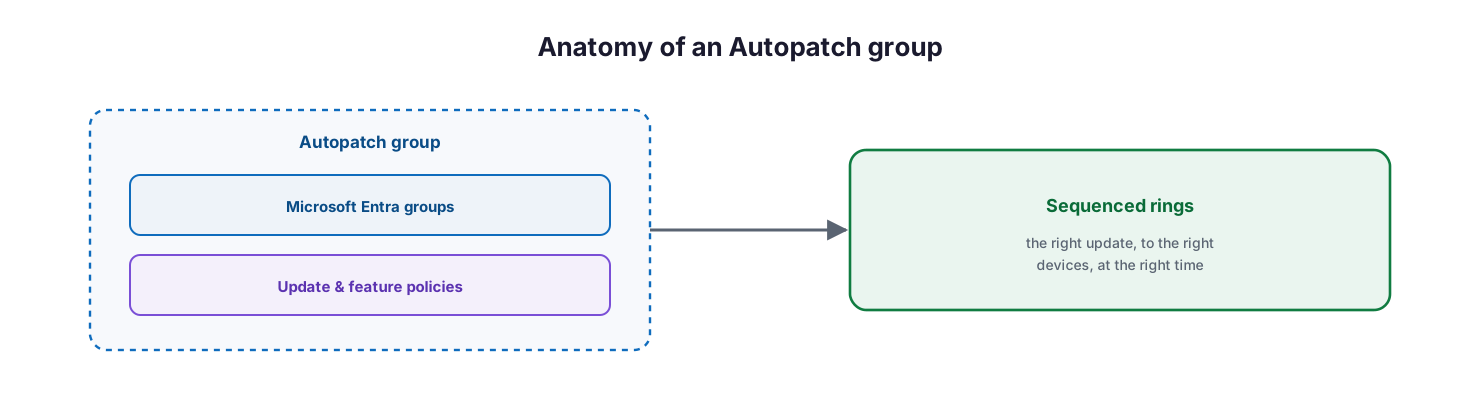
Anatomy of an Autopatch group: a logical container that combines Microsoft Entra groups with update and feature policies, driving sequenced rings that deliver the right update to the right devices at the right time.
The organizing concept is the Autopatch group — a logical container that combines Microsoft Entra groups with software update policies such as update rings and feature-update policies, so the right update reaches the right devices at the right time. Autopatch manages quality updates with a service-level objective of keeping at least 95% of devices on the latest quality update, feature updates through controlled multi-phase releases, hotpatch updates that avoid restarts, and driver and firmware updates either automatically or under your approval. It aims to keep at least 90% of eligible devices on a supported version of the Microsoft 365 Apps Monthly Enterprise Channel. The result is that patching becomes a governed, largely automated service rather than a monthly manual scramble.
How do you patch servers and third-party apps?
Endpoints are only part of the estate. A complete patch program must also cover servers and non-Microsoft applications, which are frequent targets precisely because they are often forgotten.
For servers and virtual machines — on-premises, in Azure, or in other clouds — Azure Update Manager provides a unified service to assess and deploy operating-system updates at scale, with scheduling and compliance reporting. Bringing servers under the same managed cadence as endpoints closes a gap that attackers routinely exploit. Third-party applications — browsers, PDF readers, and the long tail of business software — are a harder problem, because Windows Update does not patch them. Microsoft 365 Apps, Edge, and Teams are handled by Autopatch, but other vendors’ software needs to be packaged and updated through Intune or a dedicated third-party patching capability. A mature program explicitly owns third-party patching rather than assuming it is covered; the unpatched PDF reader is as dangerous as the unpatched OS.
How do you measure and enforce patch compliance?
A patch program that is not measured is not managed. Patch compliance — the percentage of devices current on required updates — is the metric that tells you whether the process is actually working, and it should be tracked and reported like any other service KPI.
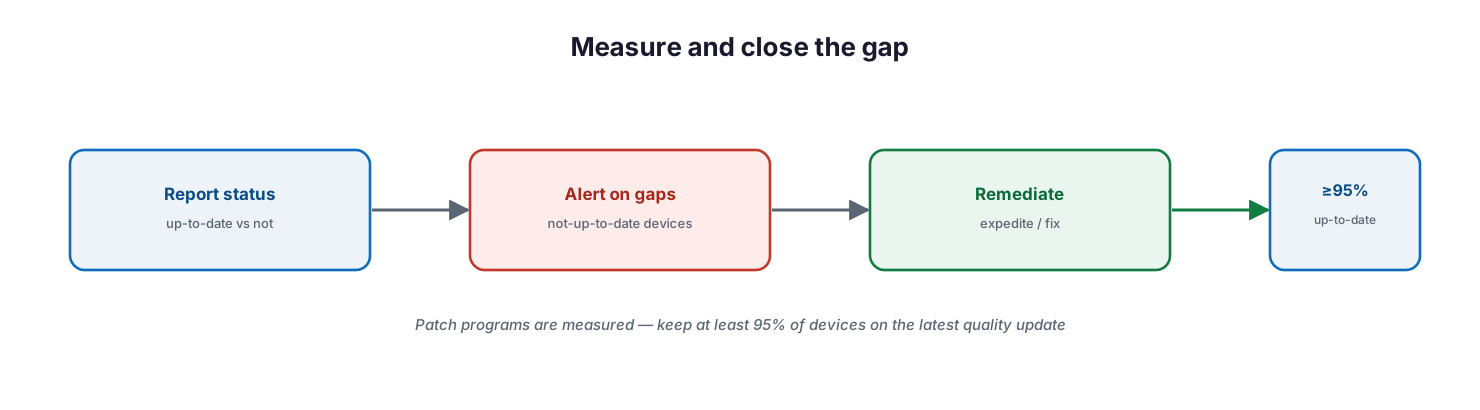
Measure and close the gap: report update status (up-to-date versus not), alert on not-up-to-date devices, remediate by expediting or fixing, and hold the estate at 95% or more up to date.
Microsoft provides Intune reports and Windows quality and feature update reports with device alerts, so you can see which devices are not up to date and act on them — expediting a critical update, resolving an alert, or troubleshooting a device that keeps failing. Best practice is to set explicit targets (for example, keeping at least 95% of devices on the latest quality update and 95% of critical patches applied within 14 days), review the reports on a cadence, and treat every persistently unpatched device as an owned work item. Where compliance policies require devices to be up to date, an unpatched device can be marked noncompliant and lose access through Conditional Access — turning patch status into an enforceable control, as covered in the companion device compliance guide.
Managed patch service model: ownership, controls, and service levels
Delivered as a managed service, patch management is a continuous, measured operation. The tables below define it for CIO-level evaluation: who owns each activity, the tool behind it, the cadence, the risk if it lapses, and the business value it protects.
Responsibility matrix (RACI)
| Service area | Activity | MSP team (Responsible) | Customer IT / CIO (Accountable) | Consulted | Informed | Tooling | SLA / impact |
|---|---|---|---|---|---|---|---|
| Ring design | Define deployment rings & Autopatch groups | MSP Endpoint | CIO | Customer IT | End users | Autopatch / Intune | Phased, low-risk rollout |
| Quality updates | Deploy monthly security patches | MSP Endpoint | CIO | MSP Security | Customer IT | Windows Autopatch | ≥95% devices up to date |
| Feature updates | Manage annual OS rollout | MSP Endpoint | CIO | Customer IT | End users | Autopatch | Controlled adoption before end of service |
| Driver & firmware | Approve and deploy hardware updates | MSP Endpoint | Customer IT | Hardware vendors | Customer IT | Autopatch | Stable, secure hardware |
| Server patching | Patch servers and VMs | MSP Infra | CIO | Customer IT | Executive team | Azure Update Manager | Servers patched within SLA |
| Third-party & app patching | Patch M365 Apps, Edge, Teams, third-party | MSP Endpoint | CIO | App owners | End users | Autopatch / Intune | Applications current and secure |
| Reporting | Patch compliance reporting | MSP Endpoint | CIO | Customer IT | Board | Intune reports | Auditable patch posture |
Service control matrix
| Domain | Service / control | Description | Tool used | Frequency | Risk if missing |
|---|---|---|---|---|---|
| Endpoint | Quality (security) updates | Monthly security and reliability fixes | Windows Autopatch | Monthly | Exploited known vulnerabilities |
| Endpoint | Deployment rings | Phased rollout with signal gating | Autopatch / Intune | Continuous | Mass breakage from a bad patch |
| Endpoint | Feature updates | Annual OS version upgrades | Autopatch | Annual | Unsupported, out-of-date OS |
| Endpoint | Driver & firmware updates | Hardware-level patching | Autopatch | As released | Hardware faults and vulnerabilities |
| Endpoint | Application updates | M365 Apps, Edge, Teams kept current | Autopatch | Continuous | Vulnerable applications |
| Infrastructure | Server & VM patching | Patch the server estate | Azure Update Manager | Monthly | Unpatched, exposed servers |
| Endpoint | Third-party app patching | Patch non-Microsoft software | Intune / third-party | Regular | Third-party exploitation gap |
Operations lifecycle
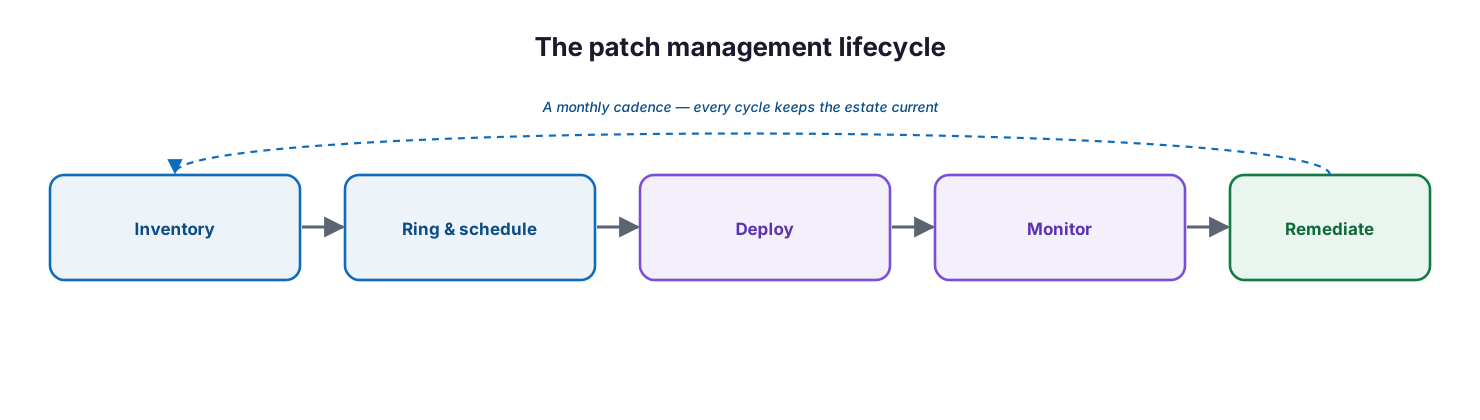
The patch management lifecycle: inventory the estate, assign devices to rings and schedules, deploy updates, monitor status, and remediate gaps — repeated on a monthly cadence so every cycle keeps the estate current.
| Stage | Activity | Outcome | Tool | Business impact |
|---|---|---|---|---|
| Monitor | Track update status and alerts | Patch visibility | Intune reports | Known posture |
| Detect | Flag not-up-to-date or failed devices | Gaps surfaced | Autopatch reports | Early risk detection |
| Respond | Remediate, expedite, or pause | Devices patched or protected | Autopatch | Reduced exposure |
| Optimize | Tune rings, schedules, exclusions | Fewer disruptions | Autopatch / Intune | Better uptime and experience |
| Report | Compliance & SLO reporting | Auditable patch posture | Intune reports | Governance evidence |
Decision matrix
| Scenario | Recommended action | Justification | Tool / service |
|---|---|---|---|
| Manual patching is a burden | Adopt Windows Autopatch | Automates and sequences updates | Windows Autopatch |
| Need zero-downtime security | Enable hotpatch updates | Patches without a restart | Autopatch hotpatch |
| Risky annual feature update | Use a multi-phase feature policy | Controlled, staged rollout | Autopatch feature updates |
| Driver-caused instability | Self-manage driver approvals | Control hardware updates | Autopatch drivers |
| Servers need patching | Use Azure Update Manager | Native, scalable server patching | Azure Update Manager |
| Emergency zero-day | Expedite the quality update | Rapid, targeted deployment | Autopatch expedite |
SLA / KPI scorecard
| Metric | Target | Tool | Business value |
|---|---|---|---|
| Quality update currency | ≥95% up to date | Autopatch reports | Minimal vulnerability window |
| Critical patch compliance | ≥95% within 14 days | Intune reports | Reduced exploit risk |
| Microsoft 365 Apps currency | ≥90% on Monthly Enterprise Channel | Autopatch | Secure, supported apps |
| Feature update adoption | 100% before end of service | Autopatch | Supported operating system |
| Server patch compliance | ≥95% monthly | Azure Update Manager | Server security |
| Patch-related incidents | At or below agreed target | Reporting | Stability maintained |
Implementation checklist
- Every update type is owned — quality, feature, hotpatch, driver/firmware, and apps
- Deployment rings (test, pilot, broad) are defined with critical devices last
- Windows Autopatch (or update rings) is configured with Autopatch groups
- Hotpatch is enabled where supported to reduce restart disruption
- Feature updates use multi-phase policies and are adopted before end of service
- Driver and firmware updates are managed, automatically or by approval
- Servers and VMs are patched under a managed cadence (for example, Azure Update Manager)
- Third-party application patching is explicitly owned, not assumed
- Patch compliance targets are set (for example, ≥95% up to date)
- Update and compliance reports are reviewed on a cadence
- Unpatched devices are treated as owned work items with a remediation timeline
- Patch status is tied to device compliance and Conditional Access where required
Best practices
- Cover the whole stack — OS, drivers, firmware, and applications, not just Windows updates.
- Always deploy in rings, with the most critical devices last.
- Automate with Windows Autopatch so routine patching does not consume IT time.
- Use hotpatch where supported to patch without disrupting users.
- Stage annual feature updates with multi-phase policies rather than all at once.
- Bring servers under the same managed cadence as endpoints.
- Own third-party patching explicitly; it is a common blind spot.
- Set and track patch-compliance targets, and report them to leadership.
- Tie patch status to compliance and Conditional Access so unpatched devices lose access.
Common mistakes
- Patching Windows but ignoring drivers, firmware, and third-party applications.
- Deploying updates to the whole fleet at once, so a bad patch breaks everything.
- Running patching manually until it slips, leaving known vulnerabilities open.
- Delaying feature updates until a Windows version reaches end of service.
- Forgetting servers, which are patched on a different (or no) schedule.
- Assuming Microsoft 365 Apps and browsers patch themselves without governance.
- Never measuring patch compliance, so gaps stay invisible.
- Treating a noncompliant, unpatched device as acceptable rather than a work item.
Frequently asked questions
What is patch management?
It is the disciplined process of getting security and reliability updates onto every device and server quickly and safely — covering OS quality and feature updates, hotpatches, drivers and firmware, and applications — and measuring the result.
What is Windows Autopatch?
It is a Microsoft cloud service that automates updates for Windows, Microsoft 365 Apps, Edge, and Teams, sequencing them through deployment rings and responding to reliability signals. It is available with Microsoft 365 Business Premium and enterprise plans.
What are deployment rings?
They are progressively larger groups of devices that receive an update in sequence — test, pilot, then broad. Rings catch a defective update on a few devices before it reaches the whole fleet, balancing speed with stability.
What is the difference between quality and feature updates?
Quality updates are the monthly security and reliability fixes. Feature updates are the annual operating-system upgrades. Quality updates are the most time-sensitive; feature updates require staged, controlled adoption before a version’s end of service.
How do we patch servers and third-party apps?
Servers and VMs can be patched with Azure Update Manager under the same managed cadence as endpoints. Microsoft 365 Apps, Edge, and Teams are handled by Autopatch; other third-party applications must be packaged and updated through Intune or a dedicated third-party patching capability.
How is patch management measured?
Through patch compliance — for example, keeping at least 95% of devices on the latest quality update and applying critical patches within 14 days — tracked in Intune and Autopatch reports and reviewed on a cadence.
Can unpatched devices be blocked from access?
Yes. When a compliance policy requires devices to be up to date, an unpatched device can be marked noncompliant and blocked by Conditional Access, turning patch status into an enforceable access control.
Conclusion
Patch management is where good intentions meet operational discipline. The vulnerabilities attackers exploit are, overwhelmingly, ones for which a fix already exists — so the value is entirely in execution: covering the whole software stack, deploying in rings to stay both fast and stable, automating the routine with Windows Autopatch, extending the same cadence to servers and third-party applications, and measuring compliance so nothing is left exposed. Done well, patching moves from a monthly manual scramble to a governed, largely automated service that quietly keeps the business’s attack surface small.
The path forward is practical: own every update type, define your rings, turn on Autopatch, bring servers and third-party apps into the program, set compliance targets, and review the reports on a cadence. For the surrounding disciplines, see the companion Microsoft Intune deployment and device compliance guides, which together with patch management form the core of a managed endpoint service.
Authoritative references
All sources are official Microsoft documentation. Verify current features and licensing before acting; update tooling changes frequently. Source access date: 28 July 2026.
- What is Windows Autopatch? — Microsoft Learn
- Windows Autopatch prerequisites — Microsoft Learn
- Windows Autopatch groups overview — Microsoft Learn
- Manage update rings with Windows Autopatch — Microsoft Learn
- Windows quality updates in Autopatch — Microsoft Learn
- Windows feature updates in Autopatch — Microsoft Learn
- Hotpatch updates — Microsoft Learn
- Manage driver and firmware updates — Microsoft Learn
- Windows quality and feature update reports — Microsoft Learn
- Update rings for Windows 10 and later in Intune — Microsoft Learn
- Azure Update Manager overview — Microsoft Learn
- Intune reports — Microsoft Learn
On this page
- Executive Summary
- What must a patch program cover?
- How do deployment rings balance speed and stability?
- How does Windows Autopatch automate patching?
- How do you patch servers and third-party apps?
- How do you measure and enforce patch compliance?
- Managed patch service model: ownership, controls, and service levels
- Responsibility matrix (RACI)
- Service control matrix
- Operations lifecycle
- Decision matrix
- SLA / KPI scorecard
- Implementation checklist
- Best practices
- Common mistakes
- Frequently asked questions
- Conclusion
- Authoritative references