Alert Fatigue Reduction: Making Every Alert One Worth Acting On
Monitoring is supposed to make IT safer, but a monitoring system that fires hundreds of alerts a day does the opposite.
- Content owner
- Insyto Content Team
- Editorial reviewer
- Ritesh Mhatre
- Technical reviewer
- Navish Ansari
- Next review
- To be scheduled
- Last reviewed
- Review pending
- Technical level
- Intermediate · IT operations leaders, platform engineers
Executive Summary
Monitoring is supposed to make IT safer, but a monitoring system that fires hundreds of alerts a day does the opposite. When most of those alerts are noise — informational messages, false positives, duplicates, and low-priority warnings all clamoring with the same urgency — the people receiving them do the only rational thing: they stop paying attention. This is alert fatigue, and it is one of the most dangerous and under-appreciated problems in IT operations. It is the classic tale of the boy who cried wolf, translated into an operational risk: when the team has been desensitized by a hundred false alarms, the one genuine alert — the disk about to fill, the service beginning to fail — gets the same weary shrug as all the noise before it, and a recoverable problem becomes an outage.
The damage is real on two fronts. Operationally, alert fatigue slows response and causes missed incidents, because the signal is buried in the noise and no one can tell the difference anymore. On the human side, it burns out the team, especially the on-call staff who are woken repeatedly for problems that did not need them. Both effects compound: a tired, desensitized team responds even more slowly, which makes the next incident worse. Crucially, the answer is not simply “fewer alerts” or “more alerts.” It is alerts that are trusted — where every single one that reaches a person is real, urgent, and actionable, so that when the pager goes off, everyone knows it matters.
This vendor-neutral guide explains how to reduce alert fatigue. It describes what alert fatigue is and why it is so damaging, identifies the specific and fixable causes of alert noise, sets out six concrete strategies to cut it, presents alert hygiene as an ongoing habit rather than a one-time cleanup, and defines what healthy alerting looks like and how to measure the journey toward it. The recurring principle is simple and demanding: a page should mean “a human is needed, now” — and nothing less should ever reach one.
What Alert Fatigue Is and Why It Matters
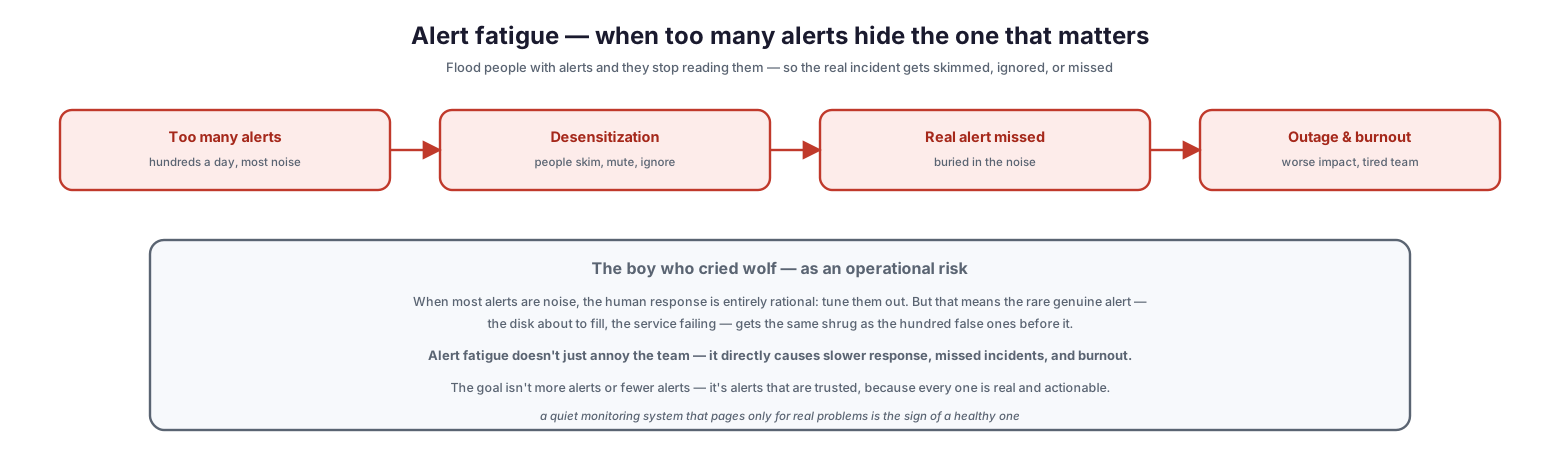
To fix alert fatigue you first have to see it clearly as an operational risk, not merely an annoyance. It follows a predictable, damaging cycle.
Alert fatigue — when too many alerts hide the one that matters
The cycle begins with too many alerts — hundreds a day, most of them noise. That leads to desensitization, as people skim, mute, and ignore the flood. Which means the real alert is missed, buried in the noise. And that produces an outage with worse impact and a burnt-out team. This is the boy who cried wolf as an operational risk: when most alerts are noise, tuning them out is entirely rational human behavior, but it means the rare genuine alert gets no more attention than the hundred false ones before it. Alert fatigue therefore does not just annoy the team — it directly causes slower response, missed incidents, and burnout. The goal, importantly, is neither more alerts nor fewer alerts for their own sake; it is alerts that are trusted, because every one is real and actionable. A quiet monitoring system that pages only for genuine problems is the sign of a healthy one, not a neglected one.
Where the Noise Comes From
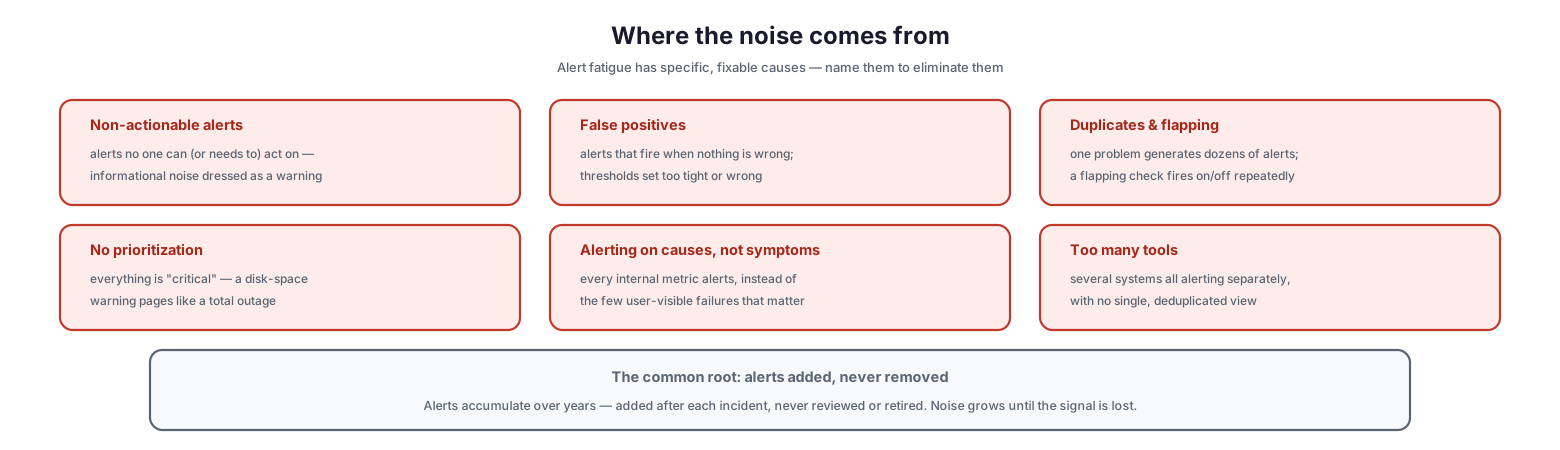
Alert fatigue is not inevitable; it has specific causes, and naming them is the first step to eliminating them. Most alert noise falls into a handful of categories.
Where the noise comes from
The common causes are: non-actionable alerts — alerts no one can or needs to act on, informational noise dressed up as a warning; false positives — alerts that fire when nothing is actually wrong, from thresholds set too tight or simply wrong; duplicates and flapping — one problem generating dozens of alerts, or a flapping check firing on and off repeatedly; no prioritization — everything marked “critical,” so a disk-space warning pages exactly like a total outage; alerting on causes, not symptoms — every internal metric raising an alert instead of the few user-visible failures that actually matter; and too many tools — several systems all alerting separately with no single, deduplicated view. Underlying all of these is a common root cause: alerts are added but never removed. Over the years, an alert is added after each incident and never reviewed or retired, so the noise steadily grows until the signal is lost. Recognizing this accumulation is what makes reduction possible.
| Cause | What it looks like |
|---|---|
| Non-actionable alerts | Informational noise no one acts on |
| False positives | Alerts fire when nothing is wrong |
| Duplicates & flapping | One issue floods; checks fire on/off |
| No prioritization | Everything is “critical” |
| Cause not symptom | Every internal metric alerts |
| Too many tools | Separate, un-deduplicated alert streams |
Six Ways to Cut the Noise
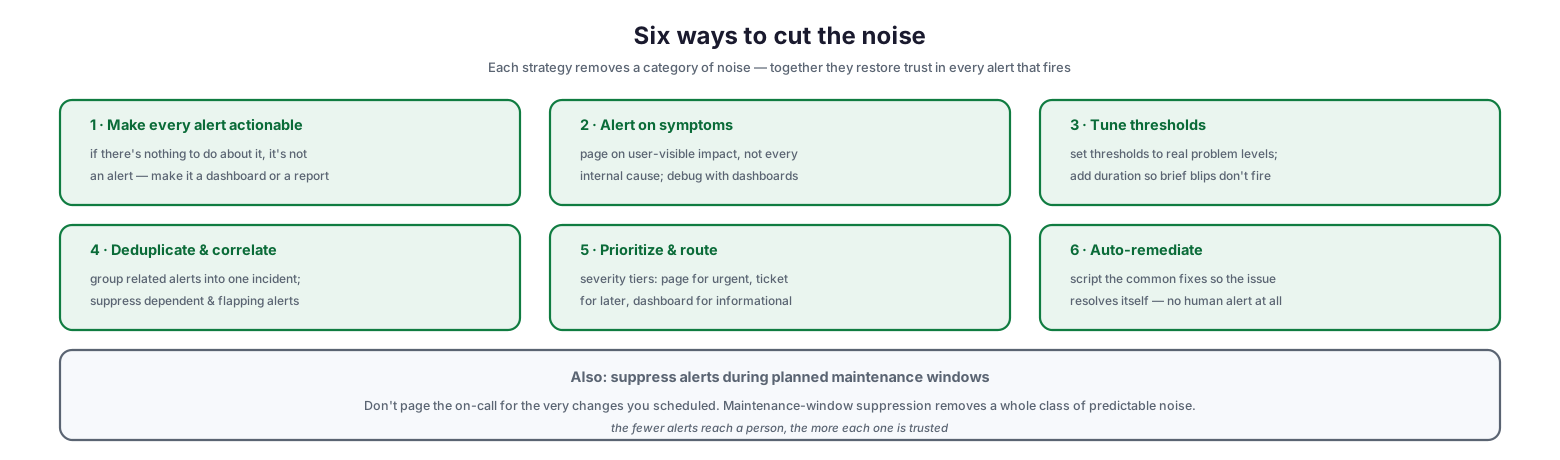
With the causes named, the remedies are concrete. Each strategy removes a category of noise, and together they restore trust in every alert that fires.
Six ways to cut the noise
First, make every alert actionable: if there is nothing to do about it, it is not an alert — make it a dashboard or a report instead. Second, alert on symptoms: page on user-visible impact rather than every internal cause, and use dashboards for debugging. Third, tune thresholds: set them to real problem levels and add a duration requirement so brief blips do not fire. Fourth, deduplicate and correlate: group related alerts into a single incident, and suppress dependent and flapping alerts. Fifth, prioritize and route: use severity tiers so urgent issues page a human, important-but-not-urgent ones become tickets, and informational items land on a dashboard. Sixth, auto-remediate: script the common fixes so the issue resolves itself with no human alert at all. A further high-value practice is to suppress alerts during planned maintenance windows — there is no reason to page the on-call for the very changes that were scheduled, and maintenance-window suppression removes a whole class of predictable noise. The cumulative effect is decisive: the fewer alerts that reach a person, the more each one is trusted.
| Strategy | Removes |
|---|---|
| Make every alert actionable | Informational, do-nothing noise |
| Alert on symptoms | Cause-level metric spam |
| Tune thresholds (+ duration) | False positives and brief blips |
| Deduplicate & correlate | Duplicate and flapping floods |
| Prioritize & route by severity | “Everything is critical” paging |
| Auto-remediate | Alerts for issues that self-heal |
Alert Hygiene as a Habit
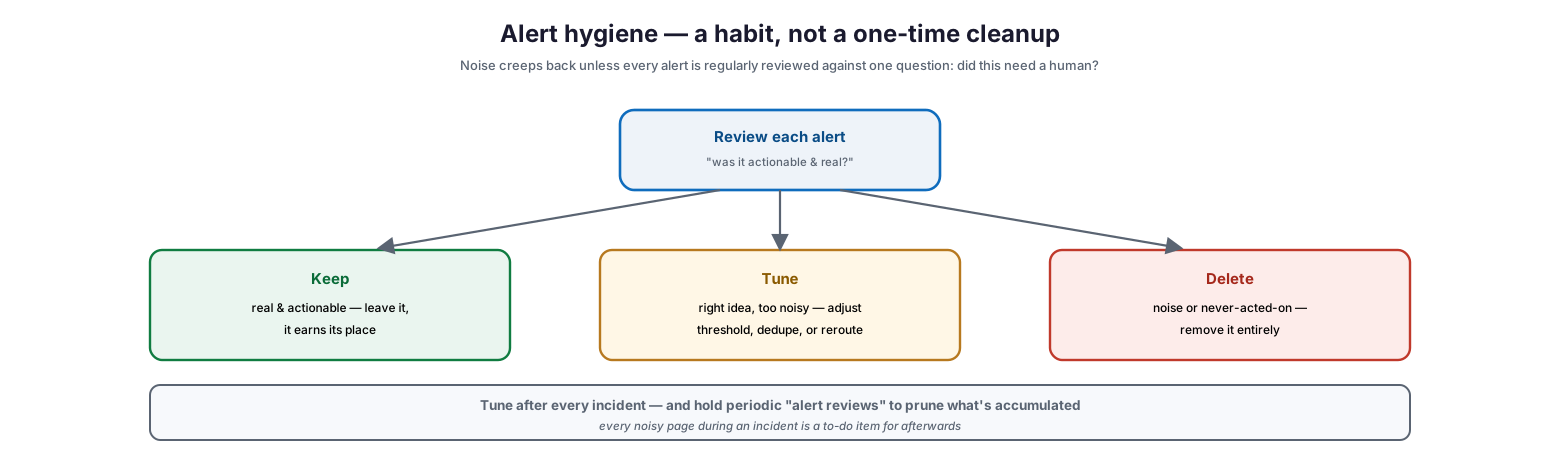
Cutting noise once is not enough, because noise creeps back. New alerts get added, systems change, and thresholds drift. Sustained low-noise alerting requires making alert hygiene an ongoing habit built around a single question.
Alert hygiene — a habit, not a one-time cleanup
The habit is to review each alert against one test: “was it actionable and real?” Every alert then sorts into one of three outcomes. Keep it if it was real and actionable — it earns its place, so leave it alone. Tune it if the idea was right but it was too noisy — adjust the threshold, deduplicate it, or reroute it. Delete it if it was noise or something no one ever acts on — remove it entirely. The most effective moment to apply this is after every incident: every noisy page that fired during an incident is a to-do item for afterwards, a candidate to tune or delete. Beyond post-incident tuning, periodic “alert reviews” prune what has accumulated across the whole system. This continuous pruning is what keeps the signal strong; without it, even a well-tuned alerting system slowly silts up with noise again.
What Good Looks Like
Having a picture of healthy alerting — and a way to measure progress toward it — turns noise reduction from a vague aspiration into a managed outcome.
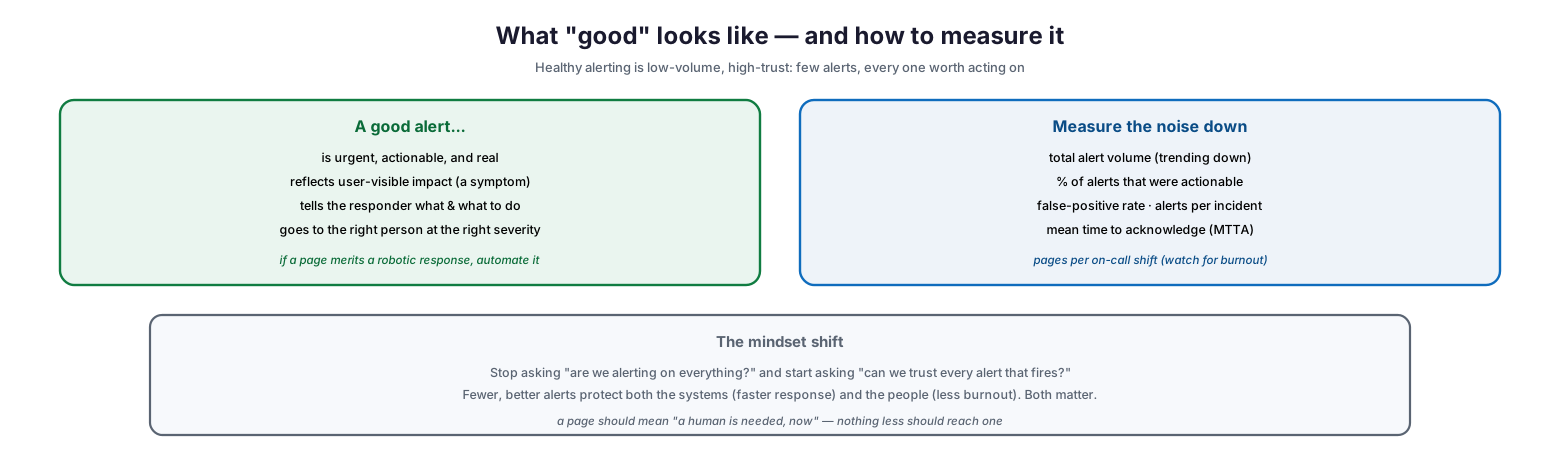
What “good” looks like — and how to measure it
| A good alert is urgent, actionable, and real; it reflects user-visible impact (a symptom); it tells the responder what is happening and what to do; and it goes to the right person at the right severity. A useful test underlies all of this: if a page merits only a robotic, scripted response, it should be automated, not sent to a person. To track the journey, measure the noise down: total alert volume (which should trend down), the percentage of alerts that were actionable, the false-positive rate, the number of alerts per incident, the mean time to acknowledge, and pages per on-call shift (a leading indicator of burnout). | Metric | What it tells you |
|---|---|---|
| Total alert volume | Overall noise level | Trending down |
| Actionable alert % | Share worth acting on | Rising toward 100% |
| False-positive rate | Alerts firing on nothing | Falling toward 0% |
| Alerts per incident | Duplication and flapping | Low, ideally near 1 |
| Mean time to acknowledge | Responsiveness | Falling |
| Pages per on-call shift | Burnout leading indicator | Low and sustainable |
Underpinning it all is a mindset shift: stop asking “are we alerting on everything?” and start asking “can we trust every alert that fires?” Fewer, better alerts protect both the systems, through faster response, and the people, through less burnout — and both matter equally. A page should mean “a human is needed, now,” and nothing less should ever reach one.
Alert Fatigue Reduction Checklist
- Recognize alert fatigue as an operational and human risk, not just an annoyance.
- Audit current alerts and identify the noise: non-actionable, false-positive, duplicate, and unprioritized.
- Make every alert actionable; convert do-nothing alerts to dashboards or reports.
- Alert on user-visible symptoms; use dashboards, not pages, for internal-cause debugging.
- Tune thresholds to real problem levels and require a duration so blips don’t fire.
- Deduplicate and correlate related alerts into single incidents; suppress flapping.
- Use severity tiers to route urgent issues to a page, others to tickets or dashboards.
- Automatically remediate common issues so they never generate a human alert.
- Suppress alerts during planned maintenance windows.
- Tune or delete noisy alerts after every incident; hold periodic alert reviews.
- Automate any alert that merits only a scripted, robotic response.
- Measure alert volume, actionable rate, false positives, MTTA, and pages per shift.
Best Practices
Demand that every alert be actionable. The single most powerful filter is to ask, for each alert, “what would a person do about this?” If the answer is “nothing,” it is not an alert — move it to a dashboard. This one rule eliminates a large share of noise.
Page on symptoms, watch causes on dashboards. Reserve pages for user-visible impact, and keep the many internal cause-metrics on dashboards for debugging. This keeps the alert stream small and meaningful while preserving the detail needed to diagnose.
Tune after every incident. The moments right after an incident, when the noisy pages are fresh, are the best time to fix them. Treat every unnecessary page during an incident as a to-do item to tune or delete afterwards.
Correlate and route by severity. Group related alerts into one incident so a single problem does not flood the team, and use severity tiers so only genuinely urgent issues reach a person. Everything else becomes a ticket or a dashboard item.
Automate the robotic responses. If a page always triggers the same scripted fix, automate that fix so the alert disappears. Self-healing removes both the toil and the interruption.
Measure and protect the people. Track pages per on-call shift as a burnout indicator, not just system metrics. Fewer, better alerts are as much about protecting the team as protecting the systems, and a sustainable on-call load is essential.
Common Mistakes
Alerting on everything. Trying to alert on every possible condition guarantees noise and fatigue. Alert only on the actionable, user-visible problems that genuinely require a person.
Treating all alerts as critical. When every alert pages with the same urgency, the team cannot distinguish a minor warning from a real emergency. Severity tiers and routing are essential.
Never removing alerts. Adding an alert after every incident without ever reviewing or retiring alerts causes noise to accumulate relentlessly. Prune continuously.
Ignoring false positives. Tolerating alerts that fire when nothing is wrong trains the team to ignore alerts. Fix the thresholds or logic behind false positives promptly.
Skipping maintenance suppression. Paging the on-call for scheduled maintenance is pure, avoidable noise that erodes trust. Suppress alerts during planned windows.
Measuring only system health. Focusing solely on uptime while ignoring alert volume and on-call load hides a brewing fatigue and burnout problem. Measure the alerting itself.
Frequently Asked Questions
What is alert fatigue? Alert fatigue is the desensitization that happens when people receive so many alerts — especially noisy, non-actionable ones — that they start to ignore them. The danger is that genuine, important alerts get missed among the noise, slowing response and causing outages.
Why is alert fatigue dangerous? Because it causes real incidents to be missed or handled slowly when the critical alert is buried among false ones, and because it burns out the team, particularly on-call staff. Both effects compound, making each subsequent incident worse.
How do we reduce alert noise? Make every alert actionable, alert on user-visible symptoms rather than every internal cause, tune thresholds with duration requirements, deduplicate and correlate related alerts, prioritize and route by severity, auto-remediate common issues, and suppress alerts during maintenance.
Should we just turn off alerts to stop the noise? No — the goal is not fewer alerts indiscriminately but trusted alerts. Turning off alerts blindly risks missing real problems. The aim is to remove noise so that every alert that remains is real and actionable.
How do we keep alerts from getting noisy again? Make alert hygiene an ongoing habit: after every incident, tune or delete the alerts that fired unnecessarily, and hold periodic alert reviews to prune accumulated noise. Every alert should be regularly re-tested for whether it is actionable and real.
How do we measure whether alerting is healthy? Track total alert volume (trending down), the percentage of alerts that were actionable, the false-positive rate, alerts per incident, mean time to acknowledge, and pages per on-call shift. The last is a key early warning of burnout.
Conclusion
Alert fatigue is what happens when monitoring forgets its purpose. The point of an alert is to get a human’s attention when it is genuinely needed — but flood people with noise, and their attention is exactly what you lose. The desensitization that follows is not a failure of discipline; it is a rational response to an unreliable signal, and its consequences are severe: missed incidents, slower response, and a burnt-out team. The remedy is not to alert more or less indiscriminately, but to make every alert trustworthy, so that when the pager sounds, everyone knows it is real.
That trust is built by attacking the specific causes of noise — non-actionable alerts, false positives, duplicates, poor prioritization, cause-level spam, and tool sprawl — with concrete strategies: actionable-only alerting, symptom-based paging, tuned thresholds, deduplication, severity routing, auto-remediation, and maintenance suppression. And it is sustained by treating alert hygiene as a permanent habit, pruning noise after every incident and in regular reviews, because noise always creeps back. Measure the volume down and the actionable rate up, protect the on-call team as carefully as the systems, and hold to the single standard that makes everything work: a page should mean a human is needed now — and nothing less should ever reach one.
References
- Google SRE Book — Monitoring Distributed Systems (alerting philosophy)
- Google SRE Book — Being On-Call (alert load and burnout)
- Google SRE Workbook — Alerting on SLOs
- Google SRE Book — Practical Alerting
- Google SRE Book — Eliminating Toil (auto-remediation)
- NIST SP 800-61 Rev. 2 — Incident Handling (detection and analysis)
- ITIL 4 — Monitoring and Event Management practice