Identity Security Assessment Checklist: Measure and Harden Your Zero Trust Identity Posture
Identity is the control plane of a Zero Trust strategy, which makes the state of your identity configuration one of the most important security facts about your organization.
- Content owner
- Insyto Content Team
- Editorial reviewer
- Ritesh Mhatre
- Technical reviewer
- Navish Ansari
- Next review
- To be scheduled
- Last reviewed
- Review pending
- Technical level
- Intermediate · CISOs, IT directors, identity administrators
Identity is the control plane of a Zero Trust strategy, which makes the state of your identity configuration one of the most important security facts about your organization. An identity security assessment establishes where that configuration stands today, measures it against Microsoft’s recommendations, prioritizes the gaps that matter most, and produces a defensible plan to close them. Anchored to the Microsoft Identity Secure Score and organized around six control domains — authentication, access control, privileged access, identity protection, governance, and monitoring — the assessment turns a broad “is our identity secure?” question into a measured, ranked, and repeatable program.
This guide provides that assessment framework: how to baseline with the Identity Secure Score, what to check in each domain, how to judge maturity, how to prioritize remediation, and how to keep the posture improving. As the capstone of our Zero Trust identity series, it ties together strong authentication, Conditional Access, and privileged access into a single review. Because Microsoft updates these capabilities and their licensing regularly, treat the specifics here as a well-grounded starting point and confirm current behavior against Microsoft documentation before you act.
Who should read this
- CIOs and CISOs accountable for identity security posture
- IT directors and identity / security administrators
- Compliance and risk leaders overseeing access controls
- Enterprise architects validating a Zero Trust identity baseline
Key points for executives
A defensible identity security assessment normally rests on four conditions:
- There is a measured baseline — the Identity Secure Score plus a documented review of each control domain, not assumptions.
- Findings are prioritized by risk and importance, so the highest-value fixes are addressed first.
- Remediation is applied and verified across authentication, access, privilege, protection, governance, and monitoring.
- Posture is tracked continuously, because configuration and threats both drift over time.
Identity security is a continuous discipline, not a one-time project. This assessment builds on the rest of the series — Zero Trust identity with Microsoft Entra ID, Conditional Access best practices, and why MFA alone is no longer enough.
Executive takeaways
- Baseline with the Identity Secure Score — a measured percentage aligned to Microsoft’s recommendations.
- Assess six domains: authentication, access control, privileged access, identity protection, governance, and monitoring.
- The most urgent fixes are usually MFA gaps, standing Global Admins, and legacy authentication.
- Judge maturity honestly and target a phishing-resistant, risk-based posture.
- Re-measure on a cadence; the score is a means to reduce risk, not the goal itself.
What does an identity security assessment cover?
A complete assessment spans six control domains. Each maps to specific settings you can verify and to the Microsoft controls that implement them.
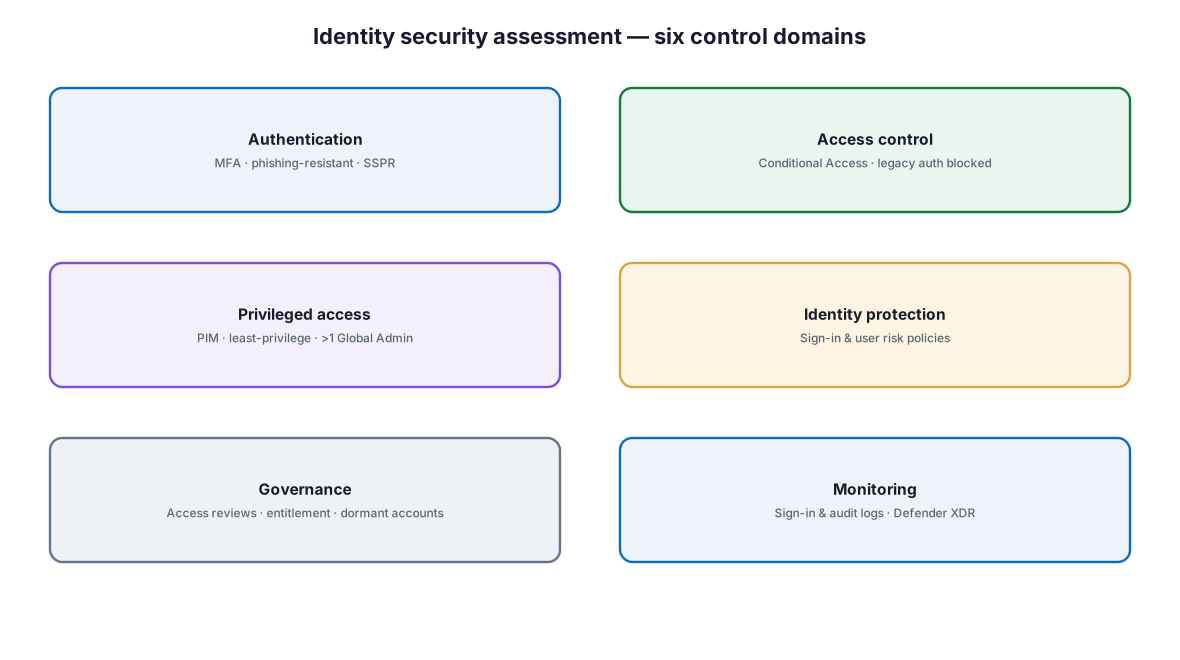
Figure 1. The six control domains of an identity security assessment.
Diagram description: Six identity control domains: Authentication (MFA, phishing-resistant methods, self-service password reset); Access control (Conditional Access, legacy authentication blocked); Privileged access (Privileged Identity Management, least-privilege roles, more than one Global Administrator); Identity protection (sign-in and user risk policies); Governance (access reviews, entitlement management, dormant accounts); and Monitoring (sign-in and audit logs, Microsoft Defender XDR).
Table 1. Assessment domains and what to verify.
| Domain | What to verify |
|---|---|
| Authentication | MFA for all users; phishing-resistant MFA for admins; SSPR enabled |
| Access control | Conditional Access baseline; legacy authentication blocked |
| Privileged access | PIM just-in-time; least-privilege roles; more than one Global Admin |
| Identity protection | Sign-in-risk and user-risk policies enabled |
| Governance | Access reviews; entitlement management; dormant accounts removed |
| Monitoring | Sign-in and audit logs retained; Defender XDR detection |
How do you baseline with the Identity Secure Score?
The starting point is the Microsoft Identity Secure Score, a percentage that indicates how aligned your Microsoft Entra configuration is with Microsoft’s security recommendations. It is found in Microsoft Entra recommendations, recalculated every 24 hours, and tracked over time; it is available to free and paid tenants, though some recommendations require a paid license to act on. Each improvement action is tailored to your configuration and scored either in a binary fashion or as a percentage of completion.

Figure 2. The identity security assessment lifecycle — baseline, assess, prioritize, remediate, and monitor.
Diagram description: A five-phase assessment lifecycle: Baseline (an Identity Secure Score snapshot), Assess (the six control domains), Prioritize (by risk and importance), Remediate (high-importance actions first), and Monitor (track the score with a recurring review).
Table 2. Representative Identity Secure Score recommendations.
| Recommendation | Why it matters |
|---|---|
| Ensure all users can complete MFA | Baseline verification for every account |
| Require MFA for administrative roles | Protects the highest-value accounts |
| Enable policy to block legacy authentication | Removes the path that bypasses MFA |
| Designate more than one Global Administrator | Avoids a single point of failure |
| Use least privileged administrative roles | Shrinks the blast radius of compromise |
| Protect all users with sign-in and user risk policies | Adapts access to real-time risk |
| Do not allow users to consent to unreliable apps | Closes the OAuth consent backdoor |
| Remove dormant accounts from sensitive groups | Reduces standing, unused privilege |
Clarification. The Identity Secure Score is the identity category of the broader Microsoft Secure Score (Identity, Data, Devices, Infrastructure, and Apps). Microsoft is explicit that it is not an absolute measure of breach likelihood — it reflects the extent to which you have adopted controls that offset risk. Focus on the high-importance recommendations relevant to your organization rather than chasing a number.
How mature is our identity security?
A maturity view helps set a realistic target and sequence investment. Most organizations entering a Zero Trust program sit at the lower levels; the goal is a phishing-resistant, risk-based posture.
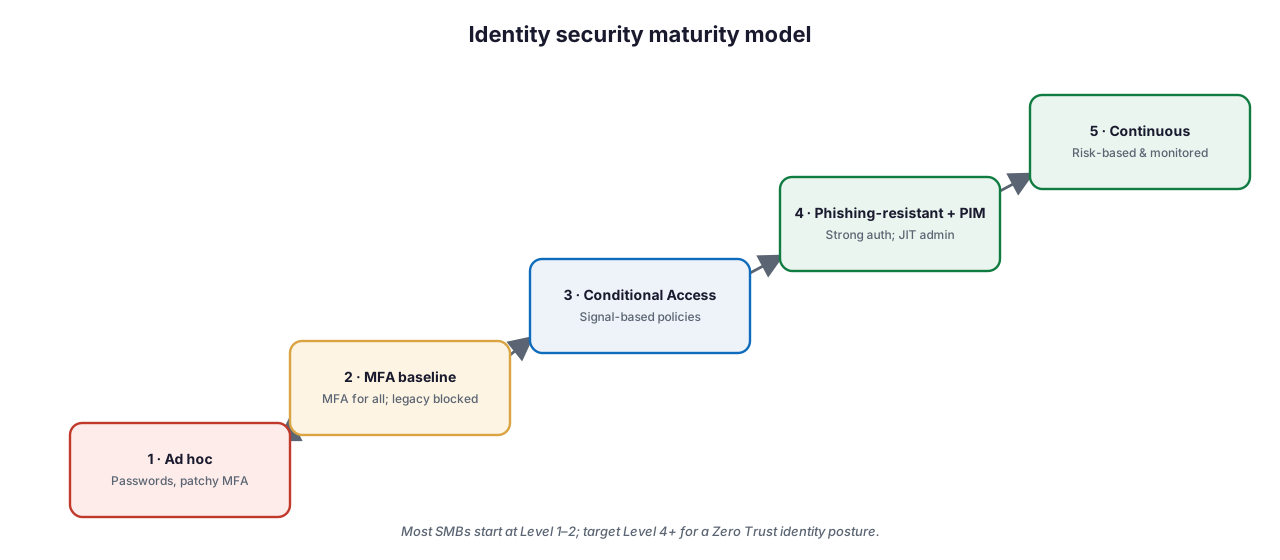
Figure 3. An identity security maturity model — from ad hoc to continuous, risk-based identity.
Diagram description: A five-level identity security maturity model rising from Level 1 Ad hoc (passwords, patchy MFA); Level 2 MFA baseline (MFA for all, legacy authentication blocked); Level 3 Conditional Access (signal-based policies); Level 4 Phishing-resistant plus PIM (strong authentication and just-in-time admin); to Level 5 Continuous (risk-based and monitored). Most SMBs start at Level 1–2; target Level 4 or above for a Zero Trust identity posture.
Table 3. Identity security maturity levels.
| Level | State |
|---|---|
| 1 · Ad hoc | Passwords, inconsistent MFA, standing admin access |
| 2 · MFA baseline | MFA for all users; legacy authentication blocked |
| 3 · Conditional Access | Signal-based access policies enforced |
| 4 · Phishing-resistant + PIM | Phishing-resistant MFA; just-in-time privileged access |
| 5 · Continuous | Risk-based policies, monitoring, and recurring reviews |
How should findings be prioritized and remediated?
Not every gap is equal. Prioritize by a combination of risk and effort, so the highest-value, lowest-friction fixes come first.
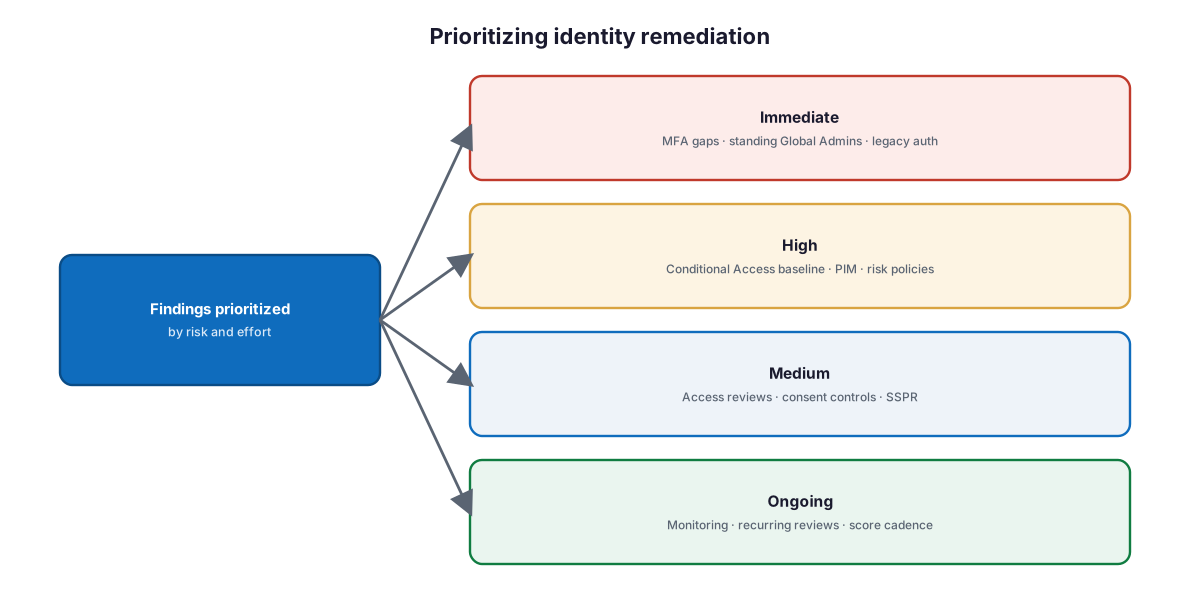
Figure 4. Prioritizing identity remediation by risk and effort.
Diagram description: Findings prioritized by risk and effort fall into four tiers: Immediate (MFA gaps, standing Global Admins, legacy authentication); High (Conditional Access baseline, Privileged Identity Management, risk policies); Medium (access reviews, consent controls, self-service password reset); and Ongoing (monitoring, recurring reviews, and a score cadence).
Table 4. Remediation priority tiers.
| Priority | Typical actions |
|---|---|
| Immediate | Enforce MFA; remove standing Global Admins; block legacy auth |
| High | Conditional Access baseline; PIM; sign-in/user risk policies |
| Medium | Access reviews; restrict app consent; enable SSPR |
| Ongoing | Monitoring, recurring access reviews, and score tracking |
What does a hardened identity posture look like?
Brought together, a hardened identity is a layered defense on the Microsoft Entra ID control plane — strong authentication, signal-based authorization, minimized privilege, real-time protection, and continuous governance and monitoring.
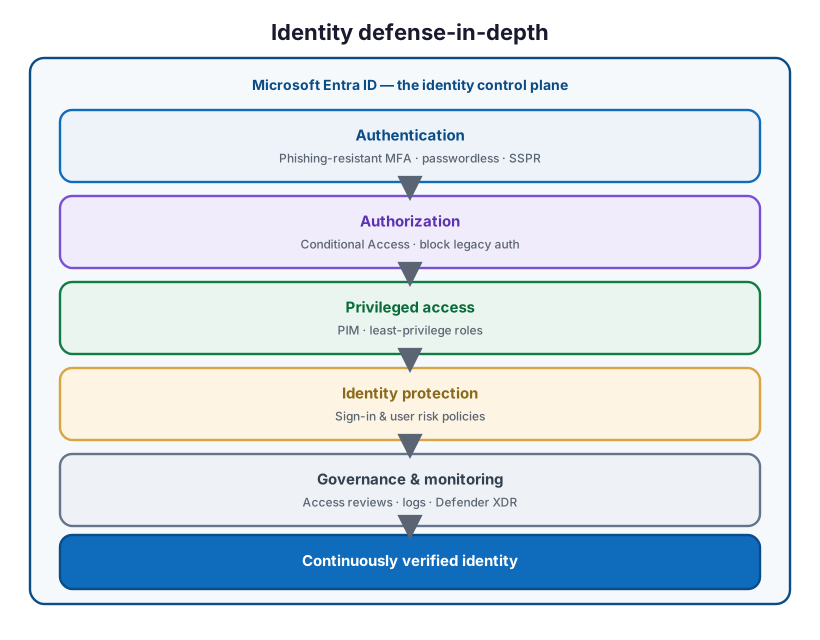
Figure 5. Identity defense-in-depth — layered controls delivering a continuously verified identity.
Diagram description: An identity defense-in-depth stack on the Microsoft Entra ID control plane: Authentication (phishing-resistant MFA, passwordless, SSPR); Authorization (Conditional Access, block legacy authentication); Privileged access (PIM, least-privilege roles); Identity protection (sign-in and user risk policies); and Governance and monitoring (access reviews, logs, Defender XDR) — together delivering a continuously verified identity.
Best practices
- Baseline the Identity Secure Score and set a review cadence, not a fixed target number.
- Enforce MFA for all users and phishing-resistant MFA for administrators.
- Block legacy authentication so nothing bypasses MFA.
- Minimize Global Administrators and move admin roles to PIM just-in-time.
- Enable sign-in and user risk policies where Entra ID P2 is licensed.
- Run recurring access reviews and remove dormant accounts and stale guests.
- Restrict user consent to applications and enable an admin-consent workflow.
- Retain sign-in and audit logs and monitor with Microsoft Defender XDR.
- Re-assess after major changes and at least twice a year.
Common mistakes
- Chasing the score instead of reducing risk. Focus on high-importance recommendations.
- Leaving legacy authentication enabled. It bypasses MFA entirely.
- Standing Global Administrator access. Permanent privilege widens the blast radius.
- Stopping at basic MFA. Traditional MFA is phishable; move to phishing-resistant methods.
- Never reviewing access. Dormant accounts and stale guests accumulate privilege.
- Ignoring app consents. Malicious apps gain access without a password.
- Assessing once. Configuration and threats drift; assessment must be recurring.
Identity security assessment checklist
Confirm that:
Authentication
- MFA is enforced for all users
- Administrators use phishing-resistant MFA (FIDO2 / Windows Hello / certificate)
- Self-service password reset is enabled; passwords are set not to expire
Access control
- A Conditional Access baseline is deployed (users, admins, devices, risk)
- Legacy authentication is blocked
- Two break-glass accounts are configured, excluded, and monitored
Privileged access
- More than one Global Administrator exists, but the number is minimized
- Admin roles use PIM with just-in-time activation
- Least-privilege roles are used instead of broad admin roles
Identity protection
- Sign-in-risk and user-risk policies are enabled (Entra ID P2)
- Microsoft Entra Password Protection is enabled
Governance
- Access reviews recertify membership and guests on a cadence
- Entitlement management governs access requests
- Dormant accounts and stale guests are removed
Monitoring
- Sign-in and audit logs are retained and sent to a SIEM
- Microsoft Defender XDR detection is enabled and owned
- The Identity Secure Score is reviewed on a recurring cadence
Frequently asked questions
What is the Identity Secure Score?
It is a percentage in Microsoft Entra recommendations indicating how aligned your Entra configuration is with Microsoft’s security recommendations. It is recalculated every 24 hours, tracked over time, and represents the identity category of the broader Microsoft Secure Score.
Does a high Identity Secure Score mean we are secure?
No. Microsoft states it is not an absolute measure of breach likelihood — it reflects how extensively you use available controls. Prioritize the high-importance recommendations relevant to your environment rather than a target number.
What should we fix first?
Usually MFA gaps, standing Global Administrator accounts, and legacy authentication. These are the highest-risk, highest-value fixes and appear prominently in the Identity Secure Score.
How often should we assess identity security?
Treat it as continuous: review the Identity Secure Score on a cadence, run recurring access reviews, and re-assess fully after major changes or at least twice a year.
Which domains does the assessment cover?
Authentication, access control, privileged access, identity protection, governance, and monitoring — with the Identity Secure Score as the measured baseline across them.
What licensing is required?
The Identity Secure Score is available to free and paid tenants; some recommendations need a paid license. Conditional Access requires Entra ID P1; risk policies, PIM, entitlement management, and access reviews require Entra ID P2.
How does this relate to the rest of the Zero Trust series?
This assessment measures the controls the series builds — strong and phishing-resistant authentication, Conditional Access, and privileged access — and produces a prioritized plan to close the gaps.
Key takeaways
- Baseline with the Identity Secure Score and assess six control domains.
- Fix MFA gaps, standing Global Admins, and legacy authentication first.
- Move toward phishing-resistant MFA, PIM, and risk-based policies.
- Sustain the posture with access reviews, monitoring, and a recurring score cadence.
- Treat the score as a guide to reducing risk, not the goal itself.
Summary
An identity security assessment turns identity — the control plane of Zero Trust — into something you can measure, prioritize, and improve. Baseline with the Identity Secure Score, assess authentication, access control, privileged access, identity protection, governance, and monitoring, and remediate by risk: MFA and admin gaps first, then Conditional Access and risk policies, then governance and monitoring. As the capstone of the Zero Trust identity series, it converts the individual controls into a single, defensible posture — and a recurring rhythm to keep it strong.
Organizations can begin with the Data & AI Readiness Checklist, review the Microsoft 365 Governance Knowledge Center, or schedule a technology assessment.
Authoritative references
Verified against publicly available Microsoft Learn documentation. Source access date: 23 July 2026. Product capabilities and licensing change frequently — confirm current details before deployment.
- Microsoft Learn: What is the Identity Secure Score?
- Microsoft Learn: What are Microsoft Entra recommendations?
- Microsoft Learn: Microsoft Secure Score
- Microsoft Learn: Securing identity with Zero Trust
- Microsoft Learn: Conditional Access authentication strengths
- Microsoft Learn: What is Conditional Access?
- Microsoft Learn: Block legacy authentication with Conditional Access
- Microsoft Learn: Plan a Privileged Identity Management deployment
- Microsoft Learn: What is Microsoft Entra ID Protection?
- Microsoft Learn: What are access reviews?
- Microsoft Learn: Manage consent to applications and evaluate consent requests
- Microsoft Learn: Manage emergency access (break-glass) accounts
- Microsoft Learn: Enable self-service password reset
- Microsoft Learn: Plan a Microsoft Entra reporting and monitoring deployment
Microsoft product capabilities, licensing, and feature availability may vary by subscription, tenant configuration, region, and Microsoft product updates. Verify current Microsoft documentation before making deployment decisions.
Related Knowledge Center resources
- How to Implement Zero Trust Identity Using Microsoft Entra ID — The identity foundation.
- Conditional Access Best Practices for SMBs — Access control policies.
- Why MFA Alone Is No Longer Enough — Phishing-resistant authentication.
- Microsoft 365 Tenant Security Assessment Checklist — The wider tenant posture.
- Microsoft 365 Security — Identity hardening, Defender, and Purview.
On this page
- Key points for executives
- Executive takeaways
- What does an identity security assessment cover?
- How do you baseline with the Identity Secure Score?
- How mature is our identity security?
- How should findings be prioritized and remediated?
- What does a hardened identity posture look like?
- Best practices
- Common mistakes
- Identity security assessment checklist
- Frequently asked questions
- Summary
- Authoritative references
- Related Knowledge Center resources