Passwordless Authentication
Passwordless authentication is the shift from proving who you are with a shared secret you can remember — a password — to proving it with something you securely possess and something you are: a cryptographic key held on a trusted device, unlocked by a biometric or PIN.
- Content owner
- Insyto Content Team
- Editorial reviewer
- Ritesh Mhatre
- Technical reviewer
- Navish Ansari
- Next review
- To be scheduled
- Last reviewed
- Review pending
- Technical level
- Intermediate · CISOs, security architects, IT directors
Passwordless authentication is the shift from proving who you are with a shared secret you can remember — a password — to proving it with something you securely possess and something you are: a cryptographic key held on a trusted device, unlocked by a biometric or PIN. For the enterprise, this is not a convenience feature. It is the most effective single change an organization can make to stop the identity-based attacks that cause the majority of breaches, and it is a foundational requirement of a modern Zero Trust architecture.
This is a vendor-neutral guide. Passwordless is an ecosystem built on open standards — FIDO2, WebAuthn, and passkeys — implemented across many identity providers, authenticators, and platforms. We use real enterprise technologies as examples throughout, from Microsoft Entra ID, Okta, Ping Identity, and Google Workspace to Cisco Duo, Beyond Identity, RSA, YubiKey, HID, and Apple and Windows platform authenticators, alongside the governance and privileged-access disciplines (IAM, PAM, CIAM, and identity governance) that surround them. The goal is an authentication architecture that is phishing-resistant, adaptive, and enterprise-ready — regardless of which vendors you standardize on.
Who should read this
- CISOs and security architects designing an authentication strategy
- IAM, PAM, and identity-governance leaders and engineers
- IT directors modernizing workforce or customer authentication
- Compliance and risk leaders aligning to phishing-resistant MFA mandates
Key points for executives
A defensible passwordless strategy normally rests on four conditions:
- Authentication is phishing-resistant by design — credentials are cryptographically bound to the legitimate service and cannot be relayed or replayed.
- Trust is continuous and adaptive — every access decision weighs user, device, and risk signals, not just a one-time login.
- The approach is standards-based and portable — built on FIDO2, WebAuthn, and passkeys so it works across identity providers and platforms.
- Passwords are progressively eliminated, not merely supplemented, so the weakest credential is removed from the attack surface.
Passwordless is how Zero Trust’s “verify explicitly” principle is realized at the front door. For the identity foundation it sits on, see the Identity Security Assessment Checklist.
Executive takeaways
- Passwords are the root cause of most breaches; passwordless removes the shared secret entirely.
- FIDO2, WebAuthn, and passkeys provide open, phishing-resistant, cross-vendor authentication.
- Zero Trust turns login into continuous, risk-based, adaptive authentication.
- The enterprise ecosystem spans identity providers, authenticators, PAM, CIAM, and governance.
- Treat passwordless as a phased migration ending in the elimination of passwords.
What is passwordless authentication?
Authentication has always drawn on three factor types: something you know (a password or PIN), something you have (a device, security key, or smart card), and something you are (a biometric). Passwords are the “something you know” factor — and the most fragile, because a secret that a human can remember can also be phished, guessed, reused, or stolen in bulk from a breached database.
Passwordless authentication removes the knowledge factor as the primary credential. Instead, the user authenticates with a cryptographic credential bound to a device they possess, unlocked locally by a biometric or PIN that never leaves that device. Importantly, “passwordless MFA” is inherently multifactor: possession of the authenticator plus the biometric or PIN that unlocks it satisfies two factors without a password ever being transmitted. Done with modern standards, it is also phishing-resistant — a property ordinary MFA (one-time codes and push approvals) does not have.
Why do passwords fail?
Passwords fail for structural reasons that no amount of user training fully solves. They are reused across services, so one breach cascades. They are phished through convincing fake sign-in pages. They are sprayed and stuffed at scale using credentials traded on criminal markets. And they impose real cost — help-desk resets, lockouts, and lost productivity — while still leaving the organization exposed.
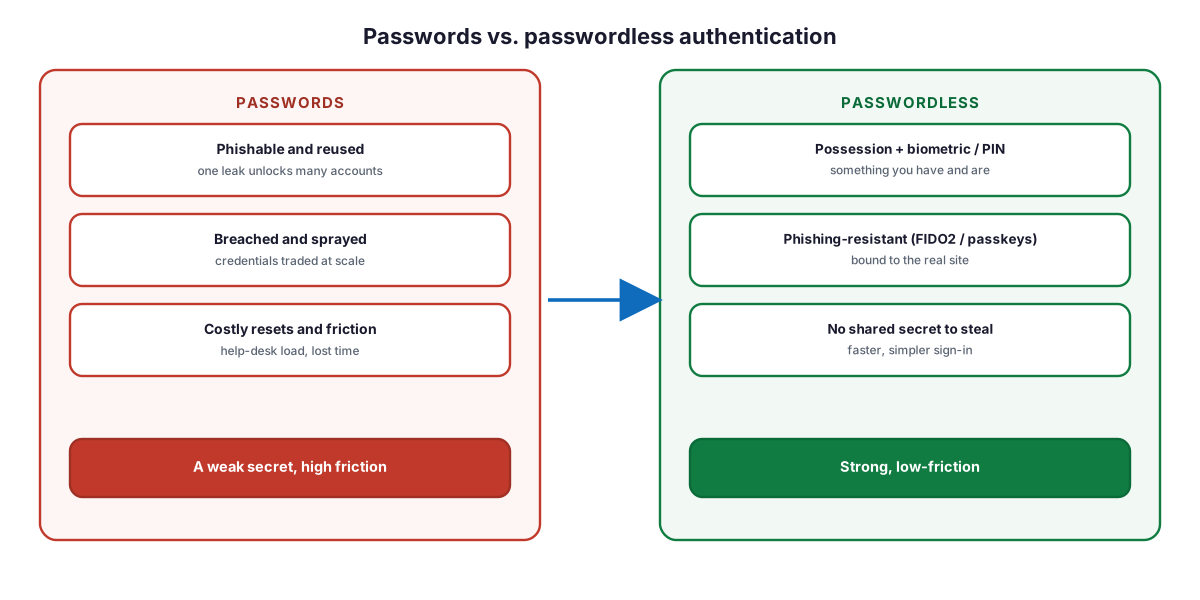
Figure 1. Passwords versus passwordless authentication — a weak, high-friction secret replaced by strong, low-friction, phishing-resistant credentials.
Diagram description: Passwords are phishable and reused (one leak unlocks many accounts), breached and sprayed (credentials traded at scale), and costly (resets and friction) — a weak secret with high friction. Passwordless authentication uses possession plus a biometric or PIN (something you have and are), is phishing-resistant with FIDO2 and passkeys (bound to the real site), and has no shared secret to steal — strong and low-friction.
How did enterprise authentication evolve?
Enterprise authentication has moved through three broad eras. First, the password era, where a single knowledge factor guarded everything. Second, the MFA era, which added a second factor — SMS codes, one-time passwords, or push notifications — dramatically reducing untargeted attacks but remaining phishable, because an adversary-in-the-middle proxy can relay a code or push in real time. Third, the passwordless and phishing-resistant era, in which cryptographic credentials bound to the legitimate origin make relaying impossible, and the password is removed entirely.
The distinction that matters today is not “do we have MFA?” but “is our MFA phishing-resistant?” Standards bodies and regulators have converged on the same answer: the strongest, mandated methods — FIDO2/WebAuthn and PIV/smart-card certificate-based authentication — are all passwordless or password-optional by design.
How does passwordless relate to Zero Trust?
Zero Trust rests on three principles: verify explicitly, use least privilege, and assume breach. Passwordless authentication is how the first principle is delivered at the point of access. A phishing-resistant credential provides high-assurance proof of identity that a stolen password or relayed code cannot, and because that proof is cryptographic and device-bound, it feeds directly into the risk-based, continuous verification that Zero Trust demands. In a mature architecture, authentication is not a one-time gate but an ongoing evaluation — strong at the front door, and re-checked continuously as context changes.
How do FIDO2 and WebAuthn work?
FIDO2 is the open standard that makes phishing-resistant passwordless authentication possible across vendors. It combines two specifications: WebAuthn, a W3C web standard implemented by browsers and platforms, and CTAP (Client to Authenticator Protocol) from the FIDO Alliance, which lets external authenticators such as security keys talk to the client. Together they use public-key cryptography: the authenticator holds a private key that never leaves the device, and the relying party (the app or service) holds only the corresponding public key.
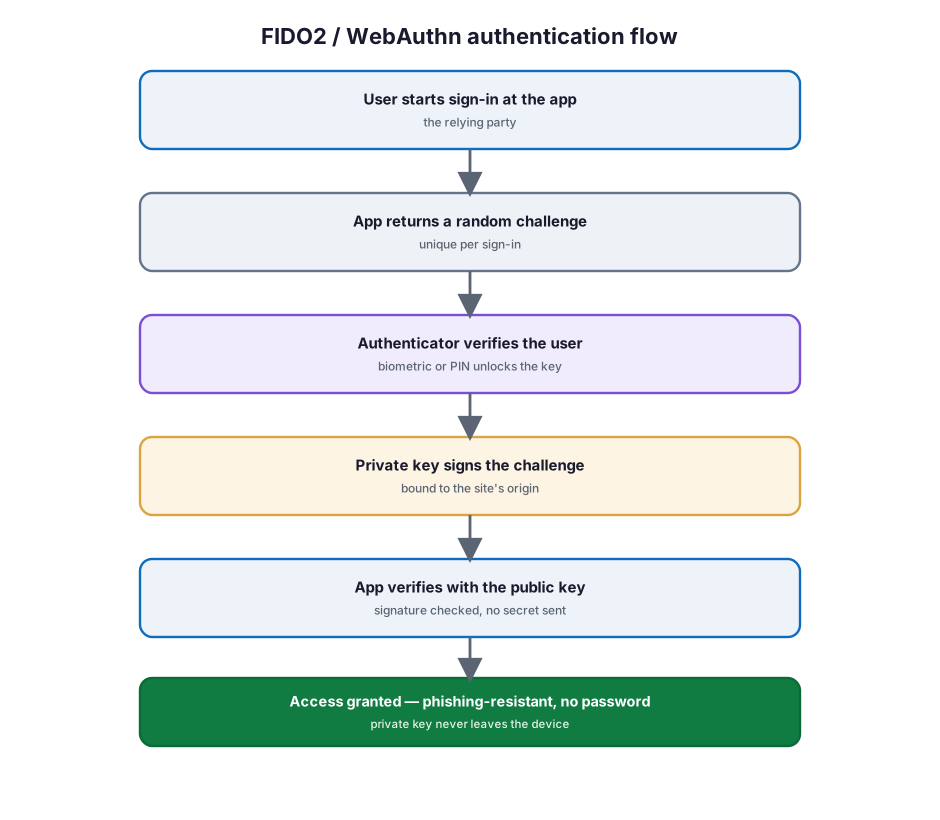
Figure 2. The FIDO2 / WebAuthn authentication flow — a challenge signed by a device-bound private key, verified with a stored public key, with no secret transmitted.
Diagram description: In the FIDO2/WebAuthn authentication flow, the user starts sign-in at the app (relying party); the app returns a random challenge unique to that sign-in; the authenticator verifies the user with a biometric or PIN that unlocks the key; the private key signs the challenge, bound to the site’s origin; and the app verifies the signature with the stored public key. Access is granted — phishing-resistant, with the private key never leaving the device.
The phishing resistance comes from origin binding: each credential is scoped to a specific relying-party identifier (the real domain). An adversary-in-the-middle proxy on a look-alike domain cannot use the credential, because the signature would be for the wrong origin. This is the property that ordinary MFA lacks and that makes FIDO2 the gold standard.
Before a credential can be used, it must be registered. Registration is a separate ceremony that creates the key pair and shares only the public key with the service.
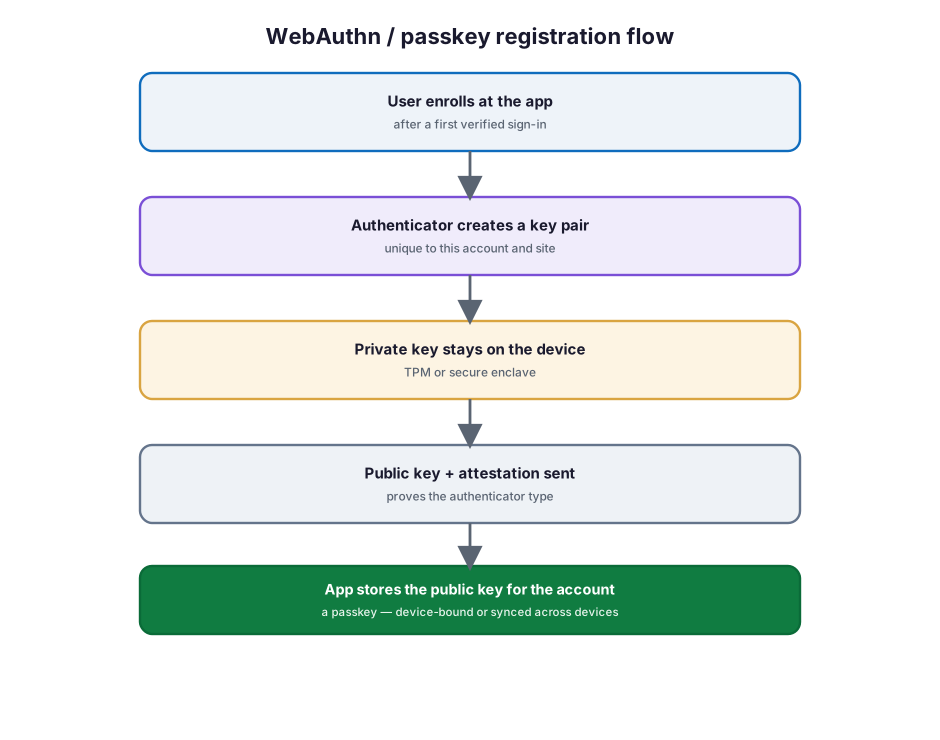
Figure 3. The WebAuthn / passkey registration flow — a key pair created on the device, with only the public key stored by the service.
Diagram description: In the WebAuthn/passkey registration flow, the user enrolls at the app after a first verified sign-in; the authenticator creates a key pair unique to this account and site; the private key stays on the device in a TPM or secure enclave; the public key and an attestation (proving the authenticator type) are sent to the app; and the app stores the public key for the account — creating a passkey that can be device-bound or synced across devices.
What are passkeys?
A passkey is a FIDO2/WebAuthn credential — the modern, consumer-friendly name for the same phishing-resistant technology. Passkeys come in two forms that enterprises should distinguish clearly. Device-bound passkeys never leave a single authenticator, such as a FIDO2 security key (YubiKey, HID) or a hardware-backed platform credential; they offer the highest assurance and are ideal for administrators and regulated use. Synced passkeys are backed up and synchronized across a user’s devices through a provider such as Apple, Google, or Microsoft; they are more convenient and drive broad adoption, at a modest reduction in assurance because the private key can move between the user’s own devices. Many enterprises use both: synced passkeys for the general workforce, device-bound keys for privileged and high-risk roles.
Table 1. Authentication methods by phishing resistance.
| Method | Type | Phishing-resistant |
|---|---|---|
| Password | Knowledge | No |
| SMS / voice one-time code | Possession (weak) | No |
| Authenticator app code / push | Possession | No |
| Passkey / FIDO2 security key | Possession + inherence | Yes |
| Platform authenticator (Windows Hello, Apple, Android) | Possession + inherence | Yes |
| Certificate-based auth (smart card / PIV) | Possession (PKI) | Yes |
What does an enterprise passwordless architecture look like?
Enterprise passwordless is a layered architecture. Users authenticate with an authenticator, an identity provider (or access broker) enforces policy and federates identity, and relying parties — applications and resources — trust the provider’s assertion. The strength of the model is that the same open standards work across every layer and vendor.
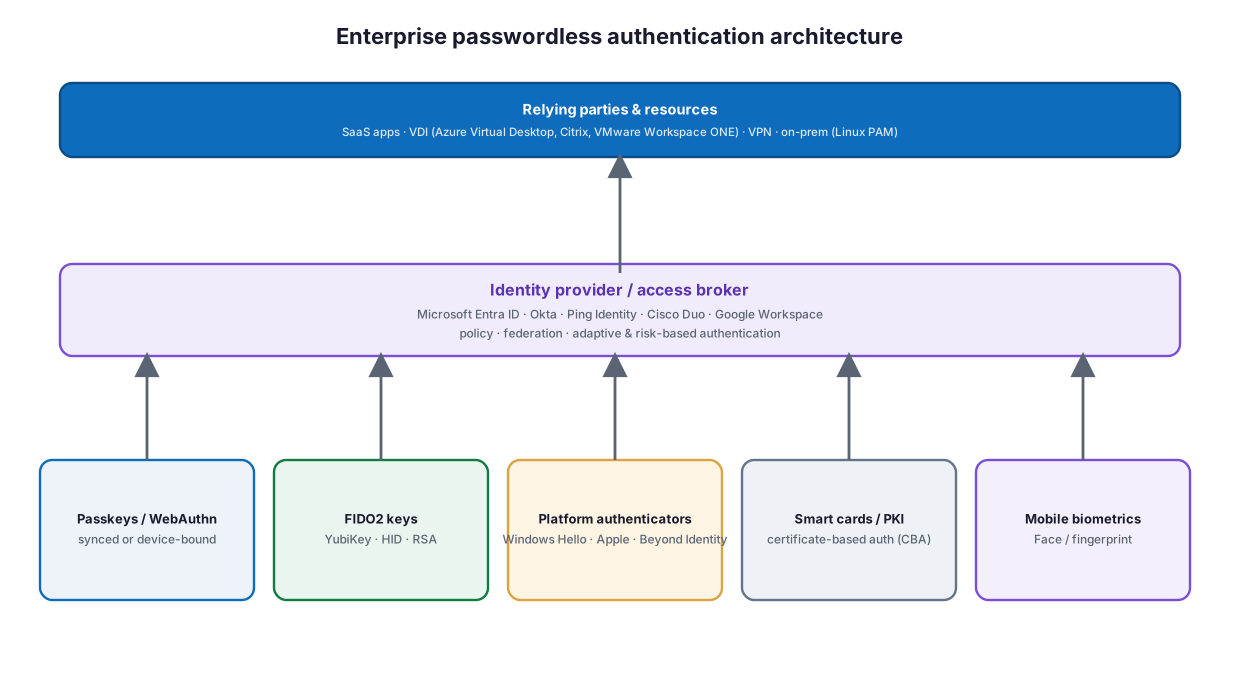
Figure 4. An enterprise passwordless authentication architecture — authenticators, an identity provider, and relying parties, all built on open standards.
Diagram description: An enterprise passwordless architecture has three tiers. Authenticators (passkeys/WebAuthn, FIDO2 keys such as YubiKey, HID, and RSA, platform authenticators such as Windows Hello, Apple, and Beyond Identity, smart cards and PKI for certificate-based authentication, and mobile biometrics) authenticate to an identity provider or access broker (Microsoft Entra ID, Okta, Ping Identity, Cisco Duo, or Google Workspace) that handles policy, federation, and adaptive, risk-based authentication. The provider then grants access to relying parties and resources — SaaS apps, VDI (Azure Virtual Desktop, Citrix, VMware Workspace ONE), VPN, and on-premises systems integrated through Linux PAM.
Around this core sit the identity disciplines that make it enterprise-grade. IAM (identity and access management) governs workforce access and federation. PAM (privileged access management), from vendors such as CyberArk, brokers and records privileged sessions, ideally requiring phishing-resistant authentication to elevate. CIAM (customer identity and access management) extends passkeys and adaptive authentication to external users and consumers. And identity governance (from SailPoint, Saviynt, and others) manages the lifecycle — who should have access, and the reviews and certifications that keep it accurate.
How does adaptive, risk-based authentication work?
Strong authentication at login is necessary but not sufficient for Zero Trust. Adaptive authentication evaluates signals about each access request — the user and their role, the trust of the device, the location and network, behavioral risk, and session context — and chooses a proportionate response. It is the mechanism that lets an organization be strict when risk is high and frictionless when it is low.
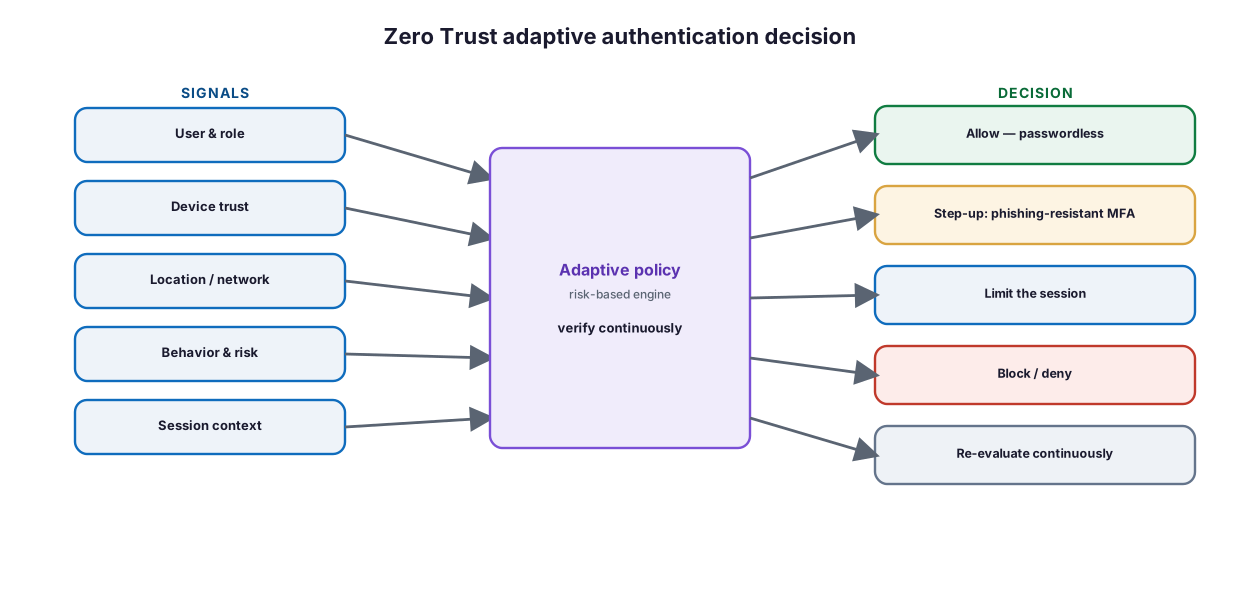
Figure 5. Zero Trust adaptive authentication — signals drive a risk-based decision, evaluated continuously.
Diagram description: A Zero Trust adaptive authentication decision evaluates signals — user and role, device trust, location and network, behavior and risk, and session context — through a risk-based policy engine that verifies continuously, and produces a decision: allow with passwordless authentication, step up to phishing-resistant MFA, limit the session, block or deny, or re-evaluate continuously.
Critically, the decision is not made once. Continuous authentication re-evaluates the session as conditions change — a shift in location, a risk detection, or a change in device posture can trigger a re-check or revoke access mid-session. This continuous model, combined with phishing-resistant credentials, is what distinguishes a Zero Trust authentication architecture from a traditional login.
How do device trust and user trust factor in?
Zero Trust access is a function of both user trust and device trust. User trust is established by the strength of the authentication — passwordless and phishing-resistant methods provide high user assurance. Device trust is established by the posture of the endpoint: is it managed, compliant, patched, and does it present a valid certificate? Passwordless and device trust reinforce each other, because platform authenticators bind the credential to a specific, attestable device.
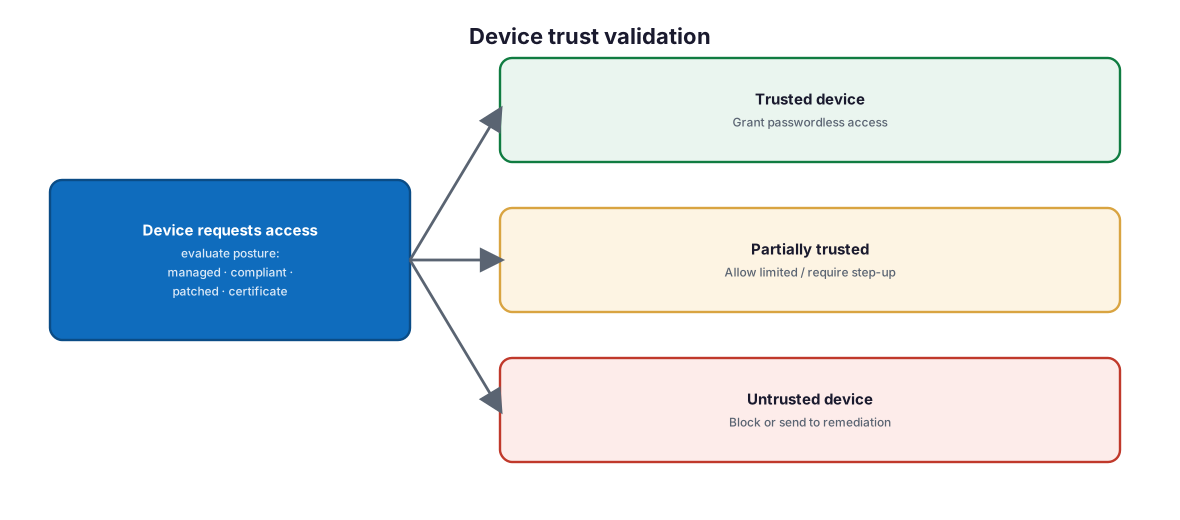
Figure 6. Device trust validation — endpoint posture shapes the access decision alongside user authentication.
Diagram description: When a device requests access, its posture is evaluated — managed, compliant, patched, and certificate present. A trusted device is granted passwordless access; a partially trusted device is allowed limited access or required to step up; an untrusted device is blocked or sent to remediation.
Unified endpoint management and device-trust platforms — Microsoft Intune, VMware Workspace ONE, Cisco Duo Device Trust, and others — supply the posture signals, while the identity provider enforces the resulting decision.
What are the enterprise deployment models?
Passwordless is deployed differently across scenarios, and most enterprises run several models at once.
Table 2. Common enterprise deployment models.
| Model | What it covers | Typical technologies |
|---|---|---|
| Workforce (platform) | Employees on managed laptops and phones | Windows Hello for Business, Apple/Android platform passkeys |
| Workforce (roaming) | Shared devices, high assurance, admins | FIDO2 security keys (YubiKey, HID), smart cards |
| Privileged access (PAM) | Administrators and sensitive systems | Device-bound keys + PAM brokering (CyberArk, Delinea) |
| Customer (CIAM) | External users and consumers | Synced passkeys, adaptive authentication |
| VDI / remote | Virtual desktops and remote apps | Azure Virtual Desktop, Citrix, VMware Workspace ONE with FIDO2 |
| High-assurance / regulated | Government, finance, critical infrastructure | PKI, smart cards (PIV/CAC), certificate-based auth |
Legacy and non-web systems are bridged rather than left behind: certificate-based authentication and enterprise PKI extend strong credentials to Windows and Linux (via Linux PAM modules), and access brokers front older applications so they inherit modern, phishing-resistant sign-in.
How does the identity lifecycle change?
Passwordless changes the identity lifecycle from “issue a password” to “enroll trusted authenticators and govern them.” A user is provisioned, enrolls one or more authenticators (with a secure bootstrap for the first credential), authenticates passwordlessly day to day, is subject to adaptive and continuous checks, is periodically reviewed by identity governance, and finally has credentials revoked at offboarding.
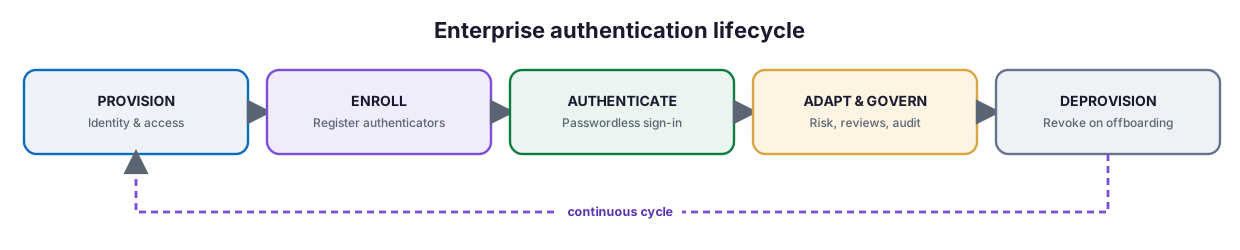
Figure 7. The enterprise authentication lifecycle — provision, enroll, authenticate, adapt and govern, and deprovision, run as a continuous cycle.
Diagram description: The enterprise authentication lifecycle runs continuously through five stages: Provision (identity and access), Enroll (register authenticators), Authenticate (passwordless sign-in), Adapt and govern (risk, reviews, and audit), and Deprovision (revoke on offboarding).
The most delicate step is enrollment. The first credential must be bootstrapped securely — for example, with a temporary access pass, an in-person or verified issuance, or an existing high-assurance credential — because an attacker who can register their own authenticator bypasses everything downstream. Requiring at least two registered authenticators (for example, a platform passkey plus a backup security key) also removes the temptation to keep a password as a fallback.
Which standards and compliance frameworks apply?
Passwordless is anchored in open standards and increasingly mandated by regulators.
Table 3. Standards and compliance touchpoints.
| Standard / framework | Relevance |
|---|---|
| FIDO2 (WebAuthn + CTAP) | The core open standard for phishing-resistant credentials |
| W3C WebAuthn | Browser and platform API for public-key authentication |
| Passkeys (FIDO Alliance) | Consumer-and-enterprise FIDO credentials, synced or device-bound |
| NIST SP 800-63B | Authenticator Assurance Levels; AAL3 requires hardware, phishing-resistant methods |
| CISA / EO 14028 / OMB M-22-09 | US federal mandate for phishing-resistant MFA (FIDO2 or PIV) |
| PSD2 / eIDAS (EU) | Strong customer authentication and high-assurance identity |
Aligning to these frameworks is not just a compliance exercise: they codify the same technical conclusion — that phishing-resistant, hardware-backed, passwordless authentication is the target state.
How do the technologies and vendors compare?
No single vendor owns passwordless; the ecosystem is deliberately interoperable. The table below maps the major categories to representative technologies so architects can assemble a stack that fits their environment.
Table 4. The enterprise passwordless vendor landscape.
| Category | Representative technologies | Role |
|---|---|---|
| Identity providers (IAM) | Microsoft Entra ID, Okta, Ping Identity, Google Workspace | Policy, federation, adaptive authentication |
| Passwordless / MFA platforms | Cisco Duo, Beyond Identity, RSA ID Plus | Passwordless sign-in and device trust |
| FIDO2 authenticators | YubiKey, HID, Feitian; FIDO Alliance certified | Phishing-resistant hardware keys |
| Platform authenticators | Windows Hello for Business, Apple passkeys, Android | Built-in biometric passwordless |
| Privileged access (PAM) | CyberArk, Delinea, BeyondTrust | Broker and secure privileged access |
| Identity governance (IGA) | SailPoint, Saviynt, Microsoft Entra ID Governance | Lifecycle, access reviews, certification |
| PKI / smart cards | Enterprise PKI, PIV/CAC smart cards, CBA | High-assurance certificate-based auth |
The practical guidance is to standardize on the open standards (FIDO2/WebAuthn) first and choose vendors second, so that authenticators, identity providers, and applications remain interchangeable over time.
Best practices
- Prioritize phishing-resistant methods (FIDO2/WebAuthn, PIV) over any code- or push-based MFA.
- Standardize on open standards so authenticators and providers stay interoperable.
- Register at least two authenticators per user, including a backup, to avoid password fallbacks.
- Secure the enrollment bootstrap; treat first-credential issuance as a high-assurance event.
- Use device-bound keys for administrators and high-risk roles; synced passkeys for scale.
- Pair passwordless with device trust and adaptive, continuous authentication.
- Extend strong authentication to VDI, VPN, and legacy apps via brokers, PKI, and Linux PAM.
- Govern authenticators through the identity lifecycle with reviews and prompt revocation.
- Plan to eliminate passwords, not just add a passwordless option alongside them.
Common mistakes
- Calling code- or push-based MFA “passwordless.” It is neither passwordless nor phishing-resistant.
- Leaving passwords as a fallback. The weakest credential remains exploitable if it still works.
- Weak enrollment. An attacker who can register an authenticator bypasses everything.
- No backup authenticator. Lockouts drive users and admins back to passwords.
- Ignoring device trust. Strong user authentication from a compromised device is still risky.
- One-time login thinking. Zero Trust requires continuous, adaptive re-evaluation.
- Vendor lock-in. Proprietary schemes undermine the portability that standards provide.
What is the migration roadmap?
Passwordless is a journey with a definite endpoint — the removal of passwords — reached in phases.

Figure 8. A passwordless migration roadmap — assess, pilot, roll out, enforce, and eliminate.
Diagram description: A five-phase passwordless migration roadmap: Assess (inventory apps, users, and authenticators), Pilot (phishing-resistant methods for administrators and pilot groups), Roll out (deploy passkeys, security keys, and platform authenticators), Enforce (require passwordless via policy), and Eliminate (remove passwords where possible).
Table 5. Migration phases.
| Phase | Focus |
|---|---|
| 1 · Assess | Inventory applications, users, devices, and current authenticators |
| 2 · Pilot | Deploy phishing-resistant authentication to admins and a pilot ring |
| 3 · Roll out | Provision passkeys, security keys, and platform authenticators broadly |
| 4 · Enforce | Require passwordless / phishing-resistant methods via policy |
| 5 · Eliminate | Remove or disable passwords where the estate allows |
Enterprise implementation strategy and checklist
A successful program is as much organizational as technical: name an executive sponsor, align stakeholders across IAM, security, endpoint, and application teams, and communicate the change to users. Then confirm that:
- Applications and identity providers are inventoried and mapped to authentication methods
- Phishing-resistant methods (FIDO2/WebAuthn, PIV) are the default target
- A secure enrollment and bootstrap process is defined and tested
- Every user has at least two registered authenticators, including a backup
- Device trust signals feed the access decision
- Adaptive, risk-based, continuous authentication policies are in place
- Privileged access requires phishing-resistant authentication (integrated with PAM)
- VDI, VPN, and legacy systems are bridged with PKI, brokers, or Linux PAM
- Identity governance reviews and revokes authenticators across the lifecycle
- A phased plan exists to enforce passwordless and ultimately remove passwords
- The program aligns to NIST SP 800-63B and any phishing-resistant MFA mandates
Frequently asked questions
What is passwordless authentication?
It is authenticating without a password, using a cryptographic credential held on a device you possess and unlocked by a biometric or PIN. Modern passwordless (FIDO2/WebAuthn, passkeys) is both multifactor and phishing-resistant.
Is passwordless the same as MFA?
Passwordless authentication is inherently multifactor (possession plus biometric/PIN). But not all MFA is passwordless or phishing-resistant — codes and push approvals are MFA yet remain phishable. The strongest posture is phishing-resistant, passwordless MFA.
What are FIDO2, WebAuthn, and passkeys?
FIDO2 is the open standard combining W3C WebAuthn (the browser/platform API) and the FIDO Alliance CTAP protocol. Passkeys are FIDO2/WebAuthn credentials — either device-bound (on a security key or a single device) or synced across a user’s devices.
Why is passwordless phishing-resistant when normal MFA is not?
Because FIDO credentials are cryptographically bound to the legitimate site’s origin. An adversary-in-the-middle proxy on a look-alike domain cannot use them, whereas it can relay a one-time code or push in real time.
Do we still need device trust and adaptive authentication?
Yes. Zero Trust evaluates both user and device trust and re-checks continuously. Passwordless provides strong user assurance; device trust and adaptive, risk-based policies complete the picture.
How does passwordless work for privileged users and legacy systems?
Use device-bound FIDO2 keys or smart cards for privileged roles, integrated with a PAM solution; bridge legacy and non-web systems with certificate-based authentication, enterprise PKI, access brokers, and Linux PAM modules.
Is this Microsoft-specific?
No. Passwordless is built on open standards and works across identity providers (Entra ID, Okta, Ping, Google), authenticator vendors (YubiKey, HID, RSA, Beyond Identity), and platforms (Windows Hello, Apple, Android). Standardize on the standards first, then choose vendors.
How do we start?
Assess your estate, pilot phishing-resistant authentication with administrators, roll out authenticators broadly, enforce passwordless by policy, and progressively eliminate passwords.
Key takeaways
- Passwordless removes the shared secret that causes most breaches.
- FIDO2, WebAuthn, and passkeys deliver open, phishing-resistant, cross-vendor authentication.
- Zero Trust makes authentication continuous, adaptive, and risk-based.
- The enterprise ecosystem spans identity providers, authenticators, PAM, CIAM, and governance.
- Migrate in phases and finish by eliminating passwords.
Summary
Passwordless authentication is the practical heart of a Zero Trust identity strategy. By replacing a phishable, reusable secret with a device-bound cryptographic credential unlocked by a biometric or PIN, enterprises gain authentication that is both stronger and simpler — and, uniquely among common methods, resistant to the adversary-in-the-middle phishing that defeats ordinary MFA. The winning approach is standards-first and vendor-neutral: build on FIDO2, WebAuthn, and passkeys; combine strong user authentication with device trust and continuous, adaptive risk evaluation; extend it across workforce, privileged, customer, VDI, and legacy scenarios; govern authenticators through the identity lifecycle; and migrate in phases toward the elimination of passwords. Do this, and authentication stops being the weakest link and becomes a durable Zero Trust control.
Organizations can begin with the Data & AI Readiness Checklist, review the Microsoft 365 Governance Knowledge Center, or schedule a technology assessment.
Authoritative references
Verified against publicly available standards and vendor documentation. Source access date: 23 July 2026. Product capabilities and standards evolve — confirm current details before deployment.
- FIDO Alliance: FIDO2 and passkeys overview
- FIDO Alliance: Passkeys
- W3C: Web Authentication (WebAuthn) specification
- NIST SP 800-63B: Digital Identity Guidelines — Authentication
- CISA: Implementing phishing-resistant MFA
- Microsoft Learn: Conditional Access authentication strengths
- Microsoft Learn: Passwordless authentication options for Microsoft Entra ID
- Okta: Passwordless authentication
- Ping Identity: Passwordless authentication
- Cisco Duo: Passwordless authentication
- Yubico (YubiKey): FIDO2 and WebAuthn
- Apple: About the security of passkeys
- CyberArk: Privileged access management
- SailPoint: Identity governance
Product capabilities, standards, and vendor features vary by version, configuration, and region. Verify current documentation before making architectural or purchasing decisions.
Related Knowledge Center resources
- Why MFA Alone Is No Longer Enough — The case for phishing-resistant methods.
- How to Implement Zero Trust Identity Using Microsoft Entra ID — Identity as the control plane.
- Conditional Access Best Practices for SMBs — Enforcing strong authentication.
- Microsoft Entra Privileged Identity Management — Just-in-time privileged access.
- Identity Security Assessment Checklist — Measure your identity posture.
On this page
- Key points for executives
- Executive takeaways
- What is passwordless authentication?
- Why do passwords fail?
- How did enterprise authentication evolve?
- How does passwordless relate to Zero Trust?
- How do FIDO2 and WebAuthn work?
- What are passkeys?
- What does an enterprise passwordless architecture look like?
- How does adaptive, risk-based authentication work?
- How do device trust and user trust factor in?
- What are the enterprise deployment models?
- How does the identity lifecycle change?
- Which standards and compliance frameworks apply?
- How do the technologies and vendors compare?
- Best practices
- Common mistakes
- What is the migration roadmap?
- Enterprise implementation strategy and checklist
- Frequently asked questions
- Summary
- Authoritative references
- Related Knowledge Center resources