Microsoft 365 Tenant Optimization
Most Microsoft 365 tenants are not configured — they are accumulated.
- Content owner
- Insyto Content Team
- Editorial reviewer
- Ritesh Mhatre
- Technical reviewer
- Navish Ansari
- Next review
- To be scheduled
- Last reviewed
- Review pending
- Technical level
- Intermediate · IT directors, Microsoft 365 administrators
Modern Workplace Management · Microsoft 365 Tenant Optimization
Executive Summary
Most Microsoft 365 tenants are not configured — they are accumulated. They start with Microsoft’s defaults, absorb a series of one-off changes as needs arise, collect inactive users and stale guest accounts, and quietly drift away from any coherent standard. The result is a tenant that is simultaneously over-exposed (default settings and open sharing), over-spent (idle licenses and unused capacity), and hard to govern (no consistent baseline). Tenant optimization is the discipline of reversing that: bringing the tenant up to a deliberate, secure, efficient configuration baseline — and keeping it there as configuration inevitably drifts.
Optimization is not the same as monitoring or administration. Monitoring watches the tenant’s health; administration governs who holds privileged roles; optimization is the act of tuning the configuration itself — hardening security, standardizing collaboration and data governance, and clearing out the clutter that adds cost and risk. Microsoft gives this a concrete shape through its recommended baselines, which organize a well-configured tenant into six pillars: identity protection, email and apps protection, endpoint enrollment, endpoint protection, data protection, and end-user experience. The measure of progress is Microsoft Secure Score, and the enemy is drift — because a tenant left alone slides back toward its insecure defaults.
This guide sets out how to optimize a Microsoft 365 tenant: how to assess the gap, apply a standard baseline across the six pillars, harden the high-risk settings, clean up the accumulated clutter, and manage drift on a cadence. It focuses on configuration and hygiene; the related disciplines of cost, performance, administration, and health monitoring are covered in their own guides. Because Microsoft’s settings and recommendations evolve, verify specifics against the linked documentation.
Who should read this:
- CIOs, CTOs, and IT directors accountable for tenant posture and efficiency
- Microsoft 365 administrators who configure and maintain the tenant
- Security and compliance leaders standardizing configuration
- SMB decision-makers and MSPs optimizing one or many tenants
What does tenant optimization mean?
Tenant optimization means moving a tenant from its accumulated, default state to a deliberate baseline, and then maintaining that baseline against drift. It is best understood as a framework: assess where you are, apply a standard configuration across the pillars that matter, add hygiene and cleanup, and loop back to catch drift.
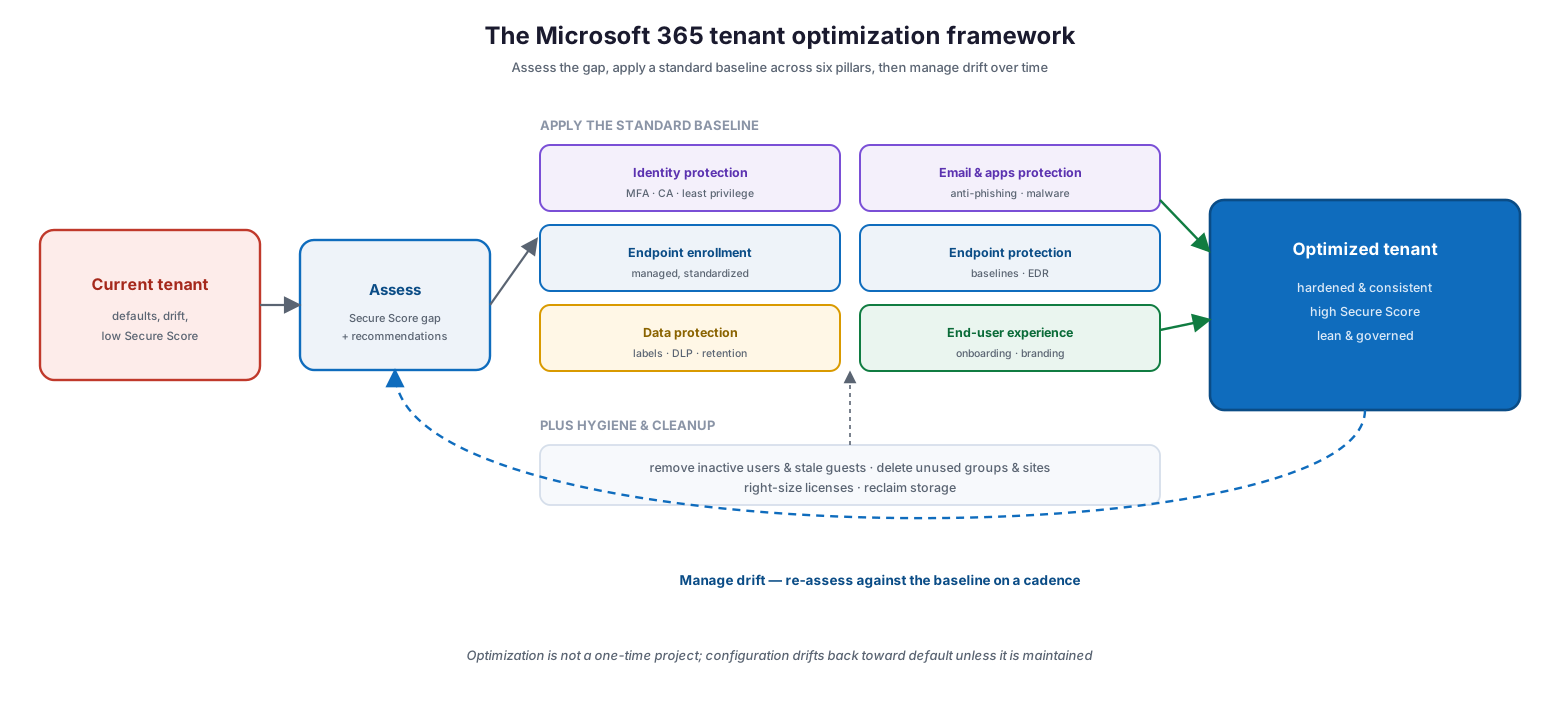
The Microsoft 365 tenant optimization framework: a current tenant with defaults, drift, and a low Secure Score is assessed for the Secure Score gap and recommendations, then a standard baseline is applied across six pillars — identity protection, email and apps protection, endpoint enrollment, endpoint protection, data protection, and end-user experience — plus hygiene and cleanup (remove inactive users and stale guests, delete unused groups and sites, right-size licenses, reclaim storage), producing an optimized tenant that is hardened, consistent, high-scoring, and lean; a drift-management loop re-assesses against the baseline on a cadence.
The critical insight is the loop at the bottom: optimization is not a one-time project. Every new exception, every hurried change, and simple time all pull configuration back toward default. An optimized tenant stays optimized only if drift is detected and corrected routinely — which is why optimization belongs to an ongoing managed discipline, not a single cleanup weekend.
What is the optimization baseline?
The heart of optimization is applying a consistent baseline. Microsoft’s recommended standard tenant configurations — available to partners at scale through Microsoft 365 Lighthouse and to any organization as best-practice guidance — organize this into six pillars. Each pillar standardizes a set of configurations and has a clear way to measure whether it is in place.
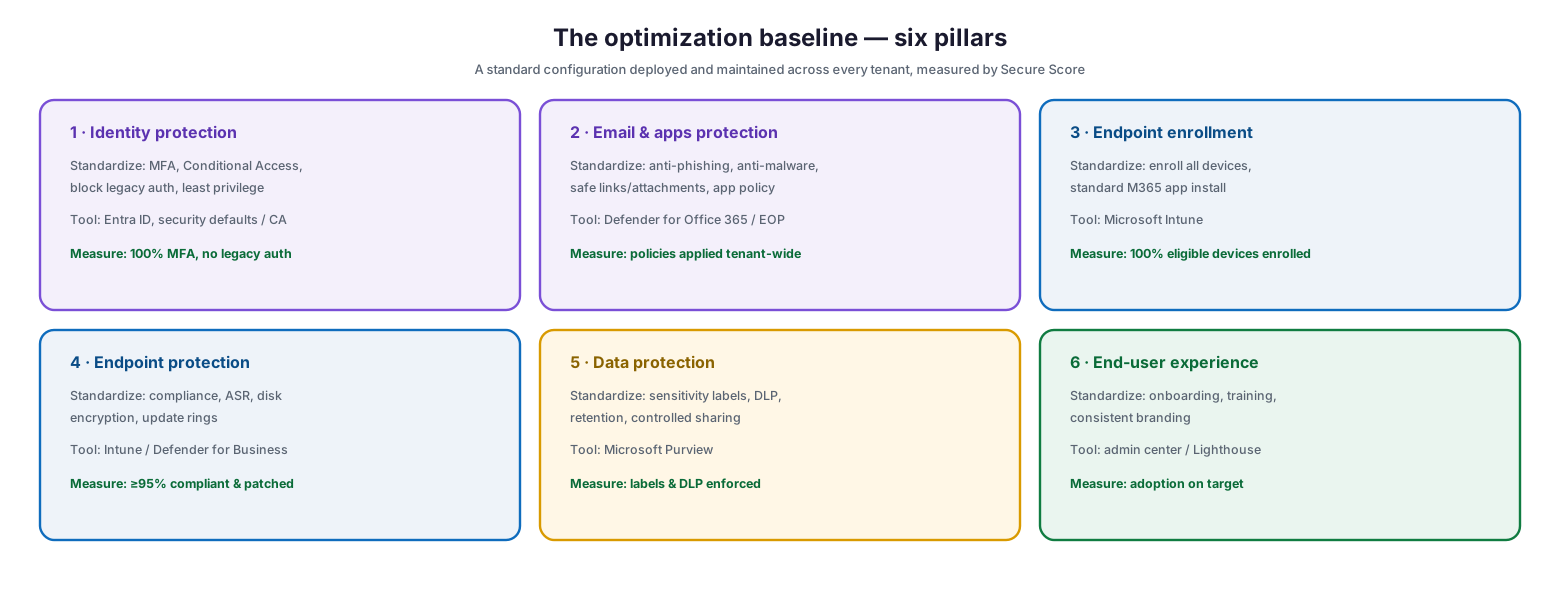
The optimization baseline in six pillars, each with what it standardizes, the tool, and the measure: identity protection (MFA, Conditional Access, block legacy auth, least privilege — 100% MFA, no legacy auth); email and apps protection (anti-phishing, anti-malware, safe links/attachments — policies applied tenant-wide); endpoint enrollment (enroll all devices, standard app install — 100% eligible devices enrolled); endpoint protection (compliance, ASR, encryption, update rings — 95%+ compliant and patched); data protection (sensitivity labels, DLP, retention, controlled sharing — labels and DLP enforced); and end-user experience (onboarding, training, branding — adoption on target).
| Baseline pillar | What it standardizes | Primary tool | Measure of success |
|---|---|---|---|
| Identity protection | MFA, Conditional Access, block legacy auth, least privilege | Microsoft Entra ID | 100% MFA; no legacy authentication |
| Email & apps protection | Anti-phishing, anti-malware, safe links/attachments | Defender for Office 365 / EOP | Policies applied tenant-wide |
| Endpoint enrollment | Enroll eligible devices; standardize app install | Microsoft Intune | 100% of eligible devices enrolled |
| Endpoint protection | Compliance, ASR, disk encryption, update rings | Intune / Defender for Business | ≥95% compliant and patched |
| Data protection | Sensitivity labels, DLP, retention, controlled sharing | Microsoft Purview | Labels and DLP enforced |
| End-user experience | Onboarding, training, consistent branding | Admin center / Lighthouse | Adoption on target |
For a managed service provider, Microsoft 365 Lighthouse makes this repeatable across many tenants by deploying the same default baseline everywhere; for a single organization, the same pillars serve as a checklist. Either way, the point is a standard — a defined target configuration rather than a bespoke, drifting one.
How do you run the optimization process?
Optimization follows a repeatable process, and each stage builds on the last. Skipping the assessment means optimizing blind; skipping the drift stage means the work slowly undoes itself.
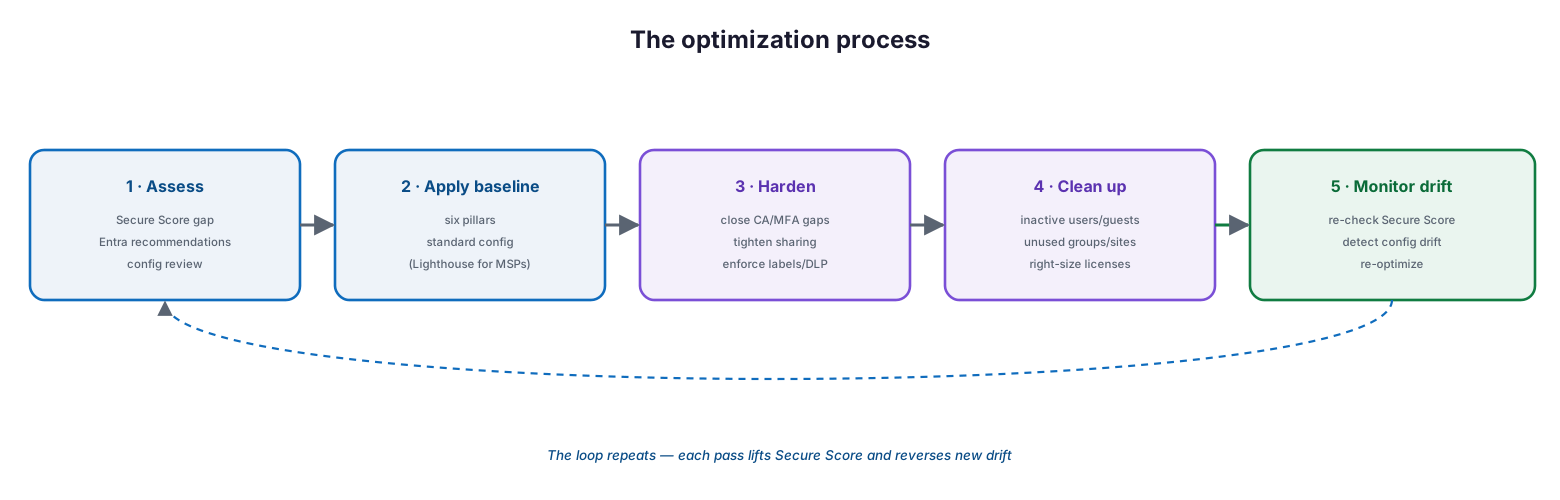
The optimization process: assess (Secure Score gap, Entra recommendations, config review), apply the baseline (six pillars, standard config, Lighthouse for MSPs), harden (close Conditional Access and MFA gaps, tighten sharing, enforce labels and DLP), clean up (inactive users and guests, unused groups and sites, right-size licenses), and monitor drift (re-check Secure Score, detect config drift, re-optimize) — the loop repeats, each pass lifting Secure Score and reversing new drift.
Begin by assessing the gap: Microsoft Secure Score gives a numeric baseline and prioritized improvement actions, and Microsoft Entra recommendations surface identity-specific improvements. Apply the standard baseline across the six pillars — noting that security defaults provide a minimum for smaller tenants, while common Conditional Access policies give a stronger, more flexible baseline for those with premium licensing. Then harden the high-risk specifics, clean up the clutter, and set up drift monitoring. The stages, tools, and outputs are summarized below.
| Stage | Key activities | Tools | Output |
|---|---|---|---|
| 1 · Assess | Measure Secure Score; review recommendations and config | Secure Score / Entra recommendations | Prioritized gap list |
| 2 · Apply baseline | Deploy the six-pillar standard configuration | Lighthouse / admin centers | Consistent baseline in place |
| 3 · Harden | Close CA/MFA gaps; tighten sharing; enforce labels & DLP | Entra / Purview / SharePoint | Reduced attack surface |
| 4 · Clean up | Remove inactive users/guests, unused groups, idle licenses | Access reviews / usage reports | Leaner, cheaper tenant |
| 5 · Monitor drift | Re-check Secure Score; detect and correct drift | Secure Score / recommendations | Maintained optimization |
What should you clean up?
A large part of optimization is subtraction. Tenants accumulate dormant accounts, abandoned collaboration spaces, and unused licenses, and every one of them is cost you pay and risk you carry for nothing. Cleaning them out shrinks the attack surface, cuts spend, and keeps the tenant governable.
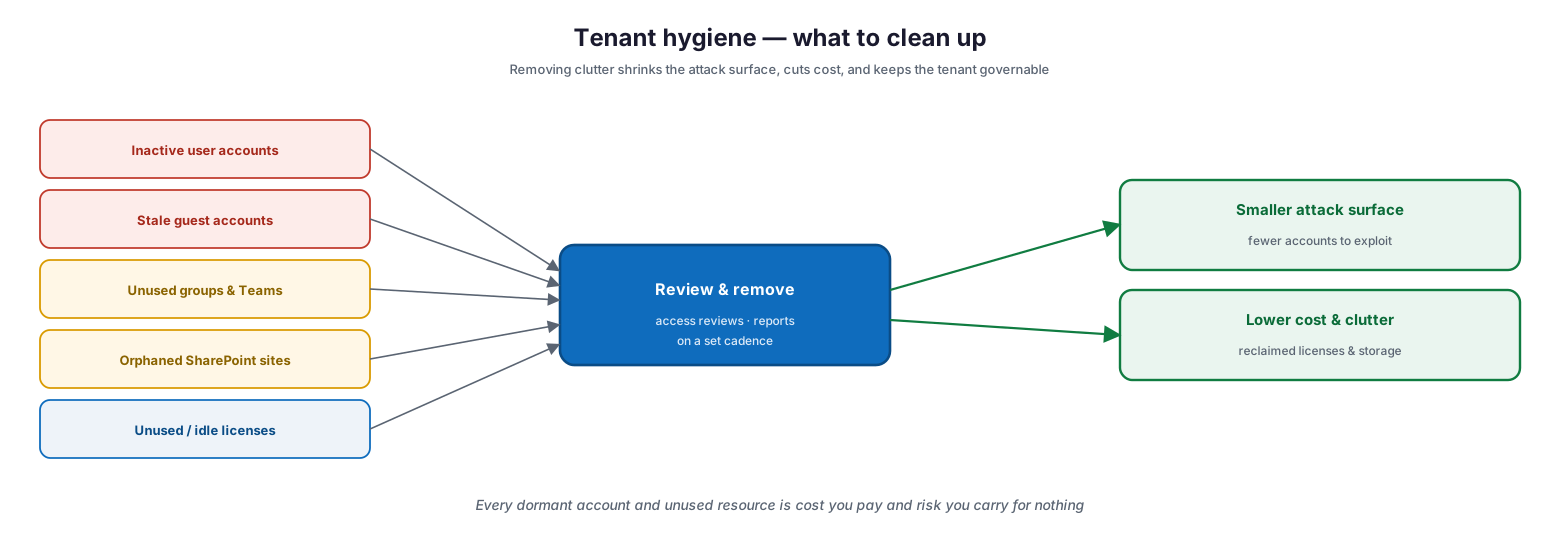
Tenant hygiene — what to clean up: inactive user accounts, stale guest accounts, unused groups and Teams, orphaned SharePoint sites, and unused or idle licenses all converge into a review-and-remove step (access reviews and reports on a set cadence), producing a smaller attack surface (fewer accounts to exploit) and lower cost and clutter (reclaimed licenses and storage).
| Cleanup target | What to remove or fix | How to find it | Benefit |
|---|---|---|---|
| Inactive user accounts | Disable/remove accounts unused for a set period | Sign-in logs; usage reports | Fewer accounts to attack |
| Stale guest accounts | Remove external guests no longer collaborating | Access reviews for guests | Reduced external exposure |
| Unused groups & Teams | Delete or archive dormant groups and Teams | Group activity reports | Less sprawl to govern |
| Orphaned SharePoint sites | Reassign or remove ownerless sites | SharePoint admin / site reports | Recovered storage, clearer data |
| Idle / unused licenses | Reclaim seats assigned but unused | Usage reports | Direct cost saving |
Cleanup is not a one-off purge; it is a recurring review — ideally driven by access reviews for identities and by usage reports for licenses and resources — so clutter does not simply re-accumulate.
How do you keep the tenant optimized?
The hardest part of optimization is not reaching the baseline but holding it. Configuration drift is inevitable: administrators make exceptions, projects change settings, and Microsoft introduces new capabilities. An optimized tenant is one where drift is expected and routinely corrected.
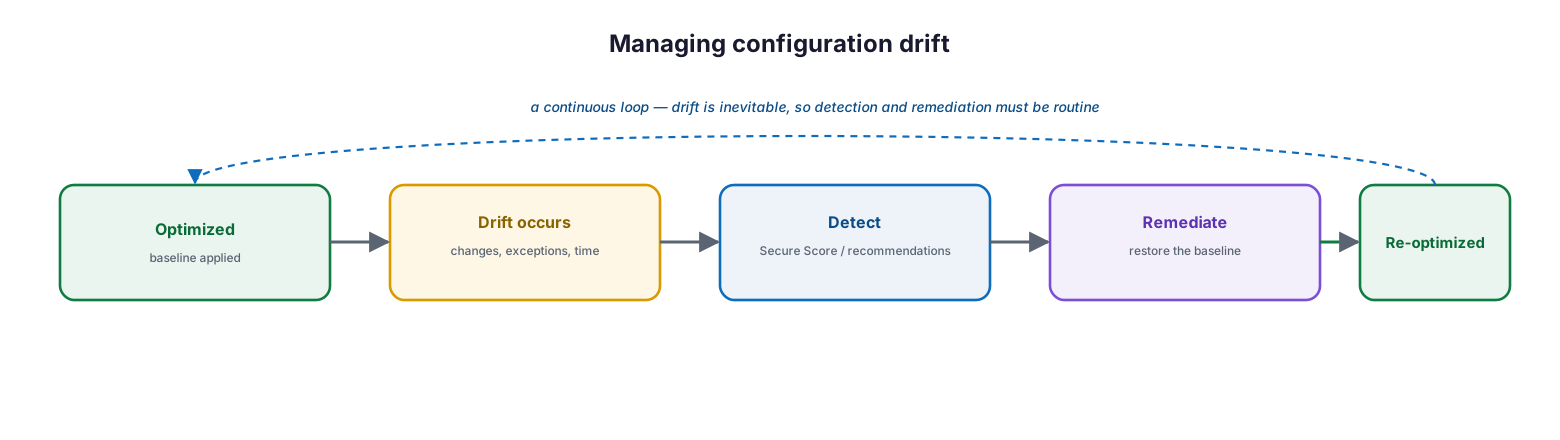
Managing configuration drift: an optimized tenant with the baseline applied experiences drift over time (changes, exceptions, elapsed time), which is detected via Secure Score and recommendations, then remediated to restore the baseline, returning the tenant to a re-optimized state — a continuous loop because drift is inevitable, so detection and remediation must be routine.
Practically, this means treating Secure Score and Entra recommendations as standing signals, reviewing them on a cadence, and correcting any regression back to the baseline. The metrics below make “optimized” measurable rather than a matter of opinion.
| Optimization metric | Healthy target | Tool | Business value |
|---|---|---|---|
| Microsoft Secure Score | At/above baseline, trending up | Secure Score | Measurable, comparable posture |
| MFA coverage | 100% of users | Entra ID | Account-takeover prevention |
| Legacy authentication | Blocked / zero use | Entra sign-in logs | Closed a top attack vector |
| Device compliance | ≥95% compliant | Intune | Healthy, trusted endpoints |
| Inactive accounts | Reviewed and removed quarterly | Access reviews | Smaller attack surface |
| License utilization | ≥95% assigned and active | Usage reports | No wasted spend |
Managed optimization service model (RACI)
Delivered as a managed service, tenant optimization is an accountable, continuously maintained capability. This RACI defines who does what, the tool, the cadence, and the impact.
| Activity | Responsible (MSP/IT) | Accountable (CIO) | Tool | Cadence | SLA / impact |
|---|---|---|---|---|---|
| Assess Secure Score & gaps | MSP engineering | CIO | Secure Score / recommendations | On onboarding & quarterly | Clear improvement targets |
| Deploy standard baseline | MSP engineering | CIO | Lighthouse / admin centers | On onboarding | Consistent configuration |
| Harden high-risk settings | MSP security | CIO | Entra / Purview / SharePoint | Continuous | Reduced attack surface |
| Run hygiene & cleanup | MSP service desk | CIO | Access reviews / usage reports | Quarterly | Leaner, cheaper tenant |
| Monitor & correct drift | MSP engineering | CIO | Secure Score / recommendations | Monthly | Optimization maintained |
Implementation checklist
- A baseline Secure Score is captured with a target for improvement
- A standard configuration is defined across the six baseline pillars
- MFA is enforced for all users and legacy authentication is blocked
- Conditional Access (or security defaults) enforces the identity baseline
- Email, endpoint, and data-protection baselines are applied and measured
- External sharing and guest access are configured to a deliberate standard
- Inactive users, stale guests, and unused groups/sites are reviewed and removed
- Licenses are right-sized against usage reports
- Secure Score and Entra recommendations are monitored on a cadence
- Configuration drift is detected and corrected routinely
- Optimization is owned as an ongoing service, not a one-time project
Best practices
- Optimize to a defined baseline, not a bespoke, drifting configuration.
- Use Secure Score as the objective measure of optimization and drive it up.
- Apply the six-pillar baseline consistently; standardize rather than customize.
- Enforce MFA everywhere and block legacy authentication first — highest impact.
- Tighten external sharing and guest access to a deliberate standard.
- Treat cleanup as a recurring review, driven by access reviews and usage reports.
- Right-size licenses as part of optimization, not a separate afterthought.
- Monitor drift continuously; correct regressions promptly.
- Run optimization as an owned, ongoing managed discipline.
Common mistakes
- Treating optimization as a one-time cleanup instead of an ongoing loop.
- Leaving Microsoft’s defaults in place and assuming they are optimized.
- Customizing every tenant differently instead of applying a standard baseline.
- Ignoring Secure Score, so there is no objective measure of progress.
- Leaving legacy authentication enabled, keeping a top attack vector open.
- Letting inactive users and stale guests accumulate unchecked.
- Over-open external sharing that quietly leaks data.
- Never re-checking for drift, so the tenant slides back to default.
Frequently asked questions
What is Microsoft 365 tenant optimization?
It is the discipline of configuring a tenant to a deliberate, secure, efficient baseline — across identity, email and apps, endpoints, data, and user experience — and maintaining that baseline against configuration drift over time.
How is it different from health monitoring or administration?
Health monitoring watches the tenant’s signals; administration governs privileged roles and access; optimization tunes the configuration itself and cleans up clutter. They are complementary disciplines, each covered in its own guide.
What is the baseline?
Microsoft’s recommended standard configuration, organized into six pillars: identity protection, email and apps protection, endpoint enrollment, endpoint protection, data protection, and end-user experience. Partners can deploy it at scale with Microsoft 365 Lighthouse; any organization can use the pillars as a checklist.
How do we measure whether a tenant is optimized?
Primarily through Microsoft Secure Score, supported by concrete metrics: 100% MFA coverage, legacy authentication blocked, ≥95% device compliance, inactive accounts removed, and licenses right-sized. Optimization should be a measurable trend, not an opinion.
What is configuration drift, and why does it matter?
Drift is the gradual movement of a tenant away from its baseline as exceptions and changes accumulate. It matters because an unmaintained tenant slides back toward insecure defaults, so drift must be detected and corrected on a cadence.
Where should we start?
Measure Secure Score, enforce MFA and block legacy authentication (the highest-impact steps), then apply the rest of the baseline, clean up inactive accounts and unused licenses, and put drift monitoring on a cadence.
Conclusion
A Microsoft 365 tenant that is merely accumulated is over-exposed, over-spent, and hard to govern. Optimization fixes that by bringing the tenant to a deliberate baseline — hardened identity, protected email and endpoints, governed data, and a clean, right-sized estate — and then holding that baseline against the drift that would otherwise pull it back to default. The six-pillar baseline gives the target, Secure Score gives the measure, and a repeatable assess-apply-harden-clean-monitor loop gives the method.
The path forward is concrete: measure Secure Score, apply the standard baseline across the six pillars, enforce MFA and block legacy authentication, clean up inactive accounts and idle licenses, and monitor for drift on a cadence. Run this way — as an owned, continuous discipline rather than a one-time cleanup — tenant optimization turns Microsoft 365 from a drifting liability into a secure, efficient, well-governed foundation. For the adjacent disciplines, see the companion administration, health monitoring, cost, and performance guides.
Authoritative references
All sources are official Microsoft documentation. Verify current features before acting; Microsoft 365 changes frequently. Source access date: 28 July 2026.
- Deploy standard tenant configurations with Microsoft 365 Lighthouse baselines — Microsoft Learn
- Overview of Microsoft 365 Lighthouse — Microsoft Learn
- Microsoft Secure Score — Microsoft Learn
- Microsoft Entra recommendations — Microsoft Learn
- Security defaults in Microsoft Entra ID — Microsoft Learn
- Common Conditional Access policies — Microsoft Learn
- Top ways to secure your business — Microsoft Learn
- Access reviews in Microsoft Entra — Microsoft Learn
- Protect information with Microsoft Purview — Microsoft Learn
- Microsoft 365 admin center usage reports — Microsoft Learn
On this page
- Executive Summary
- What does tenant optimization mean?
- What is the optimization baseline?
- How do you run the optimization process?
- What should you clean up?
- How do you keep the tenant optimized?
- Managed optimization service model (RACI)
- Implementation checklist
- Best practices
- Common mistakes
- Frequently asked questions
- Conclusion
- Authoritative references