Hybrid Work Best Practices
Hybrid work is no longer an experiment; it is how most knowledge organizations now operate.
- Content owner
- Insyto Content Team
- Editorial reviewer
- Ritesh Mhatre
- Technical reviewer
- Navish Ansari
- Next review
- To be scheduled
- Last reviewed
- Review pending
- Technical level
- Intermediate · IT directors, Microsoft 365 administrators
Modern Workplace Management · Hybrid Work
Executive Summary
Hybrid work is no longer an experiment; it is how most knowledge organizations now operate. But “hybrid” done badly is worse than either fully remote or fully in-office: remote employees become second-class participants who cannot be seen or heard in meetings, collaboration fragments across email threads and disconnected tools, and the informal connection that holds a team together quietly erodes. Done well, hybrid work lets an organization hire the best people wherever they are, give employees the flexibility they increasingly expect, and get more productivity from a workforce that is less commuted and better supported. The difference between the two outcomes is not the technology — most organizations already own it in Microsoft 365 — but the deliberate practices built around it.
Microsoft frames empowering hybrid workers around a small set of capabilities: people must be connected to their apps and data from anywhere, their access must be secure, their devices managed, and their work collaborative and productive. To that technical foundation, a successful hybrid organization adds a fifth, human capability — keeping people engaged: connected to each other, supported in their wellbeing, and equipped with the norms and skills to work well across distance. The first four are largely delivered by tools like Teams, SharePoint, OneDrive, Intune, and Windows 365; the fifth is where culture, meeting discipline, and adoption decide whether hybrid work succeeds.
This guide sets out best practices for making hybrid work genuinely work: how to balance real-time and asynchronous collaboration, how to run meetings so remote people have an equal seat, how to give every worker frictionless access whatever their device, and how to sustain employee experience and adoption. It focuses on productivity and experience; the security controls that make hybrid work safe are covered in the companion hybrid work security guide. Because Microsoft’s tools evolve, verify specifics against the linked documentation.
Who should read this:
- CIOs, CTOs, and IT directors enabling a productive hybrid workforce
- IT and workplace leaders responsible for collaboration tools and adoption
- HR and operations leaders shaping hybrid norms and employee experience
- SMB decision-makers evaluating managed hybrid-work enablement
What makes hybrid work actually work?
Hybrid work succeeds when five capabilities come together. Miss one and the whole thing wobbles: a connected, secure, well-managed setup still fails if meetings exclude remote people or if employees feel isolated.
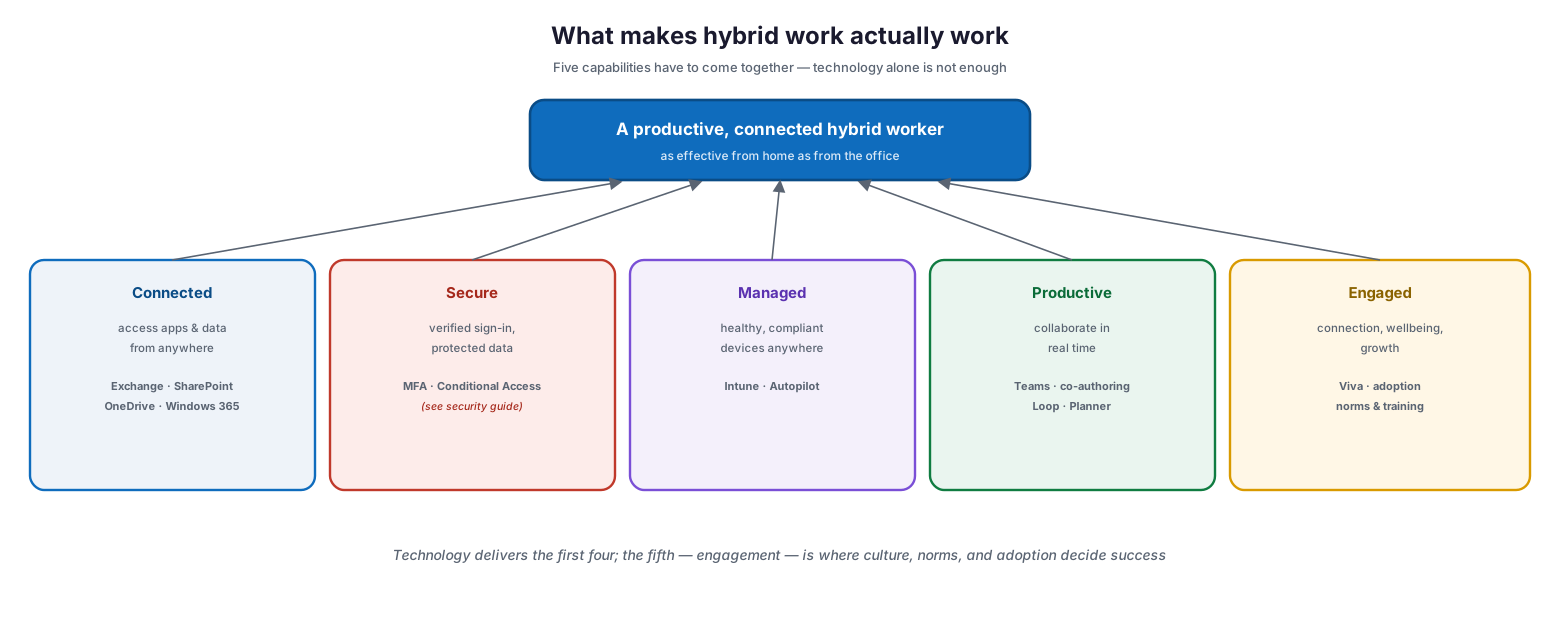
What makes hybrid work actually work: five capabilities support a productive, connected hybrid worker who is as effective from home as from the office — connected (access apps and data from anywhere via Exchange, SharePoint, OneDrive, Windows 365), secure (verified sign-in and protected data via MFA and Conditional Access; see the security guide), managed (healthy compliant devices anywhere via Intune and Autopilot), productive (collaborate in real time via Teams, co-authoring, Loop, Planner), and engaged (connection, wellbeing, and growth via Viva, adoption, norms, and training).
| Capability | What it means | Microsoft tools | Best practice |
|---|---|---|---|
| Connected | Access apps and data from anywhere, any time | Exchange, SharePoint, OneDrive, Windows 365 | Store work in the cloud, not on local drives |
| Secure | Verified sign-in and protected data | MFA, Conditional Access, Defender | Enforce MFA; require compliant devices (see security guide) |
| Managed | Healthy, compliant devices anywhere | Microsoft Intune, Windows Autopilot | Manage or app-protect every device |
| Productive | Real-time and async collaboration | Teams, co-authoring, Loop, Planner | Default to shared cloud docs and channels |
| Engaged | Connection, wellbeing, and growth | Microsoft Viva, adoption programs | Set norms, train, and listen to feedback |
The first four are technology problems with clear answers. The fifth — engagement — is a leadership and culture problem, and it is the one most organizations neglect and most often regret.
How do you balance real-time and asynchronous work?
The most common productivity mistake in hybrid teams is defaulting to synchronous work — pulling everyone into meetings and expecting instant chat replies — which punishes anyone in a different time zone or focused on deep work. High-performing hybrid teams default to asynchronous collaboration and reserve real-time interaction for the things that genuinely need it.
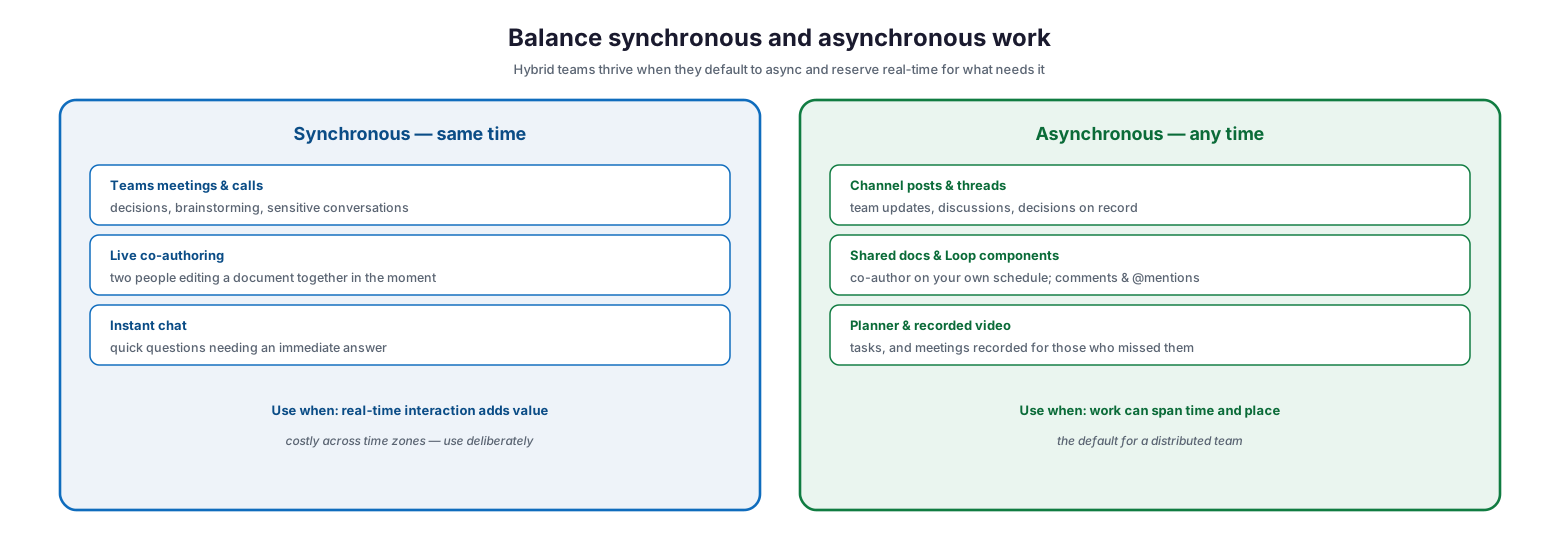
Balance synchronous and asynchronous work: synchronous (same time) suits Teams meetings and calls for decisions, brainstorming, and sensitive conversations, live co-authoring, and instant chat for quick questions — use when real-time interaction adds value, and deliberately across time zones; asynchronous (any time) suits channel posts and threads for updates and decisions on record, shared docs and Loop components for co-authoring on your own schedule, and Planner and recorded video — the default for a distributed team.
| Mode | Best used for | Microsoft tools | Team norm |
|---|---|---|---|
| Synchronous (same time) | Decisions, brainstorming, sensitive talks | Teams meetings, calls, live co-authoring | Reserve for what truly needs real time |
| Asynchronous (any time) | Updates, discussions on record, task work | Channel posts, shared docs, Loop, Planner | The default for a distributed team |
| Quick questions | Immediate, low-stakes answers | Teams chat | Don’t expect instant replies outside hours |
| Missed meetings | Catching up on what happened | Recording + transcript | Record important meetings by default |
Making async the default has a second benefit: it creates a written record, so decisions and context are visible to everyone regardless of when they were online — which is exactly what a distributed team needs.
How do you run meetings so remote people are equal?
Meeting equity is the single highest-impact hybrid practice. The classic failure is a room full of colleagues around a laptop with one small remote participant who cannot see faces, read the whiteboard, or get a word in. The fix is a discipline, not a gadget.
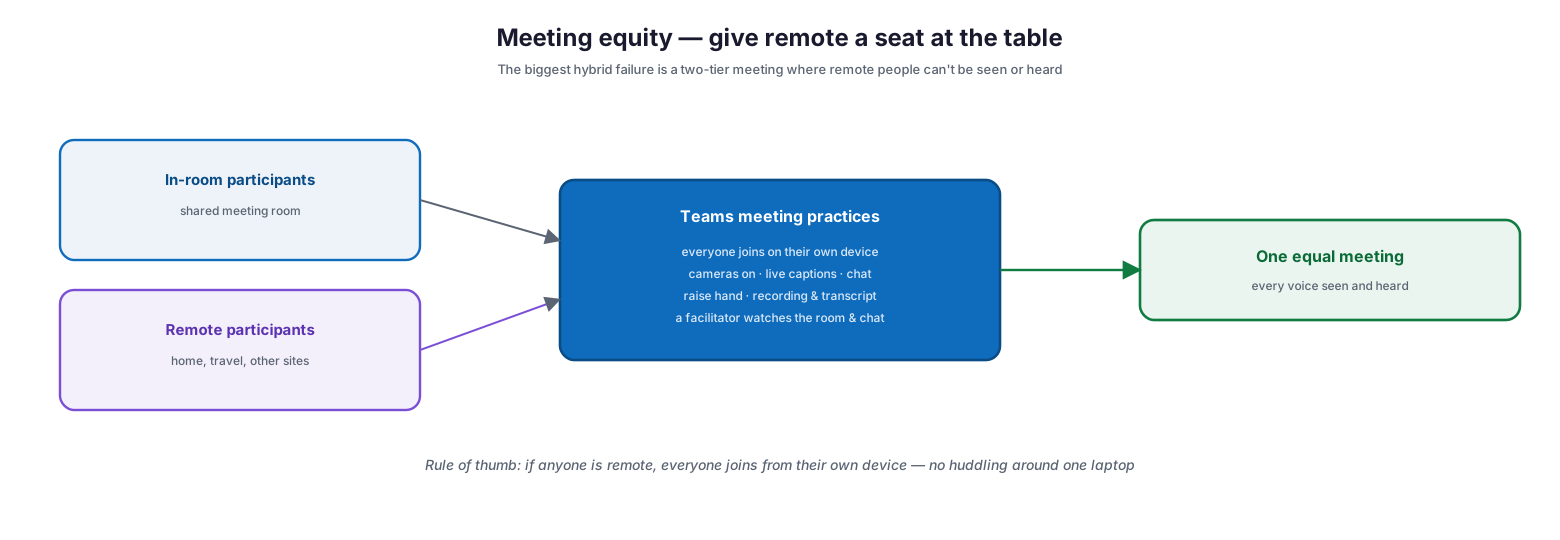
Meeting equity — give remote a seat at the table: in-room participants and remote participants both flow into Teams meeting practices where everyone joins on their own device, cameras are on, live captions and chat are used, raise-hand and recording and transcript are enabled, and a facilitator watches the room and the chat — producing one equal meeting where every voice is seen and heard; the rule of thumb is that if anyone is remote, everyone joins from their own device rather than huddling around one laptop.
| Practice | Why it matters | How (in Microsoft Teams) |
|---|---|---|
| Everyone joins on their own device | Remote sees every face, not a room from afar | Individual Teams join even when co-located |
| Cameras on where practical | Restores the non-verbal cues remote people lose | Encourage video; use background blur |
| Live captions and transcript | Accessibility and catch-up across accents/noise | Turn on captions; save the transcript |
| Use meeting chat and raise hand | Gives quieter and remote voices a channel | Monitor chat; call on raised hands |
| A named facilitator | Someone ensures remote people are included | Assign a facilitator to watch room and chat |
| Record important meetings | Absent and time-zone-shifted people stay informed | Record with transcript; share afterward |
The rule of thumb captures it: if anyone is remote, everyone joins from their own device. That one norm eliminates the two-tier meeting more effectively than any hardware.
How do you give everyone frictionless access?
Hybrid work only works if people can reach the same tools and files wherever they are, on whatever device they have. Microsoft 365 supports two paths — a modern managed device with direct cloud access, or any device (including older or personal hardware) reaching a full Windows experience through a Windows 365 Cloud PC — plus mobile apps for phones and tablets.
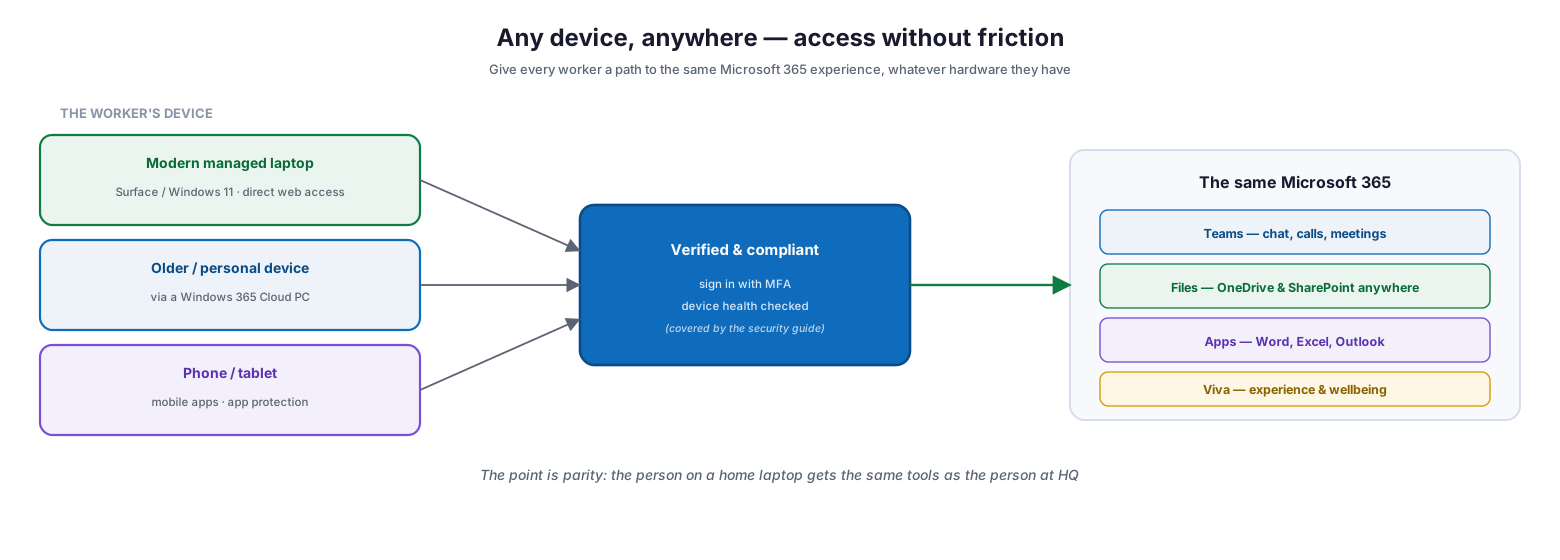
Any device, anywhere: a modern managed laptop gets direct web access, an older or personal device connects via a Windows 365 Cloud PC, and a phone or tablet uses mobile apps with app protection; all sign in with MFA and have device health checked (covered by the security guide), reaching the same Microsoft 365 — Teams for chat, calls, and meetings; files in OneDrive and SharePoint anywhere; Word, Excel, and Outlook; and Viva for experience and wellbeing. The point is parity: the person on a home laptop gets the same tools as the person at HQ.
The principle is parity: whether someone is on a corporate Surface at headquarters or an old laptop at home, they should reach the same Teams, the same files, and the same apps with the same ease. Storing work in OneDrive and SharePoint rather than on local drives is the foundation — it makes files available, co-authorable, and recoverable from anywhere, and it is what turns “I left that file on my office PC” into a non-issue. Windows 365 fills the gap for people whose own hardware cannot run the full experience, giving them a high-performance, secure, cloud-hosted Windows desktop from almost anything.
How do you sustain engagement and adoption?
The technology can be flawless and hybrid work can still fail if people feel disconnected or never learn to use the tools well. Sustaining engagement is the human half of hybrid work, and it has two parts: supporting the employee experience, and driving genuine adoption.
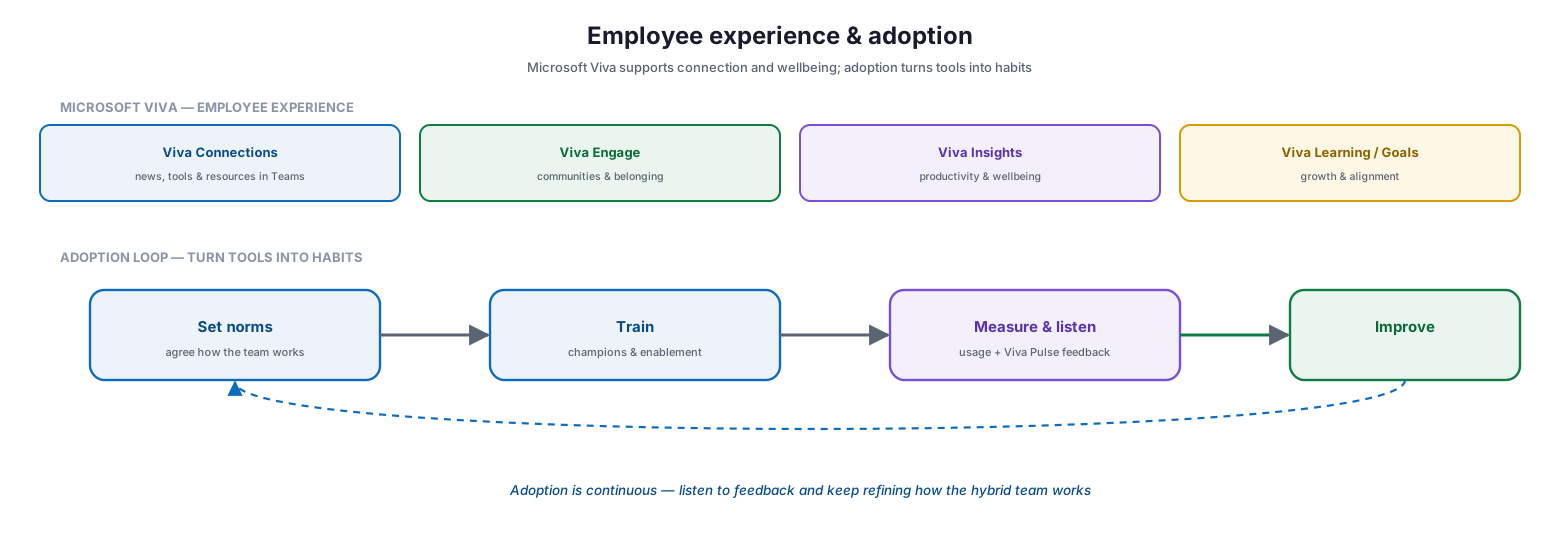
Employee experience and adoption: Microsoft Viva supports employee experience — Viva Connections (news, tools, and resources in Teams), Viva Engage (communities and belonging), Viva Insights (productivity and wellbeing), and Viva Learning/Goals (growth and alignment) — while an adoption loop turns tools into habits: set norms (agree how the team works), train (champions and enablement), measure and listen (usage plus Viva Pulse feedback), and improve, repeating continuously.
Microsoft Viva is the employee-experience platform built into Microsoft 365 and Teams, designed to support connection, insight, purpose, and growth. Viva Connections brings company news, tools, and resources into Teams; Viva Engage builds communities and belonging across a distributed workforce; Viva Insights offers privacy-protected productivity and wellbeing guidance (including nudges to protect focus time and disconnect); and Viva Learning and Viva Goals support growth and alignment. Alongside the experience platform, adoption is what turns capability into habit — and Microsoft’s own guidance is explicit that you must train workers and address usage feedback rather than assume tools will be used well.
| Viva experience | Purpose | Hybrid work benefit |
|---|---|---|
| Viva Connections | News, tools, and resources in Teams | A shared “front door” for a distributed workforce |
| Viva Engage | Communities and leader connection | Belonging and knowledge-sharing across distance |
| Viva Insights | Productivity and wellbeing guidance | Protects focus time; helps prevent burnout |
| Viva Learning | Learning in the flow of work | Growth without travel or scheduled classrooms |
| Viva Pulse / Glint | Feedback and engagement listening | Hear how hybrid is really working, and act |
Adoption itself should run as a loop: set norms so the team agrees how it works, train through champions and enablement, measure usage and listen to feedback (via usage reports and Viva Pulse), and improve — continuously, because hybrid ways of working keep evolving.
Managed hybrid-work enablement model (RACI)
Delivered as a managed service, hybrid-work enablement is an accountable capability spanning tools, experience, and adoption. This RACI defines who does what.
| Activity | Responsible (MSP/IT) | Accountable (CIO/HR) | Tool | Cadence | Business impact |
|---|---|---|---|---|---|
| Deploy collaboration tools | MSP engineering | CIO | Teams, SharePoint, OneDrive | On onboarding | Everyone can collaborate |
| Enable anywhere access | MSP engineering | CIO | Windows 365, Intune, mobile apps | On onboarding & new hires | Device parity for all |
| Configure Viva experience | MSP + HR | CIO / HR | Microsoft Viva | On rollout | Connection and wellbeing |
| Set meeting & work norms | HR + team leads | HR | Teams / policy | On rollout, reviewed | Meeting equity, less overload |
| Drive adoption & training | MSP adoption lead | CIO / HR | Champions, Viva Learning | Ongoing | Tools become habits |
| Measure & listen | MSP + HR | CIO / HR | Usage reports, Viva Pulse | Quarterly | Continuous improvement |
Implementation checklist
- Work is stored in OneDrive and SharePoint, not on local drives
- Teams is the hub for chat, channels, meetings, and calls
- The team defaults to asynchronous collaboration, reserving sync for what needs it
- Important meetings are recorded with transcripts by default
- Meeting equity norms are in place — everyone joins on their own device
- Cameras, live captions, chat, and raise-hand are used in meetings
- Every worker has a device path: managed device, Windows 365, or mobile
- Microsoft Viva is deployed for connection, wellbeing, and learning
- Hybrid work norms (hours, response expectations, focus time) are agreed
- An adoption program with champions and training is running
- Usage and employee feedback are measured and acted on
- Security controls are in place per the companion security guide
Best practices
- Store work in the cloud so files follow people, not devices.
- Make asynchronous the default and reserve real-time for what needs it.
- Practise meeting equity: if anyone is remote, everyone joins individually.
- Record important meetings and share transcripts for those who missed them.
- Give every worker frictionless access — managed device, Windows 365, or mobile.
- Deploy Viva to sustain connection, wellbeing, and learning across distance.
- Agree explicit norms for hours, response times, and focus time.
- Run adoption as a continuous program with champions and training.
- Measure usage and listen to employee feedback, then improve.
Common mistakes
- Treating hybrid as an afterthought instead of designing for it deliberately.
- Two-tier meetings where a room excludes remote participants.
- Defaulting to synchronous work and overloading everyone with meetings.
- Keeping files on local drives, so work is stranded when people move.
- Assuming tools will be adopted well without training or norms.
- Ignoring employee experience, letting isolation and burnout build.
- Forgetting the workers whose own hardware can’t run the full experience.
- Never measuring or listening, so problems stay invisible.
Frequently asked questions
What is hybrid work, in practice?
It is a way of working where people split time between the office and remote locations, and where the tools, meetings, and norms are designed so that being remote is not a disadvantage. The goal is parity: equally productive and included wherever you are.
How is this different from hybrid work security?
This guide covers productivity, collaboration, and employee experience — how to make hybrid work well. The companion hybrid work security guide covers the controls that make it safe: identity, device compliance, data protection, and Conditional Access.
What is the most important single practice?
Meeting equity. If anyone is remote, everyone should join the meeting from their own device, with cameras, captions, and chat, and a facilitator ensuring remote voices are heard. It eliminates the two-tier meeting that undermines hybrid teams.
How do we support employees on old or personal devices?
Use Windows 365 Cloud PCs to give them a full, secure Windows desktop streamed to almost any device, and mobile apps with app protection for phones and tablets. The aim is that everyone reaches the same Microsoft 365 regardless of hardware.
What is Microsoft Viva?
It is Microsoft’s employee-experience platform built into Microsoft 365 and Teams. It supports connection (Connections, Engage), wellbeing and productivity (Insights), growth (Learning, Goals), and feedback (Pulse, Glint) — helping sustain the human side of a distributed workforce.
How do we make sure tools are actually used?
Run adoption as a program, not an assumption: set norms, train through champions, provide learning in the flow of work, measure usage, and listen to feedback via tools like Viva Pulse — then keep refining. Adoption is continuous, not a one-time launch.
Conclusion
Hybrid work rewards deliberate design and punishes neglect. The organizations that thrive treat it as a capability to build, not a circumstance to tolerate: they connect people to their tools from anywhere, secure and manage the access, default to asynchronous collaboration, run meetings so remote people have an equal seat, give every worker frictionless access whatever their device, and invest in the human side — employee experience and genuine adoption. Microsoft 365 supplies the technology for all of this; the practices and norms around it are what turn it into a workforce that is as effective distributed as it ever was in one building.
The path forward is concrete: move work to the cloud, make Teams the hub, set meeting-equity and async-first norms, provide a device path for everyone, deploy Viva, and run adoption as an ongoing program that listens and improves. Do that, and hybrid stops being a compromise and becomes an advantage — in talent, productivity, and resilience. For the controls that keep it secure, see the companion hybrid work security guide.
Authoritative references
All sources are official Microsoft documentation. Verify current features before acting; Microsoft 365 changes frequently. Source access date: 28 July 2026.
- Set up your infrastructure for hybrid work with Microsoft 365 — Microsoft Learn
- Deploy hybrid worker productivity apps and services — Microsoft Learn
- Train your workers and address usage feedback — Microsoft Learn
- Microsoft Teams overview — Microsoft Learn
- Adopt Microsoft Teams — Microsoft Learn
- Microsoft Viva overview — Microsoft Learn
- Microsoft Viva Insights — Microsoft Learn
- Windows 365 Enterprise overview — Microsoft Learn
- What is Microsoft Intune? — Microsoft Learn
On this page
- Executive Summary
- What makes hybrid work actually work?
- How do you balance real-time and asynchronous work?
- How do you run meetings so remote people are equal?
- How do you give everyone frictionless access?
- How do you sustain engagement and adoption?
- Managed hybrid-work enablement model (RACI)
- Implementation checklist
- Best practices
- Common mistakes
- Frequently asked questions
- Conclusion
- Authoritative references