Microsoft 365 Health Monitoring
A Microsoft 365 tenant is a living system, and like any living system it has vital signs.
- Content owner
- Insyto Content Team
- Editorial reviewer
- Ritesh Mhatre
- Technical reviewer
- Navish Ansari
- Next review
- To be scheduled
- Last reviewed
- Review pending
- Technical level
- Intermediate · IT directors, Microsoft 365 administrators
Modern Workplace Management · Microsoft 365 Health Monitoring
Executive Summary
A Microsoft 365 tenant is a living system, and like any living system it has vital signs. Its security posture rises and falls with configuration and threats; identities are used, abused, and occasionally compromised; Microsoft’s own services have incidents; licenses are adopted or left idle; data accumulates against storage and compliance limits; and Microsoft ships changes constantly. Health monitoring is the practice of watching all of these signals continuously, comparing them against what “healthy” looks like, and acting before a warning sign becomes an outage, a breach, or a compliance failure. Without it, a tenant runs blind — problems are discovered by users, auditors, or attackers rather than by the people responsible for it.
The mistake most organizations make is to equate health monitoring with a single dashboard or to assume that because Microsoft runs the platform, the platform runs itself. It does not. Microsoft guarantees the availability of the service; the health of your tenant — your configuration, your identities, your data, your adoption — is yours to monitor. And the signals are scattered across half a dozen tools: Secure Score, the Entra sign-in and audit logs, the Service Health Dashboard, usage reports, Microsoft Purview, and the Message center. Real health monitoring is the disciplined correlation of all of them into a single, trended view that produces alerts, reports, and improvement.
This guide sets out how to monitor the health of a Microsoft 365 tenant across its six dimensions, which tools and signals matter for each, how identity health monitoring works in detail, how to turn a flood of signals into prioritized action, and the cadence that keeps it honest. It focuses on the holistic health of the tenant; the narrower discipline of tracking Microsoft’s own service incidents is covered in the companion service health monitoring guide. Because Microsoft’s tools evolve, verify specifics against the linked documentation.
Who should read this:
- CIOs, CTOs, and IT directors accountable for tenant reliability and posture
- Microsoft 365 administrators who monitor and maintain the environment
- Security and compliance leaders tracking risk and adoption signals
- SMB decision-makers evaluating managed monitoring of Microsoft 365
What does tenant health actually mean?
Tenant health is not one number; it is the combined state of several distinct dimensions, each with its own signal, its own tool, and its own definition of healthy. Treating them together — and knowing which tool reveals each — is what separates monitoring from guesswork.
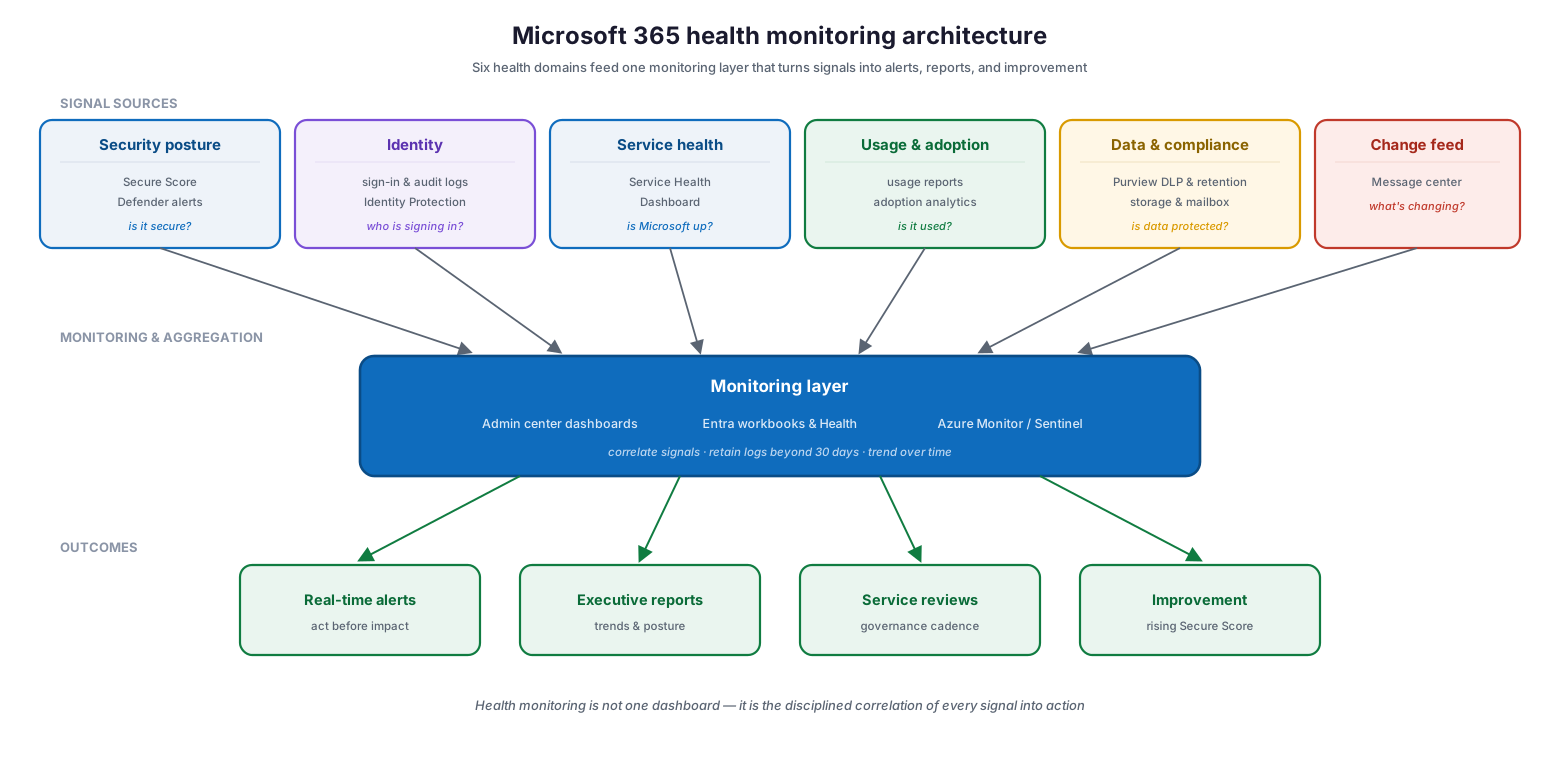
Microsoft 365 health monitoring architecture: six signal sources — security posture (Secure Score, Defender alerts), identity (sign-in and audit logs, Identity Protection), service health (Service Health Dashboard), usage and adoption (usage reports), data and compliance (Purview, storage), and the change feed (Message center) — feed a monitoring and aggregation layer (admin center dashboards, Entra workbooks and Health, Azure Monitor or Sentinel) that produces real-time alerts, executive reports, service reviews, and improvement.
The architecture above is the mental model: six domains of signal flow into one monitoring layer, which correlates them, retains them beyond their default windows, and turns them into outcomes. The table below defines each dimension concretely — what you watch, the primary tool, what healthy looks like, and the risk of not watching it.
| Health dimension | What you monitor | Primary tool | Healthy signal / threshold | Risk if unmonitored |
|---|---|---|---|---|
| Security posture | Secure Score, Defender alerts | Microsoft Secure Score / Defender | Score trending up; alerts triaged | Undetected breach |
| Identity health | Sign-ins, risky sign-ins, directory changes | Entra sign-in & audit logs, Identity Protection | MFA 100%; no unresolved risky sign-ins | Account takeover |
| Service health | Microsoft incidents and advisories | Service Health Dashboard | Incidents seen and communicated | Blind to outages |
| Usage & adoption | Active users per service | Usage reports / analytics | Adoption on target; no idle licenses | Wasted spend, low ROI |
| Data & compliance | DLP, retention, storage and mailbox usage | Microsoft Purview / storage reports | Policies enforced; storage <90% | Data loss, non-compliance |
| Change awareness | Upcoming Microsoft service changes | Message center | Changes reviewed and planned | Surprise disruptions |
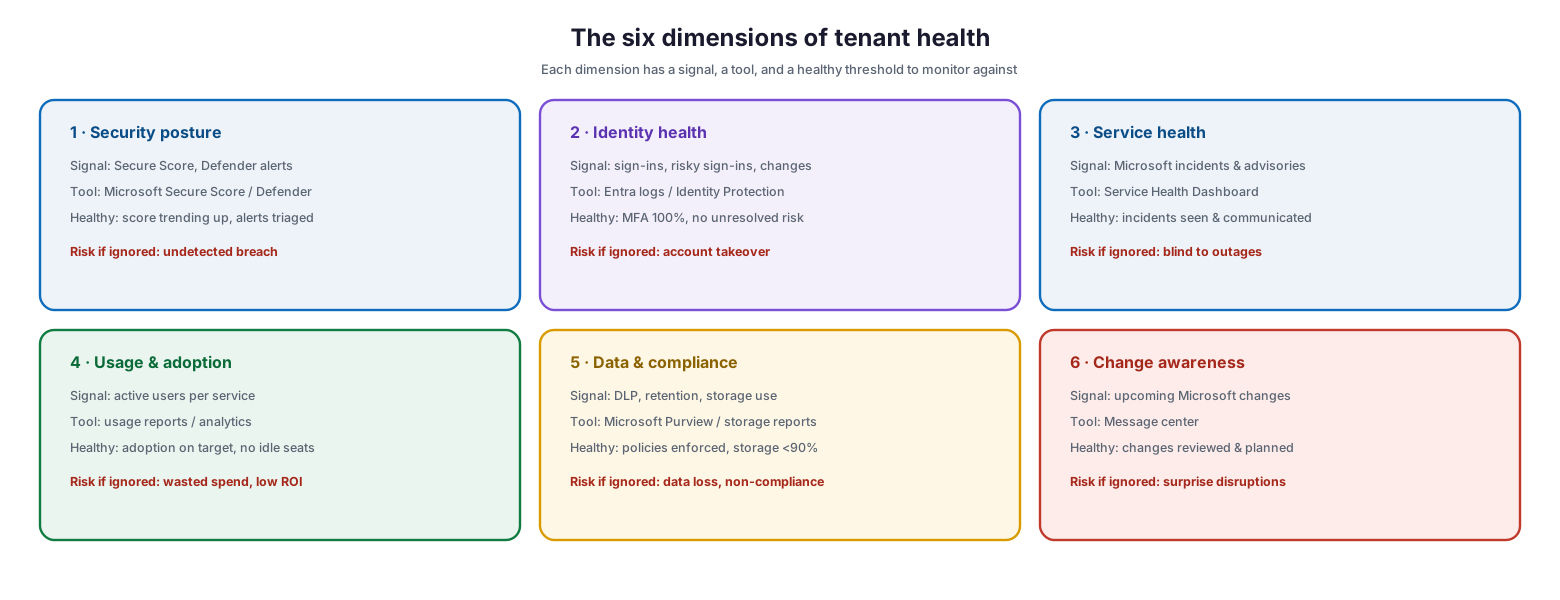
The six dimensions of tenant health as detailed panels: for each — security posture, identity health, service health, usage and adoption, data and compliance, and change awareness — the signal to watch, the tool that reveals it, the healthy threshold, and the risk if ignored.
How does identity health monitoring work?
Identity is the highest-value dimension to monitor, because compromised identities are the most common route to a breach. Microsoft Entra provides a comprehensive view of identity activity through three activity logs and a set of reports built on top of them.
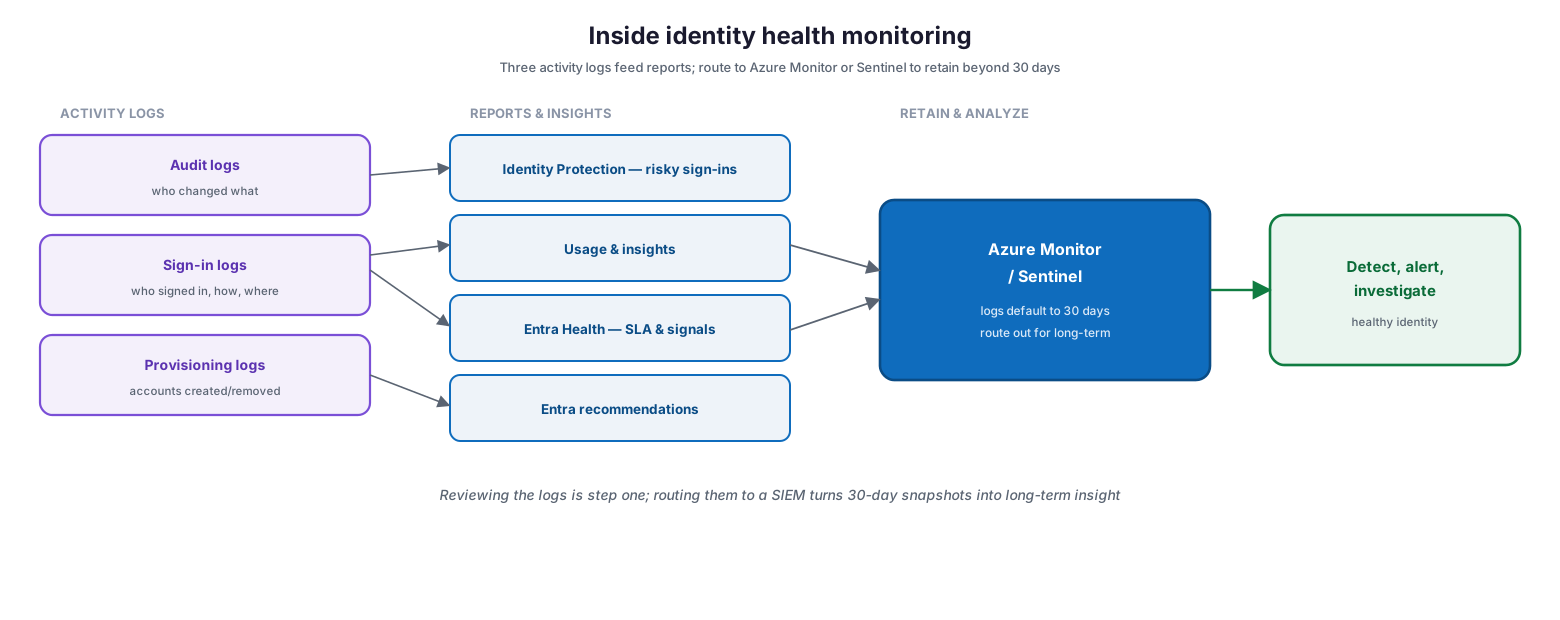
Inside identity health monitoring: three activity logs — audit logs (who changed what), sign-in logs (who signed in, how, and from where), and provisioning logs (accounts created or removed) — feed reports including Identity Protection risky sign-ins, Usage and insights, Entra Health SLA and signals, and Entra recommendations; logs default to 30 days and should be routed to Azure Monitor or Sentinel to retain and analyze longer, enabling detection, alerting, and investigation.
The audit logs record every change made in the tenant — who added someone to an admin group, what changed on an application. The sign-in logs capture every sign-in attempt, revealing patterns and anomalies. Built on these, Microsoft Entra ID Protection reports risky users and sign-ins, Microsoft Entra Health captures service-level and health signals for key scenarios, and Entra recommendations suggest concrete security improvements. A crucial operational detail: these logs are retained for only about 30 days by default, so to investigate older incidents or spot long-term trends you must route them to Azure Monitor, Microsoft Sentinel, or another SIEM.
| Log / report | What it answers | Tool | Default retention | Typical action |
|---|---|---|---|---|
| Audit logs | Who changed what, and when | Entra audit logs | ~30 days | Investigate configuration changes |
| Sign-in logs | Who signed in, how, and from where | Entra sign-in logs | ~30 days | Spot anomalous access |
| Risky sign-ins | Which sign-ins are risky | Identity Protection | — | Block or challenge, remediate user |
| Entra Health | SLA attainment and health signals | Microsoft Entra Health | — | Detect service degradations |
| Recommendations | Where to improve security | Entra recommendations | — | Remediate the highest-impact gaps |
How do you turn signals into action?
Monitoring generates a lot of signal, and most of it is not urgent. The discipline that makes health monitoring valuable is triage: converging every signal, classifying it by severity and owner, and routing it to the right response path so the few things that need action now get it, and the rest are planned or simply noted.
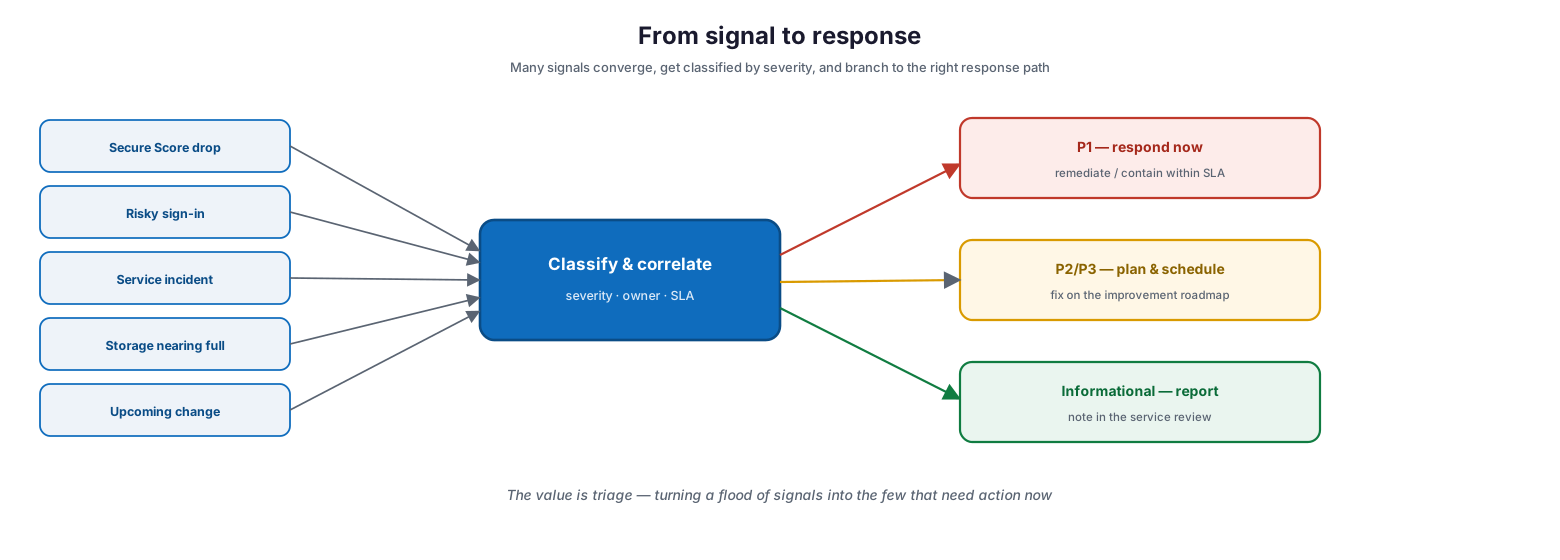
From signal to response: many signals — a Secure Score drop, a risky sign-in, a service incident, storage nearing full, an upcoming change — converge into a classify-and-correlate step that assigns severity, owner, and SLA, then branch to P1 (respond now, remediate within SLA), P2/P3 (plan and schedule on the improvement roadmap), or informational (note in the service review).
Without triage, a monitoring program either overwhelms the team with noise or buries the one alert that mattered. With it, a risky sign-in becomes an immediate P1 investigation, a gradual Secure Score decline becomes a planned improvement, and an upcoming Microsoft change becomes a note for the next service review. The same correlation is what connects signals across dimensions — an identity alert and a data-exfiltration signal seen together tell a bigger story than either alone.
How is health monitoring run and measured?
Health monitoring is a continuous loop, not a monthly glance at a dashboard. It runs on a cadence, holds specific metrics to targets, and re-tunes itself as the environment changes.
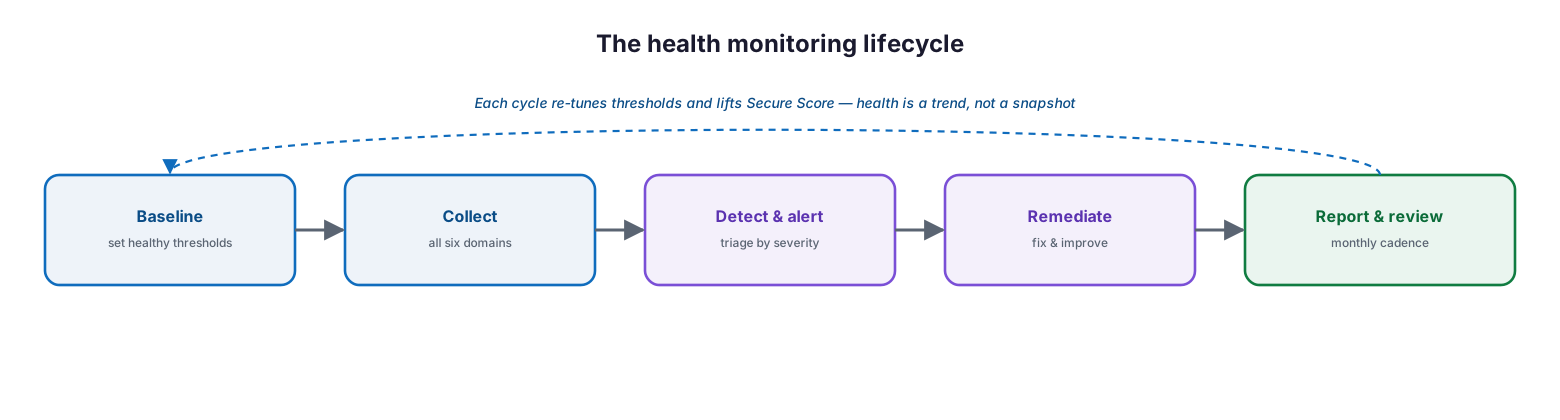
The health monitoring lifecycle: baseline healthy thresholds, collect signals across all six domains, detect and alert with severity-based triage, remediate to fix and improve, and report and review on a monthly cadence — each cycle re-tuning thresholds and lifting Secure Score, because health is a trend, not a snapshot.
| Health metric | Healthy target | Red flag | Tool | Business value |
|---|---|---|---|---|
| Microsoft Secure Score | At/above baseline, trending up | Falling or stagnant | Secure Score | Measurable security posture |
| Unresolved risky sign-ins | Zero outstanding | Growing backlog | Identity Protection | Contained identity risk |
| Admin MFA coverage | 100% | Any admin without MFA | Entra / Conditional Access | Account-takeover prevention |
| Service incident awareness | All active incidents tracked | Users report before IT knows | Service Health Dashboard | Faster, communicated response |
| License adoption | Adoption on target | Idle paid licenses | Usage reports | Return on Microsoft 365 spend |
| Storage / mailbox usage | Below ~90% of quota | Approaching or at limit | Storage reports | Avoided sudden outages |
The cadence below keeps each signal reviewed at the right frequency — some continuously, some monthly — so nothing is watched too little or, expensively, too much.
| Signal | Review cadence | Tool | What to check |
|---|---|---|---|
| Security alerts & risky sign-ins | Continuous / daily | Defender / Identity Protection | New high-severity items |
| Secure Score | Weekly | Secure Score | Trend and new recommendations |
| Service health & Message center | Daily | Service Health / Message center | Incidents and upcoming changes |
| Usage & adoption | Monthly | Usage reports | Idle licenses, adoption gaps |
| Data, compliance & storage | Monthly | Purview / storage reports | Policy enforcement, capacity |
| Full health review | Monthly | Consolidated report | Trends across all dimensions |
Managed health monitoring service model (RACI)
Delivered as a managed service, health monitoring is an accountable, continuously operated capability. This RACI defines who does what, the tool, the cadence, and the impact.
| Activity | Responsible (MSP/IT) | Accountable (CIO) | Tool | Cadence | SLA / impact |
|---|---|---|---|---|---|
| Baseline thresholds & connect sources | MSP monitoring | CIO | Admin center / Entra | On onboarding | Complete coverage |
| Watch security & identity signals | MSP SOC | CIO | Defender / Identity Protection | 24/7 | Threats caught early |
| Track service health & changes | MSP service desk | CIO | Service Health / Message center | Daily | Proactive comms |
| Route & retain logs | MSP monitoring | CIO | Azure Monitor / Sentinel | Continuous | Long-term insight & forensics |
| Report health & trends | MSP vCIO | CIO | Consolidated dashboard | Monthly | Governance and improvement |
Implementation checklist
- All six health dimensions have a defined owner and monitoring tool
- Secure Score is tracked with a baseline and an improvement target
- Entra sign-in, audit, and risky sign-in signals are monitored daily
- Activity logs are routed to Azure Monitor or Sentinel for retention beyond 30 days
- The Service Health Dashboard and Message center are checked daily
- Usage and adoption reports are reviewed monthly for idle licenses
- Data, compliance, and storage signals are monitored against thresholds
- Signals are triaged by severity into P1 / P2-P3 / informational
- Alerting routes urgent items to an owner within an agreed SLA
- A consolidated monthly health review reports trends to leadership
- Thresholds are re-tuned as the environment changes
Best practices
- Monitor all six dimensions; the one you skip is where the next surprise starts.
- Define what healthy looks like per signal, with concrete thresholds.
- Treat identity as the priority dimension — it is the main route to breach.
- Route logs to a SIEM so 30-day snapshots become long-term insight.
- Triage signals by severity so real issues are not lost in noise.
- Check service health and the Message center daily to stay ahead of changes.
- Track Secure Score as a trend and drive it upward.
- Report a consolidated health view to leadership monthly.
- Re-tune thresholds continuously as the tenant evolves.
Common mistakes
- Assuming Microsoft monitors your tenant’s health — it monitors the service, not your configuration.
- Watching one dashboard and calling it monitoring.
- Ignoring identity signals until after an account is compromised.
- Losing incident evidence because logs were never routed beyond 30 days.
- Collecting alerts with no triage, so the urgent ones are missed.
- Never checking the Message center, then being surprised by a change.
- Letting Secure Score drift with no one owning the trend.
- Reviewing health reactively instead of on a defined cadence.
Frequently asked questions
What is Microsoft 365 health monitoring?
It is the continuous practice of watching a tenant’s vital signs — security posture, identity, service health, usage, data and compliance, and upcoming changes — against defined healthy thresholds, and acting on the signals before they become incidents.
Doesn’t Microsoft monitor this for us?
Microsoft monitors and guarantees the availability of the service. The health of your tenant — your configuration, identities, data, and adoption — is your responsibility. Health monitoring is how you meet it.
What are the most important signals to watch?
Identity signals (sign-ins, risky sign-ins, directory changes) and security posture (Secure Score, Defender alerts) are the highest priority, because they most directly indicate a breach. Service health, usage, data, and change signals round out the full picture.
Why route logs to Azure Monitor or Sentinel?
Because Entra activity logs are retained for only about 30 days by default. Routing them to Azure Monitor, Microsoft Sentinel, or another SIEM lets you retain them for long-term reporting, spot trends, and investigate older incidents.
How is this different from service health monitoring?
Health monitoring is the holistic view of your tenant across all dimensions. Service health monitoring is the narrower discipline of tracking Microsoft’s own service incidents and advisories via the Service Health Dashboard, covered in its own guide.
How often should we review tenant health?
Continuously for security and identity alerts, daily for service health and changes, weekly for Secure Score, and monthly for usage, data, and a consolidated health review reported to leadership.
Conclusion
A Microsoft 365 tenant has vital signs, and health monitoring is the practice of reading them before anyone else has to. The platform’s availability is Microsoft’s job; the health of your configuration, identities, data, and adoption is yours — and the signals that reveal it are spread across Secure Score, the Entra logs, the Service Health Dashboard, usage reports, Purview, and the Message center. The discipline is to correlate all six dimensions into one trended view, route the data so it lasts, triage the signals so the urgent ones surface, and review on a cadence so nothing drifts.
The path forward is concrete: assign an owner and tool to each health dimension, baseline Secure Score and identity risk, route logs to a SIEM for retention, put daily and monthly reviews on the calendar, and report a consolidated view to leadership. Treated as a continuous, owned loop, health monitoring turns a Microsoft 365 tenant from a black box into a transparent, improving, defensible environment. For the narrower service-incident view, see the companion service health monitoring guide.
Authoritative references
All sources are official Microsoft documentation. Verify current features before acting; Microsoft 365 changes frequently. Source access date: 28 July 2026.
- What is Microsoft Entra monitoring and health? — Microsoft Learn
- Microsoft Entra audit logs — Microsoft Learn
- Microsoft Entra sign-in logs — Microsoft Learn
- Microsoft Entra Health — Microsoft Learn
- Microsoft Entra recommendations — Microsoft Learn
- Microsoft Entra ID Protection — Microsoft Learn
- Integrate Entra activity logs with Azure Monitor — Microsoft Learn
- Microsoft Secure Score — Microsoft Learn
- Microsoft 365 admin center usage reports — Microsoft Learn
- How to check Microsoft 365 service health — Microsoft Learn
- Message center in the Microsoft 365 admin center — Microsoft Learn
On this page
- Executive Summary
- What does tenant health actually mean?
- How does identity health monitoring work?
- How do you turn signals into action?
- How is health monitoring run and measured?
- Managed health monitoring service model (RACI)
- Implementation checklist
- Best practices
- Common mistakes
- Frequently asked questions
- Conclusion
- Authoritative references