Security Patch Management: Winning the Race Against Known Exploits
Of all the things an organization can do to prevent a breach, few are as effective — or as unglamorous — as applying security patches promptly.
- Content owner
- Insyto Content Team
- Editorial reviewer
- Ritesh Mhatre
- Technical reviewer
- Navish Ansari
- Next review
- To be scheduled
- Last reviewed
- Review pending
- Technical level
- Intermediate · CISOs, security teams, IT directors
Executive Summary
Of all the things an organization can do to prevent a breach, few are as effective — or as unglamorous — as applying security patches promptly. The reason is stark: a large share of successful breaches exploit vulnerabilities that were already known and for which a patch already existed. The attackers did not need a novel zero-day; they simply walked through a door the organization had left open, using a key that had effectively been published. Security patch management is the discipline of closing those doors quickly, and its defining characteristic is urgency. Unlike general IT patching, which balances stability, features, and convenience, security patching is a race — one that begins the moment a fix becomes public.
That framing matters because a public security patch is, paradoxically, a roadmap to the very vulnerability it fixes. Attackers routinely analyze a newly released patch, reverse-engineer the flaw it addresses, build a working exploit, and begin mass-exploiting unpatched systems — often within days of release. Meanwhile the defender must become aware of the patch, test it, schedule it, and deploy it across the estate, a process that is frequently slower. The gap between “patch available” and “patch applied” is the exposure window, and everything about security patch management is aimed at shrinking it for the vulnerabilities that matter most. That requires treating security patches differently from feature updates, prioritizing by real threat rather than by a fixed calendar, running an emergency lane for actively-exploited flaws alongside a standard tested cadence for routine ones, and remembering that security patches come not just from the operating system but from third-party applications, firmware, and network devices — the sources most often neglected.
This vendor-neutral guide explains how to win that race. It illustrates the exposure window and why speed matters, distinguishes security patches from other updates and maps where they come from, presents a threat-based decision tree for setting patch deadlines, shows how to balance patching speed against operational stability with a two-lane model, and lays out the cost of not patching alongside the metrics that prove a program is working. The governing principle is that the threat, not the calendar, should set the deadline — and that for a known, actively-exploited vulnerability, that deadline is measured in hours, not months.
Patching Is a Race — and the Clock Starts When the Patch Ships
The foundational idea in security patching is that time is the adversary. Understanding the timeline of an attack after a patch is released makes the urgency concrete and reframes patching from a chore into a race.
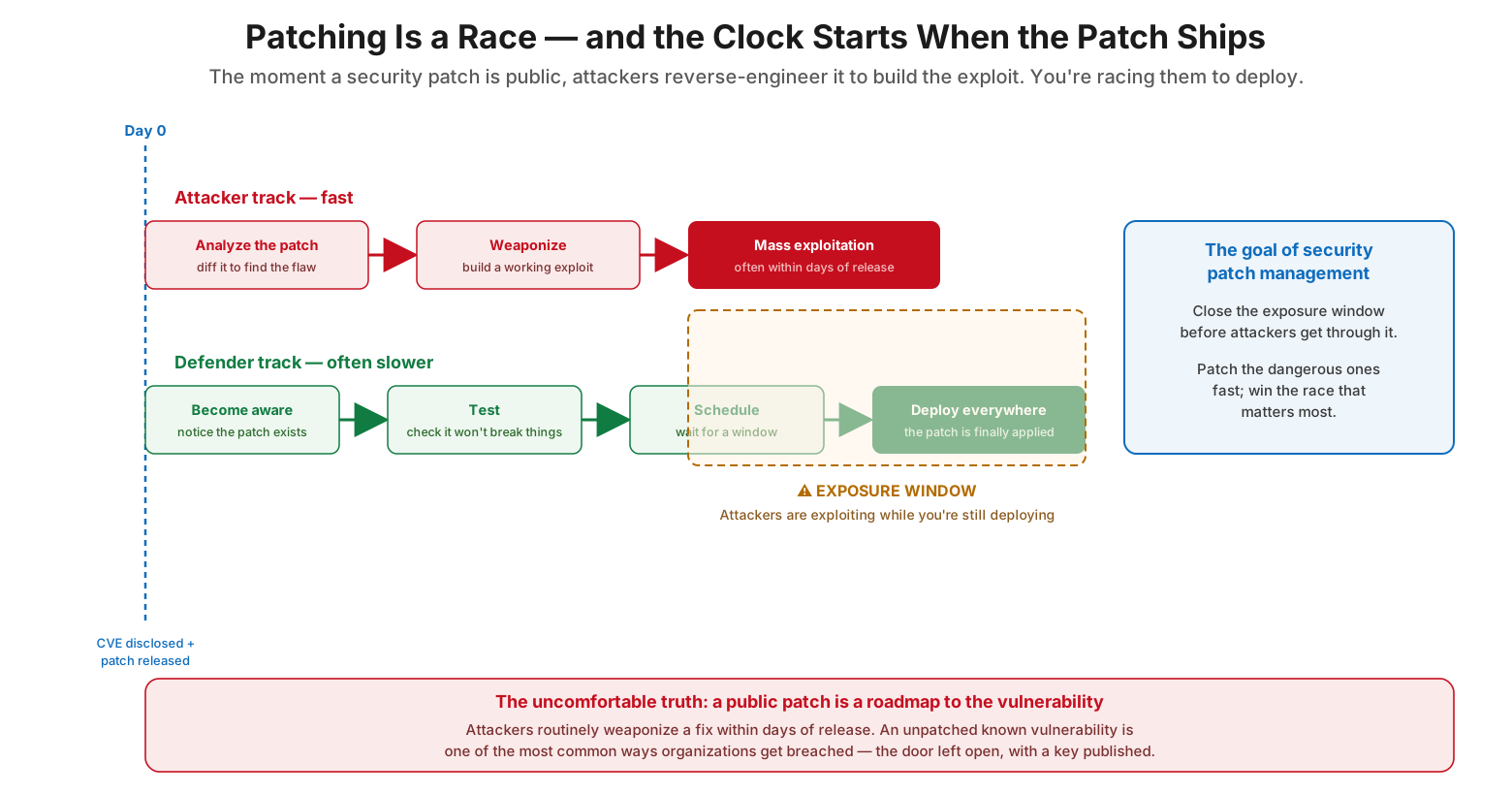
Patching is a race — and the clock starts when the patch ships
At Day 0, a vulnerability is disclosed and a patch is released. From that instant, two tracks run in parallel. On the attacker track — which is fast — adversaries analyze the patch, diffing it to locate the flaw, weaponize it into a working exploit, and move to mass exploitation, often within days of release. On the defender track — which is frequently slower — the organization must first become aware the patch exists, then test it to ensure it won’t break anything, then schedule a deployment window, and finally deploy it everywhere. The gap between when the patch is available and when it is fully applied is the exposure window, and during that window attackers may be actively exploiting the flaw while the organization is still deploying the fix. The goal of security patch management is to close that exposure window before attackers get through it — to patch the dangerous vulnerabilities fast and win the race that matters most. The uncomfortable truth underpinning all of this is that a public patch is a roadmap to the vulnerability: an unpatched known vulnerability is one of the most common ways organizations get breached, precisely because the weakness and its fix are both public knowledge.
Not All Updates Are Equal — and Security Patches Come From Everywhere
A common failure is to treat all software updates as a single undifferentiated backlog. Security patches demand different handling, and they originate from far more places than most organizations track.
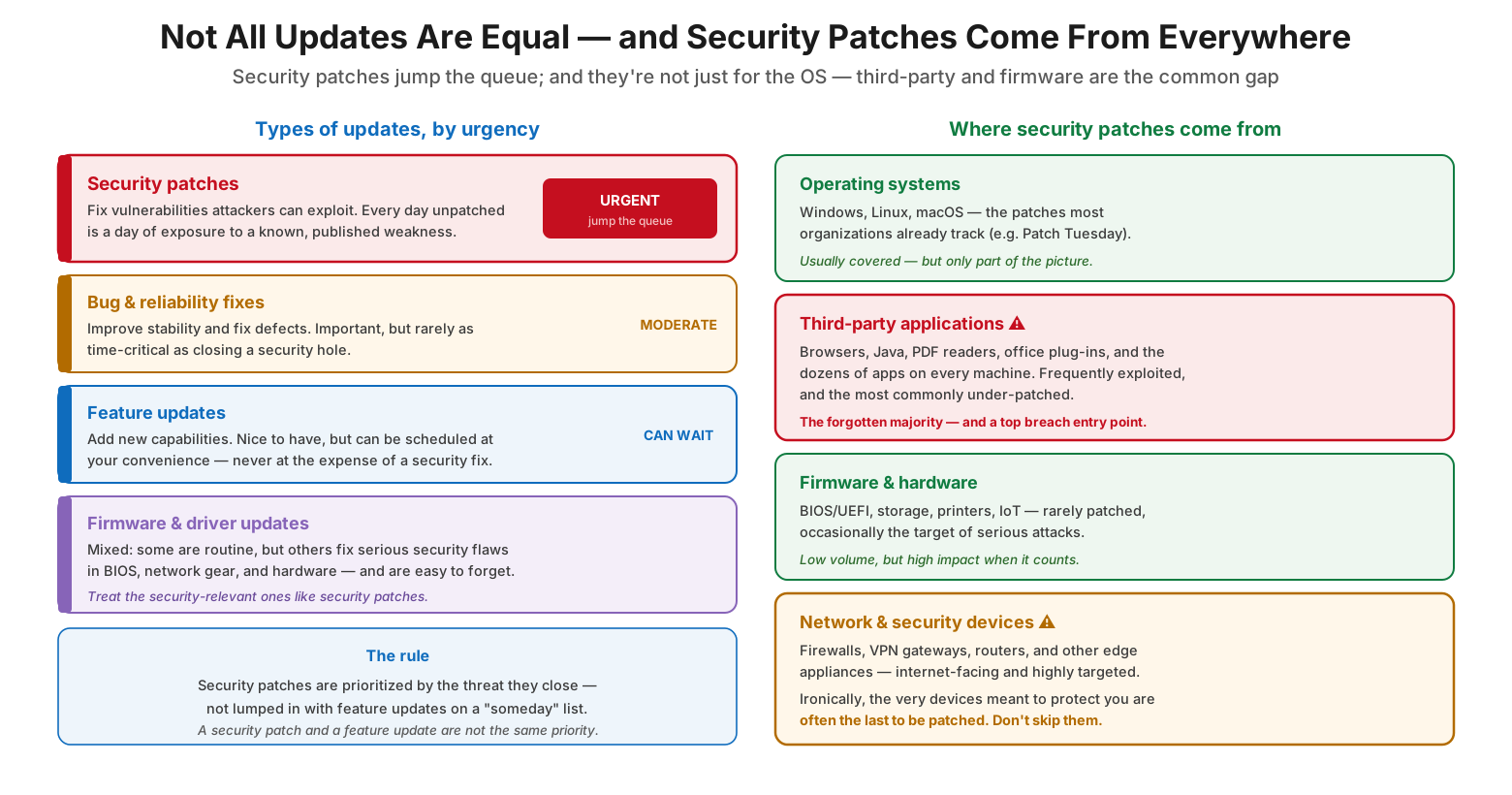
Not all updates are equal — and security patches come from everywhere
Updates fall into distinct categories by urgency. Security patches fix vulnerabilities attackers can exploit; every day one goes unpatched is a day of exposure to a known, published weakness, so they are urgent and must jump the queue. Bug and reliability fixes improve stability and matter, but are rarely as time-critical as closing a security hole. Feature updates add new capabilities and can be scheduled at your convenience — never at the expense of a security fix. Firmware and driver updates are mixed: some are routine, but others fix serious flaws in BIOS, network gear, and hardware and are easy to forget, so the security-relevant ones deserve security-patch treatment. The rule is that security patches are prioritized by the threat they close, not lumped in with feature updates on a “someday” list. Equally important is recognizing where security patches come from. Operating systems (Windows, Linux, macOS) are the patches most organizations already track. But third-party applications — browsers, Java, PDF readers, office plug-ins, and the dozens of apps on every machine — are frequently exploited and the most commonly under-patched, making them a top breach entry point. Firmware and hardware are rarely patched but occasionally targeted with high impact. And network and security devices — firewalls, VPN gateways, and routers — are internet-facing and heavily targeted, yet ironically are often the last to be patched. A real security patch program covers all of these, not just the OS.
| Update type | Purpose | Urgency |
|---|---|---|
| Security patch | Fixes an exploitable vulnerability | Urgent — jumps the queue |
| Bug / reliability fix | Improves stability, fixes defects | Moderate |
| Feature update | Adds new capabilities | Low — can wait |
| Firmware / driver | Mixed; some fix security flaws | Treat security-relevant ones as urgent |
How Fast Must This Patch Go? A Threat-Based Decision
Because “patch everything immediately” is unrealistic and “patch on a fixed monthly cadence” is too slow for dangerous flaws, security patching needs a way to set the right deadline for each patch based on the threat it addresses.
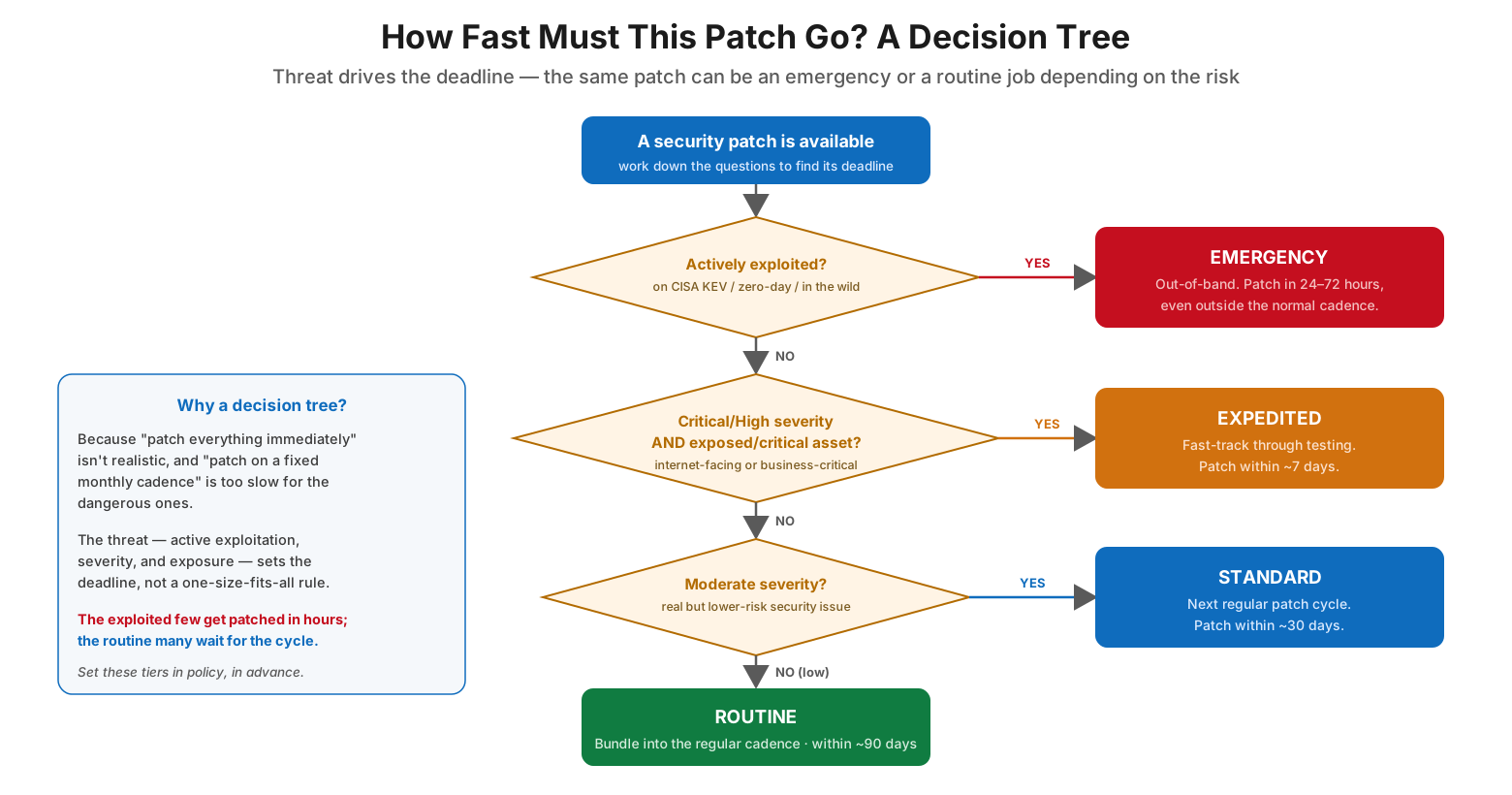
How fast must this patch go? A decision tree
The decision flows through a short series of questions. First: is the vulnerability actively exploited — listed on the CISA Known Exploited Vulnerabilities catalog, a zero-day, or seen in the wild? If yes, it is an emergency: patch out-of-band within 24 to 72 hours, even outside the normal cadence. If not, the next question is whether it is critical or high severity and on an exposed or business-critical asset (internet-facing or otherwise important). If yes, it is expedited: fast-track it through testing and patch within about seven days. If not, the question becomes whether it is a moderate-severity security issue — real but lower-risk — which makes it standard: deploy in the next regular patch cycle, within roughly 30 days. Anything below that is routine: bundle it into the regular cadence within about 90 days. The point of this decision tree is that the threat — active exploitation, severity, and exposure — sets the deadline, not a one-size-fits-all rule. The exploited few get patched in hours; the routine many wait for the cycle. Writing these tiers into policy in advance means the organization can act decisively when an emergency lands, without debating priority in the middle of a crisis.
| Condition | Tier | Target deadline |
|---|---|---|
| Actively exploited (CISA KEV / zero-day) | Emergency (out-of-band) | 24–72 hours |
| Critical/high + exposed or critical asset | Expedited | ~7 days |
| Moderate-severity security issue | Standard | ~30 days |
| Low-risk security issue | Routine | ~90 days |
Speed vs. Stability: Run Two Lanes, Not One
Security patch management lives with a permanent tension: the security team wants to patch immediately, while operations wants to test first so a bad patch doesn’t break production. The resolution is not to pick a winner but to run two lanes chosen by risk.
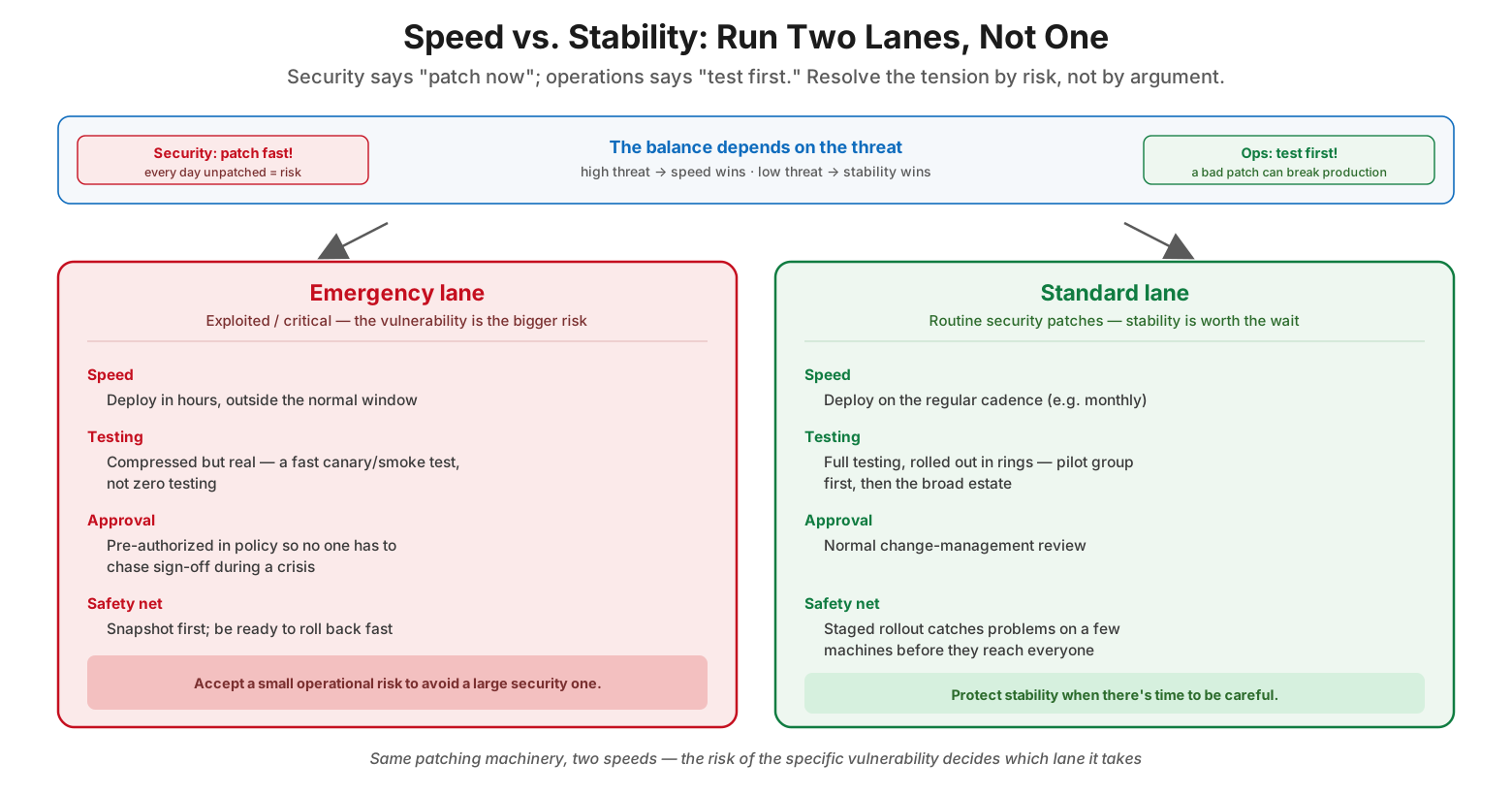
Speed vs. stability: run two lanes, not one
The balance depends on the threat: high threat means speed wins, low threat means stability wins. The emergency lane handles exploited or critical vulnerabilities, where the vulnerability itself is the bigger risk. Here, patches deploy in hours outside the normal window; testing is compressed but real — a fast canary or smoke test rather than none at all; approval is pre-authorized in policy so no one has to chase sign-off during a crisis; and a safety net of snapshots and fast rollback is in place. The trade-off is deliberate: accept a small operational risk to avoid a large security one. The standard lane handles routine security patches, where stability is worth the wait. These deploy on the regular cadence, receive full testing rolled out in rings (a pilot group first, then the broad estate), go through normal change-management review, and rely on the staged rollout to catch problems on a few machines before they reach everyone. It is the same patching machinery run at two speeds, with the risk of the specific vulnerability deciding which lane a patch takes. This model dissolves the speed-versus-stability argument: neither side is always right, because the correct answer depends entirely on how dangerous the particular flaw is.
Security Patch Management Checklist
- Treat security patches as urgent and distinct from feature and convenience updates.
- Recognize the exposure window and aim to shrink it for the vulnerabilities that matter.
- Cover all patch sources: OS, third-party apps, firmware, and network/security devices.
- Prioritize by threat: active exploitation (CISA KEV), severity, and exposure.
- Treat actively-exploited vulnerabilities as emergencies — patch within 24–72 hours.
- Define patch-urgency tiers and deadlines in a written policy, in advance.
- Run an emergency (out-of-band) lane alongside a standard tested cadence.
- Pre-authorize emergency patching so no approval scramble happens mid-crisis.
- Keep testing even in the emergency lane — a fast canary, plus snapshots and rollback.
- Don’t neglect third-party applications — a leading breach entry point.
- Measure exploited-CVE patch latency and % of critical patches within SLA.
- Track and drive down the count of exposed, unpatched critical systems.
Best Practices
Unpatched known vulnerabilities are among the most common breach causes, so a security patch program has to be measured — these are the metrics that expose gaps before attackers do.
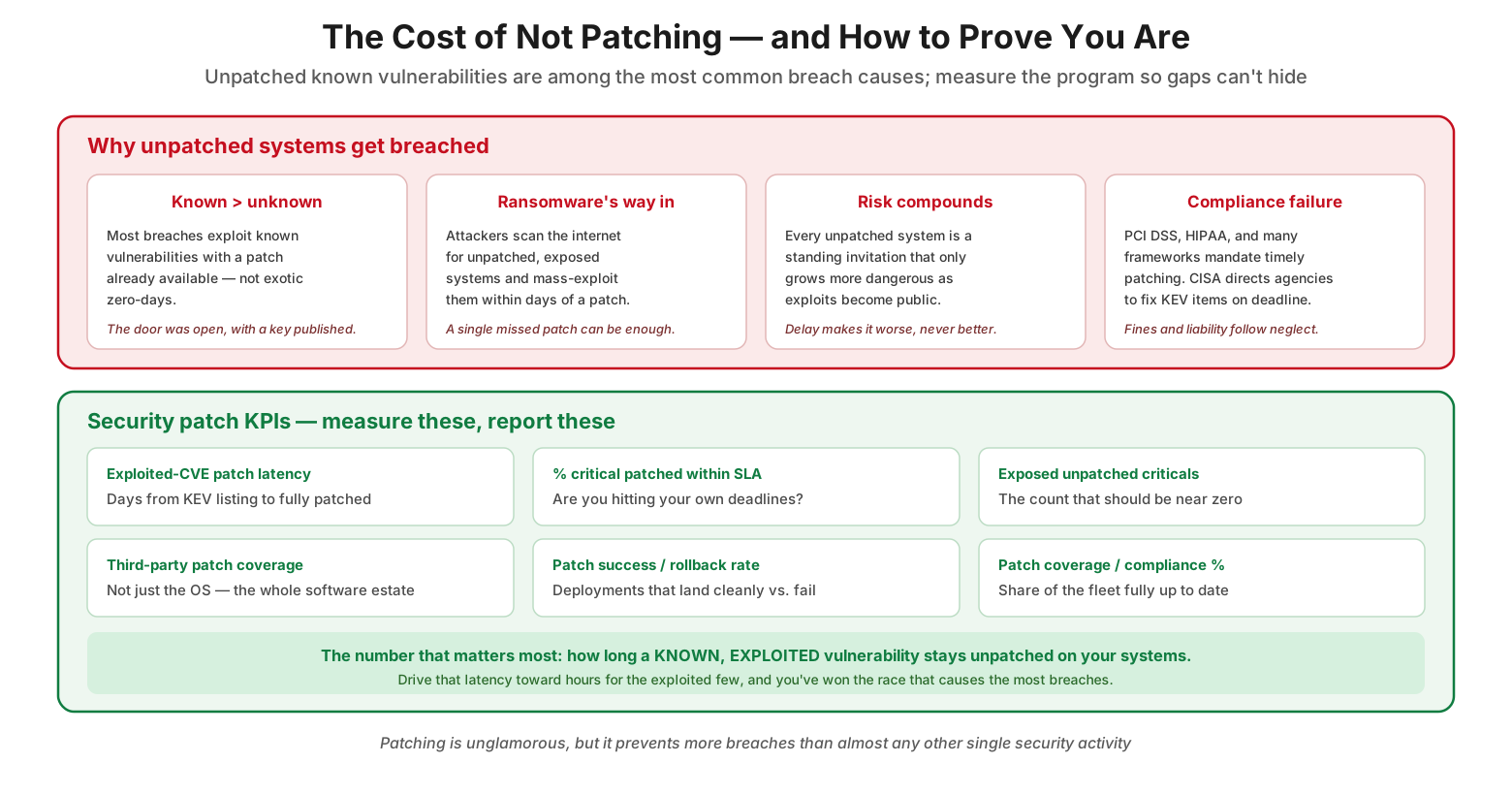
The cost of not patching, and how to prove you are
| Metric | What it tells you | Healthy direction |
|---|---|---|
| Exploited-CVE patch latency | Days from KEV listing to fully patched | Toward hours |
| % critical patched within SLA | Whether you hit your own deadlines | Toward 100% |
| Exposed unpatched criticals | Open doors on important assets | Toward zero |
| Third-party patch coverage | Beyond-the-OS software kept current | High |
| Patch success / rollback rate | Deployments that land cleanly | High success, low rollback |
Let the threat set the deadline. The single most important practice is prioritizing security patches by the risk they close — active exploitation, severity, and exposure — rather than deploying everything on a fixed calendar. The exploited few deserve hours; the routine many can wait for the cycle.
Treat exploited vulnerabilities as emergencies. When a vulnerability is on the CISA KEV list or otherwise being exploited, the normal cadence is too slow. Have a pre-authorized, out-of-band process ready to deploy the fix within days, because attackers are already moving.
Run two lanes deliberately. Resolve the speed-versus-stability tension with an emergency lane (fast, lightly tested, pre-approved) and a standard lane (cadenced, ring-tested, change-managed). Assign each patch to a lane by its risk, not by argument.
Cover the whole software estate. The OS is only part of the picture. Third-party applications, firmware, and internet-facing network devices are frequently the most exploited and least patched. Extend the program to every source of security patches.
Keep testing, even under pressure. Even emergency patches deserve a fast smoke test, a snapshot, and a rollback plan. Deploying blind can cause an outage as damaging as the breach you’re preventing — speed and a safety net are not mutually exclusive.
Measure the latency that matters. Track how long a known, exploited vulnerability stays unpatched on your systems, and drive that number toward hours. Report patch coverage and SLA performance so gaps become visible and accountable.
Common Mistakes
Treating security patches like any other update. Lumping security fixes in with feature updates on a slow, convenience-driven schedule leaves known vulnerabilities exposed for far too long. Security patches must be prioritized by threat.
Patching only the operating system. Focusing on OS patches while ignoring third-party applications, firmware, and network devices leaves wide-open, heavily-exploited gaps. Coverage must span the whole estate.
Waiting for the monthly cycle no matter what. Applying a fixed cadence to an actively-exploited vulnerability hands attackers weeks of opportunity. Emergencies require an out-of-band response.
Deploying emergency patches with no testing at all. Overcorrecting toward pure speed and pushing an untested patch to production can cause a self-inflicted outage. A fast canary and rollback plan keep speed safe.
No pre-authorized emergency process. If every urgent patch requires a fresh round of approvals, the response is fatally slow. Define the emergency lane and its authority in policy before you need it.
Not measuring exposure. Without tracking how long known vulnerabilities remain unpatched, an organization has no idea whether it is winning or losing the race. Unmeasured patch latency hides serious risk.
Frequently Asked Questions
How is security patch management different from regular patch management? Regular patch management keeps all software current, balancing features, stability, and convenience. Security patch management focuses specifically on fixing vulnerabilities before attackers exploit them, driven by threat and urgency. Security patches are prioritized by the risk they close and, for exploited flaws, deployed on emergency timelines rather than a routine schedule.
Why do we need to patch so quickly? Because a public patch reveals the vulnerability. Attackers reverse-engineer patches, build exploits, and mass-exploit unpatched systems — often within days of release. The window between a patch being available and being applied is when you’re most exposed, so speed on dangerous vulnerabilities directly reduces breach risk.
What is an exposure window? It’s the period between when a patch (and thus knowledge of the vulnerability) becomes public and when you’ve actually applied it across your systems. During this window, attackers may be actively exploiting the flaw while you’re still deploying the fix. Minimizing it for high-risk vulnerabilities is the core goal of security patching.
How do we decide which patches to prioritize? By threat. Ask whether the vulnerability is actively exploited (for example, on the CISA KEV catalog) — if so, it’s an emergency. Then consider severity and exposure: critical, internet-facing flaws are expedited; moderate ones follow the standard cycle; low-risk ones are routine. The threat, not the calendar, sets the deadline.
How do we patch fast without breaking production? Run two lanes. For emergencies, use a fast canary test, take snapshots, keep rollback ready, and deploy quickly with pre-authorized approval. For routine security patches, test fully and roll out in rings on the normal cadence. Matching the lane to the risk lets you be fast where it’s needed and careful where there’s time.
Aren’t zero-days the real threat, not known vulnerabilities? Zero-days get attention, but most breaches actually exploit known vulnerabilities with available patches — attackers prefer the easy, reliable path. That’s good news: diligent security patching prevents a large share of real-world breaches, arguably more than almost any other single security activity.
Conclusion
Security patch management is the quiet discipline that prevents more breaches than almost anything else, and it succeeds or fails on a single dimension: speed against the vulnerabilities that matter. Because a public patch doubles as a blueprint of the flaw it fixes, the release of a patch starts a race — attackers weaponizing the fix on one side, defenders deploying it on the other. An unpatched known vulnerability is not a theoretical risk; it is one of the most common and preventable ways organizations are compromised. The whole point of a security patch program is to close that exposure window before an attacker gets through it.
Winning that race means abandoning the idea that all updates are equal or that a fixed calendar is good enough. It means treating security patches as urgent, letting the threat set each patch’s deadline, and running an emergency lane for actively-exploited flaws alongside a standard tested cadence for the rest. It means covering not just the operating system but the third-party applications, firmware, and network devices where so many attacks actually land, and measuring the one number that matters most — how long a known, exploited vulnerability lingers unpatched on your systems. Drive that latency down to hours for the dangerous few, keep the routine many flowing through a stable cadence, and security patching becomes exactly what it should be: an unglamorous, relentless machine for shutting doors before attackers can walk through them.
References
- NIST SP 800-40 Rev. 4 — Guide to Enterprise Patch Management Planning
- CISA — Known Exploited Vulnerabilities (KEV) Catalog
- CISA — Binding Operational Directive 22-01 (remediating known exploited vulnerabilities)
- FIRST — Common Vulnerability Scoring System (CVSS)
- NIST Cybersecurity Framework 2.0 — Protect function
- CIS Critical Security Controls — Continuous Vulnerability Management
- NIST National Vulnerability Database (NVD)
On this page
- Executive Summary
- Patching Is a Race — and the Clock Starts When the Patch Ships
- Not All Updates Are Equal — and Security Patches Come From Everywhere
- How Fast Must This Patch Go? A Threat-Based Decision
- Speed vs. Stability: Run Two Lanes, Not One
- Security Patch Management Checklist
- Best Practices
- Common Mistakes
- Frequently Asked Questions
- Conclusion
- References