Hybrid Work Security Best Practices
Hybrid work broke the model that most business security was built on.
- Content owner
- Insyto Content Team
- Editorial reviewer
- Ritesh Mhatre
- Technical reviewer
- Navish Ansari
- Next review
- To be scheduled
- Last reviewed
- Review pending
- Technical level
- Intermediate · CISOs, security teams, IT directors
Executive Summary
Hybrid work broke the model that most business security was built on. For decades, security assumed a perimeter: trusted people and devices sat inside the office network behind a firewall, and a VPN extended that trusted zone to the occasional remote worker. When the entire workforce started working from homes, cafés, client sites, and personal devices, that assumption collapsed. The office network is no longer where work happens, and the firewall no longer marks the boundary of trust. Yet many SMBs still secure hybrid work as if it were the exception rather than the norm — a gap attackers exploit daily through stolen credentials and unmanaged devices.
The modern answer is Zero Trust: stop trusting anything by default because of where it sits, and instead verify every access request on its merits — who the user is, whether their device is healthy, where they are, and how risky the request looks. For a hybrid workforce, identity becomes the new perimeter, the device becomes a condition of access, and data is protected wherever it travels. The good news for SMBs is that the tools to do this are already in Microsoft 365 Business Premium and its enterprise equivalents; the work is in configuring and operating them as a coherent whole.
This guide sets out hybrid work security best practices for a managed IT context, organized around the Zero Trust pillars — identity, devices, data, apps, and threat protection — and the three principles that underpin them. It explains how secure access actually works when the network no longer grants trust, and how to run it as a continuous, measured service. It draws on the disciplines covered in the companion identity, device compliance, and patch management guides, and points to Microsoft’s Zero Trust guidance for depth. Because the platform evolves, verify specifics against the linked documentation.
Who should read this:
- CIOs, CTOs, and IT directors securing a distributed workforce
- IT and security managers implementing Zero Trust controls
- Risk and compliance leaders accountable for data protection off-network
- SMB decision-makers evaluating managed security for hybrid work
Why does hybrid work need a new security model?
The core problem is that the perimeter-based model assumes trust follows location, and in hybrid work location tells you almost nothing. A user signing in from home is not inherently more or less trustworthy than one in the office; a laptop on a hotel network needs the same scrutiny as one at a desk. Extending the old trusted zone outward with a full-tunnel VPN simply stretches implicit trust to places it was never designed for, and gives an attacker who compromises one device a path into everything.
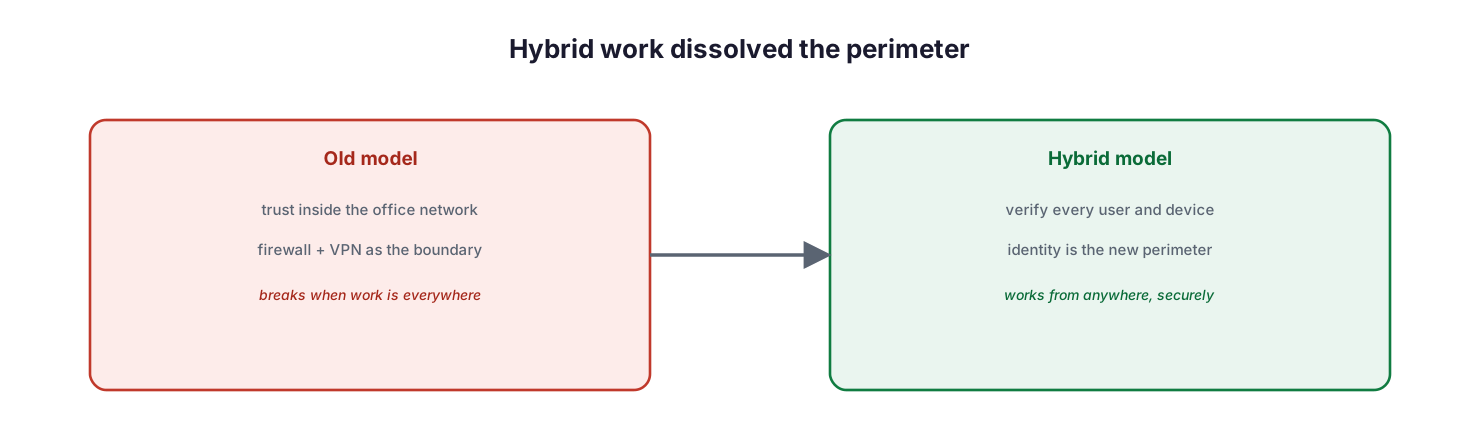
Hybrid work dissolved the perimeter: the old model trusted anything inside the office network with a firewall and VPN as the boundary, which breaks when work is everywhere; the hybrid model verifies every user and device, making identity the new perimeter.
The shift is from “trust the network, then grant access” to “verify the request, then grant the least access needed.” This is not a single product but a design approach — Zero Trust — applied across every part of the environment. For an SMB, it is also intensely practical: it is what lets people work productively from anywhere while the business is actually more secure than it was when everyone sat behind one firewall.
What are the principles behind hybrid work security?
Zero Trust rests on three principles, and every best practice in this guide is an application of one of them.
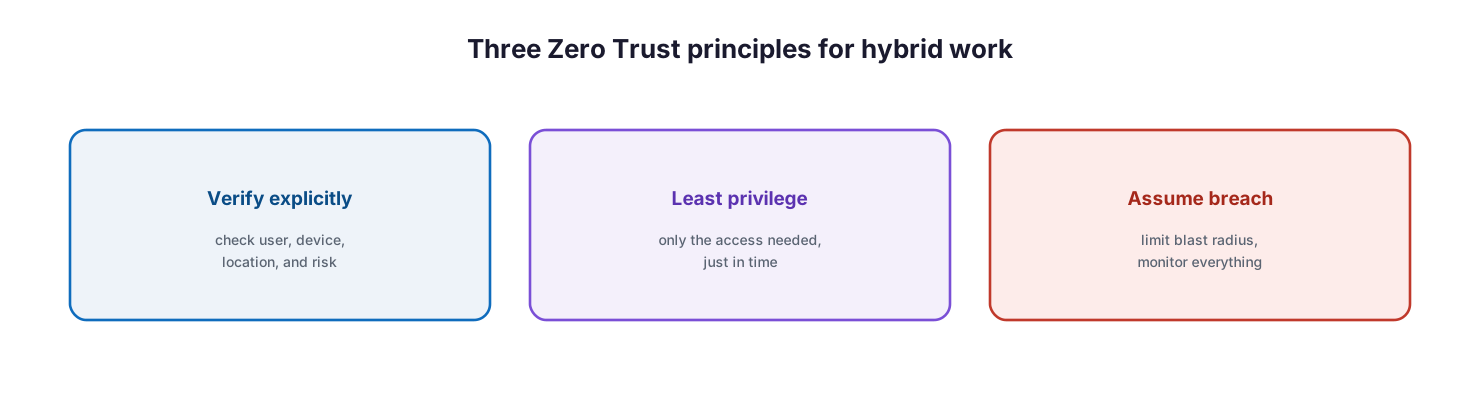
Three Zero Trust principles for hybrid work: verify explicitly by checking user, device, location, and risk; use least privilege by granting only the access needed, just in time; and assume breach by limiting blast radius and monitoring everything.
Verify explicitly means every access decision is made using all available signals — user identity, device health, location, and real-time risk — rather than trusting a network location. Use least privilege means granting only the access a person needs to do their job, ideally just in time, so a compromised account can reach as little as possible. Assume breach means designing as though an attacker is already inside: segment access, limit the blast radius of any single compromise, and monitor continuously so intrusions are detected and contained quickly. Together these turn security from a wall around the office into a set of checks that travel with every user and device.
Which pillars secure the hybrid worker?
Microsoft organizes Zero Trust into technology pillars — identity, endpoints, data, apps, infrastructure, network, and security operations. For a hybrid SMB workforce, five of these carry most of the practical weight, and they must be operated together rather than as separate projects.
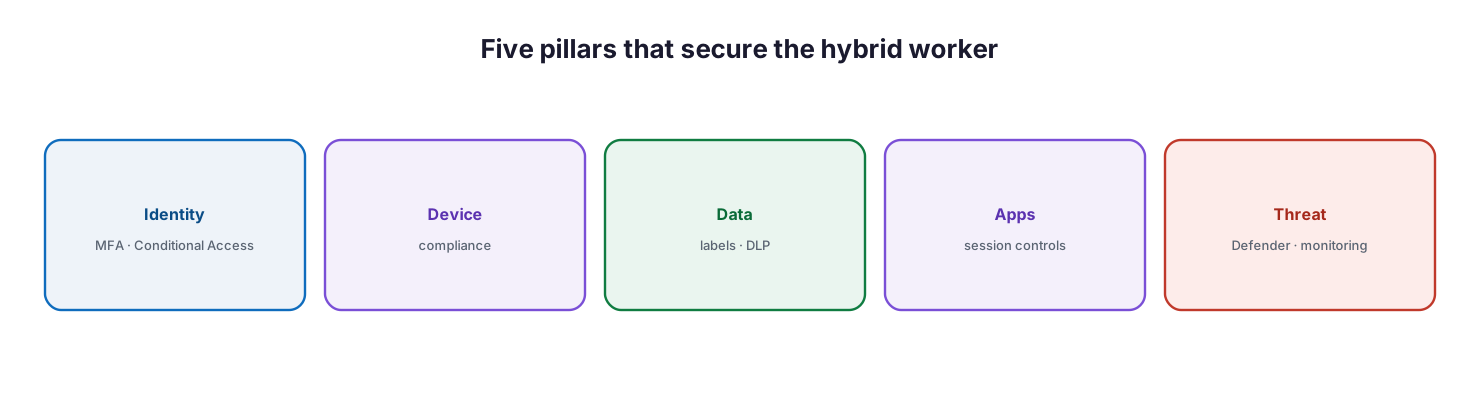
Five pillars that secure the hybrid worker: identity with MFA and Conditional Access, device compliance, data protection with labels and DLP, apps with session controls, and threat protection with Defender and monitoring.
The identity pillar is the foundation: enforce multifactor authentication or, better, passwordless sign-in for every user, and use Conditional Access to make access conditional on context. The endpoints pillar requires that only healthy, compliant devices reach corporate resources — the discipline covered in the companion device compliance guide. The data pillar protects the information itself with sensitivity labels and data-loss prevention, so protection persists even when a file leaves the organization. The apps pillar governs access at the application layer with permissions and session controls. And threat protection, delivered by Microsoft Defender, detects and responds to attacks across all of them. Skipping any pillar leaves a door open; a hardened identity means little if the device is compromised, and a compliant device means little if the data can walk out unprotected.
How does secure access actually work?
The mechanism that ties the pillars together is Conditional Access — Microsoft’s policy engine and the practical heart of hybrid work security. It evaluates each access request against a set of signals and decides whether to grant it, block it, or require an additional step such as multifactor authentication.
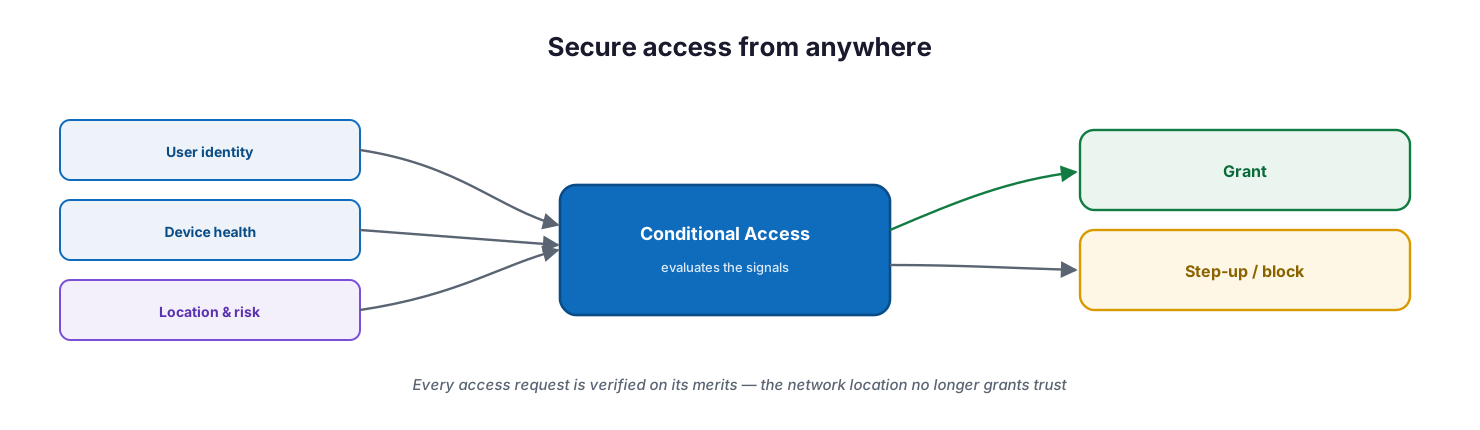
Secure access from anywhere: user identity, device health, and location and risk signals feed Conditional Access, which evaluates them and either grants access or requires a step-up or block — the network location no longer grants trust.
In practice, a policy might require that a user complete MFA, that their device be marked compliant by Intune, and that the sign-in not be flagged as risky by Microsoft Entra ID Protection before granting access to email or files. A risky sign-in — an impossible-travel event, a leaked credential — can trigger a step-up challenge or a block automatically. This is what replaces the VPN’s implicit trust: instead of “you are on the network, so you are trusted,” it is “prove who you are, on a healthy device, with an acceptable risk level, and you may access exactly what you need.” Note that risk-based Conditional Access requires the Microsoft Entra ID P2 capabilities of Identity Protection, while standard Conditional Access is included with Business Premium’s P1.
How do you run hybrid work security as a service?
Hybrid work security is not a project that finishes; it is a posture that must be maintained as people, devices, and threats change. Run it as a continuous cycle, measured against Microsoft Secure Score and reported to leadership.
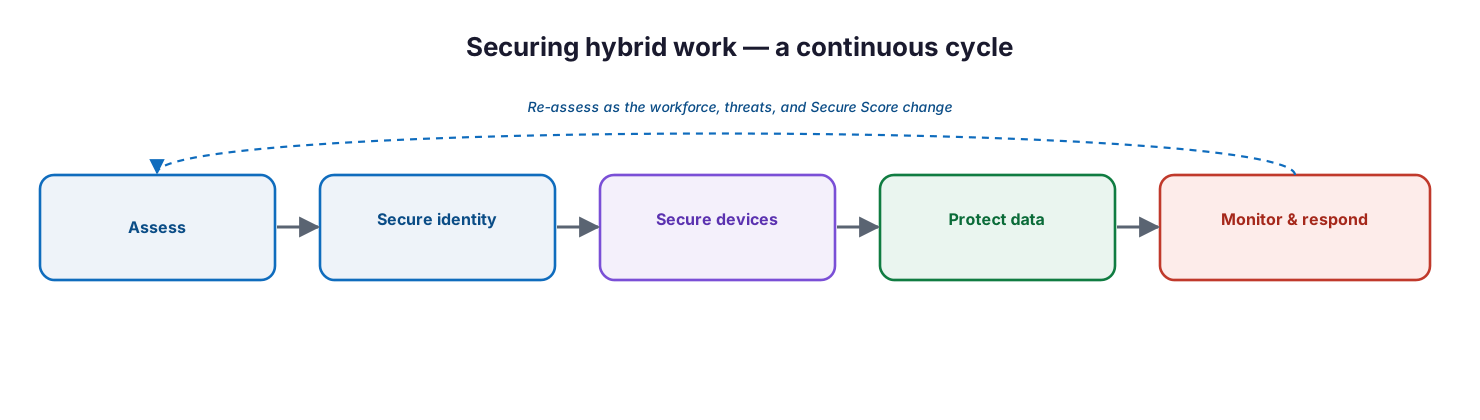
Securing hybrid work is a continuous cycle: assess, secure identity, secure devices, protect data, and monitor and respond, re-assessing as the workforce, threats, and Secure Score change.
Assess the current posture and gaps, secure identity first (it delivers the largest risk reduction per unit of effort), bring devices under compliance, protect data with labels and DLP, and stand up continuous monitoring and response. Then re-assess as the workforce and threat landscape evolve. Two things make the difference between security theatre and real protection: enforcing controls rather than merely enabling them — a Conditional Access policy in report-only mode blocks nothing — and integrating the signals so that identity risk, device health, and threat detection inform one another. This operational discipline is where a managed security service earns its keep.
Managed hybrid-security service model: ownership, controls, and service levels
Delivered as a managed service, hybrid work security is an accountable, continuously enforced capability across identity, devices, data, and threats. The tables below define it for CIO-level evaluation: who owns each activity, the tool behind it, the cadence, the risk if it lapses, and the business value it protects.
Responsibility matrix (RACI)
| Service area | Activity | MSP team (Responsible) | Customer IT / CIO (Accountable) | Consulted | Informed | Tooling | SLA / impact |
|---|---|---|---|---|---|---|---|
| Identity | Enforce MFA/passwordless & Conditional Access | MSP Security | CIO | Customer IT | End users | Microsoft Entra ID | Blocks the large majority of identity attacks |
| Device trust | Require a compliant device for access | MSP Endpoint | CIO | MSP Security | End users | Intune | Only healthy devices reach data |
| Data protection | Apply sensitivity labels & DLP | MSP Security | CIO | Compliance | Customer IT | Microsoft Purview | Data protected wherever it travels |
| Threat protection | Monitor and respond to threats | MSP SOC | CIO | Customer IT | Executive team | Microsoft Defender | Threats detected and contained |
| Secure access | Replace VPN trust with Zero Trust access | MSP Network | CIO | Customer IT | End users | Entra ID / Conditional Access | No implicit network trust |
| Awareness | Phishing training and user communication | MSP vCIO | Customer IT | HR | All staff | Training platform | Reduced human-factor risk |
Service control matrix
| Domain | Service / control | Description | Tool used | Frequency | Risk if missing |
|---|---|---|---|---|---|
| Identity | MFA / passwordless | Strong auth for remote sign-in | Microsoft Entra ID | Continuous | Account takeover |
| Identity | Conditional Access | Context-based access decisions | Entra Conditional Access | Continuous | Unfettered remote access |
| Identity | Risk-based Conditional Access | Block or challenge risky sign-ins | Entra ID Protection | Continuous | Compromised credentials used |
| Endpoint | Device compliance | Health required before access | Intune | Continuous | Unmanaged device access |
| Data | Sensitivity labels + DLP | Protect and track data off-network | Microsoft Purview | Continuous | Data leakage |
| Threat | EDR + email protection | Detect and remediate remote threats | Microsoft Defender | 24/7 | Undetected compromise |
| Network | Zero Trust access | Per-app verified access, no implicit trust | Entra ID / ZTNA | Continuous | Lateral movement |
Operations lifecycle
| Stage | Activity | Outcome | Tool | Business impact |
|---|---|---|---|---|
| Monitor | Watch sign-ins, devices, and alerts | Continuous visibility | Entra / Defender | Early warning |
| Detect | Identify risky sign-ins and threats | Incident raised | Entra ID Protection / Defender | Faster containment |
| Respond | Block, step up, or remediate | Threat contained | Conditional Access / Defender | Reduced exposure |
| Optimize | Tune policies, reduce friction | Secure and usable | Microsoft Entra ID | Security with productivity |
| Report | Posture and incident reporting | Assurance | Secure Score / reports | Governance and trust |
Decision matrix
| Scenario | Recommended action | Justification | Tool / service |
|---|---|---|---|
| Sign-in from anywhere | Enforce MFA + Conditional Access | Identity is the new perimeter | Entra Conditional Access |
| Personal devices in use | Compliance or app protection | Protect data on BYOD | Intune |
| Sensitive data leaving the org | Sensitivity labels + DLP | Protection travels with the data | Microsoft Purview |
| Legacy full-tunnel VPN trust | Move to Zero Trust access | Least privilege, no implicit trust | Entra ID / ZTNA |
| Compromised-credential risk | Risk-based Conditional Access | Auto-blocks risky sign-ins | Entra ID Protection |
| Frequent phishing | MFA + training + Defender | Layered human and technical defense | Defender / training |
SLA / KPI scorecard
| Metric | Target | Tool | Business value |
|---|---|---|---|
| MFA coverage | 100% of users | Microsoft Entra ID | Identity attacks blocked |
| Compliant-device access | 100% of sensitive apps | Intune / Conditional Access | Healthy-device-only access |
| Risky sign-in response | ≤30 minutes | Entra ID Protection | Contained credential abuse |
| Secure Score | At/above baseline, trending up | Microsoft Secure Score | Measurable security posture |
| DLP policy coverage | 100% of sensitive data types | Microsoft Purview | Data loss prevented |
| Phishing simulation / training | At or above target participation | Training platform | Lower human-factor risk |
Implementation checklist
- Multifactor authentication or passwordless is enforced for every user
- Conditional Access requires MFA and a compliant device for sensitive resources
- Risk-based Conditional Access blocks or challenges risky sign-ins (where licensed)
- All devices, including BYOD, are compliant or protected with app protection
- Sensitivity labels and DLP protect data wherever it travels
- Microsoft Defender protects endpoints and email, with monitoring in place
- Zero Trust access replaces implicit trust from legacy full-tunnel VPNs
- Policies are enforced, not left in report-only mode
- Identity risk, device health, and threat signals are integrated
- Users receive phishing awareness training on a cadence
- Posture is measured with Secure Score and reviewed with leadership
Best practices
- Secure identity first — MFA and Conditional Access are the highest-value controls for hybrid work.
- Make device health a condition of access, not an afterthought.
- Protect the data itself with labels and DLP so protection survives leaving the organization.
- Replace implicit VPN trust with verified, least-privilege Zero Trust access.
- Use risk-based Conditional Access to respond automatically to compromised credentials.
- Enforce policies rather than merely enabling them; report-only blocks nothing.
- Integrate identity, device, and threat signals so they reinforce each other.
- Treat users as part of the defense with regular phishing awareness training.
- Measure posture with Secure Score and run security as a continuous, reviewed service.
Common mistakes
- Relying on a full-tunnel VPN as if the network still defines trust.
- Enabling MFA for some users but not all, or exempting executives.
- Managing identity well but letting unmanaged, non-compliant devices in.
- Protecting the network but not the data, so files leak once they leave.
- Leaving Conditional Access policies in report-only mode and assuming they enforce.
- Ignoring sign-in risk signals, so compromised credentials go unchallenged.
- Treating hybrid security as a one-time setup rather than an operated service.
- Forgetting the human factor — no training, so phishing keeps succeeding.
Frequently asked questions
Why doesn’t a VPN secure hybrid work?
A VPN extends the trusted network to a remote device, but it grants implicit trust based on connection rather than verifying the user, device, and risk of each request. If a VPN-connected device is compromised, the attacker inherits that broad trust. Zero Trust verifies every request instead.
What is the most important control for hybrid work?
Identity. Enforcing multifactor authentication (or passwordless) and Conditional Access for every user delivers the largest risk reduction, because stolen credentials are the most common way attackers reach a distributed workforce.
Do personal devices need to be managed?
They need to be either compliant or protected with app protection policies that secure company data inside managed apps. The goal is that only healthy devices — or at least protected data — can reach corporate resources, without necessarily taking full control of a personal device.
What is Conditional Access?
It is Microsoft’s policy engine that evaluates signals — user, device, location, and risk — for each access request and grants, blocks, or challenges it. It is the mechanism that replaces network-based trust with per-request verification.
How is data protected when it leaves the organization?
Through Microsoft Purview sensitivity labels and data-loss prevention, which classify and protect the data itself — with encryption and access controls that persist — so protection travels with a file rather than stopping at the network edge.
How is hybrid work security measured?
Through Microsoft Secure Score, MFA and compliant-device coverage, responsiveness to risky sign-ins, DLP coverage, and phishing-training participation — reviewed on a cadence and reported to leadership.
Does this replace our Zero Trust program?
No. This applies Zero Trust principles specifically to securing the hybrid workforce in an SMB. For the full architecture across all pillars, see Microsoft’s Zero Trust guidance and the dedicated Zero Trust materials.
Conclusion
Hybrid work is now the default, and securing it means letting go of the idea that the office network defines trust. The durable model is Zero Trust: verify every request explicitly, grant the least privilege needed, and assume breach — applied across identity, devices, data, apps, and threat protection, and operated as one integrated service. For an SMB, the capabilities are already in Microsoft 365; the value comes from configuring them coherently, enforcing them rather than merely enabling them, and running them as a continuous, measured discipline.
The path forward is practical: enforce MFA and Conditional Access, make device compliance a condition of access, protect data with labels and DLP, replace VPN trust with verified access, and monitor and respond continuously. For the underlying disciplines, see the companion device compliance and patch management guides and the identity and Conditional Access guidance they reference; together they let a distributed workforce work anywhere while the business stays secure.
Authoritative references
All sources are official Microsoft documentation. Verify current features and licensing before acting; the platform changes frequently. Source access date: 28 July 2026.
- Zero Trust guidance center — Microsoft Learn
- Zero Trust deployment: technology pillars overview — Microsoft Learn
- Secure identities with Zero Trust — Microsoft Learn
- Secure endpoints with Zero Trust — Microsoft Learn
- Secure data with Zero Trust — Microsoft Learn
- Secure applications with Zero Trust — Microsoft Learn
- What is Conditional Access? — Microsoft Learn
- Microsoft Entra ID Protection overview — Microsoft Learn
- What is Microsoft Defender for Business? — Microsoft Learn
- Protect information with Microsoft Purview — Microsoft Learn
- Microsoft Secure Score — Microsoft Learn
On this page
- Executive Summary
- Why does hybrid work need a new security model?
- What are the principles behind hybrid work security?
- Which pillars secure the hybrid worker?
- How does secure access actually work?
- How do you run hybrid work security as a service?
- Managed hybrid-security service model: ownership, controls, and service levels
- Responsibility matrix (RACI)
- Service control matrix
- Operations lifecycle
- Decision matrix
- SLA / KPI scorecard
- Implementation checklist
- Best practices
- Common mistakes
- Frequently asked questions
- Conclusion
- Authoritative references