Microsoft Sentinel for SMBs
Microsoft Defender protects an organization’s Microsoft workloads exceptionally well — endpoints, email, identities, and apps.
- Content owner
- Insyto Content Team
- Editorial reviewer
- Ritesh Mhatre
- Technical reviewer
- Navish Ansari
- Next review
- To be scheduled
- Last reviewed
- Review pending
- Technical level
- Intermediate · CISOs, security teams, IT directors
Executive Summary
Microsoft Defender protects an organization’s Microsoft workloads exceptionally well — endpoints, email, identities, and apps. But a real attack rarely confines itself to Microsoft’s estate. It moves through firewalls, servers, on-premises systems, other clouds, and third-party applications, and the evidence of it is scattered across the logs of all of them. To see the whole picture, correlate signals from every source, keep the logs long enough to investigate and prove compliance, and automate the response, an organization needs a security information and event management (SIEM) platform. Microsoft Sentinel is that platform — a cloud-native SIEM and SOAR that has, until recently, been considered enterprise-only.
That perception is now out of date. Sentinel is generally available in the unified Microsoft Defender portal, including for customers without Defender XDR or an E5 license, and its cloud, pay-for-what-you-use model makes it accessible to smaller organizations. For an SMB, Sentinel is not a replacement for Defender but an extension of it: Defender handles detection and response on Microsoft workloads, while Sentinel aggregates everything — Microsoft and non-Microsoft alike — into one place, applies analytics to turn noisy logs into a handful of real incidents, retains data for compliance, and automates response with playbooks. The catch, and the reason it needs managing, is cost: Sentinel bills on the data you ingest, so value depends on collecting the right data, not all of it.
This guide explains what Microsoft Sentinel is, how it collects and correlates data from across the environment, how it detects, investigates, and automatically responds to threats, how it fits alongside managed Defender in one portal, and how to run it as a cost-controlled managed service. It builds on the companion managed Defender guide and assumes that foundation. Because Sentinel and its pricing evolve, verify specifics against the linked Microsoft documentation.
Who should read this:
- CIOs, CTOs, and IT directors considering a SIEM for broader visibility
- Security and IT managers evaluating managed SIEM/SOAR
- Risk and compliance leaders with log-retention or audit requirements
- SMB decision-makers weighing the cost and value of Sentinel
What is Microsoft Sentinel?
Microsoft Sentinel is a cloud-native SIEM that also provides SOAR — security orchestration, automation, and response. The two halves work together: the SIEM side collects and analyzes security data to detect threats, and the SOAR side automates the response to them.
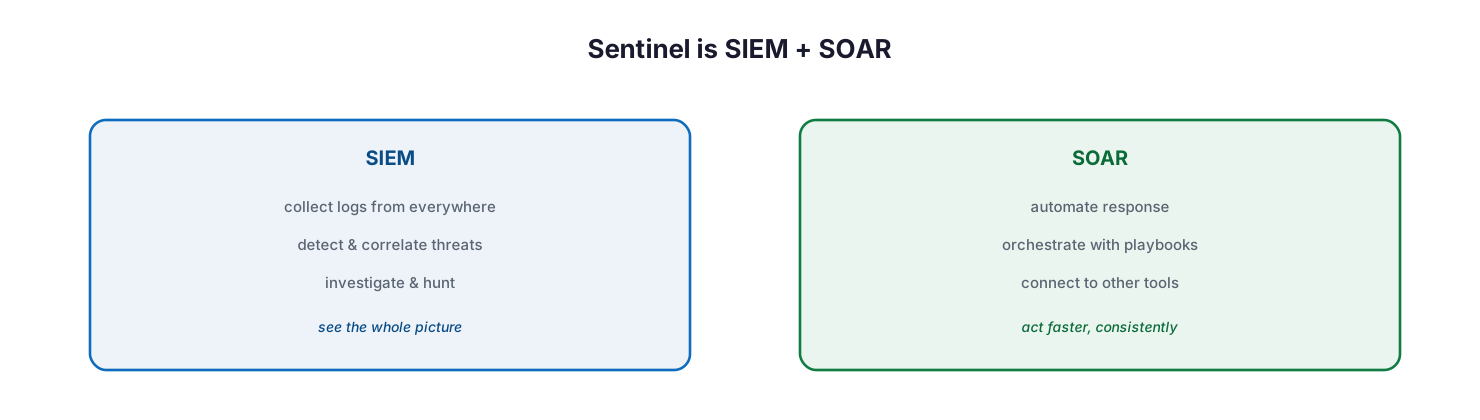
Sentinel is SIEM plus SOAR: the SIEM side collects logs from everywhere, detects and correlates threats, and supports investigation and hunting to see the whole picture; the SOAR side automates response, orchestrates with playbooks, and connects to other tools to act faster and consistently.
As a SIEM, Sentinel collects data at scale across users, devices, applications, and infrastructure — on-premises and across multiple clouds — then uses analytics, AI, and threat intelligence to detect threats, and provides tools to investigate and proactively hunt for them. As a SOAR platform, it automates common tasks and orchestrates response through playbooks that can act on incidents and integrate with the tools a business already uses. It inherits Azure Monitor’s tamper-proof, append-only data handling, which matters for forensic integrity and compliance. In short, Sentinel is the layer that sees and acts across the entire environment, not just the Microsoft parts.
How does Sentinel collect data from everywhere?
The defining capability of a SIEM is breadth of visibility, and Sentinel’s data connectors are how it achieves it. This is the single biggest reason an SMB adds Sentinel on top of Defender: to bring the non-Microsoft sources into the same picture.
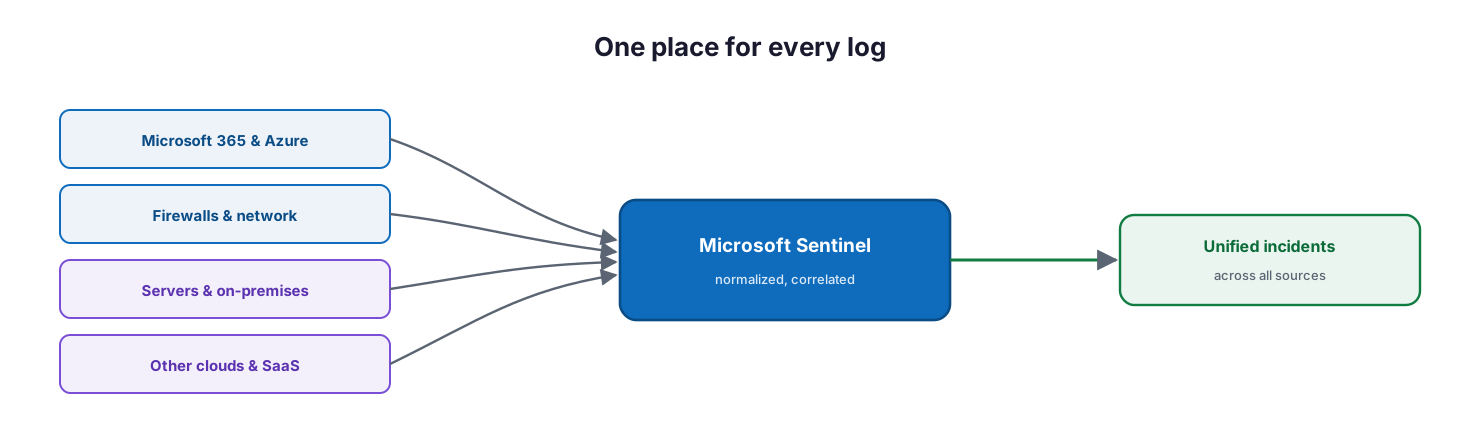
One place for every log: Microsoft 365 and Azure, firewalls and network devices, servers and on-premises systems, and other clouds and SaaS all feed into Microsoft Sentinel, which normalizes and correlates them into unified incidents across all sources.
Out-of-the-box connectors provide real-time integration with Microsoft and Azure sources, and with a broad ecosystem of non-Microsoft security and application products; where no connector exists, Sentinel accepts Common Event Format, Syslog, or REST-API data, and supports custom connectors. It then normalizes these varied sources into a uniform view using the Advanced Security Information Model, so a firewall log and an identity log can be correlated in the same query. The result is that logs from a firewall, an on-premises server, another cloud, and Microsoft 365 all land in one place and can be analyzed together — the visibility that Defender alone, focused on Microsoft workloads, does not provide.
How does Sentinel detect and respond to threats?
Collecting data is only useful if it produces action. Sentinel turns raw logs into a small number of real incidents and then helps resolve them fast — increasingly, automatically.
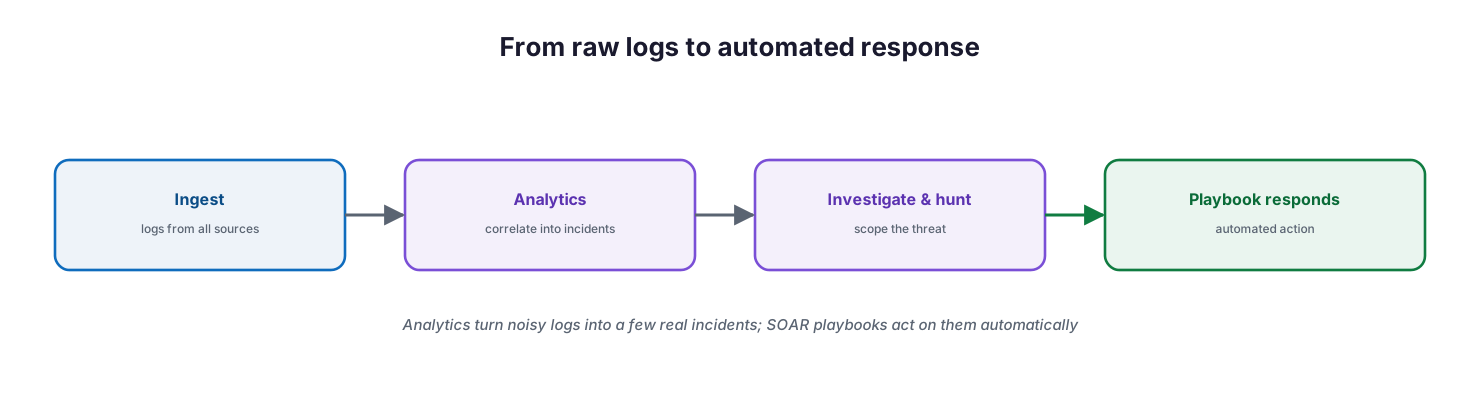
From raw logs to automated response: ingest logs from all sources, apply analytics to correlate them into incidents, investigate and hunt to scope the threat, and let a playbook respond with automated action.
On the detection side, analytics rules reduce noise by combining low-fidelity alerts about different entities into high-fidelity incidents, mapped against the MITRE ATT&CK framework and enriched with threat intelligence. Analysts investigate incidents through an interactive entity graph and hunt proactively for threats before an alert fires. On the response side, automation rules and playbooks — built on Azure Logic Apps — orchestrate remediation, from opening a ticket in an external system to isolating a device, either on demand or automatically when an incident is raised. This SOAR capability is what lets a small team punch above its weight: routine responses run themselves, and analysts focus on the incidents that need judgment.
How does Sentinel fit with managed Defender?
Sentinel and Defender are complementary, not competing, and Microsoft has brought them together. Understanding the division of labor is key to spending wisely.
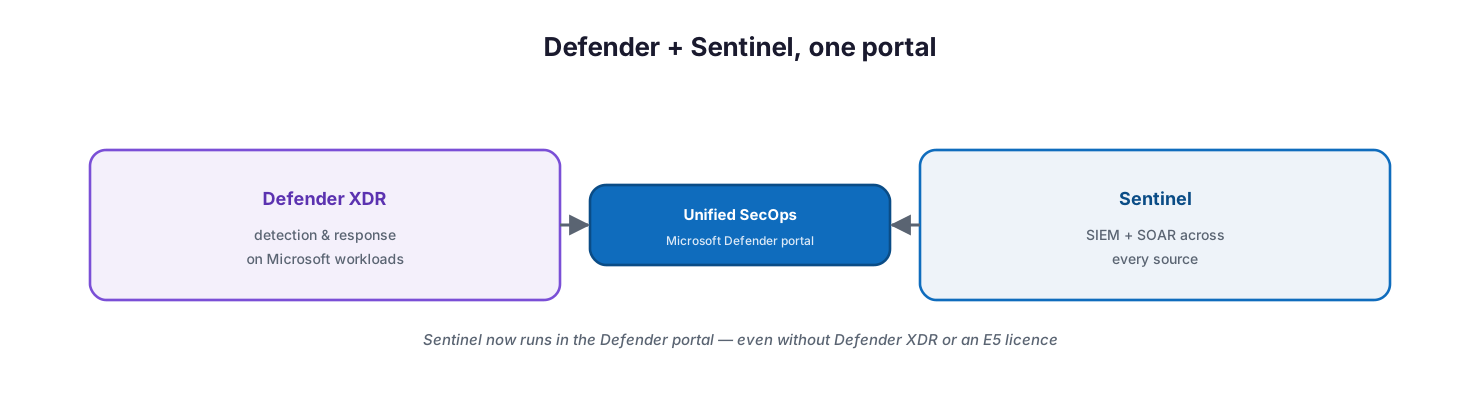
Defender plus Sentinel in one portal: Defender XDR provides detection and response on Microsoft workloads, Sentinel provides SIEM and SOAR across every source, and both are operated together as unified SecOps in the Microsoft Defender portal — Sentinel now runs there even without Defender XDR or an E5 licence.
Defender XDR delivers deep detection and response on Microsoft workloads and is included in the licenses a business already holds. Sentinel adds the SIEM and SOAR layer over the top — ingesting non-Microsoft sources, retaining logs for compliance, applying custom analytics, and automating response across tools. Crucially, Sentinel now runs in the Microsoft Defender portal, giving one unified security operations experience, and it is available there even for customers without Defender XDR or an E5 license. For MSPs, Sentinel supports Azure Lighthouse, so a provider can operate many customers’ environments from its own tenant. The practical rule for an SMB: start with managed Defender, and add Sentinel when you need to see beyond Microsoft workloads, retain logs, or automate response at scale.
How do you run Sentinel affordably as a service?
Sentinel’s power comes with a cost model that rewards discipline: because it bills largely on the volume of data ingested and retained, an unmanaged deployment can become expensive fast. Running it well as a service means continuously curating what goes in.
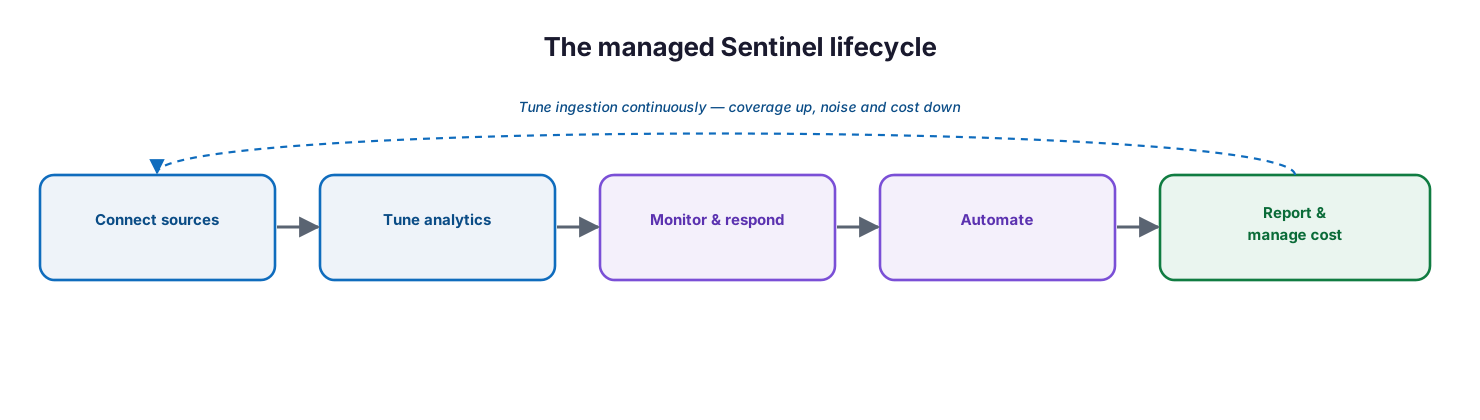
The managed Sentinel lifecycle: connect sources, tune analytics, monitor and respond, automate, and report and manage cost — tuning ingestion continuously so coverage goes up while noise and cost come down.
A managed service connects the right sources — the ones that add detection value — rather than everything; tunes analytics rules to cut false positives; monitors and responds to incidents around the clock; automates routine response with playbooks; and reports on posture while actively managing ingestion and retention against the budget. Microsoft’s pricing and billing guidance and commitment-tier options make cost predictable when managed deliberately. The discipline is the same one that separates a useful SIEM from an expensive log dump: ingest what improves detection, retain what compliance requires, and review both regularly. Done this way, Sentinel gives an SMB enterprise-grade, whole-environment security operations at a cost proportional to the value it delivers.
Managed Sentinel service model: ownership, controls, and service levels
Delivered as a managed service, Sentinel is an accountable, cost-controlled SIEM/SOAR capability. The tables below define it for CIO-level evaluation: who owns each activity, the tool behind it, the cadence, the risk if it lapses, and the business value it protects.
Responsibility matrix (RACI)
| Service area | Activity | MSP team (Responsible) | Customer IT / CIO (Accountable) | Consulted | Informed | Tooling | SLA / impact |
|---|---|---|---|---|---|---|---|
| Onboarding | Deploy workspace & connect sources | MSP Security | CIO | Customer IT | Executive team | Sentinel / data connectors | Key sources ingested |
| Analytics | Build and tune detection rules | MSP SOC | CIO | Customer IT | — | Analytics rules | High-fidelity incidents |
| Monitoring | 24/7 incident monitoring | MSP SOC | CIO | Customer IT | Executive team | Defender portal | Continuous watch |
| Response (SOAR) | Build and run playbooks | MSP SOC | CIO | Customer IT | End users | Playbooks / Logic Apps | Automated containment |
| Threat hunting | Proactive hunting across sources | MSP SOC | CIO | Customer IT | — | Hunting / KQL | Hidden threats found |
| Cost governance | Manage ingestion & retention cost | MSP vCIO | CIO | Finance | Customer IT | Sentinel billing | Predictable SIEM spend |
| Compliance reporting | Workbooks & log retention | MSP vCIO | CIO | Compliance | Board | Workbooks | Auditable, compliant logs |
Service control matrix
| Domain | Service / control | Description | Tool used | Frequency | Risk if missing |
|---|---|---|---|---|---|
| SIEM | Data ingestion | Collect logs across all sources | Data connectors | Continuous | Blind spots in coverage |
| SIEM | Analytics rules | Detect and correlate into incidents | Analytics | Continuous | Missed multi-source attacks |
| SIEM | Threat intelligence | Enrich detection with TI | Threat intelligence | Continuous | Slower, weaker detection |
| SIEM | Log retention | Store logs for compliance and forensics | Sentinel / Log Analytics | Per policy | Non-compliance; no forensics |
| SOAR | Automation & playbooks | Automate incident response | Playbooks / Logic Apps | Continuous | Slow manual response |
| SecOps | Threat hunting | Proactive KQL hunting | Hunting | Regular | Undetected threats |
| Cost | Ingestion & tier tuning | Control data volume and cost | Billing / commitment tiers | Monthly | Runaway SIEM cost |
Operations lifecycle
| Stage | Activity | Outcome | Tool | Business impact |
|---|---|---|---|---|
| Monitor | Watch incidents and workbooks | Continuous visibility | Defender portal | Whole-environment coverage |
| Detect | Analytics correlate into incidents | Incident raised | Analytics rules | Complete attack picture |
| Respond | Investigate and run playbooks | Threat contained | Playbooks / SOAR | Reduced blast radius |
| Optimize | Tune rules, hunt, manage cost | Better signal and spend | Analytics / billing | Efficiency and value |
| Report | Compliance and posture reporting | Assurance | Workbooks | Governance and audit |
Decision matrix
| Scenario | Recommended action | Justification | Tool / service |
|---|---|---|---|
| Only Microsoft workloads | Managed Defender XDR alone | XDR already covers the Microsoft estate | Defender XDR |
| Non-Microsoft sources to watch | Add Sentinel connectors | SIEM correlates firewalls, servers, clouds | Microsoft Sentinel |
| Log retention / compliance need | Use Sentinel retention | Long-term, tamper-proof logs | Sentinel / Log Analytics |
| Need response automation | Build Sentinel playbooks | SOAR automates across tools | Playbooks / Logic Apps |
| MSP managing many tenants | Use Azure Lighthouse | Operate customers from one tenant | Azure Lighthouse |
| SIEM cost is a concern | Curate ingestion + commitment tiers | Pay for data that adds value | Commitment tiers / billing |
SLA / KPI scorecard
| Metric | Target | Tool | Business value |
|---|---|---|---|
| Critical source coverage | 100% of key sources | Data connectors | No blind spots |
| P1 incident response | ≤30 minutes | SOC / Sentinel | Limits breach impact |
| Mean time to respond (MTTR) | At or below target | Playbooks / SOAR | Faster containment |
| Automation rate | At or above target | Playbooks | Speed and consistency |
| Log retention | Meets compliance requirement | Sentinel | Compliance and forensics |
| Ingestion cost | Within agreed budget | Sentinel billing | Predictable spend |
Implementation checklist
- The case for Sentinel is clear — non-Microsoft sources, retention, or SOAR need
- A workspace is deployed and operated in the Microsoft Defender portal
- The right data sources are connected — value-adding, not everything
- Analytics rules are enabled and tuned to reduce false positives
- Threat intelligence and MITRE ATT&CK coverage are in use
- Automation rules and playbooks handle routine incident response
- Log retention is set to meet compliance requirements, no more
- 24/7 monitoring of incidents is in place
- Ingestion volume and commitment tiers are managed against a budget
- Workbooks report posture and compliance to leadership
- Managed Defender is in place first, with Sentinel extending it
- Multi-tenant management (Azure Lighthouse) is configured where relevant
Best practices
- Add Sentinel to extend managed Defender, not to replace it.
- Ingest the data that improves detection; resist collecting everything.
- Operate Sentinel in the Defender portal for one unified SecOps experience.
- Tune analytics rules continuously to keep incidents high-fidelity.
- Automate routine response with playbooks so analysts focus on real threats.
- Set log retention to compliance needs — retention drives cost.
- Manage ingestion and commitment tiers actively against a budget.
- Use workbooks to demonstrate posture and compliance to leadership.
- Review sources, rules, and cost on a regular cadence.
Common mistakes
- Deploying Sentinel before managed Defender, inverting the natural order.
- Ingesting every log by default and creating an unaffordable bill.
- Turning on analytics rules without tuning, drowning analysts in false positives.
- Treating Sentinel as detection-only and never building SOAR playbooks.
- Retaining all data indefinitely regardless of compliance need or cost.
- Running Sentinel with no one monitoring the incidents it raises.
- Ignoring the unified Defender portal and operating tools in silos.
- Never reviewing sources and cost, so value and spend drift apart.
Frequently asked questions
What is Microsoft Sentinel?
It is Microsoft’s cloud-native SIEM and SOAR platform. It collects security data from across an environment, uses analytics and threat intelligence to detect and correlate threats into incidents, supports investigation and hunting, and automates response with playbooks.
How is Sentinel different from Microsoft Defender?
Defender provides detection and response on Microsoft workloads (endpoints, email, identity, apps) and is included in your licenses. Sentinel is a SIEM/SOAR that aggregates all sources — including non-Microsoft — retains logs, applies custom analytics, and automates response. They are complementary.
Do SMBs really need Sentinel?
Not always. If your environment is essentially all Microsoft, managed Defender may be enough. Sentinel adds value when you need visibility into non-Microsoft sources (firewalls, servers, other clouds), long-term log retention for compliance, or SOAR automation.
How much does Sentinel cost?
It is billed largely on the volume of data ingested and retained, with commitment-tier options that lower the rate. Cost is controllable — the key is to ingest the data that adds detection value and retain only what compliance requires. Always confirm current pricing with Microsoft.
Can we run Sentinel without an E5 license?
Yes. Sentinel is generally available in the Microsoft Defender portal, including for customers without Defender XDR or an E5 license, so it can be used even without other Defender services.
What is SOAR, and why does it matter?
SOAR (security orchestration, automation, and response) automates and orchestrates incident response through playbooks. It matters because it lets a small team respond consistently and quickly — routine actions run automatically, freeing analysts for the threats that need judgment.
How is a managed Sentinel service measured?
Through source coverage, incident response times (P1 response, MTTR), automation rate, log retention against compliance, and ingestion cost against budget — reviewed on a cadence and reported to leadership.
Conclusion
Microsoft Sentinel gives a small or midsize business something that used to be the preserve of large enterprises: a single, cloud-native place to see and act on security signals from across the entire environment, not just the Microsoft parts. It extends managed Defender rather than replacing it — Defender detects and responds on Microsoft workloads, and Sentinel aggregates everything, correlates it into real incidents, retains it for compliance, and automates the response. Now available in the unified Defender portal even without an E5 license, it is more accessible than ever.
The path forward is deliberate: put managed Defender in place first, then add Sentinel when you need to see beyond Microsoft workloads, retain logs, or automate response. Connect the sources that add value, tune the analytics, build playbooks for routine response, and manage ingestion and retention against a clear budget. Run this way — as a cost-controlled, continuously tuned managed service — Sentinel turns whole-environment security operations into something an SMB can actually afford and sustain.
Authoritative references
All sources are official Microsoft documentation. Verify current features and pricing before acting; Microsoft Sentinel changes frequently. Source access date: 28 July 2026.
- What is Microsoft Sentinel? — Microsoft Learn
- Connect data sources to Microsoft Sentinel — Microsoft Learn
- Detect threats out of the box — Microsoft Learn
- MITRE ATT&CK coverage in Sentinel — Microsoft Learn
- Threat intelligence in Microsoft Sentinel — Microsoft Learn
- Investigate incidents in Microsoft Sentinel — Microsoft Learn
- Threat hunting in Microsoft Sentinel — Microsoft Learn
- Automate threat response with playbooks — Microsoft Learn
- Microsoft Sentinel in the Microsoft Defender portal — Microsoft Learn
- Unified security operations platform — Microsoft Learn
- Plan costs and understand Sentinel pricing — Microsoft Learn
- Deployment guide for Microsoft Sentinel — Microsoft Learn
On this page
- Executive Summary
- What is Microsoft Sentinel?
- How does Sentinel collect data from everywhere?
- How does Sentinel detect and respond to threats?
- How does Sentinel fit with managed Defender?
- How do you run Sentinel affordably as a service?
- Managed Sentinel service model: ownership, controls, and service levels
- Responsibility matrix (RACI)
- Service control matrix
- Operations lifecycle
- Decision matrix
- SLA / KPI scorecard
- Implementation checklist
- Best practices
- Common mistakes
- Frequently asked questions
- Conclusion
- Authoritative references