Managed Microsoft Defender
Microsoft Defender is one of the most capable security platforms available to a small or midsize business — and one of the most under-used.
- Content owner
- Insyto Content Team
- Editorial reviewer
- Ritesh Mhatre
- Technical reviewer
- Navish Ansari
- Next review
- To be scheduled
- Last reviewed
- Review pending
- Technical level
- Intermediate · CISOs, security teams, IT directors
Executive Summary
Microsoft Defender is one of the most capable security platforms available to a small or midsize business — and one of the most under-used. Every organization on Microsoft 365 Business Premium already owns Defender for Business, and enterprise plans include the full Defender XDR suite, yet the technology rarely delivers its potential. The reason is simple: security tools do not defend a business on their own. They generate alerts, and alerts only reduce risk when someone is watching them around the clock, can tell a real attack from noise, and knows how to respond before damage spreads. Most SMBs have neither a 24/7 security team nor the specialist skills to run one.
A managed Microsoft Defender service closes that gap. It pairs the Defender platform the business already licenses with an external security operations capability that monitors continuously, triages and investigates incidents, responds to contain threats, hunts proactively for what automated tools miss, and tunes the environment to get stronger over time. The result is enterprise-grade detection and response — a managed SOC — without the cost of building one in-house. For a CIO, it turns a powerful but passive toolset into an active, accountable defense measured against clear service levels.
This guide explains what Microsoft Defender protects, how Defender XDR correlates signals into a single view of an attack, what a managed service adds on top of the technology, and how the whole thing runs as an operated discipline. It covers Defender for Business for SMBs and Defender XDR for broader estates, and points to where Microsoft Sentinel extends the picture — a topic covered in its own guide. Because Microsoft’s security products evolve quickly, verify specifics against the linked documentation.
Who should read this:
- CIOs, CTOs, and IT directors accountable for threat detection and response
- Security and IT managers evaluating managed detection and response (MDR)
- Risk and compliance leaders measuring security posture and coverage
- SMB decision-makers weighing in-house versus managed security operations
What does Microsoft Defender protect?
Microsoft Defender is not a single product but a family that protects the main avenues of attack. For an SMB, the endpoint-focused Microsoft Defender for Business — included in Business Premium and designed for up to 300 users — delivers next-generation antivirus, endpoint detection and response, attack surface reduction, automated investigation and remediation, and vulnerability management. Larger or more demanding environments use the full Microsoft Defender XDR suite, which extends protection across every major pillar.
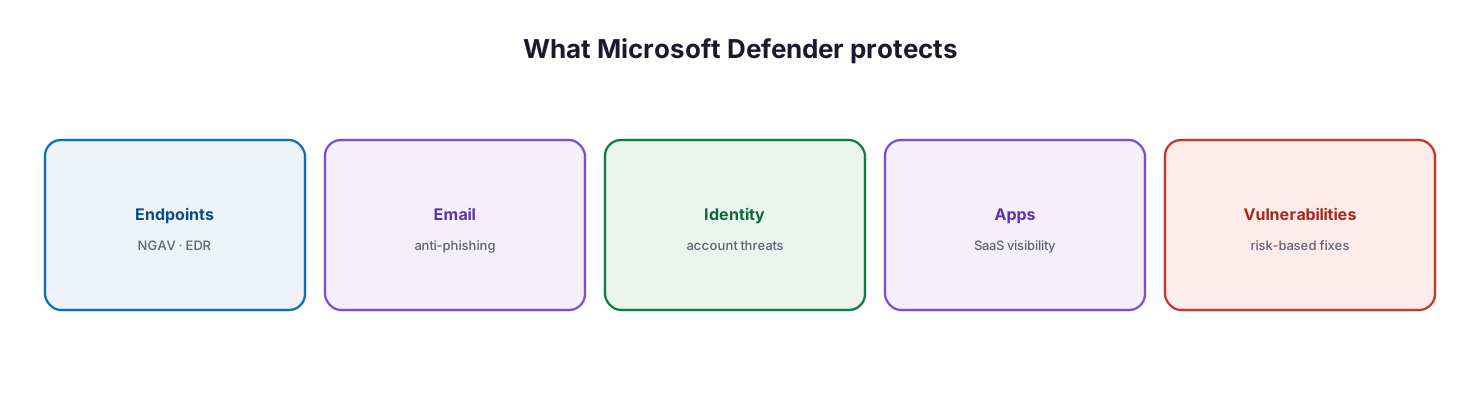
What Microsoft Defender protects: endpoints with next-generation antivirus and EDR, email with anti-phishing, identity against account threats, apps with SaaS visibility, and vulnerabilities with risk-based fixes.
Across the suite, Defender for Endpoint protects devices, Defender for Office 365 protects email and collaboration against phishing and malicious links, Defender for Identity and Microsoft Entra ID Protection detect compromised identities and risky sign-ins, Defender for Cloud Apps brings visibility and control to SaaS applications, and Defender Vulnerability Management continuously finds and prioritizes weaknesses. Together they cover the routes attackers actually use — a device, an inbox, a stolen credential, a misconfigured app, an unpatched hole.
How does Defender XDR correlate threats?
The power of Defender XDR is not any single detector but the way it joins their signals together. A sophisticated attack rarely stays in one place — it might arrive as a phishing email, land on an endpoint, and pivot to a stolen identity. Seen as three separate alerts in three tools, the connection is easy to miss. Defender XDR stitches them into one.
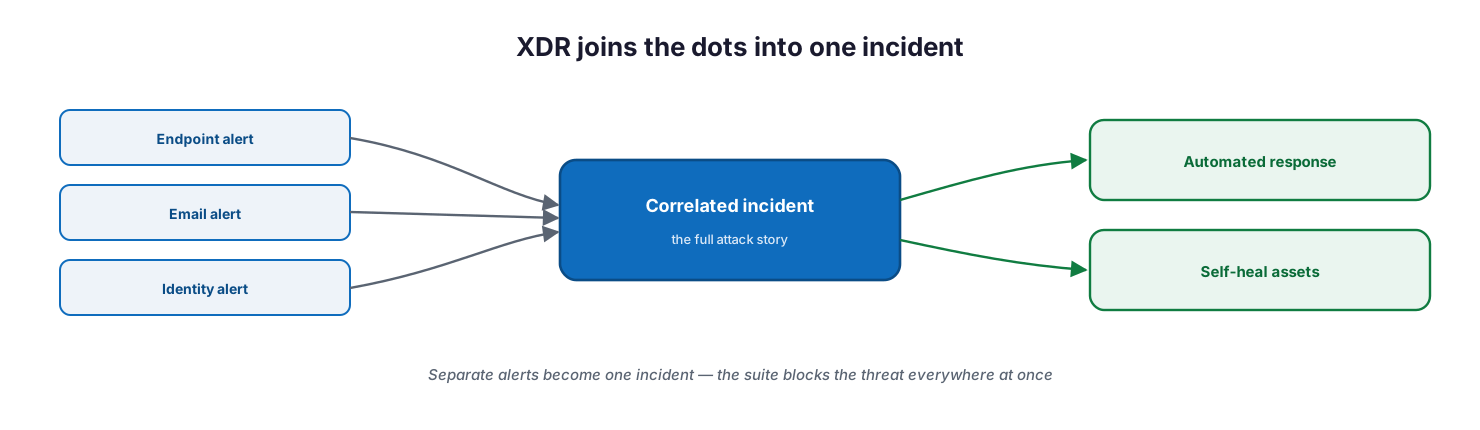
XDR joins the dots into one incident: an endpoint alert, an email alert, and an identity alert are correlated into a single incident that tells the full attack story, driving automated response and self-healing of affected assets.
Defender XDR natively coordinates detection, prevention, investigation, and response across endpoints, identities, email, and applications. It correlates individual alerts into a single incident that narrates the full scope of an attack — how it entered, what it touched, and how it is progressing — in one queue in the Microsoft Defender portal. It shares threat information in real time between products, so a malicious file caught on one endpoint is blocked across every mailbox at once, and it uses AI-powered automated investigation and response to self-heal affected devices, identities, and mailboxes. Security teams can also run advanced hunting queries across pillars to find threats proactively. This correlation is what turns a flood of disconnected alerts into a manageable set of real incidents.
What does the managed service add?
The technology is powerful, but it still needs to be operated. This is where a managed Microsoft Defender service earns its value — it supplies the human capability that a platform alone cannot.
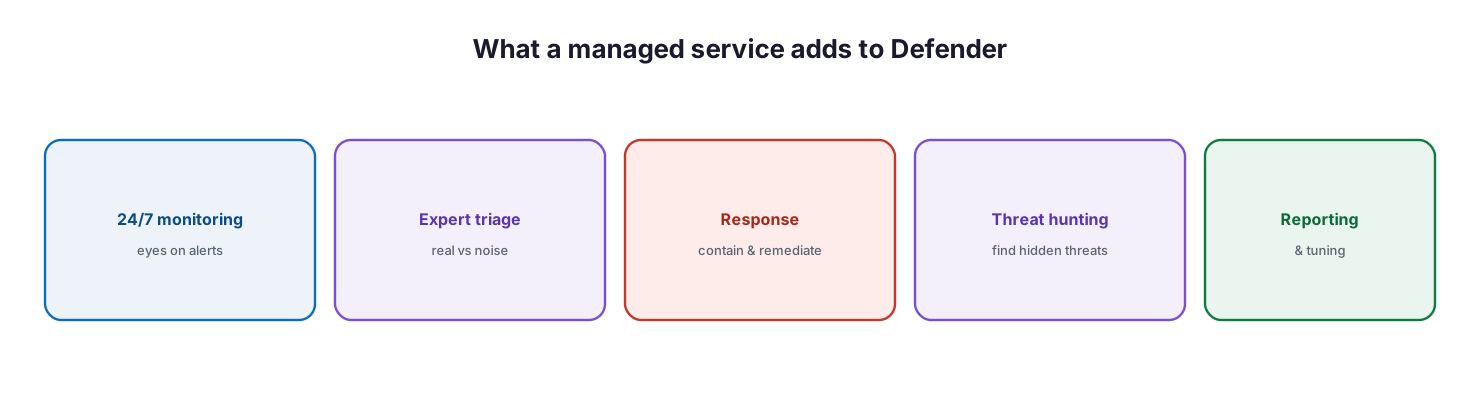
What a managed service adds to Defender: 24/7 monitoring with eyes on alerts, expert triage to separate real threats from noise, response to contain and remediate, proactive threat hunting to find hidden threats, and reporting and tuning.
A managed service provides five things on top of the licenses the business already owns. It monitors alerts around the clock, so a 2 a.m. intrusion is not waiting until morning. It applies expert triage, separating the genuine threats from the false positives that would otherwise overwhelm a small team. It responds — containing and remediating incidents, and guiding the automated actions Defender takes. It hunts proactively for the sophisticated threats that evade automated detection. And it tunes the environment and reports on posture, so the defense improves rather than drifting. For SMBs that cannot staff a 24/7 security operations center, this is the difference between owning security tools and actually being defended by them.
How is a managed Defender service run?
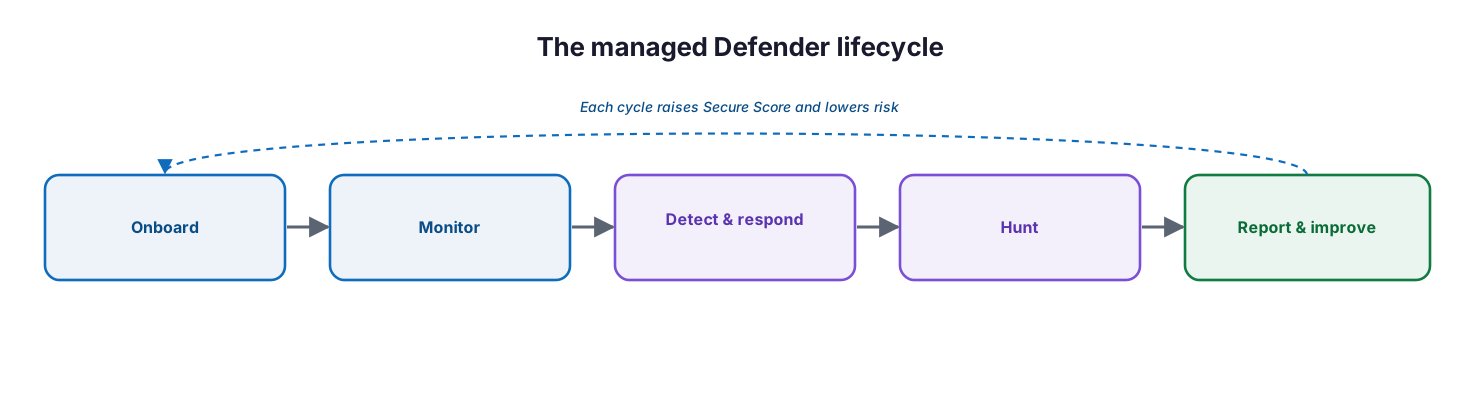
Delivered well, managed Defender is a disciplined operation, not an installation. It follows a repeatable cycle and is measured against Microsoft Secure Score and clear response targets.
The managed Defender lifecycle: onboard and baseline, monitor continuously, detect and respond to incidents, hunt for hidden threats, and report and improve — each cycle raising Secure Score and lowering risk.
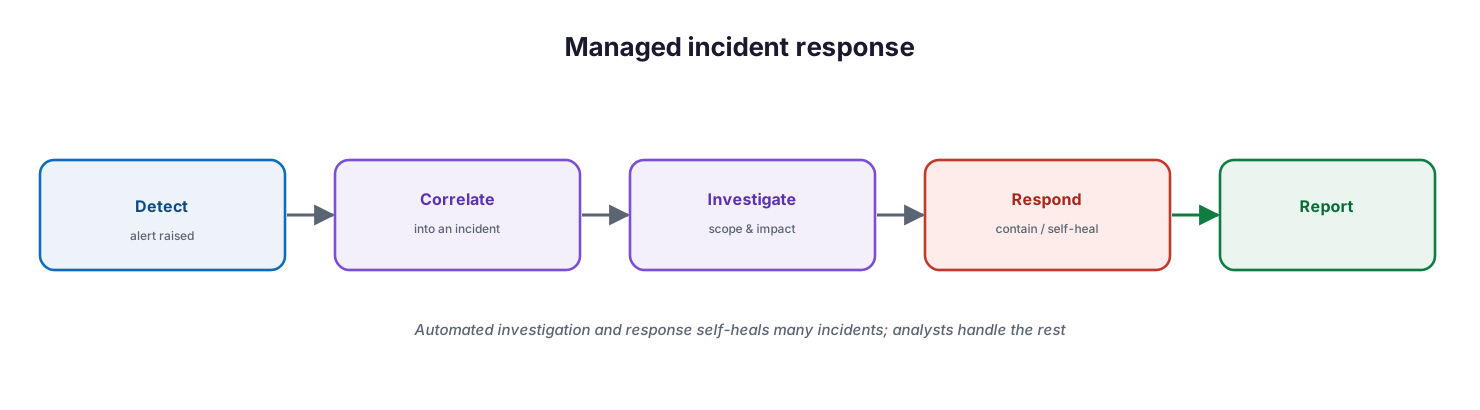
The service onboards by deploying Defender across the estate and establishing secure baselines; monitors alerts continuously in the Defender portal; detects and responds to incidents within agreed service levels; hunts for threats that automation misses; and reports on posture while tuning to reduce noise. When an incident does occur, the response follows a consistent path — detect, correlate into an incident, investigate scope and impact, respond to contain and self-heal, and report — with automated investigation and response handling much of the routine work so analysts focus on what matters.
Managed incident response: detect the alert, correlate it into an incident, investigate scope and impact, respond to contain or self-heal, and report — with automated investigation and response resolving many incidents and analysts handling the rest.
For providers managing many customers, Microsoft 365 Lighthouse gives a multi-tenant view of incidents and security posture, and Defender for Business integrates with the RMM and PSA tooling MSPs already use. Where an organization needs long-term log retention, broader data sources, or a full SIEM and SOAR capability, Microsoft Sentinel extends managed Defender — the subject of a dedicated companion guide.
Managed Defender service model: ownership, controls, and service levels
Delivered as a managed service, Microsoft Defender is an accountable, continuously operated detection-and-response capability. The tables below define it for CIO-level evaluation: who owns each activity, the tool behind it, the cadence, the risk if it lapses, and the business value it protects.
Responsibility matrix (RACI)
| Service area | Activity | MSP team (Responsible) | Customer IT / CIO (Accountable) | Consulted | Informed | Tooling | SLA / impact |
|---|---|---|---|---|---|---|---|
| Onboarding | Deploy Defender and secure baselines | MSP Security | CIO | Customer IT | End users | Defender for Business / XDR | Full coverage across the estate |
| Monitoring | 24/7 alert monitoring | MSP SOC | CIO | Customer IT | Executive team | Microsoft Defender portal | Continuous watch |
| Triage & response | Investigate and remediate incidents | MSP SOC | CIO | Customer IT | Executive team | Defender XDR | P1 response ≤30 minutes |
| Threat hunting | Proactive cross-pillar hunting | MSP SOC | CIO | Customer IT | — | Advanced hunting | Hidden threats found |
| Tuning | Reduce false positives; tune policies | MSP Security | CIO | Customer IT | End users | Defender | Better signal, less noise |
| Reporting | Posture and incident reporting | MSP vCIO | CIO | Customer IT | Board | Secure Score / reports | Governance and assurance |
Service control matrix
| Domain | Service / control | Description | Tool used | Frequency | Risk if missing |
|---|---|---|---|---|---|
| Endpoint | NGAV + EDR | Prevent and detect endpoint threats | Defender for Endpoint | 24/7 | Undetected malware or ransomware |
| Anti-phishing / anti-malware | Protect email and collaboration | Defender for Office 365 | Continuous | Phishing-led compromise | |
| Identity | Identity threat detection | Detect compromised accounts | Defender for Identity / Entra ID Protection | Continuous | Account takeover |
| Apps | Cloud app security | Visibility and control over SaaS | Defender for Cloud Apps | Continuous | Shadow IT and data exposure |
| Assets | Vulnerability management | Find and prioritize weaknesses | Defender Vulnerability Management | Continuous | Exploitable, unpatched gaps |
| SecOps | Automated investigation & response | Self-heal impacted assets | Defender XDR | Continuous | Slow, manual response |
| SecOps | Incident correlation | Stitch alerts into incidents | Defender XDR | Continuous | Alert fatigue, missed attacks |
Operations lifecycle
| Stage | Activity | Outcome | Tool | Business impact |
|---|---|---|---|---|
| Monitor | Watch alerts across all pillars | Continuous visibility | Defender portal | Full coverage |
| Detect | Correlate signals into incidents | Incident raised | Defender XDR | Complete attack picture |
| Respond | Investigate, contain, self-heal | Threat remediated | Defender XDR / auto-IR | Reduced blast radius |
| Optimize | Tune, hunt, strengthen posture | Stronger defense | Advanced hunting / Secure Score | Fewer incidents |
| Report | Incident and posture reporting | Assurance | Reports / Secure Score | Governance and trust |
Decision matrix
| Scenario | Recommended action | Justification | Tool / service |
|---|---|---|---|
| SMB up to 300 users, endpoint focus | Managed Defender for Business | SMB-optimized; included in Business Premium | Defender for Business |
| Need cross-pillar correlation | Managed Defender XDR | Unifies endpoint, email, identity, apps | Defender XDR |
| Limited or no in-house SOC | Managed detection and response | 24/7 expertise without building a SOC | MSP SOC + Defender |
| High alert volume | Automated investigation & response | Auto-remediates and correlates | Defender XDR auto-IR |
| Long log retention / SIEM need | Add Microsoft Sentinel | Retention, SOAR, broader sources | Microsoft Sentinel |
| Rising vulnerability exposure | Defender Vulnerability Management | Risk-based prioritized remediation | Defender Vulnerability Management |
SLA / KPI scorecard
| Metric | Target | Tool | Business value |
|---|---|---|---|
| P1 incident response | ≤30 minutes | Defender / SOC | Limits breach impact |
| Mean time to detect (MTTD) | At or below target | Defender XDR | Faster detection |
| Mean time to respond (MTTR) | At or below target | Defender XDR | Faster containment |
| Automated remediation rate | At or above target | Auto-IR | Speed and consistency |
| Secure Score | At/above baseline, trending up | Microsoft Secure Score | Measurable posture |
| Coverage (endpoint/email/identity) | 100% | Microsoft Defender | No blind spots |
Implementation checklist
- Defender for Business or Defender XDR is deployed across all in-scope assets
- Endpoints, email, identity, and (where licensed) apps are all onboarded
- Secure baselines and attack surface reduction are enabled
- 24/7 monitoring of the Defender portal is in place
- Incident response service levels (for example, ≤30 minutes for P1) are agreed
- Automated investigation and response is enabled and tuned
- Proactive threat hunting runs on a cadence
- Vulnerability management feeds a prioritized remediation process
- Secure Score is tracked and reported to leadership
- Multi-tenant management (Lighthouse) and RMM/PSA integration are configured where relevant
- Escalation paths to the customer are documented and tested
- The need for Microsoft Sentinel (retention, SIEM/SOAR) is assessed
Best practices
- Turn owned licenses into active defense — Defender only protects when it is operated.
- Onboard every pillar you license; a gap in email or identity undermines endpoint protection.
- Use Defender XDR’s incident correlation to cut through alert noise.
- Enable automated investigation and response so routine threats self-heal.
- Add human threat hunting for what automation misses.
- Monitor around the clock; attacks do not keep business hours.
- Track Secure Score and drive it upward as a managed KPI.
- Tie response to clear SLAs (MTTD, MTTR, P1 response) and report them.
- Assess Microsoft Sentinel when retention, compliance, or SIEM/SOAR needs grow.
Common mistakes
- Buying Business Premium and leaving Defender’s security capabilities unconfigured.
- Deploying Defender but having no one watching the alerts.
- Onboarding endpoints but not email or identity, leaving major routes open.
- Drowning in alerts because incident correlation and tuning are never used.
- Disabling automated remediation and then failing to respond manually in time.
- Treating detection as enough, with no defined response process or SLA.
- Never hunting, so sophisticated threats sit undetected.
- Ignoring Secure Score, so posture drifts without anyone noticing.
Frequently asked questions
What is managed Microsoft Defender?
It is a service that operates the Microsoft Defender platform on your behalf — 24/7 monitoring, expert triage, incident response, proactive threat hunting, and tuning — turning the security tools you already license into active, accountable detection and response.
What is the difference between Defender for Business and Defender XDR?
Defender for Business is the SMB-optimized, endpoint-focused offering included in Microsoft 365 Business Premium for up to 300 users. Defender XDR is the broader suite that correlates protection across endpoints, email, identity, and apps for larger or more demanding environments.
What is XDR, and why does it matter?
XDR (extended detection and response) correlates signals from multiple security products into a single incident that tells the full story of an attack, and coordinates automated response across them. It matters because it turns disconnected alerts into a manageable, complete picture.
Do we still need a managed service if Defender automates so much?
Yes. Automation handles routine threats and speeds response, but sophisticated attacks, false-positive triage, threat hunting, and around-the-clock coverage still need skilled people. A managed service supplies that capability without building an in-house SOC.
How does this relate to Microsoft Sentinel?
Defender provides detection and response across Microsoft workloads. Microsoft Sentinel is a cloud SIEM and SOAR that adds long-term log retention, broader data sources, and advanced automation. Managed Defender and Sentinel are complementary; Sentinel is covered in its own guide.
How is a managed Defender service measured?
Through response service levels (P1 response, mean time to detect and respond), automated remediation rate, coverage across pillars, and Microsoft Secure Score — reviewed on a cadence and reported to leadership.
Conclusion
Microsoft Defender gives an SMB genuinely enterprise-grade protection, but a security platform is only as good as the operation around it. Managed Microsoft Defender supplies that operation — continuous monitoring, expert triage and response, proactive hunting, and steady improvement — turning tools the business already owns into an active defense with real accountability. Defender XDR’s ability to correlate signals into a single incident and self-heal affected assets makes this achievable at SMB scale, and a managed service provides the 24/7 human capability that turns detection into defense.
The path forward is practical: onboard every pillar you license, put continuous monitoring and a defined response process in place, enable automation and add human hunting on top, and measure the result against Secure Score and clear response targets. For broader retention and SIEM/SOAR capability, see the companion Microsoft Sentinel guide; together they form a complete managed security operations capability for a growing business.
Authoritative references
All sources are official Microsoft documentation. Verify current features and licensing before acting; Microsoft security products change frequently. Source access date: 28 July 2026.
- What is Microsoft Defender XDR? — Microsoft Learn
- What is Microsoft Defender for Business? — Microsoft Learn
- Microsoft Defender for Endpoint — Microsoft Learn
- Microsoft Defender for Office 365 — Microsoft Learn
- What is Microsoft Defender for Identity? — Microsoft Learn
- Microsoft Defender for Cloud Apps — Microsoft Learn
- Microsoft Defender Vulnerability Management — Microsoft Learn
- Incidents in the Microsoft Defender portal — Microsoft Learn
- Automated investigation and response in Defender XDR — Microsoft Learn
- Advanced hunting in Microsoft Defender XDR — Microsoft Learn
- Microsoft Secure Score — Microsoft Learn
- Defender for Business and MSP resources — Microsoft Learn
On this page
- Executive Summary
- What does Microsoft Defender protect?
- How does Defender XDR correlate threats?
- What does the managed service add?
- How is a managed Defender service run?
- Managed Defender service model: ownership, controls, and service levels
- Responsibility matrix (RACI)
- Service control matrix
- Operations lifecycle
- Decision matrix
- SLA / KPI scorecard
- Implementation checklist
- Best practices
- Common mistakes
- Frequently asked questions
- Conclusion
- Authoritative references