IT Operations Runbooks: Turning Expert Knowledge Into Repeatable Procedures
At two in the morning, a critical service goes down and the person on call has never handled this exact failure before.
- Content owner
- Insyto Content Team
- Editorial reviewer
- Ritesh Mhatre
- Technical reviewer
- Navish Ansari
- Next review
- To be scheduled
- Last reviewed
- Review pending
- Technical level
- Intermediate · IT directors, IT operations managers
Executive Summary
At two in the morning, a critical service goes down and the person on call has never handled this exact failure before. What happens next depends almost entirely on one thing: does a runbook exist? If it does, the responder follows a tested, step-by-step procedure and restores service in minutes. If it does not, they improvise under pressure, phone the one colleague who knows the system, or make the situation worse through a well-intentioned guess. A runbook is a documented, step-by-step procedure for performing a routine or emergency operational task, written so that anyone competent can execute it correctly and consistently. It is the difference between operations that depend on heroes and operations that run on process.
Runbooks deliver value on several fronts at once. They bring consistency, so a task is done the same way every time regardless of who performs it. They reduce errors, because no step is forgotten under pressure. They enable delegation, letting junior staff safely perform work that previously only an expert could handle. They increase speed, since the responder follows steps rather than reasoning from scratch mid-crisis. They reduce key-person risk, because the knowledge lives in the runbook rather than in one person’s head. And they are the natural starting point for automation — a good runbook is, in effect, a script waiting to be written. For a growing IT team, building a library of solid runbooks is one of the highest-leverage investments available, converting scarce expert knowledge into a durable, shareable asset.
This vendor-neutral guide covers how to create and use runbooks well. It explains what a runbook is and the value it delivers, details the anatomy of a good runbook, describes the types worth building first, lays out the natural progression from manual runbook to full automation, and sets out the habits that keep runbooks reliable rather than letting them become the untested, outdated documents that fail at the worst possible moment. The recurring theme is that a runbook is only as good as it is trusted — and trust comes from being clear, complete, tested, and current.
What a Runbook Is and Why It Matters
The core idea is simple but powerful: capture how to do a task so precisely that following the runbook and asking the expert produce the same result. That precision is what unlocks the benefits.
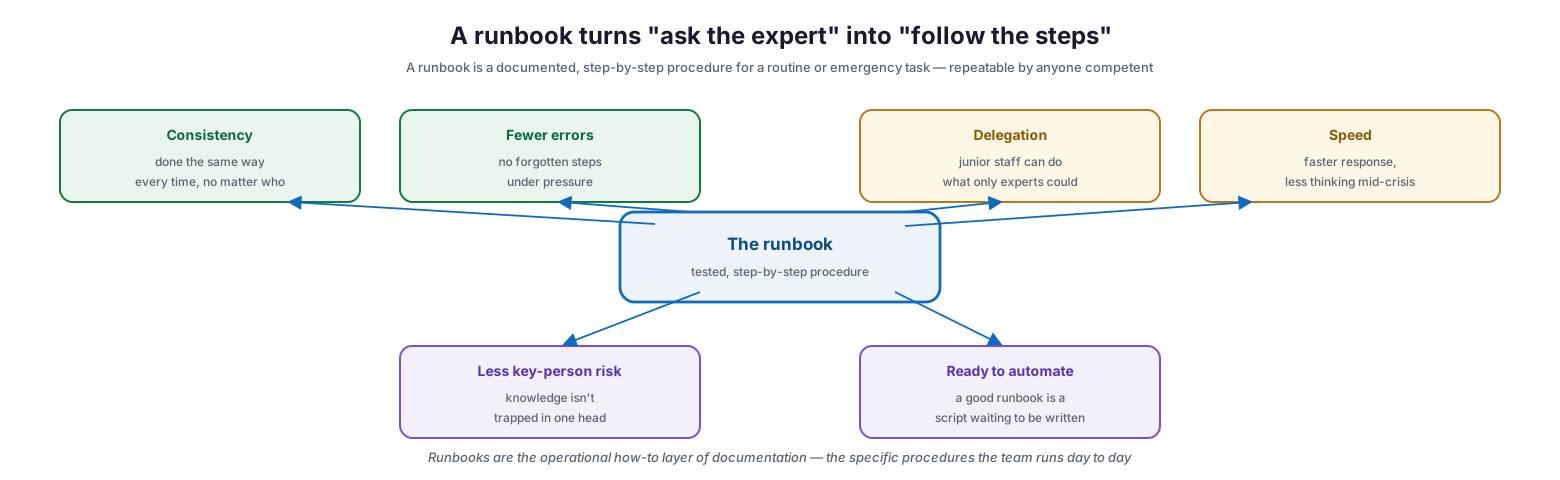
A runbook turns “ask the expert” into “follow the steps”
A runbook is a tested, step-by-step procedure, and its value radiates in several directions. Consistency means the task is done the same way every time, no matter who performs it. Fewer errors follow from having no forgotten steps under pressure. Delegation becomes possible because junior staff can do what previously only experts could. Speed improves through faster response and less thinking mid-crisis. Key-person risk drops because the knowledge is not trapped in one head. And the runbook is ready to automate, since a good runbook is a script waiting to be written. Runbooks are the operational how-to layer of documentation — the specific procedures the team runs day to day, distinct from the broader reference material of architecture diagrams and policies. They are where documentation stops describing and starts instructing.
Anatomy of a Good Runbook
A runbook is only useful if it is complete enough to act on without guessing. A good one has a predictable structure that lets a competent stranger perform the task correctly and alone.
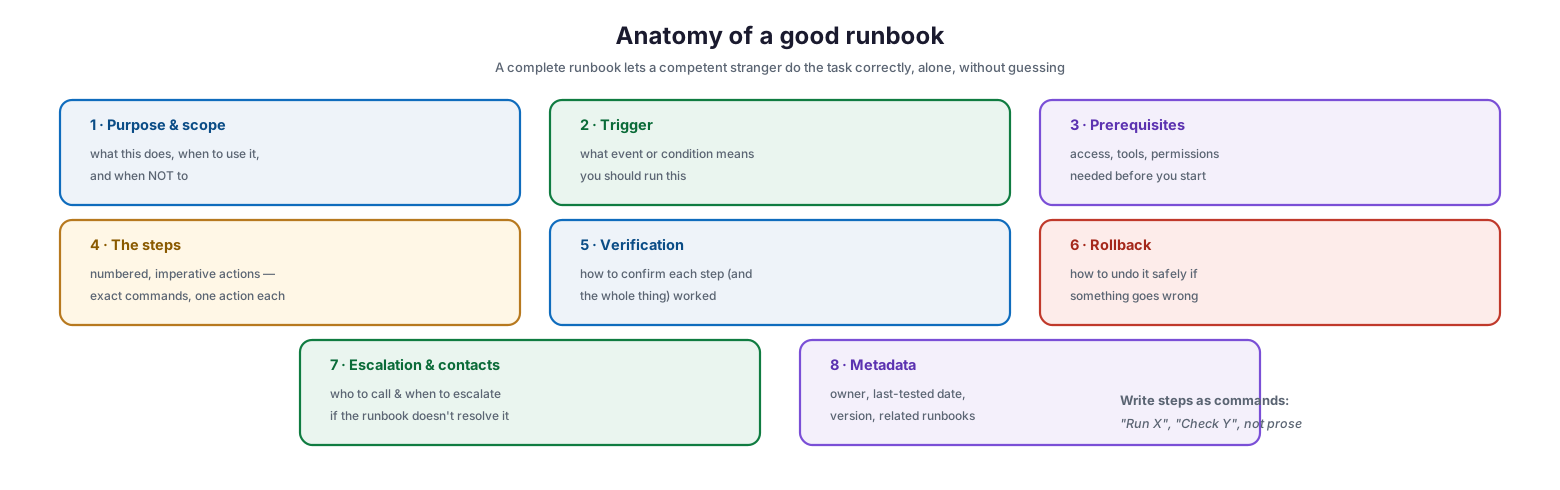
Anatomy of a good runbook
A complete runbook contains: purpose and scope — what this does, when to use it, and when not to; a trigger — the event or condition that means you should run it; prerequisites — the access, tools, and permissions needed before starting; the steps — numbered, imperative actions with exact commands, one action each; verification — how to confirm each step, and the whole procedure, worked; rollback — how to undo it safely if something goes wrong; escalation and contacts — who to call and when to escalate if the runbook does not resolve the issue; and metadata — the owner, last-tested date, version, and related runbooks. The single most important stylistic rule is to write steps as commands: “Run X,” “Check Y,” not narrative prose. A responder under stress needs unambiguous instructions to follow, not a description to interpret. The test of a good runbook is whether someone unfamiliar with the system could execute it successfully with nothing but the runbook in front of them.
| Section | Purpose |
|---|---|
| Purpose & scope | What it does, when to use it and when not |
| Trigger | The condition that means “run this” |
| Prerequisites | Access, tools, permissions needed first |
| Steps | Numbered, imperative actions with exact commands |
| Verification | How to confirm it worked |
| Rollback | How to undo it safely if it fails |
| Escalation & contacts | Who to call, when to escalate |
| Metadata | Owner, last-tested date, version, links |
The Types to Build First
Runbooks can be written for almost any task, so the practical question is where to start. The answer is to prioritize tasks that are frequent, high-risk, or known only to one person. Four categories cover most of the early value.
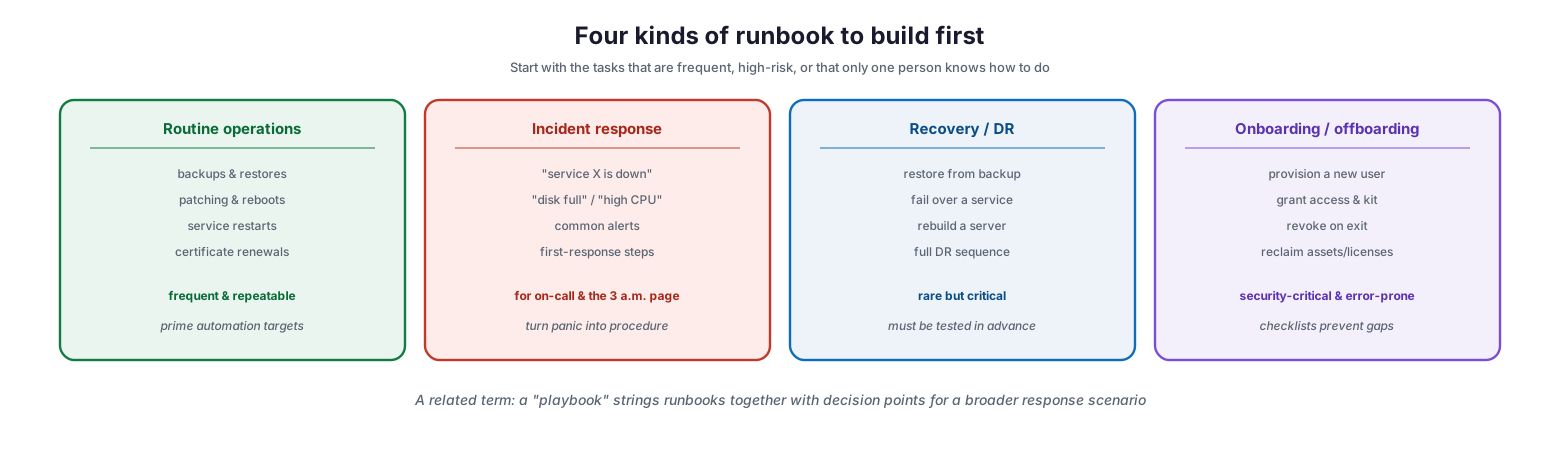
Four kinds of runbook to build first
Routine operations — backups and restores, patching and reboots, service restarts, certificate renewals — are frequent and repeatable, and are prime candidates for later automation. Incident response runbooks — for common alerts like “service X is down,” “disk full,” or “high CPU” — give on-call responders first-response steps that turn a 3 a.m. panic into a procedure. Recovery and disaster-recovery runbooks — restoring from backup, failing over a service, rebuilding a server, running the full DR sequence — are rare but critical, and must be tested in advance because their first real use is the worst time to discover a gap. Onboarding and offboarding runbooks — provisioning a new user, granting access and equipment, revoking access on exit, reclaiming assets and licenses — are security-critical and error-prone, where a checklist prevents the gaps that leave a departed employee with lingering access. A related term is worth knowing: a “playbook” strings several runbooks together with decision points to handle a broader response scenario, coordinating multiple procedures rather than documenting a single task.
| Runbook type | Examples | Why it’s a priority |
|---|---|---|
| Routine operations | Backups, patching, restarts, cert renewals | Frequent, repeatable, automatable |
| Incident response | “Service down,” disk full, high CPU | Supports on-call, speeds response |
| Recovery / DR | Restore, failover, rebuild, full DR | Rare but critical; must be pre-tested |
| Onboarding / offboarding | Provision, grant/revoke access, reclaim | Security-critical and error-prone |
From Manual to Automation
One of the most valuable properties of a good runbook is that it is the specification for automating a task. A clear, tested procedure can be moved up a ladder from manual execution to full automation wherever the payoff justifies it.
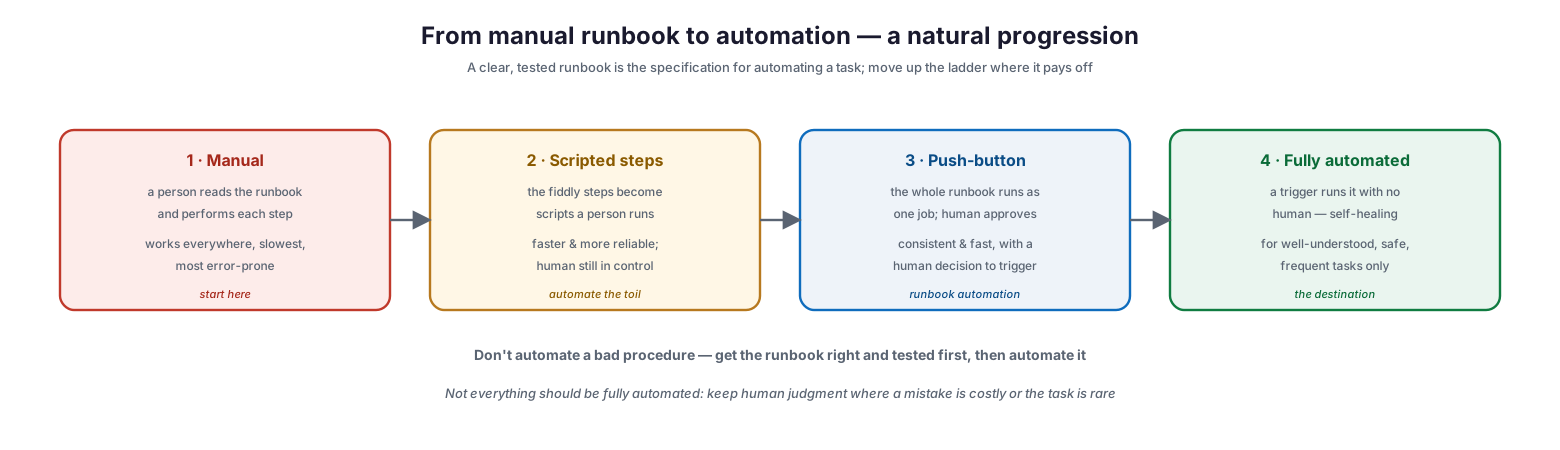
From manual runbook to automation — a natural progression
The progression has four rungs. At the manual stage, a person reads the runbook and performs each step — it works everywhere but is the slowest and most error-prone. At the scripted-steps stage, the fiddly steps become scripts a person runs, faster and more reliable while the human stays in control. At the push-button stage, the whole runbook runs as one job that a human approves and triggers, delivering consistency and speed with a human decision to start it — often called runbook automation. And at the fully automated stage, a trigger runs the procedure with no human at all, enabling self-healing systems, but appropriate only for well-understood, safe, frequent tasks. Two cautions govern the climb. First, do not automate a bad procedure: get the runbook right and tested first, because automating a flawed process just makes mistakes faster. Second, not everything should be fully automated — keep human judgment in the loop where a mistake is costly or the task is rare. The ladder is a guide to where automation pays, not a mandate to automate everything.
| Stage | How it runs | Best for |
|---|---|---|
| Manual | Person follows the runbook by hand | Everything (starting point) |
| Scripted steps | Person runs scripts for fiddly steps | Reducing toil, staying in control |
| Push-button | Whole runbook runs as one approved job | Consistent, human-triggered tasks |
| Fully automated | Trigger runs it with no human | Safe, frequent, well-understood tasks only |
Making Runbooks Reliable
A runbook that is untested or out of date does not merely fail to help; it actively misleads at the worst possible moment. A handful of habits keep runbooks trustworthy over time.
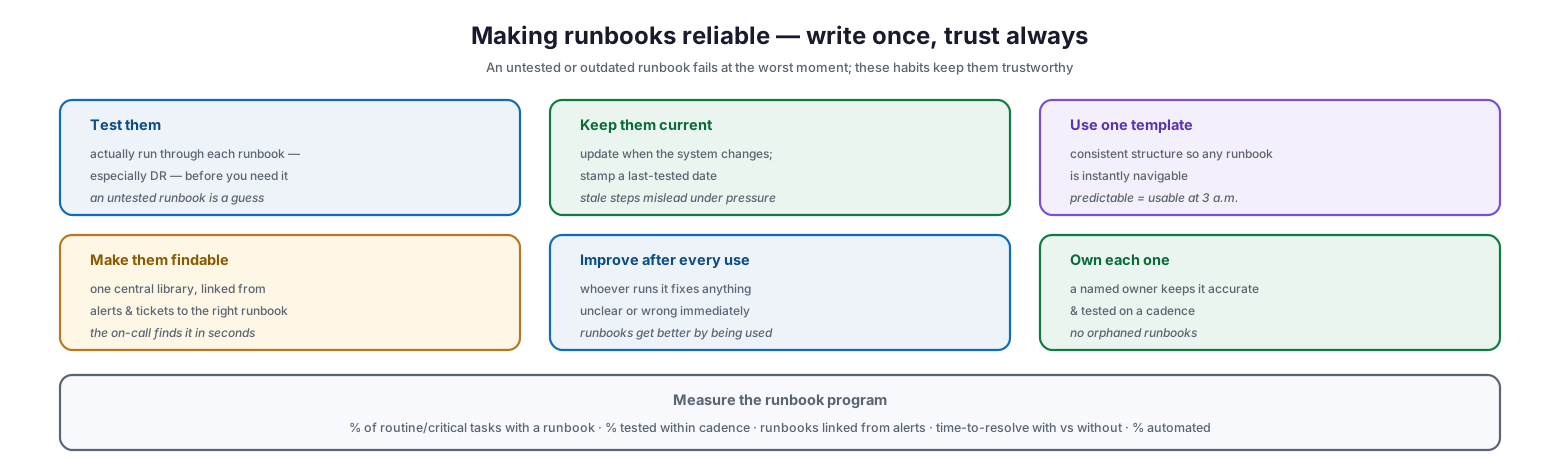
Making runbooks reliable — write once, trust always
Test them — actually run through each runbook, especially disaster-recovery ones, before you need it, because an untested runbook is a guess. Keep them current — update when the underlying system changes and stamp a last-tested date, since stale steps mislead under pressure. Use one template — a consistent structure so any runbook is instantly navigable, which matters most when someone is using it at 3 a.m. Make them findable — one central library, with alerts and tickets linked to the right runbook so the on-call responder finds it in seconds. Improve after every use — whoever runs a runbook fixes anything unclear or wrong immediately, so runbooks get better through being used. And own each one — a named owner keeps it accurate and tested on a cadence, so there are no orphaned runbooks. Measured by the percentage of routine and critical tasks that have a runbook, the percentage tested within cadence, how many are linked from alerts, the time-to-resolve with versus without a runbook, and the percentage automated, a runbook program becomes a demonstrable capability that steadily raises the reliability and resilience of operations.
IT Runbook Checklist
- Identify the tasks that are frequent, high-risk, or known to only one person, and write runbooks for them first.
- Cover the four priority types: routine operations, incident response, recovery/DR, and onboarding/offboarding.
- Include every section: purpose, trigger, prerequisites, steps, verification, rollback, escalation, and metadata.
- Write steps as numbered, imperative commands with exact syntax — not prose.
- Add verification so the responder can confirm each step and the whole task worked.
- Always include a rollback and an escalation path.
- Test every runbook, and test DR runbooks especially, before they are needed.
- Keep runbooks current by updating them when systems change; stamp a last-tested date.
- Use one consistent template and store all runbooks in a central, findable library.
- Link alerts and tickets directly to the relevant runbook.
- Assign an owner to each runbook and review on a cadence.
- Progress suitable runbooks up the automation ladder, but fix the procedure before automating it.
Best Practices
Start with the painful and the fragile. Write runbooks first for the tasks that hurt most: frequent operations, common incidents, and anything only one person currently knows. Those deliver the fastest return.
Write for the stranger under pressure. Assume the reader is unfamiliar with the system and stressed. Use unambiguous, imperative steps with exact commands, include verification, and provide a rollback and escalation path.
Test before you trust. A runbook is a hypothesis until it has been run. Test each one — and disaster-recovery runbooks especially — so its first real use is not its first-ever use.
Keep them alive. Tie runbook updates to system changes, stamp last-tested dates, and let whoever runs a runbook fix it on the spot. Runbooks decay quickly if maintenance is not built in.
Make them one click away. A brilliant runbook no one can find is useless. Centralize them, use a consistent template, and link alerts and tickets straight to the right procedure.
Automate the proven ones. Once a runbook is clear and tested, climb the automation ladder where it pays — scripting toil, adding push-button execution, and fully automating only safe, frequent, well-understood tasks. Never automate a procedure you have not first made correct.
Common Mistakes
Having no runbooks. Relying on people to remember or improvise leaves operations fragile, slow, and dependent on a few individuals. Even rough runbooks beat none.
Writing vague, prose-heavy procedures. Narrative descriptions that require interpretation fail under pressure. Steps must be explicit, imperative, and precise enough to follow without guessing.
Never testing them. An untested runbook, particularly for disaster recovery, may not work when it is finally needed — and discovering that during a real incident is catastrophic.
Letting them go stale. Runbooks that are not updated when systems change give wrong instructions, which is worse than no instructions. Build maintenance and last-tested dates into the process.
Making them hard to find. Scattering runbooks across drives and chat threads means responders cannot reach them when it counts. Centralize and link from alerts.
Automating a flawed procedure. Automating a runbook that is unclear or wrong simply makes errors faster and harder to catch. Get the manual runbook right and tested before automating it.
Frequently Asked Questions
What is a runbook? A runbook is a documented, step-by-step procedure for performing a specific routine or emergency IT task, written so that anyone competent can execute it correctly and consistently. It turns expert knowledge into a repeatable process.
What is the difference between a runbook and a playbook? A runbook documents a single specific procedure. A playbook is broader — it strings runbooks together with decision points to handle a larger response scenario, coordinating multiple procedures rather than documenting one task. Usage varies, but that is the common distinction.
What should a runbook contain? Purpose and scope, the trigger, prerequisites, numbered imperative steps with exact commands, verification of success, a rollback procedure, escalation and contacts, and metadata such as owner and last-tested date. The test is whether a stranger could execute it alone.
Which runbooks should we write first? Prioritize tasks that are frequent, high-risk, or known to only one person: routine operations, common incident responses, recovery and DR procedures, and onboarding/offboarding. These deliver the most value soonest.
Should runbooks be automated? Where it pays off. A clear, tested runbook is the specification for automation, and you can progress from manual execution to scripted steps, push-button jobs, and full automation. But automate only proven procedures, and keep human judgment for costly or rare tasks.
How do we keep runbooks from going out of date? Test them regularly, update them whenever the underlying system changes, stamp a last-tested date, assign each an owner, and let whoever runs a runbook correct it immediately. Runbooks stay accurate through use and ownership, not by being written once.
Conclusion
Runbooks are how an IT team converts hard-won expert knowledge into a durable, shareable asset — and how it stops depending on the availability of a few individuals to keep the lights on. A good runbook lets anyone competent perform a task correctly, consistently, and quickly, whether it is a routine backup, a middle-of-the-night incident, or a full disaster recovery. The value is immediate and broad: fewer errors, faster response, safe delegation to junior staff, and dramatically reduced key-person risk, all flowing from the simple act of writing down exactly how something is done.
The keys to a runbook program are precision and trust. Write procedures as unambiguous, imperative steps with verification and rollback; build the ones that matter most first; test them — especially recovery runbooks — before they are needed; keep them current, findable, and owned; and progress the proven ones up the automation ladder without ever automating a procedure you have not first made correct. Do that, and the team gains a compounding capability: every runbook written is a task that no longer requires a hero, and every runbook automated is toil the team never has to do by hand again. In operations, that is the difference between firefighting and running a well-oiled machine.
References
- Google SRE — Being On-Call and using playbooks/runbooks
- Google SRE Workbook — Playbooks and runbooks
- NIST SP 800-61 Rev. 2 — Computer Security Incident Handling (playbooks)
- ITIL 4 — Standard operating procedures and service management
- NIST SP 800-184 — Guide for Cybersecurity Event Recovery (recovery procedures)
- CISA — Incident and vulnerability response playbooks
- Google SRE — Eliminating toil (automation)