IT Documentation Standards: Turning Tribal Knowledge Into a Trusted Knowledge Base
Every IT team runs on knowledge — how the network is wired, why a server is configured a particular way, what to do when a critical system fails, who to call when a vendor’s product breaks.
- Content owner
- Insyto Content Team
- Editorial reviewer
- Ritesh Mhatre
- Technical reviewer
- Navish Ansari
- Next review
- To be scheduled
- Last reviewed
- Review pending
- Technical level
- Intermediate · IT directors, IT operations managers
Executive Summary
Every IT team runs on knowledge — how the network is wired, why a server is configured a particular way, what to do when a critical system fails, who to call when a vendor’s product breaks. In too many organizations, that knowledge lives almost entirely in people’s heads. It works, right up until the person who holds it is on holiday, out sick, or gone for good, at which point the business discovers it is one resignation away from a crisis. IT documentation is the discipline of capturing that knowledge in a form others can find, trust, and act on — of turning fragile tribal knowledge into a durable, shared asset the organization actually owns.
Documentation is often treated as a chore that competes with “real work,” and that framing is exactly why so much of it is missing, incomplete, or hopelessly out of date. But the payoff is substantial and concrete: well-documented IT means anyone can pick up the work, so key-person risk plummets; new hires become productive fast and troubleshooting is quicker; work is consistent and repeatable rather than reinvented each time; and recovery from incidents is smoother while audits become routine. Undocumented IT delivers the opposite on every count — slow onboarding, inconsistent fixes, stalled recovery, and knowledge that walks out the door. The difference between the two is not talent or effort; it is whether the organization has treated documentation as the asset it is.
This vendor-neutral guide sets out documentation standards that make a knowledge base genuinely useful. It explains why documentation matters, lays out what to document across an IT estate, defines the seven marks of good documentation, tackles the real challenge of keeping documents current rather than letting them rot, and covers how to structure, secure, and govern the whole thing. The recurring theme is that documentation is not a one-time writing project but an ongoing habit built into daily work — and the ultimate test is simple: could a competent newcomer run your environment from the documentation alone?
Why Documentation Matters
Before the standards, it is worth being clear about the stakes, because the contrast between documented and undocumented IT is stark and touches nearly every operational outcome.
Documentation turns tribal knowledge into shared knowledge
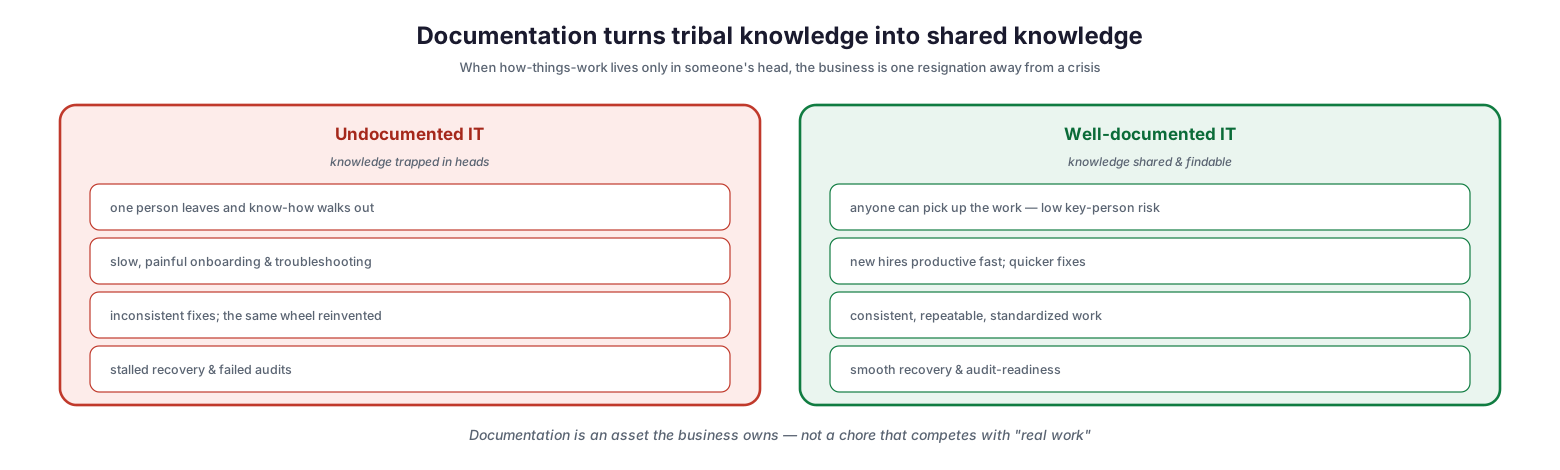
In undocumented IT, knowledge is trapped in individuals’ heads: when one person leaves, their know-how walks out with them; onboarding and troubleshooting are slow and painful; fixes are inconsistent as the same wheel is reinvented; and recovery stalls while audits fail for lack of evidence. In well-documented IT, knowledge is shared and findable: anyone can pick up the work, so key-person risk is low; new hires are productive quickly and fixes are faster; work is consistent, repeatable, and standardized; and recovery is smooth while the organization is audit-ready. The lesson is that documentation is an asset the business owns — not a distraction from real work but a multiplier of it. Every hour invested in capturing knowledge is repaid many times over in resilience, speed, and consistency, and the absence of it is a silent, compounding risk.
What to Document
Good documentation starts with knowing what to capture. A handful of categories cover most of the tribal knowledge in a typical IT team, and together they form the backbone of a knowledge base.
What to document — the essentials of an IT knowledge base
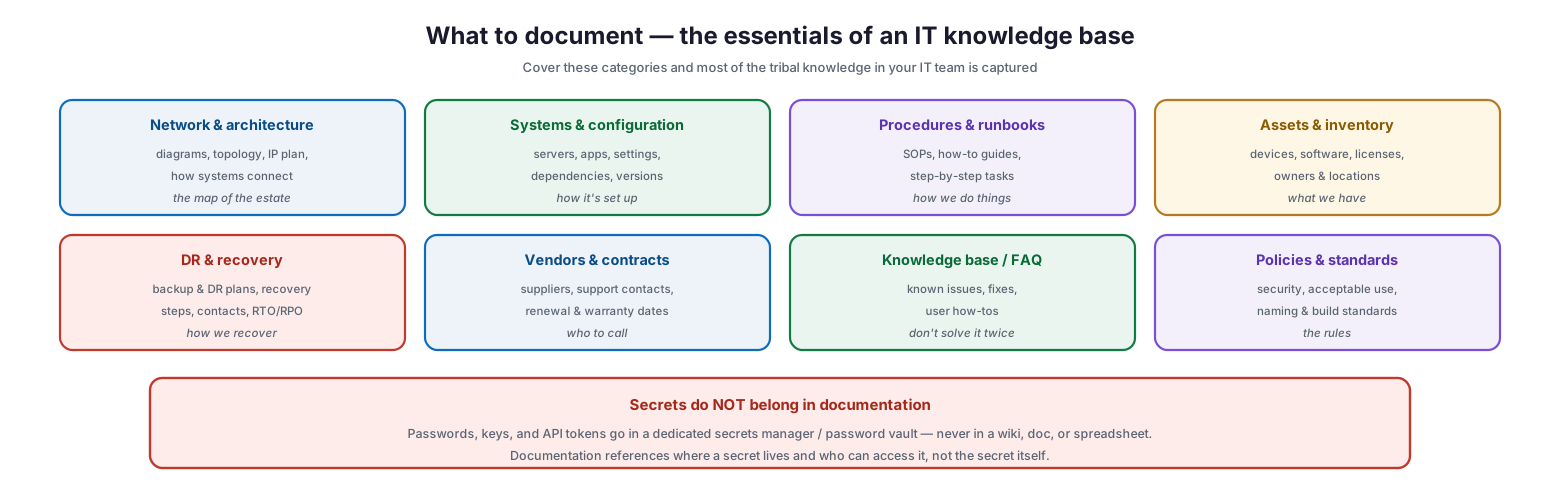
The essential categories are: network and architecture — diagrams, topology, IP plans, and how systems connect, the map of the estate; systems and configuration — servers, applications, settings, dependencies, and versions, how it is set up; procedures and runbooks — standard operating procedures, how-to guides, and step-by-step tasks, how we do things; assets and inventory — devices, software, licenses, owners, and locations, what we have; disaster recovery and recovery — backup and DR plans, recovery steps, contacts, and objectives, how we recover; vendors and contracts — suppliers, support contacts, and renewal and warranty dates, who to call; knowledge base and FAQ — known issues, fixes, and user how-tos, so problems are not solved twice; and policies and standards — security, acceptable use, and naming and build standards, the rules. One category deserves an emphatic exception: secrets do not belong in documentation. Passwords, keys, and API tokens must live in a dedicated secrets manager or password vault, never in a wiki, document, or spreadsheet. Documentation references where a secret lives and who can access it — not the secret itself.
| Category | What it captures | Answers |
|---|---|---|
| Network & architecture | Diagrams, topology, IP plan | How the estate connects |
| Systems & configuration | Servers, apps, settings, versions | How it is set up |
| Procedures & runbooks | SOPs, how-to, step-by-step | How we do things |
| Assets & inventory | Devices, software, licenses, owners | What we have |
| DR & recovery | Backup/DR plans, recovery steps | How we recover |
| Vendors & contracts | Suppliers, support, renewals | Who to call |
| Knowledge base / FAQ | Known issues, fixes, how-tos | Don’t solve it twice |
| Policies & standards | Security, acceptable use, naming | The rules |
The Seven Marks of Good Documentation
Capturing knowledge is only half the job; capturing it well is what separates a useful knowledge base from a graveyard of stale, unfindable files. Seven qualities define documentation worth having.
The seven marks of good documentation
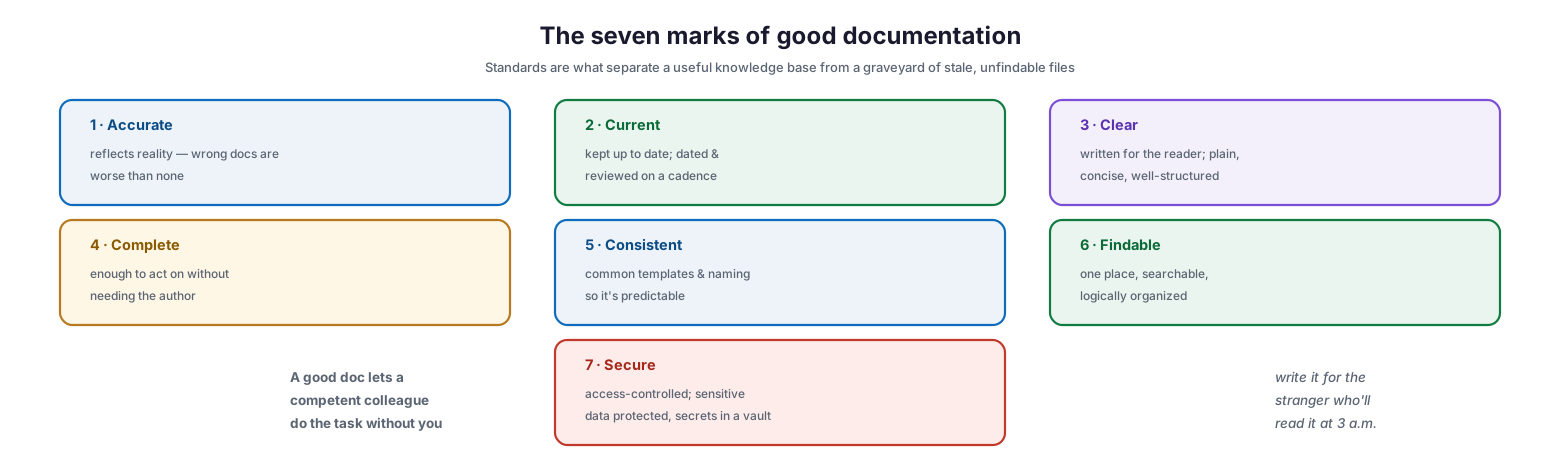
Good documentation is accurate — it reflects reality, because wrong documentation is worse than none; current — kept up to date, dated, and reviewed on a cadence; clear — written for the reader in plain, concise, well-structured language; complete — enough to act on without needing the original author; consistent — following common templates and naming so it is predictable; findable — held in one place, searchable, and logically organized; and secure — access-controlled, with sensitive data protected and secrets kept in a vault. A simple test captures the spirit of all seven: a good document lets a competent colleague do the task without you. The best documentation is written for the stranger who will read it at three in the morning during an incident — someone who needs to act, quickly, without the luxury of asking the person who wrote it.
| Mark | Meaning |
|---|---|
| Accurate | Reflects reality — wrong docs are worse than none |
| Current | Up to date, dated, reviewed on a cadence |
| Clear | Written for the reader; plain and well-structured |
| Complete | Enough to act on without the author |
| Consistent | Common templates and naming; predictable |
| Findable | One place, searchable, logically organized |
| Secure | Access-controlled; secrets in a vault |
Keeping Documentation Alive
The hardest part of documentation is not writing it but keeping it current. Documents rarely fail because they were never created; they fail because they were never updated, quietly drifting from reality until no one trusts them. Building maintenance into the lifecycle is what prevents this.
The real challenge: keeping documentation alive
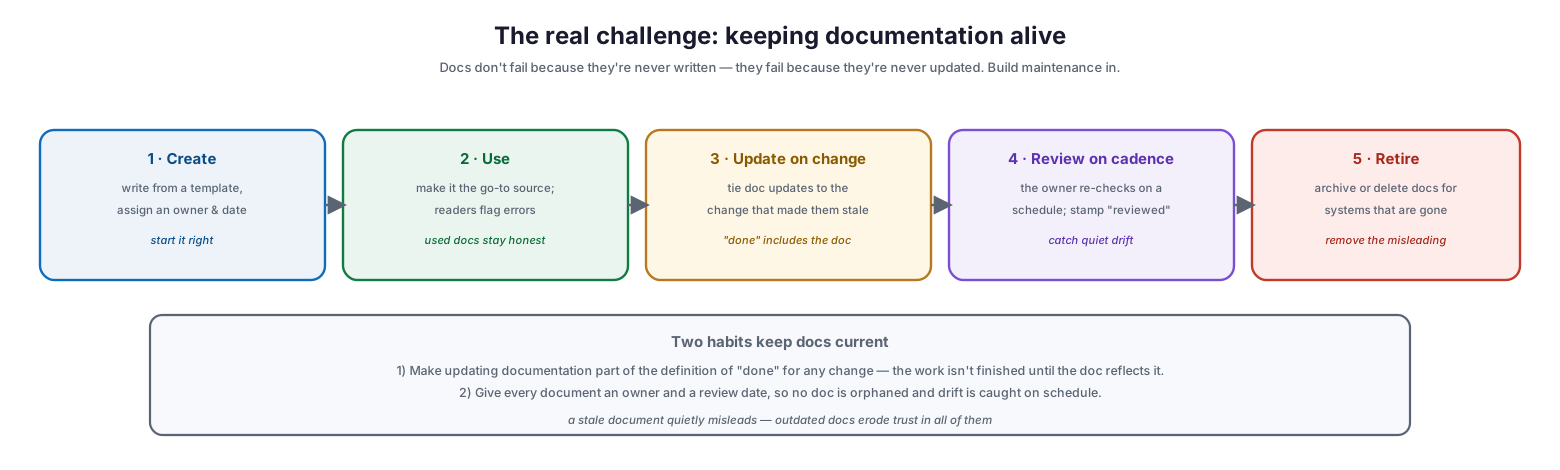
The lifecycle runs create, use, update on change, review on cadence, and retire. Create a document from a template with an assigned owner and date. Use it — make it the go-to source so that readers rely on it and flag errors, because documents that are actually used stay honest. Update on change by tying documentation updates to the change that made them stale. Review on cadence, with the owner re-checking on a schedule and stamping it “reviewed” to catch quiet drift. And retire documents for systems that no longer exist, archiving or deleting them so they cannot mislead. Two habits keep documentation current above all others: first, make updating documentation part of the definition of “done” for any change, so the work is not finished until the doc reflects the new reality; and second, give every document an owner and a review date, so no document is orphaned and drift is caught on schedule. A stale document quietly misleads, and outdated documents erode trust in all of them — which is why maintenance, not creation, is the real discipline.
| Lifecycle stage | Action |
|---|---|
| Create | Write from template; assign owner and date |
| Use | Make it the go-to source; readers flag errors |
| Update on change | Tie doc updates to the triggering change |
| Review on cadence | Owner re-checks on schedule, stamps “reviewed” |
| Retire | Archive/delete docs for decommissioned systems |
Structure, Security, and Governance
A great document that no one can find or trust adds nothing. Making documentation valuable requires organizing it, securing it, and governing it as an ongoing practice.
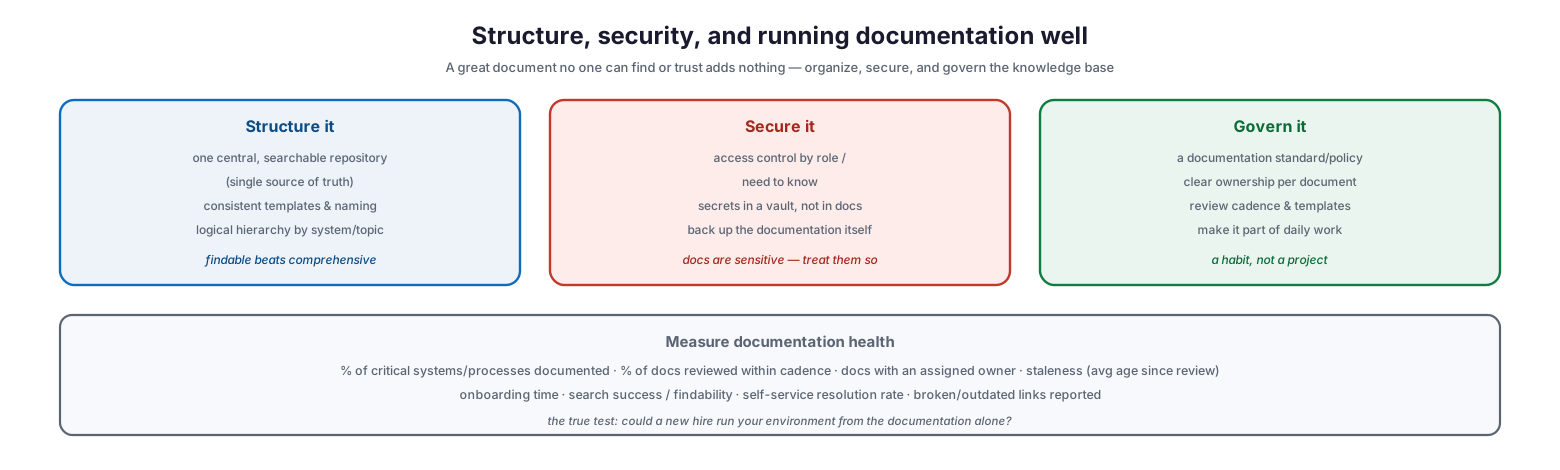
Structure, security, and running documentation well
Structure it with one central, searchable repository as the single source of truth, consistent templates and naming, and a logical hierarchy by system or topic — because findable beats comprehensive. Secure it with access control by role and need to know, secrets kept in a vault rather than in documents, and backups of the documentation itself, since documentation is sensitive and should be treated so. Govern it with a documentation standard or policy, clear ownership per document, a review cadence and templates, and — crucially — by making documentation part of daily work rather than a periodic project; it must be a habit, not a campaign. Measured by the percentage of critical systems and processes documented, the percentage of documents reviewed within cadence, ownership coverage, staleness, onboarding time, and findability, documentation becomes a managed, improving asset. The true test of the whole endeavor is the one every IT leader should ask: could a new hire run your environment from the documentation alone?
IT Documentation Checklist
- Establish a single, central, searchable repository as the source of truth.
- Adopt consistent templates and naming conventions across all documents.
- Document the essential categories: network, systems, procedures, assets, DR, vendors, KB, and policies.
- Keep secrets out of documentation — reference a vault, never store credentials in docs.
- Assign every document an owner and a review date.
- Make updating documentation part of the definition of “done” for every change.
- Review documents on a defined cadence and stamp them “reviewed.”
- Retire or archive documentation for decommissioned systems.
- Write for the reader: accurate, current, clear, complete, and consistent.
- Control access by role and need to know; protect sensitive information.
- Back up the documentation repository itself.
- Measure documentation coverage, currency, ownership, and onboarding time; improve continually.
Best Practices
Treat documentation as an asset, not a chore. Frame it as capturing organizational value and reducing risk, not as overhead that competes with real work. That reframing is what gets it done and kept up.
Write for the 3 a.m. reader. Assume the person using the document is under pressure, unfamiliar with the system, and unable to ask the author. Make it clear and complete enough to act on alone.
Bake updates into “done.” The single most effective habit is refusing to consider any change complete until the relevant documentation reflects it. This is what stops docs from drifting out of date.
Give everything an owner and a review date. Orphaned documents rot. Clear ownership and a review cadence ensure someone is accountable for each document’s accuracy over time.
Keep secrets out of docs. Never store passwords, keys, or tokens in documentation. Use a dedicated secrets manager and have documentation point to it. This is both a security and a maintenance win.
Make it findable and singular. Consolidate into one searchable repository with consistent structure and naming. A brilliant document no one can find delivers no value; findability is as important as content.
Common Mistakes
Relying on tribal knowledge. Leaving critical know-how in individuals’ heads makes the business fragile and onboarding slow. The whole point of documentation is to remove this single-person dependency.
Writing docs once and abandoning them. Documentation that is never maintained becomes inaccurate and untrusted, and wrong documentation is worse than none. Build in ownership and review.
Storing secrets in documentation. Putting passwords or keys in wikis and spreadsheets is a serious security exposure. Secrets belong in a vault; documentation references them.
Scattering documents everywhere. Spreading knowledge across personal drives, chat threads, and email means nothing can be found when needed. Centralize into a single source of truth.
Inconsistent, author-specific formats. When every document follows its own structure, the knowledge base is hard to navigate and use. Templates and naming conventions make it predictable.
Documenting only for audits. Treating documentation as a compliance exercise produces material that satisfies auditors but does not help the team operate. Write it to be used daily.
Frequently Asked Questions
Why is IT documentation so important? Because it removes the risk of critical knowledge living only in people’s heads. Good documentation reduces key-person risk, speeds onboarding and troubleshooting, ensures consistency, and makes recovery and audits far smoother.
What should we document first? Start with the highest-risk, highest-value knowledge: network and architecture diagrams, critical system configurations, disaster recovery and recovery procedures, and the tasks only one person currently knows how to do. Then expand to the other categories over time.
Should passwords be stored in documentation? No. Passwords, keys, and API tokens should be kept in a dedicated secrets manager or password vault, never in documents, wikis, or spreadsheets. Documentation should reference where the secret lives and who can access it, not contain the secret.
How do we keep documentation from going out of date? Make updating documentation part of the definition of “done” for every change, and give each document an owner and a review date so drift is caught on a schedule. Documents that are actually used and regularly reviewed stay accurate.
Where should documentation live? In a single, central, searchable repository that serves as the source of truth, organized with consistent templates and a logical hierarchy. Scattering documents across personal drives and chat tools defeats the purpose.
How do we measure whether our documentation is good? Track coverage of critical systems and processes, the percentage of documents reviewed within cadence, ownership coverage, staleness, and onboarding time. The ultimate test is whether a competent new hire could run the environment from the documentation alone.
Conclusion
IT documentation is how an organization converts fragile, person-dependent knowledge into a durable asset that the whole team can use. The difference between documented and undocumented IT is not a matter of talent but of discipline: one is resilient, fast to onboard, consistent, and audit-ready, while the other is perpetually one departure away from losing something it cannot easily rebuild. Capturing the essential categories — from network and configuration to procedures, recovery, and vendors — and holding every document to the marks of accurate, current, clear, complete, consistent, findable, and secure is what makes a knowledge base genuinely useful.
The decisive factor, though, is maintenance. Documentation fails not for want of writing but for want of updating, so the habits that keep it alive — making documentation part of the definition of “done,” giving every document an owner and a review date, and retiring what is obsolete — matter more than any initial writing effort. Structure it into one findable source of truth, secure it as the sensitive asset it is, keep secrets in a vault, and govern it as a daily practice rather than a project. Do that, and the organization can answer yes to the only question that really counts: could a new hire run our environment from the documentation alone?
References
- ITIL 4 — Knowledge Management practice (overview)
- ISO 9001 — Documented information requirements
- ISO/IEC 20000-1 — Service management (documentation and knowledge)
- NIST SP 800-53 — Documentation and system security plans
- CIS Controls — Secure configuration and documentation
- NIST SP 800-63B — Guidance on secrets management (do not store in docs)
- Google SRE — Documentation and knowledge sharing practices