Capacity Planning: Matching IT Resources to Demand Before You Hit the Wall
Every IT service runs on finite resources — compute, storage, network, database connections, licenses, and cloud budget — and every one of those resources has a limit.
- Content owner
- Insyto Content Team
- Editorial reviewer
- Ritesh Mhatre
- Technical reviewer
- Navish Ansari
- Next review
- To be scheduled
- Last reviewed
- Review pending
- Technical level
- Intermediate · IT directors, IT operations managers
Executive Summary
Every IT service runs on finite resources — compute, storage, network, database connections, licenses, and cloud budget — and every one of those resources has a limit. Capacity planning is the discipline of ensuring an organization has the right amount of each resource to meet its current and future demand, delivered at the right time and at a sensible cost. Done well, it is invisible: services handle peaks comfortably, expansions happen on schedule, and the business grows without ever noticing an infrastructure constraint. Done poorly, it produces two very visible failures — services that fall over when demand exceeds supply, or budgets consumed by resources sitting idle “just in case.” The art is staying in the middle band, and keeping there as demand changes over time.
The stakes are real in both directions. Running out of capacity causes slowdowns and outages at peak, disks that fill, servers that thrash, and an emergency, expensive scramble that costs revenue and user trust. Over-provisioning wastes money on idle servers, unused storage, over-sized cloud instances, and capital tied up in equipment that is never needed. Capacity planning is what prevents both — the practice of measuring what is used, forecasting what will be needed, identifying the gap before it becomes a crisis, and provisioning ahead of demand. And it has grown more nuanced in the cloud era: elasticity absorbs spikes automatically, which reduces the need for hard hardware forecasting but replaces it with a new discipline of cost control, because in the cloud the budget itself is the capacity and a runaway auto-scaling event is a runaway bill.
This vendor-neutral guide covers capacity planning end to end. It frames the balance between too little and too much, identifies the full range of resources that must be planned for beyond just servers, walks through the continuous planning cycle, explains why expansion should be triggered at a warning threshold rather than at the ceiling, and describes how cloud changes the discipline without eliminating it. Grounded in established capacity-management practice, the aim is a straightforward approach to a deceptively important problem: ensuring the organization never runs out of the resources its services depend on, and never massively overpays for the resources it holds.
Finding the Goldilocks Zone
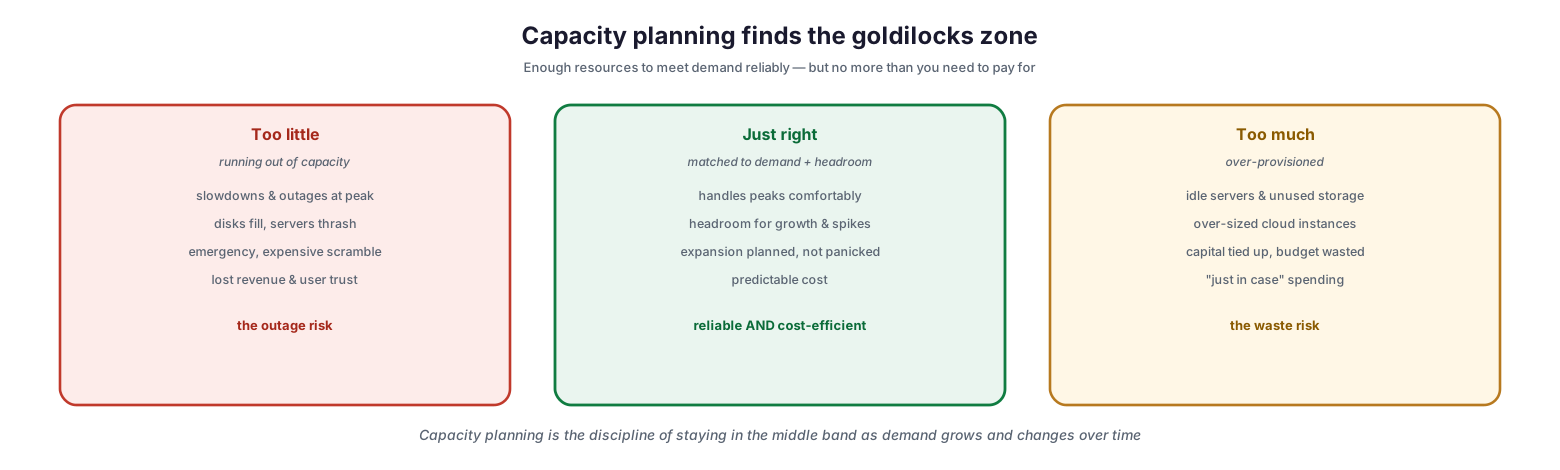
The essence of capacity planning is a balance, and understanding both failure modes clarifies exactly what the discipline is for. Neither extreme is acceptable, and the goal is to stay reliably in the middle.
Capacity planning finds the goldilocks zone
Too little capacity — running out — produces slowdowns and outages at peak, disks that fill and servers that thrash, an emergency and expensive scramble to add resources, and lost revenue and user trust. This is the outage risk. Too much capacity — over-provisioning — produces idle servers and unused storage, over-sized cloud instances, capital tied up and budget wasted, and a culture of “just in case” spending. This is the waste risk. Just right means capacity matched to demand plus sensible headroom: peaks are handled comfortably, there is room for growth and spikes, expansion is planned rather than panicked, and cost is predictable. This is reliable and cost-efficient at once. Capacity planning is the ongoing work of staying in that middle band as demand grows and shifts — neither caught short nor carrying dead weight.
Plan Across Every Resource
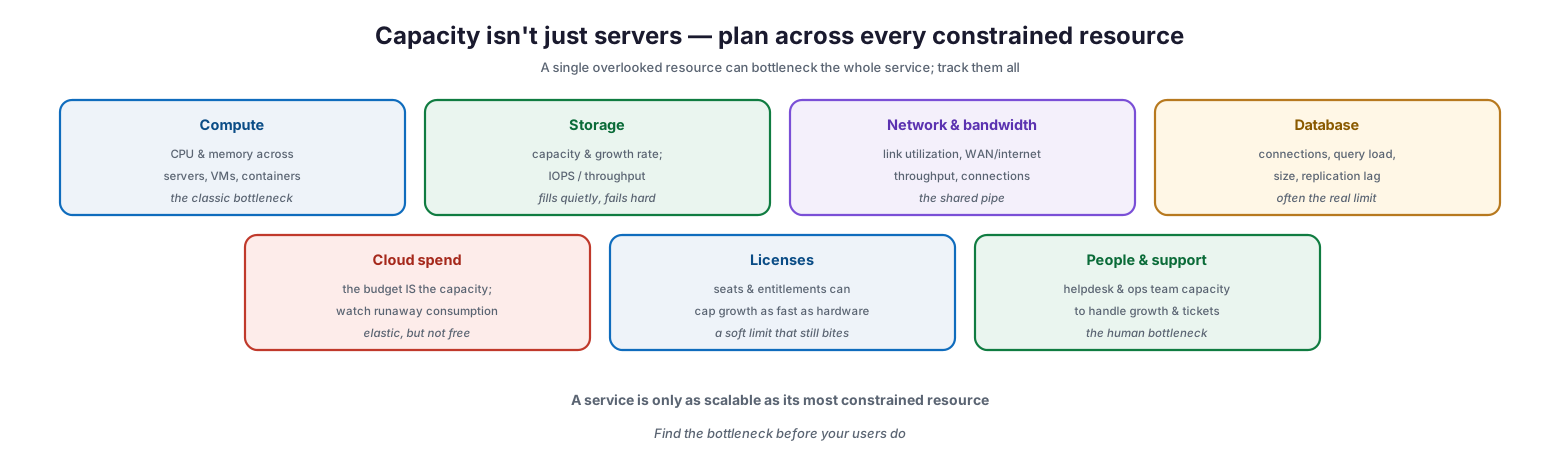
A common and costly mistake is to think of capacity as just servers. In reality, a service is only as scalable as its most constrained resource, and a single overlooked one can bottleneck everything.
Capacity isn’t just servers — plan across every constrained resource
The resources to track include: compute — CPU and memory across servers, VMs, and containers, the classic bottleneck; storage — capacity and growth rate plus IOPS and throughput, which fills quietly and fails hard; network and bandwidth — link utilization, WAN and internet throughput, and connections, the shared pipe; database — connections, query load, size, and replication lag, often the real limit; cloud spend — where the budget itself is the capacity and runaway consumption must be watched; licenses — seats and entitlements that can cap growth as fast as hardware, a soft limit that still bites; and people and support — the helpdesk and operations team’s capacity to handle growth and tickets, the human bottleneck. The discipline is to find the bottleneck before your users do. Adding compute is pointless if the database connection pool is the limit, or if the team cannot support more users; a service scales only as far as its tightest constraint allows.
| Resource | What to watch | Note |
|---|---|---|
| Compute | CPU, memory (servers, VMs, containers) | The classic bottleneck |
| Storage | Capacity, growth rate, IOPS/throughput | Fills quietly, fails hard |
| Network & bandwidth | Utilization, throughput, connections | The shared pipe |
| Database | Connections, query load, size | Often the real limit |
| Cloud spend | Consumption vs budget | The budget is the capacity |
| Licenses | Seats, entitlements | A soft limit that still bites |
| People & support | Team capacity for growth/tickets | The human bottleneck |
The Capacity Planning Cycle
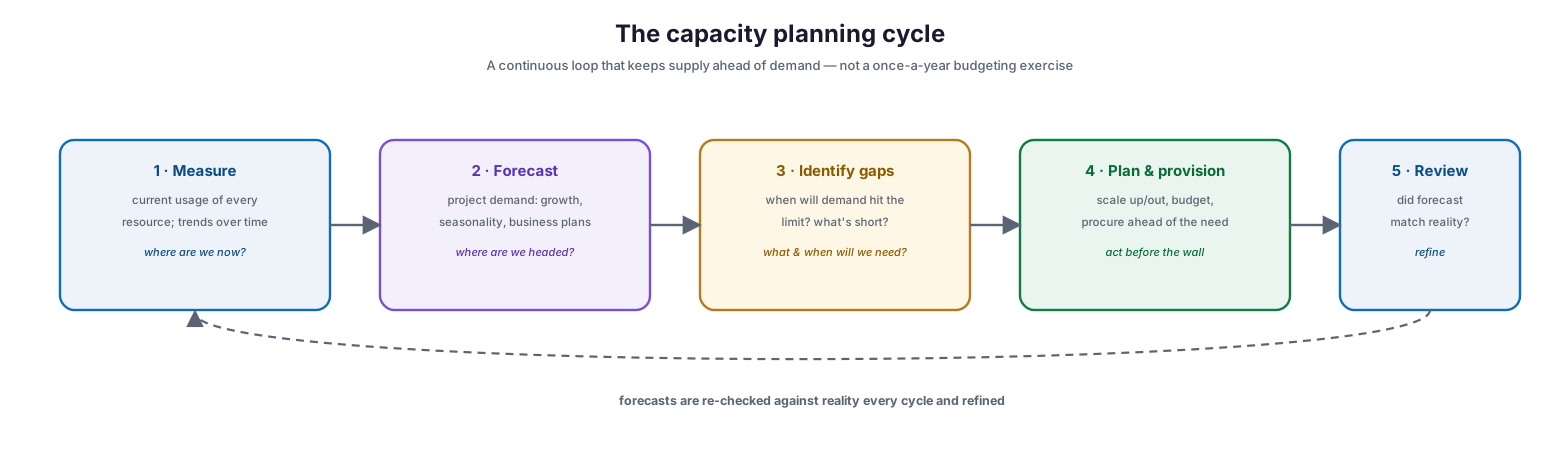
Capacity planning is not a once-a-year budgeting exercise but a continuous loop that keeps supply ahead of demand. Running it as a cycle ensures the organization is never surprised by a limit it could have seen coming.
The capacity planning cycle
The cycle has five steps. Measure the current usage of every resource and its trend over time — where are we now? Forecast future demand by projecting growth, accounting for seasonality, and incorporating business plans — where are we headed? Identify gaps by determining when demand will hit each limit and what is running short — what will we need, and when? Plan and provision by scaling up or out, budgeting, and procuring ahead of the need — acting before the wall. And review by checking whether the forecast matched reality and refining the model. The final step matters as much as the others: forecasts are hypotheses, and re-checking them against actual outcomes each cycle is what makes the next forecast more accurate. Because demand changes constantly — from organic growth, new projects, seasonal peaks, and business events like a product launch or acquisition — the cycle must run continuously rather than being dusted off at budget time.
| Step | Question | Output |
|---|---|---|
| Measure | Where are we now? | Current usage and trends |
| Forecast | Where are we headed? | Projected demand |
| Identify gaps | What/when will we need? | Time-to-limit, shortfalls |
| Plan & provision | How do we stay ahead? | Scaled/procured capacity |
| Review | Did forecast match reality? | Refined model |
Act at the Threshold, Not the Ceiling
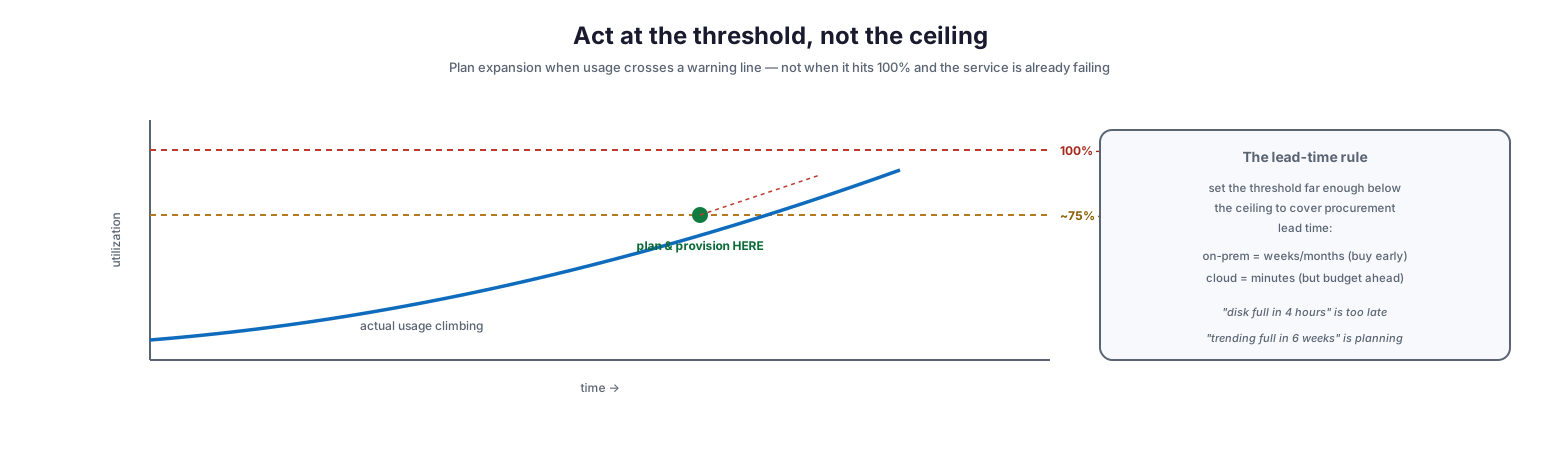
A defining principle of capacity planning is timing: expansion must be triggered when usage crosses a warning threshold, not when it reaches the ceiling. By the time a resource hits 100 percent, the service is already degrading or down, and it is far too late to plan.
Act at the threshold, not the ceiling
Picture a resource’s utilization climbing over time toward a ceiling at 100 percent — the wall, where outages occur. Well before that, at a warning threshold of, say, 75 percent, the organization should plan and provision additional capacity, so that supply is increased before demand ever reaches the limit. How far below the ceiling to set the threshold is governed by the lead-time rule: the threshold must sit far enough below the ceiling to cover the time it takes to add capacity. On-premises, that lead time is weeks or months — hardware must be ordered, racked, and configured — so the threshold must be conservative and buying must start early. In the cloud, provisioning takes minutes, but budget and reserved capacity still need to be arranged ahead of time. The practical shift this demands is from reactive to predictive alerting: “disk full in four hours” is an incident, whereas “trending full in six weeks” is a plan. Capacity planning turns the former into the latter.
Cloud Changes the Discipline
Cloud computing has transformed capacity planning, but it has not removed the need for it. Elasticity handles the spikes that once required careful hardware forecasting; the discipline simply shifts to controlling cost and reserving wisely.
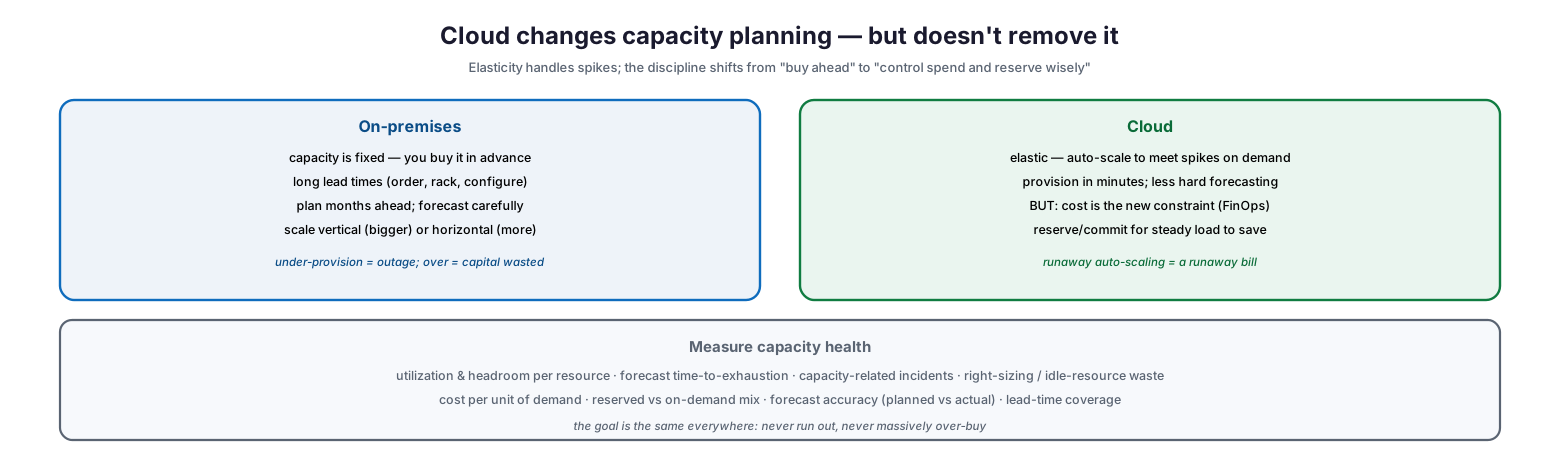
Cloud changes capacity planning — but doesn’t remove it
On-premises, capacity is fixed and bought in advance, with long lead times to order, rack, and configure equipment, so planning must run months ahead and forecasts must be careful; scaling is either vertical (bigger machines) or horizontal (more machines), and getting it wrong means either an outage from under-provisioning or wasted capital from over-provisioning. In the cloud, capacity is elastic — infrastructure auto-scales to meet spikes on demand and can be provisioned in minutes, reducing the need for hard forecasting — but cost becomes the new constraint, and the discipline becomes FinOps. Reserved capacity and commitments should be arranged for steady, predictable load to reduce cost, while runaway auto-scaling must be watched because it translates directly into a runaway bill. The underlying goal is identical in both worlds: never run out, and never massively over-buy. Measured by utilization and headroom per resource, forecast time-to-exhaustion, capacity-related incidents, right-sizing and idle-resource waste, cost per unit of demand, the reserved-versus-on-demand mix, and forecast accuracy, capacity planning remains a core operational discipline whatever the underlying platform.
| Aspect | On-premises | Cloud |
|---|---|---|
| Adding capacity | Buy in advance; weeks–months lead time | Provision in minutes; auto-scale |
| Main risk | Under-provision (outage) or over-buy (capital) | Runaway spend |
| Planning focus | Forecast demand carefully | Cost governance (FinOps) |
| Cost model | Capital expenditure | Pay-as-you-go + reservations |
| Key lever | Right-sized purchase, refresh cycle | Reserved capacity, right-sizing |
Capacity Planning Checklist
- Treat capacity planning as a continuous cycle, not an annual budgeting task.
- Plan across every constrained resource — compute, storage, network, database, cloud spend, licenses, and people.
- Identify the bottleneck resource for each service; a service scales only as far as its tightest limit.
- Measure current usage and trends for each resource over time.
- Forecast demand using growth trends, seasonality, and known business plans and projects.
- Set a warning threshold below the ceiling, sized to cover procurement lead time.
- Trigger expansion at the threshold, not at 100% utilization.
- Shift alerting from reactive (“disk full”) to predictive (“trending full in weeks”).
- On-premises, plan and procure months ahead; in the cloud, arrange budget and reservations ahead.
- Use reserved capacity or commitments for steady cloud load; watch for runaway auto-scaling.
- Right-size continuously and eliminate idle resources to control cost.
- Review forecasts against reality each cycle and refine; measure headroom, time-to-exhaustion, and forecast accuracy.
Best Practices
Run it as a continuous cycle. Capacity is not a problem you solve once. Measure, forecast, plan, and review on an ongoing basis so limits are always seen coming rather than discovered on impact.
Plan for the bottleneck, not the obvious resource. Look beyond servers to storage growth, database limits, bandwidth, licenses, and even team capacity. Adding the wrong resource does nothing if a different one is the actual constraint.
Act at thresholds. Set warning thresholds well below full utilization, sized to your procurement lead time, and trigger planning there. Waiting until a resource is nearly exhausted turns planning into firefighting.
Forecast with the business. The best capacity forecasts incorporate business plans — new products, campaigns, hiring, acquisitions — not just historical trends. Capacity planning should be a conversation with the business, not a purely technical extrapolation.
Right-size relentlessly, especially in the cloud. Elasticity makes over-provisioning easy and invisible. Continuously right-size, remove idle resources, and use reservations for steady load so cost stays matched to demand.
Measure and refine. Track utilization, headroom, forecast accuracy, and capacity-related incidents, and feed the results back into the next cycle. Forecasting improves only if outcomes are compared to predictions.
Common Mistakes
Planning reactively. Adding capacity only after a resource is exhausted guarantees outages and emergency spending. Capacity planning must be predictive, acting on trends before limits are hit.
Watching only servers. Focusing on compute while ignoring storage growth, database limits, bandwidth, or licenses leaves hidden bottlenecks that fail the service despite ample CPU.
Running resources to the ceiling. Aiming to use every last percent of capacity leaves no headroom for spikes or growth and no time to provision. Plan at a threshold with a buffer.
Ignoring lead time. Setting a threshold without accounting for how long it takes to add capacity — weeks or months on-premises — means the warning comes too late to act on.
Assuming the cloud removes the need. Trusting auto-scaling to handle everything without cost governance produces runaway bills. In the cloud, capacity planning becomes cost planning, not an optional extra.
Forecasting without the business. Extrapolating from history alone misses the step changes that business decisions cause — a launch, a merger, a new market. Involve the business in the forecast.
Frequently Asked Questions
What is capacity planning? It is the process of ensuring an organization has the right amount of IT resources — compute, storage, network, database, licenses, and budget — to meet current and future demand, at the right time and at a reasonable cost, without running out or massively over-provisioning.
Why not just add capacity when we run out? Because running out causes outages and forces emergency, expensive purchases, and because adding capacity often takes time — weeks or months for on-premises hardware. Planning ahead avoids both the disruption and the premium cost of last-minute provisioning.
What resources need capacity planning? All the constrained ones: compute (CPU and memory), storage, network and bandwidth, databases, cloud spend, software licenses, and even the support team’s capacity. A service is limited by its tightest constraint, so all must be considered.
At what utilization should we plan to expand? Set a warning threshold below full capacity — often around 70 to 80 percent — sized so that there is enough time to provision more before demand reaches the ceiling. On-premises this must be conservative because lead times are long; in the cloud it can be tighter but still needs budget planning.
Does the cloud eliminate capacity planning? No. Cloud elasticity handles demand spikes automatically, reducing hardware forecasting, but it shifts the discipline to cost management (FinOps). You still plan reserved capacity for steady load and must control runaway consumption, because in the cloud the budget is the capacity.
How do we forecast demand accurately? Combine historical usage trends with knowledge of seasonality and, crucially, business plans — new products, campaigns, hiring, and acquisitions. Review each forecast against what actually happened and refine the model over time to improve accuracy.
Conclusion
Capacity planning is the quiet discipline that keeps IT services running smoothly as demand grows — and keeps the budget under control while it does. Its purpose is to hold the organization in the goldilocks zone between too little capacity, which causes outages and emergency costs, and too much, which wastes money on idle resources. Achieving that balance means planning across every constrained resource, not just servers; running a continuous cycle of measuring, forecasting, identifying gaps, and provisioning; and above all acting at a warning threshold with enough lead time, rather than waiting for a resource to hit the wall.
The cloud has changed the mechanics but not the mission. Where on-premises capacity must be bought months ahead, cloud capacity scales in minutes — but the challenge migrates from provisioning to cost, and FinOps becomes the way capacity is managed. In both worlds the objective is the same: never run out, never massively over-buy. Build capacity planning as a predictive, business-aligned, continuously reviewed practice, measure it honestly, and the organization gains something valuable and rare — infrastructure that is always ready for what is coming, at a cost that reflects what it actually needs.
References
- ITIL 4 — Capacity and Performance Management practice (overview)
- Google SRE — Software Engineering in SRE (capacity planning)
- Google SRE — Addressing Cascading Failures (load and capacity)
- ISO/IEC 20000-1 — Service management (capacity management)
- FinOps Foundation — Managing cloud capacity and cost
- NIST SP 800-145 — The NIST Definition of Cloud Computing (elasticity)
- Google SRE — Eliminating Toil (automation of capacity work)