IT Health Assessment Checklist
Most IT problems are visible long before they become incidents — in an unpatched server, an untested backup, a shared admin account, a system nobody monitors.
- Content owner
- Insyto Content Team
- Editorial reviewer
- Ritesh Mhatre
- Technical reviewer
- Navish Ansari
- Next review
- To be scheduled
- Last reviewed
- Review pending
- Technical level
- Intermediate · IT directors, IT operations managers
Executive Summary
Most IT problems are visible long before they become incidents — in an unpatched server, an untested backup, a shared admin account, a system nobody monitors. An IT health assessment is the disciplined act of looking for those signals on purpose, before they turn into downtime, a breach, or a budget overrun. It is a structured, point-in-time review of the whole IT estate that answers a question every CIO should be able to answer at any moment: where are we strong, where are we exposed, and what should we fix first?
The value of an assessment is not the report; it is the decisions it enables. A good assessment scores each domain of IT honestly, translates technical findings into business risk, and produces a prioritized, budgeted roadmap — not a list of complaints. It turns a vague sense that “IT needs attention” into a ranked plan a leadership team can fund and track. Done once, it reveals the gaps; done on a cadence, it proves the trend and keeps IT aligned to the business as both change.
This guide is a vendor-neutral checklist for assessing IT health. It sets out the domains to review, how to score maturity, how to turn findings into priorities, and the health indicators worth tracking. It is deliberately technology-agnostic — the domains and method apply whatever platforms an organization runs — and draws on established frameworks such as the NIST Cybersecurity Framework and the CIS Controls for the security dimensions. Use it to run an assessment, to evaluate one delivered by a provider, or simply to sanity-check where your IT stands today.
Who should read this:
- CIOs, CTOs, and IT directors who need an honest baseline of IT health
- Business owners and boards weighing IT risk and investment
- IT managers preparing for or responding to an assessment
- Finance and risk leaders linking IT posture to business exposure
What does an IT health assessment cover?
A credible assessment looks across the whole estate, not just the part that is easiest to measure. Narrowing it to “is the antivirus on?” misses the systemic risks — no tested backup, no monitoring, no roadmap — that actually take businesses down.
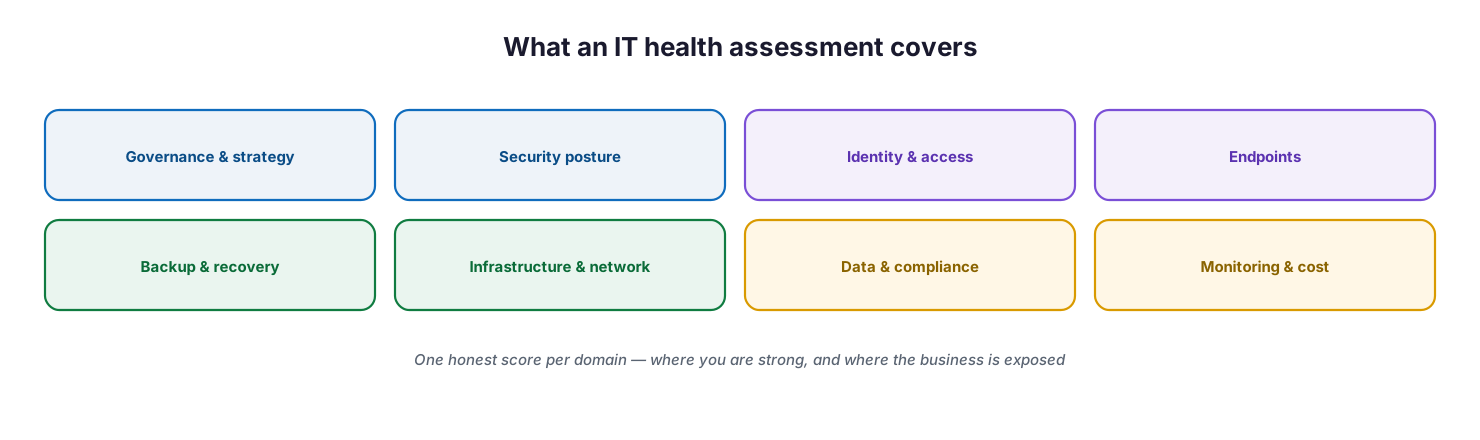
What an IT health assessment covers: governance and strategy, security posture, identity and access, endpoints, backup and recovery, infrastructure and network, data and compliance, and monitoring and cost.
Eight domains give a complete picture, and each should receive an honest score with evidence behind it. The scorecard below is the heart of the assessment: for each domain, what a healthy state looks like, the warning sign that it is weak, and — most importantly for a leadership audience — the business risk if it is left unaddressed.
| Domain | Healthy signal | Warning sign | Business risk if weak |
|---|---|---|---|
| Governance & strategy | IT roadmap tied to business goals | No plan; purely reactive | Wasted spend, missed opportunities |
| Security posture | Controls enforced and improving | Defaults left off | Breach, ransomware |
| Identity & access | MFA everywhere, least privilege | Shared or over-privileged accounts | Account takeover |
| Endpoints | Managed, compliant, patched | Unmanaged or unpatched devices | Malware entry point |
| Backup & recovery | Tested restores, offsite and immutable | Untested or absent backup | Permanent data loss |
| Infrastructure & network | Documented, resilient, monitored | Single points of failure | Unplanned downtime |
| Data & compliance | Classified, protected, auditable | No DLP or retention | Data loss, regulatory fines |
| Monitoring & cost | 24/7 visibility, right-sized spend | Blind spots, idle licenses | Slow response, wasted budget |
How do you score IT maturity?
A domain score is more useful when it maps to a maturity level, because maturity tells leadership not just what is wrong but how the IT function operates as a whole. The goal is rarely to reach the top level everywhere — it is to be deliberate about where higher maturity is worth the investment.
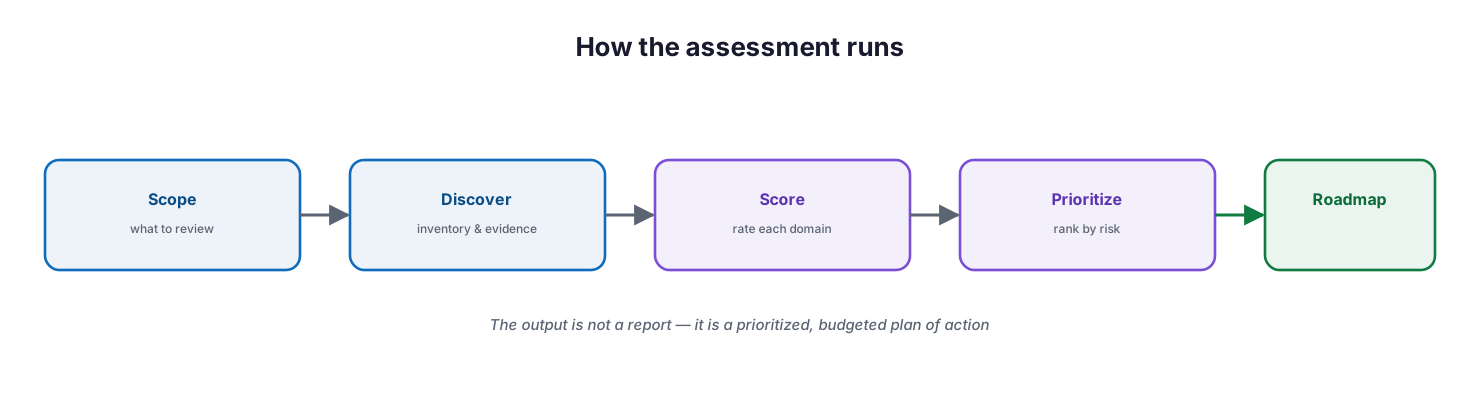
The IT maturity ladder: reactive (firefighting), managed (monitored and backed up), proactive (prevention and SLAs), and optimized (automated and aligned) — rising to lower risk and more business value.
| Level | What it looks like | Business impact |
|---|---|---|
| 1 · Reactive | Break-fix; problems drive the day | Unpredictable cost and risk |
| 2 · Managed | Basic monitoring and backup in place | Fewer surprises |
| 3 · Proactive | Prevention, SLAs, and a roadmap | Stable and business-aligned |
| 4 · Optimized | Automation and continuous improvement | IT as a competitive advantage |
Most SMBs sit between reactive and managed and assume they are more mature than they are. The assessment’s job is to place each domain honestly and show the gap between where it is and where the business needs it to be.
How do you turn findings into priorities?
An assessment that lists fifty findings without ranking them is almost useless to a decision-maker. The discipline is to sort findings by the risk they carry and the effort to fix them, so leadership funds the right things in the right order.
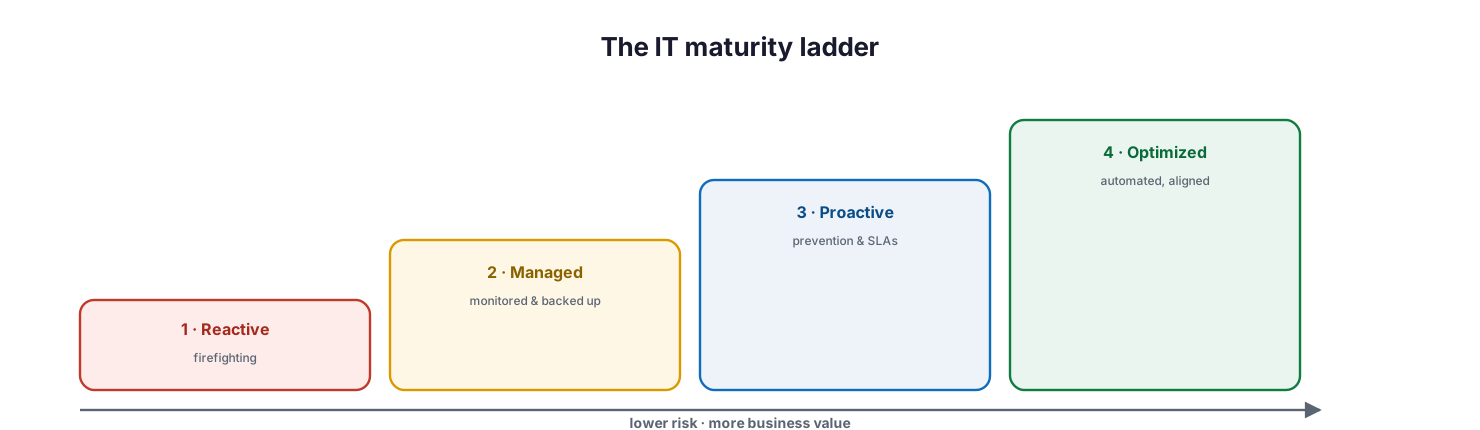
Prioritize findings by risk and effort: quick wins are high risk and low effort (do now), strategic fixes are high risk and high effort (plan and fund), fill-ins are low risk and low effort (batch later), and low-risk high-effort items are deferred.
The quadrant view keeps it simple, and the table below makes it actionable: quick wins first, strategic fixes planned and funded, everything else scheduled or deferred. The point is to give the leadership team a short list of what matters now, not a backlog.
| Priority | Trigger | Action | Timeframe |
|---|---|---|---|
| P1 · Critical | Active risk or no recovery path | Remediate immediately | Days |
| P2 · High | Major control gap | Plan and fund | Weeks |
| P3 · Medium | Hardening or efficiency gain | Schedule | This quarter |
| P4 · Low | Nice-to-have improvement | Backlog | As capacity allows |
Which health indicators should you track?
Between full assessments, a handful of indicators tell you whether IT health is holding or slipping. These are the numbers worth putting in front of leadership — each one a direct proxy for a business risk.
| Indicator | Healthy | Red flag | Why it matters |
|---|---|---|---|
| Backup restore test | Passes on a regular cadence | Never tested | Recoverability is proven, not assumed |
| Patch currency | ≥95% within days | Months behind | Exploit exposure |
| MFA coverage | 100% of users | Partial | Account security |
| Incident response (MTTR) | Hours | Days or unknown | Downtime and impact |
| Monitoring coverage | 100% of critical systems | Blind spots | Failures caught early |
| License utilization | ≥95% active | Idle seats | Wasted spend |
Who runs the assessment, and what does it produce?
An assessment needs clear ownership to be credible and actionable. Whether run in-house or by a provider, the accountable owner is the CIO, and the output is a decision-ready roadmap — not a document that sits on a shelf.
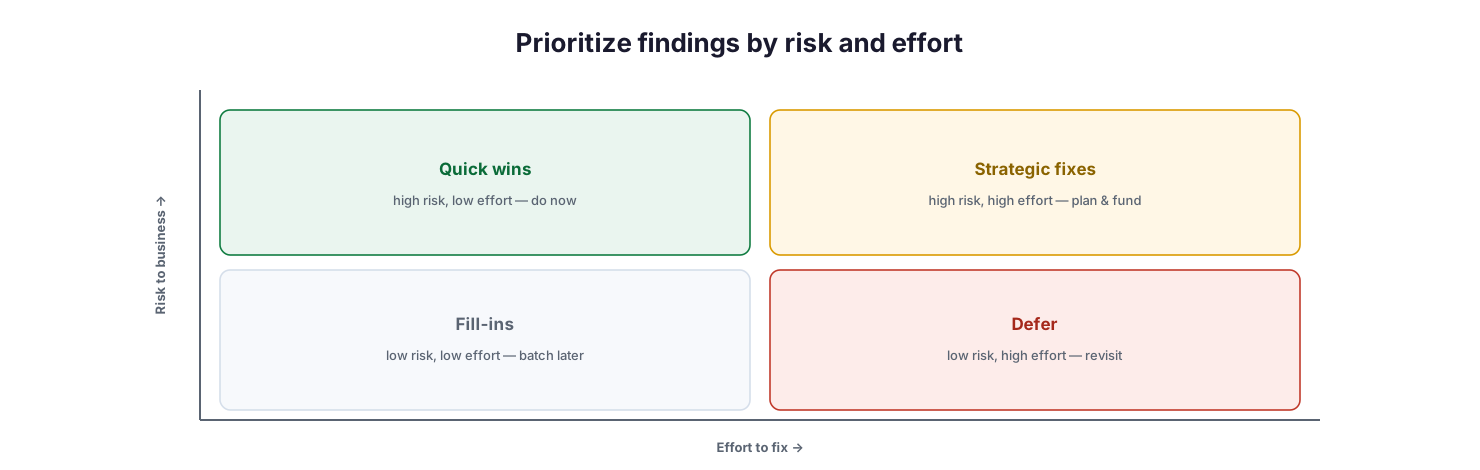
How the assessment runs: scope what to review, discover the inventory and evidence, score each domain, prioritize by risk, and produce a roadmap — the output is a prioritized, budgeted plan, not just a report.
| Activity | Responsible | Accountable | Output |
|---|---|---|---|
| Discovery & inventory | Assessor / MSP | CIO | Asset and configuration baseline |
| Domain scoring | Assessor / MSP | CIO | Health scorecard |
| Risk prioritization | Assessor + IT | CIO | Ranked findings |
| Roadmap & budget | vCIO + CIO | CIO | Funded remediation plan |
| Re-assessment | Assessor / MSP | CIO | Trend and progress |
Why is an assessment a cycle, not a one-off?
IT health decays. Staff change, systems drift, threats evolve, and a clean bill of health six months ago says little about today. The value compounds only when the assessment is repeated, because the second run measures progress and catches new drift.
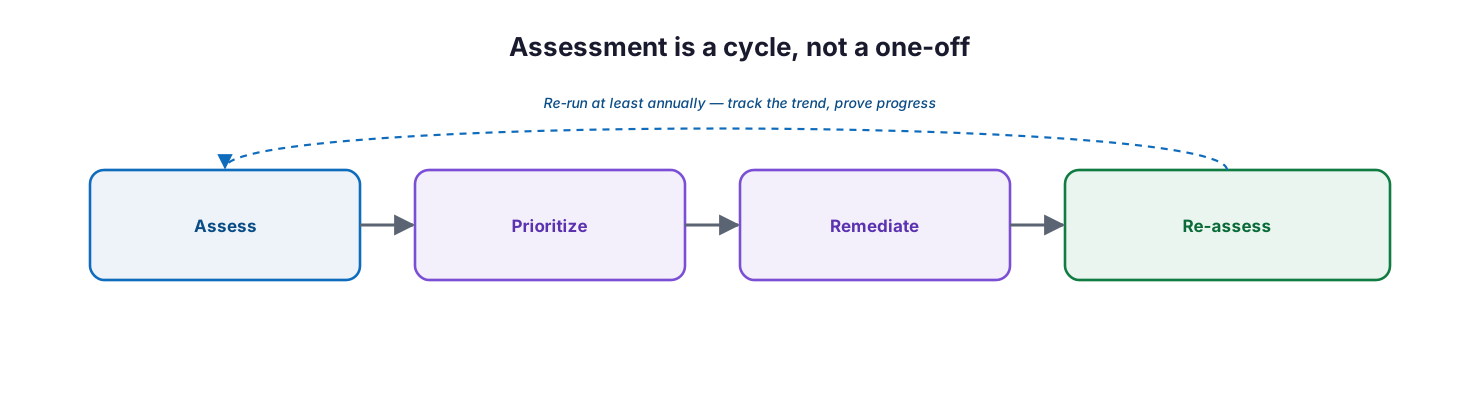
Assessment is a cycle, not a one-off: assess, prioritize, remediate, and re-assess, re-running at least annually to track the trend and prove progress.
Run a full assessment at least annually, and after any major change — a migration, an acquisition, a serious incident. Track the domain scores over time so leadership can see the trend, and use each cycle to prove that the previous roadmap was delivered. An assessment that recurs turns IT from a black box into a governed, improving function with evidence to show for it.
Implementation checklist
- The assessment scope covers all eight domains, not just security
- Each domain is scored honestly, with evidence, not opinion
- Findings are mapped to business risk, not left as technical notes
- Findings are prioritized by risk and effort into P1–P4
- Quick wins are identified for immediate action
- A budgeted remediation roadmap is produced, with owners and dates
- Health indicators (backup test, patching, MFA, MTTR) are baselined
- The CIO is the accountable owner of the assessment and its roadmap
- The assessment is scheduled to recur at least annually
- Progress against the prior roadmap is measured at each cycle
Best practices
- Assess the whole estate; systemic risks hide in the domains people skip.
- Score honestly — an assessment that flatters no one is the useful kind.
- Translate every finding into business risk a non-technical leader understands.
- Prioritize ruthlessly; a short list of what matters beats a long list of everything.
- Lead with quick wins to build momentum and credibility.
- Deliver a budgeted roadmap with owners and dates, not just findings.
- Baseline a few health indicators and review them between assessments.
- Anchor the security domains to a recognized framework such as NIST CSF or CIS Controls.
- Re-run on a cadence and track the trend to prove progress.
Common mistakes
- Treating the assessment as a security scan and ignoring backup, monitoring, and strategy.
- Producing a long report with no priorities a leader can act on.
- Listing technical findings without translating them into business risk.
- Scoring optimistically to avoid uncomfortable conversations.
- Delivering findings with no owner, budget, or timeline.
- Running it once and never again, so the trend is never known.
- Confusing tool output with an assessment; tools inform, judgment scores.
- Skipping the re-assessment that would have proven the roadmap worked.
Frequently asked questions
What is an IT health assessment?
It is a structured, point-in-time review of the whole IT estate — governance, security, identity, endpoints, backup, infrastructure, data, and monitoring — that scores each domain, maps findings to business risk, and produces a prioritized remediation roadmap.
How is it different from a security audit?
A security audit focuses on controls and compliance. A health assessment is broader: it covers operational domains like backup, monitoring, infrastructure, and IT strategy alongside security, giving leadership a complete view of IT risk and readiness.
How often should we run one?
At least annually, and after any major change such as a migration, acquisition, or serious incident. Recurring assessments measure progress and catch new drift, which is where most of the value lies.
Do we need a framework?
For the security domains, anchoring to a recognized framework — the NIST Cybersecurity Framework or the CIS Controls — makes scoring defensible and comparable. The broader operational domains draw on IT service management practice.
What should the output be?
A decision-ready roadmap: a scorecard by domain, findings ranked by risk and effort, quick wins for immediate action, and a budgeted plan with owners and dates. If the output is only a report, the assessment has failed.
Can we run it ourselves or should a provider do it?
Either works, provided the scoring is honest and the CIO owns the outcome. An external assessor adds objectivity and specialist perspective; an internal team adds context. Many organizations combine both.
Conclusion
An IT health assessment converts the uneasy sense that “IT needs attention” into something a leadership team can act on: an honest score across every domain, findings translated into business risk, and a prioritized, budgeted roadmap. Its power is in the discipline — looking deliberately for the warning signs that precede every outage, breach, and overrun, and then deciding, in order, what to fix. The report is incidental; the decisions are the point.
The path forward is simple to start and valuable to sustain: score the eight domains honestly, rank the findings by risk and effort, act on the quick wins, fund the strategic fixes, and re-run the assessment on a cadence so the trend is visible. Treated as a recurring discipline rather than a one-time exercise, an IT health assessment keeps IT aligned to the business and turns risk from a surprise into a managed, shrinking list.
References
This is a vendor-neutral overview. The following established frameworks inform the assessment domains and scoring; consult them for detailed control guidance. Source access date: 28 July 2026.
On this page
- Executive Summary
- What does an IT health assessment cover?
- How do you score IT maturity?
- How do you turn findings into priorities?
- Which health indicators should you track?
- Who runs the assessment, and what does it produce?
- Why is an assessment a cycle, not a one-off?
- Implementation checklist
- Best practices
- Common mistakes
- Frequently asked questions
- Conclusion
- References