IT Change Management: Making Changes Safely Without Slowing the Business Down
Most IT outages are not caused by hackers, hardware failures, or acts of nature.
- Content owner
- Insyto Content Team
- Editorial reviewer
- Ritesh Mhatre
- Technical reviewer
- Navish Ansari
- Next review
- To be scheduled
- Last reviewed
- Review pending
- Technical level
- Intermediate · IT directors, IT operations managers
Executive Summary
Most IT outages are not caused by hackers, hardware failures, or acts of nature. They are self-inflicted — the result of a change that someone made without fully understanding its risk. A patch applied without testing, a configuration edited on a Friday afternoon, an “quick” upgrade that took down a dependency no one remembered. Change is the single largest source of avoidable disruption in IT, which is precisely why change management exists: to control changes to the IT environment so that necessary change happens without unnecessary risk. Its purpose is not to stop change but to make change safe.
The difficulty is that change management is easy to get wrong in both directions. Too little control produces chaos: unassessed changes break things, there is no roll-back when they do, outages become forensic hunts for “who changed what,” and teams collide with each other. Too much control produces a different failure: every trivial change waits weeks for approval, bureaucracy piles up with no benefit, and — most damaging of all — people simply bypass the process, driving change underground where it is entirely uncontrolled. The right answer is neither. Modern change management, often called change enablement, matches the level of scrutiny to the level of risk, letting low-risk changes flow quickly while ensuring risky ones are properly assessed, scheduled, and reversible. The goal is safe and fast.
This vendor-neutral guide sets out how to do change management well. It explains the balance between stability and speed, distinguishes the three types of change and the different paths they follow, walks through the change process from request to review, details the controls — risk assessment, approval authority, roll-back plans, change calendars, and reviews — that make change safe, and describes the modern shift toward lighter, faster, automated change. Grounded in established service-management practice and delivery metrics, the aim is a change process that prevents self-inflicted outages while keeping IT responsive to the business, rather than becoming the bottleneck everyone learns to route around.
Balancing Stability and Speed
The foundational insight of change management is that both extremes are failures, and the discipline lives in the balance between them. Understanding the two failure modes clarifies what a good process is actually for.
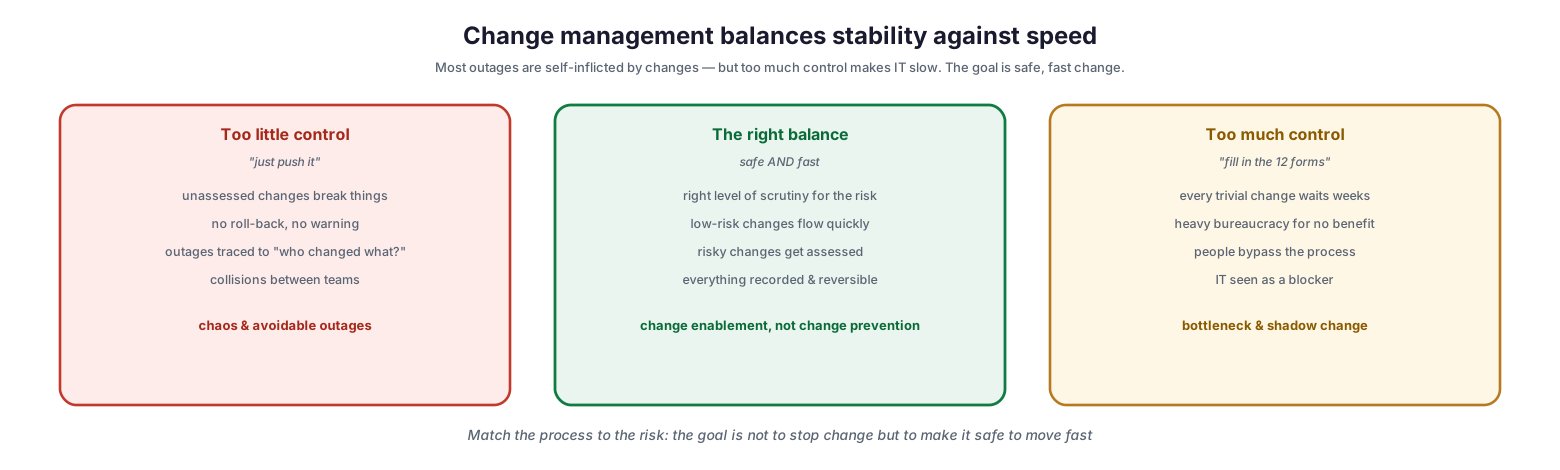
Change management balances stability against speed
Too little control — the “just push it” culture — leads to unassessed changes that break things, no roll-back and no warning when they do, outages that turn into investigations of who changed what, and collisions between teams working on the same systems. The result is chaos and avoidable outages. Too much control — the “fill in the twelve forms” culture — makes every trivial change wait weeks, imposes heavy bureaucracy for no benefit, and pushes people to bypass the process entirely, so change goes underground. The result is a bottleneck and shadow change that is more dangerous than no process at all. The right balance applies the right level of scrutiny for the risk: low-risk changes flow quickly, risky changes get assessed, and everything is recorded and reversible. This is why the modern term is change enablement, not change prevention — the objective is to make change safe to move fast, not to slow it down.
Three Types of Change
Not every change carries the same risk, and treating them all identically is exactly what makes a process either too slow or too loose. Classifying each change correctly routes it down the appropriate path.
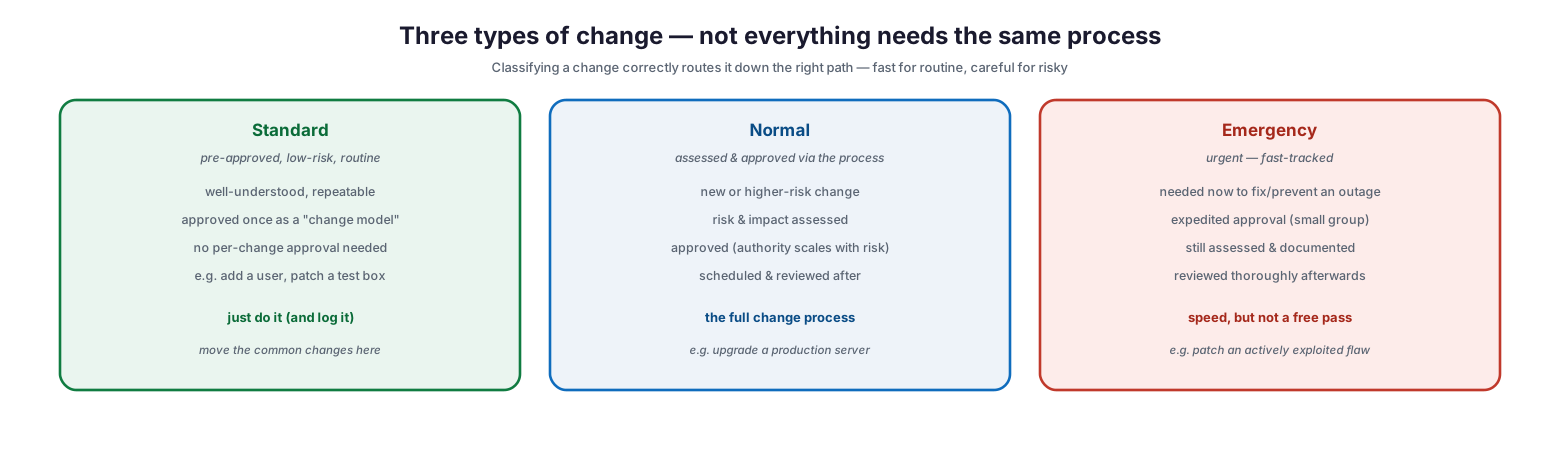
Three types of change — not everything needs the same process
A standard change is pre-approved, low-risk, and routine — a well-understood, repeatable change approved once as a “change model,” needing no per-change approval, such as adding a user or patching a test box. These should simply be done and logged, and a mature program moves as many common changes into this category as possible. A normal change is new or higher-risk and goes through the full process — risk and impact are assessed, it is approved with authority scaled to its risk, and it is scheduled and reviewed afterward, such as upgrading a production server. An emergency change is urgent and fast-tracked — needed now to fix or prevent an outage, using expedited approval from a small group, but still assessed and documented and then reviewed thoroughly afterward, such as patching an actively exploited vulnerability. The key point about emergencies is that speed does not mean a free pass: the process is compressed, not skipped.
| Type | Description | Approval | Example |
|---|---|---|---|
| Standard | Pre-approved, low-risk, routine | None per-change (pre-authorized) | Add a user, patch a test box |
| Normal | New or higher-risk | Assessed and approved via process | Upgrade a production server |
| Emergency | Urgent fix to prevent/resolve outage | Expedited, small group | Patch an exploited vulnerability |
The Change Process
For a normal change, the process flows through six steps that take it from a request to a reviewed, closed change. Standard changes skip the approval step, and emergencies compress the whole thing, but the shape is the same.
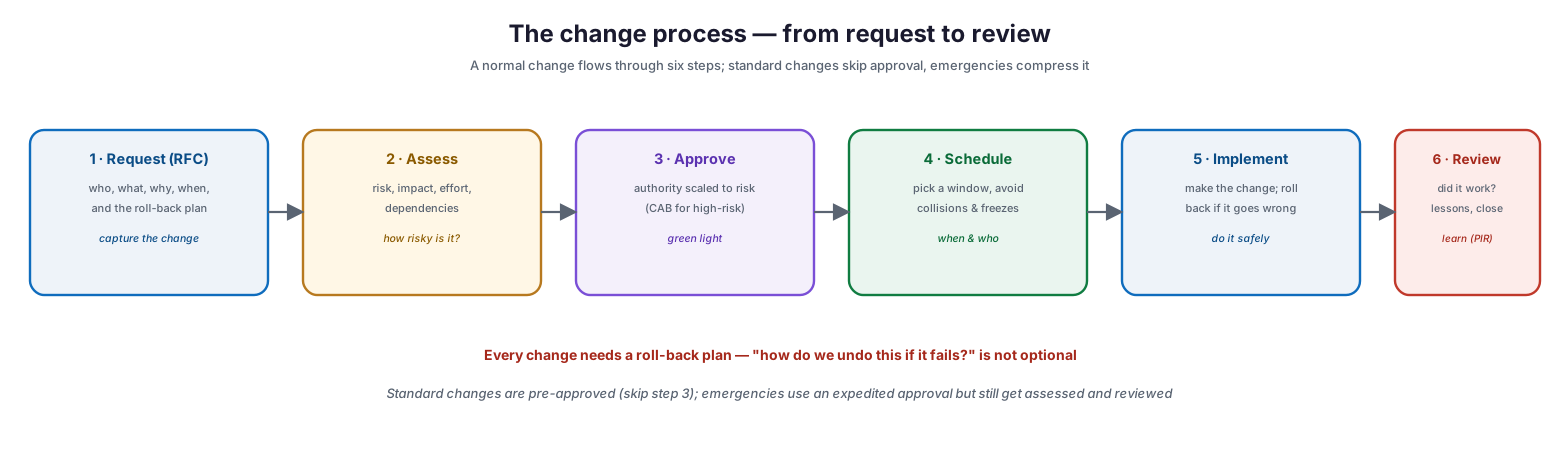
The change process — from request to review
The steps are: request (an RFC capturing who, what, why, when, and the roll-back plan); assess (risk, impact, effort, and dependencies — how risky is it?); approve (with authority scaled to risk, escalating to a change advisory board for high-risk changes); schedule (picking a window and avoiding collisions and freeze periods); implement (making the change and rolling back if it goes wrong); and review (a post-implementation review asking whether it worked, capturing lessons, and closing it out). One requirement runs through the entire process and is never optional: every change needs a roll-back plan. The question “how do we undo this if it fails?” must be answered before the change is made, not improvised during an incident. Standard changes are pre-approved and skip the approval step, while emergency changes use an expedited approval but are still assessed beforehand and reviewed afterward.
| Step | Purpose | Key output |
|---|---|---|
| Request (RFC) | Capture the proposed change | Who/what/why/when + roll-back plan |
| Assess | Evaluate risk and impact | Risk rating, affected systems |
| Approve | Authorize proportional to risk | Approved / rejected decision |
| Schedule | Place in a safe window | Slot in the change calendar |
| Implement | Make the change | Change deployed (or rolled back) |
| Review | Confirm outcome, learn | Post-implementation review, closure |
The Controls That Make Change Safe
Behind the process sit a handful of controls that turn change from a gamble into a managed, reversible operation. Applied proportionately, they deliver safety without bureaucracy.
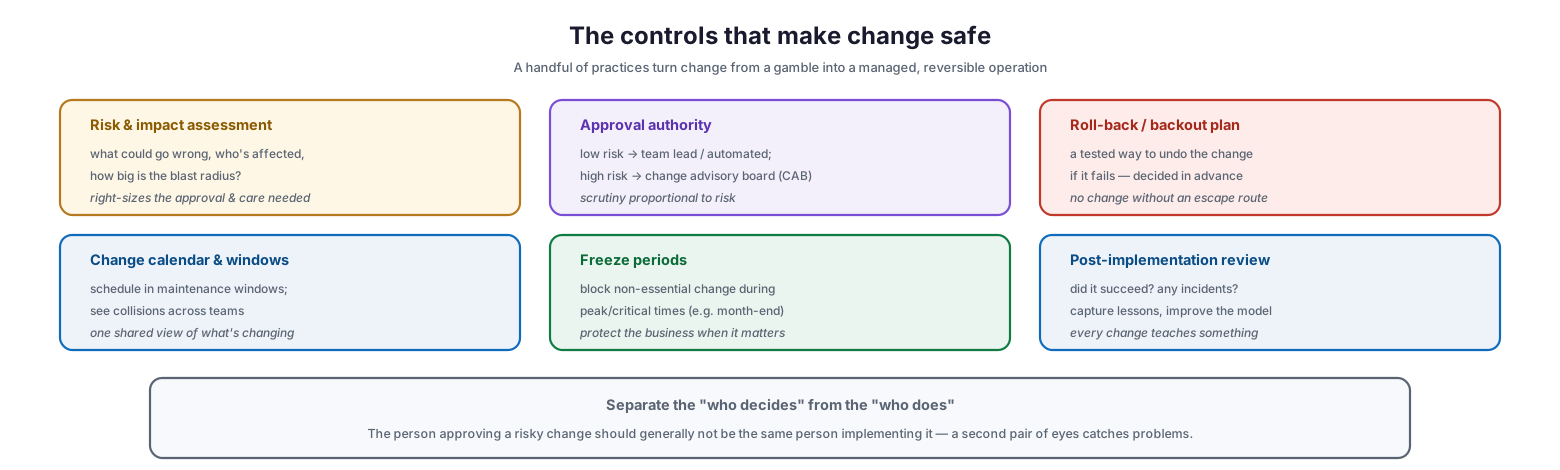
The controls that make change safe
Risk and impact assessment asks what could go wrong, who is affected, and how big the blast radius is, which right-sizes the approval and care needed. Approval authority scales with risk — low-risk changes are approved by a team lead or automatically, while high-risk ones go to a change advisory board (CAB), so scrutiny is proportional. A roll-back or backout plan is a tested way to undo the change if it fails, decided in advance; no change should proceed without an escape route. A change calendar and windows schedule changes into maintenance windows and reveal collisions across teams, giving one shared view of what is changing. Freeze periods block non-essential change during peak or critical times, such as month-end or a major sales event, protecting the business when it matters most. And a post-implementation review asks whether the change succeeded and whether it caused any incidents, capturing lessons and improving the change model. A further principle underpins these controls: separate the person who decides from the person who does. The individual approving a risky change should generally not be the one implementing it, because a second pair of eyes catches problems that the person doing the work may miss.
| Control | What it does |
|---|---|
| Risk & impact assessment | Sizes the scrutiny needed for each change |
| Approval authority | Scales sign-off to risk (team lead → CAB) |
| Roll-back / backout plan | A tested way to undo a failed change |
| Change calendar & windows | Schedules changes, reveals collisions |
| Freeze periods | Blocks non-essential change at critical times |
| Post-implementation review | Confirms outcome and captures lessons |
Modern Change: Lighter, Faster, Still Controlled
Change management has a reputation for bureaucracy, earned by heavy traditional implementations. The modern trend is decisively away from that model toward lighter, faster, automated change — without sacrificing safety.
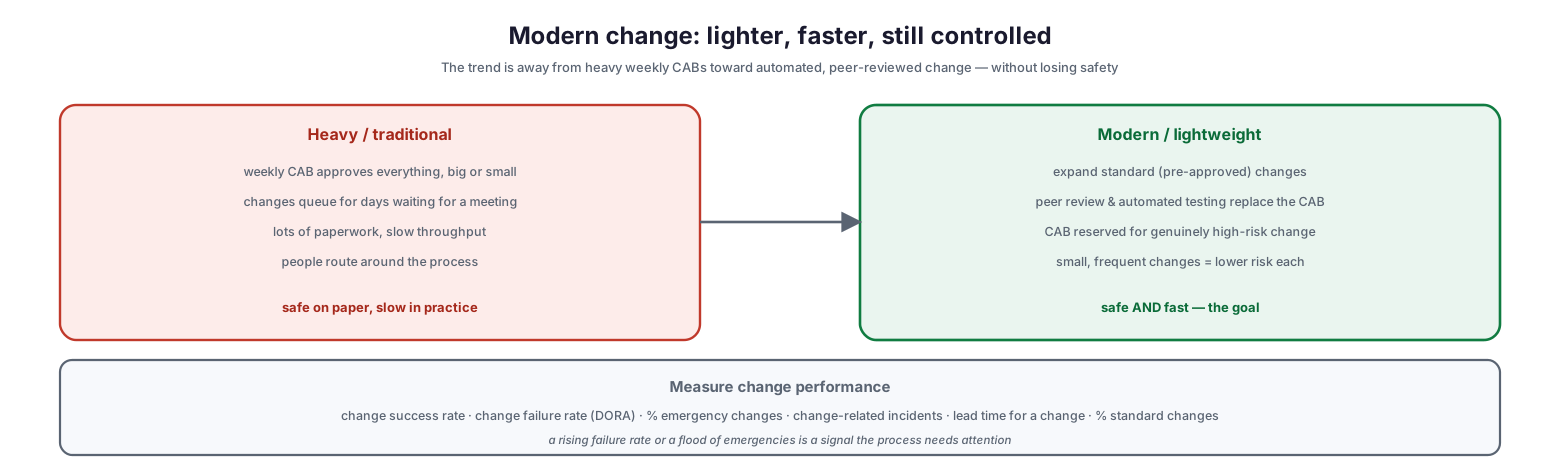
Modern change: lighter, faster, still controlled
In the heavy, traditional model, a weekly change advisory board approves everything, big or small; changes queue for days waiting for a meeting; paperwork mounts; throughput is slow; and people route around the process. It is safe on paper but slow in practice, and the slowness is what undermines the safety, because it breeds workarounds. The modern, lightweight model does several things differently: it expands the pool of standard, pre-approved changes so routine work flows freely; it uses peer review and automated testing in place of a CAB for most changes; it reserves the CAB for genuinely high-risk change; and it favors small, frequent changes, each carrying lower risk than a large batched one. The result is safe and fast — the actual goal. This shift is validated by delivery research, which finds that high-performing organizations combine a low change failure rate with high change frequency, precisely because small, well-controlled, automated changes are both safer and quicker. The program is measured by change success rate, change failure rate, the proportion of emergency changes, change-related incidents, lead time for a change, and the share of changes that are standard — and a rising failure rate or a flood of emergencies is a clear signal that the process needs attention.
IT Change Management Checklist
- Define change management as enabling safe change, not preventing change.
- Classify every change as standard, normal, or emergency, and route it accordingly.
- Move as many routine, well-understood changes as possible into pre-approved standard changes.
- Require a request (RFC) capturing who, what, why, when, and a roll-back plan.
- Assess risk and impact, and scale approval authority to the level of risk.
- Never proceed without a tested roll-back or backout plan.
- Schedule changes in maintenance windows using a shared change calendar.
- Enforce freeze periods during peak or business-critical times.
- Fast-track emergency changes with expedited approval, but still assess and review them.
- Separate who approves a risky change from who implements it.
- Hold a post-implementation review to confirm outcome and capture lessons.
- Favor small, frequent, automated changes; measure change success and failure rates.
Best Practices
Enable change, don’t block it. Frame the process around making change safe to move fast. A process seen as an obstacle will be bypassed; one that helps changes succeed will be embraced.
Right-size the process to the risk. Do not subject a routine, low-risk change to the same scrutiny as a production database migration. Standard changes should flow; only genuinely risky changes need heavy assessment and approval.
Expand standard changes aggressively. The most powerful lever for both speed and safety is moving common, well-understood changes into the pre-approved category, so they no longer wait on approval while still being logged and controlled.
Always have a roll-back plan. Before any change, answer how it will be undone if it fails. A tested backout plan is the difference between a minor hiccup and a prolonged outage.
Use a shared change calendar and freezes. Give everyone one view of what is changing and when, to prevent collisions, and freeze non-essential change during critical business periods.
Review and learn. Treat every change — especially failed and emergency ones — as a source of lessons. Post-implementation reviews are what turn a static process into an improving one, and drive down the change failure rate over time.
Common Mistakes
Having no change process. Allowing anyone to change anything at any time makes IT unstable and outages untraceable. Even a lightweight process is far better than none.
Making the process too heavy. Subjecting every trivial change to a weekly board and mountains of paperwork slows IT to a crawl and — worse — drives people to bypass the process, creating uncontrolled shadow change.
Treating all changes the same. Failing to distinguish standard, normal, and emergency changes means either routine work is needlessly delayed or risky work is dangerously rushed.
Skipping the roll-back plan. Making a change with no tested way to undo it turns any failure into a crisis. The backout plan is not optional.
Rubber-stamping emergency changes. Using “emergency” as a way to skip assessment and review entirely defeats the purpose. Emergencies compress the process; they do not eliminate it.
Never reviewing outcomes. Making changes without post-implementation reviews means the same mistakes recur and the change failure rate never improves. Learning is part of the process.
Frequently Asked Questions
What is IT change management? It is the practice of controlling changes to the IT environment so that beneficial changes are made with minimum risk and disruption. Its goal is to enable necessary change safely — assessing, approving, scheduling, and reviewing changes proportionally to their risk.
What is the difference between standard, normal, and emergency changes? Standard changes are pre-approved, low-risk, and routine, requiring no per-change approval. Normal changes are new or higher-risk and go through the full assessment and approval process. Emergency changes are urgent fixes that use expedited approval but are still assessed and reviewed.
What is a CAB? A change advisory board is a group that assesses and approves higher-risk changes, bringing together the right stakeholders to evaluate impact and risk. In modern change management, the CAB is reserved for genuinely high-risk changes rather than approving every change.
Why does every change need a roll-back plan? Because any change can fail, and without a tested way to undo it, a failure becomes a prolonged outage. Deciding in advance how to reverse a change — before making it — is what keeps a failed change from becoming a disaster.
Isn’t change management just bureaucracy? It becomes bureaucracy when the process is too heavy for the risk. Done well, it is the opposite: it right-sizes scrutiny to risk, lets routine changes flow freely, and prevents the self-inflicted outages that cause far more delay than the process ever does.
How do we measure change management? Track change success rate, change failure rate, the proportion of emergency changes, change-related incidents, and the lead time for a change. High-performing organizations achieve both a low failure rate and high change frequency through small, automated, well-controlled changes.
Conclusion
Change management is the discipline that addresses IT’s largest source of avoidable disruption: the changes IT makes to its own environment. Because most outages are self-inflicted, controlling change is one of the highest-value operational practices an organization can adopt — but only if it strikes the right balance. Too little control breeds chaos; too much breeds bureaucracy and the shadow change that comes with it. The modern answer, change enablement, matches scrutiny to risk: routine changes flow as pre-approved standard changes, risky changes are properly assessed and approved, emergencies are fast-tracked without skipping assessment, and every change carries a roll-back plan.
The trajectory of good practice is toward lighter, faster, safer change — smaller and more frequent, automated and peer-reviewed, with the change advisory board reserved for genuinely high-risk work. Supported by shared change calendars, freeze periods, and post-implementation reviews, and measured by change success and failure rates, this approach delivers what every business actually wants from IT: the ability to change quickly when needed without breaking the things that must keep running. Build change management as an enabler rather than a gatekeeper, and it stops being the process everyone dreads and becomes the reason IT can move fast with confidence.
References
- ITIL 4 — Change Enablement practice (overview)
- ISO/IEC 20000-1 — Service management (change management)
- NIST SP 800-128 — Security-Focused Configuration Management (change control)
- DORA / Accelerate — change failure rate and delivery performance
- Google SRE — Release engineering and change practices
- NIST SP 800-53 — Configuration Change Control (CM-3)
- ITIL 4 — Guiding principles applied to change