Wireless Network Optimization: Getting Fast, Reliable Wi-Fi That Scales
Wi-Fi has quietly become the primary way people connect at work.
- Content owner
- Insyto Content Team
- Editorial reviewer
- Ritesh Mhatre
- Technical reviewer
- Navish Ansari
- Next review
- To be scheduled
- Last reviewed
- Review pending
- Technical level
- Intermediate · IT directors, network and infrastructure teams
Executive Summary
Wi-Fi has quietly become the primary way people connect at work. Laptops, phones, tablets, and an ever-growing population of wireless devices all expect fast, reliable connectivity everywhere in the building, and when the wireless network struggles the complaints are immediate and universal: “the Wi-Fi is slow,” “it keeps dropping,” “my call broke up.” What makes wireless uniquely frustrating is that these problems are usually invisible. A user sees “full bars” and assumes the network is fine, while underneath, access points are colliding on the same channels, a single legacy device is starving a whole area of airtime, or the RF environment is drowning in interference the user cannot perceive.
Optimizing wireless is therefore less about buying faster equipment and more about understanding radio. Wi-Fi is a shared medium operating in a finite, noisy slice of the airwaves, and good performance comes from managing that spectrum deliberately: using the right bands, planning channels so access points cooperate rather than compete, designing for the number of simultaneous users rather than mere coverage, tuning transmit power so devices roam cleanly, and hunting down the interference that degrades every band. Layered on top are the features — band steering, fast roaming, quality of service — that squeeze real performance out of a sound design, and the security controls that keep the network safe without slowing it down.
This vendor-neutral guide walks through wireless optimization end to end. It explains the trade-offs between the 2.4, 5, and 6 GHz bands, why channel planning is the single most common cause of bad Wi-Fi, how to design for capacity instead of just coverage, the optimization levers that matter most, and how to secure and continuously tune a wireless network. Grounded in the IEEE 802.11 standards and Wi-Fi Alliance guidance, the goal is wireless that stays fast and reliable as the number of devices and demands on it keep growing.
Three Bands, Three Trade-offs
Every optimization decision begins with spectrum. Modern Wi-Fi operates across three frequency bands, and each buys you something different — none gives you range, capacity, and clean spectrum all at once.
Three bands, three trade-offs
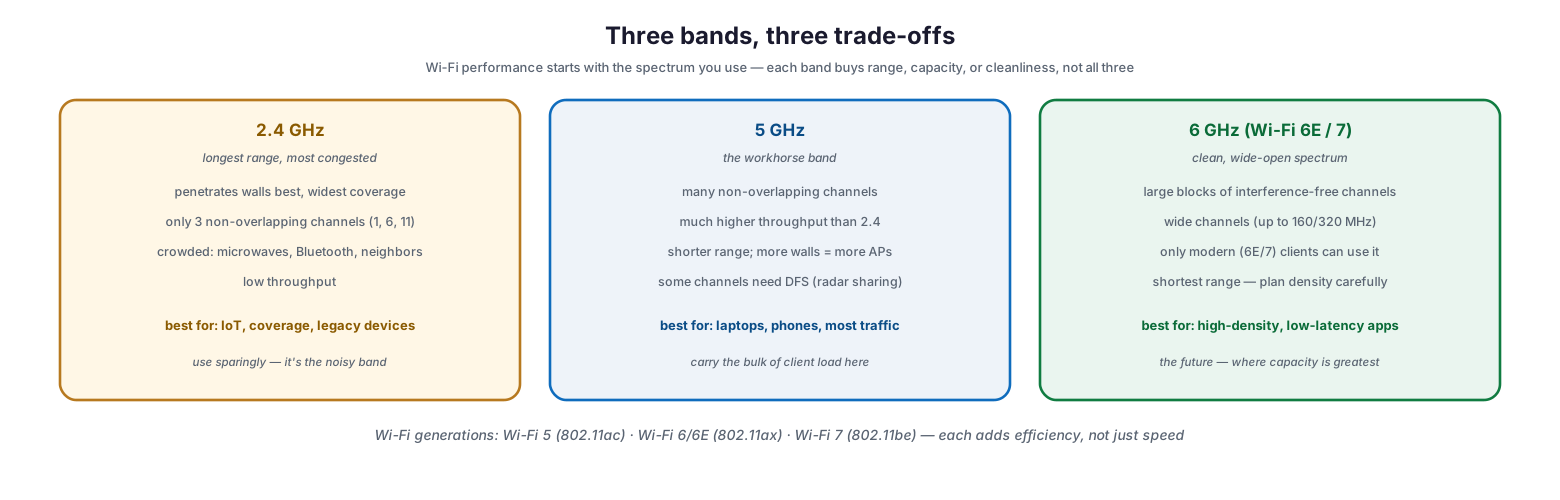
The 2.4 GHz band offers the longest range and best wall penetration, which is why it feels like the “coverage” band, but it is also the most congested: it has only three non-overlapping channels (1, 6, and 11) and shares its spectrum with microwaves, Bluetooth, and every neighbor’s network, so throughput is low. It is best reserved for IoT devices, legacy clients, and pure coverage. The 5 GHz band is the workhorse — many more non-overlapping channels and far higher throughput — at the cost of shorter range, meaning more access points are needed to cover the same area; the bulk of client traffic should live here. The 6 GHz band, available to Wi-Fi 6E and Wi-Fi 7 devices, opens large blocks of clean, interference-free spectrum with room for very wide channels, ideal for high-density and low-latency applications, though only modern clients can use it and its range is the shortest of the three. Across all bands, successive Wi-Fi generations — Wi-Fi 5, Wi-Fi 6/6E, and Wi-Fi 7 — add efficiency in dense environments, not merely headline speed.
| Band | Strength | Weakness | Best for |
|---|---|---|---|
| 2.4 GHz | Longest range, penetrates walls | Only 3 clean channels, congested, slow | IoT, legacy devices, coverage |
| 5 GHz | Many channels, high throughput | Shorter range, some DFS channels | Laptops, phones, most traffic |
| 6 GHz (6E/7) | Clean spectrum, very wide channels | Modern clients only, shortest range | High-density, low-latency apps |
Channel Planning: The Number-One Cause of Bad Wi-Fi
If wireless is slow despite strong signal, the culprit is almost always channel planning. Access points that share or overlap channels do not coexist peacefully — they interfere, and the result is a network that shows full bars yet crawls.
Channel planning — the #1 cause of bad Wi-Fi
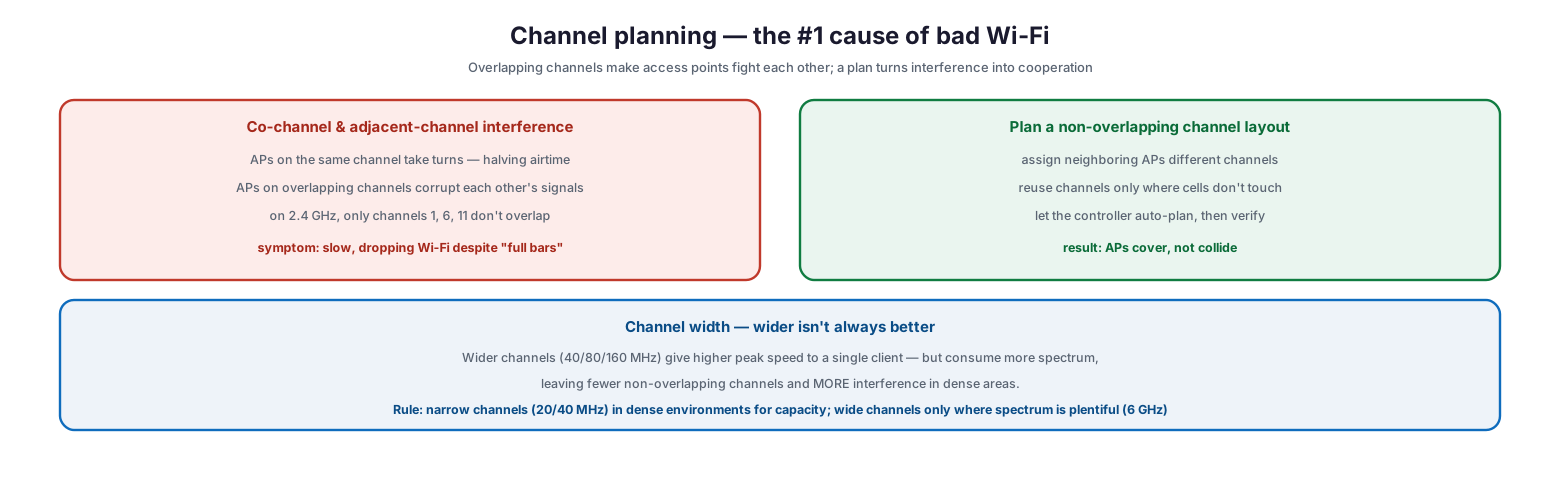
Two effects are at work. Co-channel interference occurs when access points on the same channel are forced to take turns transmitting, effectively halving the airtime available to each. Adjacent-channel interference is worse: access points on overlapping channels actively corrupt one another’s signals. On the crowded 2.4 GHz band, only channels 1, 6, and 11 avoid overlap entirely, so any other choice guarantees interference. The remedy is a deliberate, non-overlapping channel layout — neighboring access points assigned different channels, with channels reused only where their coverage cells do not touch. Most controllers can auto-plan channels, but the results should be verified rather than trusted blindly.
Channel width is the related lever that is widely misunderstood. Wider channels (40, 80, or 160 MHz) deliver higher peak speed to a single client, but they consume more spectrum, which leaves fewer non-overlapping channels available and therefore increases interference in dense areas. The rule of thumb is to use narrow channels (20 or 40 MHz) in dense environments to maximize capacity, and reserve wide channels for places where spectrum is plentiful — chiefly the 6 GHz band.
Design for Capacity, Not Just Coverage
A pervasive mistake is designing a wireless network to be reachable everywhere while ignoring how many people will use it at once. “Can I see the network?” is a coverage question; “can forty people in this room all use it simultaneously?” is a capacity question, and the two lead to very different designs.
Design for capacity, not just coverage
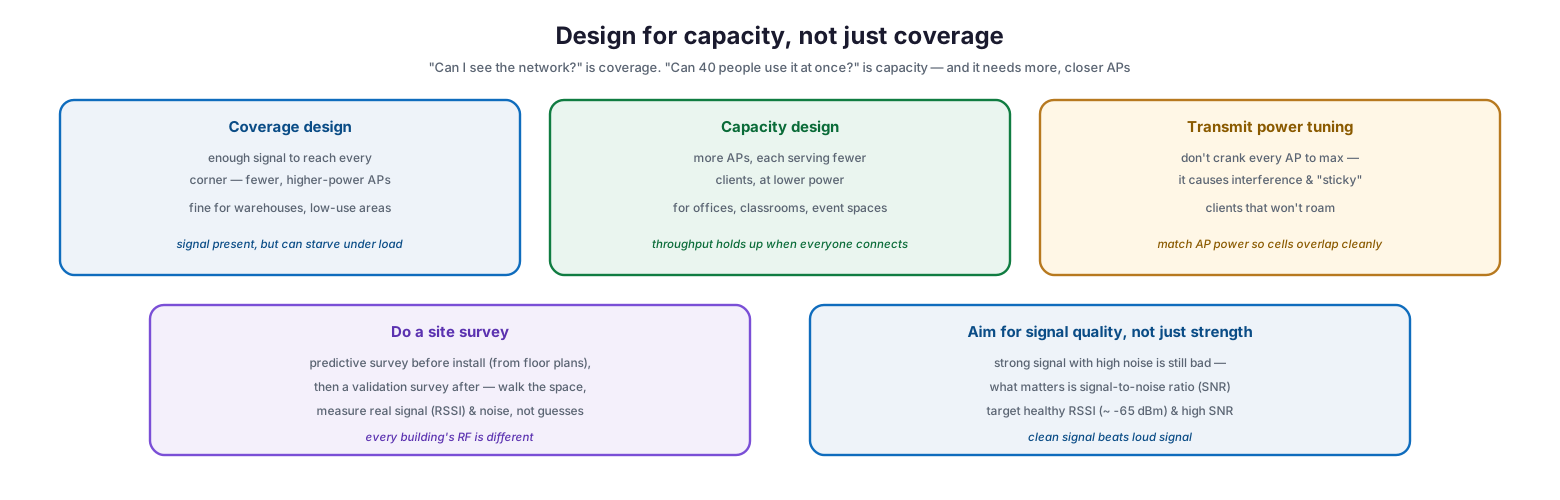
A coverage design uses fewer, higher-power access points to ensure signal reaches every corner — adequate for warehouses and low-use areas, but liable to starve when many devices connect at once. A capacity design uses more access points, each serving fewer clients at lower power, which keeps throughput healthy in offices, classrooms, and event spaces where device density is high. Transmit power is a crucial and counterintuitive part of this: cranking every access point to maximum power does not help, because it creates interference and produces “sticky” clients that cling to a distant access point instead of roaming to a closer one. Power should be tuned so that coverage cells overlap cleanly rather than shout over each other. Underpinning good design is a site survey — a predictive survey from floor plans before installation, followed by a validation survey afterward that walks the space and measures real signal and noise, because every building’s RF behavior is different. And the target is signal quality, not just strength: a strong signal in a noisy environment is still poor, so what matters is the signal-to-noise ratio (SNR), not raw signal alone.
The Optimization Levers
With a sound RF plan in place, a set of features turns a good design into a great experience. These levers address how clients connect, roam, and share the limited airtime.
The optimization levers beyond placement
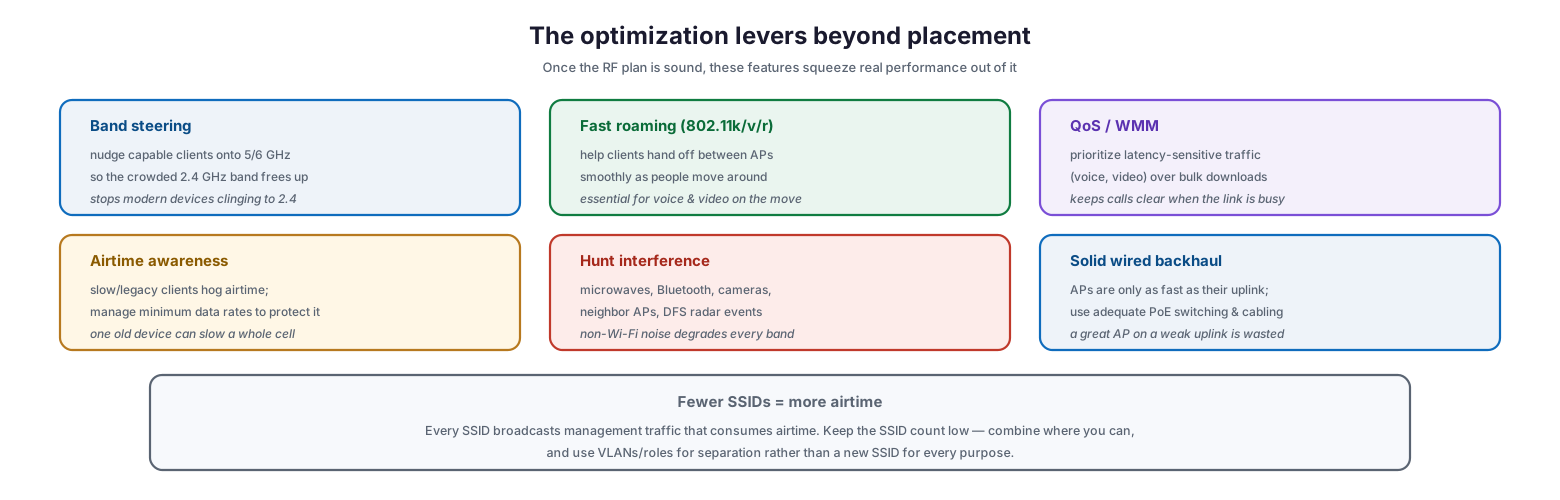
Band steering nudges capable clients onto the 5 or 6 GHz bands so the crowded 2.4 GHz band is freed up, stopping modern devices from needlessly clinging to the slow band. Fast roaming, using the 802.11k, v, and r amendments, helps clients hand off smoothly between access points as people move — essential for keeping voice and video calls from dropping. Quality of service, through Wi-Fi Multimedia (WMM), prioritizes latency-sensitive traffic like voice and video over bulk downloads so calls stay clear when the link is busy. Airtime awareness matters because slow or legacy clients consume disproportionate airtime; managing minimum data rates prevents one old device from dragging down a whole cell. Interference hunting means tracking down non-Wi-Fi noise sources — microwaves, Bluetooth devices, wireless cameras, neighboring networks, and DFS radar events — that degrade performance regardless of band. And solid wired backhaul is easy to forget: an access point is only as fast as its uplink, so adequate PoE switching and cabling are prerequisites, not afterthoughts.
| Lever | What it does | Why it matters |
|---|---|---|
| Band steering | Moves capable clients to 5/6 GHz | Frees the congested 2.4 GHz band |
| Fast roaming (802.11k/v/r) | Smooth AP-to-AP handoff | Keeps voice/video alive on the move |
| QoS / WMM | Prioritizes latency-sensitive traffic | Clear calls on a busy link |
| Airtime management | Controls slow-client airtime hogging | Stops one device slowing a whole cell |
| Interference hunting | Finds non-Wi-Fi noise sources | Removes hidden degradation |
| Wired backhaul & PoE | Adequate AP uplinks | An AP is only as fast as its uplink |
A final, often-overlooked factor is the number of SSIDs. Every SSID broadcasts management traffic that consumes airtime, so a long list of networks silently taxes performance. Keeping the SSID count low — and using VLANs or roles for separation rather than spinning up a new SSID for every purpose — reclaims airtime for actual data.
Securing and Continuously Optimizing
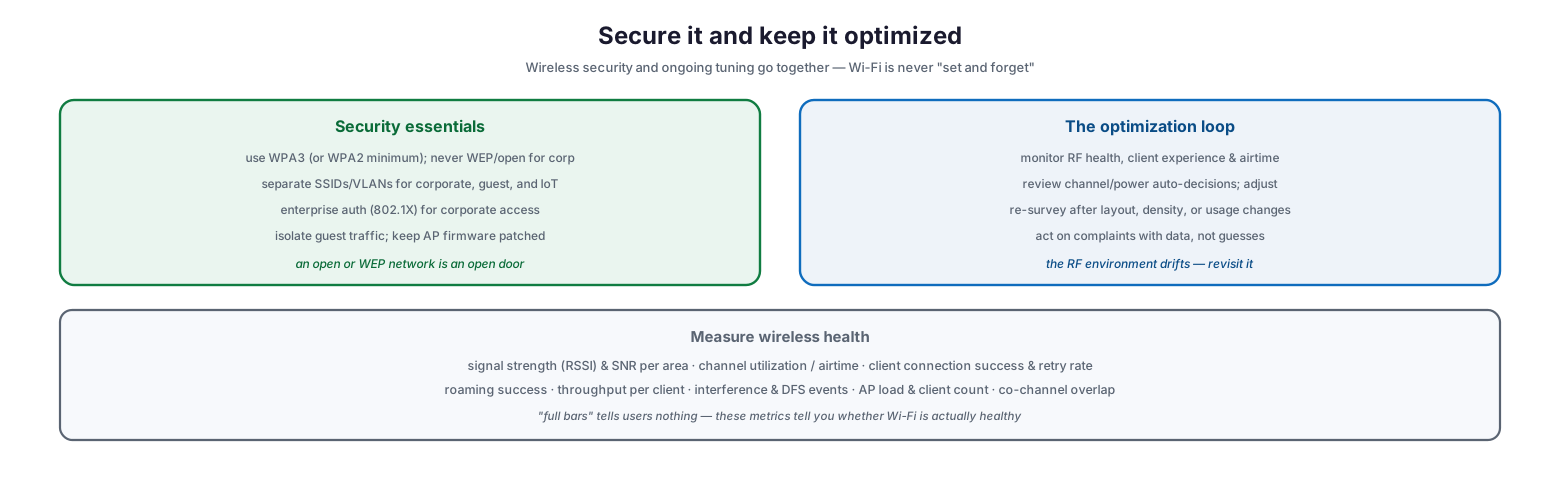
Wireless security and ongoing tuning are two halves of the same discipline, because Wi-Fi is never truly “set and forget” — the RF environment and the demands on it change constantly.
Secure it and keep it optimized
On security, the essentials are straightforward: use WPA3 where possible (WPA2 at minimum), and never run WEP or open networks for corporate access; separate SSIDs and VLANs for corporate, guest, and IoT traffic; use enterprise authentication (802.1X) for corporate access rather than a shared passphrase; isolate guest traffic from the internal network; and keep access point firmware patched. An open or WEP-secured network is simply an open door. On the operations side, wireless demands a continuous optimization loop: monitor RF health, client experience, and airtime; review the channel and power decisions the controller makes automatically and adjust where needed; re-survey after any change to layout, device density, or usage; and respond to complaints with measured data rather than guesswork. The RF environment drifts as walls change, devices multiply, and neighbors alter their networks, so periodic revisiting is part of keeping wireless healthy.
| Metric | What it tells you | Healthy target (guideline) |
|---|---|---|
| Signal strength (RSSI) | Coverage at the client | Around -65 dBm or stronger in work areas |
| Signal-to-noise ratio (SNR) | Signal quality vs noise | 25 dB or higher for reliable data |
| Channel utilization / airtime | How congested a channel is | Under ~50% busy; high = add capacity |
| Client retry rate | Retransmissions from interference | Low single digits; rising = RF problem |
| Roaming success | Clean handoff between APs | High; failures = dropped calls |
| Co-channel overlap | APs competing on the same channel | Minimal; re-plan channels if high |
| AP client count / load | Devices per access point | Balanced; hotspots need more APs |
Wireless Optimization Checklist
- Steer most client traffic onto 5 GHz, reserve 2.4 GHz for IoT and coverage, and adopt 6 GHz for high-density needs.
- Plan a non-overlapping channel layout; on 2.4 GHz use only channels 1, 6, and 11.
- Use narrow channels (20/40 MHz) in dense areas; reserve wide channels for 6 GHz where spectrum is plentiful.
- Design for capacity — more APs at lower power — in high-density spaces, not just coverage.
- Tune transmit power so cells overlap cleanly; avoid maxing out every AP.
- Conduct a predictive site survey before install and a validation survey afterward.
- Target signal quality (SNR), not just raw signal strength.
- Enable band steering, fast roaming (802.11k/v/r), and QoS/WMM for voice and video.
- Manage minimum data rates so slow clients don’t monopolize airtime.
- Keep the SSID count low; separate with VLANs and roles rather than extra SSIDs.
- Ensure adequate wired backhaul and PoE for every access point.
- Use WPA3, separate corporate/guest/IoT networks, patch AP firmware, and monitor RF health continuously.
Best Practices
Get people off 2.4 GHz. The single biggest quick win is steering modern devices to 5 and 6 GHz, leaving the congested 2.4 GHz band for the IoT and legacy devices that need it. Most “slow Wi-Fi” is crowded 2.4 GHz.
Plan channels deliberately. Non-overlapping channel assignment is the highest-leverage optimization there is. Let the controller auto-plan, then verify neighboring access points are not colliding, especially on 2.4 GHz.
Design around users, not square footage. Count the devices that will connect in each space and provision access points for that load. Coverage-only designs collapse under real-world density.
Turn power down, not up. Lower, well-matched transmit power produces cleaner cells and better roaming than maximum power, which causes interference and sticky clients.
Survey before and after. A predictive survey guides the design and a validation survey confirms reality. Real measurements beat assumptions, because every building’s RF is unique.
Treat it as continuous. Monitor RF health and client experience, re-survey after changes, and tune with data. Wi-Fi that was optimized last year may be struggling today as devices and surroundings change.
Common Mistakes
Designing for coverage only. A network that is reachable everywhere but provisioned for few users will crawl the moment a room fills up. Design for simultaneous device load.
Ignoring channel overlap. Overlapping or co-channel access points are the most common cause of slow Wi-Fi despite strong signal. Plan and verify the channel layout.
Maxing out transmit power. Turning every access point to full power creates interference and sticky clients that refuse to roam. Tune power for clean, overlapping cells.
Using wide channels in dense areas. Wide channels boost single-client speed but reduce the number of clean channels, worsening interference where density is high. Go narrow where it is crowded.
Broadcasting too many SSIDs. Each SSID consumes airtime with overhead. A long SSID list quietly degrades performance; consolidate and separate with VLANs.
Neglecting the wired side and security. A fast access point on a weak uplink is wasted, and an open or WEP network is a serious exposure. Provide proper backhaul and use WPA3 with segmented networks.
Frequently Asked Questions
Why is my Wi-Fi slow even with full signal bars? Full bars indicate signal strength, not quality or capacity. The usual causes are channel interference from overlapping access points, a congested 2.4 GHz band, too many users sharing one access point, or non-Wi-Fi interference — none of which the bars reveal.
Which band should most devices use? The 5 GHz band should carry the bulk of client traffic — it has many clean channels and high throughput. Reserve 2.4 GHz for IoT and legacy devices, and use 6 GHz (with Wi-Fi 6E/7 clients) for high-density, low-latency needs.
What is the difference between coverage and capacity design? Coverage ensures signal reaches everywhere with fewer, higher-power access points. Capacity ensures many users can connect at once, using more access points at lower power. High-density spaces need capacity design.
Do wider channels make Wi-Fi faster? They increase peak speed for a single client but consume more spectrum, leaving fewer non-overlapping channels and causing more interference in dense areas. Use narrow channels where it is crowded and wide channels only where spectrum is plentiful, such as 6 GHz.
Do I really need a site survey? Yes. Every building’s RF environment is different, and predictions from floor plans must be validated by walking the space and measuring real signal and noise. Surveys prevent both coverage gaps and interference.
What wireless security should we use? Use WPA3 where supported and WPA2 at minimum; never run WEP or open networks for corporate access. Separate corporate, guest, and IoT traffic onto different SSIDs and VLANs, use enterprise authentication for corporate access, and keep access point firmware patched.
Conclusion
Fast, reliable Wi-Fi is an engineering outcome, not a purchase. Because wireless is a shared medium in finite, noisy spectrum, performance comes from managing that spectrum with intent: using the right bands, planning non-overlapping channels, designing for the real number of simultaneous users, tuning power for clean roaming, and eliminating the interference that silently degrades every band. The optimization levers — band steering, fast roaming, quality of service, airtime management — then turn a sound RF design into a genuinely good experience, while WPA3 and network separation keep it secure.
The work does not end at deployment. Wireless environments drift as devices multiply, layouts change, and neighbors alter their networks, so continuous monitoring, periodic re-surveys, and data-driven tuning are what keep Wi-Fi healthy over time. Approach wireless as an ongoing discipline rather than a one-time install, and it will stay fast and dependable as the demands on it keep climbing — which, given how central Wi-Fi now is to how people work, is exactly what the business needs.
References
- Wi-Fi Alliance — Discover Wi-Fi (generations and technologies)
- IEEE 802.11 — Wireless LAN standards
- Wi-Fi Alliance — WPA3 security
- Wi-Fi Alliance — 6 GHz Wi-Fi (Wi-Fi 6E)
- NIST SP 800-97 — Establishing Wireless Robust Security Networks (802.11i)
- NIST SP 800-153 — Guidelines for Securing Wireless Local Area Networks (WLANs)
- FCC — 6 GHz unlicensed spectrum for Wi-Fi
On this page
- Executive Summary
- Three Bands, Three Trade-offs
- Channel Planning: The Number-One Cause of Bad Wi-Fi
- Design for Capacity, Not Just Coverage
- The Optimization Levers
- Securing and Continuously Optimizing
- Wireless Optimization Checklist
- Best Practices
- Common Mistakes
- Frequently Asked Questions
- Conclusion
- References