DHCP and IP Address Management: Best Practices for a Clean, Reliable Network
Every device on a network needs an address, and in all but the smallest environments those addresses are handed out automatically by the Dynamic Host Configuration Protocol (DHCP).
- Content owner
- Insyto Content Team
- Editorial reviewer
- Ritesh Mhatre
- Technical reviewer
- Navish Ansari
- Next review
- To be scheduled
- Last reviewed
- Review pending
- Technical level
- Intermediate · IT directors, network and infrastructure teams
Executive Summary
Every device on a network needs an address, and in all but the smallest environments those addresses are handed out automatically by the Dynamic Host Configuration Protocol (DHCP). It is one of the most quietly essential services in IT: when it works, laptops, phones, printers, and servers simply connect and function; when it fails, nothing new can get online, existing devices begin dropping off as their leases expire, and the network appears to be collapsing for no visible reason. Yet DHCP and the broader discipline of IP address management (IPAM) are among the most commonly neglected areas of infrastructure — configured once during a network’s early days and then left to drift as the organization grows, until address exhaustion, duplicate-IP conflicts, or a single-server failure force the issue.
The stakes are higher than they appear. DHCP is a single point of failure for connectivity: if the only server that leases addresses goes down, new devices cannot join and renewing devices eventually lose their addresses. It is also unauthenticated by design, which makes it an easy target — a rogue DHCP server on the network can silently point every client at an attacker-controlled gateway or DNS resolver. And without a deliberate addressing plan, IP space becomes an undocumented tangle where no one knows which addresses are in use, which are static, or where the conflicts are hiding. Getting DHCP and IPAM right is therefore foundational to both reliability and security.
This vendor-neutral guide covers the practices that keep addressing clean and dependable. It explains how DHCP leasing actually works, how to design scopes and the options they deliver, how to plan the address space with a structured IPAM approach, how to build DHCP redundancy so a single failure does not stop connectivity, and how to secure DHCP against rogue servers and starvation attacks. Grounded in the long-standing internet standards that define the protocol, the goal is an addressing practice that scales cleanly with the organization and stays invisible — because it simply works.
How DHCP Leasing Works
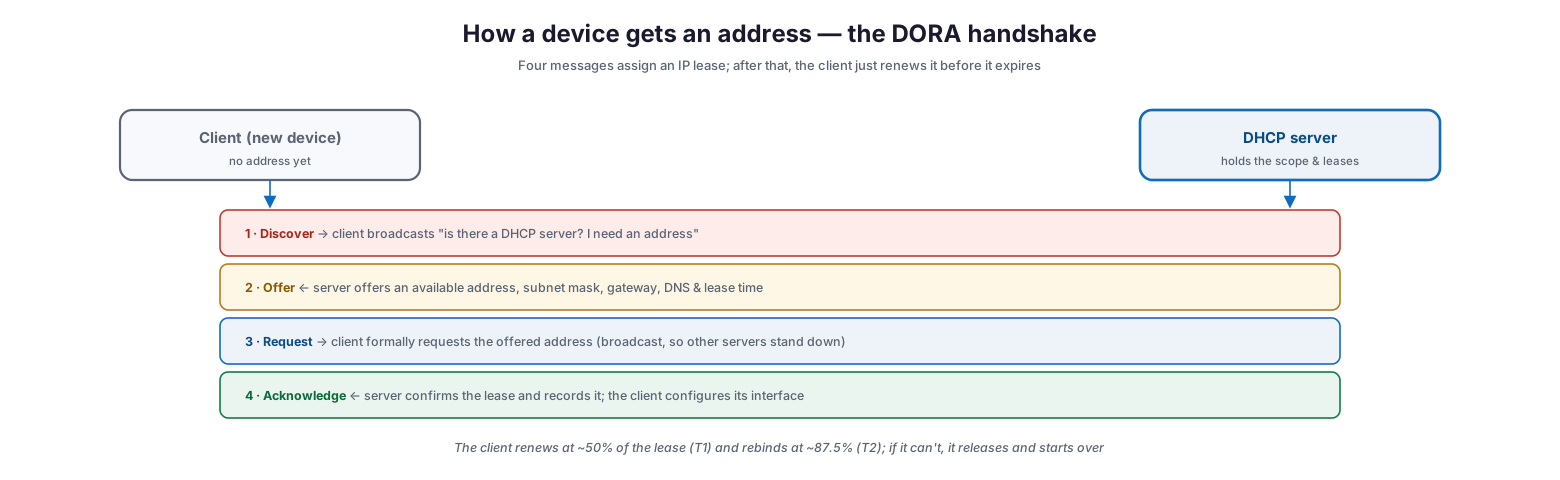
Understanding the four-message exchange behind every address assignment makes the rest of DHCP management far clearer. The process is often called DORA, after its four steps.
How a device gets an address — the DORA handshake
When a device joins the network without an address, it broadcasts a Discover message asking whether any DHCP server is present. A server responds with an Offer, proposing an available address along with the subnet mask, default gateway, DNS servers, and a lease time. The client replies with a Request, formally asking for the offered address — and because this is broadcast, any other DHCP servers that also made offers know to stand down. Finally, the server sends an Acknowledge, confirming the lease, recording it, and letting the client configure its interface. The lease is not permanent: the client attempts to renew at roughly half the lease duration and, if that fails, tries again — rebinding to any available server — at about seven-eighths of the way through. Only if it cannot renew does it release the address and start the process over. This lease-and-renew rhythm is what lets a finite pool of addresses serve a constantly changing population of devices.
Designing Scopes and Options
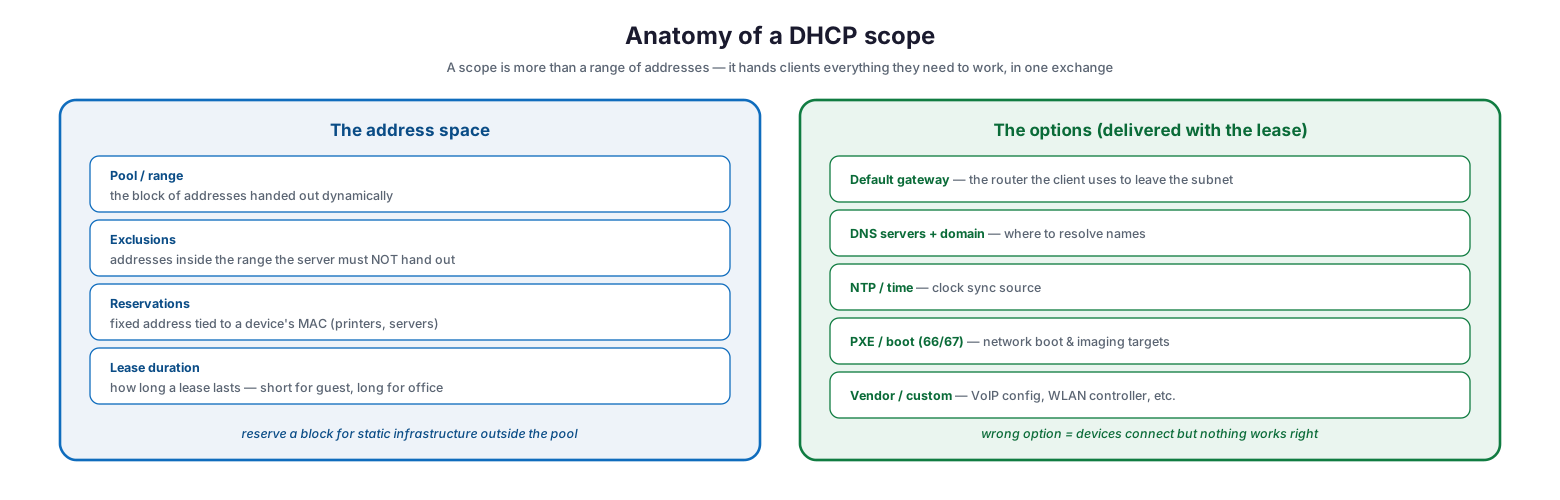
A DHCP scope is far more than a range of addresses; it is the complete set of network settings a client needs to function, delivered in a single exchange. Designing scopes well is where most day-to-day DHCP reliability is won or lost.
Anatomy of a DHCP scope
On the address side, a scope defines a pool — the block of addresses handed out dynamically — along with exclusions that mark addresses inside that range the server must never assign, reservations that tie a fixed address to a specific device’s MAC (ideal for printers and servers that need consistent addresses), and a lease duration tuned to the environment: short leases for high-churn guest networks, long leases for stable office populations. On the options side, the scope delivers the settings that make the address usable: the default gateway the client uses to leave its subnet, the DNS servers and domain for name resolution, an NTP source for time synchronization, PXE and boot parameters for network imaging, and any vendor-specific options such as VoIP or wireless-controller configuration. A misconfigured option is a subtle and common failure — devices receive an address and appear connected, yet nothing works correctly because the gateway or DNS setting is wrong.
| Scope element | What it does | Best-practice note |
|---|---|---|
| Pool / range | Addresses handed out dynamically | Size for peak devices plus headroom |
| Exclusions | Addresses never to assign | Exclude anything set statically inside the range |
| Reservations | Fixed address by MAC | Use for printers, servers, fixed infrastructure |
| Lease duration | How long a lease lasts | Short for guest/high-churn, long for stable offices |
| Options (gateway, DNS, etc.) | Settings delivered with the lease | Verify carefully — wrong option breaks connectivity silently |
Planning the Address Space
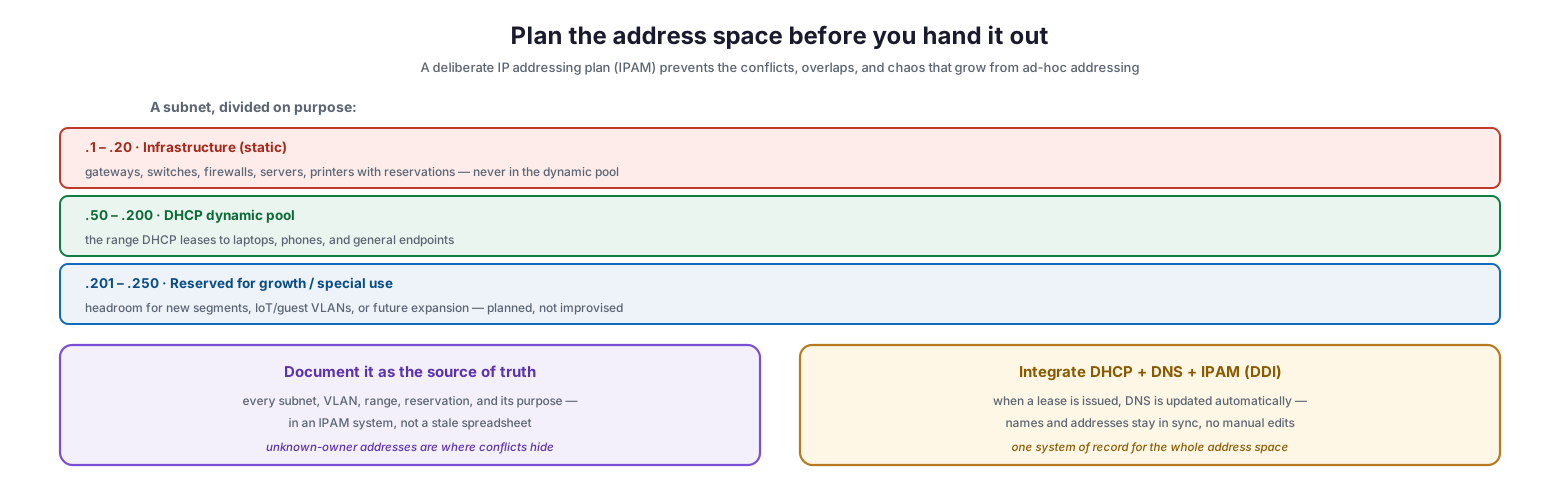
Behind good DHCP is a deliberate IP addressing plan. Addresses assigned ad hoc, without a scheme, inevitably produce overlaps, conflicts, and an undocumented mess that becomes harder to untangle as the network grows. IP address management — IPAM — is the discipline of planning and documenting the whole space.
Plan the address space before you hand it out
The foundation is dividing each subnet on purpose rather than by accident. A low block is reserved for infrastructure assigned statically or by reservation — gateways, switches, firewalls, servers, and fixed printers — which should never live inside the dynamic pool. A middle block becomes the DHCP dynamic pool that leases addresses to laptops, phones, and general endpoints. And a further block is held back for growth and special use: new segments, IoT or guest VLANs, and future expansion, planned in advance rather than improvised under pressure. Just as important as the plan is documenting it as a single source of truth — every subnet, VLAN, range, reservation, and its purpose recorded in an IPAM system rather than a stale spreadsheet, because addresses whose owner is unknown are exactly where conflicts hide. Mature environments integrate DHCP, DNS, and IPAM together (an approach known as DDI) so that issuing a lease automatically updates DNS, keeping names and addresses in sync with no manual editing.
| IP block | Purpose | Assignment method |
|---|---|---|
| Infrastructure block | Gateways, switches, servers, printers | Static or DHCP reservation |
| Dynamic pool | Laptops, phones, general endpoints | DHCP lease |
| Growth / special-use block | New segments, IoT, guest, expansion | Reserved, planned ahead |
Building DHCP Redundancy
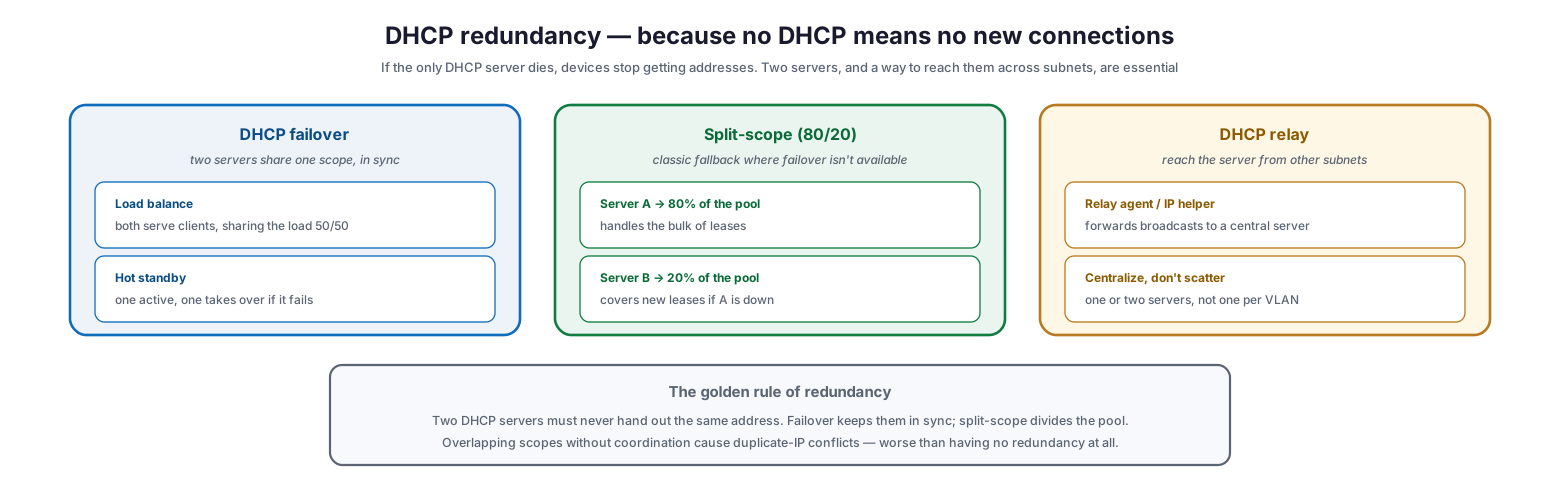
Because DHCP is a single point of failure for connectivity, redundancy is essential: if the only server that hands out addresses dies, new devices cannot connect and existing ones eventually lose their leases. There are two established approaches, plus the mechanism that lets servers be reached across subnets.
DHCP redundancy — because no DHCP means no new connections
DHCP failover pairs two servers that share a single scope and stay synchronized, in one of two modes: load-balancing, where both serve clients and split the work; or hot-standby, where one is active and the other takes over if it fails. Split-scope is the classic fallback where native failover is unavailable — the address pool is divided between two servers, commonly on an 80/20 basis, so the primary handles the bulk of leases while the secondary can still issue addresses if the primary is down. Reaching a central server from other subnets is the job of a DHCP relay agent (often configured as an “IP helper”), which forwards the client’s broadcast to a designated server; this lets an organization centralize DHCP on one or two well-managed servers rather than scattering a server onto every VLAN. The golden rule underlying all of this is that two DHCP servers must never hand out the same address — failover keeps them coordinated and split-scope divides the pool, but overlapping scopes without coordination cause duplicate-IP conflicts that are worse than having no redundancy at all.
Securing DHCP and IP
DHCP was designed for convenience, not security — it is unauthenticated, so a client will trust whichever server answers first. That openness invites specific attacks, each with an established countermeasure, alongside the everyday hygiene that keeps addressing clean.
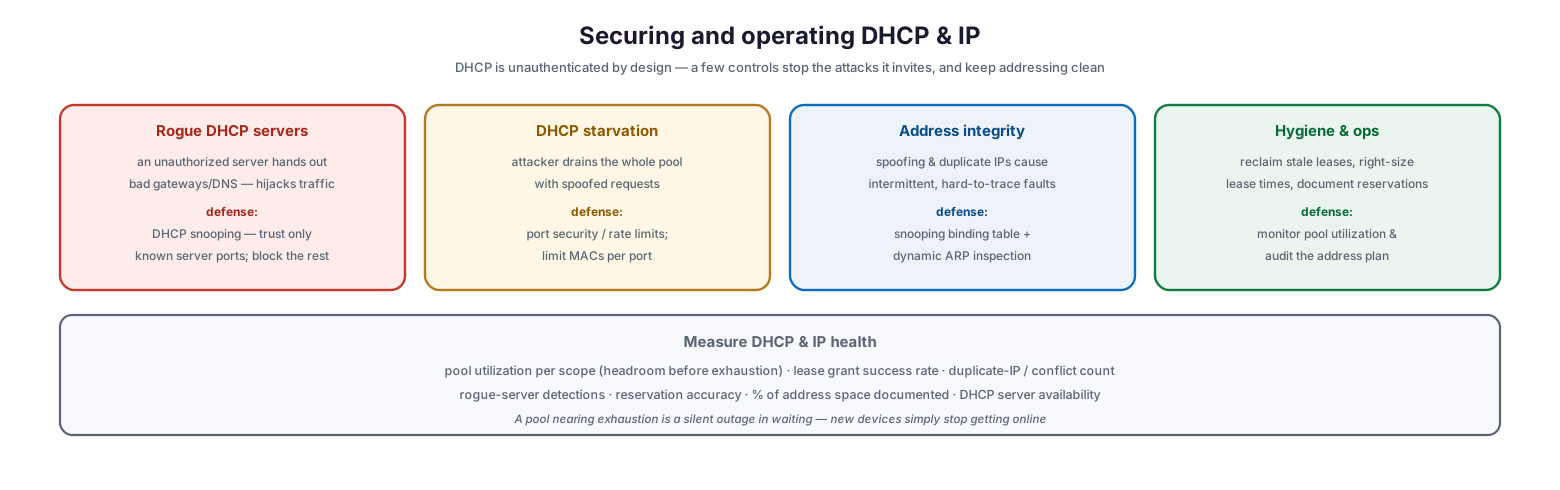
Securing and operating DHCP and IP
A rogue DHCP server — whether a malicious device or an accidental home router plugged into the network — can hand out incorrect gateways and DNS servers, silently hijacking traffic; the defense is DHCP snooping, a switch feature that trusts only the ports where legitimate DHCP servers live and blocks server responses from all others. A DHCP starvation attack floods the server with spoofed requests to drain the entire pool so legitimate devices cannot get addresses; the defense is port security and rate limiting that cap the number of MAC addresses and requests per port. Address integrity problems — spoofing and duplicate IPs — cause intermittent, hard-to-trace faults, and are countered by the snooping binding table combined with dynamic ARP inspection. And underpinning all of it is operational hygiene: reclaiming stale leases, right-sizing lease durations, documenting reservations, and monitoring pool utilization so a scope nearing exhaustion is caught before it becomes a silent outage in which new devices simply stop getting online.
| Threat / issue | Impact | Defense |
|---|---|---|
| Rogue DHCP server | Traffic hijacked via bad gateway/DNS | DHCP snooping (trusted ports only) |
| DHCP starvation | Pool drained, no addresses for real devices | Port security, rate limiting |
| Spoofing / duplicate IP | Intermittent, hard-to-trace faults | Snooping binding table, dynamic ARP inspection |
| Pool exhaustion | New devices cannot connect | Monitor utilization, right-size pool/lease |
DHCP and IP Management Checklist
- Design an addressing plan that separates static infrastructure, the DHCP pool, and growth/reserved ranges.
- Size DHCP pools for peak devices plus headroom, and monitor utilization per scope.
- Use reservations for devices that need consistent addresses; keep them outside the dynamic pool.
- Set exclusions for any addresses assigned statically within a scope’s range.
- Tune lease durations to the environment — short for guest, longer for stable offices.
- Verify every DHCP option (gateway, DNS, domain, NTP, boot) carefully before deployment.
- Build redundancy with DHCP failover or an 80/20 split-scope; never let two servers overlap uncoordinated.
- Use relay agents to centralize DHCP rather than deploying a server per VLAN.
- Enable DHCP snooping to block rogue servers, and port security to prevent starvation.
- Document every subnet, VLAN, range, and reservation in an IPAM system, not a spreadsheet.
- Integrate DHCP, DNS, and IPAM (DDI) so leases and DNS records stay in sync.
- Reclaim stale leases and audit the address plan regularly.
Best Practices
Plan the address space deliberately. Divide each subnet on purpose — infrastructure, dynamic pool, and reserved growth — before handing out a single address. Ad-hoc addressing is the root of most conflicts and confusion.
Never run a single DHCP server. Connectivity depends on it, so build redundancy with failover or split-scope. Just ensure the two servers are coordinated so they can never issue the same address.
Reserve, don’t statically configure inside the pool. For devices needing fixed addresses, use DHCP reservations tied to their MAC rather than hand-configuring an address inside the dynamic range, which invites conflicts. Keep static infrastructure in its own block.
Right-size leases and monitor pools. Match lease duration to how quickly devices come and go, and watch pool utilization so you expand or adjust before a scope exhausts and new devices silently fail to connect.
Turn on DHCP snooping. It is the single most effective control against rogue DHCP servers, whether malicious or an accidental consumer router, and it costs nothing but configuration on managed switches.
Document everything in an IPAM system. A current, authoritative record of the address space — ideally integrated with DNS as DDI — turns troubleshooting from guesswork into a lookup and prevents the undocumented sprawl that grows silently over time.
Common Mistakes
Running only one DHCP server. A single server means a single failure stops all new connectivity and eventually strands renewing devices. Redundancy is essential.
Overlapping scopes without coordination. Two servers configured to hand out the same addresses cause duplicate-IP conflicts — a self-inflicted outage worse than having no redundancy at all.
Static addresses inside the DHCP pool. Manually setting an address within the dynamic range without an exclusion guarantees an eventual conflict when the server leases the same address.
Leaving DHCP wide open. Without snooping, any device — a malicious actor or an employee’s home router — can become a rogue DHCP server and redirect the whole network.
Ignoring pool exhaustion. A scope filling up produces a quiet, baffling failure where new devices simply cannot get online. Monitor utilization and expand ahead of need.
Managing IP in a spreadsheet. Undocumented or stale address records lead to conflicts no one can trace. Use a proper IPAM system as the single source of truth.
Frequently Asked Questions
What is the difference between a DHCP reservation and a static IP? A static IP is configured manually on the device itself; a DHCP reservation is configured on the server, which always leases the same address to a given MAC. Reservations are centrally managed and avoid the conflicts that manually set static addresses inside a pool can cause.
How long should DHCP leases be? It depends on churn. High-turnover networks like guest Wi-Fi benefit from short leases (hours) so addresses are reclaimed quickly, while stable office networks can use longer leases (days) to reduce renewal traffic. Match the lease to how quickly devices come and go.
What happens if the DHCP server goes down? Existing devices keep their addresses until their leases expire and can usually renew once the server returns, but new devices cannot get addresses while it is down. This is why redundancy through failover or split-scope is important.
What is a rogue DHCP server and how do I stop it? It is an unauthorized DHCP server — malicious or accidental — that hands out incorrect settings and can hijack traffic. DHCP snooping on managed switches stops it by trusting only the ports where legitimate servers reside.
What is IPAM and do we need it? IP Address Management is the practice of planning, tracking, and documenting the address space. Any network beyond a handful of devices benefits from it, because it prevents conflicts and makes troubleshooting a lookup rather than a guess. Integrating it with DHCP and DNS (DDI) keeps everything in sync automatically.
How do devices on other subnets reach a central DHCP server? A DHCP relay agent, or “IP helper,” on the router forwards the client’s broadcast to a designated server, allowing DHCP to be centralized on one or two servers rather than deployed on every subnet.
Conclusion
DHCP and IP address management are the plumbing of the network — unglamorous, easy to ignore, and catastrophic when they fail. Because DHCP is a single point of failure for connectivity and an unauthenticated, easily abused service, and because unplanned addressing degrades into an undocumented tangle, both deserve deliberate design rather than benign neglect. Understand the lease process, build scopes with correct options, plan the address space into clear static, dynamic, and reserved blocks, and document all of it in an IPAM system.
The reliability and security payoffs are large for modest effort. Run redundant DHCP servers that can never collide, right-size leases and monitor pool utilization, enable DHCP snooping to shut out rogue servers, and integrate DHCP with DNS so names and addresses stay aligned. Do that, and addressing stops being a source of mysterious outages and conflicts and becomes what it should be: an invisible, dependable foundation that lets every device on the network simply connect and work.
References
- RFC 2131 — Dynamic Host Configuration Protocol
- RFC 2132 — DHCP Options and BOOTP Vendor Extensions
- RFC 8415 — Dynamic Host Configuration Protocol for IPv6 (DHCPv6)
- RFC 3046 — DHCP Relay Agent Information Option
- RFC 1918 — Address Allocation for Private Internets
- NIST SP 800-81r2 — Secure DNS Deployment Guide (DDI context)
- IANA — BOOTP/DHCP Parameters registry