Remote Workforce Infrastructure: Building the Foundation for Secure Work From Anywhere
Remote and hybrid work has moved from a perk to a permanent operating model, and it has quietly rewritten the rules of IT infrastructure.
- Content owner
- Insyto Content Team
- Editorial reviewer
- Ritesh Mhatre
- Technical reviewer
- Navish Ansari
- Next review
- To be scheduled
- Last reviewed
- Review pending
- Technical level
- Intermediate · IT directors, network and infrastructure teams
Executive Summary
Remote and hybrid work has moved from a perk to a permanent operating model, and it has quietly rewritten the rules of IT infrastructure. For decades, the design assumption was that employees worked inside an office, on a trusted corporate network, behind a firewall that formed a clear perimeter. That assumption no longer holds. Today the workforce is distributed across homes, coffee shops, client sites, and airports, connecting over networks the organization does not own or control, often on a mix of company and personal devices. The office network is no longer where work happens or where security lives — which means the infrastructure that supports work has to be rebuilt around people and their access, not around a building.
This is a different problem from simply “letting people use a VPN.” Supporting a remote workforce well requires a coherent stack: an identity system strong enough to serve as the new perimeter, secure connectivity matched to the sensitivity of the work, endpoints that are provisioned, managed, and protected wherever they are, cloud collaboration platforms that are available and fast from anywhere, and a support and operations model that can onboard, help, and offboard employees no one can walk over to. And because there is no office to fall back on when something fails, resilience becomes non-negotiable: an outage of the identity provider or the internet link can lock out an entire workforce at once.
This vendor-neutral guide lays out the infrastructure a distributed workforce depends on. It presents the five-layer remote work stack, explains why identity has become the perimeter, compares the main remote-access methods and when to use each, sets out the principle of securing the client device, the connection, and the internal resource against a hostile external environment, and covers resilience, worker experience, and the operations model. Grounded in established public-sector guidance on enterprise telework and remote access, the goal is a foundation on which an employee anywhere can be as secure, supported, and productive as one sitting at a desk in the office.
The Remote Workforce Infrastructure Stack
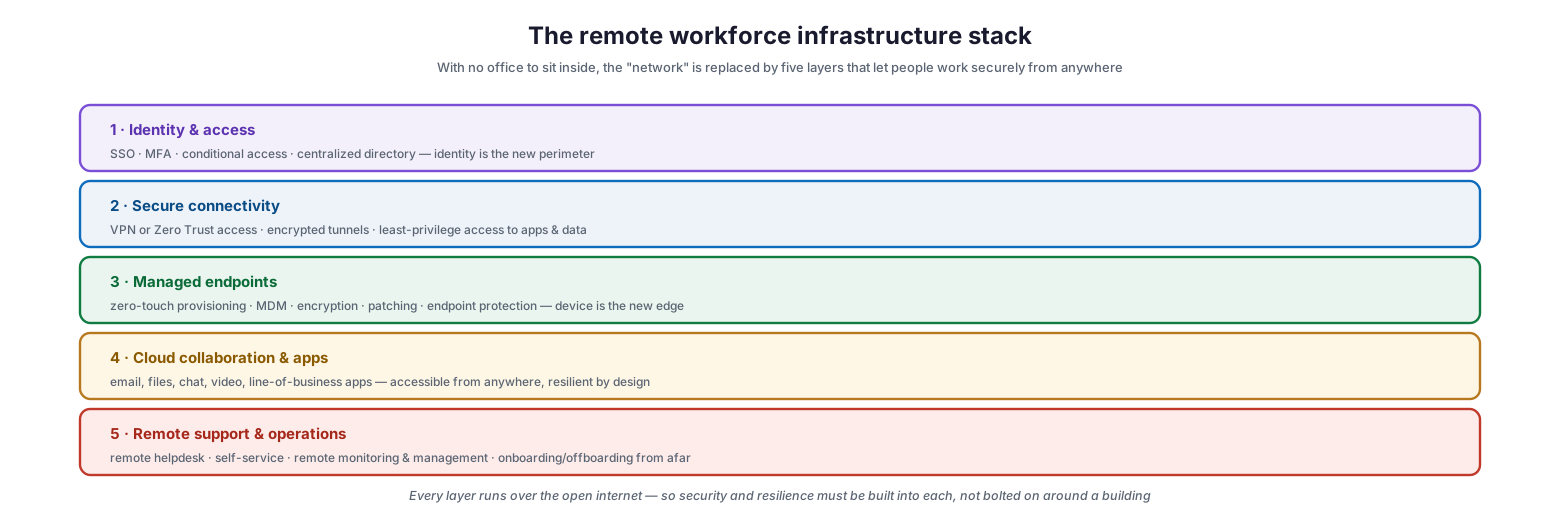
Because there is no longer a network to sit inside, the traditional perimeter is replaced by a stack of five layers, each of which must be secured and made resilient in its own right.
The remote workforce infrastructure stack
The foundation is identity and access — single sign-on, multi-factor authentication, conditional access, and a centralized directory — because identity is now the primary control point. On top of that sits secure connectivity: VPN or Zero Trust access that provides encrypted, least-privilege paths to applications and data. The third layer is managed endpoints, where zero-touch provisioning, mobile device management, encryption, patching, and endpoint protection make each device a trustworthy edge. The fourth is cloud collaboration and applications — email, files, chat, video, and line-of-business apps that must be reachable and dependable from anywhere. And the fifth is remote support and operations, encompassing the helpdesk, self-service, remote monitoring and management, and the ability to onboard and offboard people from afar. The unifying reality is that every one of these layers runs over the open internet, so security and resilience must be engineered into each layer rather than bolted on around a physical location.
| Layer | What it provides | Core components |
|---|---|---|
| Identity & access | The new perimeter | SSO, MFA, conditional access, directory |
| Secure connectivity | Protected access to resources | VPN, Zero Trust access, encrypted tunnels |
| Managed endpoints | Trustworthy device edge | Provisioning, MDM, encryption, patching, EDR |
| Cloud collaboration & apps | Work reachable anywhere | Email, files, chat, video, LOB apps |
| Remote support & operations | Running it all from afar | Helpdesk, self-service, RMM, onboarding/offboarding |
Identity as the New Perimeter
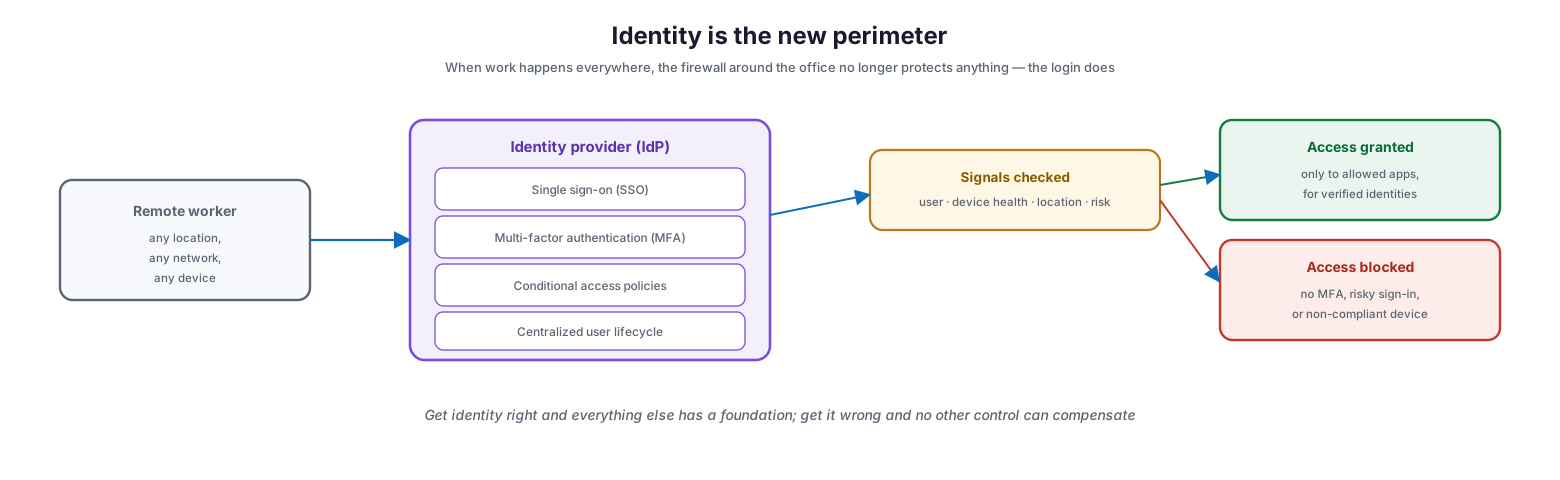
The single most important shift in remote infrastructure is that identity, not the network, is now the perimeter. When employees work from anywhere on any network, a firewall around the office protects almost nothing; what determines whether access is safe is who is signing in, from what device, and under what circumstances.
Identity is the new perimeter
A central identity provider becomes the gatekeeper for everything. It delivers single sign-on so users authenticate once to reach all their applications, enforces multi-factor authentication so a stolen password alone is not enough, applies conditional access policies that weigh signals such as the user, device health, location, and risk before granting access, and manages the user lifecycle centrally so accounts are provisioned and — critically — de-provisioned cleanly. Each access request is evaluated against those signals: a verified user on a compliant device is granted access to the applications they are entitled to, while a sign-in with no MFA, from a risky context, or on a non-compliant device is blocked. The strategic weight of this cannot be overstated: get identity right and every other layer has a solid foundation; get it wrong and no firewall, VPN, or endpoint tool can compensate, because the attacker is simply logging in as a legitimate user.
The Ways Workers Reach Corporate Resources
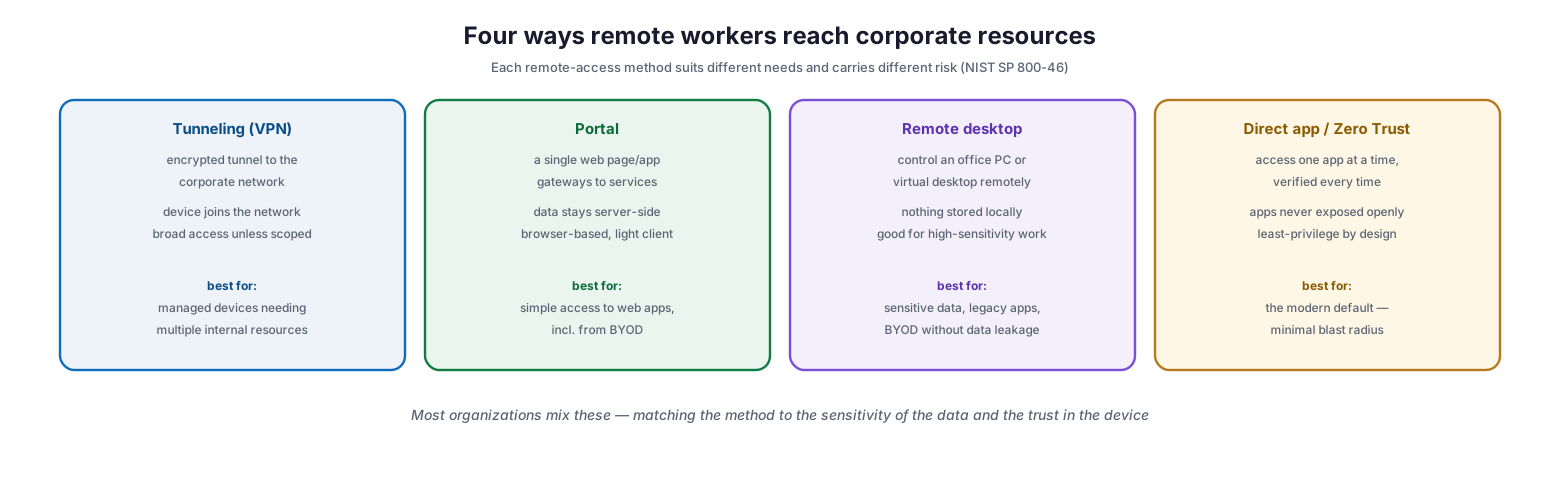
Once identity is established, remote workers need a path to the applications and data they use, and there are four established methods, each suited to different needs and carrying different risk.
Four ways remote workers reach corporate resources
Tunneling, the classic VPN, builds an encrypted tunnel that effectively places the device on the corporate network — powerful for managed devices that need multiple internal resources, but granting broad access unless it is carefully scoped. A portal provides a single web page or application that gateways to services, keeping data server-side and requiring only a browser, which makes it well suited to simple web-app access including from personal devices. Remote desktop access lets a worker control an office PC or a virtual desktop, so nothing is stored on the local device — an excellent fit for highly sensitive work, legacy applications, and bring-your-own-device scenarios where data must not leak locally. And direct application access, the model behind Zero Trust, grants access to one application at a time with continuous verification and never exposes applications openly to the internet, making it the modern default because it minimizes the blast radius of any compromise. Most organizations blend these methods, matching each to the sensitivity of the data and the trustworthiness of the device.
| Method | How it works | Best for |
|---|---|---|
| Tunneling (VPN) | Encrypted tunnel onto the network | Managed devices needing multiple resources |
| Portal | Web gateway to services, data server-side | Simple web-app access, including BYOD |
| Remote desktop | Control a remote PC/virtual desktop | Sensitive data, legacy apps, BYOD |
| Direct app / Zero Trust | Per-app access, verified each time | Modern default; minimal blast radius |
Securing the Whole Chain
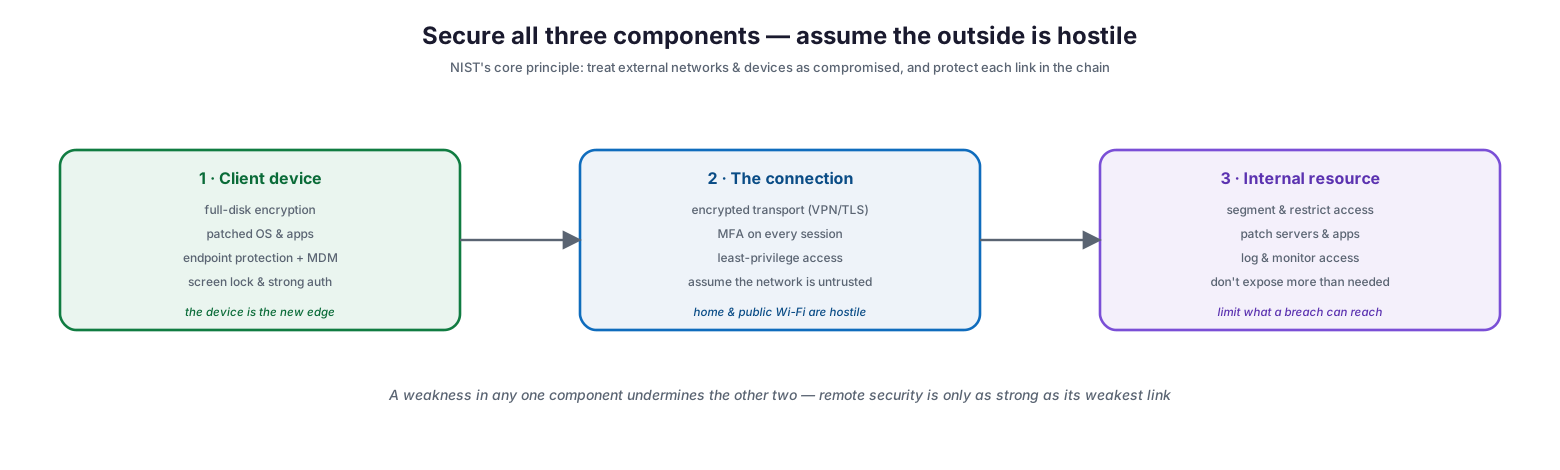
The governing security principle for remote infrastructure is to assume the external environment is hostile — that home and public networks are untrusted and that any device could be compromised — and therefore to secure each of the three components involved in remote access rather than trusting any of them by default.
Secure all three components — assume the outside is hostile
The first component is the client device, which must be protected with full-disk encryption, a patched operating system and applications, endpoint protection and management, and a screen lock with strong authentication, because the device is now the edge of the organization. The second is the connection, which must use encrypted transport, require multi-factor authentication on every session, enforce least-privilege access, and be treated as if the network beneath it is hostile — which, on home and public Wi-Fi, it effectively is. The third is the internal resource being accessed, which should be segmented and access-restricted, kept patched, logged and monitored, and never exposed more broadly than necessary, so that a compromise reaches as little as possible. The crucial insight is that these three are a chain: a weakness in any one undermines the other two, so remote security is only as strong as its weakest link.
Resilience, Experience, and Operations
With no office to fall back on, the services that support remote work and the operations around them must be dependable for everyone, all the time.
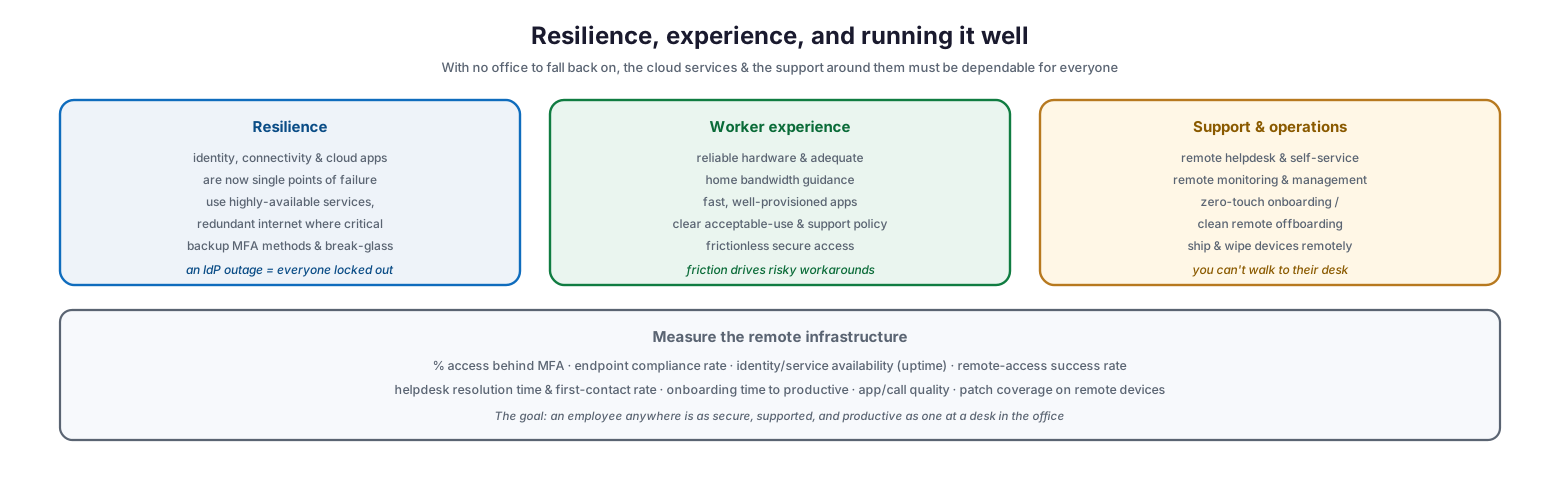
Resilience, experience, and running it well
Resilience matters more than ever because identity, connectivity, and cloud applications have become single points of failure for the entire workforce — an identity provider outage can lock out everyone simultaneously. The response is to use highly available services, provide redundant internet where connectivity is business-critical, and maintain backup MFA methods and break-glass access for emergencies. Worker experience is not a soft concern but a security one: reliable hardware, guidance on adequate home bandwidth, fast and well-provisioned applications, clear acceptable-use and support policies, and frictionless secure access all matter, because friction is what drives employees to risky workarounds that bypass controls. And support and operations must be reconceived for distance: a remote helpdesk and self-service, remote monitoring and management, zero-touch onboarding that ships a device ready to use, and clean remote offboarding that can wipe a device from afar — all built on the reality that no one can walk over to a struggling employee’s desk. The measure of success across all of this is simple to state: an employee anywhere should be as secure, supported, and productive as one at a desk in the office.
| Dimension | Focus | Key practices |
|---|---|---|
| Resilience | No office fallback | HA services, redundant internet, backup MFA, break-glass |
| Worker experience | Productivity and low friction | Reliable hardware, bandwidth guidance, fast apps, clear policy |
| Support & operations | Running it from afar | Remote helpdesk, RMM, zero-touch onboarding, remote wipe |
Remote Workforce Infrastructure Checklist
- Establish a central identity provider with SSO, MFA, and conditional access as the primary control point.
- Enforce MFA on all remote access without exception, and maintain backup MFA methods.
- Choose remote-access methods (VPN, portal, remote desktop, Zero Trust) to match data sensitivity and device trust.
- Provision endpoints for zero-touch setup; enforce encryption, patching, endpoint protection, and MDM.
- Secure all three components: the client device, the connection, and the internal resource.
- Treat home and public networks as hostile; require encrypted transport and least-privilege access.
- Segment and monitor internal resources so a compromise reaches as little as possible.
- Use highly available identity and cloud services; add redundant internet where business-critical.
- Provide reliable hardware and clear guidance on home bandwidth and acceptable use.
- Build a remote helpdesk, self-service, and remote monitoring and management.
- Enable zero-touch onboarding and clean remote offboarding, including remote device wipe.
- Measure MFA coverage, endpoint compliance, service availability, and support metrics.
Best Practices
Make identity the cornerstone. Invest first in a strong central identity system with SSO, MFA, and conditional access. It is the control that everything else depends on, and the one an attacker most wants to defeat.
Match the access method to the risk. Do not force everything through a single VPN. Use portals and Zero Trust for web apps, remote desktop for sensitive data on untrusted devices, and scoped VPN where broad managed access is genuinely needed.
Assume the outside is hostile. Design as though every home network is compromised and every device could be lost. Encrypt the device, secure the connection, and restrict the resource — protect all three, trust none by default.
Engineer for resilience. Because there is no office to retreat to, treat identity, connectivity, and cloud services as tier-one systems. Use highly available providers, add redundancy where it matters, and plan break-glass access for the day the identity provider is down.
Reduce friction deliberately. Secure access that is painful gets bypassed. Smooth sign-on, fast apps, and good hardware are security investments because they keep employees inside the sanctioned, monitored path.
Operate for distance. Build the helpdesk, monitoring, onboarding, and offboarding around the assumption that IT and the employee are never in the same room. Zero-touch provisioning and remote wipe are foundational, not optional.
Common Mistakes
Relying on the network perimeter. Designing remote work as “VPN back into the trusted office network” recreates a perimeter that no longer protects anything and grants over-broad access. Identity and least privilege are the modern controls.
Weak or optional MFA. Leaving MFA off for some users or applications leaves the door open, because in a remote model a stolen password is often all an attacker needs. MFA must be universal.
Neglecting endpoint management. Allowing unmanaged, unpatched, or unencrypted devices to access corporate resources turns every remote laptop into an exposure. The device is the edge and must be managed.
Ignoring resilience. Treating the identity provider and internet link as things that “just work” invites a company-wide outage the day they do not. Build redundancy and break-glass access.
Overlooking experience. Deploying controls that are slow or cumbersome pushes employees toward personal email, unmanaged file sharing, and other risky workarounds. Friction is a security problem.
Onboarding and offboarding as an afterthought. Without zero-touch onboarding and clean remote offboarding, new hires wait days to be productive and departing employees keep access they should not. Both must be designed for remote from the start.
Frequently Asked Questions
What does ****“identity is the new perimeter” ****mean? It means that with employees working anywhere, the old network firewall no longer defines the security boundary — the login does. Access decisions are made based on the verified identity, device health, and context of each sign-in, enforced by a central identity provider with SSO and MFA.
Which remote-access method should we use? It depends on the work. Zero Trust or portal access suits most web applications; remote desktop is ideal for sensitive data or personal devices where nothing should be stored locally; and a scoped VPN fits managed devices that need broad access to internal resources. Most organizations use a mix.
Do personal (BYOD) devices work for remote infrastructure? Yes, with the right method. Remote desktop and portal access keep corporate data off the personal device entirely, and app protection can secure data within specific apps. The key is choosing access methods that match the lower trust of an unmanaged device.
Why is resilience such a big concern for remote work? Because there is no office to fall back on. If the identity provider, internet connection, or a core cloud service fails, the entire distributed workforce can be locked out at once. Highly available services, redundancy, and break-glass access mitigate this.
How do we support employees we can’t visit? Through a remote helpdesk and self-service, remote monitoring and management tools that let IT see and fix devices from afar, zero-touch onboarding that ships ready-to-use devices, and remote wipe for lost or departing devices. The operations model must assume physical distance.
What is the most important first investment? A strong central identity system with universal MFA and conditional access. It is the foundation every other layer relies on and the highest-leverage control against the credential-based attacks that remote work invites.
Conclusion
Supporting a remote workforce is not a matter of extending the old office network outward; it is a matter of rebuilding infrastructure around people and their access. The five-layer stack — identity, secure connectivity, managed endpoints, cloud collaboration, and remote operations — replaces the vanished perimeter, and identity sits at its center as the new control point. Choose access methods that fit the sensitivity of the work, secure the device, the connection, and the resource against a hostile external world, and never trust any single component by default.
Above all, engineer for resilience and experience, because a distributed workforce has no office to retreat to and little tolerance for friction. Make identity and cloud services dependable, reduce the friction that breeds risky workarounds, and build support and operations that work at a distance. Do that, and remote work stops being a collection of exceptions bolted onto an office-era design and becomes a deliberate, secure, resilient foundation — one on which an employee anywhere is as protected and productive as they would be at a desk down the hall.
References
- NIST SP 800-46 Rev. 2 — Guide to Enterprise Telework, Remote Access, and BYOD Security
- NIST SP 800-207 — Zero Trust Architecture
- NIST SP 800-114 Rev. 1 — User’s Guide to Telework and BYOD Security
- CISA — Telework guidance and resources
- NIST ITL Bulletin — Security for Enterprise Telework and Remote Access
- NIST SP 800-63 — Digital Identity Guidelines
- CISA — Zero Trust Maturity Model
On this page
- Executive Summary
- The Remote Workforce Infrastructure Stack
- Identity as the New Perimeter
- The Ways Workers Reach Corporate Resources
- Securing the Whole Chain
- Resilience, Experience, and Operations
- Remote Workforce Infrastructure Checklist
- Best Practices
- Common Mistakes
- Frequently Asked Questions
- Conclusion
- References