Infrastructure Health Checks: A Proactive Review Discipline for Reliable IT
Most infrastructure failures are not sudden. A backup quietly fails for weeks before a restore is needed.
- Content owner
- Insyto Content Team
- Editorial reviewer
- Ritesh Mhatre
- Technical reviewer
- Navish Ansari
- Next review
- To be scheduled
- Last reviewed
- Review pending
- Technical level
- Intermediate · IT directors, network and infrastructure teams
Executive Summary
Most infrastructure failures are not sudden. A backup quietly fails for weeks before a restore is needed. A storage array creeps toward full until the day it stops accepting writes. A server runs years past its warranty until a disk dies with no spare on hand. A certificate expires, a firewall rule drifts, a patch is missed — each a small, invisible degradation that accumulates until it becomes an outage. Real-time monitoring is superb at catching the moment something breaks, but it is tuned for immediacy and routinely misses this slow-burn risk. Catching problems before they mature into incidents requires a different discipline: the infrastructure health check.
An infrastructure health check is a scheduled, structured review of the IT estate against a known-good baseline. Where monitoring asks “is anything broken right now?”, a health check asks “what will break, degrade, or run out soon?” It is the IT equivalent of a building inspection or a vehicle service — a deliberate, periodic examination of every system, not to react to a failure but to find the conditions that would cause one. Done well, it converts unpredictable, expensive emergencies into planned, scheduled work, and gives IT leaders a clear, defensible picture of the health and risk in their environment.
This vendor-neutral guide sets out how to run health checks that actually reduce risk. It explains how health checks differ from monitoring and why both are needed, the eight infrastructure domains a complete check must cover, the review cycle that turns observations into remediated risk, the cadence tiers that match the depth of a check to how often it runs, and how to translate technical findings into a red-amber-green scorecard that leadership can act on. Anchored in established practice — asset inventory and configuration management from the NIST Cybersecurity Framework, and the continual-improvement mindset of IT service management — the aim is a repeatable program that steadily raises reliability rather than a one-off audit that gathers dust.
Health Checks Versus Monitoring
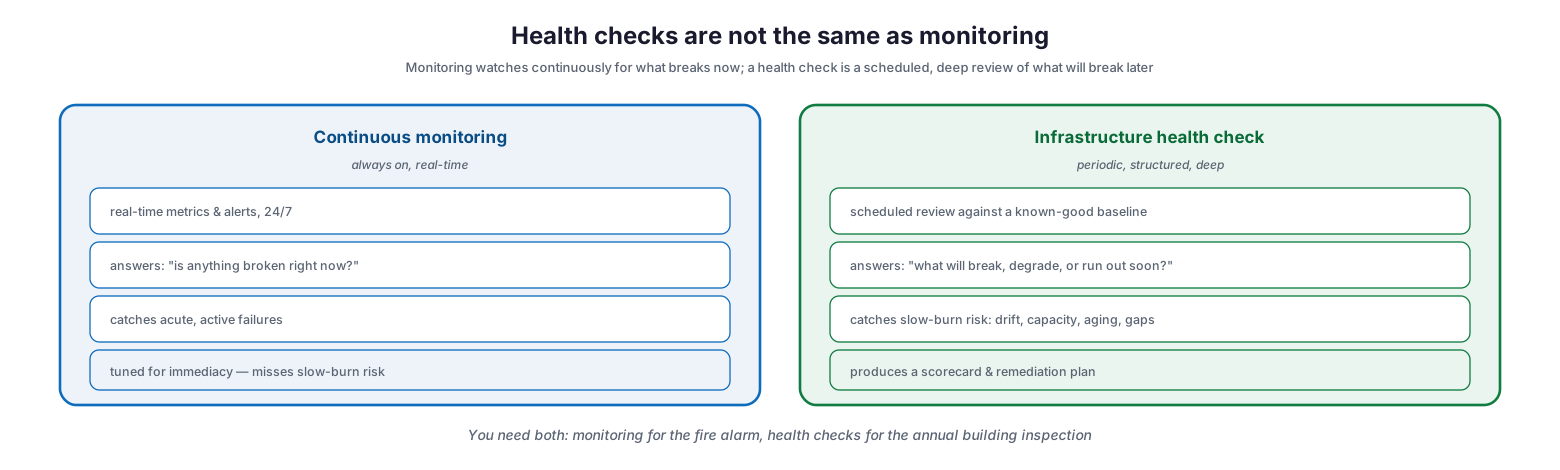
The most common confusion about health checks is that good monitoring makes them unnecessary. It does not, because the two answer fundamentally different questions and catch different classes of problem.
Health checks are not the same as monitoring
Continuous monitoring is always on and real-time. It streams metrics, fires alerts around the clock, and answers “is anything broken right now?” — catching acute, active failures the instant they occur. But precisely because it is tuned for immediacy, it tends to miss the slow-burn risks that develop gradually and never trip an instantaneous threshold: configuration drift, aging hardware, capacity that is fine today but exhausted next quarter, a backup regime that succeeds every night yet has never been test-restored. A health check is periodic, structured, and deep. It reviews the environment against a known-good baseline, asks “what will break, degrade, or run out soon?”, and produces a scorecard and a remediation plan rather than an alert. The two are complementary, not competing: monitoring is the fire alarm that tells you the building is burning, while the health check is the annual inspection that finds the frayed wiring before it ignites. A mature operation runs both.
The Eight Domains a Health Check Covers
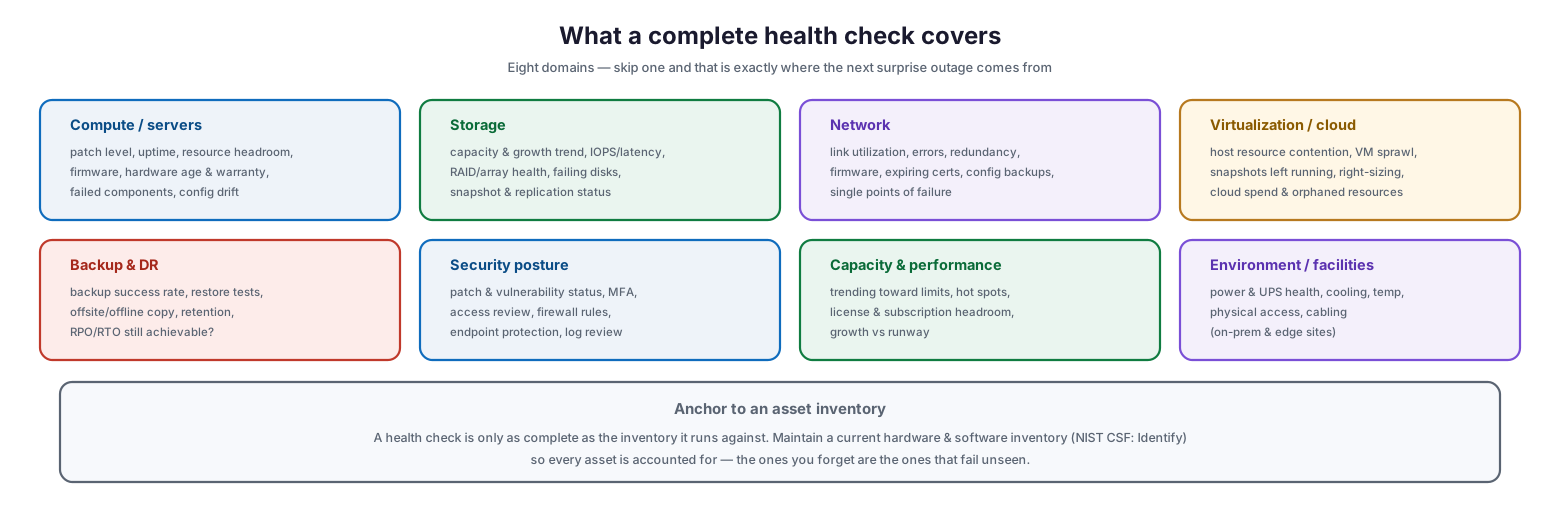
A health check is only as good as its coverage, and the domains that go unexamined are precisely where the next surprise originates. A complete check spans eight areas of the infrastructure.
What a complete health check covers
Compute and servers are examined for patch level, resource headroom, firmware, hardware age and warranty status, failed components, and configuration drift. Storage is checked for capacity and growth trend, IOPS and latency, array and RAID health, failing disks, and snapshot and replication status. The network is reviewed for link utilization and errors, redundancy, firmware, expiring certificates, configuration backups, and single points of failure. Virtualization and cloud are assessed for host resource contention, VM sprawl, forgotten running snapshots, right-sizing, and cloud spend and orphaned resources. Backup and disaster recovery — often the most neglected and the most consequential — are checked for backup success rate, actual restore tests, the existence of an offsite or offline copy, retention, and whether the recovery objectives are still achievable. Security posture covers patch and vulnerability status, multi-factor authentication, access review, firewall rules, endpoint protection, and log review. Capacity and performance track what is trending toward its limits, license and subscription headroom, and growth against runway. And environment and facilities — power and UPS health, cooling, temperature, physical access, and cabling — matter wherever on-premises or edge equipment lives.
| Domain | What the check examines |
|---|---|
| Compute / servers | Patch level, headroom, firmware, hardware age/warranty, config drift |
| Storage | Capacity trend, IOPS/latency, array health, failing disks, replication |
| Network | Utilization, errors, redundancy, certs, config backups, single points of failure |
| Virtualization / cloud | Host contention, VM sprawl, snapshots, right-sizing, cloud spend |
| Backup & DR | Backup success, restore tests, offsite/offline copy, RPO/RTO achievability |
| Security posture | Patch/vulnerability status, MFA, access review, firewall rules, logs |
| Capacity & performance | Trend toward limits, license headroom, growth vs runway |
| Environment / facilities | Power/UPS, cooling, temperature, physical access, cabling |
Underpinning all eight is a current asset inventory. A health check can only examine what it knows exists, so maintaining an up-to-date hardware and software inventory — the “Identify” foundation of the NIST Cybersecurity Framework — is a prerequisite, not an afterthought. The assets you forget to list are the ones that fail unseen.
The Health Check Cycle
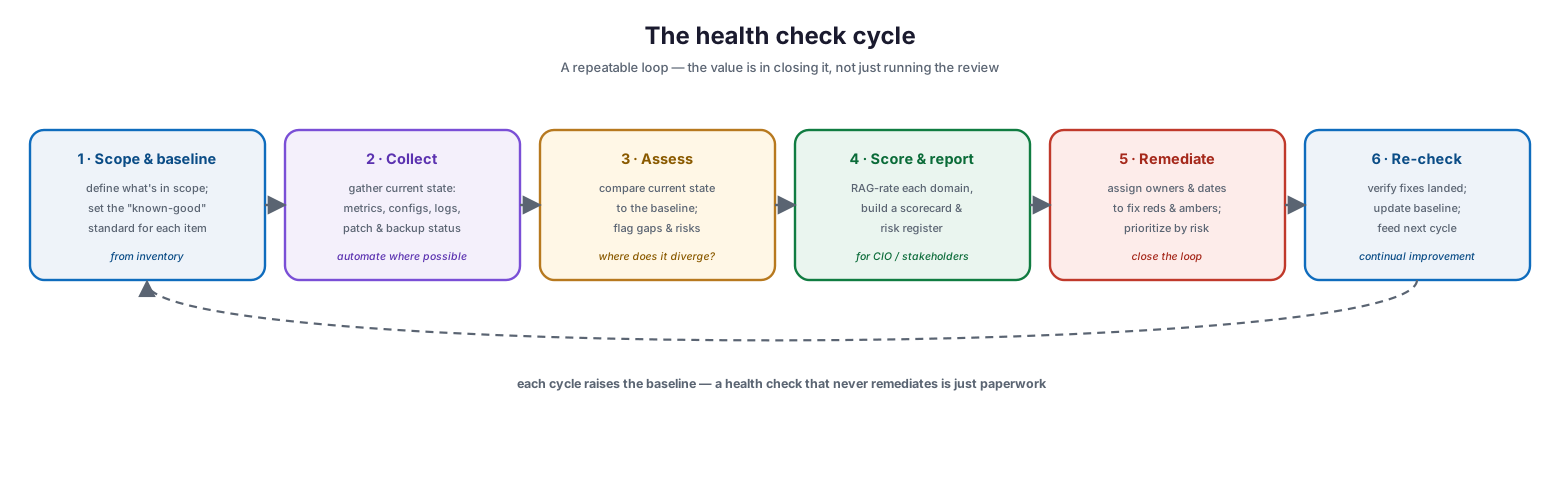
A health check is a loop, and its value lies in closing that loop. A review that produces findings but no fixes is merely expensive paperwork.
The health check cycle
The cycle begins by defining scope and baseline: deciding what is in scope and establishing the known-good standard each item is measured against, drawn from the asset inventory. Next is collection — gathering the current state through metrics, configurations, logs, and patch and backup status, automated wherever possible to keep the effort sustainable. Assessment then compares the current state to the baseline and flags every gap and risk. Those findings are scored and reported: each domain is rated red, amber, or green, and the results assembled into a scorecard and risk register aimed at leadership. Remediation assigns owners and target dates to fix the reds and ambers, prioritized by risk. Finally, a re-check verifies that the fixes actually landed, updates the baseline, and feeds the next cycle. Each turn of the loop raises the baseline a little, which is exactly the continual-improvement pattern that mature IT service management is built on.
| Stage | Purpose | Output |
|---|---|---|
| Scope & baseline | Define what to check and the known-good standard | Scoped checklist and baseline |
| Collect | Gather current state | Metrics, configs, logs, statuses |
| Assess | Compare to baseline, find gaps | List of deviations and risks |
| Score & report | Rate and communicate | RAG scorecard, risk register |
| Remediate | Fix reds and ambers | Assigned actions with owners/dates |
| Re-check | Verify and update | Confirmed fixes, revised baseline |
Matching Depth to Cadence
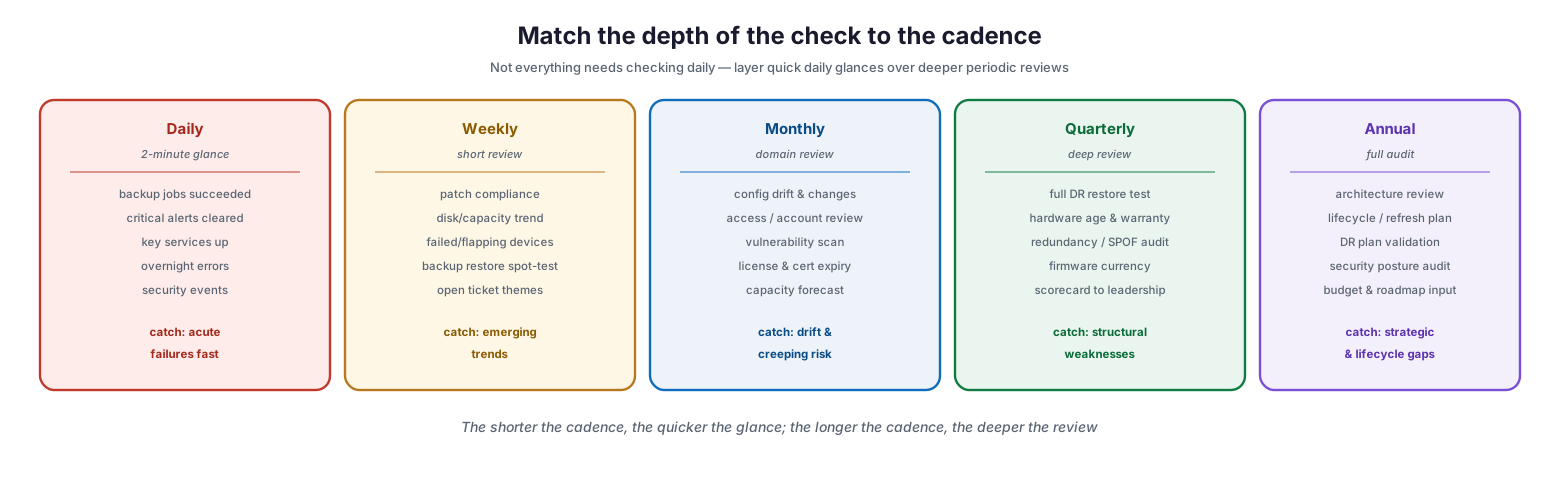
Not everything warrants the same frequency or depth. Trying to check everything every day is unsustainable, while checking critical items only annually is negligent. The answer is to layer quick, frequent glances over deeper, less frequent reviews.
Match the depth of the check to the cadence
A daily check is a two-minute glance at the things that fail acutely and matter immediately: did backups succeed, are critical alerts cleared, are key services up, were there overnight errors or security events. A weekly review is short but broader — patch compliance, disk and capacity trends, flapping or failed devices, a backup restore spot-test, and recurring ticket themes. A monthly review goes deeper into each domain: configuration drift and changes, access and account reviews, a vulnerability scan, license and certificate expiry, and a capacity forecast. A quarterly review is a genuine deep dive — a full disaster-recovery restore test, hardware age and warranty assessment, a redundancy and single-point-of-failure audit, firmware currency, and a scorecard delivered to leadership. And an annual review is a full audit: architecture review, lifecycle and refresh planning, disaster-recovery plan validation, a security posture audit, and input to budget and roadmap. The principle is simple: the shorter the cadence, the quicker the glance; the longer the cadence, the deeper the review.
| Cadence | Depth | Representative checks |
|---|---|---|
| Daily | Quick glance | Backup success, critical alerts, key services up |
| Weekly | Short review | Patch compliance, capacity trend, restore spot-test |
| Monthly | Domain review | Config drift, access review, vuln scan, cert/license expiry |
| Quarterly | Deep review | Full DR test, hardware/warranty, SPOF audit, scorecard |
| Annual | Full audit | Architecture, lifecycle plan, DR validation, roadmap input |
Turning Findings Into Action
Technical findings only reduce risk when they drive decisions, and decisions require a format that non-technical stakeholders can absorb. That format is the red-amber-green scorecard.
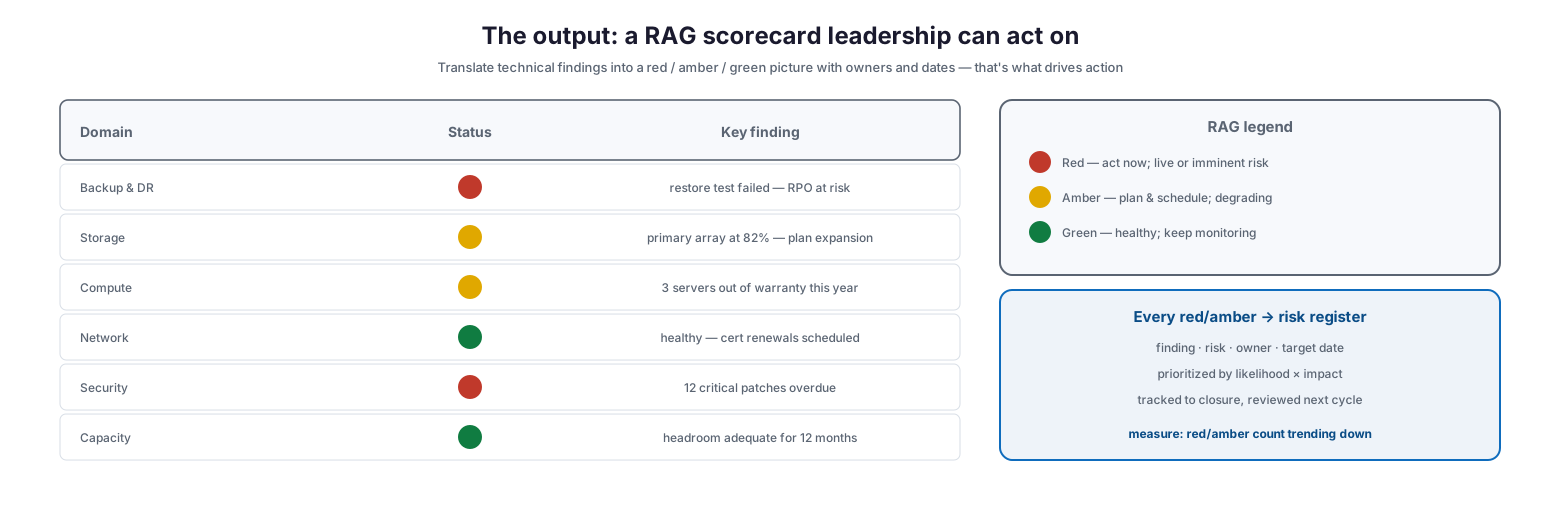
The output: a RAG scorecard leadership can act on
Each domain is rated at a glance: red means act now — a live or imminent risk, such as a failed restore test or overdue critical patches; amber means plan and schedule — something degrading, like a storage array at 82 percent or servers falling out of warranty this year; green means healthy, keep monitoring. This translation is what turns a wall of technical detail into a business conversation about risk and investment. Every red and amber item then flows into a risk register that records the finding, the risk it poses, an owner, and a target date, prioritized by likelihood and impact and tracked to closure. Over successive cycles, the clearest measure of a maturing program is the trend: a steadily falling count of red and amber items, and a rising share of issues caught and fixed before they ever became incidents.
Infrastructure Health Check Checklist
- Maintain a current hardware and software inventory as the foundation for every check.
- Define a known-good baseline for each item so deviations are objective, not subjective.
- Cover all eight domains: compute, storage, network, virtualization/cloud, backup & DR, security, capacity, and environment.
- Test actual restores, not just backup success — an untested backup is an assumption, not a safeguard.
- Layer cadences: daily glances, weekly reviews, monthly domain checks, quarterly deep dives, annual audits.
- Automate data collection wherever possible to keep the effort sustainable.
- Score each domain red/amber/green and assemble a scorecard for leadership.
- Route every red and amber finding into a risk register with an owner and target date.
- Prioritize remediation by likelihood and impact, and track items to closure.
- Re-check to confirm fixes landed, then update the baseline for the next cycle.
- Watch for single points of failure and expiring certificates, licenses, and warranties.
- Track the trend of red/amber counts and issues caught before they became incidents.
Best Practices
Baseline everything first. A finding only has meaning against a defined standard. Establish what “good” looks like for each item before you start reviewing, so the check produces objective deviations rather than opinions.
Test restores, not backups. The single most valuable — and most skipped — health check is an actual restore test. A backup job that reports success every night is worthless if the data cannot be recovered. Prove recoverability on a schedule.
Automate the collection, keep judgment human. Gathering current state should be scripted and repeatable so the effort is sustainable, but interpreting the results against business risk is where human judgment earns its place.
Close the loop every time. The remediation and re-check stages are the point of the exercise. A review that ends at “report” changes nothing; assign owners and dates, and verify the fixes landed.
Speak in red, amber, green. Leadership funds risk reduction when they can see the risk. Translate technical findings into a RAG scorecard so decisions about investment and priority can actually be made.
Layer your cadences. Do not try to check everything constantly, and do not defer critical checks to once a year. Match the depth and frequency of each check to how quickly the risk it covers can develop.
Common Mistakes
Assuming monitoring covers it. Monitoring catches acute failures; it does not catch drift, aging, or capacity heading toward a wall. Treating the two as interchangeable leaves the slow-burn risks entirely unmanaged.
Never testing restores. Trusting backup success reports without ever performing a restore is the most common and most damaging gap a health check exists to close.
Checking without a baseline. Without a defined standard, a health check becomes subjective and inconsistent, and its findings are hard to defend or act on.
Reviewing but not remediating. A polished report that leads to no fixes is theater. The value is entirely in closing the loop with owned, dated, tracked remediation.
Ignoring the boring domains. Environment, licensing, certificate expiry, and warranty status are unglamorous and routinely skipped — and they are frequent, avoidable causes of outages.
Running it once. A single health check is a snapshot. Risk accumulates continuously, so the check must be a recurring cycle that raises the baseline over time, not a one-off project.
Frequently Asked Questions
How is a health check different from monitoring? Monitoring is continuous and real-time, catching problems the moment they occur. A health check is a periodic, structured review against a baseline that catches slow-developing risks — drift, capacity, aging, untested backups — before they cause an incident. You need both.
How often should we run infrastructure health checks? Layer cadences: quick daily glances at critical items, short weekly reviews, deeper monthly domain reviews, a quarterly deep dive including a full DR restore test, and an annual full audit. Match the frequency to how fast each risk can develop.
What should a health check cover? Eight domains: compute/servers, storage, network, virtualization/cloud, backup and DR, security posture, capacity and performance, and environment/facilities — all anchored to a current asset inventory.
What is the single most important check? An actual restore test. Backup jobs reporting success mean nothing until you have proven the data can be recovered. Test restores on a schedule.
How do we present findings to leadership? Use a red-amber-green scorecard per domain, backed by a risk register that records each finding, its owner, and a target date. This turns technical detail into a business conversation about risk and investment.
How do we know the program is working? Track the trend over cycles: a falling count of red and amber items and a rising share of issues caught and remediated before they became incidents are the clearest signs of a maturing, effective program.
Conclusion
Infrastructure health checks are how a business gets ahead of failure instead of forever reacting to it. Monitoring will always be essential for catching what breaks in the moment, but the outages that hurt most — the failed restore discovered during a crisis, the array that fills without warning, the server that dies out of warranty — grow quietly over time and are caught only by deliberate, periodic review. A structured health check, run across all eight domains against a clear baseline and closed out with owned remediation, turns those latent risks into planned, scheduled work.
The path is practical and repeatable: maintain an accurate inventory, baseline what “good” looks like, layer daily-through-annual cadences that match depth to frequency, test your restores, and translate every finding into a red-amber-green scorecard that leadership can act on. Then close the loop and do it again, raising the baseline each cycle. A business that adopts this discipline stops being surprised by its own infrastructure — and that predictability, more than any single tool, is what reliable IT is made of.
References
- NIST Cybersecurity Framework — Quick Start Guide (Identify, Protect, Detect)
- NIST Cybersecurity Framework 2.0
- NIST SP 800-128 — Security-Focused Configuration Management of Information Systems
- NIST SP 800-137 — Information Security Continuous Monitoring
- NIST SP 800-34 — Contingency Planning Guide (backup & recovery)
- ITIL Continual Service Improvement (overview)
- NIST CSF — asset management and inventory guidance