When Should You Outsource IT? A Decision Guide for Leaders
Few decisions weigh on a growing organization’s leadership quite like whether to keep IT in-house or hand some or all of it to an outside provider.
- Content owner
- Insyto Content Team
- Editorial reviewer
- Ritesh Mhatre
- Technical reviewer
- Navish Ansari
- Next review
- To be scheduled
- Last reviewed
- Review pending
- Technical level
- Beginner · CIOs, CTOs, IT directors
Executive Summary
Few decisions weigh on a growing organization’s leadership quite like whether to keep IT in-house or hand some or all of it to an outside provider. It is tempting to frame this as a binary — build a team or hire a company — but that framing is exactly what leads to poor choices. In reality, outsourcing IT is a spectrum, and the useful question is not “should we outsource?” but “which parts of IT should we outsource, how much, and when?” The best answers are almost always a deliberate blend, matched function by function to what serves the business, and revisited as the organization grows.
Deciding well starts with recognizing the signals that point toward outside help: a team perpetually firefighting with no capacity for strategic work, skills gaps that can’t be hired for, growth outpacing what internal IT can absorb, unpredictable and rising costs, security and compliance slipping behind, and a dangerous dependence on one key person. It continues with an honest weighing of the drivers — access to a whole team’s expertise, predictable cost, scalability, focus on the core business, and round-the-clock coverage — against the legitimate reasons to keep certain things in-house, chiefly when IT is a genuine competitive differentiator or demands deep, business-specific knowledge and control. The guiding principle that resolves most of these cases is simple: outsource the undifferentiated heavy lifting — the commodity functions that look the same across every organization — and keep close the strategic capabilities that make you distinct.
This vendor-neutral guide walks leaders through that decision. It lays out the outsourcing spectrum from fully in-house to fully outsourced, identifies the signals that it may be time, presents a balanced view of the drivers and the counter-arguments, distinguishes what to outsource from what to keep close, and offers a five-step framework for making the call deliberately rather than reactively. It also flags when not to outsource. The throughline is that outsourcing is a strategic tool, not an escape hatch: it amplifies a sound strategy but cannot substitute for one, and the accountability for IT — even when the work is handed off — always stays with you.
Outsourcing IT Isn’t All-or-Nothing
The first and most liberating realization is that this is not a single, irreversible choice between two extremes. Seeing IT delivery as a spectrum changes the question from “in or out?” to “what mix is right for us?”
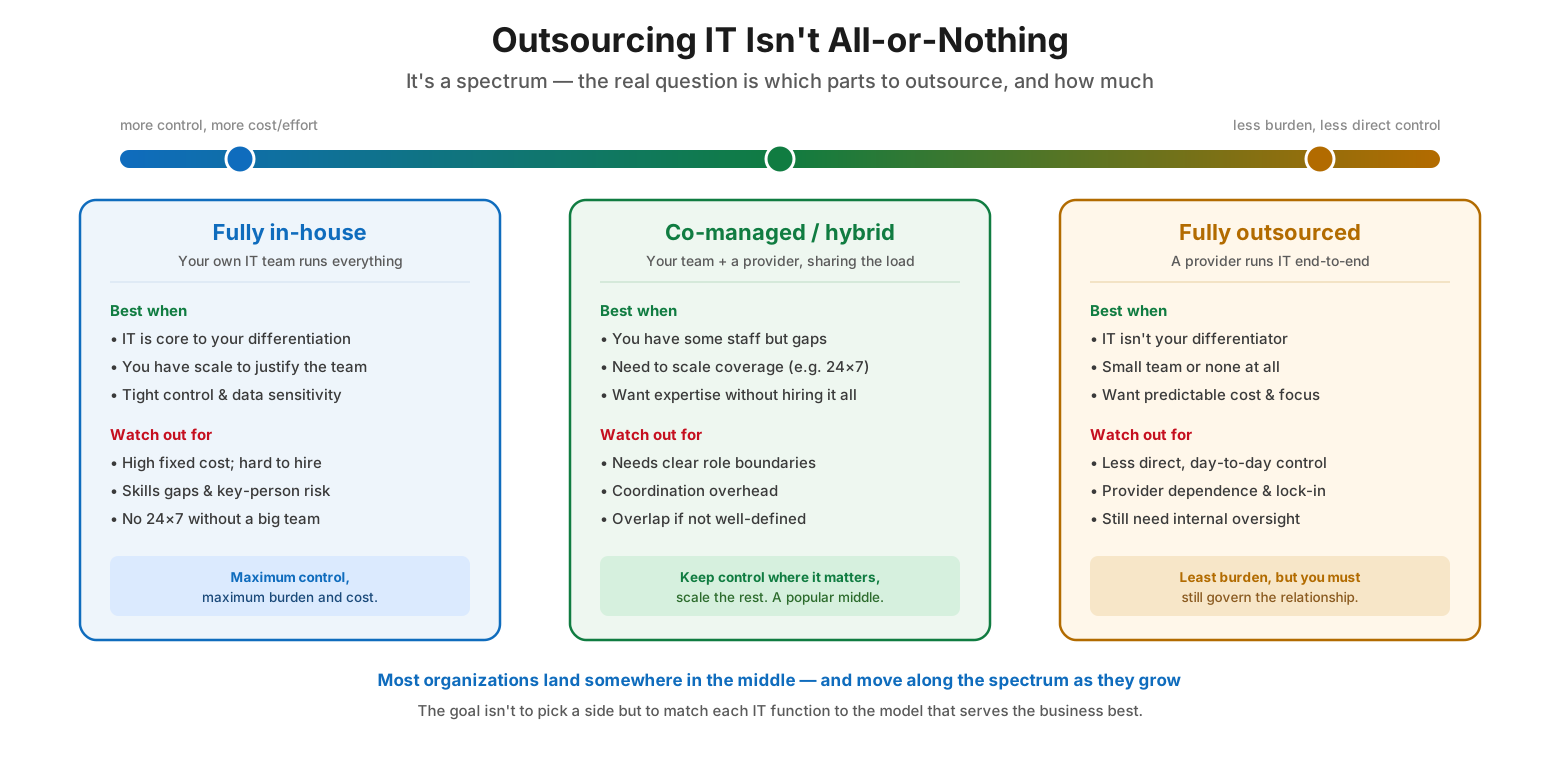
Outsourcing IT isn’t all-or-nothing
At one end is fully in-house, where your own IT team runs everything. This offers maximum control and is the right choice when IT is core to your differentiation, when you have the scale to justify a full team, and when tight control and data sensitivity demand it — but it carries high fixed costs, is hard to staff, exposes you to skills gaps and key-person risk, and can’t deliver 24×7 coverage without a large team. At the other end is fully outsourced, where a provider runs IT end-to-end. This is best when IT isn’t your differentiator, when you have a small team or none, and when you want predictable cost and to focus on the business — at the cost of less direct day-to-day control, provider dependence, and the continued need for internal oversight. In between sits co-managed or hybrid, where your team and a provider share the load. This is the popular middle ground: it fits organizations that have some staff but with gaps, that need to scale coverage such as adding 24×7, and that want expertise without hiring all of it — provided roles are clearly bounded to avoid overlap and coordination overhead. Most organizations land somewhere in the middle and move along the spectrum as they grow. The goal is not to pick a side but to match each IT function to the model that serves the business best.
| Model | Who runs IT | Best when | Trade-off |
|---|---|---|---|
| Fully in-house | Your own team | IT is a differentiator; you have scale | Max control, but high cost & key-person risk |
| Co-managed / hybrid | Your team + a provider | You have staff but gaps; need 24×7 | Control where it matters; needs clear roles |
| Fully outsourced | A provider, end-to-end | IT isn’t your differentiator; small/no team | Least burden, but less day-to-day control |
Six Signals It May Be Time to Outsource IT
Rather than deciding on instinct, leaders can look for concrete signals. One or two may be manageable internally, but several appearing together make a strong case for bringing in outside help.
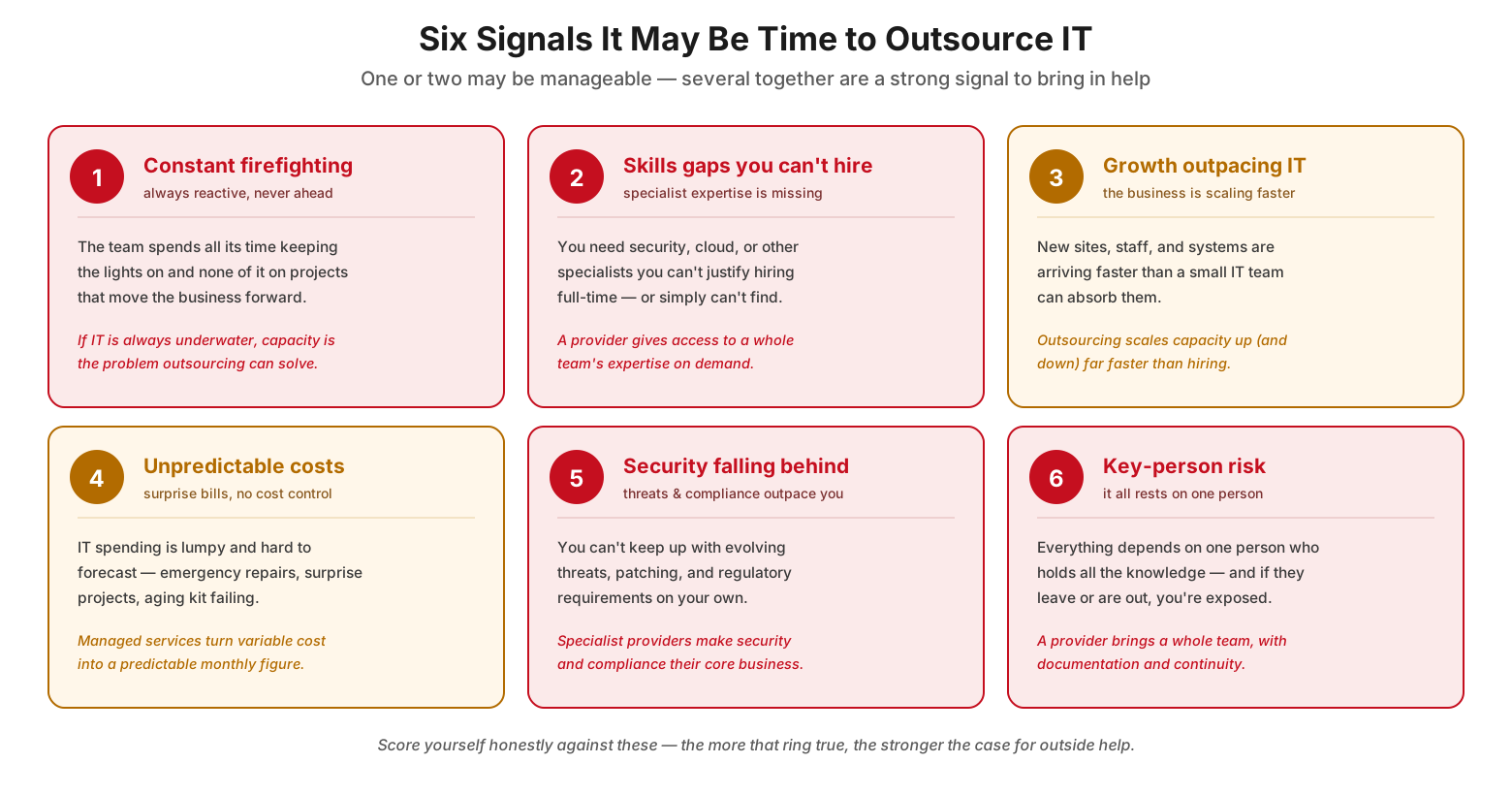
Six signals it may be time to outsource IT
The first signal is constant firefighting: the team spends all its time keeping the lights on and none of it on projects that move the business forward — if IT is always underwater, capacity is precisely the problem outsourcing can solve. The second is skills gaps you can’t hire: you need security, cloud, or other specialists you can’t justify hiring full-time, or simply can’t find, whereas a provider gives access to a whole team’s expertise on demand. The third is growth outpacing IT: new sites, staff, and systems are arriving faster than a small team can absorb, and outsourcing scales capacity up (and down) far faster than hiring. The fourth is unpredictable costs: IT spending is lumpy and hard to forecast — emergency repairs, surprise projects, aging equipment failing — while managed services turn that variable cost into a predictable monthly figure. The fifth is security falling behind: you can’t keep up with evolving threats, patching, and regulatory requirements on your own, whereas specialist providers make security and compliance their core business. The sixth is key-person risk: everything depends on one person who holds all the knowledge, and if they leave or are unavailable you’re exposed — a provider brings a whole team, with documentation and continuity. Score yourself honestly against these; the more that ring true, the stronger the case for outside help.
| Signal | What it looks like | Why outsourcing helps |
|---|---|---|
| Constant firefighting | No capacity for strategic work | Adds capacity so IT can get ahead |
| Skills gaps you can’t hire | Missing security/cloud specialists | On-demand access to a whole team |
| Growth outpacing IT | Business scaling faster than IT | Scales capacity faster than hiring |
| Unpredictable costs | Lumpy, surprise IT spending | Turns cost into a predictable fee |
| Security falling behind | Can’t keep up with threats/compliance | Specialists whose core business it is |
| Key-person risk | Everything rests on one person | A team with documentation & continuity |
Reasons to Outsource — and Reasons to Keep It In-House
A sound decision weighs both sides honestly. Outsourcing offers real and substantial benefits, but there are legitimate reasons certain functions should stay internal.
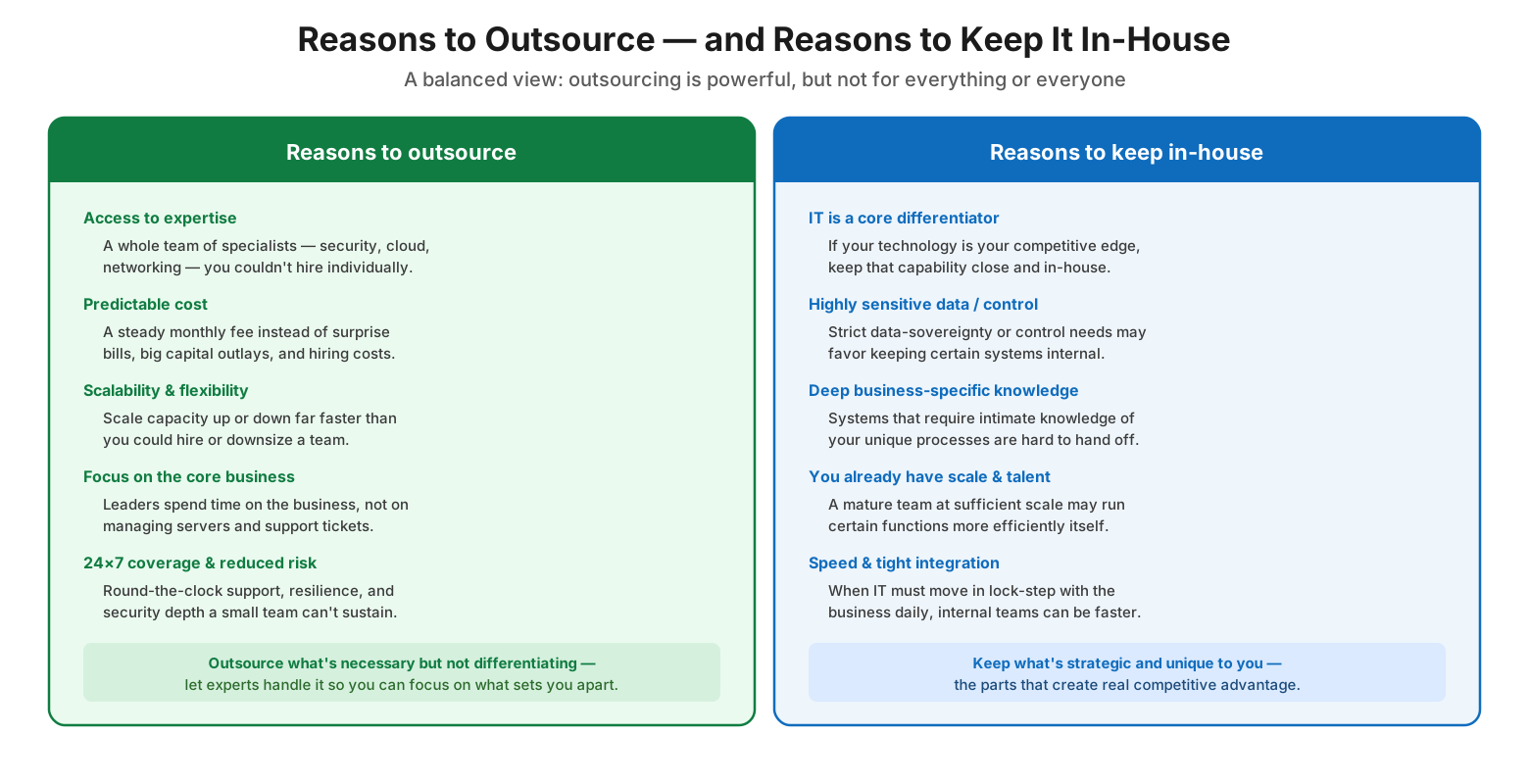
Reasons to outsource and reasons to keep it in-house
The reasons to outsource are compelling. Access to expertise means a whole team of specialists — security, cloud, networking — that you could never hire individually. Predictable cost replaces surprise bills, large capital outlays, and hiring costs with a steady monthly fee. Scalability and flexibility let you adjust capacity up or down far faster than you could hire or downsize. Focus on the core business frees leaders to spend time on the business rather than managing servers and support tickets. And 24×7 coverage and reduced risk provide round-the-clock support, resilience, and security depth that a small team cannot sustain. The unifying idea is to outsource what’s necessary but not differentiating, letting experts handle it so you can focus on what sets you apart. The reasons to keep in-house are equally valid in the right circumstances. Keep IT internal when it is a core differentiator and your technology is your competitive edge; when highly sensitive data or strict control requirements favor internal systems; when functions require deep, business-specific knowledge that is hard to hand off; when you already have the scale and talent to run certain functions efficiently yourself; and when IT must move in lock-step with the business daily and internal teams are simply faster. The rule of thumb: keep what’s strategic and unique to you — the parts that create real competitive advantage — and be willing to outsource the rest.
What to Outsource vs. What to Keep Close
The most practical way to turn this into action is to sort IT functions by whether they differentiate the business. The guiding rule is to outsource the undifferentiated heavy lifting and keep close what makes you distinct.
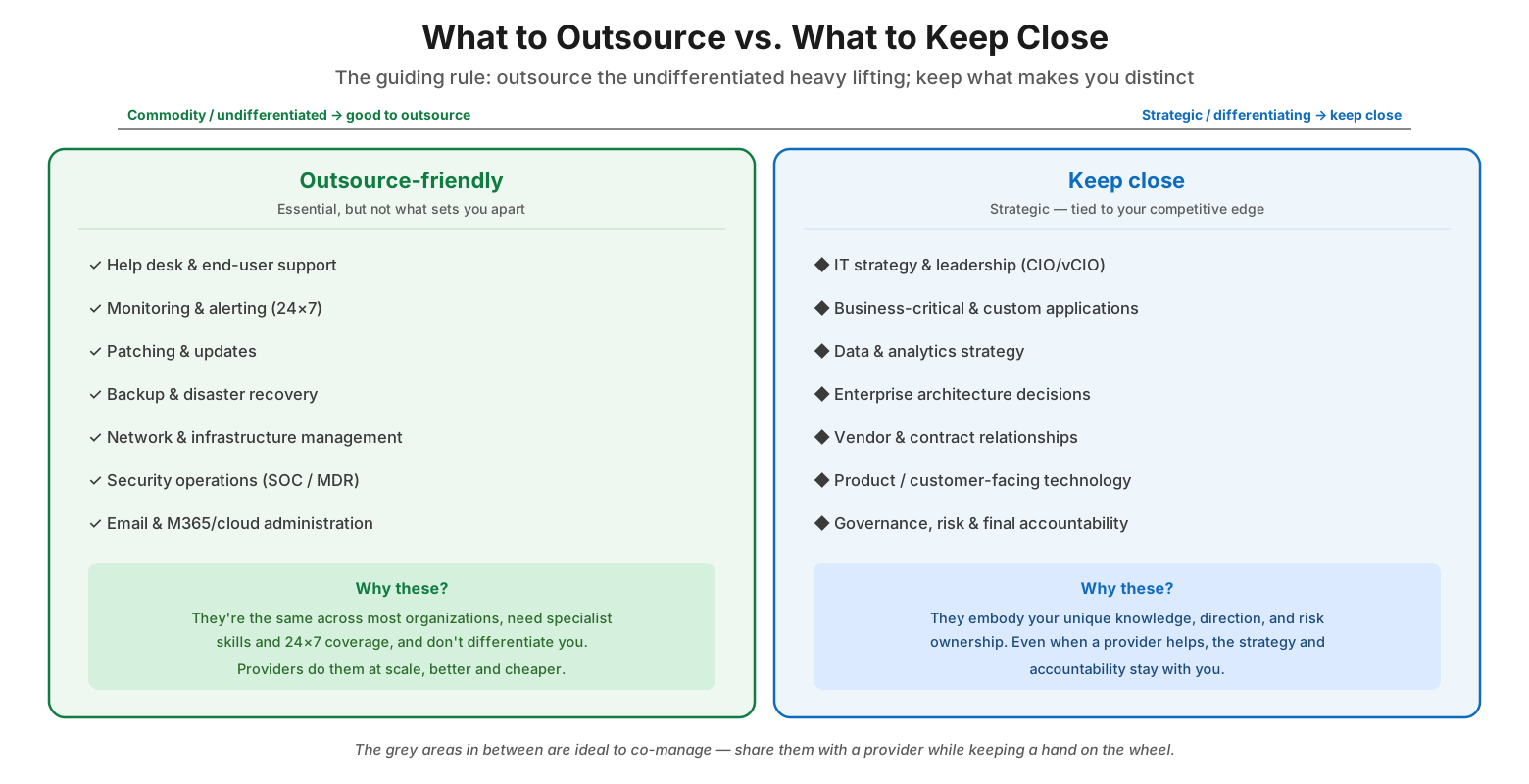
What to outsource vs. what to keep close
On the outsource-friendly side sit the functions that are essential but not what sets you apart: help desk and end-user support, 24×7 monitoring and alerting, patching and updates, backup and disaster recovery, network and infrastructure management, security operations (a SOC or MDR service), and email and cloud administration. These are good candidates to outsource because they look much the same across most organizations, they require specialist skills and round-the-clock coverage, and they don’t differentiate you — so providers can do them at scale, often better and cheaper. On the keep-close side sit the strategic capabilities tied to your competitive edge: IT strategy and leadership (whether a CIO or a fractional vCIO), business-critical and custom applications, data and analytics strategy, enterprise architecture decisions, vendor and contract relationships, product or customer-facing technology, and governance, risk, and final accountability. These should stay close because they embody your unique knowledge, direction, and risk ownership; even when a provider helps execute, the strategy and accountability remain yours. The grey areas in between are ideal to co-manage — shared with a provider while you keep a hand on the wheel.
| Outsource-friendly (commodity) | Keep close (strategic) |
|---|---|
| Help desk & end-user support | IT strategy & leadership (CIO/vCIO) |
| 24×7 monitoring & alerting | Business-critical & custom applications |
| Patching & updates | Data & analytics strategy |
| Backup & disaster recovery | Enterprise architecture decisions |
| Network & infrastructure management | Vendor & contract relationships |
| Security operations (SOC/MDR) | Product / customer-facing technology |
| Email & cloud administration | Governance, risk & final accountability |
A Five-Step Framework for the Outsourcing Decision
With the principles established, the decision itself becomes a deliberate, repeatable process rather than a reactive leap. Working through it function by function keeps the choice grounded in business need.
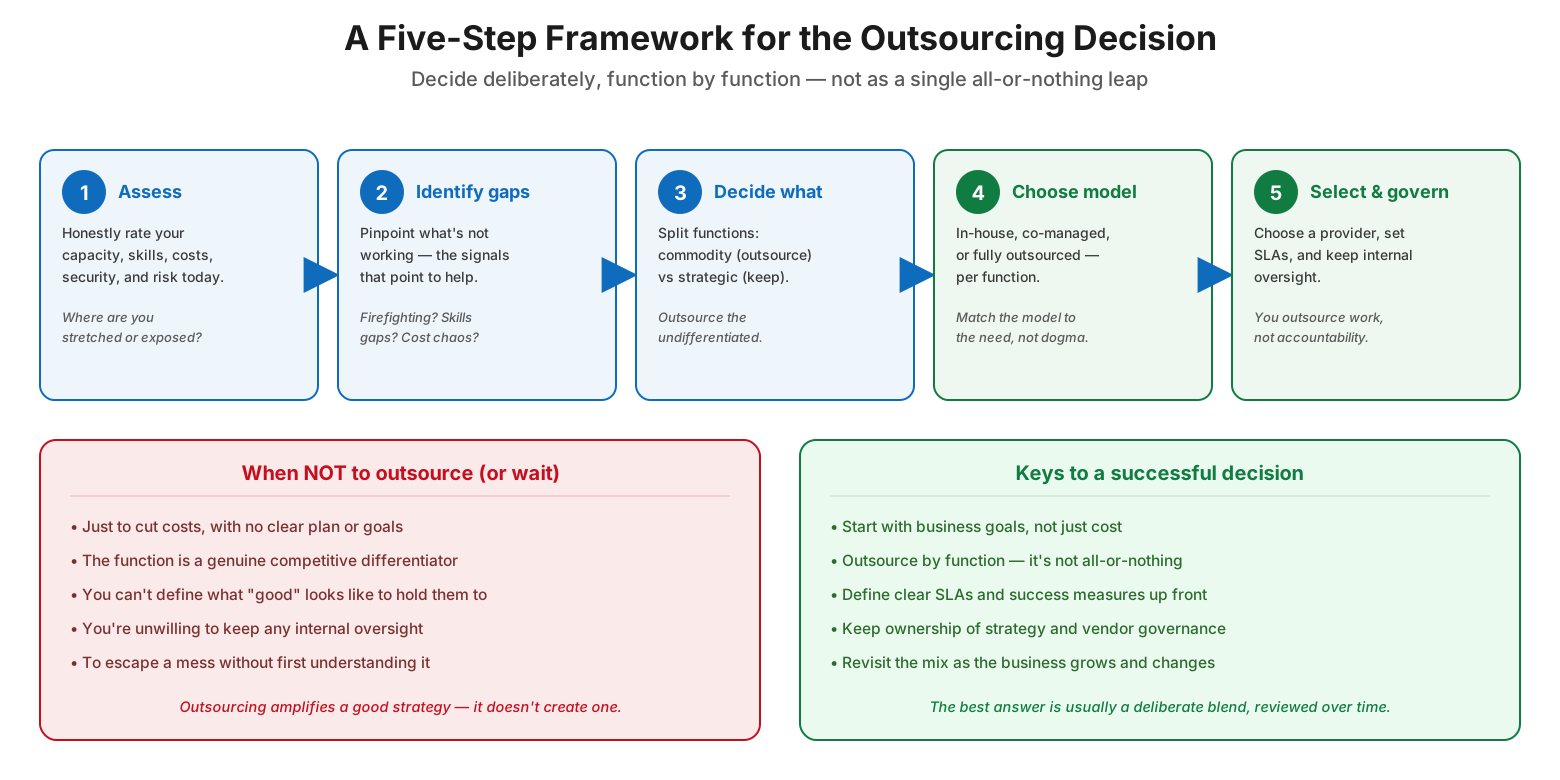
A five-step framework for the outsourcing decision
The framework has five steps. First, assess: honestly rate your current capacity, skills, costs, security, and risk, asking where you are stretched or exposed. Second, identify gaps: pinpoint what isn’t working, using the signals — firefighting, skills gaps, cost chaos — as diagnostic markers. Third, decide what: split functions into commodity (candidates to outsource) and strategic (to keep), outsourcing the undifferentiated. Fourth, choose the model: for each function, select in-house, co-managed, or fully outsourced, matching the model to the need rather than to dogma. Fifth, select and govern: choose a provider, set clear SLAs, and retain internal oversight, remembering that you outsource work, not accountability. Alongside this runs a crucial caution about when not to outsource — or to wait. Do not outsource merely to cut costs with no clear plan or goals, when the function is a genuine competitive differentiator, when you can’t define what “good” looks like well enough to hold a provider to it, when you’re unwilling to keep any internal oversight, or simply to escape a mess without first understanding it. Outsourcing amplifies a good strategy; it doesn’t create one. The keys to a successful decision are to start with business goals rather than cost alone, to outsource by function since it’s not all-or-nothing, to define clear SLAs and success measures up front, to keep ownership of strategy and vendor governance, and to revisit the mix as the business grows and changes. The best answer is usually a deliberate blend, reviewed over time.
Outsourcing Decision Checklist
- Treat IT delivery as a spectrum, not a binary in-or-out choice.
- Assess your current capacity, skills, costs, security, and risk honestly.
- Look for the signals: firefighting, skills gaps, growth, cost chaos, security lag, key-person risk.
- Weigh the drivers (expertise, cost, scale, focus, 24×7) against reasons to keep in-house.
- Outsource commodity, undifferentiated functions; keep strategic ones close.
- Co-manage the grey areas rather than forcing an all-in or all-out choice.
- Choose the model (in-house / co-managed / outsourced) per function.
- Start from business goals, not just cost savings.
- Define clear SLAs and success measures before you sign.
- Keep ownership of IT strategy, vendor governance, and accountability.
- Don’t outsource a function you can’t define “good” for, or that differentiates you.
- Revisit the mix regularly as the organization grows and changes.
Best Practices
Start with strategy, not cost. Let the business goals drive the decision. Outsourcing purely to cut costs, with no clear objectives, tends to disappoint; the biggest wins come from freeing the organization to focus on what it does best while experts handle the rest.
Decide function by function. Because IT delivery is a spectrum, resist the urge to make one sweeping choice. Sort functions by whether they differentiate you, and choose the right model — in-house, co-managed, or outsourced — for each.
Outsource the commodity, keep the strategic. The clearest sorting rule is differentiation. Hand off the undifferentiated heavy lifting that looks the same everywhere, and keep close the leadership, architecture, and business-specific capabilities that create competitive advantage.
Define success before you sign. Know what “good” looks like and write it into clear SLAs and measures. If you can’t articulate the outcomes you expect, you won’t be able to hold a provider accountable — and that’s a sign to slow down.
Retain oversight and ownership. Outsourcing hands off the work, never the accountability. Keep internal responsibility for IT strategy, vendor governance, and risk, and assign someone to manage the relationship actively.
Revisit the mix over time. The right balance shifts as the organization grows, its needs change, and its internal capabilities mature. Treat the outsourcing decision as a living one, reviewed periodically rather than made once and forgotten.
Common Mistakes
Treating it as all-or-nothing. Framing the decision as a single choice between a full in-house team and total outsourcing forecloses the co-managed and hybrid options that fit most organizations best. Decide by function instead.
Outsourcing to cut costs alone. Chasing savings without a clear strategy or defined goals often leads to disappointment and hidden costs. Outsourcing should serve business objectives, not just trim a line item.
Outsourcing a differentiator. Handing off a function that is central to your competitive advantage can erode the very thing that makes you distinct. Keep strategic, differentiating capabilities close.
Abdicating oversight. Assuming a provider removes all responsibility is a serious error. Governance, strategy, and accountability stay with you; a provider that isn’t actively managed will drift from your needs.
Skipping clear success measures. Signing without defined SLAs and outcomes leaves you unable to judge or hold the provider to account. Define what good looks like before committing.
Outsourcing to escape a mess. Handing a chaotic, poorly understood IT environment to a provider without first understanding it tends to transfer the chaos rather than resolve it. Understand the problem before outsourcing it.
Frequently Asked Questions
Should we outsource all of our IT or none of it? Almost never all or none. IT delivery is a spectrum, and the best approach for most organizations is a blend — outsourcing commodity functions while keeping strategic ones in-house, often with a co-managed model in between. Decide function by function rather than as a single sweeping choice.
What are the signs it’s time to outsource? Common signals include a team stuck firefighting with no time for strategic work, skills gaps you can’t hire for, growth outpacing your IT, unpredictable and rising costs, security and compliance falling behind, and heavy dependence on one key person. One may be manageable; several together make a strong case for outside help.
What should we keep in-house? Keep the functions that differentiate you and require deep, business-specific knowledge: IT strategy and leadership, business-critical and custom applications, data strategy, enterprise architecture, vendor governance, and customer-facing technology. These embody your competitive edge and your accountability, so even when a provider assists, the strategy stays with you.
Isn’t outsourcing just about saving money? Cost predictability is one benefit, but the strongest reasons are access to specialist expertise, scalability, 24×7 coverage, reduced risk, and the ability to focus on your core business. Outsourcing purely to cut costs, without clear goals, often underdelivers.
Do we lose control if we outsource? You hand off the work, not the accountability. A well-run outsourcing relationship keeps you in control of strategy, governance, and success measures through clear SLAs and active management. Retaining internal oversight is essential regardless of how much you outsource.
When should we NOT outsource? Avoid outsourcing merely to cut costs with no plan, when the function is a genuine differentiator, when you can’t define what good looks like, when you’re unwilling to keep any oversight, or as a way to escape a mess you don’t yet understand. Outsourcing amplifies a good strategy but cannot create one.
Conclusion
The decision of whether and when to outsource IT is less about choosing a side than about matching each part of IT to the model that best serves the business. Once leaders stop asking “in or out?” and start asking “which functions, how much, and when?”, the choice becomes clearer and far less risky. The signals that point toward outside help — chronic firefighting, unfillable skills gaps, growth outpacing capacity, unpredictable costs, security falling behind, and key-person risk — are usually visible well before a crisis, and the guiding rule for what to hand off is straightforward: outsource the undifferentiated heavy lifting and keep close what makes you distinct.
Approached deliberately — assess honestly, identify the gaps, sort functions by differentiation, choose the right model for each, and select and govern providers with clear expectations — outsourcing becomes a strategic lever rather than a reactive gamble. It can give a small organization access to enterprise-grade expertise, predictable costs, and round-the-clock coverage while freeing its leaders to concentrate on what actually sets the business apart. But it is not a cure for an absent strategy or a way to make responsibility disappear. Outsourcing amplifies good judgment; it does not replace it, and accountability always stays home. Make the decision function by function, define what success looks like, keep a firm hand on strategy and governance, and revisit the balance as you grow — and you’ll get the benefits of outside help without giving up control of your own direction.
References
- Gartner IT Glossary — Outsourcing
- ISACA — COBIT Framework (IT governance)
- Axelos — ITIL 4 Service Management
- NIST Cybersecurity Framework 2.0 — Govern function
- U.S. SBA — Technology and IT for Small Business
- CIO.gov — IT governance and management resources
- Technology Business Management (TBM) Council
On this page
- Executive Summary
- Outsourcing IT Isn’t All-or-Nothing
- Six Signals It May Be Time to Outsource IT
- Reasons to Outsource — and Reasons to Keep It In-House
- What to Outsource vs. What to Keep Close
- A Five-Step Framework for the Outsourcing Decision
- Outsourcing Decision Checklist
- Best Practices
- Common Mistakes
- Frequently Asked Questions
- Conclusion
- References