Co-Managed IT vs Fully Managed IT
Every growing business eventually faces the same question about its IT: how much of it should we run ourselves, and how much should a partner run for us?
- Content owner
- Insyto Content Team
- Editorial reviewer
- Ritesh Mhatre
- Technical reviewer
- Navish Ansari
- Next review
- To be scheduled
- Last reviewed
- Review pending
- Technical level
- Beginner · CIOs, CTOs, IT directors
Executive Summary
Every growing business eventually faces the same question about its IT: how much of it should we run ourselves, and how much should a partner run for us? For years the choice was framed as break-fix versus outsourcing, but the modern decision is more nuanced. It sits on a spectrum between two mature models — co-managed IT, where an external provider works alongside an in-house team and shares the load, and fully managed IT, where a provider takes complete ownership of the IT function as an outsourced department. Choosing well is not about which model is objectively better; it is about which fits your organization’s size, skills, budget, risk profile, and ambitions.
The stakes are real. Pick fully managed when you actually have the internal talent to direct strategy, and you pay for capability you already have while sidelining your own people. Pick co-managed when you have no internal IT to build on, and you create gaps, slow response, and unclear ownership. Get it right and the effect is measurable: well-run managed services typically improve operational efficiency and reduce IT cost meaningfully, while giving leadership a predictable, accountable IT function instead of a source of surprises. The decision is a business decision, not a technical one, and it deserves to be made deliberately.
This guide is a vendor-neutral comparison of co-managed and fully managed IT. It defines each model, explains how responsibilities divide, sets out the factors that should drive the choice, and provides the ownership, control, decision, and service-level tables a CIO needs to structure and govern either arrangement. It is deliberately technology-agnostic — the principles apply whatever platforms and tools an organization runs — and focuses on the operating model rather than any particular product stack.
Who should read this:
- CIOs, CTOs, and IT directors deciding how to source IT capability
- Business owners and operators weighing in-house versus outsourced IT
- Finance leaders comparing cost models and predictability
- IT managers whose roles will be shaped by the chosen model
What are co-managed and fully managed IT?
Both models are forms of managed IT — proactive, service-based IT delivered against a defined scope and service level, rather than reactive break-fix. What separates them is how much the organization keeps in-house.
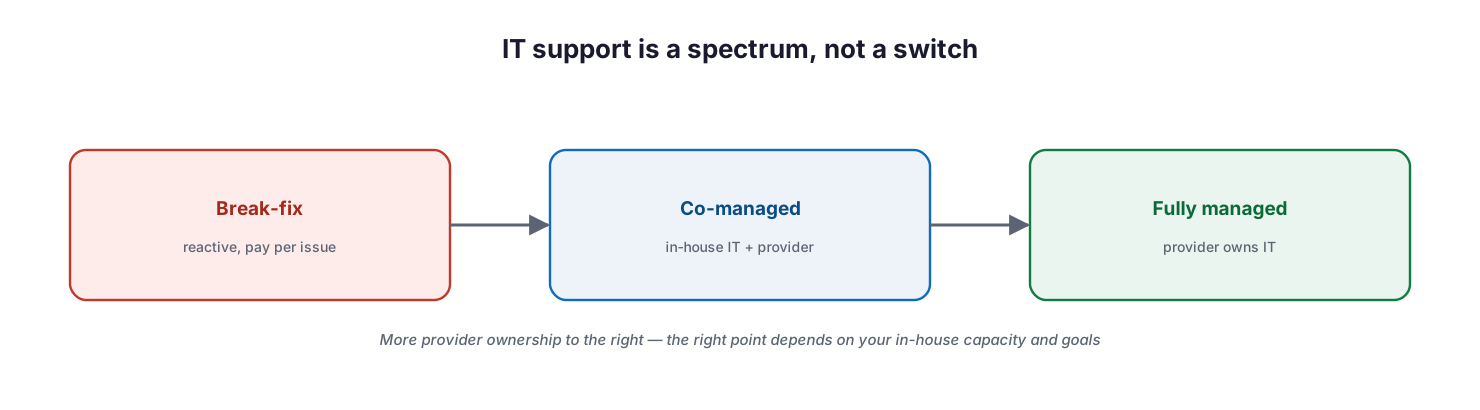
IT support is a spectrum, not a switch: from break-fix (reactive, pay per issue) to co-managed (in-house IT plus a provider) to fully managed (the provider owns IT) — more provider ownership to the right, with the right point depending on in-house capacity and goals.
In fully managed IT, a provider takes complete responsibility for the IT function — strategy, deployment, monitoring, support, security, and vendor management — operating as the organization’s IT department. It suits businesses with little or no internal IT, or those that would rather not build one, and it usually runs on a fixed monthly fee that makes cost predictable. In co-managed IT, the provider handles specific functions while an in-house team retains others, working as one blended team. It suits businesses that already have IT staff but need to extend them — filling skill gaps, adding around-the-clock coverage, offloading commodity work, or scaling for a project — without giving up strategic control. Neither is a lesser version of the other; they solve different problems.
How do responsibilities divide?
The defining difference is ownership. Fully managed concentrates accountability with the provider; co-managed distributes it, which is exactly its strength and its risk.
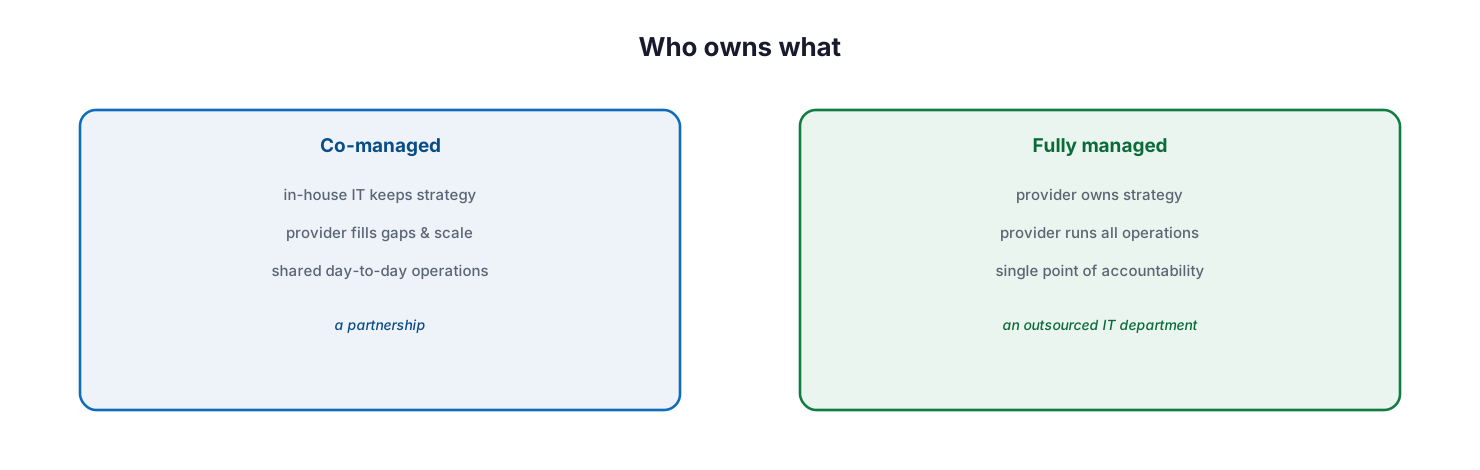
Who owns what: in co-managed, in-house IT keeps strategy, the provider fills gaps and scale, and day-to-day operations are shared — a partnership; in fully managed, the provider owns strategy and runs all operations as a single point of accountability — an outsourced IT department.
Under fully managed IT, the provider is the single point of accountability for essentially everything, which simplifies governance — there is one throat to choke and one number to call — at the cost of day-to-day control. Under co-managed IT, the in-house team typically keeps strategy, business context, and the most sensitive or differentiating systems, while the provider takes tools, 24/7 monitoring, specialist skills such as security, and the high-volume commodity workload that burns out internal staff. The catch is that shared responsibility only works when the split is written down. The most common cause of co-managed failure is an undocumented boundary, where a task everyone assumed the other party owned simply falls through the gap.
How does the co-managed model work in practice?
Because co-managed is the more nuanced arrangement, it is worth seeing how it holds together. The provider does not replace the internal team; it extends it, adding capacity and capability where the business needs them most.
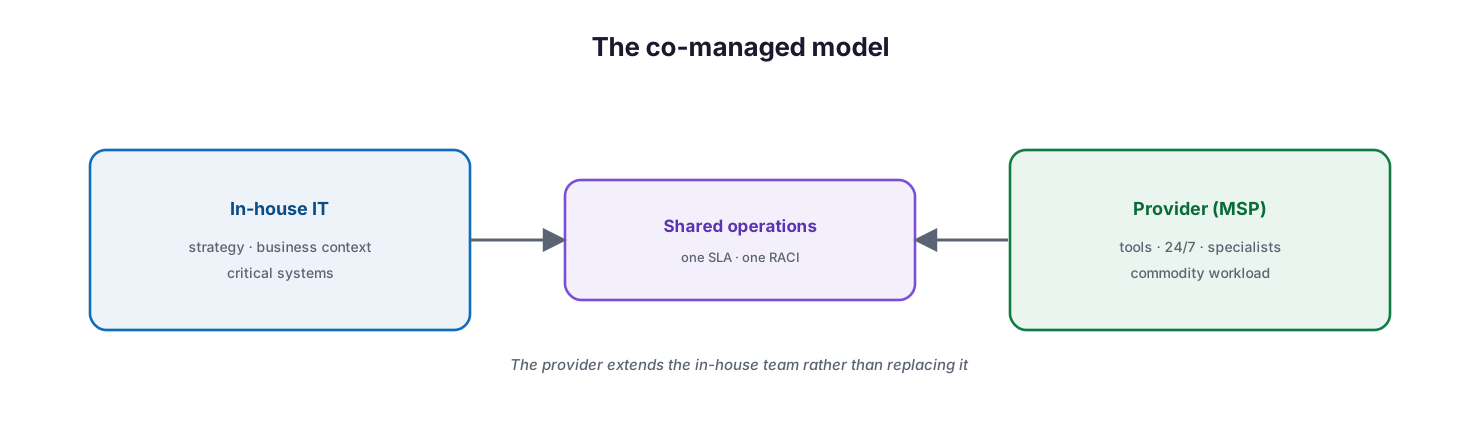
The co-managed model: in-house IT owns strategy, business context, and critical systems; the provider brings tools, 24/7 coverage, specialists, and commodity workload; and the two meet in shared operations governed by one SLA and one RACI — the provider extends the in-house team rather than replacing it.
A typical co-managed engagement has the in-house team focusing on the work that requires business knowledge — strategy, key applications, stakeholder relationships — while the provider supplies the platforms (monitoring, ticketing, security tooling) and the muscle (after-hours support, patching, project surge capacity). The two operate as one team against a shared service-level agreement and a documented responsibility matrix. Done well, this relieves the pressure that causes IT staff turnover, adds coverage a small team cannot sustain alone, and lets internal people spend their time on work that moves the business rather than on routine maintenance.
Which factors should drive the choice?
The right model follows from an honest assessment of a handful of factors, not from a preference for insourcing or outsourcing.
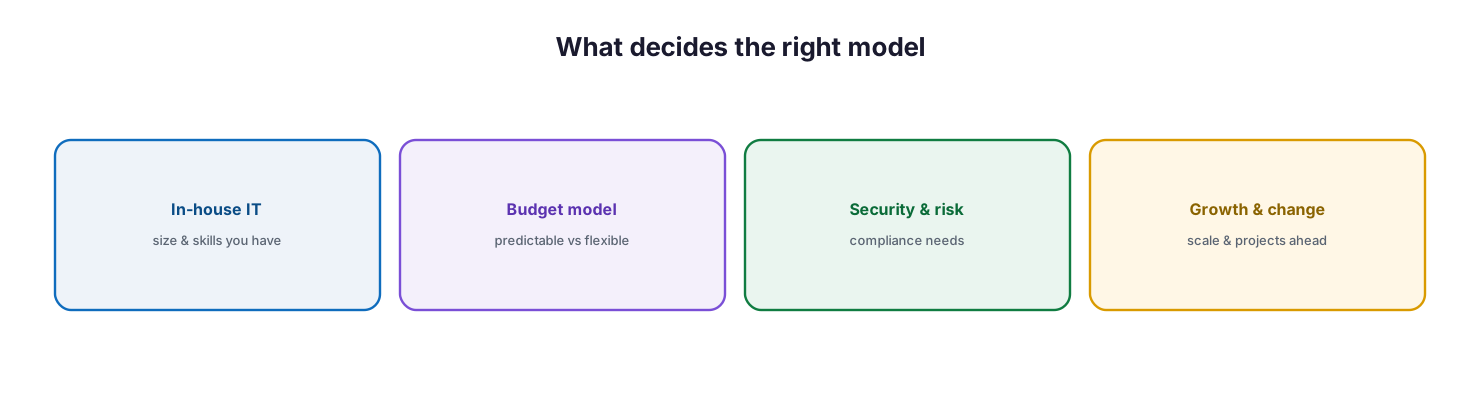
What decides the right model: the in-house IT you have (size and skills), the budget model you want (predictable versus flexible), your security and risk and compliance needs, and the growth and change ahead (scale and projects).
The first factor is your existing IT capability — a business with no IT staff has little to co-manage, while one with a capable team has much to lose by displacing it. The second is the budget model: fully managed offers predictable fixed costs, while co-managed can be more cost-efficient when you already employ IT staff and only need to supplement them. The third is security and compliance: organizations with heavy regulatory or risk demands often need specialist capability that neither a small internal team nor a generalist arrangement can provide alone. The fourth is growth and change: a business facing rapid scaling, migrations, or major projects benefits from a partner that can flex capacity up and down. The honest answer for many organizations is a blend that shifts over time — and the model should be revisited as the business and its IT team evolve.
Co-managed vs fully managed at a glance
The comparison below summarizes the practical differences that most influence the decision.
| Dimension | Co-managed IT | Fully managed IT |
|---|---|---|
| In-house IT | Required — the model extends it | Optional — the provider replaces it |
| Ownership | Shared, split by agreement | Provider owns end to end |
| Strategic control | Retained in-house | Delegated to the provider |
| Accountability | Distributed (needs a clear RACI) | Single point of accountability |
| Cost model | Flexible; supplements existing staff | Predictable fixed monthly fee |
| Best for | Businesses with an IT team needing scale or skills | Businesses with little or no internal IT |
| Main risk | Undocumented responsibility gaps | Reduced day-to-day control |
| Scales by | Adding provider capacity to the team | Expanding the provider’s scope |
Managed engagement model: ownership, controls, and service levels
Whichever model is chosen, it must be governed. The tables below define a managed engagement the way a CIO needs to evaluate it — who is responsible, what capability delivers it, the cadence, the risk if it lapses, and the business value it protects. They are framed for a co-managed engagement, where clarity of ownership matters most; in a fully managed engagement the provider carries the Responsible role across the board.
Responsibility matrix (RACI)
| IT function | Activity | Responsible (typical co-managed) | Accountable (CIO) | Consulted | Informed | Tooling category | SLA / impact |
|---|---|---|---|---|---|---|---|
| Service desk (L1/L2) | Handle day-to-day user tickets | Provider | CIO | In-house IT | End users | ITSM / ticketing | First response within SLA |
| Monitoring & infrastructure | 24/7 monitoring and alerting | Provider | CIO | In-house IT | Executive team | RMM / monitoring | Issues detected before impact |
| Security operations | Threat detection and response | Provider | CIO | In-house IT | Executive team | SIEM / EDR | Threats contained quickly |
| Strategy & architecture | Roadmap and standards | In-house IT | CIO | Provider (vCIO) | Board | Governance / EA | Aligned to business goals |
| Critical/line-of-business apps | Manage core business systems | In-house IT | CIO | Provider | End users | App management | Core systems available |
| Backup & disaster recovery | Protect and recover data | Provider | CIO | In-house IT | Compliance | Backup / DR platform | Recoverability assured |
| Vendor & asset management | Manage suppliers and lifecycle | Shared | CIO | Provider | Finance | Asset / PSA | Cost and risk controlled |
Service control matrix
| Domain | Service / control | Description | Tooling category | Frequency | Risk if missing |
|---|---|---|---|---|---|
| Service desk | Tiered support | Structured L1–L3 support path | ITSM / ticketing | Continuous | Slow, inconsistent support |
| Infrastructure | Proactive monitoring | Detect issues before outages | RMM / monitoring | 24/7 | Unplanned downtime |
| Security | Detection & response | Identify and contain threats | SIEM / EDR | 24/7 | Undetected breaches |
| Endpoints | Patch & compliance | Keep devices current and healthy | Endpoint management | Continuous | Exploited vulnerabilities |
| Data | Backup & recovery | Protect and restore data | Backup / DR platform | Daily | Permanent data loss |
| Governance | Reporting & reviews | Track posture, cost, and roadmap | Reporting / vCIO | Monthly | Drift and blind spots |
Operations lifecycle
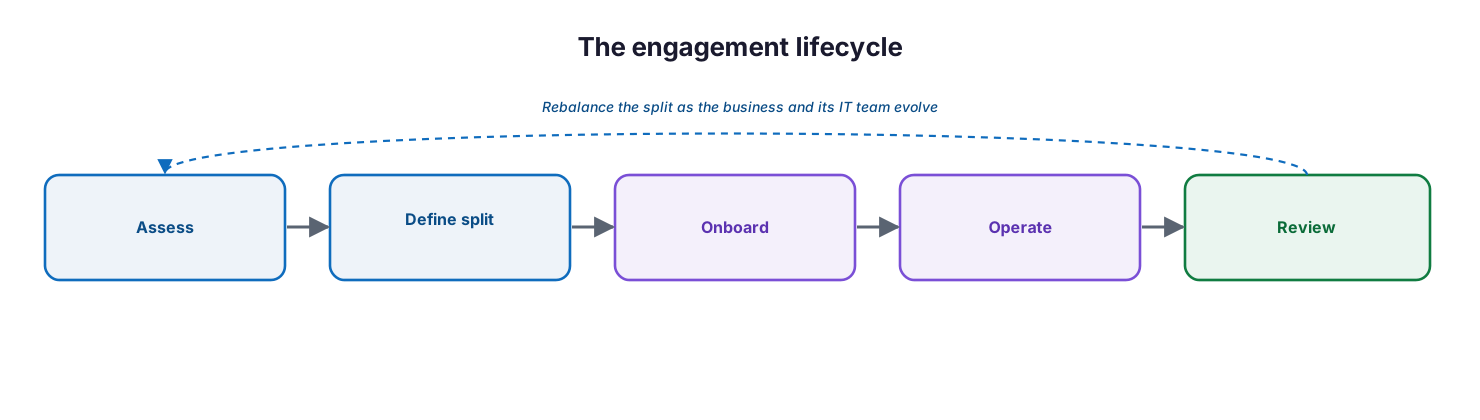
The engagement lifecycle: assess the environment, define the responsibility split, onboard, operate, and review — rebalancing the split as the business and its IT team evolve.
| Stage | Activity | Outcome | Tooling category | Business impact |
|---|---|---|---|---|
| Monitor | Watch systems, tickets, and alerts | Continuous visibility | RMM / ITSM | Early warning |
| Detect | Identify incidents and risks | Incident raised | Monitoring / SIEM | Faster containment |
| Respond | Triage and remediate | Issue resolved | ITSM / EDR | Reduced disruption |
| Optimize | Improve systems and processes | Better posture and cost | Reporting / EA | Efficiency gains |
| Report | Service and executive reporting | Informed decisions | vCIO / dashboards | Governance and trust |
Decision matrix
| Scenario | Recommended model | Justification | Key consideration |
|---|---|---|---|
| No internal IT team | Fully managed | Provider becomes the IT department | Predictable cost, single accountability |
| Capable IT team, needs 24/7 | Co-managed | Provider adds coverage the team can’t sustain | Document the on-call split |
| Skill gap (e.g., security) | Co-managed | Provider supplies specialist capability | Define scope of specialist work |
| Rapid growth or major project | Co-managed | Flex provider capacity up and down | Agree surge terms upfront |
| Wants to exit IT operations | Fully managed | Full offload of the IT function | Retain governance oversight |
| Highly regulated environment | Either, with clear RACI | Compliance needs explicit ownership | Auditable responsibility split |
SLA / KPI scorecard
| Metric | Target | Tooling category | Business value |
|---|---|---|---|
| First response time | Within agreed SLA | ITSM / ticketing | Predictable support experience |
| Critical incident resolution | Within agreed SLA | ITSM / EDR | Limited business disruption |
| System availability | ≥99.9% | Monitoring | Business continuity |
| Patch / compliance rate | ≥95% | Endpoint management | Reduced risk exposure |
| Backup success & restore test | ≥99% / passing | Backup / DR | Recoverability assured |
| Service review cadence | Monthly or quarterly | vCIO / reporting | Governance and alignment |
| CSAT / user satisfaction | At or above target | Survey / ITSM | Adoption and trust |
Implementation checklist
- The organization’s current IT capability and skill gaps are honestly assessed
- The primary drivers are agreed — capability, cost model, security, and growth
- A model is chosen (co-managed, fully managed, or a defined blend)
- Scope is documented explicitly, with a RACI covering every function
- A service-level agreement defines response, resolution, and availability targets
- Escalation paths and on-call responsibilities are unambiguous
- Tooling ownership (who runs which platform) is agreed
- Security and compliance responsibilities are assigned and auditable
- Onboarding transfers knowledge, access, and documentation cleanly
- A regular service review governs performance, cost, and roadmap
- The model is revisited as the business and its IT team evolve
Best practices
- Choose the model from an honest assessment of in-house capability, not a preference.
- Write the responsibility split down in a RACI — undocumented boundaries cause failures.
- Use co-managed to relieve, not replace, an internal team, and to add coverage and specialist skills.
- Use fully managed when there is no internal IT to build on, and value the single point of accountability.
- Define the SLA in business terms — response, resolution, availability — not just activity.
- Agree tooling ownership explicitly so nothing is double-run or unowned.
- Plan onboarding as a real knowledge transfer, not a switch flip.
- Review the arrangement regularly and rebalance the split as needs change.
- Treat the choice as a spectrum; many organizations blend and shift over time.
Common mistakes
- Choosing fully managed while sidelining a capable internal team.
- Choosing co-managed with no internal IT to actually co-manage.
- Leaving the responsibility split undocumented, so tasks fall through the gap.
- Defining the SLA around activity rather than business outcomes.
- Ignoring who owns security and compliance until an incident exposes it.
- Underestimating onboarding and losing knowledge in the transition.
- Never reviewing the model, so it drifts out of step with the business.
- Treating the decision as permanent rather than a point on a spectrum.
Frequently asked questions
What is the difference between co-managed and fully managed IT?
Fully managed IT means a provider takes complete ownership of the IT function as an outsourced department. Co-managed IT means the provider works alongside an in-house team, sharing responsibilities according to a defined split. The difference is how much the organization keeps in-house.
Which model is cheaper?
It depends. Fully managed offers predictable fixed costs and can be economical for a business with no IT staff. Co-managed can be more cost-efficient when you already employ IT people and only need to supplement them. Compare total cost against the capability each delivers.
We already have an IT team — which model fits?
Usually co-managed. It extends your team with tools, coverage, and specialist skills while keeping strategy and critical systems in-house. Fully managed would displace capability you already have, unless you intend to exit IT operations entirely.
What is the biggest risk in co-managed IT?
Undocumented responsibility. Because the load is shared, any task that is not clearly owned can fall through the gap. A written RACI and SLA are essential to make co-managed work.
Can we start with one model and change later?
Yes. The choice is a point on a spectrum, and many organizations shift over time — for example, moving from fully managed toward co-managed as they build internal capability, or the reverse. Review the arrangement regularly and rebalance.
How do we govern either model?
Through a documented scope and RACI, an SLA defined in business terms, clear escalation and tooling ownership, and a regular service review that tracks performance, cost, and roadmap. Governance is what keeps either model accountable.
Conclusion
Co-managed and fully managed IT are not rivals but different answers to different situations. Fully managed suits organizations that want to hand the IT function to an accountable partner and value predictable cost and simplicity. Co-managed suits organizations that have an internal team worth keeping and want to extend it with coverage, tools, and specialist skills without surrendering strategic control. The wrong choice wastes capability or creates gaps; the right one gives leadership a dependable, well-governed IT function aligned to the business.
The path forward is to decide deliberately: assess your real in-house capability, weigh cost, security, and growth, choose the model — or blend — that fits, and then govern it with a written responsibility split, a business-focused SLA, and a regular review. Because the right answer is a point on a spectrum rather than a fixed destination, the best arrangements are the ones that are revisited and rebalanced as the organization grows.
References
This is a vendor-neutral overview of IT service delivery models. The following industry sources informed the definitions and comparisons; verify current market specifics independently before making a sourcing decision. Source access date: 28 July 2026.
- Co-Managed IT vs Fully Managed IT Services — Auxilion
- Co-Managed IT vs Fully Managed IT: How to Choose — BCS365
- Managed vs. Co-Managed IT Services — CoEvolve
- How to Choose Between Fully Managed and Co-Managed IT Services — Tech Advisors
- Co-Managed IT vs Managed IT: What’s the Difference? — IntegriCom
On this page
- Executive Summary
- What are co-managed and fully managed IT?
- How do responsibilities divide?
- How does the co-managed model work in practice?
- Which factors should drive the choice?
- Co-managed vs fully managed at a glance
- Managed engagement model: ownership, controls, and service levels
- Responsibility matrix (RACI)
- Service control matrix
- Operations lifecycle
- Decision matrix
- SLA / KPI scorecard
- Implementation checklist
- Best practices
- Common mistakes
- Frequently asked questions
- Conclusion
- References