Microsoft 365 Cost Optimization
Microsoft 365 is usually one of the largest recurring line items in an SMB’s IT budget, and it is almost always larger than it needs to be.
- Content owner
- Insyto Content Team
- Editorial reviewer
- Ritesh Mhatre
- Technical reviewer
- Navish Ansari
- Next review
- To be scheduled
- Last reviewed
- Review pending
- Technical level
- Beginner · CIOs, IT directors, procurement leaders
Executive Summary
Microsoft 365 is usually one of the largest recurring line items in an SMB’s IT budget, and it is almost always larger than it needs to be. The waste is rarely dramatic — it accumulates quietly through licenses assigned to people who left, users on a premium plan who only ever open Outlook, add-ons purchased separately that were already included in the plan, and subscriptions billed monthly when an annual commitment would cost less. None of these is visible on a single invoice, which is exactly why they persist. Cost optimization is the discipline of finding and removing that waste systematically, without weakening security or productivity.
The opportunity has grown sharply in 2026. Microsoft has repositioned its Business plans so that Standard and Premium now lead as Copilot-inclusive bundles, and has introduced a new enterprise tier, and Copilot add-ons carry a meaningful per-user premium. That makes the two central questions of licensing — which plan does each user actually need, and who genuinely needs Copilot — more financially significant than ever. Getting them right, and revisiting them on a cadence, is where the savings are.
This guide gives IT and finance leaders a practical, current approach to optimizing Microsoft 365 spend. It maps where cost leaks, sets out the major optimization levers with live 2026 pricing, shows how to reclaim unused licenses using the admin center’s own usage reports, explains how to avoid paying twice for capabilities already bundled in Business Premium, and defines the governance — including a clear RACI — that keeps spend aligned to real usage over time. All prices are current Microsoft list pricing (US, annual commitment) as of 28 July 2026; because Microsoft changes pricing and packaging regularly, always confirm against the official pricing pages before acting.
Who should read this:
- CIOs, CTOs, and IT directors accountable for the Microsoft 365 budget
- Finance and procurement leaders reviewing recurring software spend
- IT managers and administrators who assign and reclaim licenses
- SMB owners seeking to cut cost without cutting capability
Where does Microsoft 365 cost leak?
Before optimizing, it helps to name the failure modes, because each maps to a specific lever. Most overspend falls into four buckets, and most organizations have all four to some degree.
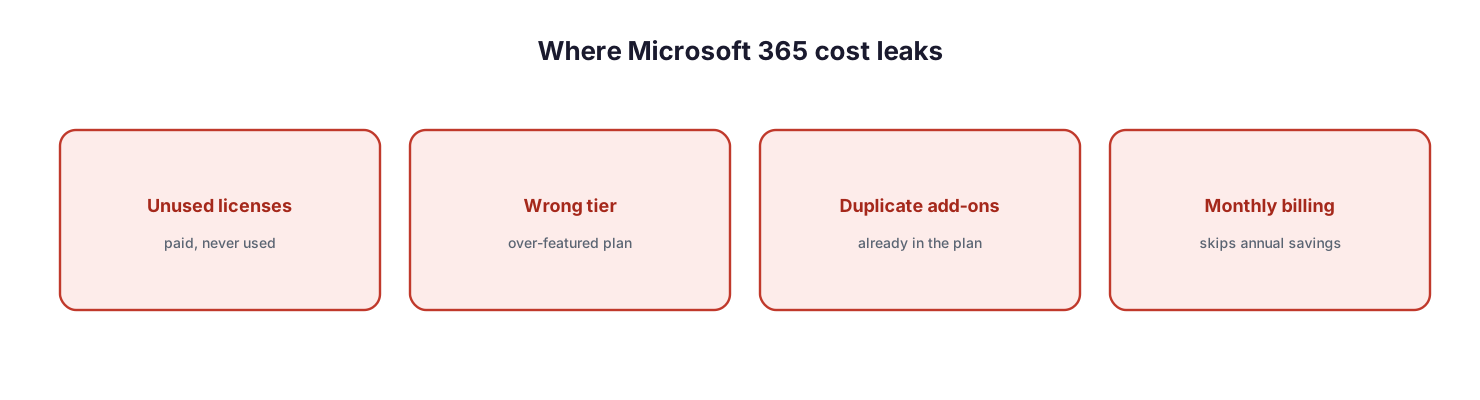
Where Microsoft 365 cost leaks: unused licenses that are paid but never used, the wrong tier with an over-featured plan, duplicate add-ons already included in the plan, and monthly billing that skips annual savings.
Unused licenses are seats that are paid for but not used — former employees, duplicate accounts, or seats provisioned “just in case.” The wrong tier means users sit on a plan far richer than their role requires. Duplicate add-ons are standalone products bought separately when the plan already includes them. And monthly billing forgoes the discount that an annual commitment provides. The good news is that each leak has a well-understood fix, and the tools to find them are built into the Microsoft 365 admin center.
What are the major cost optimization levers?
Optimization is not a single action but a set of levers, each with a different balance of savings and effort. The lowest-effort, highest-return moves are reclaiming unused licenses (find inactive seats in usage reports, unassign them, and remove them from the subscription) and eliminating duplicate add-ons (stop buying what the plan already includes). Right-sizing the plan to each role and segmenting the workforce onto frontline or Apps-only plans take more effort but cut recurring cost structurally. Committing annually rather than monthly captures the discount, right-sizing Copilot assigns the premium only where it pays back, and a standing governance cadence keeps spend aligned to usage over time. The managed-service tables later in this guide define who owns each of these levers, the tool behind it, and the risk if it lapses.
What does Microsoft 365 cost today?
Accurate optimization requires accurate prices. The tables below reflect current Microsoft list pricing (US, per user per month, annual commitment) as of 28 July 2026. Note the significant 2026 change: Business Standard and Business Premium are now sold as Copilot-inclusive bundles on Microsoft’s pricing pages.
| Business plan (annual) | Price/user/mo | Notes |
|---|---|---|
| Microsoft 365 Business Basic | $7.00 | Web/mobile apps, email, Teams |
| Microsoft 365 Apps for business | $10.00 | Desktop apps only, no email/Teams |
| Business Standard with Copilot | $23.50 | Desktop apps + Copilot |
| Business Premium with Copilot | $32.00 | Standard + security + device management + Copilot |
| Add-on / standalone (annual) | Price/user/mo |
|---|---|
| Microsoft 365 Copilot (Business add-on) | $21.00 (promotional $18.00) |
| Microsoft 365 Copilot (enterprise add-on) | $30.00 |
| Microsoft Teams Phone Standard | $10.00 |
| Microsoft Defender for Business (standalone) | $3.00 |
| Enterprise plan (annual) | Price/user/mo | Notes |
|---|---|---|
| Microsoft 365 E3 | $39.00 | Core enterprise productivity + security |
| Microsoft 365 E5 | $60.00 | Advanced security, compliance, analytics, voice |
| Microsoft 365 E7 | $99.00 | Includes E5, Copilot, Agent 365, and Entra Suite |
Two things stand out for cost planning. First, the jump from Business Premium to enterprise plans is large, so the 300-user Business family should be exhausted before moving to E3/E5 unless a specific enterprise capability is required. Second, Copilot is a substantial premium — $30 per user per month at the enterprise level — which is why deciding who actually needs it is one of the highest-value decisions in the whole exercise.
How do you reclaim unused licenses?
The fastest savings come from seats you are already paying for but nobody is using. Microsoft 365 gives you the evidence directly: the admin center’s usage reports show, in Microsoft’s own words, who uses a service fully and who barely uses it and might not need a license, across the last 7, 30, 90, or 180 days.
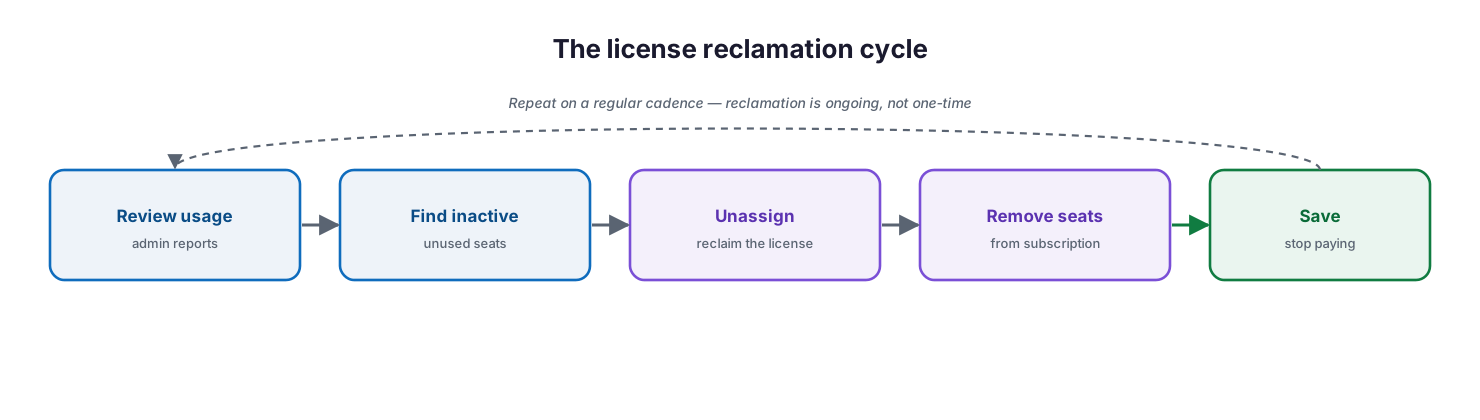
The license reclamation cycle: review usage in admin reports, find inactive seats, unassign the license, remove seats from the subscription, and save — repeated on a regular cadence.
The cycle is straightforward and repeatable. Review the usage reports to identify inactive users. Unassign the license from those users. Then — and this is the step organizations most often miss — remove the now-unneeded seats from the subscription, because unassigning alone stops nothing; you keep paying until the seat count is reduced. Microsoft’s own guidance is explicit: if you do not plan to reassign unused licenses, remove them from your subscription so you are not paying for more than you need. Be mindful of data: when a license is removed, Exchange mailbox data is held for 30 days, and OneDrive files remain until the user account is deleted, so follow a proper leaver process before reclaiming.
How do you avoid paying twice?
A common and entirely avoidable leak is buying add-ons that a plan already includes. Business Premium in particular is a bundle: it already contains the security and management products that many organizations also purchase separately. Before buying any add-on, check whether the plan already covers it.
| Capability | Standalone price | Included in Business Premium? |
|---|---|---|
| Microsoft Defender for Business | $3.00/user/mo | Yes |
| Microsoft Intune (endpoint management) | Add-on | Yes |
| Microsoft Entra ID P1 (Conditional Access) | Add-on | Yes |
| Microsoft Purview information protection | Add-on | Yes (core capabilities) |
| Autopatch / Windows management | Add-on | Yes (via included services) |
For an organization on Business Premium, separately licensing Defender for Business, Intune, or Entra ID P1 is pure duplication. Consolidating onto the bundle — rather than assembling a plan from standalone parts — is almost always cheaper and simpler to manage.
How do you match plans to your workforce?
Not every user needs the same plan, and treating the workforce as uniform is expensive. Segment users by how they actually work and assign the least-cost plan that meets each segment’s needs.
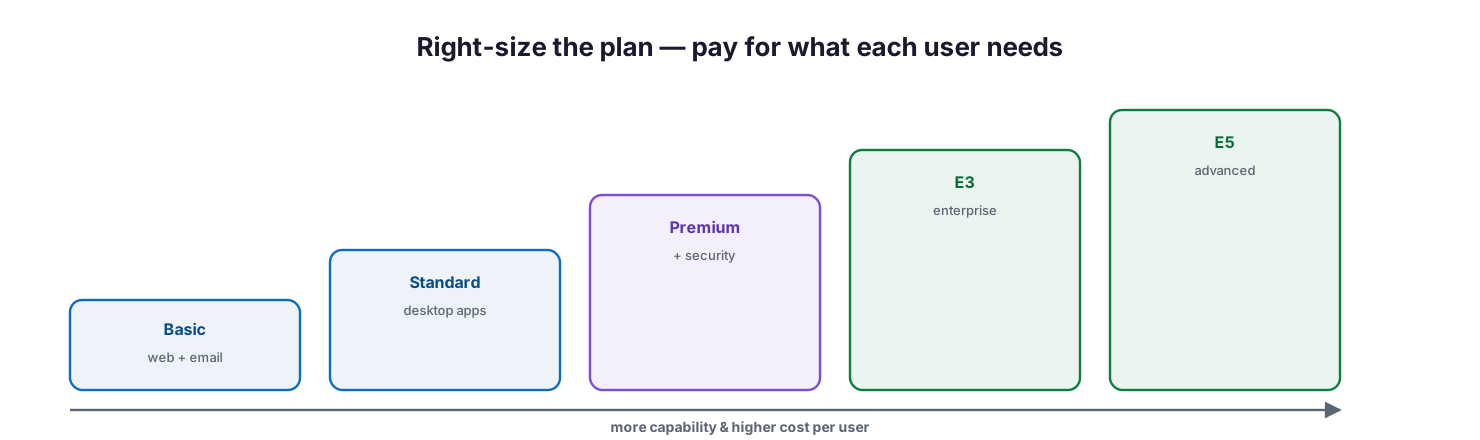
Right-size the plan: a ladder from Basic to Standard to Premium to E3 to E5, where capability and cost per user rise together — assign each user the lowest rung that meets their needs.
| User persona | Typical fit | Why |
|---|---|---|
| Frontline / shift worker | Frontline (F) plan | Web/mobile apps and email at low cost |
| Task worker, web-only | Business Basic | Email, Teams, web apps; no desktop suite |
| Shared/kiosk or app-only | Apps for business | Desktop apps without email services |
| Knowledge worker | Business Standard | Full desktop apps and collaboration |
| Security-sensitive SMB user | Business Premium | Adds device management and threat protection |
| Regulated / advanced enterprise | E3 or E5 | Advanced compliance, analytics, or voice |
The largest single miscalculation is putting an entire company on one premium plan for the convenience of it. A field or frontline workforce on knowledge-worker licensing, or a shared shop-floor PC on a full user plan, is money spent on capability no one uses.
How should you handle Copilot cost?
Copilot is the newest and one of the most expensive levers, and it rewards discipline. Because Microsoft now bundles Copilot into Business Standard and Premium and sells it as a $30 enterprise add-on, blanket-deploying it across every user is an easy way to inflate the bill without a matching return. Treat Copilot as an investment to be justified per role.
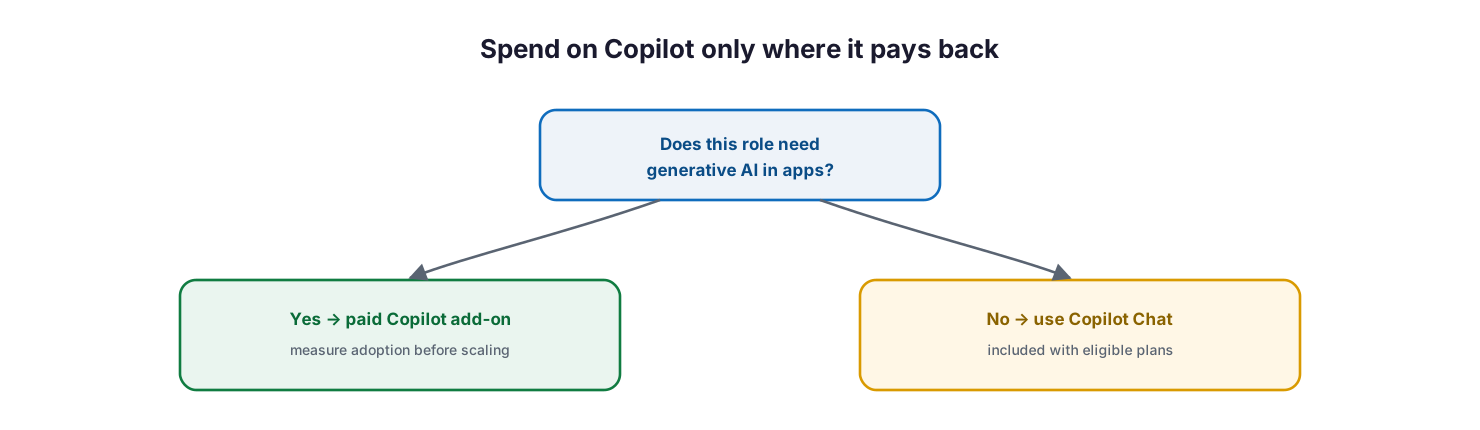
Spend on Copilot only where it pays back: if a role needs generative AI in apps, assign a paid Copilot add-on and measure adoption before scaling; if not, use the included Copilot Chat.
The decision is simple to frame. If a role genuinely benefits from generative AI inside Word, Excel, PowerPoint, and Teams, assign a paid Copilot license — but pilot it, use the admin center’s Copilot readiness and usage reports to confirm real adoption, and scale only where usage justifies the cost. If a role does not, the included Copilot Chat available with eligible subscriptions covers lighter needs at no additional per-seat charge. Paying for full Copilot seats that go unused is one of the costliest mistakes available in 2026.
Who owns cost optimization? (RACI)
Cost optimization fails when it is nobody’s job. It sits across the managed IT provider, the customer’s IT leadership, finance, and the business, so responsibilities should be explicit. This RACI assigns each activity to the party responsible for doing the work and the party accountable for the outcome, along with the tooling and the impact if it is neglected.
| Service area | Activity | MSP team (Responsible) | Customer IT / CIO (Accountable) | Consulted | Informed | Tooling | SLA / impact |
|---|---|---|---|---|---|---|---|
| Usage review | Run usage & licence reports | MSP Service Desk | CIO | Finance | Customer IT | Admin usage reports | Monthly review delivered |
| Reclamation | Unassign & remove unused seats | MSP Service Desk | Customer IT | Finance | HR | M365 admin center | Waste removed each cycle |
| Right-sizing | Recommend plan / tier changes | MSP vCIO | CIO | Department managers | Finance | Service descriptions | Users on the correct plan |
| Add-on rationalization | Remove duplicate add-ons | MSP vCIO | CIO | Customer IT | Finance | M365 admin center | No double-paying |
| Copilot governance | Assign & measure Copilot | MSP vCIO | CIO | Department managers | Finance | Copilot usage reports | Paid only where used |
| Renewal | Negotiate commitment & renewal | MSP vCIO | CIO | Finance | Executive team | Billing / CSP | Best commitment terms |
The pattern that works is a standing quarterly review, accountable to the IT leader, executed by the managed partner’s team, with finance consulted on commitment and renewal and department managers approving who needs what.
Service control matrix
| Domain | Service / control | Description | Tool used | Frequency | Risk if missing |
|---|---|---|---|---|---|
| Licensing | Inactive licence detection | Identify unused seats | Admin usage reports | Monthly | Paying for nothing |
| Licensing | Seat removal | Reduce subscription seat count | M365 admin center | Quarterly | Bill never drops |
| Licensing | Plan right-sizing | Match plan to role | Service descriptions | Quarterly | Over-featured spend |
| Licensing | Add-on rationalization | Avoid bundled duplicates | M365 admin center | Quarterly | Double-paying |
| AI | Copilot usage governance | Assign by demonstrated need | Copilot usage reports | Monthly | Wasted premium seats |
| Commercial | Commitment optimization | Annual vs monthly billing | Billing / CSP | At renewal | Missed discounts |
Operations lifecycle
| Stage | Activity | Outcome | Tool | Business impact |
|---|---|---|---|---|
| Monitor | Track usage and spend | Spend visibility | Admin usage reports | Informed decisions |
| Detect | Flag waste and drift | Waste identified | Usage / Copilot reports | Savings surfaced |
| Respond | Reclaim, right-size, consolidate | Cost reduced | M365 admin center | Lower recurring bill |
| Optimize | Tune renewal and commitment | Best terms secured | Billing / CSP | Sustained savings |
| Report | Cost and savings reporting | Auditable ROI | Reporting / vCIO | Finance confidence |
Decision matrix
| Scenario | Recommended action | Justification | Tool / service |
|---|---|---|---|
| Inactive licences found | Unassign and remove the seats | Stops paying for unused seats | M365 admin center |
| User is over-featured | Downgrade the plan or tier | Match the plan to the role | Service descriptions |
| Duplicate add-on in use | Consolidate onto the bundle | Business Premium already includes it | M365 admin center |
| Copilot seat unused | Reclaim the Copilot licence | Pay only where it is used | Copilot usage reports |
| Stable headcount | Switch to annual commitment | Captures the annual discount | Billing / CSP |
| Frontline staff | Move to a frontline (F) plan | Right-cost licensing for the role | Frontline licensing |
SLA / KPI scorecard
| Metric | Target | Tool | Business value |
|---|---|---|---|
| Licence utilization | ≥95% assigned and active | Admin usage reports | Minimal waste |
| Unused-seat reclamation | Reviewed quarterly | M365 admin center | Ongoing savings |
| Cost per user | Trending down or stable | Billing | Predictable spend |
| Copilot paid-seat adoption | At or above target usage | Copilot usage reports | ROI on AI spend |
| Annual commitment coverage | At or above agreed percentage | Billing / CSP | Discount captured |
| Cost review cadence | Quarterly, delivered | vCIO reporting | Governance and control |
What does the optimization cycle look like?
Cost optimization is not a one-time cleanup; it is a recurring discipline, because staff change, usage shifts, and Microsoft’s packaging evolves. A simple loop keeps spend aligned to reality.
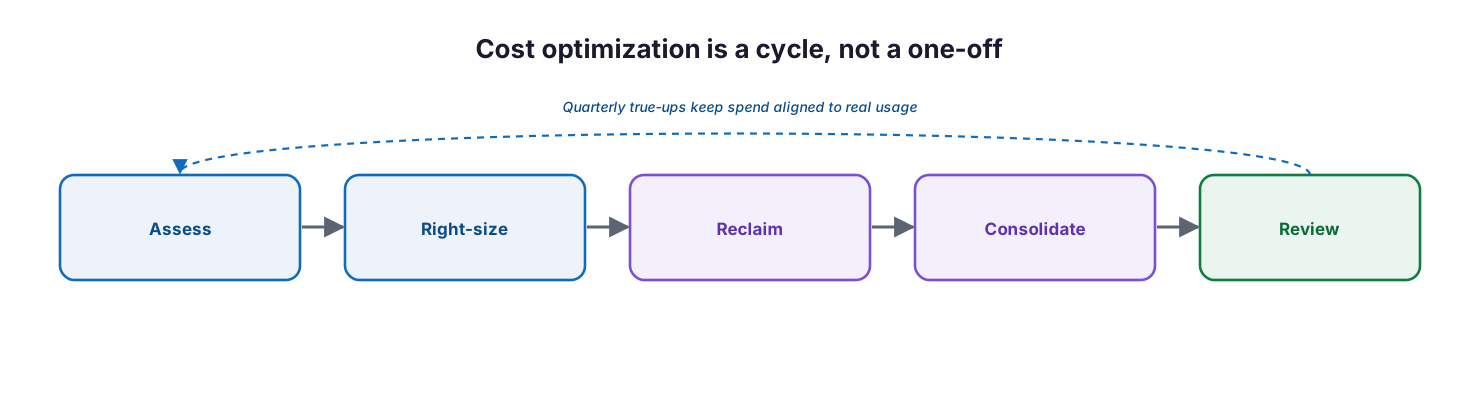
Cost optimization is a cycle: assess, right-size, reclaim, consolidate, and review, repeated with quarterly true-ups that keep spend aligned to real usage.
Assess current licensing and usage, right-size plans to roles, reclaim unused seats, consolidate away duplicate add-ons, and review on a cadence — then repeat. A quarterly true-up is usually the right rhythm for an SMB: frequent enough to catch drift, infrequent enough not to become a burden. Each turn of the loop should produce a documented change and a measured saving.
Implementation checklist
- Current Microsoft 365 spend is inventoried by plan, add-on, and seat count
- Usage reports are reviewed to identify inactive and low-usage licenses
- Inactive licenses are unassigned and the seats removed from the subscription
- A leaver process protects data before licenses are reclaimed
- Each user segment is mapped to the least-cost plan that meets its needs
- Frontline and Apps-only plans are used where appropriate
- No add-on is purchased that the plan already includes (especially on Premium)
- Subscriptions are on annual commitment where usage is stable
- Copilot is assigned only to roles with demonstrated need and adoption
- A RACI assigns ownership across IT, finance, and the business
- A quarterly cost review is scheduled and minuted
Best practices
- Start with reclamation — unused seats are the fastest, lowest-risk saving.
- Right-size to the role, not to the convenience of a single company-wide plan.
- Exhaust the Business family (up to 300 users) before moving to enterprise plans.
- Consolidate on bundles like Business Premium instead of assembling standalone add-ons.
- Choose annual commitment for stable headcount to capture the discount.
- Treat Copilot as a per-role investment, validated with usage reports before scaling.
- Follow a leaver process so reclaiming licenses never risks data loss.
- Make cost optimization a scheduled, owned, quarterly discipline with a clear RACI.
- Always verify current prices and packaging on Microsoft’s official pages before deciding.
Common mistakes
- Paying for licenses assigned to former employees who were never de-provisioned.
- Unassigning licenses but never removing the seats, so the bill never drops.
- Putting the whole company on one premium plan regardless of role.
- Buying Defender, Intune, or Entra ID P1 separately when Business Premium already includes them.
- Defaulting to monthly billing and forgoing the annual discount.
- Rolling out Copilot to everyone without measuring who actually uses it.
- Ignoring frontline and Apps-only plans for segments that don’t need full user licensing.
- Treating optimization as a one-off project instead of a recurring review.
- Acting on outdated price assumptions instead of current Microsoft pricing.
Frequently asked questions
What is the fastest way to cut Microsoft 365 cost?
Reclaim unused licenses. Use the admin center usage reports to find inactive seats, unassign them, and remove the seats from the subscription. It is low-risk and immediate, provided you follow a proper leaver process for data.
Does unassigning a license stop the charge?
No. Unassigning frees the license from a user, but you keep paying until you reduce the seat count on the subscription. Removing the seats is the step that actually lowers the bill.
Should everyone get the same Microsoft 365 plan?
No. Match plans to roles. Frontline workers, task workers, and shared devices often need far less than a full knowledge-worker plan, and paying for unused capability is the most common source of overspend.
Do we need to buy Defender or Intune separately with Business Premium?
No. Business Premium already includes Microsoft Defender for Business, Intune, Microsoft Entra ID P1, and core Purview information protection. Buying them separately is paying twice.
Is Copilot worth the cost?
It depends on the role. For users who genuinely use generative AI in their daily apps it can pay back; for others, the included Copilot Chat may suffice. Pilot it, measure adoption with the Copilot usage reports, and assign paid seats only where justified.
How often should we review Microsoft 365 spend?
Quarterly is a good default for most SMBs — frequent enough to catch drift from staff changes and usage shifts, and to react to Microsoft’s packaging changes, without becoming a burden.
Why do the prices here differ from what I remember?
Microsoft changes pricing and packaging regularly. In 2026 it repositioned Business Standard and Premium as Copilot-inclusive bundles and introduced a new enterprise tier. Always confirm current list prices on Microsoft’s official pricing pages.
Conclusion
Microsoft 365 cost optimization is not about buying less capability; it is about stopping payment for capability no one uses. The savings are concentrated in a handful of disciplined moves: reclaim the seats you are already paying for but not using, right-size each user to the plan their role needs, refuse to buy add-ons the plan already includes, commit annually where headcount is stable, and treat Copilot as a per-role investment rather than a default. Done once, these moves cut the bill; done on a quarterly cadence with clear ownership, they keep it lean as the organization and Microsoft’s packaging change.
The path forward is concrete: inventory current spend, run the usage reports, reclaim and right-size, consolidate onto bundles, and put a quarterly review with a RACI on the calendar. Because Microsoft’s prices and packaging move — as the 2026 shift to Copilot-inclusive plans shows — the single most important habit is to verify current pricing on Microsoft’s official pages before every renewal decision.
Authoritative references
Prices are current Microsoft list pricing (US, annual commitment) as of 28 July 2026 and change frequently; always confirm on Microsoft’s official pricing pages before acting.
- Microsoft 365 for business plans and pricing — Microsoft (official)
- Microsoft 365 Enterprise plans and pricing — Microsoft (official)
- Assign or unassign licenses for users — Microsoft Learn
- Buy or remove licenses for a business subscription — Microsoft Learn
- Understand subscriptions and licenses — Microsoft Learn
- Microsoft 365 admin center usage reports overview — Microsoft Learn
- Microsoft 365 usage analytics — Microsoft Learn
- Microsoft 365 Copilot readiness report — Microsoft Learn
- What is Microsoft Defender for Business? — Microsoft Learn
- Microsoft 365 service descriptions — Microsoft Learn
On this page
- Executive Summary
- Where does Microsoft 365 cost leak?
- What are the major cost optimization levers?
- What does Microsoft 365 cost today?
- How do you reclaim unused licenses?
- How do you avoid paying twice?
- How do you match plans to your workforce?
- How should you handle Copilot cost?
- Who owns cost optimization? (RACI)
- Service control matrix
- Operations lifecycle
- Decision matrix
- SLA / KPI scorecard
- What does the optimization cycle look like?
- Implementation checklist
- Best practices
- Common mistakes
- Frequently asked questions
- Conclusion
- Authoritative references