Endpoint Lifecycle Management: From Provisioning to Secure Retirement
Most organizations think about devices only at two moments: when they buy one and when something breaks. Everything in between — and everything after — happens by accident.
- Content owner
- Insyto Content Team
- Editorial reviewer
- Ritesh Mhatre
- Technical reviewer
- Navish Ansari
- Next review
- To be scheduled
- Last reviewed
- Review pending
- Technical level
- Intermediate · IT directors, endpoint administrators
Executive Summary
Most organizations think about devices only at two moments: when they buy one and when something breaks. Everything in between — and everything after — happens by accident. That gap is where cost, risk, and frustration accumulate. Devices sit unpatched, ex-employees keep company data on personal phones, retired laptops leave the building with drives full of sensitive files, and IT spends its days firefighting instead of running a system. Endpoint lifecycle management replaces that ad-hoc reality with a deliberate, repeatable loop that governs every device from the moment it is planned to the moment it is securely retired.
For a CIO or IT director, the lifecycle is the operating discipline that ties together provisioning, configuration, patching, compliance, and decommissioning into one governed flow. In a Microsoft environment, the machinery is Microsoft Intune and Microsoft Entra ID: Entra establishes the device’s identity, Intune enrolls and manages it, policy flows automatically, and remote actions retire it cleanly at end of life. Done well, a new hire’s laptop configures itself out of the box, every device in the estate is continuously compliant, and a departing employee’s data is removed the same day — without a technician ever touching the hardware.
This article lays out the full endpoint lifecycle as a practical management framework for SMBs and mid-market organizations. It walks through each of the six stages — plan, provision, enroll, configure, operate, and retire — explains the enrollment and retirement decisions that trip organizations up most, and provides the tables, checklists, and operating model needed to run devices as a governed system rather than a running series of emergencies.
The Lifecycle as a Loop
Every device, regardless of platform or owner, moves through the same six stages. Treating these as a connected loop — rather than isolated events — is what separates a managed estate from a collection of individually maintained machines.
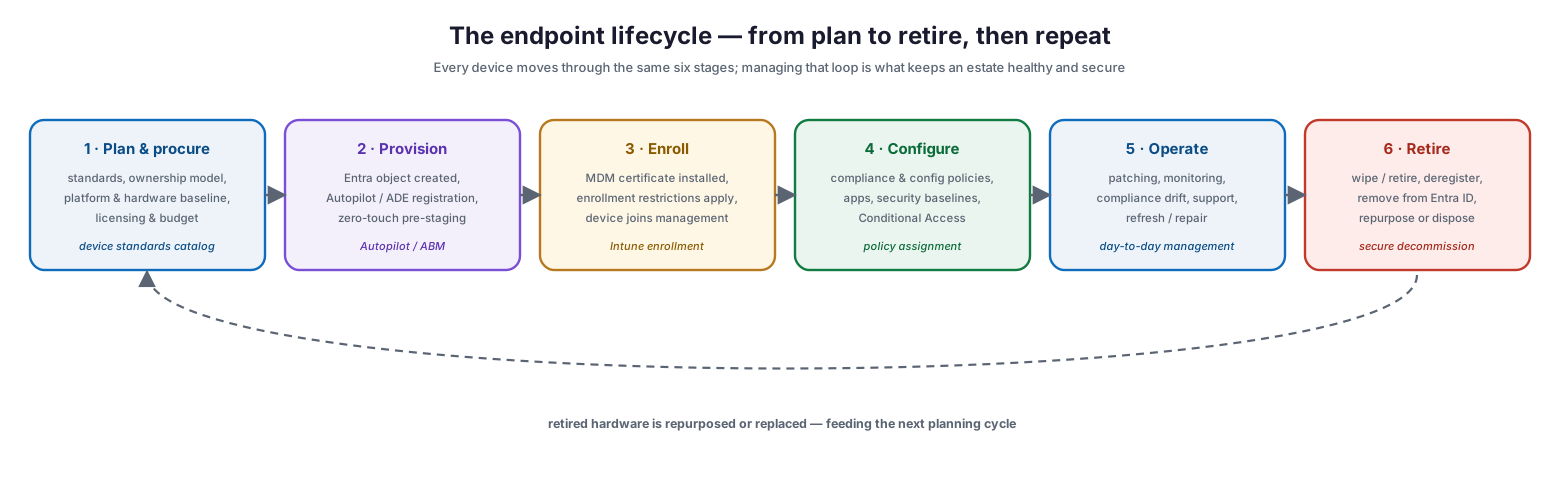
The endpoint lifecycle from plan to retire
The loop begins with planning and procurement, where the organization sets device standards, chooses ownership models, and secures licensing. It moves through provisioning, where the device’s identity is established, and enrollment, where it comes under management. Configuration applies compliance policies, security baselines, and apps. The operate stage is the long middle of the device’s working life — patching, monitoring, and support. Finally, retirement removes the device securely and cleans up its records, and the hardware is repurposed or replaced, feeding the next planning cycle. The key insight is that decisions made early — the ownership model, the enrollment method — constrain everything downstream, so the lifecycle must be designed as a whole.
| Stage | Primary activity | Key tools | Signal it is working |
|---|---|---|---|
| Plan & procure | Set standards, ownership model, licensing | Device standards catalog, Intune licensing | Consistent, supported hardware in the estate |
| Provision | Establish identity, pre-register hardware | Entra ID, Windows Autopilot, Apple Business Manager | Zero-touch, ready-to-use devices |
| Enroll | Bring device under management | Intune enrollment, MDM certificate | High enrollment success rate |
| Configure | Apply compliance, config, apps, baselines | Intune policies, security baselines | High % of compliant devices |
| Operate | Patch, monitor, support, refresh | Windows Update for Business, Intune reporting | Low compliance drift, fast MTTR |
| Retire | Wipe/retire, deregister, clean up records | Intune remote actions, Entra cleanup | No stale records, no orphaned data |
Provisioning: Establishing Identity Before Trust
Provisioning is where a device becomes known to the organization. In a Microsoft environment, this is a coordinated handoff between Entra ID and Intune. When a device is provisioned, Entra ID creates the device object and records its identity and ownership — marking it personal or corporate — while Intune, acting as the MDM authority, installs a management certificate that lets it enforce policy. That certificate is the mechanism through which every compliance and configuration policy is delivered.
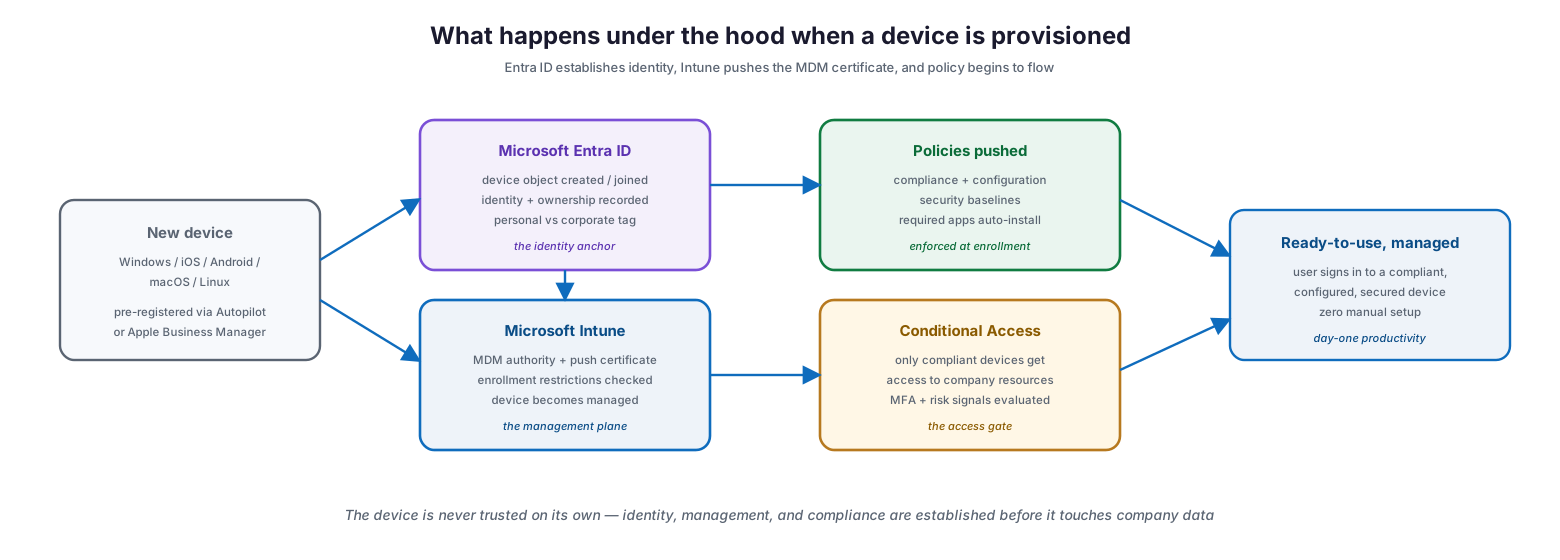
What happens under the hood during provisioning
The strategic value of this architecture is that the device is never trusted on its own merits. Identity, management, and compliance are all established before the device is allowed to touch company data, and Conditional Access ensures that only compliant devices reach corporate resources. For corporate hardware, pre-registration through Windows Autopilot or Apple Business Manager makes provisioning zero-touch: the device ships directly to the employee, and the first sign-in triggers the entire enrollment and configuration flow automatically. The MDM certificate renews on its own as long as the device keeps communicating with Intune, and Intune removes idle devices from record 180 days after that certificate expires — an automatic hygiene mechanism that keeps inventory clean.
Enrollment: Ownership First, Then Platform
Enrollment is the single most consequential lifecycle decision, and the right method flows from two questions asked in order: who owns the device, and what platform is it running? Get the ownership question right and the platform-specific method usually follows naturally.
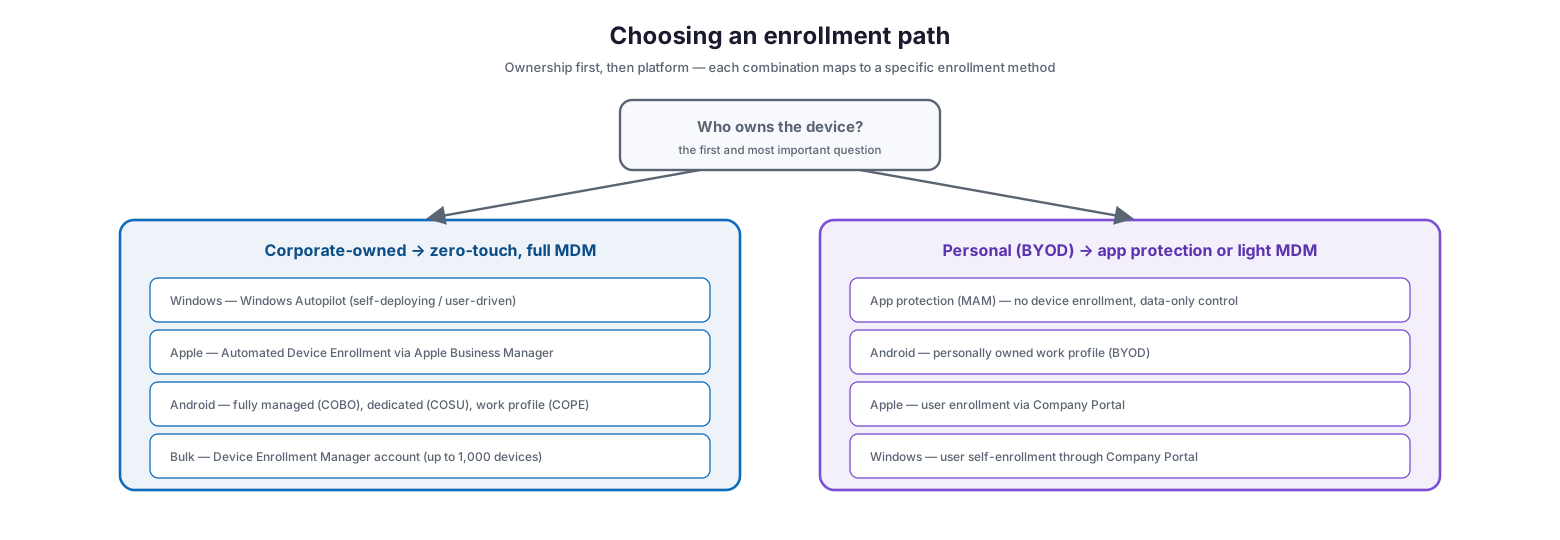
Choosing an enrollment path by ownership and platform
Corporate-owned devices should use zero-touch, full MDM enrollment: Windows Autopilot for Windows, Automated Device Enrollment through Apple Business Manager for iOS and macOS, and the appropriate Android Enterprise mode (fully managed, dedicated, or corporate work profile) for Android. For bulk scenarios, a Device Enrollment Manager account can enroll up to 1,000 devices for pre-configuration before handout. Personal (BYOD) devices should default to app protection without enrollment, or a light enrollment model such as an Android personally owned work profile or Apple user enrollment, so the employee keeps their privacy. Enrollment is enabled for all platforms by default, and enrollment restriction policies let you block the platforms or ownership types you do not want.
| Ownership | Platform | Recommended method | Why |
|---|---|---|---|
| Corporate | Windows | Windows Autopilot | Zero-touch, full management, ships to user |
| Corporate | iOS / macOS | Automated Device Enrollment (ABM) | Supervised, strongest control, zero-touch |
| Corporate | Android | Fully managed / dedicated / COPE | Full device control on company hardware |
| Corporate | Bulk / kiosk | Device Enrollment Manager account | Pre-configure up to 1,000 devices |
| Personal | Any | App protection (MAM), no enrollment | Protects data, respects privacy |
| Personal | Android | Personally owned work profile | Separates work and personal on device |
| Personal | iOS / Windows | User enrollment via Company Portal | Light management, user-initiated |
A migration note that catches organizations out: devices already enrolled in another MDM should be unenrolled first, and depending on platform a factory reset may be required — iOS, macOS, and Android Enterprise corporate modes require a reset, while Windows, Linux, and Android work-profile BYOD do not.
Configuration and Operation: The Long Middle
Once enrolled, a device receives its configuration automatically — compliance policies that define what “healthy” means, configuration profiles that set up features, security baselines, and required apps that install without user action. Conditional Access then ties compliance to access, so a device that drifts out of compliance loses access to company resources until it is remediated.
The operate stage is where a device spends most of its life, and it is where lifecycle management proves its worth day to day. This is continuous work: applying updates through Windows Update for Business and platform update rings, monitoring compliance drift, responding to support requests with remote actions, and refreshing or repairing hardware as needed. The organizations that run this stage well treat compliance reporting as a live operational feed rather than a periodic audit, catching devices that fall behind on patches or slip out of policy before they become an incident.
| Operational activity | What to watch | Tool | Cadence |
|---|---|---|---|
| Patch & update management | Update ring success, failed installs, lag | Windows Update for Business, update rings | Continuous / monthly |
| Compliance monitoring | % compliant, drifting devices, grace periods | Intune compliance reports | Daily / weekly |
| Security baseline enforcement | Baseline deviations, misconfigured settings | Intune security baselines | Continuous |
| App lifecycle | Required-app install failures, outdated versions | Intune app deployment | Weekly |
| Support & remediation | Ticket volume, remote-action usage | Intune remote actions, helpdesk | As needed |
| Hardware refresh | Warranty status, age, performance complaints | Asset inventory | Quarterly review |
Retirement: The Stage Most Organizations Get Wrong
End of life is where the most damage happens, because a device that is decommissioned carelessly either leaks data or becomes unusable. The correct action depends on ownership and on why the device is leaving service, and there are three distinct operations that must be chosen deliberately.
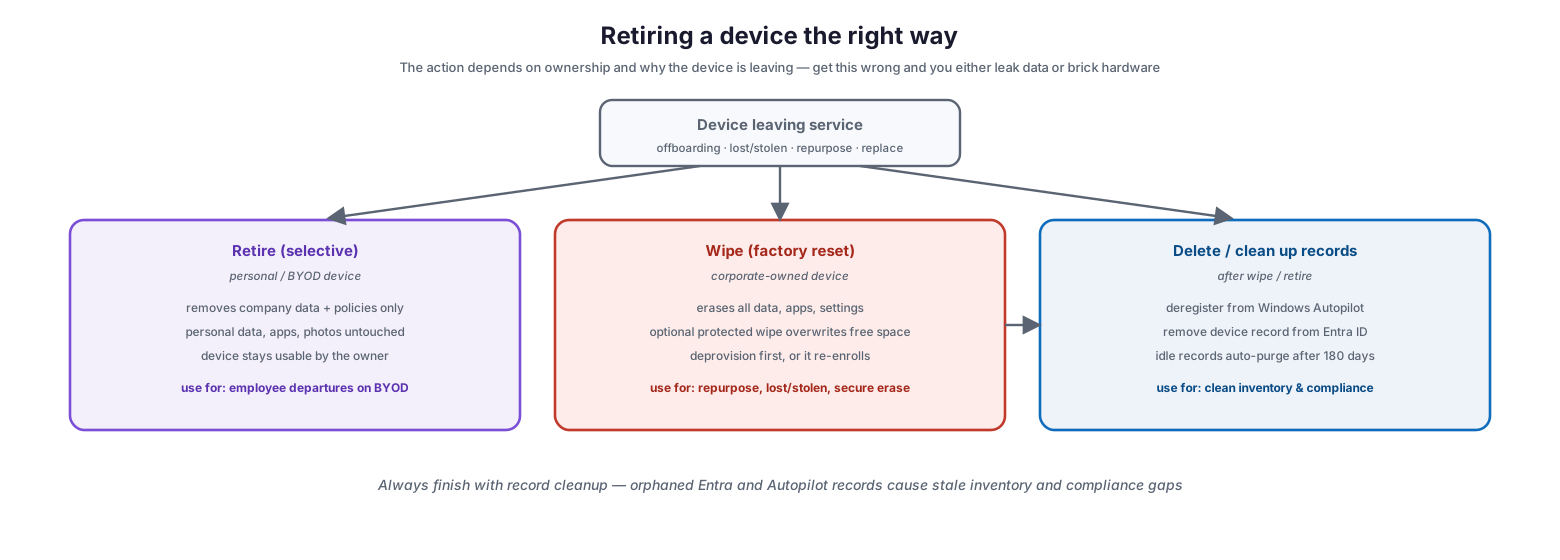
Retiring a device the right way
Retire (selective) removes only company data and policies, leaving personal content intact — this is the right action for a personal or BYOD device when an employee departs. Wipe (factory reset) erases everything and is appropriate for corporate-owned hardware being repurposed, replaced, or recovered after loss or theft; for high-security scenarios a protected wipe overwrites free space to prevent data recovery, though it must be used with care as it can render some devices unbootable. Critically, a corporate device should be deprovisioned before a factory reset, otherwise it will simply re-enroll the moment it reconnects to Wi-Fi. The third operation is record cleanup: after wiping or retiring, deregister the device from Windows Autopilot and remove its record from Entra ID so that inventory stays clean and no stale permissions linger. Idle records purge automatically after 180 days, but proactive cleanup is better practice.
| Scenario | Correct action | Ownership | Follow-up cleanup |
|---|---|---|---|
| Employee leaves, BYOD phone | Retire (selective wipe) | Personal | Remove Entra record |
| Corporate laptop repurposed | Wipe, then re-provision | Corporate | Keep Autopilot registration |
| Corporate device replaced | Wipe (standard) | Corporate | Deregister Autopilot, remove Entra record |
| Device lost or stolen | Protected wipe (continue on power loss) | Corporate | Remove Entra record, review access |
| Device beyond repair / disposed | Wipe + secure disposal | Corporate | Deregister Autopilot, remove Entra record |
| Contractor engagement ends | Retire or wipe per ownership | Either | Revoke access, remove records |
The Endpoint Operating Model
Running the lifecycle at scale requires an operating model, not just a set of tools. Four layers turn a pile of devices into a governed, measurable estate: a governance layer that sets standards and ownership; a platform layer built on Intune, Entra ID, and provisioning services; an operations layer that executes the day-to-day; and a measurement layer that proves it is working.
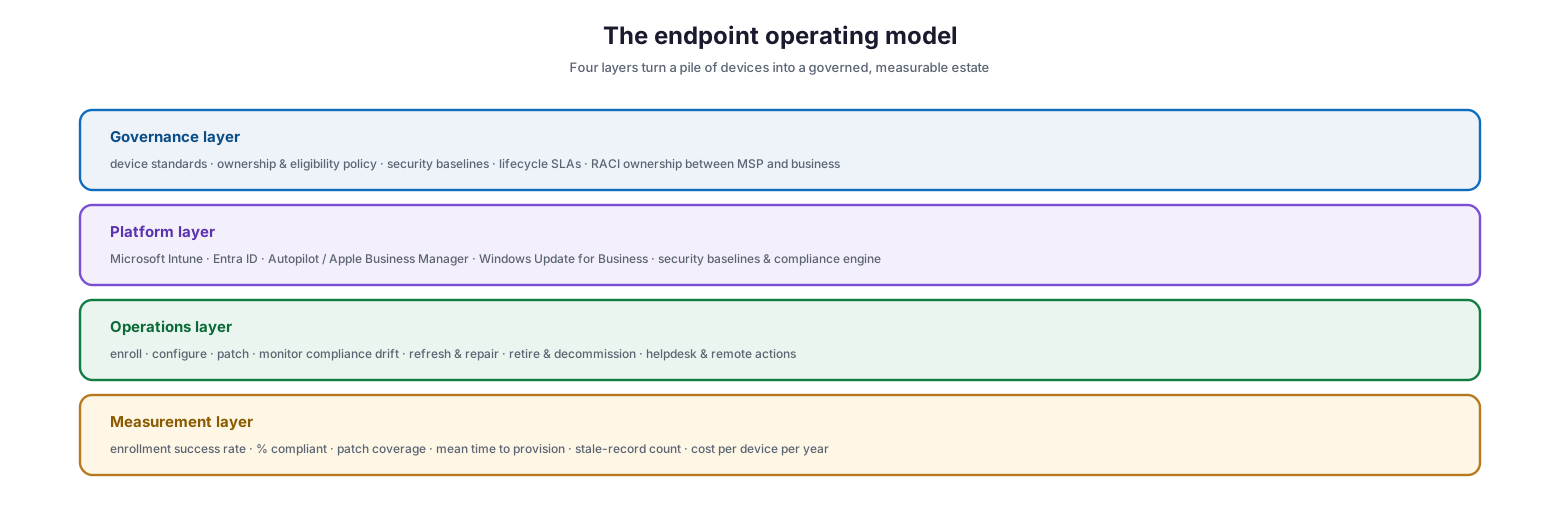
The four-layer endpoint operating model
The measurement layer deserves particular attention from IT leaders, because lifecycle management is only credible when it is measured. Enrollment success rate, percentage of compliant devices, patch coverage, mean time to provision, stale-record count, and cost per device per year are the metrics that tell you whether the system is healthy and where it is leaking money or risk.
| Metric | What it reveals | Healthy target (illustrative) |
|---|---|---|
| Enrollment success rate | Provisioning reliability | > 98% first-attempt success |
| % compliant devices | Overall estate health | > 95% compliant |
| Patch coverage | Vulnerability exposure | > 97% within SLA window |
| Mean time to provision | Onboarding efficiency | < 1 hour zero-touch |
| Stale device records | Inventory hygiene | Near zero beyond 180 days |
| Cost per device per year | Lifecycle efficiency | Trending down year over year |
Endpoint Lifecycle Checklist
- Define and publish device standards covering supported platforms, hardware, and ownership models.
- Set the MDM authority to Intune and confirm Intune licenses are assigned before enrolling.
- Pre-register corporate hardware in Windows Autopilot and Apple Business Manager for zero-touch provisioning.
- Choose enrollment methods by ownership first, then platform; apply enrollment restrictions to block unwanted types.
- Baseline every device with compliance policies, configuration profiles, and security baselines at enrollment.
- Tie compliance to access through Conditional Access so non-compliant devices lose resource access.
- Run patching through update rings and monitor update success continuously.
- Treat compliance reporting as a live feed; remediate drifting devices before they become incidents.
- Build retirement into offboarding: retire BYOD selectively, wipe corporate devices, deprovision before reset.
- Deregister retired devices from Autopilot and remove their records from Entra ID.
- Track lifecycle metrics — enrollment success, compliance, patch coverage, provisioning time, stale records, cost per device.
Best Practices
Design the lifecycle as a whole. The enrollment method you choose determines how a device can be configured, managed, and retired. Decide the ownership and enrollment model up front rather than device by device.
Make provisioning zero-touch. Autopilot and Apple Business Manager let hardware ship directly to employees and configure itself on first sign-in. This eliminates imaging, cuts onboarding time to under an hour, and removes a whole class of manual errors.
Enforce compliance through access. A compliance policy that does not gate access is just a report. Pair every compliance policy with Conditional Access so drift has an immediate, self-correcting consequence.
Automate retirement. Wire selective wipe and record cleanup into your leaver process so company data is removed and inventory stays clean the moment someone departs — without waiting on a manual ticket.
Measure the whole loop. Lifecycle management is a system, and systems are managed by metrics. Report enrollment success, compliance, patch coverage, and cost per device to leadership so the discipline stays funded and visible.
Common Mistakes
Managing devices without a lifecycle view. Handling provisioning, patching, and retirement as separate, disconnected tasks leads to gaps at every handoff. The stages must connect.
Skipping deprovisioning before a wipe. A corporate device that is factory-reset without being deprovisioned re-enrolls the moment it reconnects, defeating the purpose. Deprovision first.
Enrolling personal devices into full MDM. This is invasive and drives shadow IT. Use app protection or light enrollment for BYOD and reserve full MDM for corporate hardware.
Forgetting record cleanup. Wiping a device but leaving its Entra ID and Autopilot records behind produces stale inventory, confused reporting, and lingering permissions. Always clean up.
No retirement in offboarding. Company data left on a departed employee’s device is a breach waiting to happen. Selective wipe must be part of every leaver workflow.
Not measuring anything. Without metrics, lifecycle problems stay invisible until they become incidents. Track the health of the loop continuously.
Frequently Asked Questions
What is the difference between retire and wipe? Retire performs a selective wipe that removes only company data and policies, leaving personal content intact — ideal for BYOD. Wipe is a full factory reset that erases everything, appropriate for corporate-owned devices.
Do I need to reset a device before enrolling it in Intune? It depends on the platform. iOS, macOS, and Android Enterprise corporate modes require a factory reset; Windows, Linux, and Android work-profile BYOD do not. Always unenroll from any existing MDM first.
How does zero-touch provisioning work? Corporate hardware is pre-registered in Windows Autopilot or Apple Business Manager. When the employee first signs in, the device automatically enrolls in Intune, receives its policies and apps, and is ready to use — no manual imaging required.
What happens to idle or stale devices? The MDM certificate renews automatically while a device syncs with Intune. If a device stops communicating, the certificate eventually expires and Intune removes the record 180 days later. Proactive cleanup is still recommended.
Why deprovision before wiping a corporate device? If you factory reset a corporate device without deprovisioning it, the device will automatically re-enroll the next time it connects to Wi-Fi, undoing the retirement.
What licensing do we need for lifecycle management? The capabilities come from Microsoft Intune and Entra ID, included in Microsoft 365 plans such as Business Premium and the enterprise E3/E5 tiers. Verify entitlements against your specific plan.
Conclusion
Endpoint lifecycle management is the difference between running devices as a system and reacting to them as a series of emergencies. By treating every device as moving through one governed loop — plan, provision, enroll, configure, operate, retire — and by anchoring that loop in Microsoft Intune and Entra ID, an organization gets zero-touch onboarding, continuous compliance, and clean, secure retirement without technicians touching hardware. The payoff is concrete: faster onboarding, lower risk, less firefighting, and a device estate whose health can actually be measured.
For a growing business, the path forward is clear. Define your device standards and ownership models, make provisioning zero-touch, enforce compliance through Conditional Access, automate retirement into offboarding, and measure the whole loop. Do that, and endpoints stop being a source of cost and risk and become a well-run, quiet part of the business.
References
On this page
- Executive Summary
- The Lifecycle as a Loop
- Provisioning: Establishing Identity Before Trust
- Enrollment: Ownership First, Then Platform
- Configuration and Operation: The Long Middle
- Retirement: The Stage Most Organizations Get Wrong
- The Endpoint Operating Model
- Endpoint Lifecycle Checklist
- Best Practices
- Common Mistakes
- Frequently Asked Questions
- Conclusion
- References