Immutable Backup Best Practices: Ransomware-Proof Copies That Can’t Be Deleted
For years, backups were treated as the last line of defense that would always be there. Ransomware changed that assumption permanently.
- Content owner
- Insyto Content Team
- Editorial reviewer
- Ritesh Mhatre
- Technical reviewer
- Navish Ansari
- Next review
- To be scheduled
- Last reviewed
- Review pending
- Technical level
- Intermediate · CISOs, security teams, IT directors
Executive Summary
For years, backups were treated as the last line of defense that would always be there. Ransomware changed that assumption permanently. Modern attackers no longer simply encrypt production systems and demand payment; they first hunt down and destroy the backups, because a victim who can restore has no reason to pay. Encrypting or deleting the backup repositories turns a recoverable incident into an extortion with no exit. The result is that an ordinary backup — one that can be modified or deleted by anyone with sufficient access — is precisely the target attackers aim for first, and the safety net an organization was counting on can be gone before it even realizes it is under attack.
Immutable backups are the answer to this reality. An immutable backup is written once and cannot be altered or deleted until its retention period expires — not by a user, not by an administrator, and not by malware. Enforced by the storage itself rather than by trust in people or accounts, immutability guarantees that at least one clean copy of the data survives no matter what happens to production and to the writable backups. It removes the attacker’s leverage entirely: recovery becomes possible even in the worst case, and the ransom becomes something the organization can simply decline. Immutability has moved from a niche compliance feature to a core requirement of any credible backup strategy.
This vendor-neutral guide explains how to use immutable backups effectively. It defines what immutability actually means, shows why it defeats the modern ransomware playbook, places it within the evolved 3-2-1-1-0 backup rule, surveys the technologies that deliver it and the crucial difference between governance and compliance lock modes, and sets out the practices — from retention windows to isolated credentials to restore testing — that make immutability genuinely dependable rather than a false sense of security. The aim is a backup posture where at least one copy is provably beyond the reach of ransomware, insiders, and mistakes, so that recovery is always an option.
What “Immutable” Means
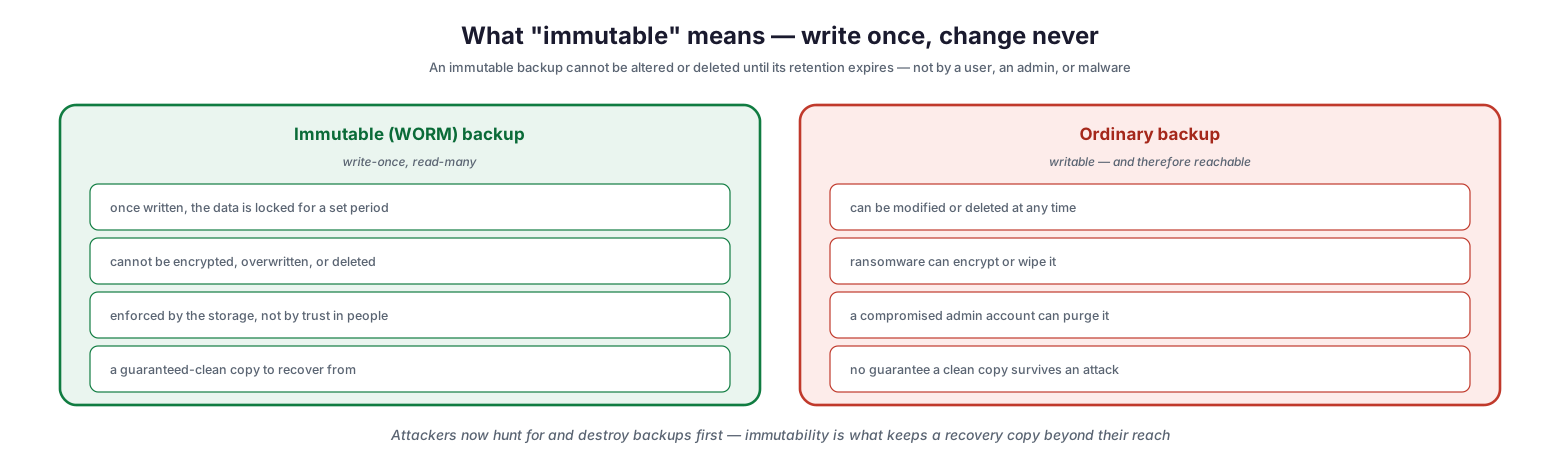
The concept behind immutable backup is straightforward but its implications are profound: data that, once written, cannot be changed. The industry term is WORM — write once, read many.
What “immutable” means — write once, change never
An immutable, or WORM, backup locks the data for a set retention period the moment it is written. During that period it cannot be encrypted, overwritten, or deleted, and — critically — this is enforced by the storage system itself, not by trusting that people and accounts will behave. The result is a guaranteed-clean copy to recover from. An ordinary backup, by contrast, is writable and therefore reachable: it can be modified or deleted at any time, which means ransomware can encrypt or wipe it, a compromised administrator account can purge it, and there is no guarantee a clean copy will survive an attack. The distinction is the entire point. Because attackers now deliberately seek out and destroy backups, the only reliable defense is a copy that is technically incapable of being altered — one that stays beyond their reach by design.
Why Immutability Matters
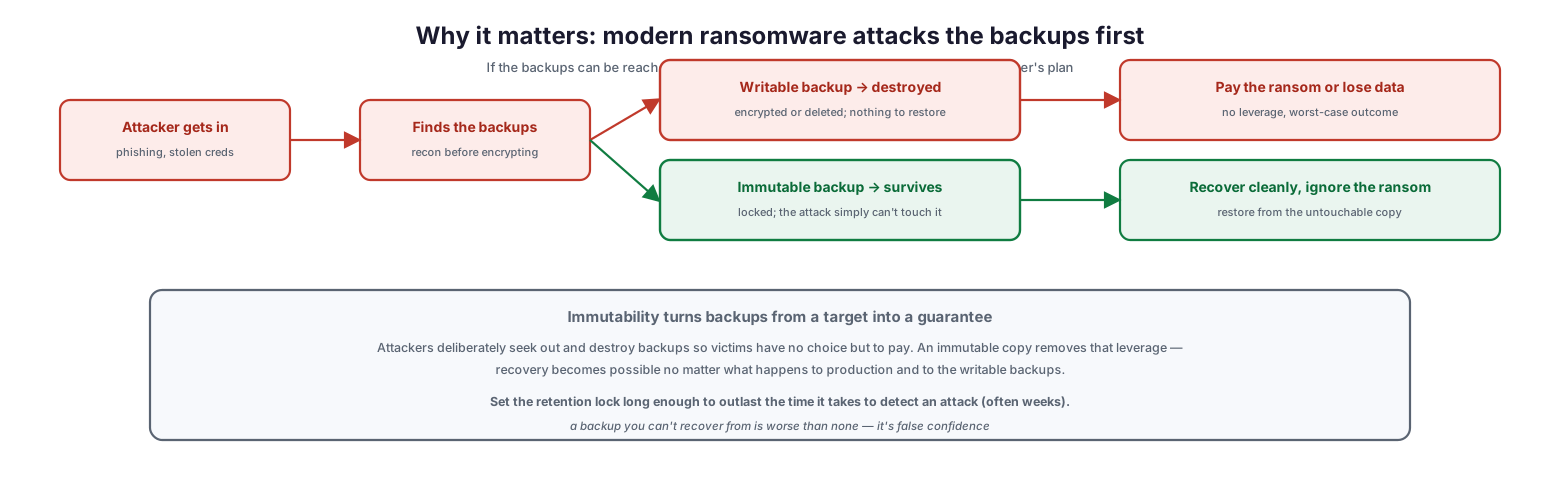
To appreciate why immutability has become essential, it helps to trace the modern ransomware playbook and see exactly where an immutable copy breaks it.
Why it matters: modern ransomware attacks the backups first
A typical attack begins with the attacker getting in — through phishing or stolen credentials — and then, before encrypting anything, performing reconnaissance to find the backups. From there the paths diverge. If the backups are writable, they are destroyed: encrypted or deleted so there is nothing to restore, leaving the victim to pay the ransom or lose the data. If a backup is immutable, it survives: it is locked, and the attack simply cannot touch it, so the organization recovers cleanly and ignores the ransom demand. Immutability turns backups from a target into a guarantee. Because attackers rely on destroying backups to force payment, an untouchable copy removes their leverage and makes recovery possible regardless of what happens to production and the online backups. One caveat is essential: the retention lock must be set long enough to outlast the time it takes to detect the attack, which is often weeks, because a copy that unlocks before the intrusion is even discovered offers no protection. A backup you cannot recover from is worse than none — it is false confidence.
The 3-2-1-1-0 Rule
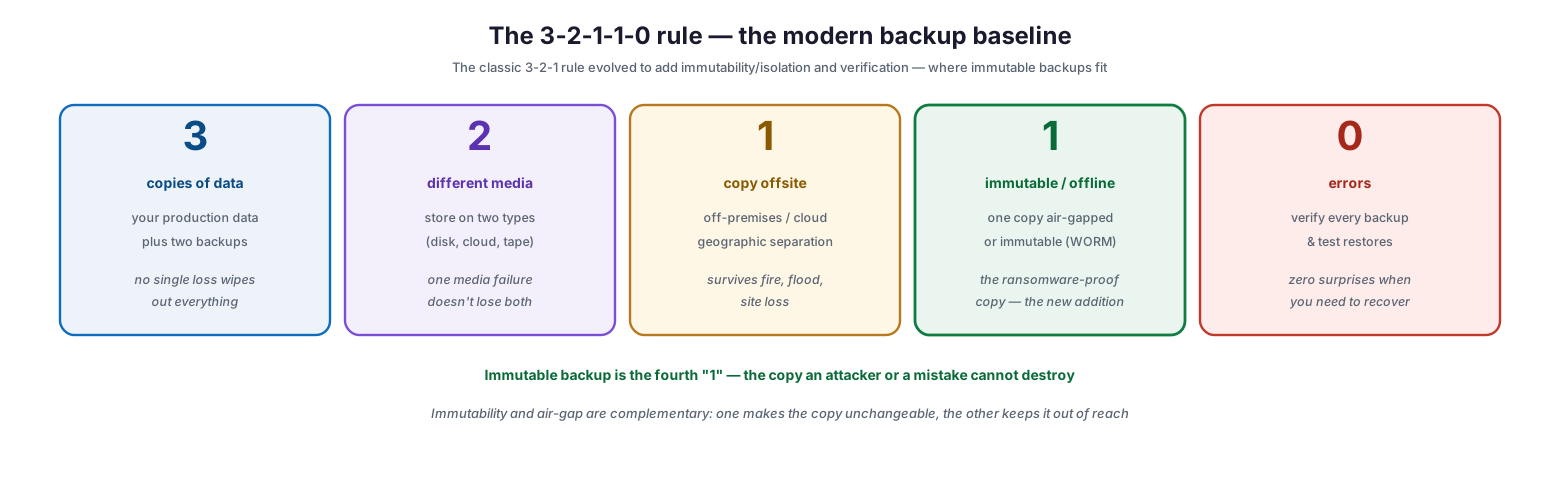
Immutable backup fits into a well-known and recently evolved principle for backup resilience. The classic 3-2-1 rule has grown to 3-2-1-1-0 to reflect the ransomware era, and immutability is one of the additions.
The 3-2-1-1-0 rule — the modern backup baseline
The rule reads as follows. Keep three copies of your data — the production copy plus two backups — so no single loss wipes out everything. Store them on two different media types, such as disk, cloud, or tape, so one media failure does not lose both backups. Keep one copy offsite, off-premises or in the cloud, so a fire, flood, or site loss cannot destroy every copy. Keep one copy immutable or offline — air-gapped or WORM — as the ransomware-proof copy that an attacker or a mistake cannot destroy; this is the modern addition where immutable backup lives. And aim for zero errors by verifying every backup and testing restores, so there are no surprises when recovery is needed. Immutable backup is the fourth element, the “1” that guarantees a copy survives. Immutability and air-gap are complementary rather than redundant: immutability makes a copy unchangeable, while an air-gap keeps it out of reach, and combining them provides defense in depth.
| Element | Requirement | Purpose |
|---|---|---|
| 3 | Three copies of data | No single loss destroys everything |
| 2 | Two different media types | One media failure doesn’t lose both |
| 1 | One copy offsite | Survives fire, flood, site loss |
| 1 | One copy immutable / offline | Ransomware-proof, cannot be destroyed |
| 0 | Zero errors (verified/tested) | No surprises when you recover |
How Immutability Is Achieved
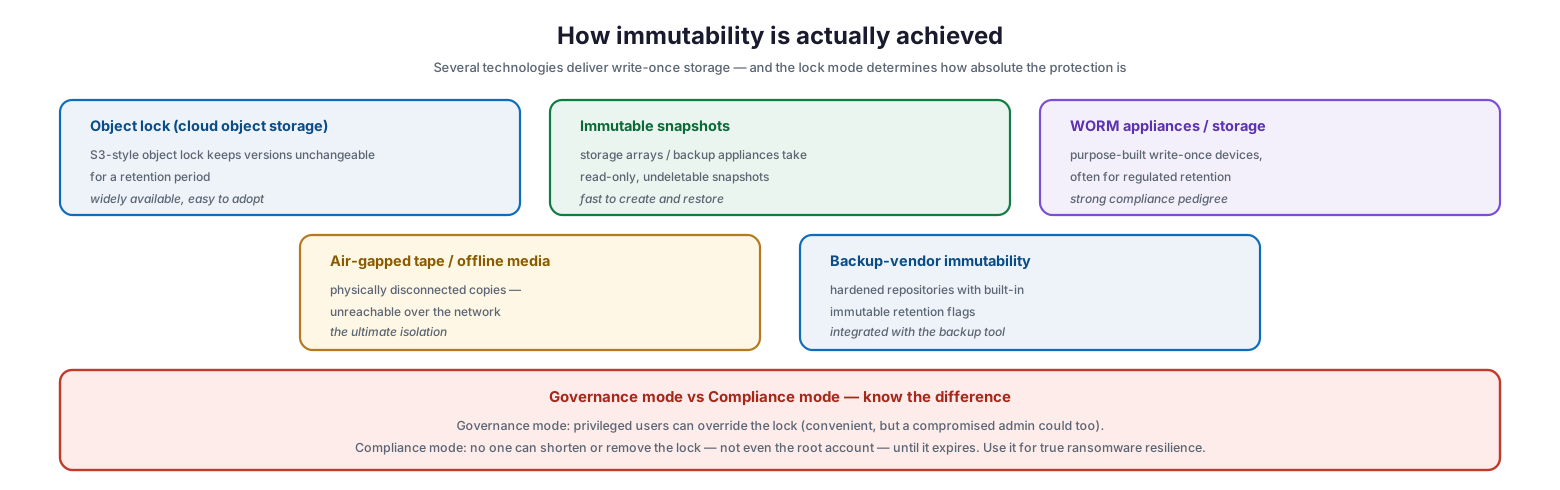
Immutability is delivered by several different technologies, and — importantly — the mode of the lock determines how absolute the protection really is.
How immutability is actually achieved
Object lock on cloud object storage, in the S3 style, keeps stored versions unchangeable for a retention period and is widely available and easy to adopt. Immutable snapshots taken by storage arrays or backup appliances create read-only, undeletable point-in-time copies that are fast to create and restore. WORM appliances and storage are purpose-built write-once devices, often used for regulated retention, with a strong compliance pedigree. Air-gapped tape and offline media are physically disconnected copies, unreachable over the network and offering the ultimate isolation. And many backup vendors provide immutability directly, through hardened repositories with built-in immutable retention flags integrated into the backup tool. Cutting across these options is a distinction that matters enormously: governance mode versus compliance mode. In governance mode, privileged users can override the lock — convenient, but a compromised administrator could override it too. In compliance mode, no one can shorten or remove the lock, not even the root account, until it expires. For true ransomware resilience, the copy that must survive should use compliance-mode locking, because a lock an attacker can override is no lock at all.
| Aspect | Governance mode | Compliance mode |
|---|---|---|
| Can privileged users override the lock? | Yes | No — not even root |
| Can retention be shortened early? | Yes, by authorized users | No, until it expires |
| Convenience | Higher (flexible) | Lower (rigid by design) |
| Resistance to compromised admin | Weak | Strong |
| Best use | Non-critical / operational locks | The ransomware-resilient copy |
| Method | How it works | Note |
|---|---|---|
| Object lock (cloud) | S3-style locked versions for a retention period | Widely available, easy to adopt |
| Immutable snapshots | Read-only, undeletable array/appliance snapshots | Fast to create and restore |
| WORM appliances | Purpose-built write-once storage | Strong compliance pedigree |
| Air-gapped tape / offline | Physically disconnected copies | Ultimate isolation |
| Backup-vendor immutability | Hardened repositories with retention flags | Integrated with the backup tool |
Making Immutability Dependable
Immutability is powerful, but it is not automatic protection. Several practices separate a genuinely resilient immutable backup from one that merely looks protected.
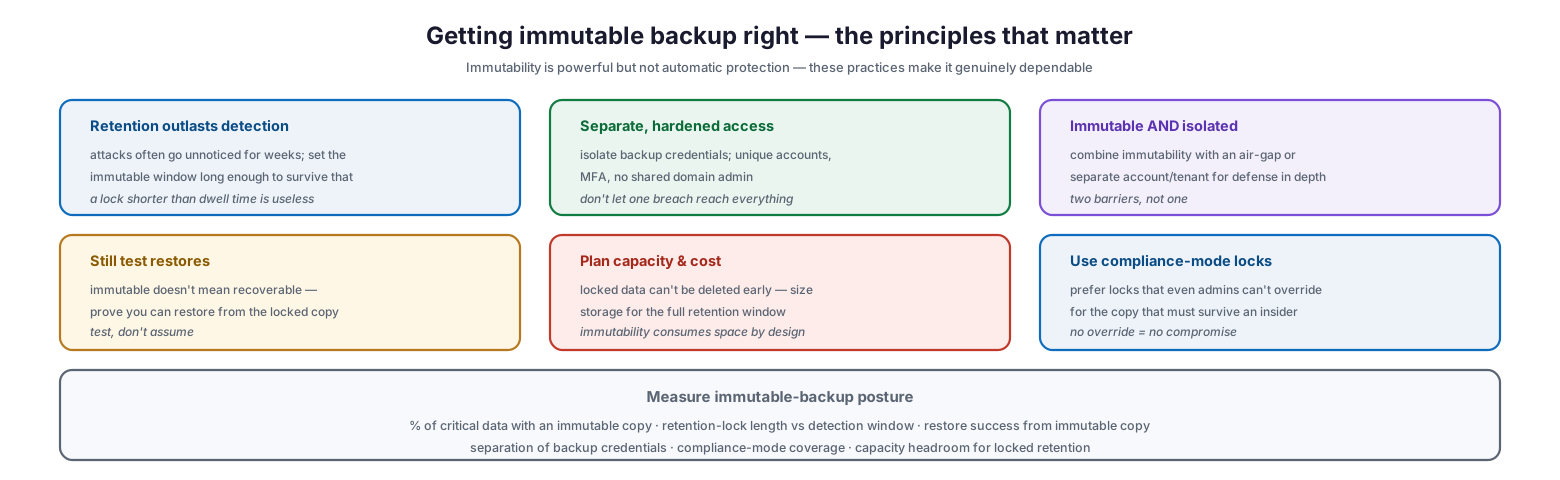
Getting immutable backup right — the principles that matter
First, retention must outlast detection: because attacks often go unnoticed for weeks, the immutable window has to be long enough to survive that dwell time, since a lock shorter than the time to detect an intrusion is useless. Second, access must be separate and hardened: backup credentials should be isolated with unique accounts and MFA, never shared with domain administration, so that one breach cannot reach both production and backups. Third, immutable and isolated should be combined: pairing immutability with an air-gap or a separate account or tenant provides two barriers rather than one. Fourth, restores must still be tested, because immutable does not mean recoverable — the organization must prove it can restore from the locked copy rather than assume it. Fifth, capacity and cost must be planned, since locked data cannot be deleted early and storage must be sized for the full retention window; immutability consumes space by design. And sixth, compliance-mode locks should be used for the copy that must survive an insider, because a lock even administrators cannot override is the one that cannot be compromised. Measured together — the percentage of critical data with an immutable copy, the lock length against the detection window, restore success from the immutable copy, credential separation, and compliance-mode coverage — these practices turn immutability into a dependable guarantee.
Immutable Backup Checklist
- Keep at least one immutable copy of all critical data as part of a 3-2-1-1-0 strategy.
- Use compliance-mode locking for the copy that must survive an attacker or malicious insider.
- Set the retention lock longer than the typical time to detect an intrusion (often weeks).
- Combine immutability with isolation — an air-gap or a separate account or tenant.
- Isolate backup credentials with unique accounts and MFA; never share domain admin.
- Choose an immutability method that fits: object lock, immutable snapshots, WORM, or air-gapped media.
- Understand governance vs compliance mode and pick the right one per copy.
- Test restores from the immutable copy regularly — immutable is not the same as recoverable.
- Size storage for the full retention window, since locked data cannot be deleted early.
- Verify backups for errors so there are no surprises during recovery.
- Document which data is immutable, the lock mode, and the retention period.
- Measure immutable coverage, lock length vs detection window, and restore success.
Best Practices
Make one copy untouchable. Ensure at least one backup copy of every critical dataset is immutable, so that recovery is possible no matter what happens to production and the writable backups. This is the single most important defense against ransomware that targets backups.
Prefer compliance-mode locks. For the copy that must survive a determined attacker or a rogue administrator, use a lock that no one — not even root — can override before it expires. A lock that can be lifted is a lock an attacker will lift.
Set retention to outlast dwell time. Intrusions frequently go undetected for weeks. Make the immutable window long enough that a clean copy still exists when the attack is finally discovered.
Isolate backup access. Give the backup system its own hardened credentials with MFA, separate from general administration, so a single compromised account cannot reach both production and its backups.
Layer immutability with isolation. Combine an immutable copy with an air-gap or a separate tenant. Two independent barriers are far harder to defeat than one, and together they deliver genuine defense in depth.
Test the locked copy. Immutability guarantees the data cannot be altered, not that it can be restored. Regularly perform and verify restores from the immutable copy so recovery is proven before it is needed.
Common Mistakes
Assuming standard backups are safe. Believing ordinary, writable backups will survive an attack ignores that ransomware now targets them first. Without an immutable copy, the safety net may already be gone when disaster strikes.
Using governance mode for ransomware protection. Relying on a lock that privileged users can override means a compromised admin account can remove it. Compliance mode is required for the copy that must resist an attacker.
Setting the lock too short. An immutable window shorter than the time it takes to detect an intrusion offers no real protection, because the copy unlocks before the attack is even noticed.
Sharing backup credentials with production. If backup access uses the same accounts as everything else, a single breach reaches both. Backup systems need isolated, hardened credentials.
Trusting immutability without testing. An immutable backup that cannot actually be restored is still a failure. Immutability and recoverability are different things, and both must be verified.
Ignoring capacity planning. Because immutable data cannot be deleted early, storage fills predictably over the retention window. Failing to plan for that leads to full repositories and failed backups.
Frequently Asked Questions
What is an immutable backup? It is a backup written in a write-once, read-many (WORM) form, so that once created it cannot be changed or deleted until its retention period expires — not by a user, an administrator, or malware. The immutability is enforced by the storage system itself.
Why do I need immutable backups if I already back up? Because modern ransomware deliberately finds and destroys ordinary backups before encrypting production, leaving victims unable to recover. An immutable copy cannot be destroyed, guaranteeing a clean copy survives and removing the attacker’s leverage.
What is the difference between governance and compliance mode? In governance mode, privileged users can override the retention lock — convenient but vulnerable if an admin account is compromised. In compliance mode, no one can shorten or remove the lock until it expires, even the root account. Use compliance mode for true ransomware resilience.
How long should the immutable retention be? Long enough to outlast the time it typically takes to detect an intrusion, which is often several weeks. If the lock expires before the attack is discovered, the immutable copy provides no protection.
Is immutability the same as an air-gap? No, but they are complementary. Immutability makes a copy unchangeable; an air-gap keeps a copy physically or logically out of reach over the network. Combining them provides defense in depth — the copy is both unreachable and unchangeable.
Does an immutable backup still need testing? Yes. Immutability guarantees the data cannot be altered, not that it can be successfully restored. You must still test restores from the immutable copy to confirm recoverability before you rely on it in a crisis.
Conclusion
Ransomware rewrote the rules of backup by making the backups themselves the primary target, and immutable backup is the discipline that restores the guarantee. By keeping at least one copy that is written once and cannot be altered or deleted until its retention expires — enforced by the storage, not by trust — an organization ensures a clean copy always survives, no matter what happens to production and to the writable backups. That single, untouchable copy removes the attacker’s leverage and turns recovery from a hope into a certainty.
Getting it right means more than flipping a switch. Use compliance-mode locks for the copy that must resist a determined attacker, set retention long enough to outlast the weeks an intrusion can hide, isolate backup credentials, combine immutability with an air-gap for defense in depth, plan capacity for locked data, and — always — test that the immutable copy can actually be restored. Build immutable backup into a 3-2-1-1-0 strategy and treat it as a core requirement rather than an optional extra, and the organization gains the one thing ransomware is designed to take away: the ability to recover on its own terms.
References
- CISA — #StopRansomware Guide (backups and immutability)
- NIST SP 800-209 — Security Guidelines for Storage Infrastructure
- NIST SP 800-184 — Guide for Cybersecurity Event Recovery
- NIST IR 8374 — Ransomware Risk Management (CSF profile)
- CISA — Data Backup Options and the 3-2-1 rule
- SEC Rule 17a-4(f) — WORM electronic records retention
- NIST SP 800-53 — Contingency Planning (CP) control family