Backup Testing Best Practices: Proving Your Data Can Actually Be Recovered
Every organization backs up its data, and most trust that those backups will be there when disaster strikes. Far fewer ever confirm it.
- Content owner
- Insyto Content Team
- Editorial reviewer
- Ritesh Mhatre
- Technical reviewer
- Navish Ansari
- Next review
- To be scheduled
- Last reviewed
- Review pending
- Technical level
- Intermediate · IT directors, infrastructure and recovery teams
Executive Summary
Every organization backs up its data, and most trust that those backups will be there when disaster strikes. Far fewer ever confirm it. This is the quiet, dangerous gap at the center of data protection: a backup job that reports success is not the same as data that can actually be recovered, and the difference only becomes visible at the worst possible moment — during a real incident, when the restore fails, the data is incomplete, or the recovery takes so long the business is already in crisis. The single most important truth in backup management is deceptively simple: an untested backup is not a backup. It is an assumption.
Backups fail silently in a surprising number of ways. A job can report green while backing up an empty or incomplete dataset. A backup file can be quietly corrupted and refuse to restore. A critical system can be missing from the backup scope entirely. A restore can technically work but take far longer than the recovery time the business was promised. And, increasingly, ransomware can encrypt the backups themselves, leaving nothing clean to recover from. None of these failures are visible on a backup dashboard showing successful jobs. Only testing — actually restoring data and verifying it — reveals them, and only testing done before an incident gives an organization the chance to fix them.
This vendor-neutral guide explains how to test backups so that recoverability is proven rather than presumed. It covers why a successful backup is not a successful restore, the layers of testing from cheap automated checks to full disaster-recovery drills, what every restore test must actually verify, how often different tests should run, and a repeatable process that turns each test into an improvement. Grounded in established contingency-planning and recovery guidance, the aim is a backup program where the answer to “can we recover this?” is not “we think so” but “yes — we proved it, and here is how long it took.”
Why a Successful Backup Is Not a Successful Restore
The foundation of backup testing is understanding that the backup job and the restore are two entirely different events, and success at the first does not guarantee success at the second.
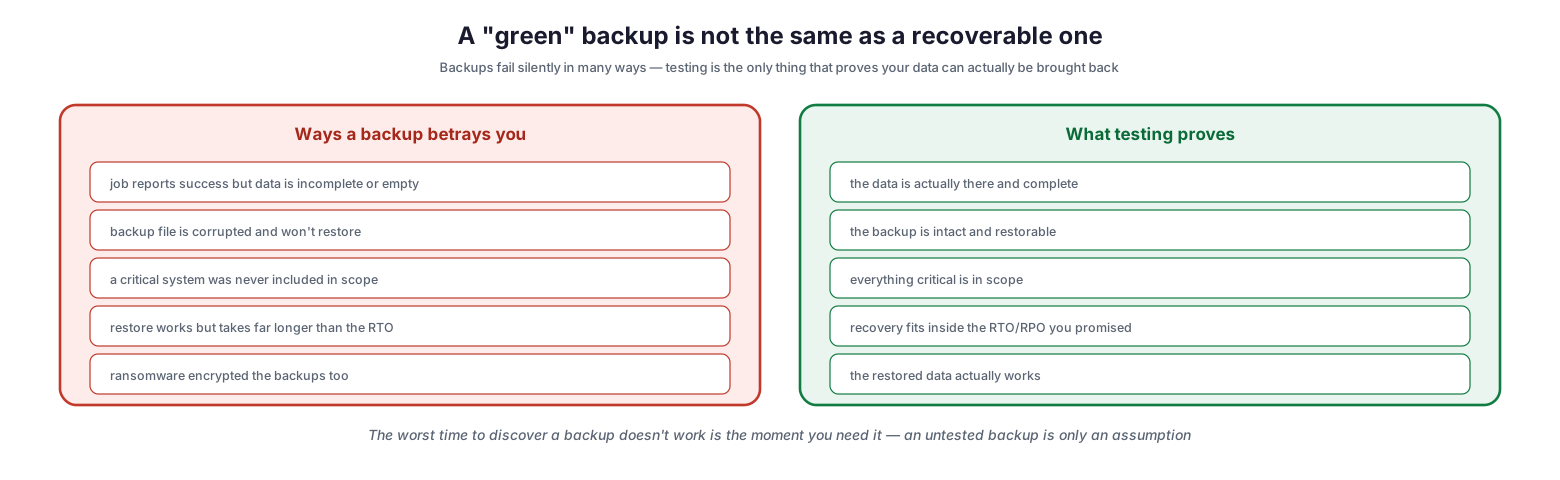
A “green” backup is not the same as a recoverable one
There are many ways a backup betrays the organization that relies on it. A job can report success while the data it captured is incomplete or empty. The resulting backup file can be corrupted and refuse to restore. A critical system can have been left out of scope and never backed up at all. A restore can work but run far longer than the recovery time objective, missing the deadline the business depends on. And ransomware can reach and encrypt the backups alongside production, destroying the very safety net. What testing proves is the mirror image of each failure: that the data is genuinely there and complete, that the backup is intact and restorable, that everything critical is in scope, that recovery fits inside the promised RTO and RPO, and that the restored data actually works. The lesson is blunt — the worst time to discover a backup does not work is the moment you need it, which is precisely why testing must happen before that moment, not during it.
The Layers of Backup Testing
Backup testing is not a single activity but a set of layers, ranging from cheap automated checks that run constantly to full-scale drills run occasionally. Each layer catches classes of failure the ones below it cannot.
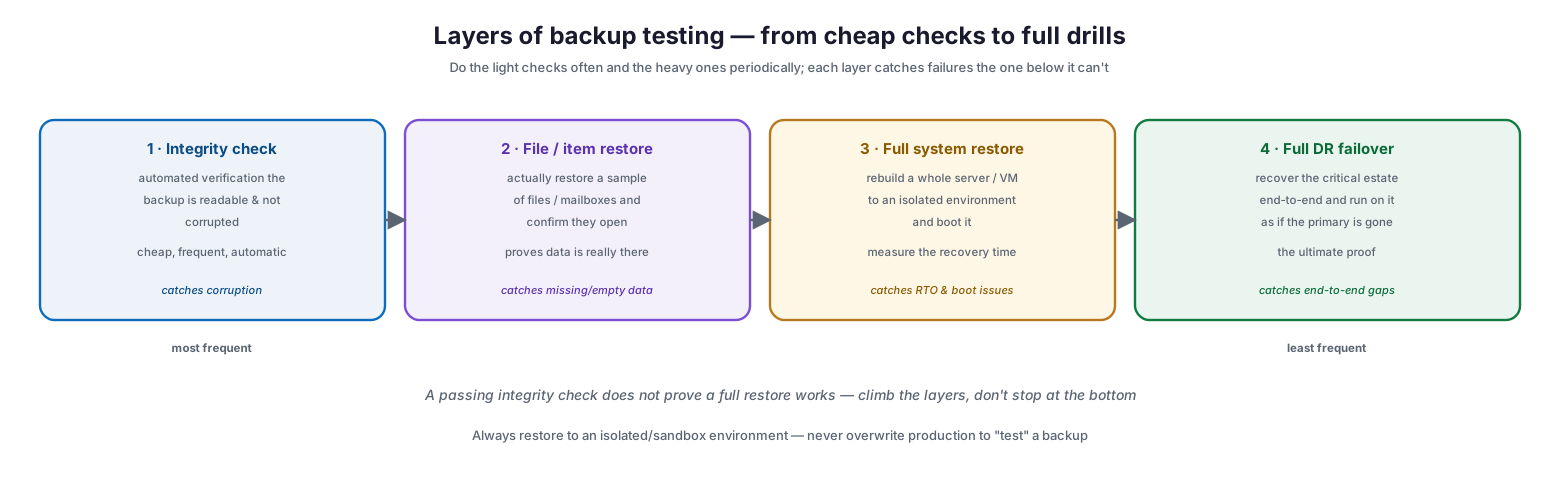
Layers of backup testing — from cheap checks to full drills
The lightest layer is the integrity check — automated verification that a backup is readable and not corrupted, cheap enough to run frequently and automatically. Above it sits file or item restore testing, where a sample of files or mailboxes is actually restored and confirmed to open, proving the data is really present rather than merely reported. Higher still is full system restore, rebuilding an entire server or virtual machine into an isolated environment and booting it, which measures the real recovery time and catches boot and dependency issues. At the top is full disaster-recovery failover, recovering the critical estate end to end and running on it as though the primary had been lost — the ultimate proof that the whole recovery works. A vital rule underlies all of it: always restore to an isolated or sandbox environment, never overwrite production to “test” a backup, because a botched test should never itself cause an outage. And a passing integrity check does not prove a full restore works, so organizations must climb the layers rather than stop at the cheapest one.
| Layer | What it does | Catches | Frequency |
|---|---|---|---|
| Integrity check | Automated readable/uncorrupted verification | Corruption | Continuous / automatic |
| File / item restore | Restore a sample, confirm it opens | Missing or empty data | Weekly / monthly |
| Full system restore | Rebuild and boot a server/VM in a sandbox | RTO and boot failures | Quarterly |
| Full DR failover | Recover the critical estate end to end | End-to-end gaps | Annually |
What Every Restore Test Must Verify
Restoring data is not the same as verifying a restore. A test that ends at “it came back” misses most of what can be wrong. A genuine test confirms that the data is complete, correct, timely, and usable.
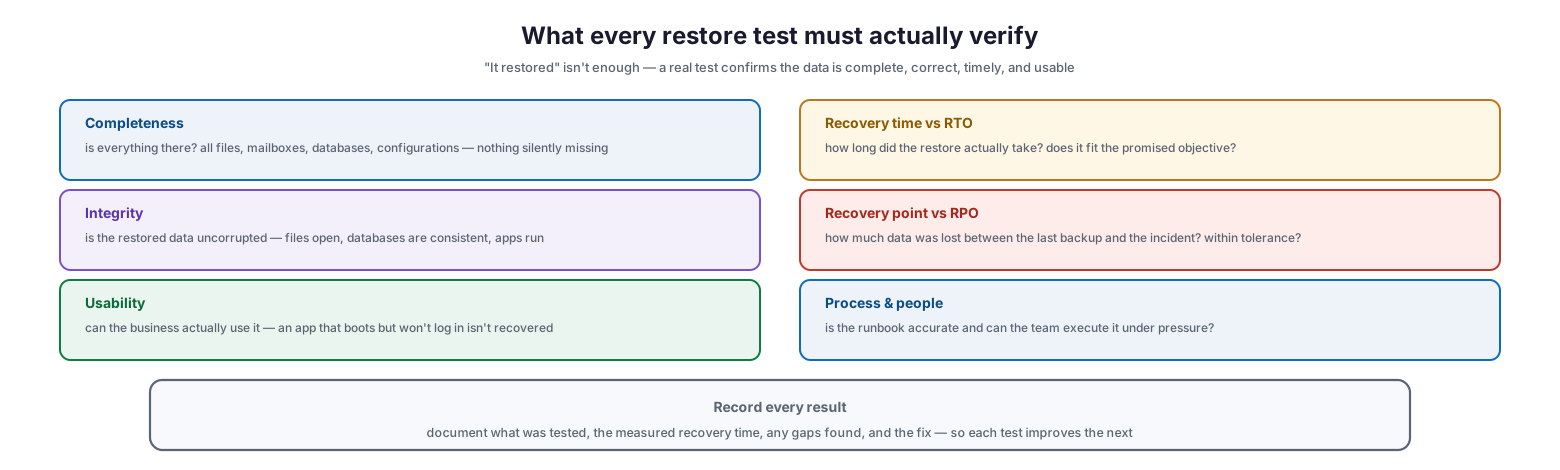
What every restore test must actually verify
Completeness asks whether everything is there — all files, mailboxes, databases, and configurations, with nothing silently missing. Integrity asks whether the restored data is uncorrupted: files open, databases are consistent, and applications run. Usability asks whether the business can actually use it, because an application that boots but will not accept logins is not truly recovered. Recovery time versus RTO measures how long the restore actually took and whether that fits the objective the business was promised. Recovery point versus RPO measures how much data was lost between the last backup and the incident, and whether that loss is within tolerance. And process and people asks whether the runbook is accurate and whether the team can actually execute it under pressure — because a perfect backup is useless if no one can perform the restore when it counts. Every test result should be recorded: what was tested, the measured recovery time, any gaps found, and the fix, so each test makes the next one better.
| Verification check | Question it answers | Pass condition |
|---|---|---|
| Completeness | Is everything there? | All files, mailboxes, DBs, configs present |
| Integrity | Is the data uncorrupted? | Files open, databases consistent, apps run |
| Usability | Can the business use it? | Users can log in and work with the data |
| Recovery time vs RTO | Was it fast enough? | Restore completes within the RTO |
| Recovery point vs RPO | Was data loss tolerable? | Loss within the RPO window |
| Process & people | Can the team execute it? | Runbook accurate, team able under pressure |
How Often to Test
Testing has to be sustainable, which means matching frequency to effort and risk. Light checks run constantly, while heavier restores run on a schedule — so testing becomes a routine rather than an annual scramble.
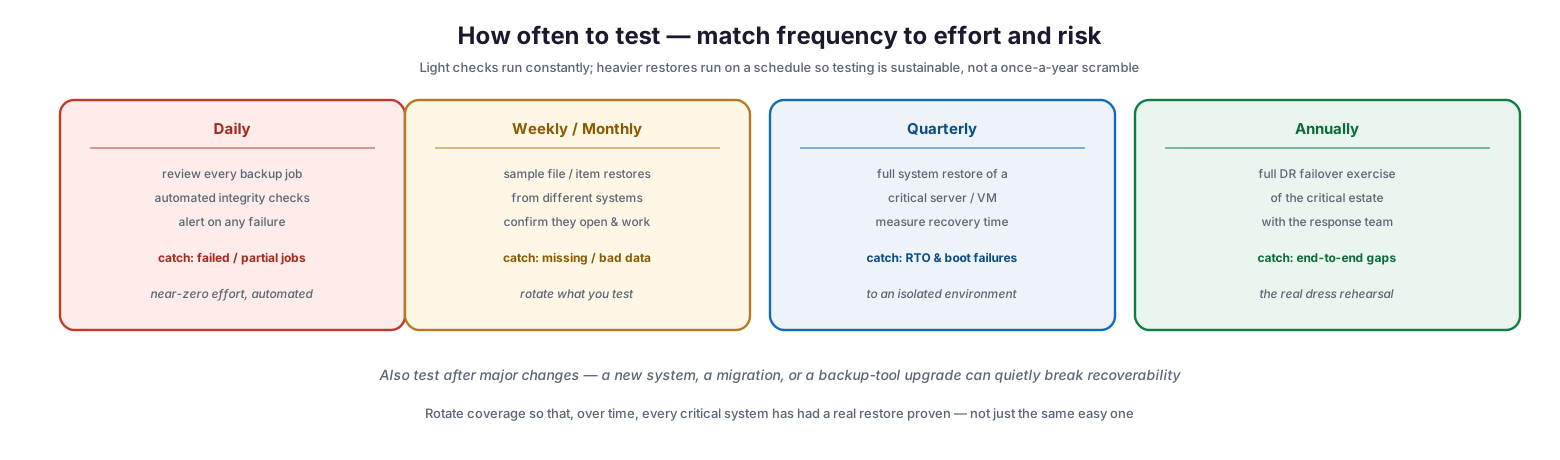
How often to test — match frequency to effort and risk
Daily, every backup job should be reviewed and automated integrity checks run, with alerts on any failure — near-zero effort that catches failed or partial jobs immediately. Weekly or monthly, sample file and item restores should be performed from different systems and confirmed to open and work, rotating what is tested so coverage spreads over time. Quarterly, a full system restore of a critical server or VM should be run to an isolated environment with the recovery time measured, catching RTO problems and boot failures. And annually, a full disaster-recovery failover exercise of the critical estate should be run with the response team, the true dress rehearsal that catches end-to-end gaps. Beyond the schedule, testing should also follow major changes — a new system, a migration, or a backup-tool upgrade can quietly break recoverability — and coverage should rotate so that, over time, every critical system has had a real restore proven, not just the same easy one repeated.
| Cadence | Test | Primary value |
|---|---|---|
| Daily | Job review + automated integrity checks | Catch failed/partial jobs fast |
| Weekly / monthly | Sample file/item restores | Confirm data is present and usable |
| Quarterly | Full system restore to sandbox | Measure and validate RTO |
| Annually | Full DR failover exercise | Prove end-to-end recovery |
| After major change | Targeted restore of affected systems | Catch newly introduced gaps |
A Repeatable Restore-Test Process
Testing works best when it follows a consistent process, both so it becomes routine and so its results feed directly into a more reliable backup program.
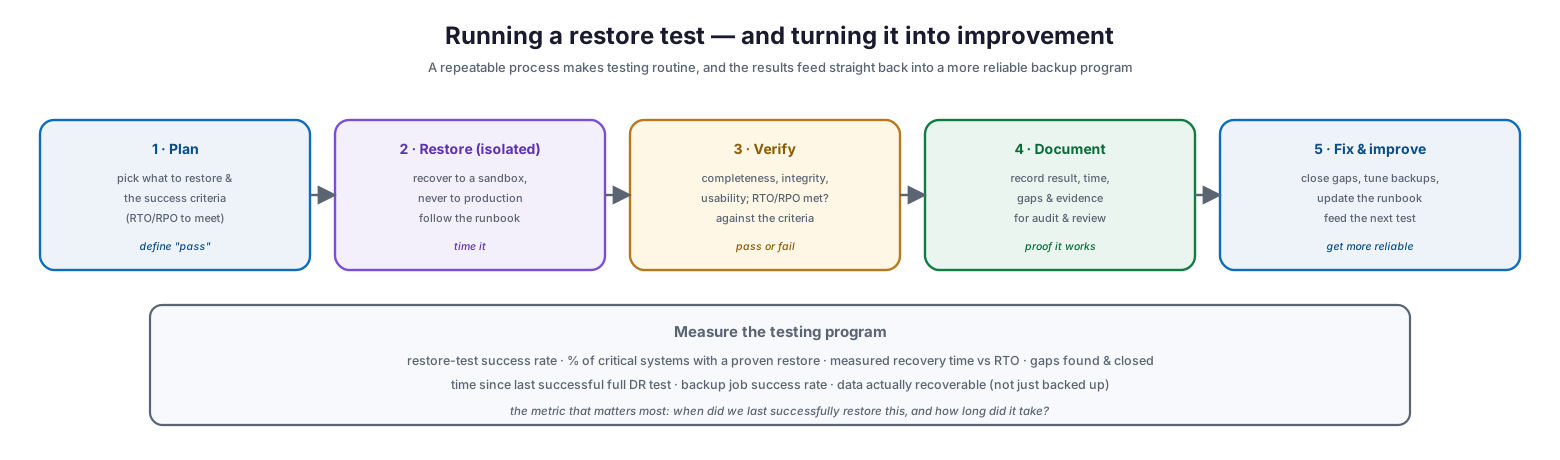
Running a restore test — and turning it into improvement
The process runs in five steps. First, plan: choose what to restore and define the success criteria, including the RTO and RPO the test must meet. Second, restore to an isolated environment — a sandbox, never production — following the documented runbook and timing the effort. Third, verify against the criteria: completeness, integrity, usability, and whether the recovery time and point were met, producing a clear pass or fail. Fourth, document the result, the measured time, any gaps, and the evidence, both for audit and for review. Fifth, fix and improve: close the gaps, tune the backups, update the runbook, and feed the lessons into the next test. Over repeated cycles this steadily raises reliability, and the metrics it produces — restore-test success rate, percentage of critical systems with a proven restore, measured recovery time against RTO, gaps found and closed, and time since the last successful full DR test — turn backup from an act of faith into a measured, auditable capability. The single most valuable metric to know for any critical system is simple: when did we last successfully restore this, and how long did it take?
Backup Testing Checklist
- Treat a successful backup job as a starting point, not proof of recoverability.
- Run automated integrity checks continuously and alert on any backup failure.
- Perform sample file and item restores weekly or monthly, rotating across systems.
- Run full system restores quarterly to an isolated environment and measure recovery time.
- Conduct a full DR failover exercise at least annually with the response team.
- Always restore to a sandbox — never overwrite production to test a backup.
- Verify completeness, integrity, usability, RTO, and RPO in every restore test.
- Confirm the runbook is accurate and the team can execute it under pressure.
- Test after every major change: new systems, migrations, backup-tool upgrades.
- Rotate coverage so every critical system eventually has a proven restore.
- Document each test: scope, measured time, gaps, and remediation.
- Track testing metrics and the date and duration of the last successful restore per system.
Best Practices
Prove it, don’t presume it. Never rely on a green backup dashboard. Regularly restore real data and confirm it works, because recoverability is the only outcome that matters and the only one testing can guarantee.
Climb the testing layers. Automated integrity checks are necessary but not sufficient. Progress through file restores, full system restores, and full DR failover so that each class of hidden failure is caught.
Restore to isolation. Always test into a sandbox environment. Testing should never risk production, and an isolated restore also lets you verify safely and thoroughly.
Measure against your objectives. A restore that succeeds but misses the RTO is a failure in disguise. Time every restore and check both recovery time and recovery point against the promises made to the business.
Rotate and follow change. Do not test the same easy system every time. Rotate coverage so every critical system is eventually proven, and always test after changes that could quietly break recoverability.
Document and improve. Record every test result and use the gaps it reveals to tune backups and runbooks. Testing that does not feed improvement is only reassurance; testing that does makes the program measurably better.
Common Mistakes
Trusting the backup report. Believing that successful jobs mean recoverable data is the fundamental error backup testing exists to correct. Jobs can succeed while the data is unusable.
Never restoring. Backing up diligently but never performing a restore leaves recoverability entirely unproven. The first real restore should not be during a disaster.
Only checking integrity. Automated verification catches corruption but not missing scope, unusable data, or missed RTOs. It is the floor, not the ceiling, of testing.
Testing to production. Restoring over live systems to “test” a backup risks causing the very outage backups are meant to prevent. Always use an isolated environment.
Ignoring recovery time. Confirming that data restores while never measuring how long it takes hides the risk that recovery will blow past the RTO when it matters.
Testing the same thing forever. Repeatedly restoring the one easy system creates false confidence. Rotate so that every critical system is genuinely proven over time.
Frequently Asked Questions
Why isn’t a successful backup enough? Because the backup job and the restore are different events. A job can report success while the data is incomplete, corrupted, out of scope, or slow to restore. Only actually restoring and verifying the data proves it can be recovered.
How often should we test backups? Review jobs and run integrity checks daily, perform sample restores weekly or monthly, run a full system restore quarterly, and conduct a full DR failover exercise annually. Also test after any major change to systems or backup tooling.
What should a restore test verify? Completeness (nothing missing), integrity (data uncorrupted), usability (the business can use it), recovery time against the RTO, recovery point against the RPO, and whether the runbook and team can actually perform the restore.
Should we test on production systems? No. Always restore to an isolated or sandbox environment. Testing on production risks causing an outage, and a sandbox allows thorough verification without any impact on live services.
What is the difference between RTO and RPO in testing? RTO is how quickly recovery must complete — testing measures the actual restore time against it. RPO is how much data loss is acceptable — testing checks how much data would be lost between the last backup and an incident. Both must be validated, not just assumed.
How do we prove backups are safe from ransomware? Testing helps confirm that clean, restorable copies exist, especially copies that are isolated or immutable and therefore out of reach of ransomware. A restore test from such a copy demonstrates the organization can recover even if production and online backups are compromised.
Conclusion
Backup testing is the discipline that converts a backup from a hopeful gesture into a dependable capability. Because backups fail silently — through corruption, incomplete scope, unusable data, missed recovery times, and even ransomware — the only way to know that data can be recovered is to recover it, deliberately and repeatedly, before an incident forces the question. A successful backup job is a starting point; a verified restore is the proof.
The path is practical and sustainable: run cheap automated checks constantly, climb the layers to full restores and DR drills on a schedule, always test into an isolated environment, and verify not just that data comes back but that it is complete, correct, usable, and recovered within the objectives the business was promised. Document every test, fix what it reveals, and rotate coverage so every critical system is genuinely proven over time. Do that, and when disaster arrives the organization will not be hoping its backups work — it will know they do, because it has proven it, and it will know exactly how long recovery will take.
References
- NIST SP 800-34 Rev. 1 — Contingency Planning Guide (testing, training, and exercises)
- NIST SP 800-184 — Guide for Cybersecurity Event Recovery
- CISA — Data Backup Options and the 3-2-1 rule
- CISA — Protecting Against Ransomware (backups and recovery)
- NIST SP 800-53 — Contingency Planning (CP) control family
- Ready.gov — IT Disaster Recovery Plan
- NIST SP 800-34 — Recovery and reconstitution guidance