Backup Compliance Checklist: Meeting Regulatory Requirements for Data Protection
Backups are usually thought of as an operational safety net — the thing that gets data back after a failure.
- Content owner
- Insyto Content Team
- Editorial reviewer
- Ritesh Mhatre
- Technical reviewer
- Navish Ansari
- Next review
- To be scheduled
- Last reviewed
- Review pending
- Technical level
- Intermediate · IT directors, infrastructure and recovery teams
Executive Summary
Backups are usually thought of as an operational safety net — the thing that gets data back after a failure. But for most organizations they are also a legal and regulatory obligation, and a technically excellent backup program can still fail an audit if it is not designed, documented, and provable in the way regulators expect. Data protection laws, industry standards, and contractual commitments increasingly dictate not just that data be backed up, but how long it must be kept, how it must be secured, how quickly it must be recoverable, and — critically — how all of this must be evidenced. Backup compliance is the discipline of ensuring that an organization’s backup practices satisfy those external requirements, not merely its internal recovery needs.
The stakes are concrete. Failing to protect, retain, or recover data in line with the rules can bring regulatory fines, failed audits, lost contracts, legal liability, and rejected insurance claims — frequently on top of the operational damage of the data loss itself. And the requirements pull in more than one direction at once: some regulations demand that data be retained for years, while privacy laws insist it not be kept longer than necessary and be deleted on request. Meeting all of these obligations simultaneously requires more than good backup technology; it requires a deliberate mapping of obligations to controls, a retention scheme grounded in data classification, and a body of documentation that proves every control is in place and working.
This vendor-neutral guide turns backup compliance into something manageable. It explains why backups are a compliance concern, surveys the regulations and standards that govern them and what each demands, sets out the six control domains that nearly every requirement maps onto, addresses the retention tension between keeping data and deleting it, and provides a practical checklist for self-assessment. Grounded in widely adopted security standards and data-protection principles, the aim is a backup program that not only recovers data reliably but stands up to scrutiny — one where the answer to an auditor’s question is always “yes, and here is the evidence.”
Why Backups Are a Compliance Concern
Before working through specific rules, it helps to see what regulators are fundamentally asking of backups. Across the many frameworks that apply, the expectations converge on four properties.
Backups are a compliance obligation, not just an IT nicety
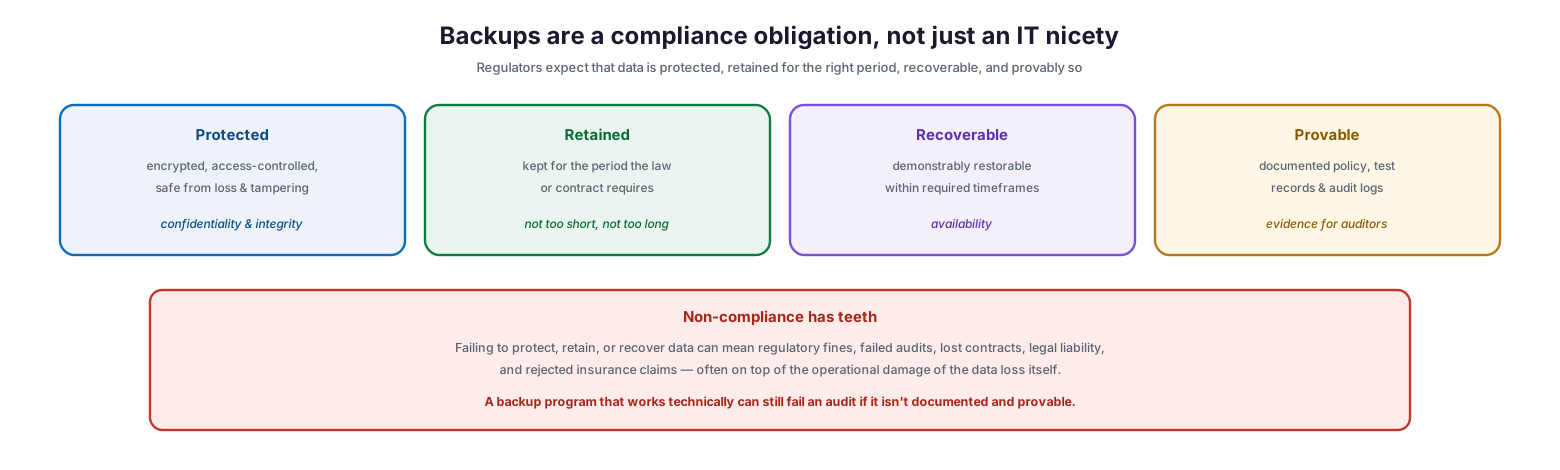
Regulators expect data to be protected — encrypted, access-controlled, and safe from loss and tampering, satisfying confidentiality and integrity. They expect it to be retained — kept for the period the law or contract requires, neither too short nor too long. They expect it to be recoverable — demonstrably restorable within required timeframes, satisfying availability. And they expect it to be provable — backed by a documented policy, test records, and audit logs that serve as evidence. That last property is where many organizations stumble: a backup program that works perfectly in practice can still fail an audit if it is not documented and cannot be demonstrated. Non-compliance has real teeth — regulatory fines, failed audits, lost contracts, legal liability, and rejected insurance claims — and those consequences often arrive on top of, not instead of, the operational harm of the data loss. Compliance, in short, is not an add-on to backup; it is a core requirement of doing it properly.
The Regulations and Standards That Govern Backups
Which specific rules apply depends on an organization’s data and sector, but a familiar set recurs, and most demand the same underlying properties of protection, retention, and recoverability.
The regulations and standards that govern backups
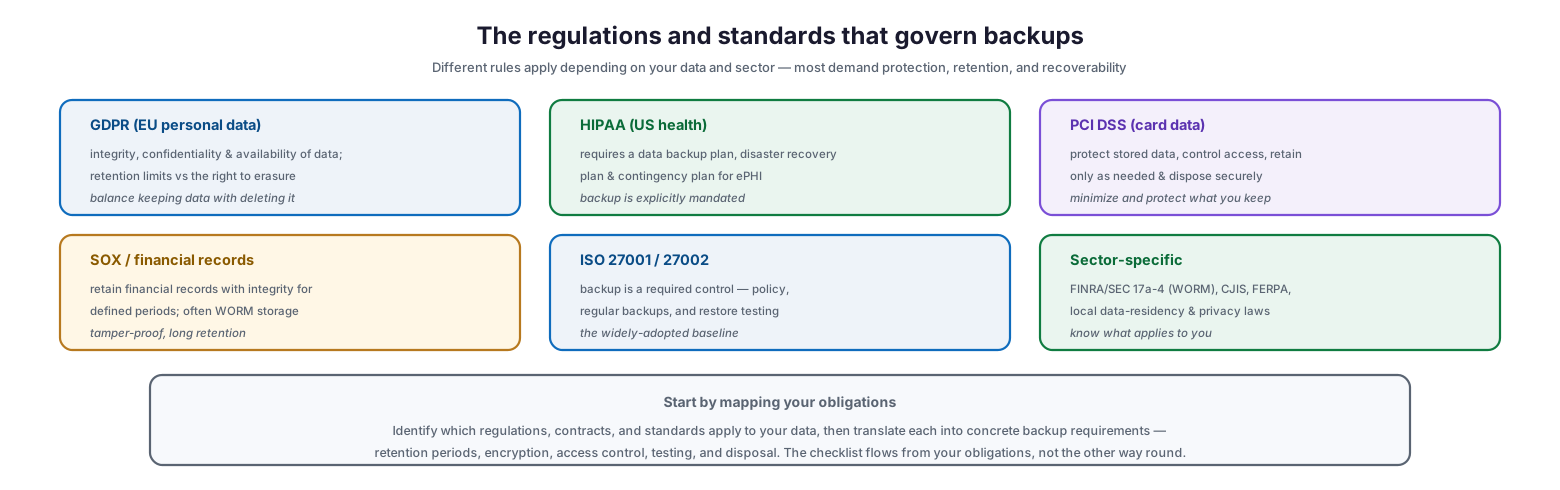
GDPR, governing EU personal data, requires the integrity, confidentiality, and availability of data, and creates a tension between retention limits and the right to erasure. HIPAA, covering US health information, explicitly mandates a data backup plan, a disaster recovery plan, and a contingency plan for electronic protected health information — here backup is not optional but required. PCI DSS, for payment-card data, requires protecting stored data, controlling access, retaining data only as long as needed, and disposing of it securely. SOX and financial-records rules require retaining financial records with integrity for defined periods, often on write-once (WORM) storage. ISO 27001 and 27002 make backup a required control, calling for a policy, regular backups, and restore testing — the widely adopted baseline. And sector-specific rules — FINRA and SEC 17a-4 with its WORM requirement, CJIS, FERPA, and local data-residency and privacy laws — add their own demands. The practical starting point is to map your obligations: identify which regulations, contracts, and standards apply to your data, then translate each into concrete backup requirements. The checklist flows from your obligations, not the other way round.
| Regulation / standard | Applies to | Key backup demand |
|---|---|---|
| GDPR | EU personal data | Integrity, confidentiality, availability; retention limits vs erasure |
| HIPAA | US health data (ePHI) | Mandated data backup, DR, and contingency plans |
| PCI DSS | Payment-card data | Protect stored data, control access, retain minimally, dispose securely |
| SOX / financial | Financial records | Retain with integrity for defined periods; often WORM |
| ISO 27001 / 27002 | General baseline | Backup policy, regular backups, restore testing |
| Sector-specific | FINRA/SEC, CJIS, FERPA, etc. | WORM, residency, and sector rules |
The Six Control Domains
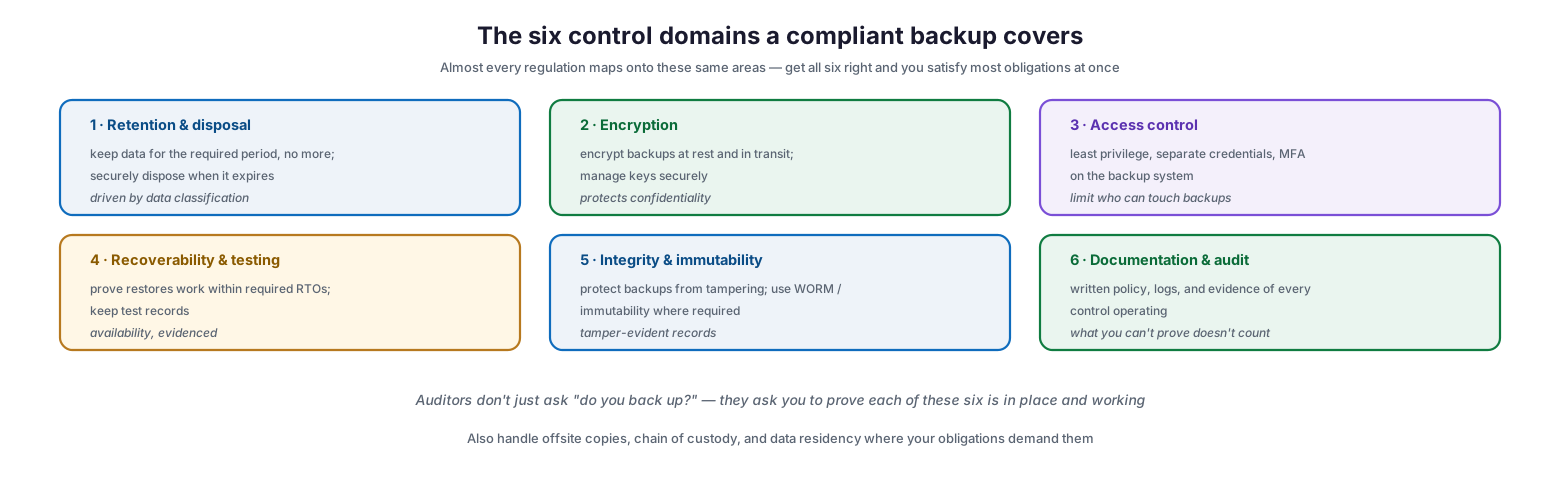
The good news is that the many regulations largely overlap. Nearly every requirement maps onto the same six control domains, so getting all six right satisfies most obligations at once.
The six control domains a compliant backup covers
Retention and disposal means keeping data for the required period and no longer, and securely disposing of it when it expires, driven by data classification. Encryption means encrypting backups at rest and in transit and managing the keys securely, protecting confidentiality. Access control means least privilege, separate credentials, and MFA on the backup system, limiting who can touch backups. Recoverability and testing means proving that restores work within the required recovery time objectives and keeping the test records that evidence it. Integrity and immutability means protecting backups from tampering and using WORM or immutability where required, producing tamper-evident records. And documentation and audit means maintaining a written policy, logs, and evidence of every control operating — because what you cannot prove does not count. Auditors do not simply ask “do you back up?”; they ask an organization to prove each of these six domains is in place and working. Beyond the six, obligations may also require attention to offsite copies, chain of custody, and data residency.
| Domain | What it requires |
|---|---|
| Retention & disposal | Keep for the required period, dispose securely after |
| Encryption | Encrypt at rest and in transit; manage keys |
| Access control | Least privilege, separate credentials, MFA |
| Recoverability & testing | Prove restores meet RTOs; keep test records |
| Integrity & immutability | Tamper protection; WORM where required |
| Documentation & audit | Written policy, logs, evidence of operation |
The Retention Tension
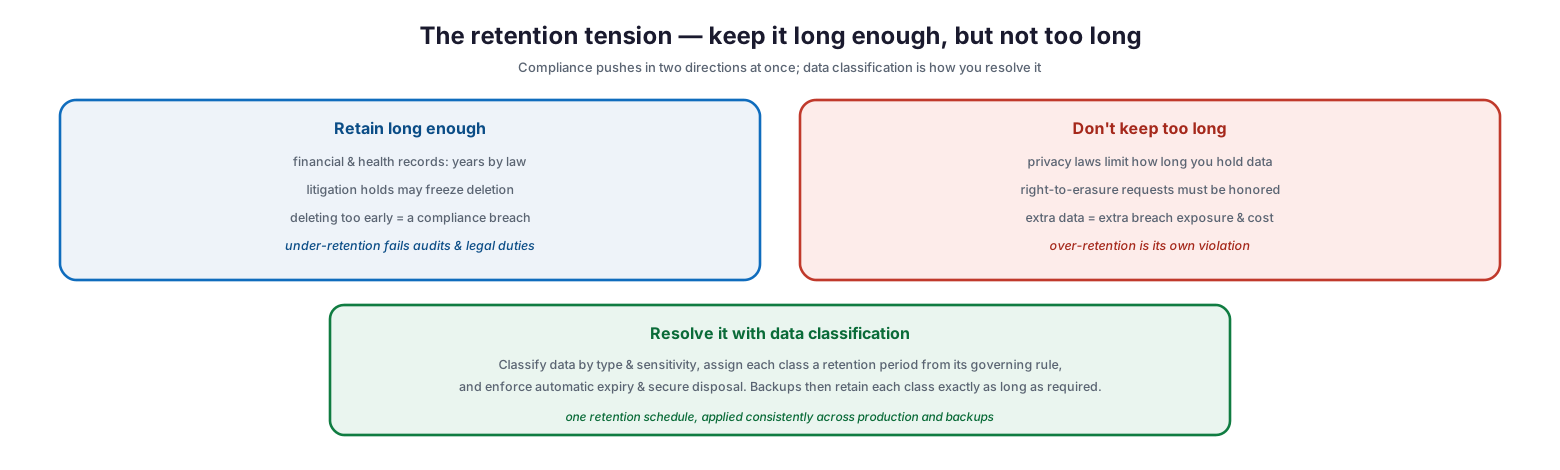
Of all the compliance requirements, retention is the one that most often trips organizations up, because it pulls in two opposite directions at the same time. Resolving that tension is central to backup compliance.
The retention tension — keep it long enough, but not too long
On one side, data must be retained long enough: financial and health records must be kept for years by law, litigation holds may freeze deletion entirely, and deleting data too early is itself a compliance breach — under-retention fails audits and legal duties. On the other side, data must not be kept too long: privacy laws limit how long personal data can be held, right-to-erasure requests must be honored, and every extra piece of retained data adds breach exposure and cost — over-retention is its own violation. The way to resolve this apparent contradiction is data classification: classify data by type and sensitivity, assign each class a retention period drawn from its governing rule, and enforce automatic expiry and secure disposal. Backups then retain each class of data exactly as long as required — no more, no less. The key is a single retention schedule applied consistently across both production systems and backups, so that a record deleted for privacy reasons does not quietly live on in a backup past its lawful life, and a record required for compliance is not lost because a backup rotated it away.
The schedule maps each data class to a retention period drawn from its governing obligation (illustrative):
| Data class | Example driver | Typical retention |
|---|---|---|
| Financial records | Tax / SOX rules | Several years (often 7) |
| Health records (ePHI) | HIPAA / local health law | Years, per jurisdiction |
| Payment-card data | PCI DSS | Minimal — only as needed |
| Personal data (general) | GDPR / privacy law | Only as long as necessary; erase on request |
| Operational / logs | Internal / security policy | Months to a few years |
The Backup Compliance Checklist
All of the preceding comes together in a practical checklist. If an organization can tick every box with evidence, it will stand up to most audits.
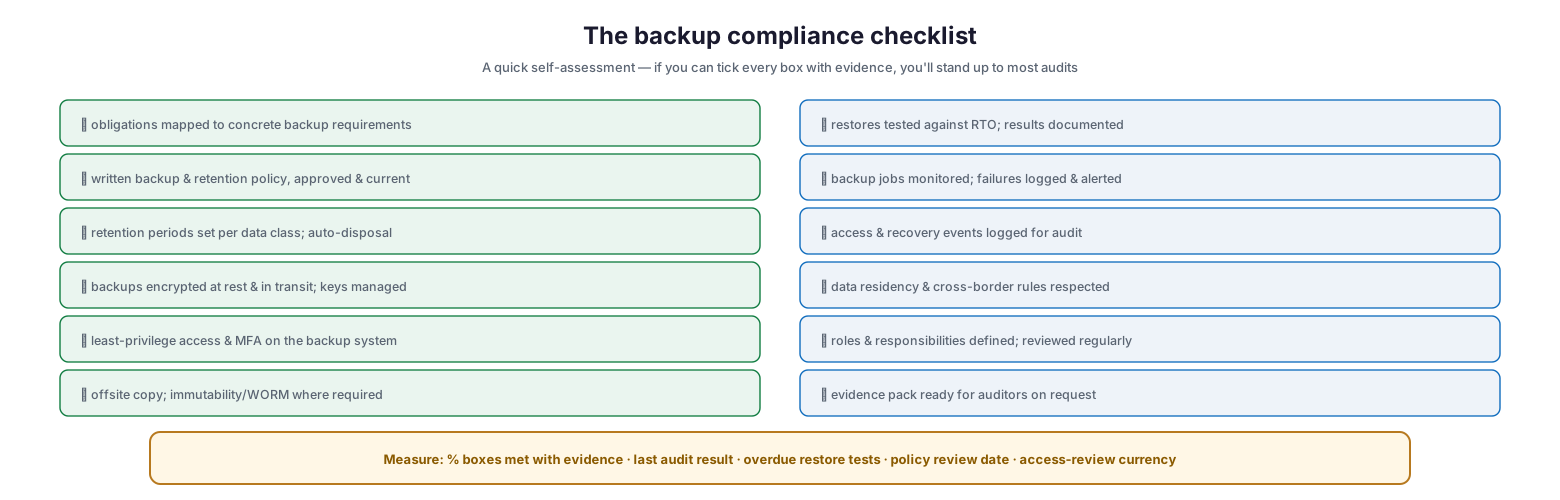
The backup compliance checklist
The checklist spans the full scope of compliance: obligations mapped to concrete backup requirements; a written, approved, current backup and retention policy; retention periods set per data class with automatic disposal; backups encrypted at rest and in transit with managed keys; least-privilege access and MFA on the backup system; an offsite copy and immutability or WORM where required; restores tested against the RTO with documented results; backup jobs monitored and failures logged and alerted; access and recovery events logged for audit; data residency and cross-border rules respected; roles and responsibilities defined and reviewed; and an evidence pack ready for auditors on request. The recurring theme is evidence — nearly every item pairs a control with proof that the control operates. Measured by the percentage of boxes met with evidence, the last audit result, overdue restore tests, the policy review date, and access-review currency, backup compliance becomes a tracked, demonstrable posture rather than an anxious guess before each audit.
Backup Compliance Checklist (Detailed)
- Map every applicable regulation, standard, and contractual obligation to specific backup requirements.
- Maintain a written, approved, and current backup and data-retention policy.
- Classify data and assign each class a retention period from its governing rule.
- Enforce automatic expiry and secure disposal when retention ends.
- Encrypt all backups at rest and in transit, and manage encryption keys securely.
- Apply least-privilege access, separate credentials, and MFA to the backup system.
- Keep at least one offsite copy, and use immutability or WORM where required.
- Test restores against required RTOs and retain dated test records.
- Monitor backup jobs and log, alert on, and remediate failures.
- Log access to, and recovery from, backups for audit purposes.
- Respect data-residency and cross-border transfer rules for backup copies.
- Honor right-to-erasure and litigation holds consistently across production and backups.
- Define backup roles and responsibilities and review them regularly.
- Assemble and maintain an evidence pack — policy, logs, test records — ready for auditors.
Best Practices
Start from your obligations, not your tools. Identify exactly which laws, standards, and contracts apply to your data, then translate each into concrete backup requirements. Compliance flows from obligations, and a control with no obligation behind it may be effort misspent.
Classify data to drive retention. The retention tension is resolvable only with data classification. Assign each class a retention period from its governing rule, and apply that schedule consistently to production and backups alike.
Make everything provable. Auditors test evidence, not intentions. Pair every control with documentation — policy, logs, test records — so that a working backup program is also a demonstrable one.
Encrypt and lock down access. Backups concentrate an organization’s data and are a prime target. Encrypt them at rest and in transit, and restrict access with least privilege, separate credentials, and MFA.
Test and record restores. Recoverability is a compliance requirement in its own right, and an untested backup cannot be evidenced. Test restores against your RTOs and keep dated records of the results.
Automate expiry and disposal. Manual retention management drifts out of compliance. Automate expiry and secure disposal so data is neither kept too long nor deleted too early, and so backups reflect erasure obligations.
Common Mistakes
Treating backup as purely operational. Viewing backups only as a recovery tool overlooks the legal duties around retention, protection, and provability, leaving an organization exposed at audit even when recovery works.
Backing up without a policy. Without a written, approved retention and backup policy, there is nothing to audit against and no basis to demonstrate compliance. The policy is foundational.
Ignoring the retention tension. Keeping everything forever violates privacy and erasure rules; deleting too soon breaches retention duties. Both are failures, and only data classification resolves them.
Neglecting evidence. Running strong controls but keeping no records means failing audits despite doing the work. If you cannot prove it, it does not count.
Leaving backups unencrypted or wide open. Unencrypted backups or backups accessible to too many accounts are both a security risk and a compliance breach under most frameworks.
Forgetting backups in erasure and residency. Honoring a deletion request or a data-residency rule in production but not in backups leaves non-compliant copies lingering out of sight.
Frequently Asked Questions
Is backing up data a legal requirement? For many organizations, yes. Regulations such as HIPAA explicitly mandate backup and contingency plans, and standards like ISO 27001 make backup a required control. Even where not named directly, retention, availability, and data-protection obligations effectively require backups.
How long do we have to keep backups? It depends on the data and the rules that govern it — financial and health records often must be kept for years, while personal data must not be kept longer than necessary. Use data classification to assign each class its required retention period.
Do backups need to be encrypted for compliance? In almost all cases, yes. Most data-protection regulations and standards require that data, including backups, be protected against unauthorized access, and encryption at rest and in transit is the standard way to satisfy that requirement.
How does the right to erasure affect backups? Privacy laws like GDPR give individuals the right to have their data deleted, and that obligation extends to backups. Organizations must be able to honor erasure across production and backup copies, typically through retention schedules and controlled processes rather than editing individual backups.
What evidence do auditors want to see? A written backup and retention policy, records of restore tests, backup job logs, access and recovery logs, encryption and access-control configuration, and proof that retention and disposal operate as documented. Auditors verify that each control both exists and functions.
What is the difference between backup and backup compliance? Backup is the technical capability to recover data. Backup compliance is ensuring that capability meets external legal, regulatory, and contractual requirements — the right retention, protection, recoverability, and documentation — and can be proven to do so.
Conclusion
A backup program is not complete when it recovers data reliably; it is complete when it also satisfies the legal, regulatory, and contractual obligations that govern that data — and can prove it. Regulators expect backups to be protected, retained for the right period, recoverable within required timeframes, and evidenced by documentation and logs. Meeting those expectations means mapping obligations to controls, resolving the retention tension through data classification, and covering the six domains — retention and disposal, encryption, access control, recoverability and testing, integrity and immutability, and documentation and audit — that nearly every rule maps onto.
The practical path is the checklist: work through each item, tick it only when it is backed by evidence, and maintain the evidence pack so that an audit becomes a demonstration rather than a scramble. Above all, remember that in compliance, what cannot be proven does not count — a technically flawless backup that is undocumented will still fail an audit. Build compliance into the backup program from the start, classify data to drive retention, test and record restores, and keep the evidence current. Do that, and the organization gains not only dependable recovery but a backup posture that withstands scrutiny — protecting it from regulatory penalties and lost trust as surely as from data loss.
References
- ISO/IEC 27002 — Information security controls (backup control 8.13)
- NIST SP 800-53 — Contingency Planning (CP-9 Information System Backup)
- GDPR — Article 32, Security of processing
- HIPAA Security Rule — Contingency plan (data backup, disaster recovery)
- PCI DSS — Official standards and resources
- NIST SP 800-34 Rev. 1 — Contingency Planning Guide
- SEC Rule 17a-4 — Records retention (WORM)