Disaster Recovery Planning
Every business will eventually face an event it cannot absorb in the normal course of operations — a region-wide cloud outage, a ransomware attack that corrupts production data, a failed deployment, or a serious human error.
- Content owner
- Insyto Content Team
- Editorial reviewer
- Ritesh Mhatre
- Technical reviewer
- Navish Ansari
- Next review
- To be scheduled
- Last reviewed
- Review pending
- Technical level
- Intermediate · IT directors, infrastructure and recovery teams
Executive Summary
Every business will eventually face an event it cannot absorb in the normal course of operations — a region-wide cloud outage, a ransomware attack that corrupts production data, a failed deployment, or a serious human error. High availability handles the small, frequent failures that happen every day; disaster recovery is the discipline of planning for the rare, catastrophic ones. The difference between an organization that survives such an event and one that suffers days of downtime and permanent data loss is almost never the technology available to them. It is whether they planned, and whether they tested the plan.
Disaster recovery planning is the process of identifying what could go catastrophically wrong, deciding how much data loss and downtime the business can tolerate for each critical system, and putting in place the replication, failover, backup, and documented procedures needed to recover within those limits. Two numbers anchor the entire exercise: the recovery point objective (how much data you can afford to lose) and the recovery time objective (how quickly you must be back online). Everything else — the strategy you choose, the tools you deploy, the money you spend — flows from agreeing those numbers with the business.
This guide gives IT leaders a practical, vendor-accurate approach to disaster recovery planning. It explains the relationship between business continuity, high availability, and disaster recovery; how to run the planning process from criticality classification through risk mitigation; how to set realistic recovery objectives; the spectrum of DR strategies from simple backup-and-restore to active-active; how Azure services such as Azure Site Recovery and Azure Backup support failover and recovery; and why testing is the step that separates a real plan from a false sense of security. Backing up Microsoft 365 data specifically is covered in the companion Microsoft 365 backup strategy guide; this article addresses organization-wide continuity. Because platform capabilities evolve, verify specifics against the linked Microsoft documentation.
Who should read this:
- CIOs, CTOs, and IT directors accountable for business continuity
- IT and infrastructure managers who own recovery procedures
- Risk, compliance, and finance leaders weighing downtime exposure
- SMB decision-makers investing in resilience
How do business continuity, HA, and DR relate?
Microsoft’s business continuity, high availability, and disaster recovery guidance defines the terms precisely, and the distinction matters for planning. Business continuity is the overall state in which a business can keep operating through failures, outages, and disasters. It is achieved through two complementary disciplines. High availability designs a system to be resilient to day-to-day, common issues — transient network blips, a virtual machine reboot, a busy service timing out. Disaster recovery plans for the uncommon, catastrophic risks that no amount of everyday resilience can absorb.
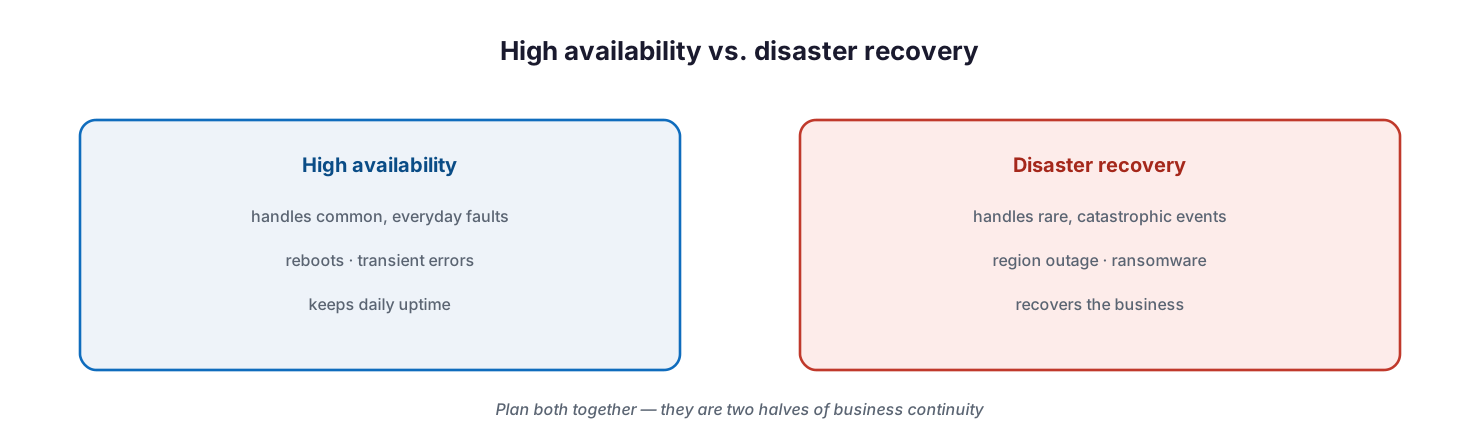
High availability versus disaster recovery: high availability handles common, everyday faults such as reboots and transient errors to keep daily uptime, while disaster recovery handles rare, catastrophic events such as region outages and ransomware to recover the business.
The two are interrelated and must be planned together. The same risk can even be classified differently depending on architecture: a full region outage is a disaster for a single-region workload, but merely a high-availability event for a workload running active-active across multiple regions with automatic failover. The practical takeaway is that disaster recovery is not a product you buy; it is a plan you design against defined risks and objectives, supported by the resilience features of your platform.
What are the steps of continuity planning?
A disaster recovery plan is the output of a structured process, not a document written from scratch in a crisis. Microsoft frames continuity planning as four sequential steps, and following them keeps the effort grounded in business need rather than technology for its own sake.
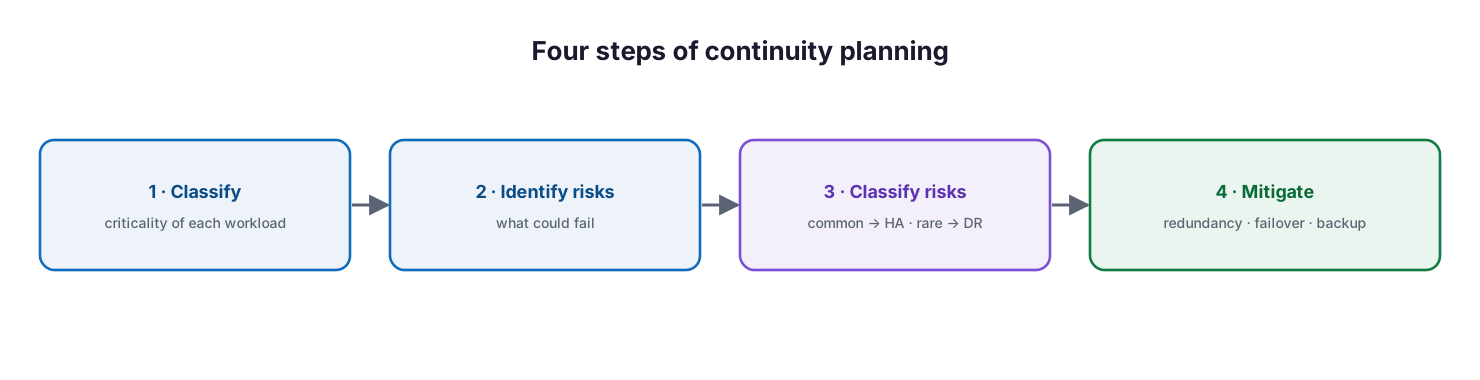
Four steps of continuity planning: classify the criticality of each workload, identify risks, classify each risk as common (high availability) or rare (disaster recovery), and mitigate with redundancy, failover, and backup.
First, classify the criticality of each workload — a financial system demands far more than an internal supply-ordering tool. Second, identify the risks to each workload’s availability and functionality, from hardware failure and datacenter outage to region outage, data corruption, failed deployments, denial-of-service attacks, and rogue administrators. Third, classify each risk as common — to be handled by high availability — or uncommon, to be handled by disaster recovery. Fourth, design mitigations: redundancy, data replication, failover, and backups on the technology side, and playbooks, manual fallback procedures, and training on the human side. Crucially, this is a continuous process; the plan must be reviewed and updated regularly to stay relevant as the business changes.
How do you set recovery objectives?
Two objectives turn a vague desire for resilience into concrete, testable requirements. The recovery point objective (RPO) is the maximum amount of data loss the business can accept, measured in time — “thirty minutes of data” or “four hours of data” — and it dictates how frequently you must replicate or back up. The recovery time objective (RTO) is the maximum acceptable downtime, and it dictates how fast your recovery mechanism must be. Each critical workload, and sometimes each flow within it, has its own RPO and RTO.
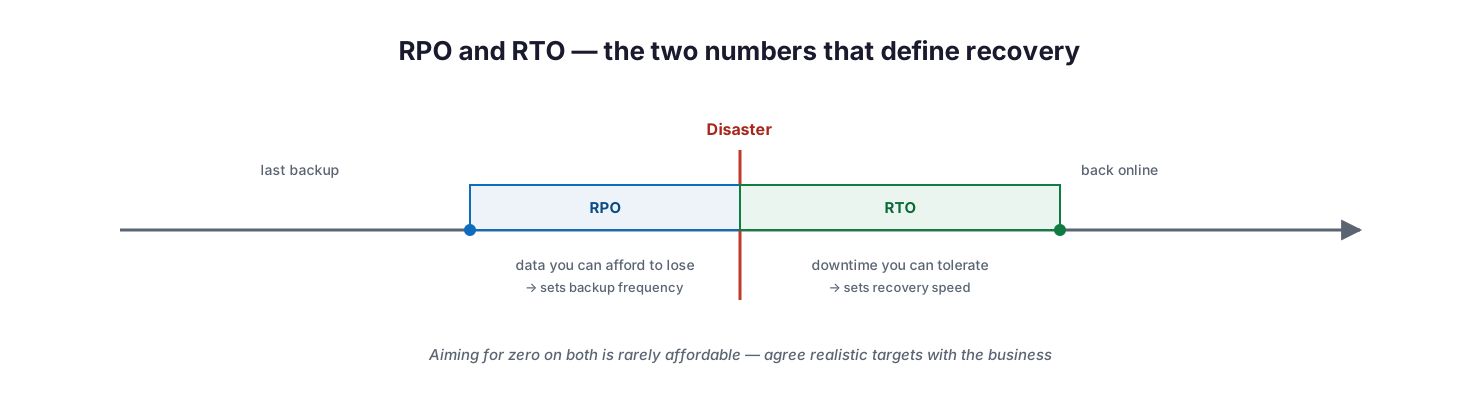
RPO and RTO on a timeline: RPO is the amount of data before the disaster you can afford to lose and sets backup frequency, while RTO is the downtime after the disaster you can tolerate and sets recovery speed.
The temptation is to demand zero data loss and zero downtime, but in practice that is difficult and expensive to achieve, and rarely justified for every system. The right approach is a business conversation, not a technical one: stakeholders weigh the cost of downtime and data loss against the cost of the resilience required to prevent it, and agree realistic targets per workload. Those agreed numbers then become the design constraints for everything that follows — the failover time of your solution must be within its RTO, and your backup interval must be within its RPO.
Which disaster recovery strategy should you choose?
There is no single disaster recovery strategy; there is a spectrum, and different workloads sit at different points on it depending on their recovery objectives and the budget the business will fund. The trade-off is consistent across the spectrum: faster recovery costs more.
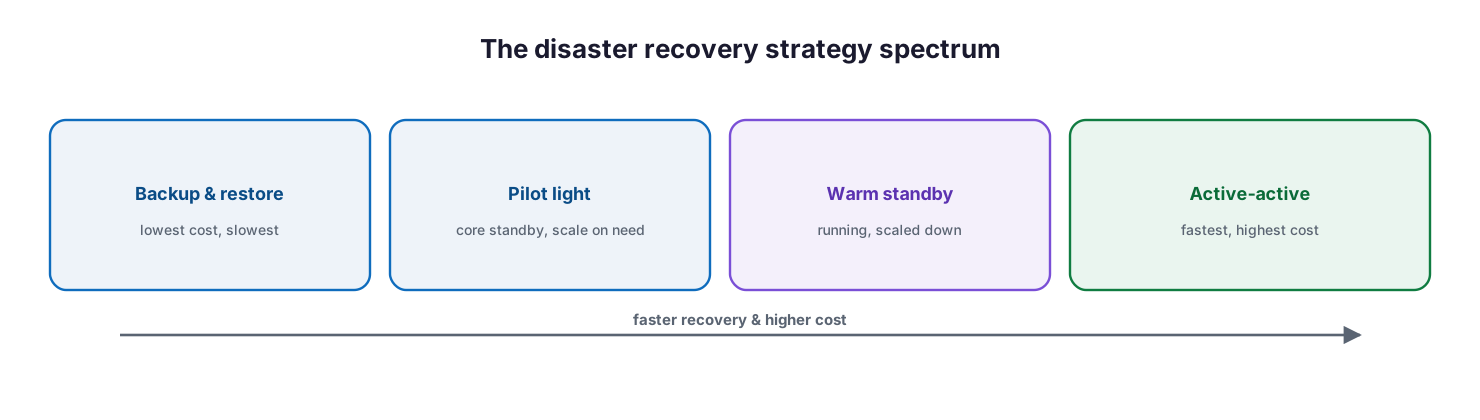
The disaster recovery strategy spectrum: backup and restore is lowest cost and slowest, pilot light keeps core components on standby, warm standby runs a scaled-down copy, and active-active is fastest and highest cost — moving right increases recovery speed and cost.
At the economical end, backup and restore keeps copies of data in a separate location and rebuilds the environment when needed — cheapest, but slowest, and it involves some data loss. Pilot light keeps the core elements of the system provisioned and ready, scaling them up only when a disaster strikes. Warm standby runs a fully functional but scaled-down copy that can take over quickly. At the premium end, active-active runs the workload across multiple locations simultaneously, so a failure in one is absorbed with little or no downtime. Microsoft’s Well-Architected disaster recovery guidance helps map each workload’s criticality tier to the appropriate strategy. Most SMBs use a mix — active-active or warm standby for the few truly critical systems, backup and restore for everything else.
How does Azure support failover and recovery?
Disaster recovery is not an automatic feature of the cloud, but Azure provides services that implement the strategies above. The two pillars are replication with failover, and backup. Azure Site Recovery is Microsoft’s business-continuity service for keeping applications running through an outage: it replicates workloads running on Azure VMs, on-premises VMware and Hyper-V machines, and physical servers from a primary site to a secondary location, then orchestrates failover when the primary fails and failback once it recovers — all managed from the Azure portal.
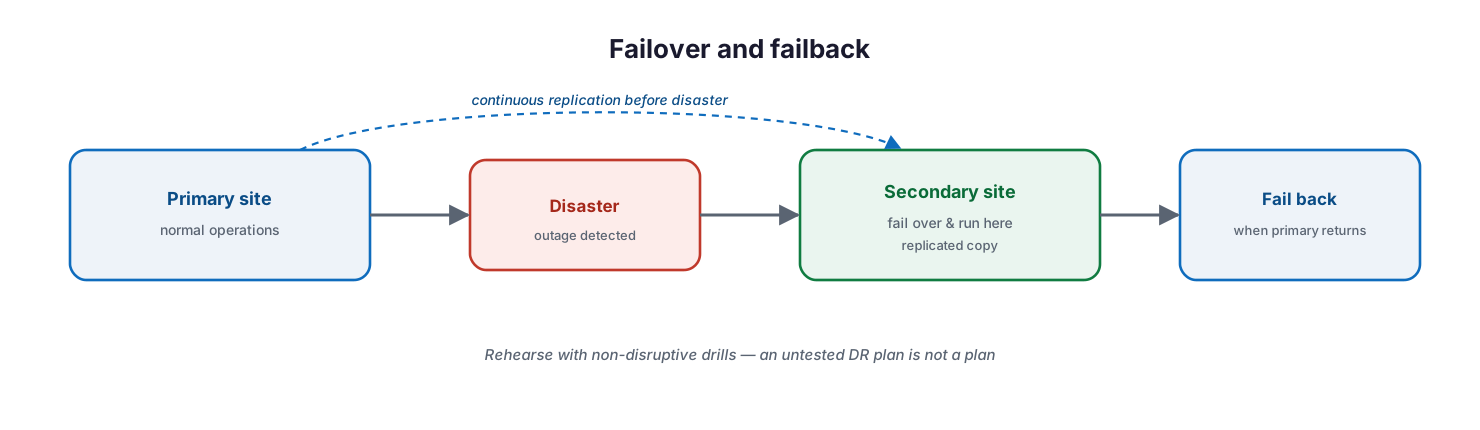
Failover and failback: a primary site replicates continuously to a secondary site; when a disaster is detected, operations fail over to the secondary site and run there, then fail back to the primary when it returns.
Several capabilities make it practical for real recovery objectives. It offers continuous replication for Azure and VMware VMs (as frequent as every 30 seconds for Hyper-V), application-consistent recovery points, and customized recovery plans that sequence the failover of multi-tier applications and can invoke automation runbooks. Critically, it supports non-disruptive disaster recovery drills, so you can rehearse without affecting production. Alongside it, Azure Backup keeps data safe and recoverable, and backups used for DR should be stored in a separate region from the primary data. Traffic services such as Azure Front Door and Azure Traffic Manager automate the redirection of incoming traffic between deployments during a failover.
Why is testing the most important step?
A disaster recovery plan that has never been tested is a hypothesis, not a plan. Microsoft’s guidance is unambiguous: if you have not tested your recovery processes in a simulation, you are far more likely to face major problems during a real disaster — and testing is how you validate that your RTO is actually achievable. Restoration from backup, in particular, often takes longer than expected, and only a real drill reveals whether the business can recover within its agreed limits.
Effective testing goes beyond the technical mechanics. Drills should include the human processes — the runbook steps, the communication plan, and the escalation path that a good DR plan documents — because in a real event people execute the plan under pressure. Run drills on a schedule and after any significant change, cover both the failover and the failback, and treat every drill as a chance to find and fix gaps before they matter. Infrastructure-as-code assets make recovery faster and more reliable by letting you redeploy environments consistently rather than rebuilding them by hand.
Managed DR service model: ownership, controls, and service levels
Delivered as a managed service, disaster recovery is an accountable, tested capability rather than a document in a drawer. The tables below define it for CIO-level evaluation: who owns each activity, the tool behind it, the cadence, the risk if it lapses, and the business value it protects.
Responsibility matrix (RACI)
| Service area | Activity | MSP team (Responsible) | Customer IT / CIO (Accountable) | Consulted | Informed | Tooling | SLA / impact |
|---|---|---|---|---|---|---|---|
| Objectives | Classify criticality; set RPO/RTO | MSP vCIO | CIO | Business owners | Finance | BIA workshop | Objectives agreed per workload |
| Replication | Configure & maintain replication | MSP Infra | CIO | Customer IT | Executive team | Azure Site Recovery | Meets agreed RPO |
| Failover | Execute failover on disaster | MSP Infra | CIO | Customer IT | All staff | Azure Site Recovery | Meets agreed RTO |
| Backup for DR | Maintain off-region backups | MSP Backup | CIO | Compliance | Customer IT | Azure Backup | Recoverable off-region |
| DR testing | Run non-disruptive drills | MSP Infra | CIO | Customer IT | Executive team | ASR test failover | Drill passes; RTO validated |
| Runbook & comms | Maintain plan, comms, escalation | MSP vCIO | CIO | Customer IT | All staff | DR runbook | Plan current and actionable |
Service control matrix
| Domain | Service / control | Description | Tool used | Frequency | Risk if missing |
|---|---|---|---|---|---|
| Infrastructure | Workload replication | Replicate to a secondary region | Azure Site Recovery | Continuous | No failover target exists |
| Backup | Off-region backup | Recoverable copies in another region | Azure Backup | Daily | Single point of failure |
| Infrastructure | Recovery plans | Sequenced multi-tier failover | ASR recovery plans | Per change | Chaotic, slow recovery |
| Infrastructure | DR drills | Non-disruptive test failovers | ASR test failover | Quarterly | Untested plan fails |
| Process | Runbook & comms plan | Documented steps and escalation | DR runbook | Reviewed quarterly | Confusion during a crisis |
| Infrastructure | Failback | Return cleanly to primary | Azure Site Recovery | Post-incident | Prolonged, costly secondary run |
Operations lifecycle
| Stage | Activity | Outcome | Tool | Business impact |
|---|---|---|---|---|
| Monitor | Watch replication health | Replication healthy | Azure Site Recovery | Ready to fail over |
| Detect | Identify outage or disaster | Incident declared | Monitoring / ASR | Timely response |
| Respond | Execute failover | Service restored on secondary | Azure Site Recovery | Continuity maintained |
| Optimize | Tune RPO/RTO and plans | Improved resilience | ASR / WAF | Lower risk |
| Report | DR test & incident reporting | Auditable readiness | Reporting | Board-level assurance |
Decision matrix
| Scenario | Recommended action | Justification | Tool / service |
|---|---|---|---|
| Critical low-RTO application | Warm standby or active-active | Fast recovery is justified | Azure Site Recovery |
| Standard application | Backup & restore | Cost-effective for a higher RTO | Azure Backup |
| On-premises servers | Replicate to Azure | Avoids a second datacenter | Azure Site Recovery |
| Multi-tier application | Recovery plan with sequencing | Orderly, dependable failover | ASR recovery plans |
| Unknown recoverability | Run a DR drill | Validate RTO before a real event | ASR test failover |
| Microsoft 365 data | Use M365 backup (separate) | Covered by the backup strategy | Microsoft 365 Backup |
SLA / KPI scorecard
| Metric | Target | Tool | Business value |
|---|---|---|---|
| RPO achieved | ≤ agreed per workload | ASR / Azure Backup | Bounded data loss |
| RTO achieved | ≤ agreed per workload | Azure Site Recovery | Bounded downtime |
| Replication health | ≥99% healthy | Azure Site Recovery | Failover readiness |
| DR drill cadence | ≥ quarterly, passing | ASR test failover | Proven recovery |
| Off-region backup coverage | 100% of critical workloads | Azure Backup | Regional resilience |
| Plan review currency | Reviewed ≤ quarterly | DR runbook | Actionable in a crisis |
Implementation checklist
- Workloads are classified into criticality tiers agreed with the business
- Risks are identified and classified as common (HA) or uncommon (DR)
- RPO and RTO are defined and agreed for each critical workload
- A DR strategy is chosen per workload to match its objectives and budget
- Replication and/or failover is configured for critical systems
- Backups for DR are stored in a separate region from primary data
- A documented DR plan includes a runbook, communication plan, and escalation path
- Recovery is automated with infrastructure-as-code where possible
- DR drills are scheduled, including failover and failback, and human processes
- Tests confirm recovery meets the agreed RTO and RPO
- The plan is reviewed and updated on a regular cadence
Best practices
- Plan high availability and disaster recovery together as two halves of continuity.
- Drive every decision from business-agreed RPO and RTO, not from technology.
- Match the DR strategy to each workload’s criticality — do not over-engineer everything.
- Store DR backups in a different region from the primary data.
- Document a clear runbook, communication plan, and escalation path.
- Automate recovery with infrastructure-as-code to cut recovery time and error.
- Rehearse with non-disruptive drills, and include the people and processes.
- Plan failback deliberately, including how to reconcile data written during failover.
- Review and update the plan regularly as systems and risks change.
Common mistakes
- Treating disaster recovery as a product to buy rather than a plan to design and test.
- Confusing high availability with disaster recovery, and preparing for only one.
- Setting RPO and RTO in IT without a business conversation about cost and tolerance.
- Aiming for zero data loss and downtime everywhere, then funding none of it properly.
- Storing backups in the same region as the data they are meant to protect.
- Writing a DR plan and never testing it, then discovering it fails under pressure.
- Ignoring failback, so the return to normal operations becomes its own crisis.
- Leaving human processes — communication, escalation — out of the plan and the drills.
Frequently asked questions
What is the difference between high availability and disaster recovery?
High availability keeps a system running through common, everyday faults such as reboots and transient errors. Disaster recovery plans for rare, catastrophic events such as a region outage or ransomware. Both are needed, and they should be planned together.
What are RPO and RTO?
RPO (recovery point objective) is the maximum data loss you can accept, which sets how often you replicate or back up. RTO (recovery time objective) is the maximum downtime you can accept, which sets how fast recovery must be. Both are agreed with the business per workload.
Which disaster recovery strategy is best?
It depends on the workload. Backup and restore is cheapest and slowest; pilot light and warm standby offer faster recovery at higher cost; active-active gives the fastest recovery but the highest cost. Most organizations mix strategies by workload criticality.
What is Azure Site Recovery?
It is Microsoft’s service for replicating workloads from a primary site to a secondary location and orchestrating failover and failback. It supports Azure VMs, on-premises VMware and Hyper-V, and physical servers, with recovery plans and non-disruptive drills.
How often should we test the DR plan?
On a regular schedule and after any major change. Test both failover and failback, include the human processes, and confirm that recovery meets your agreed RTO and RPO. An untested plan should not be trusted.
Does this cover Microsoft 365 data?
This guide addresses organization-wide continuity and failover. Protecting Microsoft 365 mailboxes, files, and sites specifically is covered in the companion Microsoft 365 backup strategy guide, which complements this plan.
Conclusion
Disaster recovery planning is fundamentally a business exercise supported by technology. It starts by classifying what matters, identifying what could go catastrophically wrong, and agreeing — with the business — how much data loss and downtime each critical system can tolerate. Those recovery objectives then drive a strategy per workload, from simple backup and restore to full active-active, implemented with services like Azure Site Recovery and Azure Backup and documented in a clear runbook. The final and most important step is to test: a plan proven in a drill is resilience, while a plan on paper is only hope.
The path forward is concrete: classify your workloads, set RPO and RTO with the business, choose and implement a strategy for each, document the runbook and communication plan, and put drills on the calendar. For the Microsoft 365 data layer that underpins much of this, see the companion Microsoft 365 backup strategy guide, and treat both as living documents reviewed as the business grows.
Authoritative references
All sources are official Microsoft documentation. Verify current features before acting; capabilities change frequently. Source access date: 28 July 2026.
- Business continuity, high availability, and disaster recovery — Microsoft Learn
- About Azure Site Recovery — Microsoft Learn
- Azure Backup overview — Microsoft Learn
- Well-Architected Framework: Reliability pillar — Microsoft Learn
- Recommendations for designing a disaster recovery strategy — Microsoft Learn
- Failover and failback — Microsoft Learn
- Redundancy, replication, and backup — Microsoft Learn
- Azure region pairs and nonpaired regions — Microsoft Learn
- Recommendations for designing a reliability testing strategy — Microsoft Learn
- Recommendations for defining reliability targets — Microsoft Learn
On this page
- Executive Summary
- How do business continuity, HA, and DR relate?
- What are the steps of continuity planning?
- How do you set recovery objectives?
- Which disaster recovery strategy should you choose?
- How does Azure support failover and recovery?
- Why is testing the most important step?
- Managed DR service model: ownership, controls, and service levels
- Responsibility matrix (RACI)
- Service control matrix
- Operations lifecycle
- Decision matrix
- SLA / KPI scorecard
- Implementation checklist
- Best practices
- Common mistakes
- Frequently asked questions
- Conclusion
- Authoritative references