VPN Best Practices: Secure Remote Access Without Becoming a Target
The virtual private network has been the default answer to a simple question for two decades: how do people and offices connect securely to corporate resources across the untrusted internet?
- Content owner
- Insyto Content Team
- Editorial reviewer
- Ritesh Mhatre
- Technical reviewer
- Navish Ansari
- Next review
- To be scheduled
- Last reviewed
- Review pending
- Technical level
- Intermediate · IT directors, network and infrastructure teams
Executive Summary
The virtual private network has been the default answer to a simple question for two decades: how do people and offices connect securely to corporate resources across the untrusted internet? A VPN builds an encrypted tunnel so that traffic which would otherwise cross the open network in plain sight becomes confidential, integrity-checked, and authenticated. For remote and hybrid workforces, branch offices, and cloud connectivity, it remains a foundational tool. But the VPN’s very role — a trusted, always-available doorway into the network — has also made it one of the most attacked pieces of infrastructure an organization operates. The gateway sits internet-facing by definition, and when it is breached, attackers do not just intercept traffic; they gain a foothold inside.
That dual nature is the central theme of modern VPN practice. A VPN done well is a strong security control; a VPN done carelessly is a liability that hands adversaries the keys. The difference comes down to a handful of decisions: choosing modern, uncompromised protocols; requiring multi-factor authentication on every connection; patching the gateway with the urgency of an emergency because VPN vulnerabilities are exploited within days of disclosure; and — crucially — abandoning the old assumption that a connected user should have broad access to the whole network. That last point is why the industry is steadily moving from network-level VPN access toward Zero Trust models that grant access to individual applications, verified continuously.
This vendor-neutral guide covers what it takes to run VPNs securely. It explains what a VPN does and the two main types, how to choose a protocol and retire the dangerous legacy ones, the six hardening controls every VPN deployment needs, the split-tunnel-versus-full-tunnel decision, and how VPNs are evolving toward Zero Trust Network Access. Grounded in established public-sector security guidance, the goal is remote access that genuinely protects the organization rather than quietly becoming its weakest point.
What a VPN Does
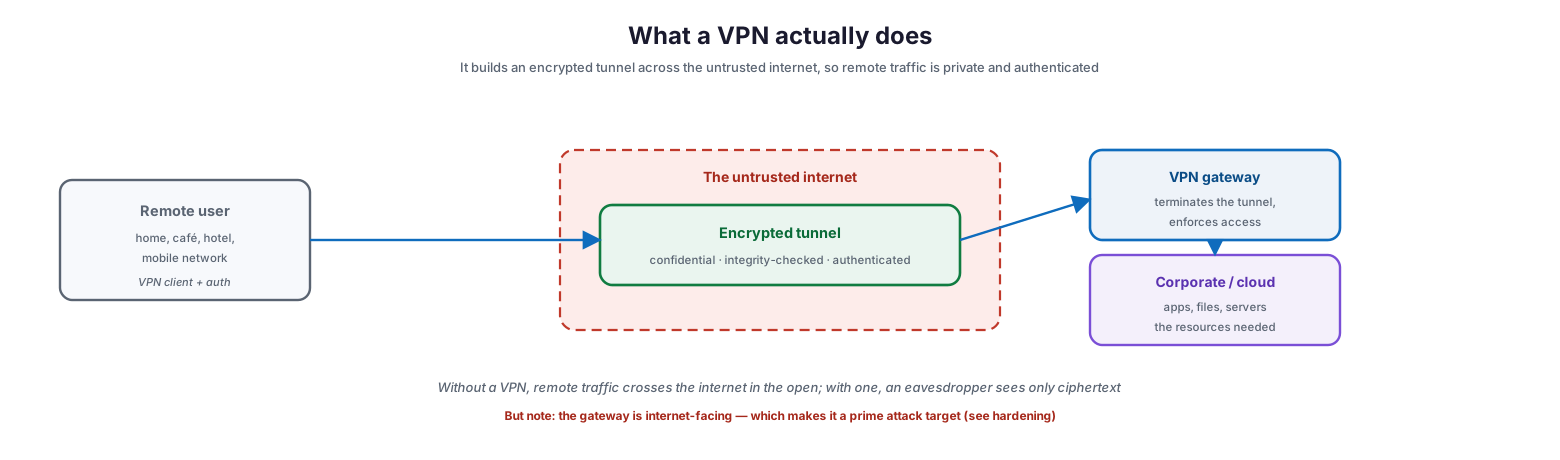
At its core, a VPN solves a confidentiality and trust problem created by the internet: traffic between a remote endpoint and corporate resources must cross networks the organization does not control.
What a VPN actually does
A VPN client on the remote device establishes an encrypted tunnel across that untrusted internet to a VPN gateway, which terminates the tunnel and forwards traffic to the corporate or cloud resources behind it. Inside the tunnel, data is encrypted so an eavesdropper sees only ciphertext, integrity-checked so tampering is detectable, and authenticated so both ends can trust who they are talking to. This is genuinely valuable protection — without it, remote traffic traverses the internet in the open. But the diagram also reveals the catch that defines modern VPN security: the gateway is internet-facing and therefore reachable by anyone, which makes it a prime target. A VPN protects the traffic, but the gateway itself must be protected with equal seriousness, or it becomes the very entry point it was meant to guard.
The Two Types of VPN
VPNs come in two architectures that solve different problems, and knowing which one fits a given need prevents both over-engineering and gaps.
The two kinds of VPN — and where each fits
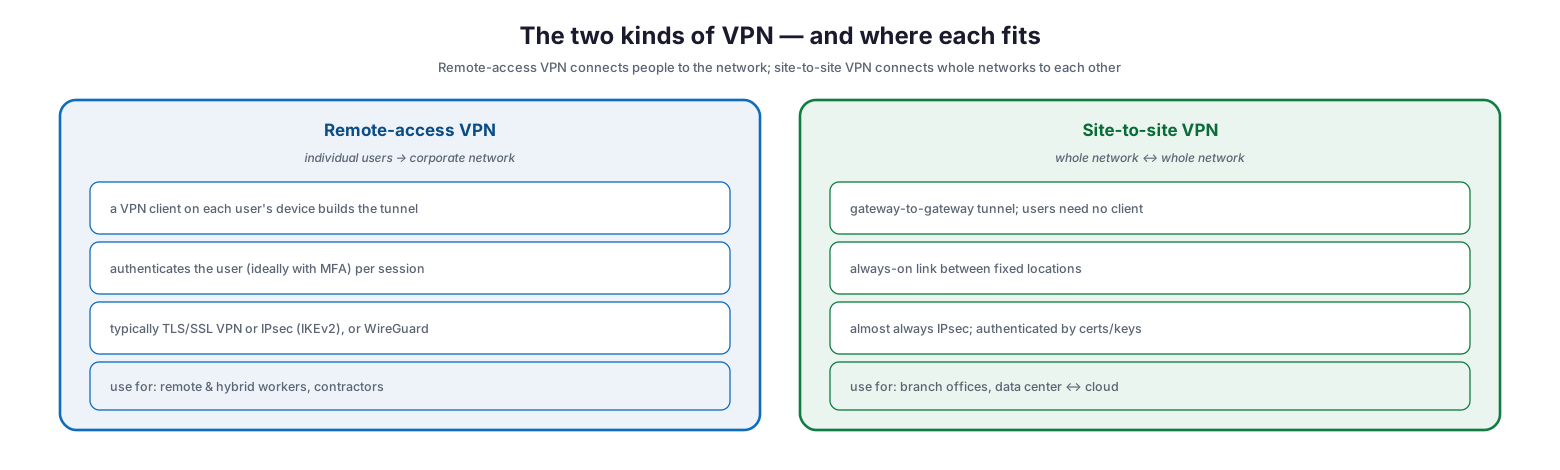
A remote-access VPN connects individual users to the corporate network. Each user’s device runs a VPN client that builds the tunnel, the user authenticates per session — ideally with multi-factor authentication — and the connection typically uses a TLS/SSL VPN, IPsec with IKEv2, or increasingly WireGuard. This is the model for remote and hybrid workers and contractors. A site-to-site VPN, by contrast, connects whole networks to one another through a gateway-to-gateway tunnel, so users at either location need no client of their own; it is an always-on link between fixed locations, almost always built on IPsec and authenticated with certificates or pre-shared keys. This is the model for connecting branch offices to headquarters or linking a data center to a cloud environment. Most organizations run both, and the security priorities differ: remote-access VPNs live or die by user authentication, while site-to-site VPNs depend on strong gateway configuration and key management.
| Aspect | Remote-access VPN | Site-to-site VPN |
|---|---|---|
| Connects | Individual users to the network | Whole networks to each other |
| Client needed | Yes, on each user device | No, gateway-to-gateway |
| Typical protocol | TLS/SSL VPN, IPsec/IKEv2, WireGuard | IPsec |
| Authentication | Per user (MFA strongly advised) | Certificates / pre-shared keys |
| Best for | Remote/hybrid workers, contractors | Branch offices, data center to cloud |
Choosing a Protocol
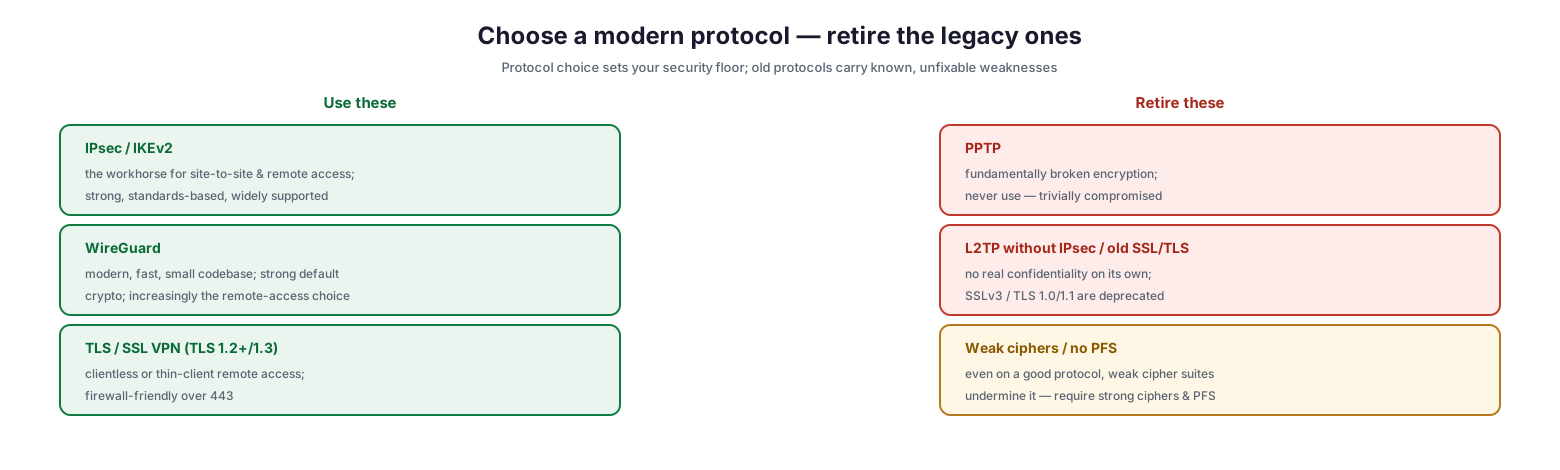
The protocol sets the security floor for a VPN, and this is one area where the right choices are clear and the wrong ones are dangerous. Legacy protocols carry known, unfixable weaknesses that no amount of configuration can overcome.
Choose a modern protocol — retire the legacy ones
Among the protocols to use, IPsec with IKEv2 is the standards-based workhorse for both site-to-site and remote access, strong and widely supported. WireGuard is a modern option with a small codebase, high performance, and strong default cryptography, increasingly favored for remote access. TLS/SSL VPNs using current TLS (1.2 or 1.3) provide clientless or thin-client remote access that is firewall-friendly over port 443. Among the protocols to retire, PPTP has fundamentally broken encryption and must never be used; L2TP without IPsec provides no real confidentiality on its own, and deprecated SSL/TLS versions (SSLv3, TLS 1.0 and 1.1) should be disabled. Even on a sound protocol, weak cipher suites or the absence of perfect forward secrecy undermine the whole tunnel, so strong ciphers and PFS should be required regardless of protocol.
| Protocol | Status | Notes |
|---|---|---|
| IPsec / IKEv2 | Recommended | Strong, standard, broad support; site-to-site and remote |
| WireGuard | Recommended | Modern, fast, strong defaults; growing for remote access |
| TLS / SSL VPN (TLS 1.2+/1.3) | Recommended | Clientless/thin-client, firewall-friendly over 443 |
| PPTP | Retire | Broken encryption — never use |
| L2TP without IPsec | Retire | No confidentiality on its own |
| SSLv3 / TLS 1.0-1.1 | Retire | Deprecated, known weaknesses |
Hardening the VPN
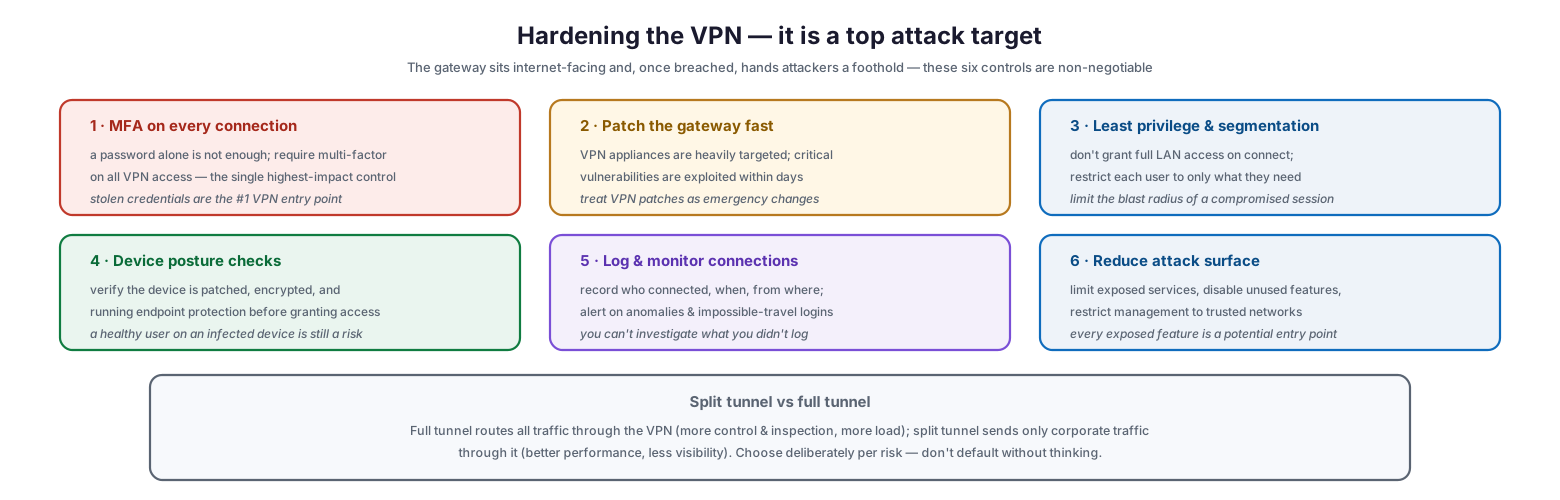
Because the gateway is internet-facing and a proven target, hardening is not optional polish — it is the difference between a security control and a breach waiting to happen. Six controls are non-negotiable.
Hardening the VPN — it is a top attack target
First, require multi-factor authentication on every connection; stolen credentials are the single most common way attackers get in through a VPN, and MFA is the highest-impact control available. Second, patch the gateway fast — VPN appliances are heavily targeted and critical vulnerabilities are routinely exploited within days of disclosure, so VPN patches should be treated as emergency changes. Third, apply least privilege and segmentation: a connected user should not land on a flat network with broad access, but be restricted to only the resources they need, limiting the blast radius of any compromised session. Fourth, enforce device posture checks so that access is granted only to devices that are patched, encrypted, and running endpoint protection — a legitimate user on an infected device is still a threat. Fifth, log and monitor connections, recording who connected, when, and from where, and alerting on anomalies such as impossible-travel logins. Sixth, reduce the attack surface by limiting exposed services, disabling unused features, and restricting management interfaces to trusted networks.
| Control | Why it matters |
|---|---|
| MFA on every connection | Stops stolen-credential access — the top VPN entry point |
| Patch the gateway fast | VPN vulnerabilities are exploited within days |
| Least privilege & segmentation | Limits blast radius of a compromised session |
| Device posture checks | Keeps unhealthy/infected devices out |
| Log & monitor connections | Enables detection and investigation |
| Reduce attack surface | Fewer exposed features, fewer entry points |
Cutting across hardening is the split-tunnel-versus-full-tunnel decision. A full tunnel routes all of a user’s traffic through the VPN, giving more control and inspection at the cost of higher load and latency; a split tunnel sends only corporate-bound traffic through the VPN, improving performance but reducing visibility into the rest of the user’s activity. Neither is universally correct — the choice should be made deliberately based on risk appetite and inspection needs, not left to a default.
Where VPNs Are Heading: Zero Trust
The deepest limitation of the traditional VPN is architectural: it grants trust at the network level. Once a user connects, they are effectively “inside,” with broad access to whatever the network segment allows, and that trust is granted at the door and rarely re-checked. A stolen or hijacked session therefore yields access to the flat network behind the gateway. This is why remote access is steadily evolving toward Zero Trust.
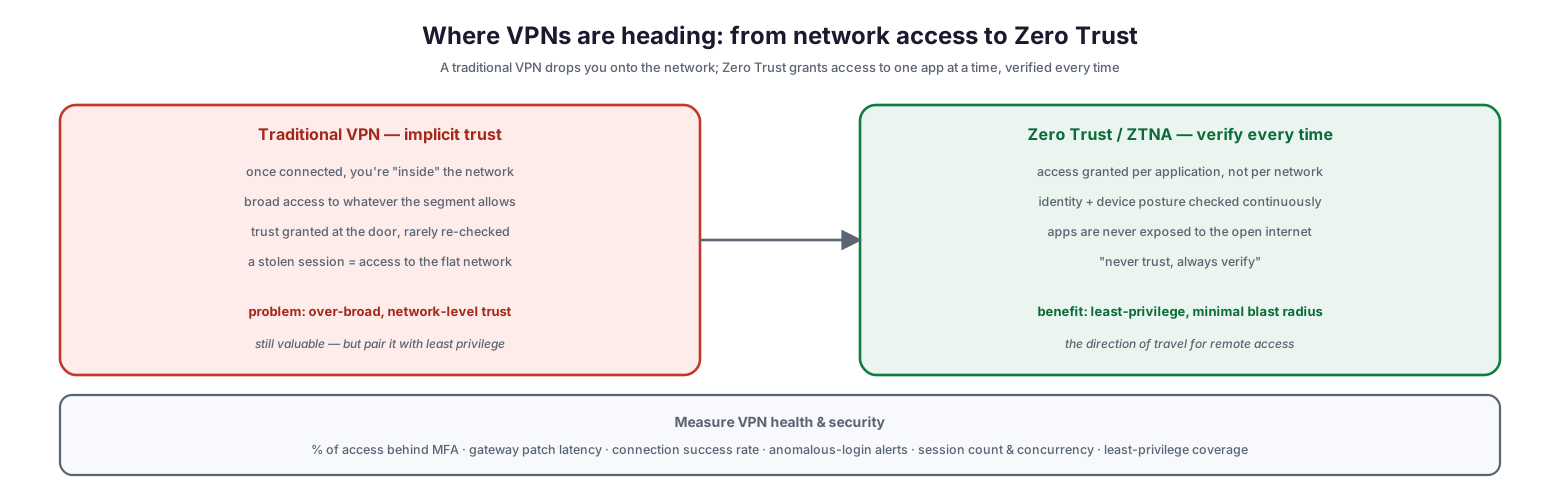
Where VPNs are heading: from network access to Zero Trust
Zero Trust Network Access inverts the model. Instead of connecting a user to a network, it grants access to individual applications, one at a time, with identity and device posture verified continuously rather than once at login. Applications are never exposed directly to the open internet, and the governing principle is “never trust, always verify.” The benefit is least-privilege access with a minimal blast radius: a compromised session reaches only the specific application it was authorized for, not the whole network. This does not make VPNs obsolete overnight — they remain valuable, especially for site-to-site connectivity — but it does mean that where a traditional VPN is used, it should be paired with strong least-privilege controls, and that the strategic direction for remote user access is toward Zero Trust.
VPN Best Practices Checklist
- Require multi-factor authentication on all VPN access without exception.
- Use only modern protocols — IPsec/IKEv2, WireGuard, or current TLS — and disable PPTP and deprecated TLS/SSL.
- Require strong cipher suites and perfect forward secrecy.
- Patch VPN gateways immediately; treat VPN vulnerabilities as emergency changes.
- Apply least privilege and network segmentation rather than granting broad LAN access on connect.
- Enforce device posture checks before granting access.
- Log all connections and alert on anomalous or impossible-travel logins.
- Reduce attack surface: disable unused features, restrict management to trusted networks.
- Choose split versus full tunnel deliberately, based on inspection needs and risk.
- Use certificate-based authentication for site-to-site links and manage keys carefully.
- Monitor gateway patch latency and the share of access behind MFA as key metrics.
- Plan the path toward Zero Trust Network Access for remote user access over time.
Best Practices
Put MFA in front of everything. If you do only one thing to secure a VPN, require multi-factor authentication on every connection. The overwhelming majority of VPN intrusions begin with a stolen password that MFA would have stopped.
Patch the gateway like it’s on fire. VPN appliances are among the most actively exploited targets in security, with working attacks appearing within days of a disclosure. Build an expedited, tested process to apply VPN patches immediately.
Stop trusting the network. Do not let a connected user roam a flat internal network. Segment aggressively and grant only the access each role needs, so a compromised session is contained.
Modernize the protocol and ciphers. Retire PPTP and deprecated TLS outright, standardize on IPsec/IKEv2, WireGuard, or current TLS, and enforce strong ciphers with perfect forward secrecy.
Verify the device, not just the user. A valid login from a compromised laptop is still a breach. Check device posture — patch level, encryption, endpoint protection — before granting access.
Log, monitor, and plan for Zero Trust. Record and watch every connection so you can detect and investigate abuse, and set a strategic direction toward Zero Trust access that grants apps, not networks.
Common Mistakes
Relying on passwords alone. A VPN protected only by usernames and passwords is one credential leak away from compromise. MFA is essential, not optional.
Slow gateway patching. Treating VPN appliance updates as routine maintenance leaves a window that attackers exploit within days. VPN patches are emergencies.
Granting broad network access. Dropping connected users onto a flat network means one compromised session can reach everything. Least privilege and segmentation are core, not extras.
Keeping legacy protocols enabled. PPTP and outdated TLS versions carry unfixable weaknesses. Leaving them enabled for compatibility undermines the entire deployment.
Ignoring device health. Authenticating the user while ignoring the state of their device lets infected endpoints tunnel straight into the network.
Not logging connections. Without connection logs, a VPN compromise is invisible and uninvestigable. Log who connects, when, and from where, and alert on anomalies.
Frequently Asked Questions
What is the difference between a remote-access and a site-to-site VPN? A remote-access VPN connects individual users to the network using a client on their device. A site-to-site VPN connects entire networks through a gateway-to-gateway tunnel, so users need no client. Most organizations use both for different purposes.
Which VPN protocol should we use? Use IPsec with IKEv2, WireGuard, or a TLS/SSL VPN on current TLS (1.2 or 1.3). Retire PPTP entirely, avoid L2TP without IPsec, and disable deprecated TLS/SSL versions. Always require strong ciphers and perfect forward secrecy.
Is MFA really necessary on a VPN? Yes. Stolen credentials are the most common way attackers breach a VPN, and multi-factor authentication is the single most effective control against that. It should be required on every connection.
Why are VPN gateways such a common target? Because they are internet-facing by design and, once breached, provide a foothold inside the network. Attackers actively scan for and exploit unpatched VPN appliances, often within days of a vulnerability being disclosed — which is why fast patching is critical.
Should we use split tunnel or full tunnel? It depends on your needs. Full tunnel routes all traffic through the VPN for maximum control and inspection but adds load and latency; split tunnel sends only corporate traffic through it for better performance but less visibility. Decide deliberately based on your risk and inspection requirements.
Is Zero Trust replacing the VPN? It is changing how remote access is done. Zero Trust Network Access grants access to individual applications with continuous verification, rather than placing users on the network as a VPN does. VPNs remain useful — especially site-to-site — but for remote user access the strategic direction is toward Zero Trust.
Conclusion
A VPN remains a powerful tool for secure remote and site-to-site connectivity, but it is only as strong as the discipline behind it. Its encrypted tunnel genuinely protects traffic across the untrusted internet; its internet-facing gateway just as genuinely presents a target that attackers probe relentlessly. The organizations that get VPNs right treat them as the critical, exposed infrastructure they are — enforcing MFA on every connection, patching gateways with urgency, choosing modern protocols, verifying devices, and refusing to grant broad network trust on connect.
The strategic arc is equally clear. The old assumption that a connected user should be trusted across the network is giving way to Zero Trust models that grant least-privilege access to individual applications and verify continuously. Wherever a VPN is used, pair it with strong segmentation and least privilege, and set a direction toward Zero Trust for remote access over time. Do that, and remote access becomes what it should be: a secure, well-monitored capability that protects the business rather than an over-trusted doorway waiting to be exploited.
References
- NIST SP 800-77 Rev. 1 — Guide to IPsec VPNs
- NIST SP 800-113 — Guide to SSL VPNs
- NIST SP 800-207 — Zero Trust Architecture
- CISA / NSA — Selecting and Hardening Remote Access VPN Solutions
- CISA — More than a Password (MFA guidance)
- RFC 7296 — Internet Key Exchange Protocol Version 2 (IKEv2)
- NIST SP 800-52 Rev. 2 — Guidelines for TLS Implementations