Jump to a section
What should you do before an AI agent sees company data?
Give the agent a named owner, an approved purpose, a defined identity, the smallest useful data and tool access, and a way to inspect and revoke that access. Microsoft Agent 365 helps administrators observe and govern supported agents, but it does not replace those business decisions or automatically make an over-shared tenant safe.
As of the November 24, 2026 source review, Agent 365 is Microsoft's agent control plane. Microsoft announced new inventory, identity, governance and security features at Ignite. Some are generally available; others are in preview or are still rolling out. An agent may use Microsoft 365 content, external systems, plugins or local tools depending on its design and permissions. The name “AI agent” alone does not tell you what it can read or do.
Editorial owner: Insyto Content Team. Product facts verified from the Microsoft sources below on November 24, 2026. A named Insyto technical reviewer has not yet approved tenant-specific procedures.
Map the person, agent, identity and data separately
An employee can ask an agent to summarize a document; an agent can also connect to a system through a tool or API. Those are different access paths. SharePoint agents built through Microsoft 365 Copilot use the user's existing access for answers. Other agents and connections may use a separately assigned identity or API grant. Review the actual configuration, including who can invoke it and whether it can write as well as read.
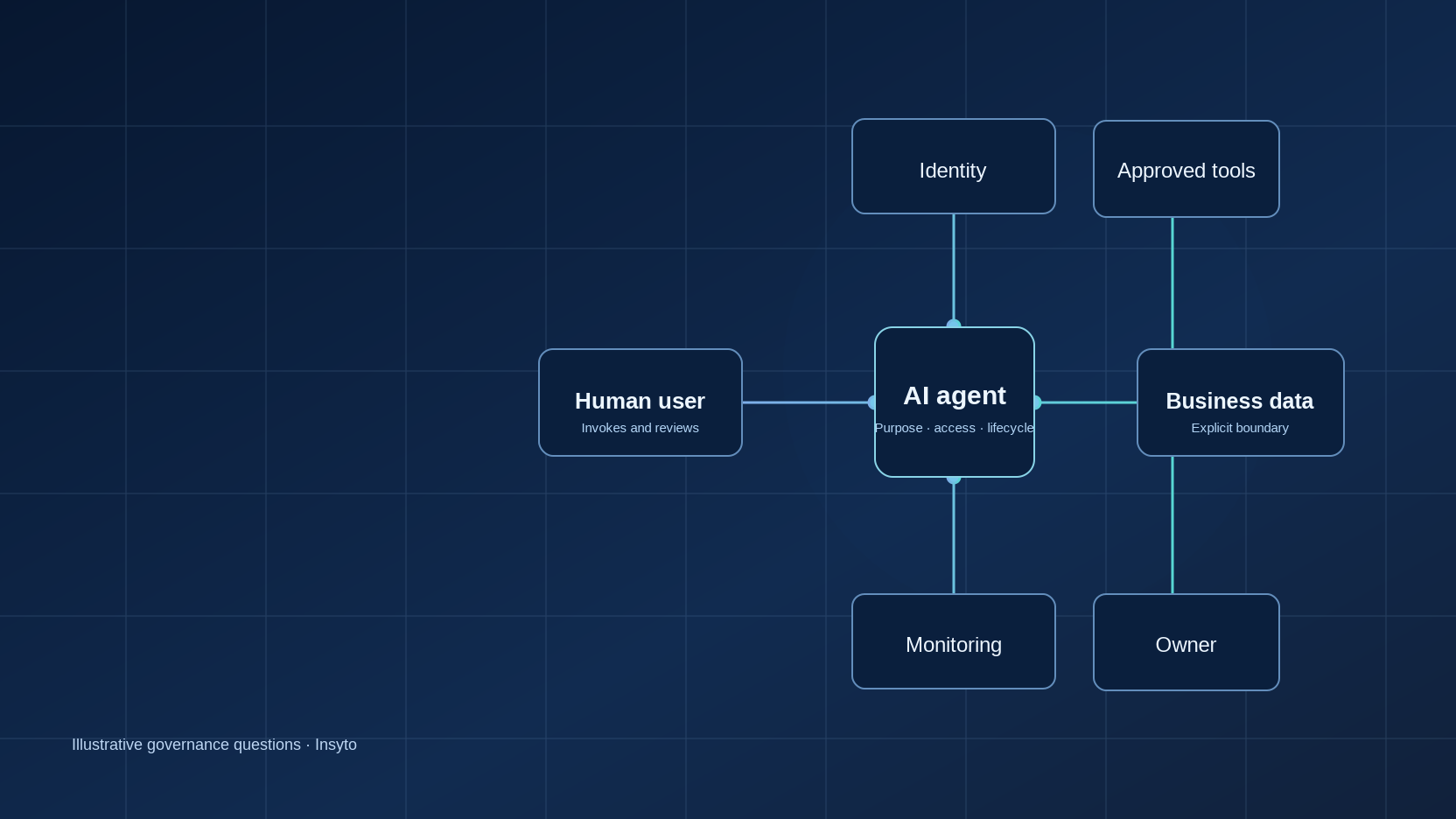
| Element | Ask | Record |
|---|---|---|
| Human user | Who can invoke or share the agent? | Group, sponsor and approval owner |
| Agent identity | Does it act for the user or use its own supported identity? | Identity type and lifecycle owner |
| Permissions | What may it read, change or send through tools? | Granted scopes, sites and exceptions |
| Business data | Which sources contain sensitive or broadly shared material? | Data owner and exposure review |
| Monitoring | Who follows an unexpected action or access change? | Signal source, response owner and revocation step |
Insyto's SharePoint permissions cleanup guide covers the existing content-access problem. The map above is an Insyto planning aid; it is not a claim that every tenant has the same Agent 365 features.
What Microsoft can control today, and what is still rolling out
Microsoft's November announcement says plugin and skills governance is generally available for supported Microsoft 365 experiences. It describes local agent discovery in Defender as generally available and Defender's local-agent runtime protection on Windows as generally available. The connected-platform expansion, dynamic agent risk, multi-tenant management and several local-agent, Purview DLP and Intune controls are preview capabilities. Microsoft also describes foundational usage visibility for qualifying Microsoft 365 subscriptions and premium features that require Agent 365 or Microsoft 365 E7 licensing.
Availability is not uniform across agent platforms, tenants or licenses. Confirm your tenant's feature, region and license state in the current service description. Do not assume a preview control blocks an action in production. Entra agent identity can help separate a supported agent from a person, Purview can apply supported data controls, and Defender can surface supported runtime signals; none makes an unreviewed permission grant safe by itself.
Microsoft's SharePoint guidance is particularly important: the answer an agent returns can reflect the material its user already had access to. If “Everyone” links, old guests or stale workspace memberships are wrong, fix those grants at their source before a pilot.
An agent-readiness checklist you can use today
This is an Insyto recommended governance practice, not a Microsoft product prerequisite or certification. Check the items that have an accountable answer; unchecked items become the pilot's decision log.
Checklist choices stay in this browser session; this page does not submit them to Insyto.
A sensible first pilot decision
- Select one useful workflow with a business owner and a measurable outcome.
- Inventory the agent's user, identity, connectors, tools and permitted data. Verify who can create, invoke or share it.
- Inspect SharePoint and other data permissions before connecting them. Choose a small approved dataset.
- Test useful and unsafe actions, including what happens when access is revoked or a tool fails.
- Name the person who reviews activity, exceptions, costs and incidents. Record an off switch.
- Expand only after the owner accepts the documented result and the operating team can maintain the controls.
For broader policy and risk ownership, see AI Governance & Security Consulting. For a Microsoft 365 Copilot pilot, the narrower Copilot Readiness Assessment and Microsoft 365 operations describe separate service boundaries.
What Microsoft Agent 365 means for businesses in Carlsbad
Carlsbad organizations considering employee-created agents should make the business owner and administrator visible before expanding access. For a hypothetical life sciences team, an agent summarizing approved research policies would need a defined source library and a data owner who can reject access to unrelated records. For a hypothetical hospitality team, an employee-facing agent could use a much narrower policy set. These are planning scenarios, not Insyto customer results.
In either case, identify agents built by employees, check whether they act through a person's permissions or a separate identity, review Entra and SharePoint grants, and document who sees usage, exceptions and revocation events. Agent 365 visibility may help, subject to feature availability, but the Microsoft 365 administrator still needs to verify the tenant's actual settings before a pilot. A local Carlsbad IT consulting assessment can frame those decisions; AI governance consulting addresses policy and risk ownership, while Microsoft 365 managed services concerns separately agreed recurring administration. For a Copilot-specific use case, see the Copilot readiness service.
Frequently asked questions
Is Agent 365 the same thing as Microsoft 365 Copilot?
No. Microsoft 365 Copilot is an AI experience for users. Agent 365 is Microsoft's management, governance and security control plane for supported agents. An organization can assess agent inventory and controls without assuming every agent is a Copilot agent.
Does creating an agent automatically grant it access to all SharePoint files?
No. Access depends on the agent type, its connections and the permissions of the user or identity involved. SharePoint agents using Microsoft 365 Copilot respect the user's existing access; other connected agents may have separately granted API or application permissions. Check the specific agent rather than relying on one blanket rule.
Can employees make agents without IT approval?
Creation and sharing depend on the tenant's product settings, licenses and administrator controls. Administrators can manage access and creation for supported Microsoft 365 agents, but discovery of local or third-party agents is a separate challenge.
Does Agent 365 eliminate the need to clean up existing permissions?
No. Inventory and policy controls do not repair a SharePoint site that was already shared too broadly. Review content ownership and existing grants before expanding agent access.
Which Agent 365 license is required?
Microsoft distinguishes foundational capabilities available with qualifying Microsoft 365 subscriptions from premium Agent 365 or Microsoft 365 E7 capabilities. Purchase prerequisites and feature licensing vary; verify the current Microsoft service description and your tenant's agreements before buying or enabling a feature.
How should a Carlsbad business prepare for enterprise AI agents?
Start with one owned workflow. Inventory who can create and invoke each agent, the identity and tools it uses, SharePoint and other data it can reach, and who can approve or revoke access. Review tenant controls and licensing before a pilot.
Can an AI consultant assess agent governance without deploying agents?
Yes. A scoped assessment can document ownership, access paths, data risk and a decision roadmap. Agent deployment or ongoing administration would need its own approved scope.
Sources and verification
Primary sources checked November 24, 2026. Follow the linked vendor pages for changes after that date.
- Microsoft Agent 365: What's new at Ignite 2026 — Feature availability and licensing summary
- Microsoft Agent 365 service description — Current eligibility and feature details
- Microsoft 365 agents FAQ — Data access and administrative controls
- Manage access to agents in SharePoint — User permission behavior for SharePoint agents
- Share and manage agents built in Agent Builder — Agent creation and permissions
- City of Carlsbad economic update — Local industry context; article scenarios are hypothetical